Trip.com Airport Transfer: Promo Code & Booking Tips


Book Trip.com Airport Transfer with discounts here! Get Trip.com Airport Transfer promo code, learn how to book, baggage rules & cancellation policies.
🔥Exclusive Trip.com Airport Transfer Promo Codes & 12% Discounts

Plus, all first-time users in any currency can claim a 10-12% discount coupon—but only through Trip.com app!
- Free cancellation up to 24 hours before pickup.
- Instant compensation for driver delays.
- Free waiting time for flight delays.
【12% Off】How to Book Trip.com Airport Transfer on App?
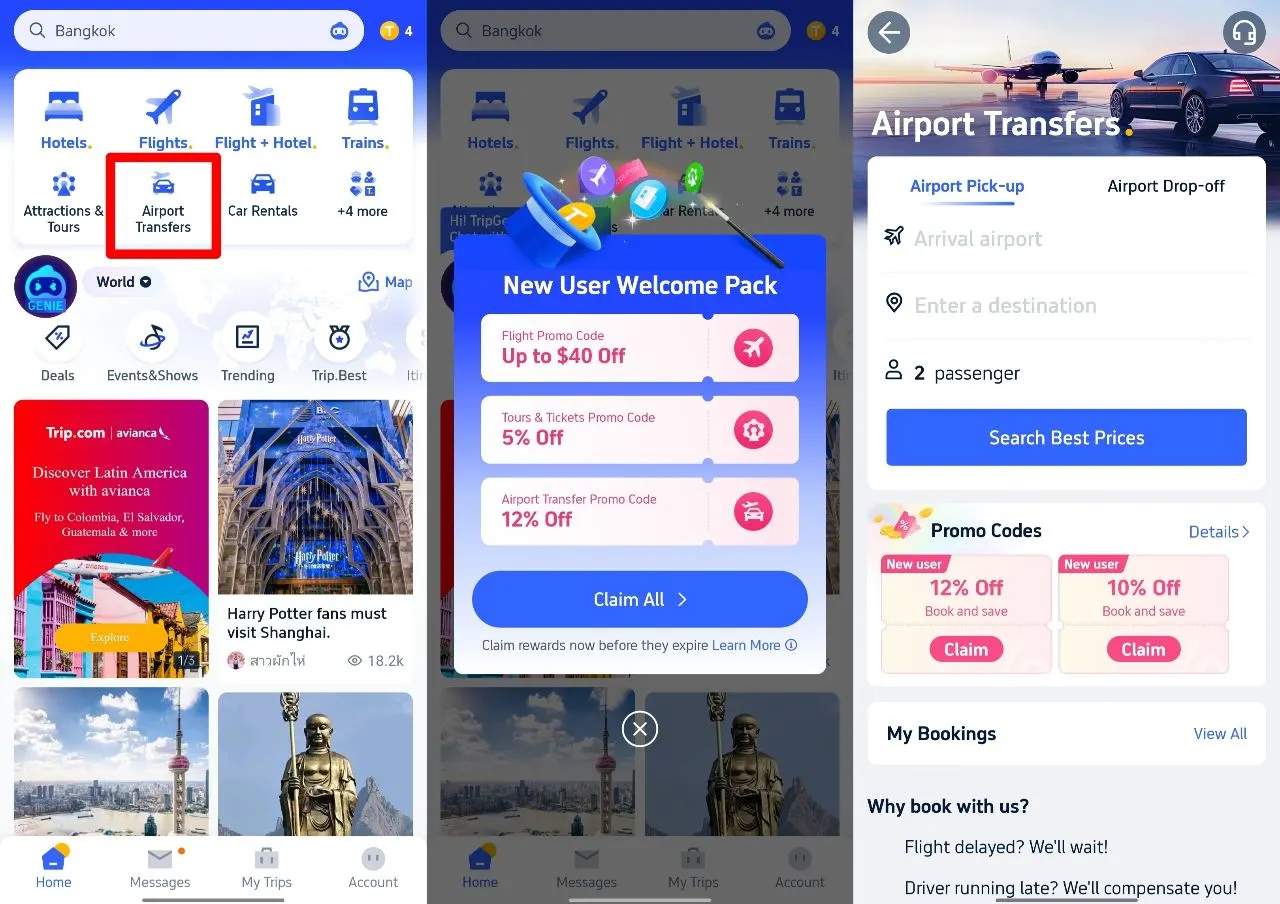
Download the app today and get your Trip.com Airport Transfer 12% Off in these 3 steps!👇
1. Download Trip.com app & Tap Airport Transfer
2. Claim Airport Transfer Promo Code
3. After Choosing the right car, enter promo code in the payment page
Is Trip.com Airport Transfer Reliable? Real User Reviews
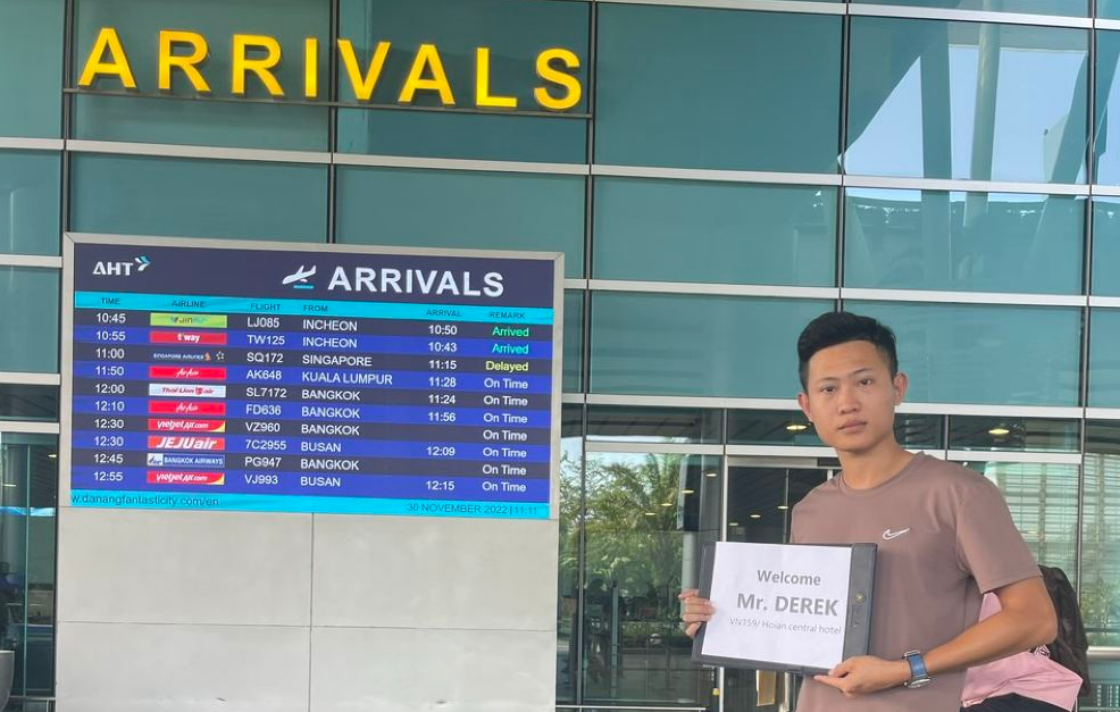
Great shuttle agent to arrange for driver well in advanced before pickup. The driver was on time and deliver us to airport safe and sound!
Very enjoyable travel with Ms Phượng from Trip.com, who had arranged the private car pick up for me & family. She had been a prompt response assistance to me, even last mins request from my family. Mr Nam ,our driver, he is very good and entertaining us thru out the journey. He brought us around and a very caring person. I am lucky to meet both of them who are really responsive to us. They had given us a smooth & memorable trip.
After I book this transfer ,the Dimo trip reply me in a short time and provide clear info to me. And the day we depart from hotel,the staff called Phuong Le carefully check the location and made the driver perfectly arrived on time and pick up us,even called to check we are successfully get on the car to the airport,very thoughtful service!Recommend a lot.
Phuong Le has been a helpful and sincere contact person, and the driver was also very nice. I would definitely consider using the airport pick-up service again if I visit Hanoi in the future.


Ho Chi Minh Airport Pickup & Sending at a Great Price (No Tips, Private)
4.9/5
34 reviewsIt was a 3-night, 4-day trip, and I barely managed to find it.
I was so pressed for time that I didn't want to waste a single minute at the airport.
I booked a pickup service, so I could be on my way as soon as I arrived.
It felt like my trip had been extended by at least 30 minutes, lol.
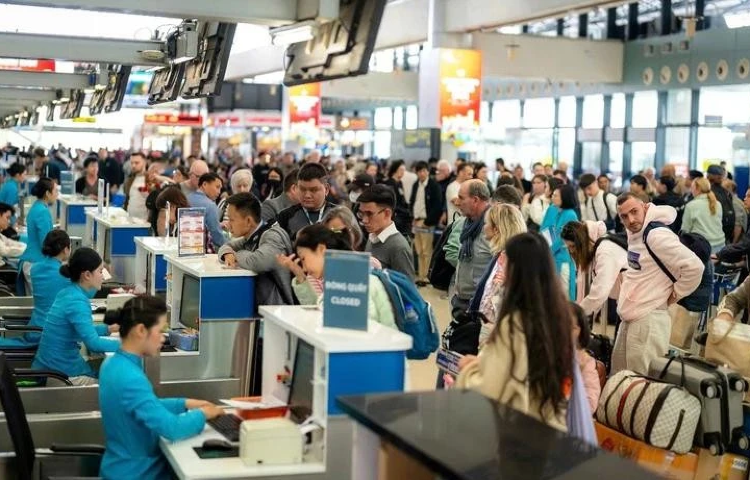
Vietnam VIP Exclusive Fast Track Pass Skip the Line
4.7/5
1710 reviews⭐⭐⭐⭐⭐ After much deliberation, I only have one thought after using it: It was definitely the right choice!
When I saw the "Vietnam Airport VIP Fast Track (Skip Long Queues) - Ho Chi Minh Airport VIP Fast Immigration" service on Trip for my trip to Ho Chi Minh City, I hesitated for a long time.
Before my trip, I read many articles and traveler reviews on Trip, constantly wondering: "Is it really necessary to pay extra for fast track?" "How much faster is it?" "Will there actually be that many people at the airport?" In the end, I thought that since I was traveling abroad, the last thing I wanted to waste was waiting in line at the airport after arrival, so I decided to book it.
After using it, I can only say: It was absolutely worth the money!
Upon arriving at Tan Son Nhat International Airport in Ho Chi Minh City, the entire fast track immigration process was much smoother than I had imagined. There were staff to assist and guide me; I didn't have to wander around the crowded airport confused. Then, I went through the fast track immigration process.
Seeing the long queues at the regular immigration area, and then realizing you've already smoothly completed immigration, you truly feel:
"Thank goodness I booked this before I left!"
Especially after a long flight to Vietnam, everyone's first thought is to quickly clear immigration, collect their luggage, and leave the airport to officially begin their journey, not waste precious travel time queuing.
The biggest advantage of this service for me isn't the so-called "VIP" aspect, but rather saving time and energy, and reducing the uncertainty of arriving at an unfamiliar airport for the first time.
The entire process was assisted and guided, and the clearance was very smooth. The actual experience completely met my expectations when I booked this service.
Furthermore, I think this service is especially suitable for first-time visitors to Vietnam, independent travelers, travelers with elderly relatives or children, or travelers who have airport pickup, restaurant reservations, or other planned itineraries upon arrival. Because if the immigration queue gets long, all subsequent itineraries can be affected.
I personally read numerous reviews on Trip and considered it carefully before deciding to book, so I'm sharing my experience here for anyone still hesitant like I was:
If you value time and don't want to face long queues upon arrival in Ho Chi Minh City, I highly recommend booking this service.
⭐⭐⭐⭐⭐ Clearance Speed: 5/5
⭐⭐⭐⭐⭐ Service Process: 5/5
⭐⭐⭐⭐⭐ Staff Guidance: 5/5
⭐⭐⭐⭐⭐ Convenience: 5/5
⭐⭐⭐⭐⭐ Overall Satisfaction: 5/5
I was initially hesitant about whether it was worth it, but after using it, I have absolutely no regrets.
The smooth and quick immigration process made my Ho Chi Minh City trip start off well from the moment I arrived at the airport.
Next time I travel to Vietnam, if my immigration time coincides with peak travel periods, I will definitely purchase the fast-track clearance service again. Five-star recommendation! 👍
Why Choose Trip.com Airport Transfers?

- 🕒 Complimentary waiting time for eligible flight delays
- 🆓 Flexible cancellation for eligible bookings
- 🚗 Verified drivers and transparent upfront pricing
- 🌍 Global Coverage: Available at over 600 airports worldwide with localized support, with coverage expanding continuously.
See all attractions
 2080 booked






How to Book Trip.com Airport Transfer?
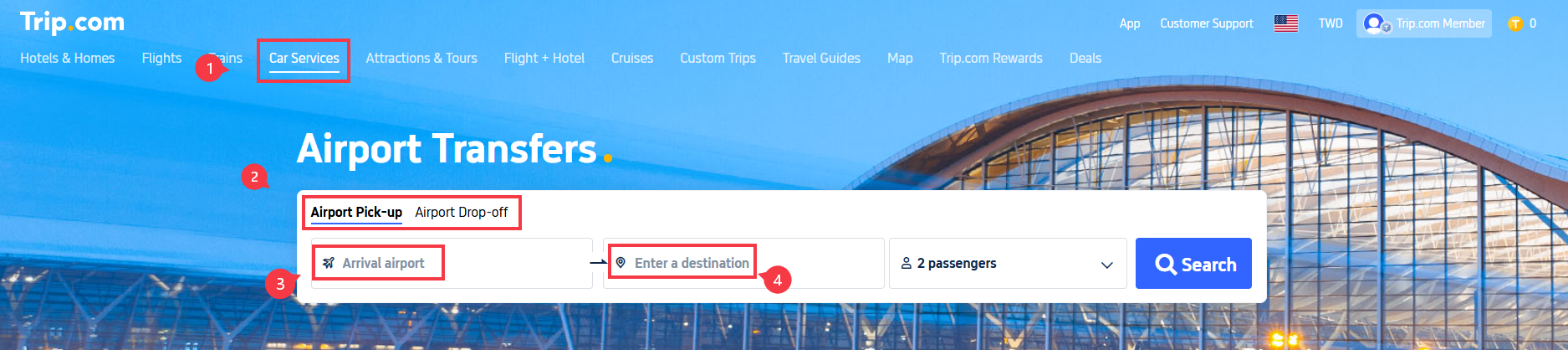
Step 1: Start on Trip.com’s Homepage
- Go to Trip.com’s homepage and select “Car Services” from the menu.
- Click on “Airport Transfer”.
- Choose between “Airport Pick-up” (for arrival) or “Airport Drop-off” (for departure).
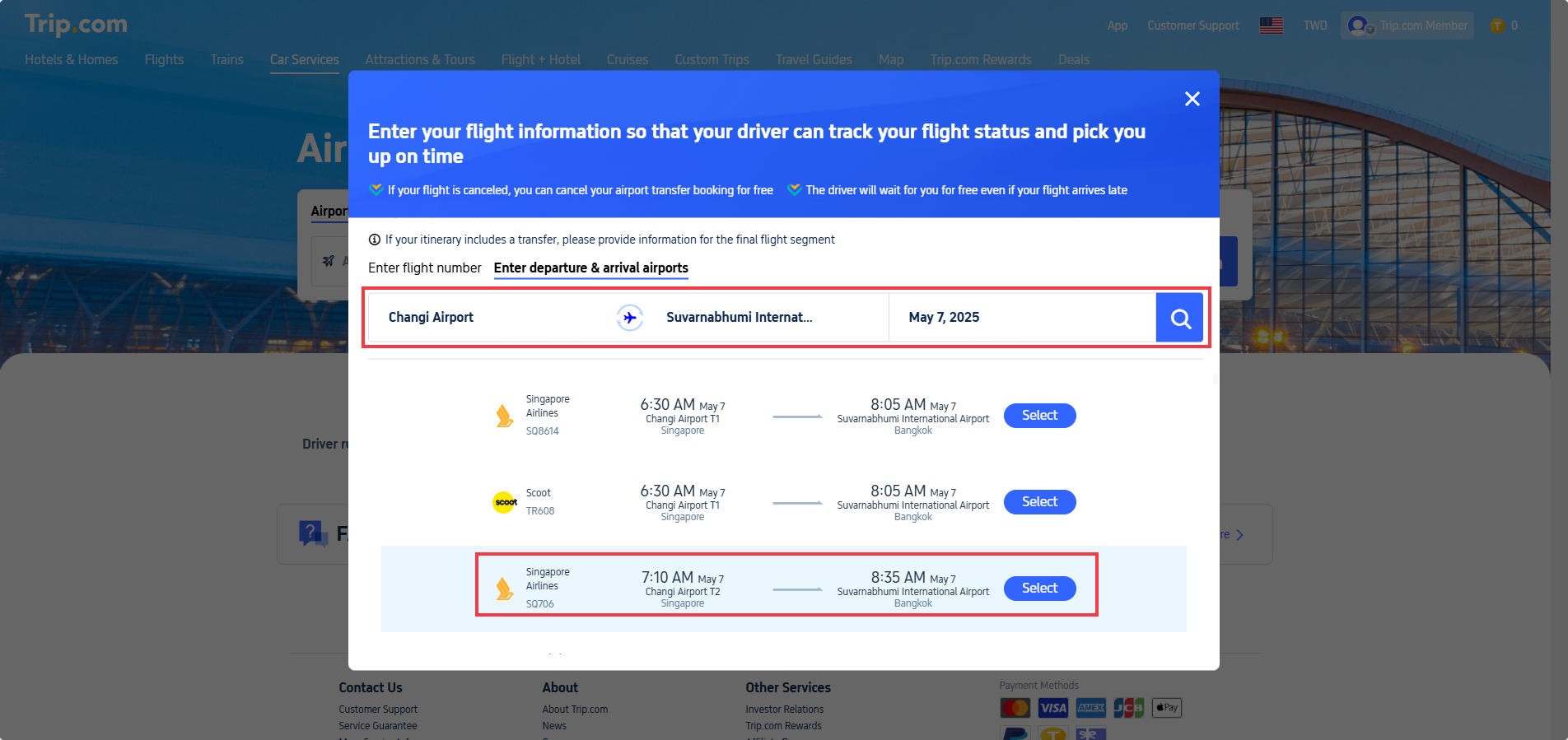
Step 2: Enter Flight Details
For Airport Pick-up (arrival):
- Select your arrival airport.
- On the flight information page:
- Option 1: Enter your flight number (recommended for accuracy).
- Option 2: Manually input Departure Airport, Arrival Airport, and Departure Date (local time).
- Click the “Search” icon and Select your flight from the results.
Important Notes:
✅ Drivers track your flight status automatically.
✅ Full refund is available for canceled flights in accordance with policy terms.
✅ Your driver will wait for you at no extra cost within the complimentary waiting period, even if your flight arrives late.
✈️ For connecting flights, provide details for your final flight segment.

Step 3: Enter Destination & Choose Your Car
- Return to the airport transfer page and “Enter a destination” (e.g., your hotel name/address in the arrival city).
- Click “Search” to view available cars.
- Filter options by:
- Car type (Standard, SUV, Luxury).
- Passenger capacity (e.g., Max. 4 passengers).
- Supplier (select preferred provider).
- Click “Book” once you’ve chosen your vehicle.
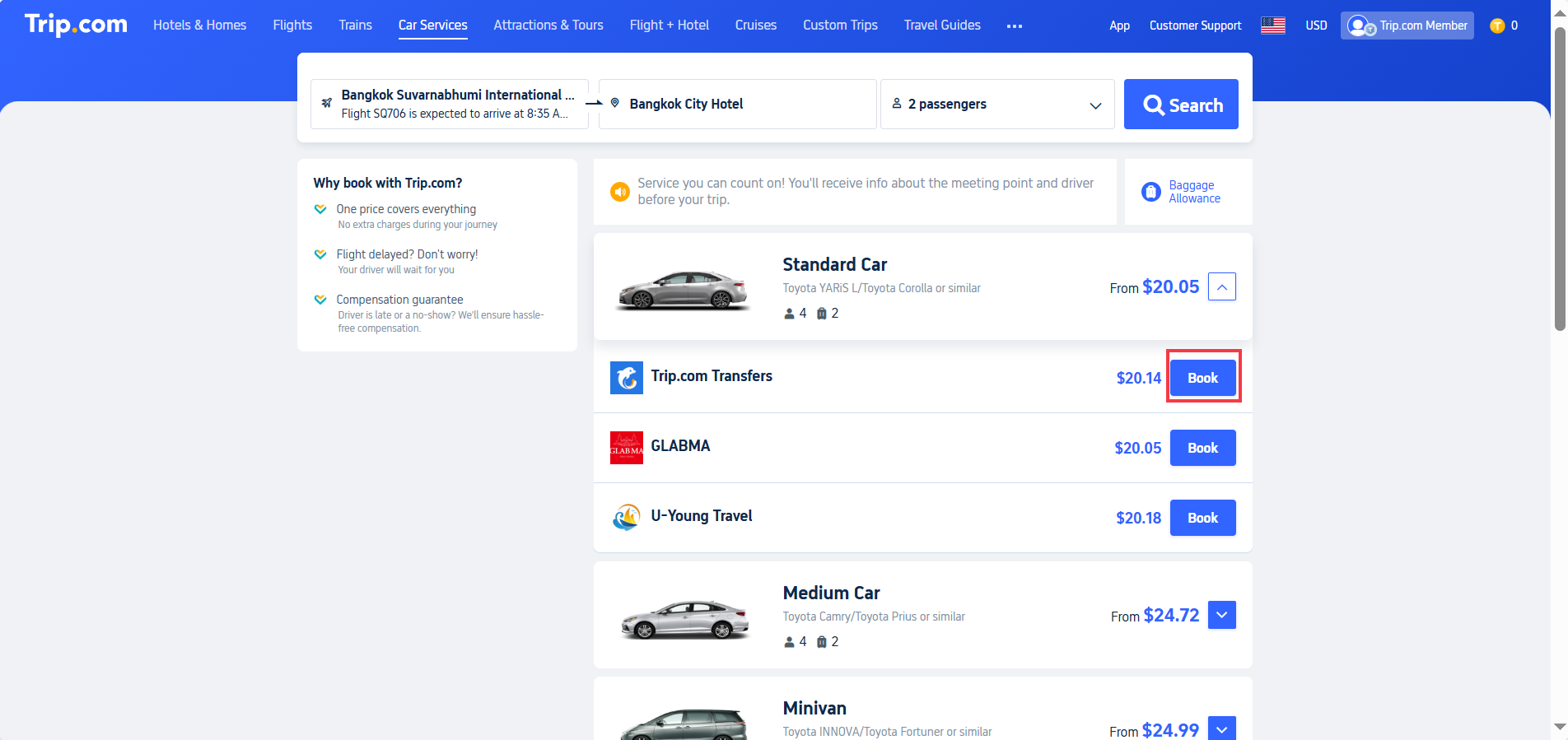
Step 4: Confirm Booking & Payment
Review the booking details on the final page:
Pick-up/Drop-off Time: Based on flight schedule.Route: Airport to destination (e.g., "Suvarnabhumi Airport → Bangkok City Hotel").Price: Total fare (e.g., $20.14).Cancellation Policy: Free cancellation deadline is shown on your booking page (example: free until 3:25 AM, May 7, 2025 local time). After the deadline, cancellation fees apply.
Final Steps:
- Enter contact information (ensure it’s correct for driver communication).
- Apply a promo code (if available) for discounts.
- Click “Continue to Pay” to complete your booking.
Tokyo to Manila
Bangkok to Phuket
Taipei to Manila
Manila to Tokyo
Phuket to Bangkok
See all flights


Trip.com Airport Transfer - Baggage Allowance & Luggage Rules
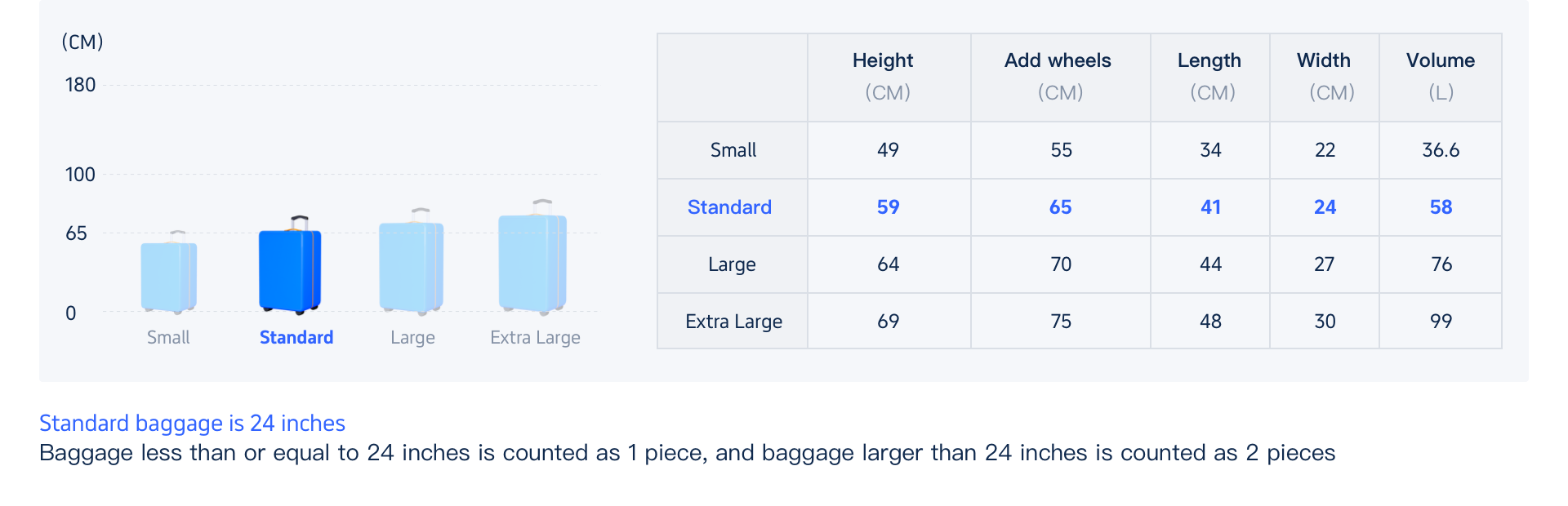
Note: Baggage rules may vary by supplier and vehicle type. Below are general guidelines for reference only. Please confirm details with the supplier before booking if you have special luggage needs.
1. Luggage Size Rules
- Standard Allowance:
- Bags 24 inches (61 cm) or smaller are generally counted as 1 standard piece
- Bags larger than 24 inches may take up additional space
- Actual capacity depends on the vehicle type you select
2. Can Luggage Be Placed on Seats?
- Small personal items (handbags, backpacks, briefcases) may be placed on passenger seats
- Rolling suitcases must be stored in the vehicle’s trunk or cargo area for safety
3. What If My Luggage Exceeds the Limit?
- Check with the Supplier First: Some drivers may accommodate slightly extra luggage if space allows.
- Upgrade Your Vehicle: If you have a lot of bags, book a larger car (e.g., an SUV or minivan) or even a second vehicle to avoid issues.
- Avoid Last-Minute Surprises: Measure your bags before booking to ensure they fit the car type you select.
4. Can Too Much Luggage Disrupt My Trip?
- Yes! Overpacking can cause problems:
- Infants/Children Count as Passengers: Even if they’re on your lap, they reduce available luggage space.
- If the number of passengers or amount of luggage exceeds the vehicle’s rated capacity, the supplier may not be able to provide the service for safety reasons. Please select the appropriate vehicle size when booking.
Pro Tip: When in doubt, book a bigger vehicle or message the supplier before your trip to confirm space.
Trip.com Airport Transfer Cancellation Policy: What You Need to Know

1. Free Cancellation Window
- You can cancel your booking without penalty up until the deadline shown on your booking confirmation.
- Tip: Cancellation deadlines are based on your pickup's local time — please double-check your booking details page for the exact cutoff time.
2. Flight Disruptions
- Delayed Flights: Your driver will automatically adjust the pickup time based on your flight status for eligible bookings. Example: If your flight arrives at 11:00 AM instead of 10:00 AM, your pickup time will be adjusted accordingly. You can check the updated time in your Trip.com order details.
- Canceled or Diverted Flights: Eligible bookings qualify for a full refund. You may rebook later when your plans are confirmed.
3. Late Cancellations
- Missed the free cancellation window? A 100% fee applies.
4. Driver Waiting Time Policy
- A complimentary waiting period (typically 1–2 hours) starts at your scheduled pickup time (or adjusted time for flight delays). Exact duration depends on your booking’s service terms.
- If you need more time, you may contact your driver — extended waiting time may incur an additional fee.
5. Adding Stops Mid-Route
- Most standard transfers are direct to your destination.
- If you have special requests, you may inquire with your driver in advance — additional stops may be available for an extra charge, subject to supplier approval.
How to Track Your Trip.com Airport Transfer Driver

- Before Pickup: Driver contact information and vehicle details will be sent to you via email and in-app notification before your pickup time.
- At the Airport:
- Open Trip.com app → "My Orders" → Live driver GPS tracking (where available).
- If you cannot reach the driver, head to the designated meeting point specified on your voucher.
Trip.com Airport Transfer: Car Types for Every Budget

Trip.com works with multiple suppliers across vehicle classes worldwide. Below are examples of typical vehicle options (taking Bangkok Suvarnabhumi Airport as a reference). Actual available models vary by city and supplier; please refer to the booking page for real-time options.
Car Type | Passengers | Bags | Example Models | Best For |
Economy | 4 | 2 | Toyota Corolla | Solo/couples |
SUV/Minivan | 4-6 | 4 | Toyota Innova | Families/small groups |
Premium Van | 6 | 4 | Mercedes V-Class | Business/luxury travelers |
Minibus | 9-12 | 6 | Toyota HiAce | Large groups/sports teams |
Trip.com Airport Transfer vs. Taxis/Rideshares vs. Car Rentals: Which Is Best?
Trip.com Airport Transfer is Best For: Travelers prioritizing reliability, especially with tight schedules or language barriers.
Feature | Taxis/Rideshares 🚕 | ||
Pricing | ✅ Fixed upfront price for eligible bookings | Metered/surge pricing | Base rate + fuel, insurance, tolls |
Convenience | ✅ Door-to-door service | ✅ On-demand pickup | ❌ Self-drive; must navigate |
Flight Tracking | ✅ Auto-adjusted for delays | ❌ Manual updates | (you’re the driver) |
Waiting Time | ✅ Complimentary waiting period (typically 1–2 hours) for flight delays | ❌ Extra charges after 5–10 mins | - |
Vehicle Choice | ✅ Pre-select exact size/type | ❌ Depends on availability | ✅ Choose any class (but may sell out) |
Customer Support | ✅ 24/7 multilingual help | ❌ Limited local support | ✅ Rental desk (often limited hours) |
Payment | ✅ Prepaid (no cash) | ❌ Cash/card on arrival | ✅ Prepaid + deposit (card required) |
Luggage Space | ✅ Guaranteed (book by size) | ❌ Unpredictable | ✅ Flexible (trunk + seats) |
Flexibility | Usually Fixed route (no detours), but maybe can pay to change routes | ✅ Can add stops (extra fee) | ✅ Go anywhere, anytime |
Best For | Stress-free arrivals, groups, tight schedules | Short trips, spontaneity | Road trips, remote areas, multi-stop itineraries |
Car Rentals
Car Rental Promo Code - 8% Off
New User Enjoy up to 8% Off
TRIPCAR8
Top Tips for a Smooth Trip.com Airport Transfer Experience

- Book Early: Reserve in advance for better availability, especially during peak travel seasons.
- Flight Details: Always enter your flight number (not just times) to enable automatic flight status tracking.
- Meeting Points: Check your voucher for airport-specific pickup instructions (e.g., "Gate 3, Column B").
- Use Trip.com’s in-app chat with drivers (auto-translation available where supported).
- Delays: No action needed for most flight delays — your pickup time will be adjusted automatically for eligible bookings.
- Luggage: Confirm that your luggage dimensions match your booked car’s capacity before travel.
Strat Your Travel with Trip.com!
Trip.com is an international online travel agency that offers 24/7 customer service in multiple languages. It offers easy booking services for flights, hotels, and tours and activities. As Platimum & Diamond Members of Trip.com, you can access a free airport lounge, earn more Trip coins, save more on hotel booking, reduce refund fees for trains, etc.
Top 10 Global Hotels
See All Hotels







FAQs about Trip.com Airport Transfer
-
How far in advance should I book Trip.com airport transfer service?
-
How do I choose the appropriate time for the airport transfer?
-
Why haven't I seen the vehicle assignment information after my booking was successful?
-
How do I find the driver after arriving at the airport?
-
If my flight is delayed, do I need to cancel the order and rebook?
Disclaimer: This article has been provided by an individual contributor or third party platform. If there is any discrepancy regarding the copyright, please contact us directly and we will delete the content immediately.