eSIM for International Travel

Best eSIM for International Travel

eSIM Guide

Best Europe eSIMs

Europe 40 countries eSIM

Europe 40 Countries eSIM

  • Coverage40 Europe Countries
  • Data0.5GB-5GB/Day or 1-30GB Total
  • Validity1-30 Days
  • Pricefrom US$0.36
Europe 33 countries eSIM

Europe 33 Countries eSIM

  • Coverage33 Europe Countries
  • Data0.5GB-100GB/Day or 1-50GB Total
  • Validity1-30 Days
  • Pricefrom US$0.36
Europe 66 countries eSIM

Europe 66 Countries eSIM

  • Coverage66 Europe Countries
  • Data0.5GB-5GB Total
  • Validity1-7 Days
  • Pricefrom US$1.3

Best Canada/USA eSIMs

USA & Canada eSIM

USA & Canada eSIM

  • CoverageUSA & Canada
  • Data0.5GB-100GB/Day or 1-50GB Total
  • Validity1-30 Days
  • Pricefrom US$0.47
US & Canada 5G eSIM

US & Canada 5G eSIM

  • CoverageUSA & Canada
  • Data0.5GB-5GB/Day or 1-30GB Total
  • Validity1-30 Days
  • Pricefrom US$1.08
US/Canada/Mexico 5G eSIM

US/Canada/Mexico 5G eSIM

  • CoverageUSA, Canada, Mexico
  • Data0.5GB-5GB/Day or 1-30GB Total
  • Validity1-30 Days
  • Pricefrom US$1.18

Best Japan eSIMs

Japan SoftBank Docomo eSIM

Japan SoftBank/Docomo eSIM

  • CoverageJapan
  • Data0.5GB-10GB/Day or 3-50GB Total
  • Validity1-30 Days
  • Pricefrom US$0.56
Japan KDDI/SOFTBANK 5G/4G eSIM

Japan KDDI/SOFTBANK 5G/4G eSIM

  • CoverageJapan
  • Data0.5GB-100GB/Day or 1-50GB Total
  • Validity1-30 Days
  • Pricefrom US$1.67
Japan 4G eSIM

Japan 4G eSIM

  • CoverageJapan
  • Data0.5GB-100GB/Day or 3-50GB Total
  • Validity1-30 Days
  • Pricefrom US$0.53

Best China eSIMs

China eSIM

CMCC China 4/5G eSIM

  • CoverageMainland China
  • Data0.5G-3GB/day or 1-50GB Total
  • Validity1 to 30 Days
  • Pricefrom US$0.41
China 5G eSIM

China Mobile 5G eSIM

  • CoverageMainland China
  • Data0.5G-3GB/day or 1-50GB Total
  • Validity1 to 30 Days
  • Pricefrom US$0.43
China/HK/Macau eSIM

China/HK/Macau eSIM

  • CoverageChina(Mainland,HK&Macau)
  • Data3-50GB Total or 0.5-100GB/Day
  • Validity1 to 30 Days
  • Pricefrom US$0.43

Trip.com eSIM Guide 2025: eSIM Card for International Travel

Author's Profile Picture
Trip.com eSIM for International Travel

Finding an eSIM or SIM card for international travel? By downloading a global eSIM to your smartphone, you can instantly stay connected abroad.

In this article, we'll guide you through the process of choosing Trip.com eSIM for international travel, discussing esim providers, how to use esim etc. in simple terms. Keep reading!

What is an International eSIM Exactly?

An International eSIM is like a digital version of the traditional SIM card that comes built into your device 100% digitally.

It lets you start a mobile data plan abroad without the need for a physical card. Instead, you can easily set it up online with a QR code and get it working quickly.

🎁 Book Cheapest Flights Worldwide & Best Hotels | Get Trip.com eSIM or SIM Card with 5% Off.

[5% Off] Trip.com Global eSIM Reviews - from Users Worldwide

As for me, I bought it on Android and used it. You can easily activate it using Wi-Fi at the airport. Almost everything was set up automatically just by scanning the QR code. It is connected by 5G, so the speed is super fast! I highly recommend it to u all, pls see others' comments for more reference:

Global 108 Destinations 5G eSIM | One eSIM, Worldwide Coverage | 1–30 Days | Instant QR
4.3/5
173 reviews
Everything works! I added an eSIM card at home, and the internet worked as soon as I landed in Dubai. Although there's internet everywhere here anyway, I bought it for Bahrain, so I hope the internet will be great there too!
Global 77 Countries 4G/5G eSIM | Day Pass/Total Data Package | 1-30 Days | 24-Hour Billing | QR Code
4.6/5
3354 reviews
Got this e-sim as a gift! Works perfectly fine and was great for a whole day of usage in Indonesia. My usage was around 500mb for a full day with moderate usage of google maps, e-hailing apps and very occasional social media.
Global (66 countries) | 4G/5G eSIM | Total Package | 1-7 days | 24H Billing | Real-Name Auth Required (Hong Kong & Taiwan) | QR code
4.5/5
7316 reviews
Very easy and fast to use. Just need to scan the code and turn on the roaming then everything would be fine. It is applicable to many countries throughout the world! Can reload and top up times. Fast response of the cs also ************* line fast👍🏻
Global 92 Countries 4G/5G eSIM | Day Pass/Total Package | 1-30 Days | QR Code
4.6/5
72 reviews
I was worried about the area, but I was able to get drunk smoothly without any problems. The switching process was also easy and I didn't have any trouble.

How Much Does Trip.com eSIM Cost for International Travel?

Trip.com eSIM: How much does an eSIM cost for international travel?

Trip.com's eSIM offers a variety of plans for international travel. For short-term visitors and those who want to enjoy the Internet without worrying about data capacity, the "Unlimited" plan is recommended. On the other hand, if you want to reduce the cost of eSIM for international travel as much as possible, the "capped" plan is a good choice.

We have compiled a list of the eSIM prices you are interested in, so please click the place you plan to visit. 👇

RegionPlan 1Plan 2From Price
Europe eSIM5 Days / 3GB15 Days / 5GBfrom $0.36
Canada eSIM3 Days / 1GB7 Days / 3GBfrom $0.47
Mexico eSIM5 Days / 1GB15 Days / 3GBfrom $5.74
Japan eSIM3 Days / 1GB7 Days / 3GBfrom $1.67
UK eSIM5 Days / 3GB15 Days / 5GBfrom $0.36
China eSIM3 Days / 1GB7 Days / 3GBfrom $0.41
Australia & New Zealand eSIM5 Days / 2GB15 Days / 5GBfrom $0.73
Singapore/Malaysia/Indonesia eSIM3 Days / 1GB7 Days / 3GBfrom $0.44

How Does Trip.com eSIM work?

How Does a Global eSIM Work?

An eSIM works by connecting you to your chosen mobile network in a way that's similar to SIM cards but with a few key differences.

Instead of a tangible card, you'll use a QR code provided by your mobile service to activate your eSIM, but on Trip.com you just need to install directly (No QR code needed!). This means you can use the internet and make calls over your network just like before, but now it's all digital.

One cool thing about eSIMs is that they can handle more than one phone number and network at the same time. They are especially handy for international travel because they can be more cost-effective and you won't have to change your phone number. eSIMs are compatible with both iPhones & Android phones.

🎁 Book Cheapest Flights Worldwide | Search 8% Off Best Hotels.

Best eSIM Provider for International Travel

Trip.com eSIM: Trip.com Offers the Best eSIM: Here is Why

The “best” eSIM depends on your needs, but Trip.com’s eSIM consistently ranks among the top choices for travelers:

  • Global Coverage: Works in 70+ countries across Asia, Europe, and the Americas, with 5G support in many regions.
  • Affordability: Plans start as low as $0.59/day (e.g., Indonesia’s 0.6 GB/day plan) and include no hidden fees. For longer trips, a 30-day 1.5 GB/day plan costs just $17.71.
  • Ease of Use: QR code activation, 24/7 multilingual customer support, and a user-friendly app make setup hassle-free.
  • Daily Data Refreshes: Unlike competitors like Airalo, Trip.com’s plans reset data allowances daily, ideal for heavy users who want predictable usage.

Alternatives:

  • Airalo: Best for travelers needing coverage in 200+ countries, though plans are pricier and lack daily data resets.
  • Holafly: Offers “unlimited” data plans, but speeds may throttle after heavy usage, and prices are significantly higher than Trip.com’s.
🎁 Book Cheapest Flights Worldwide & Best Hotels | Get Trip.com eSIM or SIM Card with 5% Off.
to Bangkok
to Manila
to Shanghai
to Tokyo
to Seoul
See All Flights
Los Angeles
LAX
Bangkok
BKK
Mon, Jan 19
Wed, Jan 21
One way
34% off
From 2,875.90QAR 1,908.81
Los Angeles
LAX
Bangkok
BKK
Fri, Dec 5
Sat, Dec 6
One way
22% off
From 2,875.90QAR 2,230.65
Los Angeles
LAX
Bangkok
BKK
Sun, Dec 7
Tue, Dec 9
One way
21% off
From 2,875.90QAR 2,261.08
Los Angeles
LAX
Bangkok
BKK
Fri, Dec 5
Sun, Dec 7
One way
20% off
From 2,875.90QAR 2,286.86
Los Angeles
LAX
Bangkok
BKK
Wed, Jan 14
Fri, Jan 16
One way
15% off
From 2,875.90QAR 2,447.26
Los Angeles
LAX
Bangkok
BKK
Sun, Dec 7
Tue, Dec 9
One way
13% off
From 2,875.90QAR 2,495.75
Los Angeles
LAX
Bangkok
BKK
Mon, Jan 19
Wed, Jan 21
One way
12% off
From 2,875.90QAR 2,540.62
Los Angeles
LAX
Bangkok
BKK
Mon, Jan 19
Wed, Jan 21
One way
11% off
From 2,875.90QAR 2,545.77

Trip.com eSIM for International Travel: eSIM vs SIM vs WiFi Router

eSIM Card for International Travel: eSIM vs SIM vs WiFi Router

Now we compare eSIMs, physical SIM cards, and Wi-Fi routers. We'll help you understand which option suits your travel needs, focusing on ease of use, benefits, and key considerations.

Below is a table summarizing the comparison between 3 connectivity options 👇

Feature

eSIM

SIM

WiFi Router

Ease of Use

No physical handling required

Requires physical insertion

Needs regular charging

Portability

digital

Attached to smartphone

Must be carried for connectivity

Benefits

Risk of loss/damage eliminated,

No physical handover needed

Wide variety of plan options

Shareable among multiple users

Considerations

Limited to compatible smartphones,

Activation needed prior to use

Requires an unlocked smartphone,

Risk of losing the SIM

Requires charging,

Additional device to carry,

Pickup/delivery can be inconvenient

  • eSIMs are ideal for many travelers because they're convenient, don't require a physical card, and can be easily set up in compatible phones.
  • People with devices that don't support eSIMs or who like traditional methods might prefer physical SIM cards, which come with various plans.
  • Wi-Fi routers work well for groups that need to share a connection or when eSIMs and SIM cards aren't options.

Overall, the choice between eSIM, physical SIM cards, and Wi-Fi routers ultimately depends on the your device compatibility, personal preferences, and specific needs~

Does International eSIM Comes with Voice Line?

Does International eSIM Comes with Voice Line?

An eSIM can indeed serve as your primary data line. If having a voice line is a priority for your mobile usage, you may choose a traditional SIM card specifically for this purpose. If it is too troublesome to change SIM overseas, you can actually use eSIM as your primary data line and SIM as your voice line!

Feature

eSIM

Traditional SIM Card

Primary Data Line

Can serve as the primary data line.

Can serve as both primary data and voice line.

Voice Line Support

Depends on the provider; not all eSIMs include voice lines.

Includes voice line capabilities.

Recommendation for Voice Line

Consider specific eSIM plans that offer voice services or use in combination with a traditional SIM card for voice services.

Recommended if voice services are a priority.

Device Compatibility

Supported by newer devices that are eSIM-compatible.

Supported by all mobile devices with a SIM card slot.

Setup

Activated digitally through scanning a QR code or via carrier app.

Requires physical insertion of a SIM card into the device.

When considering the switch to an eSIM for your mobile device, it's important to understand its capabilities and limitations, especially regarding its use as a primary data line. SIM cards are widely supported and offer a straightforward way to access both voice and data services from your mobile provider.

🎁 Book Cheapest Flights Worldwide | Search 8% Off Best Hotels | Get fast & reliable eSIM.
See All Attractions
1426 booked
4.6/578 reviews
Global 92 Countries 4G/5G eSIM | Day Pass/Total Package | 1-30 Days | QR Code
SIM card
82778 booked
4.7/53424 reviews
Europe 4G/5G eSIM | DayPass /Total | 500MB/day-total 30GB | 1-30 days | 24-hour billing | QR code
SIM card
QAR 0.36
10599 booked
4.5/5371 reviews
USA/Canada 5G eSIM | Day Pass/Total Data Package | 1-30 Days | 24-Hour Billing | QR Code
SIM card
QAR 1.71
177516 booked
4.7/56187 reviews
Japan SoftBank 4G/5G eSIM | TikTok & ChatGPT Available | Day Pass | 24-Hour Billing | 1-30 Days | QR Code
SIM card
QAR 2.07
213850 booked
4.6/55489 reviews
Mainland China/Hong Kong/Macao/Taiwan | 5G eSIM | Day Pass/Total Package | 24H | 1-30 days | QR code
SIM card
QAR 1.56
87039 booked
4.7/53878 reviews
Thailand | 5G eSIM | Day Pass/Total Package | 24H Billing | 1-30 days | QR code
SIM card
QAR 0.87
1301 booked
4.3/5106 reviews
Vietnam eSIM | 1-30 Days | Up to 60GB High-Speed Data | Coverage on Leading Network
SIM card
33706 booked
4.6/51206 reviews
Malaysia 5G eSIM | Day Pass/Total Data Package | 1-30 Days | 24-Hour Billing | QR Code
SIM card
QAR 0.55

How to Redeem Trip.com eSIM (NO QR Code Needed!)

Trip.com eSIM Setup (NO QR Code Needed!)

The easiest eSIM method I’ve used is on Trip.com:

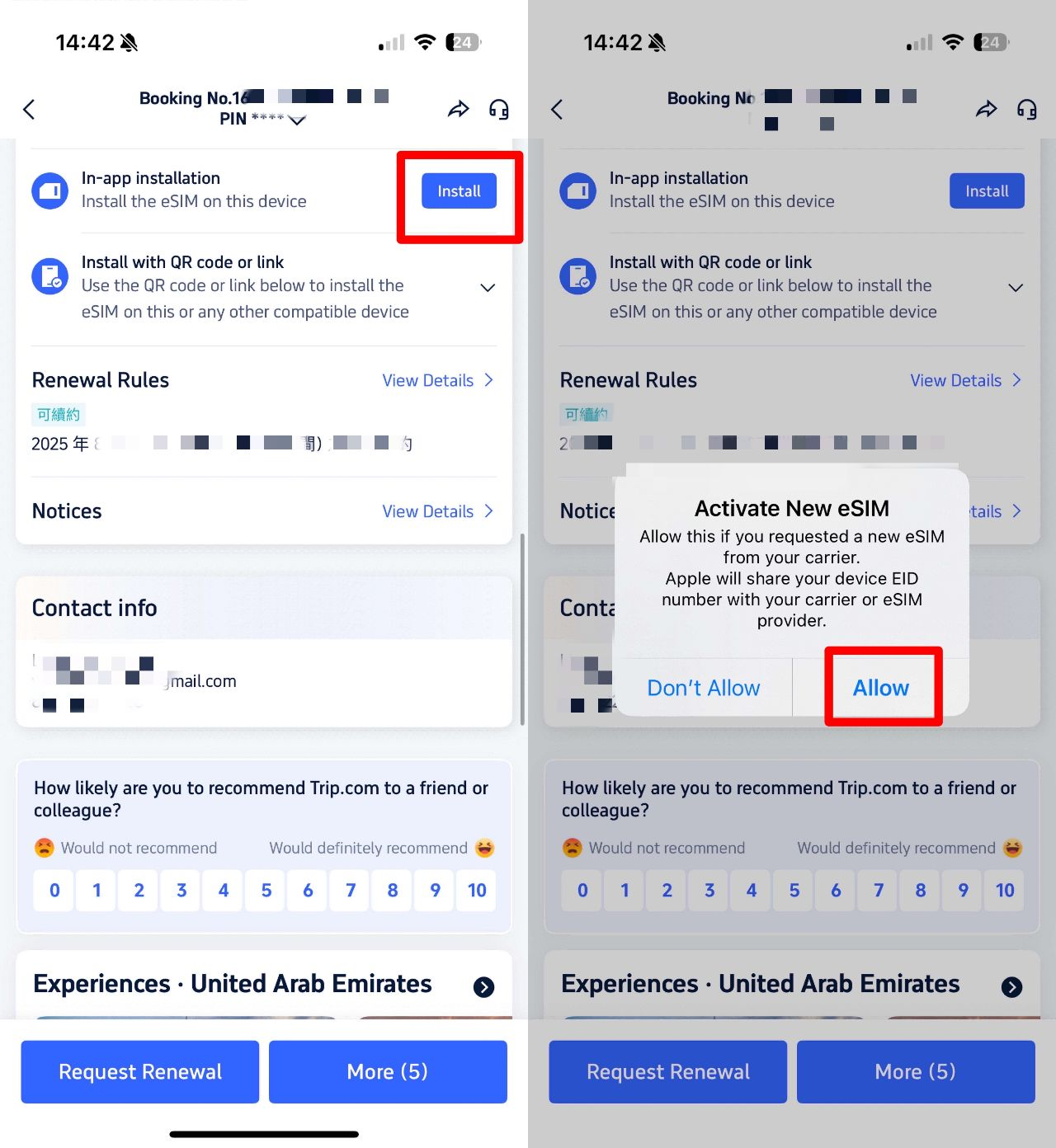
  1. Buy plan in the Trip.com app.
  2. Go to "My Orders" → Find your eSIM.
  3. Tap "In-App Installation".
  4. Done – it auto-loads into Settings.

How Do I Activate Trip.com eSIM before Travel?

How to active eSIM

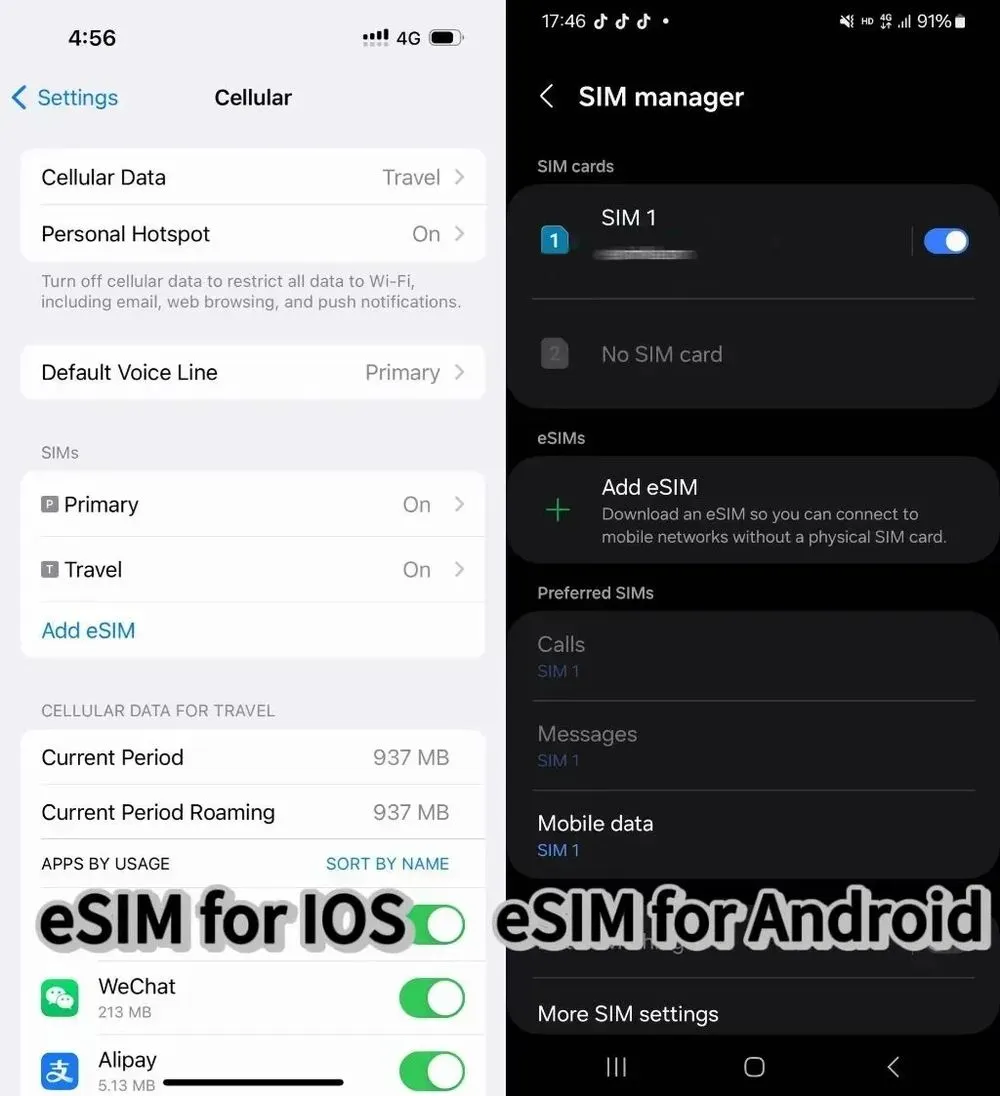
Here, we will introduce eSIMs in 32 European countries as examples. Below is a table that organizes the eSIM installation instructions for both iOS and Android devices, incorporating both QR code and manual methods.

Device

QR Code Installation

Manual Installation

iOS

1. Navigate to Settings > Cellular > Add eSIM > Use QR code > Scan > Activate eSIM > Continue.

2. Choose the default network for Cellular Data, turn off Allow Cellular Data Switching, enable Turn On This Line, and turn on Data Roaming.

3. For incorrect network, select the correct one under Network Selection.

1. Go to Settings > Cellular > Add eSIM > Use QR code > Enter Details Manually > Input SM-DP+ Address and Activation Code > Next.

2. Follow QR Code Installation steps 5 and 6.

Android

1. Go to Settings > Network & internet > SIMs > + > Download a SIM > Next > Scan QR code > Download.

2. Once "Download Complete" appears, go to Settings.

1. Navigate to Settings > Network & internet > SIMs > + > Download a SIM > Next > Need help? > Enter it manually.

2. Enter the code for Android, tap Continue, then Download. When "Download Complete" appears, go to Settings.

✨Special Note✨

  • Please first check your phone to see if the phone supports esim before placing an order. (You can find these info in the product page)
  • Please do not delete eSim once eSim is successfully installed, or the package might be invalid and you will need to purchase another esim.
🎁 Book Cheapest Flights Worldwide & Best Hotels | Get Trip.com eSIM or SIM Card with 5% Off.

Benefits of Trip.com eSIM for International Travel

Trip.com eSIM: 3 Benefits of Using an eSIM for International Travel

1. eSIM can be used as soon as you arrive

When you travel overseas, the ability to use the Internet smoothly from the moment you land at the airport is a big advantage of eSIM. In the case of traditional SIM cards, you need to make a purchase at the airport shop or have time to pick up your pre-ordered SIM. However, by downloading the eSIM in advance, you can connect to the network the moment you get off the plane. This will help you make your trip more efficient, such as arranging a taxi or giving directions to your hotel.

2. eSIM has No risk of loss or damage

Traditional SIM cards are very small and require careful handling. Especially when replacing it at a travel destination, the risk of loss or damage increases. The eSIM, on the other hand, is not physically shaped, so you don't have to worry about it being lost or damaged. You don't have to worry about opening the SIM tray with a small pin or accidentally dropping the SIM card.

3. Dual SIM possible

By utilizing an eSIM, it is possible to use a dual SIM. Dual SIM means that you can use two networks on one smartphone. This allows you to install a SIM that can be used in Japan and overseas in one device. When moving from Japan to overseas or from overseas to Japan, the network environment can be switched smoothly. With dual SIM, you don't have to go through the hassle of re-signing up for your internet connection every time you visit multiple countries.

What are the disadvantages of eSIM?

Trip.com eSIM: 3 disadvantages of using an eSIM for international travel

While eSIMs offer convenience, they’re not perfect. Here are the main drawbacks:

  • Device Compatibility: Not all devices support eSIM. For example, most Android models sold in the U.S. or South Korea lack eSIM functionality, and older iPhones (pre-XS) cannot use eSIMs. Additionally, some carrier-locked devices may restrict eSIM usage.
  • Limited Flexibility for Swapping Devices: Unlike physical SIMs, eSIMs are tied to a specific device. If your phone breaks, you’ll need to purchase a new eSIM for a replacement device. Some providers allow limited transfers (e.g., Trip.com supports up to 10 installations), but this is not universal.
  • Network Reliance on Wi-Fi: Activation often requires an internet connection, which can be an issue if you arrive in a location with poor airport Wi-Fi.
  • Regional Coverage Gaps: While global eSIMs like Trip.com’s cover 70+ countries, niche destinations or rural areas may have limited network availability compared to local physical SIMs.

More Popular Trip.com eSIMs Worldwide

[8% Off] Global Hotel Recommendations

🎁 Book Cheapest Flights Worldwide & Trip.com Airport Transfer | 8% Off Best Hotels | Get fast & reliable eSIM.
Search Top Global Hotels
See All Hotels
NO.1
9/10908 reviews
TRIBE Living Bangkok Sukhumvit 39 by AccorHotels
Hotel in Bangkok
Sauna
Airport pickup service
NO.2
9.6/103102 reviews
Shanghai Xiangyun Parent Child Hotel
Hotel in Shanghai
Restaurant
24-hour front desk
NO.3
8.9/101326 reviews
KOKO HOTEL Osaka Shinsaibashi
Hotel in Osaka
24-hour front desk
Luggage storage
NO.4
9.7/1079 reviews
The Mulia Bali
Hotel in Bali
Airport pickup service
Restaurant
NO.5
9.5/103846 reviews
J Hotel Shanghai Tower
Hotel in Shanghai
Airport pickup service
Restaurant
NO.6
8.9/10108 reviews
HOSHINOYA Fuji
Hotel in Fujikawaguchiko
Restaurant
24-hour front desk

FAQs about Trip.com eSIM

  • Does Trip.com eSIM comes with voice line?

    Whether an eSIM comes with a voice line depends on the provider's plan. Some eSIM plans may include voice services, while others are data-only.
  • How do I get eSIM on my iPhone?

    To get an eSIM on your iPhone, go to Settings > Cellular and tap Convert to eSIM. If you don't see this option, your carrier might not support it. In that case, contact your carrier to switch your number to an eSIM using their eSIM Carrier Activation or a QR code they provide.
  • How does eSIM work?

    eSIM functions similarly to the traditional SIM card but differs in its activation method. Instead of being physically inserted, an eSIM is built into the device and activated digitally. After activation, it operates just like a physical SIM. A key advantage of eSIMs is the ability to store multiple profiles on a single device, allowing users to switch between them without needing to swap out physical SIM cards, offering a more seamless and convenient experience.
  • Do I need to buy an eSIM before I travel?

    Yes, it’s highly recommended. Purchasing an eSIM in advance ensures seamless connectivity from the moment you arrive at your destination. Trip.com’s eSIMs, for example, allow you to activate instantly via QR code or app upon landing, eliminating the need to search for a physical SIM card vendor or deal with language barriers at airports. While some providers enable activation after arrival, pre-buying guarantees you won’t be left without data during critical moments like arranging transportation or checking into your hotel. Pro Tip: Download the eSIM profile to your device before departure (if supported) and enable it once you’re at your destination. This reduces reliance on airport Wi-Fi for activation.
  • How long does it take for a travel eSIM to activate?

    Activation typically takes 2–10 minutes, depending on your device and network. Here’s what to expect: QR Code Activation (iOS 17.4+): Trip.com’s eSIMs can be installed directly via the Trip.com App, requiring just a scan of the QR code and a few taps in your phone’s settings. Once activated, data becomes available immediately upon connecting to a local network. Manual Setup (Android): For devices without automatic QR code support, you’ll need to enter the activation code and APN settings manually. This process may take slightly longer but is still straightforward. iOS 26 Auto-Activation: Newer iOS versions (26+) can auto-detect your arrival and prompt you to enable the eSIM with one tap, streamlining the process even further. Note: Ensure your device is unlocked and compatible with the eSIM technology (e.g., iPhone XS or later, select Android models) to avoid delays.
  • Do I need to turn on data roaming for eSIM?

    Yes, but with a key caveat. Travel eSIMs rely on local networks, which your device treats as “roaming.” To enable connectivity: Enable Data Roaming for the eSIM: Go to your device’s settings (e.g., Settings > Cellular > Cellular Data Options > Data Roaming) and toggle it on for the eSIM profile. Disable Data Roaming for Your Primary SIM: If you’re using a physical SIM alongside the eSIM, turn off roaming for your primary line to avoid accidental charges. This ensures your device prioritizes the eSIM for data. Why It Matters: Skipping this step could result in your device using your home carrier’s expensive international roaming instead of the eSIM’s local network.
  • Does eSIM change your number?

    No, your primary phone number remains unchanged when using a travel eSIM. The eSIM acts as a secondary data-only line, allowing you to keep your home number for calls and texts while accessing local data. Here’s how it works: Dual eSIM Support (iOS/Android): Most modern devices let you use both a physical SIM (with your home number) and an eSIM simultaneously. You can choose which line handles data, calls, and texts in your device settings. Apps and Verification: Some apps (e.g., banking, social media) may prompt you to update your number if they detect a new SIM. Simply decline the update to retain your original number. Note: If you purchase an eSIM with a local phone number (rare for data-only plans), you can use it for calls/texts in addition to data. However, this is optional and not required for basic connectivity.
Disclaimer: This article has been provided by an individual contributor or third party platform. If there is any discrepancy regarding the copyright, please contact us directly and we will delete the content immediately.