
If you fly occasionally, skipping a frequent flyer number means losing rewards you should've had. Let’s cover the essentials: what it is, how to find yours, and how to use it.


What is a Frequent Flyer Number?
It’s your personal rewards ID for an airline’s loyalty program. Sign up for free, and they’ll give you this unique number. Every time you fly with them (or partner airlines), share this number to earn points or miles. Later, trade those points for flights, upgrades, or other perks.
How Do I Find my Frequent Flyer Number?
Credit: Unsplash
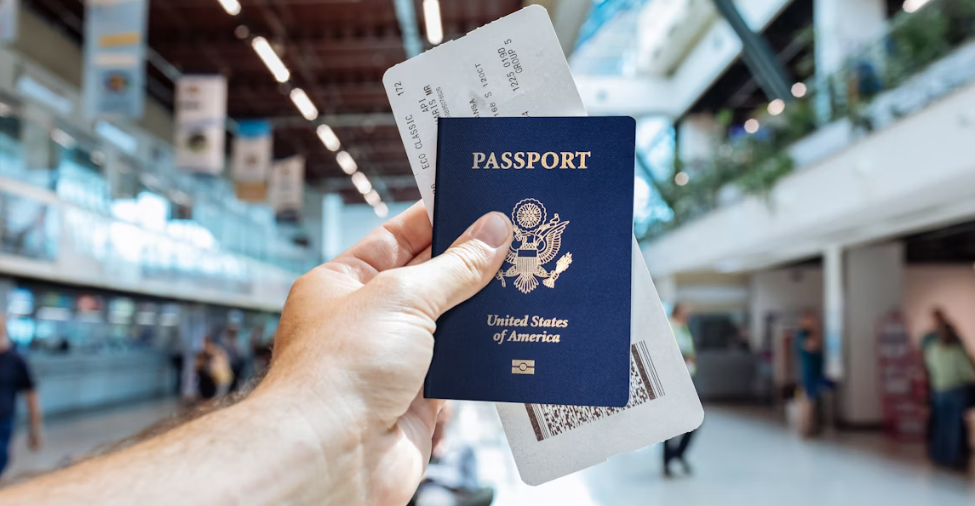
Happens all the time. Here’s where to look your frequent flyer number:
Check here | What to do |
Your email | Search: |
Old boarding passes | Dig up past flight confirmations (app or email). Your number’s on there. |
Airline app/website | Log in → profile section. Can’t log in? Click "forgot number." |
Your wallet | Some airlines mail plastic cards (Delta, United, Qantas). |
Call the airline | Last resort. Have your ID ready: name, birthday, address, recent flight info. |
Trip.com Frequent Flyer Number - Earn Air Miles + Trip Coins
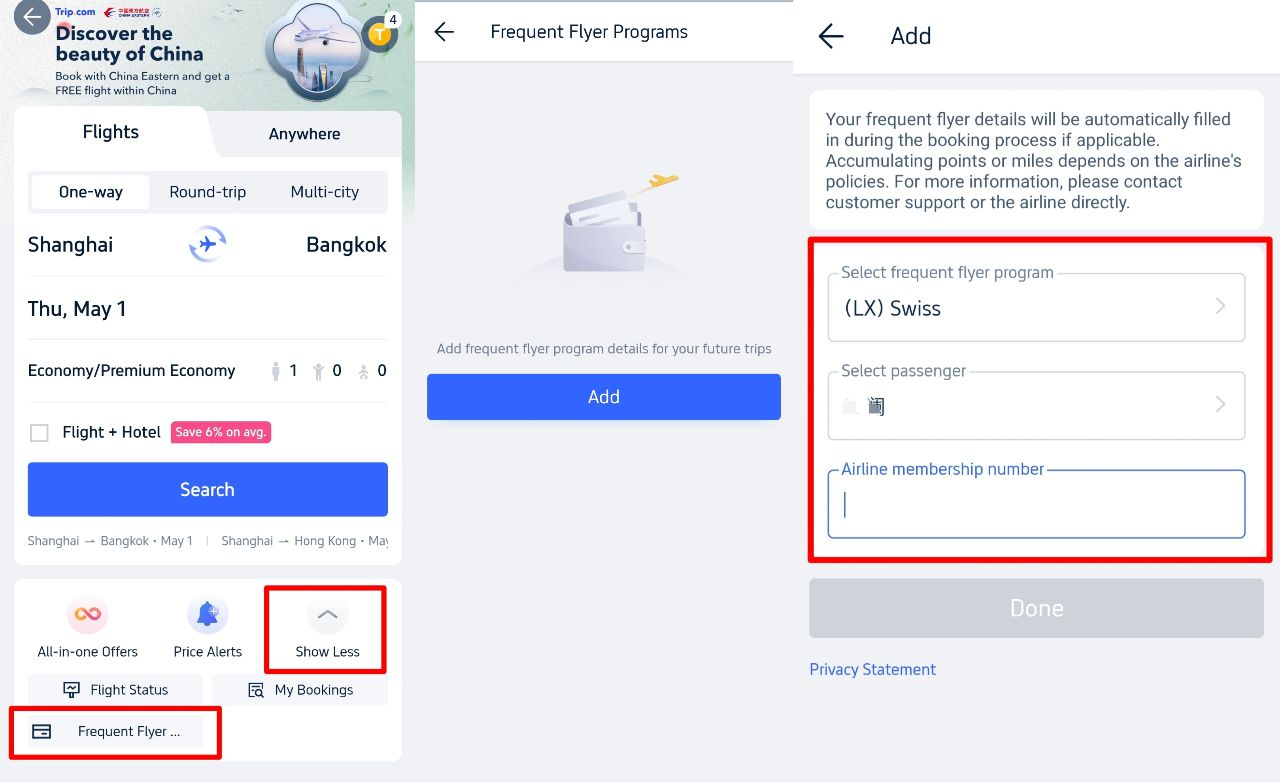
If you usually book flights or hotels on Trip.com, you can link your frequent flyer number during the booking process. This not only ensures your air miles are credited to your account but also lets you earn extra Trip Coins, unlocking "Trip.com Air Miles + Trip Coins" dual benefits. Follow these steps for operation:
- Trigger the input process when booking: After selecting a flight or hotel on Trip.com and navigating to the "Passenger Details" page (for hotel bookings, this is in the "Membership Information" section before order confirmation), scroll down to find the "Frequent Flyer Program" section.
- Fill in/verify your membership number: Select your airline’s loyalty program from the dropdown menu (e.g., EVA Air’s Infinity MileageLands, Qatar Airways’ Privilege Club) and manually enter your frequent flyer number. If you previously added this information to Trip.com (path: Flights homepage → tap "Show More" → select "Frequent Flyer Programs" → enter membership details), the system will auto-fill it, no re-entry required.
- Note special rules: Currently, only flights operated by BR-EVA Air allow direct frequent flyer mileage accumulation via Trip.com. For mileage credit rules of other partner airlines (e.g., Qatar Airways, Garuda Indonesia), refer to the official website of the respective airline. We recommend confirming mileage eligibility before booking.
- Claim dual rewards: After completing your trip, air miles will be credited to your frequent flyer account within 4–8 weeks, while Trip Coins will be automatically added to your Trip.com account. These coins can be used for discounts on future hotel bookings, airport lounge access purchases, or flight ticket redemptions.
How do I Get a Frequent Flyer Number?
Credit: Unsplash
Super simple. Seriously, do this before your next flight.
- Pick Your Airline(s): Focus on who you fly most, or who has a big hub near you. You can join multiple programs.
- Go to Their Website: Navigate to their "Loyalty" or "Frequent Flyer" section. Look for "Join," "Enroll," or "Sign Up."
- Fill Out the Form: Basic stuff: Name, email, address, date of birth. Takes 2 minutes.
- Get Your Number: Boom. You'll usually get your FFN instantly on screen and via email confirmation. Write it down somewhere accessible (phone notes app works).
- Use It: Crucially, remember to enter this number every single time you book a flight with them or their partners. That's how you earn.
 1426 booked







How to Use your Frequent Flyer Miles?
You've earned your frequent flyer miles, now spend 'em! Here's how to use:
- Log In: Go to the airline's website or app where your miles live.
- Find "Use Miles" or "Book Award Travel": This is usually very prominent.
- Search for Flights: Enter your route/dates and select the option to pay with miles/points. Pro Tip: Be flexible with dates for better availability.
- Choose Your Reward: Select the flight option that fits your point budget.
- Pay Fees/Taxes: Remember, you'll almost always pay cash for government taxes and carrier-imposed fees, even on "free" award tickets. This can range from negligible to hundreds of dollars, so check before confirming!
- Confirm: Review everything and book. Your miles will be deducted.
What Can You Spend Air Miles On?
Credit: Unsplash
Reward Type | What You Get | Notes |
Flights | Free flights on the airline or its partners. | The most popular use. Value varies wildly. |
Upgrades | Jump from Economy to Premium Economy, Business, or First Class. | Usually requires booking a specific fare class first. Great value if you snag it. |
Seat Selection | Pay for preferred seats (extra legroom, exit row) using points instead of cash. | Often not the best value, but convenient. |
Lounge Access | Buy single-entry passes or annual memberships. | Nice perk for long layovers. |
Hotel Stays | Book partner hotels through the airline's portal. | Value can be good or bad; compare to cash rates. |
Car Rentals | Similar to hotels, book via the airline portal. | Compare prices. |
Shopping/Gift Cards | Convert miles to points for retailers or get gift cards. | Usually the WORST value. Only do this if you won't fly anymore. |







Global Airline Frequent Flyer - Programs & Rules
Program rules constantly evolve, but core principles remain: Your FFN is personal, miles earned are yours to spend (often on others), and you must actively enter it when booking to earn. Key recent trends include more "revenue-based" earning (miles based on ticket $ spent, not just distance flown) and dynamic award pricing (points cost fluctuates with demand/cash price). Always check your specific program's terms. Here's a snapshot of major airlines:
Region | Airline | Program Name | How to Find Your FFN (Official Methods) |
North America | MileagePlus | 1. Website: united.com → "Forgot number?" → Enter email → FFN emailed instantly. 2. App: Profile → Top of screen. 3. Call: 1-800-864-8331 (have ID ready). | |
AAdvantage | 1. Website: aa.com → "Forgot AAdvantage number?" → FFN emailed. 2. Boarding pass: Check past passes (app/email). 3. Physical card: If issued. | ||
SkyMiles | 1. App: Profile tab → FFN displayed. 2. Email: Search "SkyMiles account number". 3. Call: 1-800-323-2323 (verify with DOB/address). | ||
Aeroplan | 1. Website: Log in → Dashboard shows FFN. 2. Email: Search "Aeroplan welcome". 3. Call: 1-800-361-5373 (Canada). | ||
Mileage Plan | 1. App: "Profile" → FFN under name. 2. Website: Login → "Account overview". 3. Physical card: Check wallet. | ||
Europe | Executive Club | 1. Website: ba.com → "Forgot number?" → FFN emailed. 2. Monthly newsletter: FFN in email header. 3. Call: +44 (0) 344 493 0787 (UK). | |
Miles & More | 1. App: Profile → "Membership details". 2. Website: Log in → "Personal data" tab. 3. Call: +49 (0) 69 86 799 799 (Germany). | ||
/ | Flying Blue | 1. Website: Log in → "My Profile" → FFN beside name. 2. Email: Search "Flying Blue membership". 3. Physical card: Mailed upon signup. | |
Miles&Smiles | 1. App: Profile icon → "Membership no." 2. Website: Login → Dashboard header. 3. Call: +90 212 444 0849 (Turkey). | ||
Asia/Pacific | Frequent Flyer | 1. Website: qantas.com → "Forgot number?" → FFN emailed. 2. Physical card: Check mailed card. 3. Call: +61 2 8222 2300 (Australia). | |
KrisFlyer | 1. App: Profile → "Membership" tab. 2. Email: Search "KrisFlyer membership". 3. Boarding pass: Old passes (app/email). | ||
ANA Mileage Club | 1. Website: Log in → "My Page" → FFN top-right. 2. Call: +81-3-6741-1120 (Japan). 3. Physical card: If issued. | ||
Infinity MileageLands | 1. App: "Account" → FFN visible. 2. Email: Search "EVA membership confirmation". | ||
Middle East | Skywards | 1. Website: Log in → "My Profile" → Membership details. 2. App: "Account" tab → FFN displayed. 3. Call: +971 600 555 555 (UAE). | |
Privilege Club | 1. Website: Login → Click profile icon → FFN shown. 2. Email: Search "Privilege Club number". 3. Boarding pass: Past QR tickets. | ||
Etihad Guest | 1. App: Profile → "Membership card". 2. Website: Login → Dashboard. | ||
Latin America | LATAM Pass | 1. Website: Log in → "My Account" → FFN visible. 2. Email: Search "LATAM Pass registration". | |
Club Premier | 1. App: "Profile" → FFN below name. 2. Physical card: Check mailed card. | ||
LifeMiles | 1. Website: Login → Dashboard shows FFN. 2. Email: Search "LifeMiles account created". | ||
ConnectMiles | 1. App: Profile → "Membership number". 2. Call: +507 304-2777 (Panama). |
*Always check your program’s site—partnerships, blackout dates, and fees change frequently. Above is just a reference I curated.
Can I Use my Frequent Flyer Number for Someone Else?
No. It’s tied to your name only. Why?
- Earning points: Only works if the ticket name matches your FFN account. Using your number for a friend’s flight earns nothing for either of you.
- Spending points: You can book flights for others using your points, but you can’t transfer your number or points to their account.
Exception: A few programs (like British Airways) let family pool points—but that’s managed inside your account.
The exception? A few programs offer limited "points pooling" with family members in the same household (like British Airways Household Account), but this is managed within the program rules, not by sharing the FFN itself.
FAQs about Frequent Flyer Number
Can anyone get a frequent flyer number?
Absolutely, yes. Signing up for a frequent flyer program is almost always free and open to pretty much everyone. You don't need to be a jet-setting business traveler. Whether you fly once a year or once a month, you can join an airline's program and get your unique number. The only real restrictions are age-related: minors (usually under 13 or 18, depending on the airline) might need parental consent or have limited accounts. Otherwise, grab your passport details and sign up online in minutes.How do I use my frequent flyer number when checking in?
You need to plug that number in whenever you check in to make sure you get credit for the flight. If you're checking in online or via the airline's app, there's always a field specifically for your frequent flyer number – just type it in. At the airport counter, hand your passport to the agent and say, "Could you please add my frequent flyer number to this reservation? It's [your number].". They'll input it for you. If using a kiosk, look for a loyalty program option during the check-in flow. Always double-check your boarding pass afterward; your FFN or program name is usually printed on it.What exactly is a frequent flyer number?
Think of it simply as your membership ID for an airline's rewards club (their frequent flyer program). It's a unique combination of letters and numbers assigned just to you when you sign up for free. This number is how the airline tracks every flight you take with them (and often their partner airlines), so they know how many miles or points to dump into your account. You use it when booking flights and at check-in to earn those points. Later, you spend those points on stuff like free flights, upgrades, or other travel perks. It's strictly personal – never share it for someone else to use on their flights.How do I find my frequent flyer number if I lost it?
First, don't panic. Check your email inbox (including spam) for the welcome email you got when you first signed up – it almost always has your number. Next, dig out any old boarding passes or flight confirmation emails; your FFN is often listed there. If you have a physical membership card (less common now), check your wallet. Logging into the airline's website or app usually displays your number prominently on the account dashboard. If all else fails, call the airline's frequent flyer program customer service. Have your full name, birthdate, and the email/address associated with the account ready – they'll verify you and give you the number.