High-Speed China eSIM 1 Day from $0.74: Best China Travel eSIM

by Sophie
July 31, 2026
Planning to go to China for just 1 day for a meeting or transit purpose and worried about the internet? 1-Day China eSIM plan is the perfect solution for you! Trip.com offes cheap and high-speed China eSIM 1 day package to ensure you to connect to the internet freely in China. In this article, we offers a comprehensive guide to China eSIM 1 day, including various 1-day China eSIM providers, pros and cons, and China eSIM 1 Day price. Please read until the end.
See all flights

Top 3 Best China eSIM Plans for 1 Day
Here are my top 3 China eSIM picks. They have great ratings and strong sales. I use them myself and fully vouch for them. They unlock Western apps without a VPN, which is a lifesaver since China blocks most overseas services. Grab one and stay connected hassle‑free.
CMCC China 4/5G eSIM
- CoverageMainland China
- Data500MB/day
- Duration1 Day
- Pricefrom US$0.20

China Mobile 5G eSIM
- CoverageMainland China 5G eSIM
- Data1 GB/day
- Validity1 Day
- Pricefrom US$0.56

China/HK/Macau eSIM
- CoverageMainland China
- Data2GB/Day
- Validity1 Day
- Pricefrom US$1.12
Best China eSIM 1 Day for Travel
China eSIM 1 Day Provider | Validity | Data | Price |
Trip.com | 1 Day | 500MB/Day | $0.22 |
1GB/Day | $0.44 | ||
2GB/Day | $0.73 | ||
3GB/Day | $1.18 |
*As of July 2026
See all attractions
 656008 booked

Why Choose Trip.com China eSIM?
There are numerous China eSIM 1‑day providers for travelling to China, with Trip.com offering plans ranging from $0.22 to $6.00 for 500MB to unlimited data to be used in China.
Trip.com China eSIM 1 Day
- 500 MB/Day data for 1 day = US $0.22
- 1 GB/Day data for 1 day = US $0.44
- 2 GB/Day data for 1 day = US $0.73
- 3 GB/Day data for 1 day = US $1.18
Trip.com offers a wide array of 1-day eSIM options for China, catering to travelers in need of efficient, affordable, and flexible mobile data plans. The plans vary from 500 MB to 3 GB per day, ensuring there's something suitable for everyone. Regardless of whether you're in China for an urgent meeting or just passing through for a day, you can choose the plan that best meets your travel requirements. These eSIM plans are highly cost-effective, making it easy and affordable to stay connected throughout your journey.
In addition to offering a diverse range of eSIM plans, Trip.com also offers 24/7 customer service. They provide excellent customer support to assist with any issues you may encounter during your visit to China. Whether you need help with your eSIM or encounter any challenges during your trip, the dedicated team at Trip.com is always ready to assist you.
Trip.com China eSIM 1 Day Feature
- Network Operator: China Mobile
- High-Speed 4G LTE network
- Hotspot Sharing: Supported
- Validility: Within 30 days from the purchase date
- Data only: Does not support calls or SMS
- You can use Google map, Facebook, Twitter, Instagram and LINE.
Mainland China + Hong Kong + Macau 4G eSIM 1-30 days High-speed data daily package/data package (days selectable, calendar days) QR code
4.6/5
601 reviewsGood service coverage without any disconnecting using smoothly throughout the trip.
Chinese Mainland / Hong Kong / Macau 5G eSIM | Daily Plan / Total Data Plan | 1-180 Days | Calendar Day Billing | QR Code
4.3/5
395 reviewsEverything's fine, I had no problems with installation or use. I recommend it.

Asia-Pacific eSIM | 5G/4G | High-speed data | Daily data/data plan | 24-hour service | 1-30 days | QR code
4.6/5
2051 reviewsI traveled across mainland China and Hong Kong. The connection was excellent for the entire two weeks. Not a single outage or connection failure. No reactivation or anything was required when crossing the border between China and Hong Kong. The setup was very simple and the technical support was excellent. It was also very convenient to track my remaining data plan balance in the trip.com app so I could adjust my data usage. I'll definitely use this on my next trips to China and Hong Kong.
Mainland China 5G eSIM | 2GB/day - 50GB total | Some plans include voice calls | AI & TikTok available | 1-365 days | Natural | QR Code
4.2/5
329 reviewsThe eSIM is really great! Everything works perfectly, including TikTok and WhatsApp. I'm very satisfied! 👍
Mainland China 5G eSIM | Dual Net | Daily/Total Data Package | 1–30 Days | 24-Hour Billing | QR Code
4.6/5
5781 reviewsI liked the ease of installation and the ability to access Instagram and Facebook and stay in touch with my friends. I recommend it.
What is a China eSIM 1 Day?
China eSIM Basic Information
eSIM, short for Embedded SIM, is a digital SIM that is built into the device, unlike traditional physical SIM cards. In 2018, devices compatible with eSIM were launched in Japan and the user base has been growing ever since. Traditional SIM cards needed to be physically inserted into the device, but eSIM eliminates the need for this.
It's an innovative system that enables easy internet connectivity in China and other countries by simply downloading or erasing SIM data on the device, without the need for inserting or removing a physical card.
Explore Beijing for Free During Your Layover!

Starting December 27, 2024, transit passengers with an 8+ hour layover at Beijing Capital Airport can enjoy the Beijing Express Half-Day FREE Layover Tour. Choose from two exciting routes daily and make the most of your stopover!
Difference between eSIM and SIM card
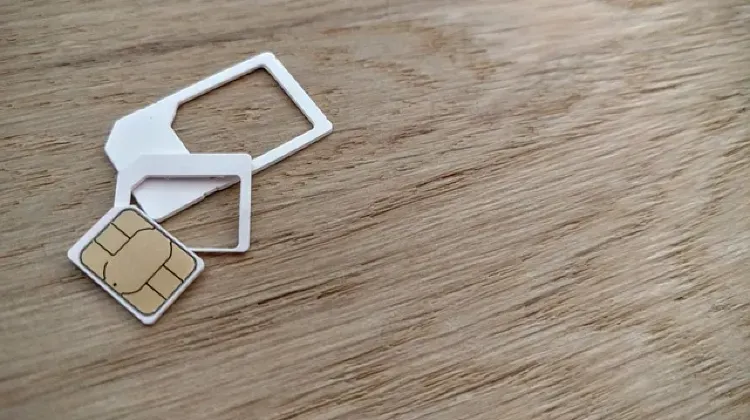
eSIM and SIM cards are both utilized for international smartphone communication. Despite their many commonalities, they also have notable differences.
SIM cards are made of plastic and are placed into a specific slot in the smartphone for operation. If you wish to switch carriers, you must physically replace this card.
Conversely, an eSIM is not a tangible card. It's an electronic SIM that's pre-installed in the device. Changes to the carrier can be made directly on the device, eliminating the need for any physical replacement.
Item | SIM card | eSIM |
Form | Physical Card | Embedded (electronic) |
Hassle of replacement | Card needs to be physically replaced | Only settings on the device |
Compatible devices | Requires SIM slot | Only devices that support eSIM |
Carrier change | Need to purchase and insert a new SIM card | Can be changed in the settings screen |
Size & Shape | Different sizes such as micro SIM and nano SIM | Physical size and shape don't matter |
Excellent Review of China eSIM 1 Day Users
This China eSIM gets great feedback from real travelers. See for yourself in the reviews!
4.6/5
28613 reviews
5/5
Conveniently, the internet was good and we connected quickly. You need internet to connect, so I recommend connecting on the plane before takeoff or upon arrival with WiFi enabled. We bought two eSIM cards for one day because we had a layover in China.
5/5
Based on my experience buying an e-sim from another provider in Japan (my first time using an e-sim because it was cheap), I was worried because the internet was incredibly slow, almost unusable. This time in China, I was very worried because I don't understand Chinese. But in reality, my boyfriend's and other people's roaming from Thailand kept losing internet connection multiple times when they were in restaurants trying to load menus or pay for bills. Only my e-sim from the trip worked normally. So I'm not sure if it's good or bad in the end, because I'm always the one paying for food and reservations. 😅
5/5
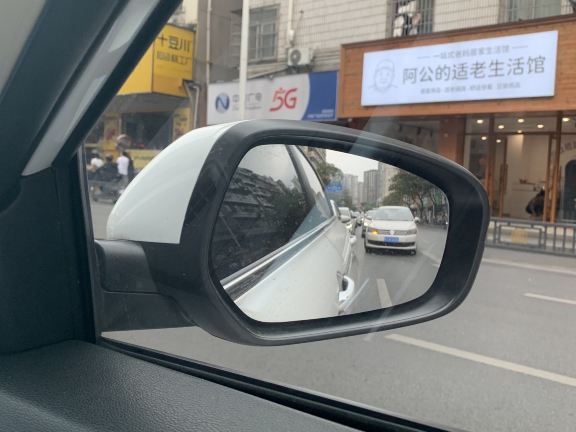
In mainland China, eSIM usage mainly falls into two scenarios. If you own a mainland China phone that supports eSIM, the three major operators still require you to personally visit their physical stores with your ID card and phone to apply for an eSIM, and this is subject to the "one ID, five numbers" restriction. The "one number, two devices" service for smartwatches is relatively mature, with a service fee of around 10 RMB/month, sharing the main number's plan.
For overseas travelers or those wanting to access services, many will purchase an overseas travel eSIM. These plans utilize overseas operator networks, allowing direct use of services like LINE and Google without a VPN. They are ready to use immediately upon arrival and easy to set up. The main drawbacks are weak signal in remote areas or indoors for some plans, and limited hotspot sharing.
5/5
Traveling Solo in Xinjiang for 12 Days, Navigating the Entire Trip with This SIM Card | Uninterrupted Internet Access Even in Remote Scenic Spots
This trip took me solo from Urumqi to Kanas and Hemu, a total of 12 days. The biggest fear when traveling alone is no internet and getting lost. Before setting off, I bought this China Mainland 5G eSIM (1GB daily plan) from Trip.com. In my testing, it was incredibly stable, and I highly recommend it to anyone traveling solo in mainland China, especially to remote areas.
Installation: I suggest installing it before departure, connected to your home Wi-Fi. Scanning the QR code in the order takes only a minute. Once you arrive, simply turn on data roaming. For iPhones, remember to set the SIM card to "Mobile Data" and turn on data roaming. I connected automatically within about ten seconds of landing.
Signal Performance: 5G throughout Urumqi city. Navigation, taxi hailing, translation, and posting on social media were all smooth. The key part was the mountain road to Kanas and Hemu. I was worried about signal loss, but most of the route maintained 4G/5G, Google Maps navigation never dropped, and I could upload photos normally even in Hemu village. Only the section towards the Fish Viewing Platform briefly dropped to no service, but it recovered after a few steps. Overall, it was much better than I expected.
Usage Experience: Google Maps, ChatGPT, WhatsApp, Instagram, Xiaohongshu, Alipay, and Didi all worked directly without needing a VPN. I relied entirely on it for researching travel guides, finding restaurants, and calling taxis. 1GB per day was more than enough for me—navigation and photo uploads during the day, and Wi-Fi connection at my accommodation at night. I didn't even run out of credit in 12 days.
Billing: The 24-hour plan is very cost-effective. I activated it upon arrival at night, and it was still on my first day's credit the next morning, essentially giving me half a day free. For longer trips, the daily plan is more convenient than the total credit plan.
A quick tip: If you can't connect, turn off the VPN and then turn airplane mode back on; this should usually fix it. Also, don't delete the eSIM from your phone; once you do, you can't reinstall it.
Having a stable SIM card when traveling alone is really reassuring. I'll definitely buy one again next time I go to mainland China.
5/5
I've used up my data allowance and renewed it. The signal is excellent. It's very convenient to use here in Chongqing, but I haven't tried it in the mountains yet, so I don't know how the signal will be up there.
Which is better in China for 1 day? eSIM, SIM card, or Wi-Fi router

SIM cards don't require charging like Wi-Fi routers and are more compact, with a variety of plans available. However, they can be complex to set up and require a SIM-free smartphone. Wi-Fi routers, on the other hand, are easy to install and can be shared among multiple users or devices. However, they may incur additional charges and costs. eSIM eliminates the risk of loss or damage as it doesn't require a physical SIM card. Its setup is straightforward, but it's only compatible with certain smartphones. Below, I've outlined the key features of these three options in a table.
Feature | Caution | |
eSIM | No risk of loss or damage Easy to set up Can be used immediately upon arrival | Limited number of smartphones can be used Phone number cannot be used |
SIM card | No need to charge Not bulky Many plans available | Setup required Need pin Requires SIM-free phone |
Wi-Fi router | Can be used immediately upon arrival Can be shared by multiple people Can be connected to multiple devices | Worried about charge life Difficulty in receiving and delivering |
3 Benefits of Using China eSIM 1 Day

1. Immediate use upon arrival in China
One of the primary advantages of eSIM is its ability to provide instant internet access upon landing in China. Traditional SIM cards require time for purchase or delivery. But with an eSIM, you can connect to the network as soon as you disembark the plane, allowing you to efficiently plan your travel, such as booking taxis or navigating to your hotel.
2. No risk of loss or damage
Traditional SIM cards are tiny and require careful handling. The risk of loss or damage increases, especially when changing them during your trip. However, eSIMs are digital, eliminating the worry of loss or damage. There's no need to fiddle with a small pin to open the SIM tray or worry about dropping the SIM card.
3. Dual SIM capability
eSIM allows for dual SIM usage, enabling you to use two networks on one smartphone. This feature allows for seamless network switching when traveling internationally. With dual SIM, there's no need to contract a new internet service every time you visit different countries.
3 Disadvantages of Using 1-Day China eSIM

1. Limited device compatibility
To use eSIM, your device must support it. While newer models are becoming eSIM compatible, older or certain budget devices may not support it. This means you'll need to verify if your device is eSIM compatible, which can be inconvenient. If you need to buy a new device to use eSIM, you'll also need to factor in the cost.
2. Not transferable between multiple devices
Traditional SIM cards can be easily switched between devices, allowing one SIM to be used on multiple devices. However, eSIM is embedded in the device, making it difficult to transfer between devices. This could be inconvenient for those who use multiple devices during their trip to China.
3. No phone numbers
eSIM data plans may not include a unique phone number, or it may come with additional charges. This could be inconvenient when a local number is needed, like when making restaurant reservations or contacting hotels. Traditional SIM cards often include a phone number in addition to data, so this is an important consideration when thinking about using eSIM.
3 Tips for Choosing China eSIM for 1 Day
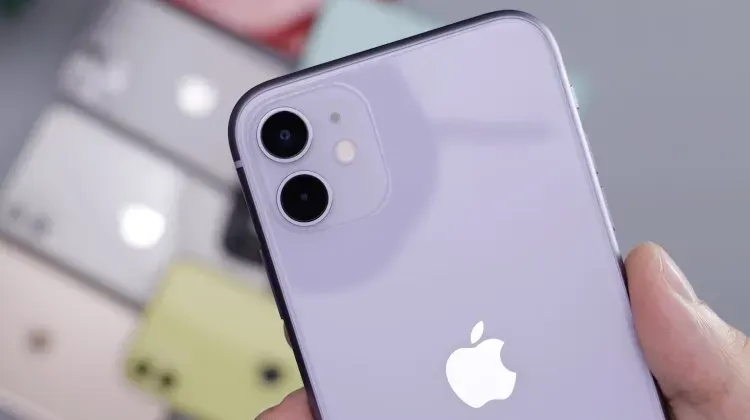
1. Is it affordable?
When selecting an eSIM, the first aspect to consider is its cost. When travelling to China, you'll have to account for expenses such as transport, accommodation, and food, so it's crucial to keep communication costs as low as possible. However, chasing the lowest price might lead to issues with communication speed, data limit, and customer support. It's important to review the services offered and opt for a plan that offers good value for money.
2. Does it offer enough data?
China boasts a highly developed IT infrastructure, providing access to high-speed internet. Therefore, the data allowance of an eSIM is a critical factor to consider. If you intend to stream videos or download large amounts of data, a plan with unlimited data is advisable. However, such plans are typically pricier, so make your choice based on your budget for your China trip.
3. What do the reviews say?
Looking at third-party reviews and feedback can be beneficial in assessing the quality and dependability of an eSIM. Reviews from previous users can provide valuable insights into the actual user experience and the level of support provided in case of issues.
How to Set up and Use China eSIM 1 Day?
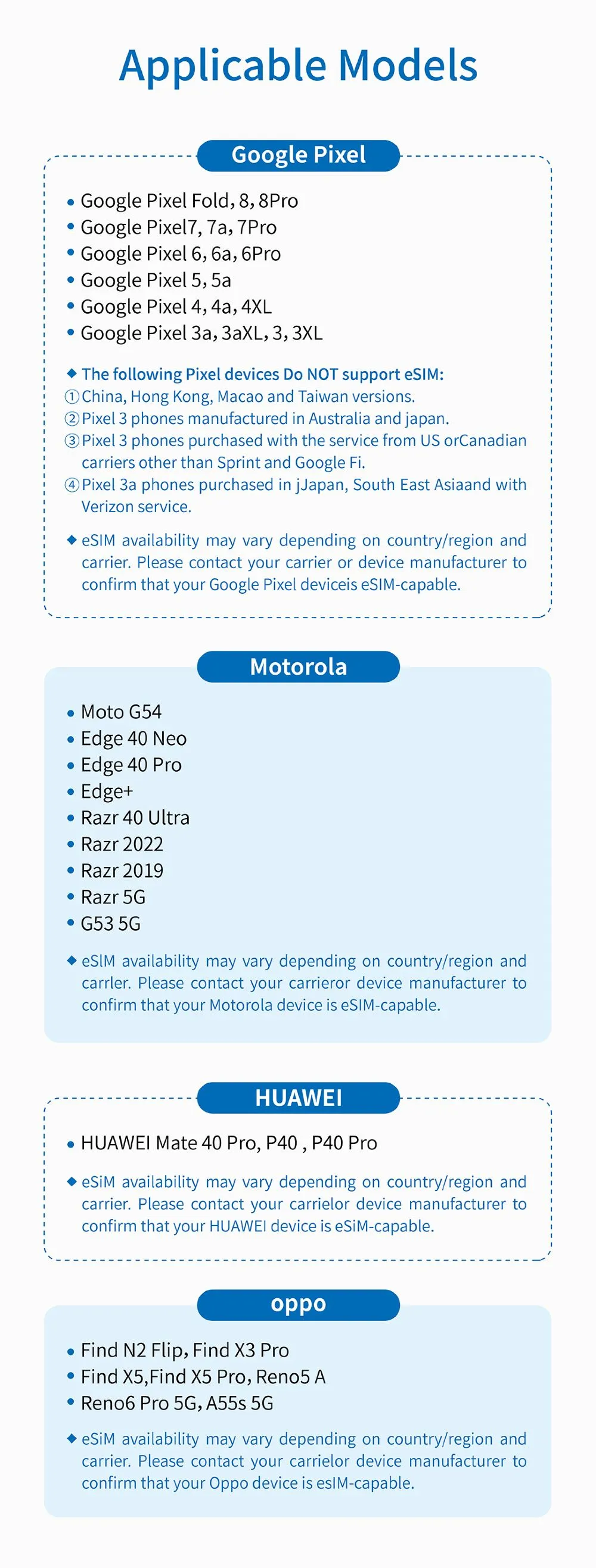
Before purchasing 1-day China eSIM for travelling, please confirm if your mobile phone is compatible with eSIM.
🙌Compatible Models🙌
1. Installation
1. Check the QR code displayed in the eSIM activation email.
2. Go to "Settings" on your smartphone's home screen and select "Mobile Data" (iOS) or "SIM Card Management" (Android).
3. Add a mobile data plan (iOS) or tap "SIM Card Management" (Android), agree to install Mobile Data (iOS) or SIM Card Management (Android), and then scan the QR code displayed in the activation email to complete the installation.
2. How to use
1. After installation, turn off the traditional SIM card.
2. When using Mobile Data (iOS) or SIM Card Management (Android), the LTE icon will be displayed in the upper right corner.
3. Turn on data roaming to enable communication.
4. If you are not connected to the network after performing the above steps, toggle airplane mode on and off or restart your smartphone.
3. How to deactivate
Tap "Mobile Data" (iOS) or "SIM Card Management" (Android) and switch it to "Off" (the same procedure applies for activation).
More Trending eSIM for Other Countries
If You Need an eSIM for a Day in China, Use it Right Away!

If you're planning a journey to China, an eSIM is absolutely crucial. Continuous internet access is key to fully experiencing China. Whether it's booking hotels, utilizing maps, or looking for local suggestions, seamless connectivity can enhance the comfort and satisfaction of your trip.
Many travelers highly appreciate the eSIM from Trip.com due to its dependability and ease of use. Why not give Trip.com's eSIM a shot for your upcoming trip?
[10% Off] Best China Hotel Recommendations
Top Shanghai Hotels
Top Beijing Hotels
Top Guangzhou Hotels
See All Hotels























What to Prepare for a Trip to China?
- Visa & Entry Tips China’s 240-hour visa-free transit policy now covers 54 countries, incl. the US, UK, Canada, and Brazil, allowing up to 10 days during layovers. Learn more about China Entry Tips to land in China easily.
- Getting Connected VPNs are vital for accessing Google, WhatsApp, Instagram, etc in China. Set one up before arriving. China eSIMs are the easiest option for data and bypassing restrictions. Pocket Wi-Fi devices work best for group but are pricier and require pickup/return.
- Money Exchange & Tax Refunds Exchange money in China banks (better rates than airports). ATMs accept foreign cards, but notify your bank first. For tax refunds, spend over ¥500 at stores with a "Tax-Free" sign. Keep receipts and get forms stamped at customs before departure.
Must-Have Apps in China
- China Payment Apps Forget cash. Chinese use Alipay (I like it better) or WeChat Pay to pay for everything in China. Scan a QR code at noodle stalls, metros, even temples. Link your foreign Visa/Mastercard before landing.
- China Map Apps Amap (Gaode Map) & Baidu Map (limited English) is what locals use, with real-time navigation, metro/bus routes, and traffic updates. Apple Maps does a good job too if you're already an IOS user.
- China Transport Apps Street taxis are cheap, but drivers rarely speak English. Use China Taxi App like DiDi (China’s Uber)—set your destination in English, pay by Alipay.
- China Travel Apps 15+ China trips taught me: Use Trip.com. It's the best English app for booking China trains/flights/hotels + finds Trip.com deals.
- China Dating Apps Locals use Tantan (China’s Tinder) and Momo. WeChat’s “People Nearby” works too, but expect language barriers unless your Mandarin’s decent.
- China Food App Use Meituan (also helps find nearby restaurants) or Ele.me for food delivery—both have English mode. No English menu in restaurants? Scan the QR with Alipay's translator.
FAQs about Using China eSIM for 1 Day for Travel
-
Why is there no path to "add cellular number"/"join mobile network plan"/"join mobile service plan"?
-
Can eSIM be installed outside the eSIM Option China?
-
What should I do if there is still no network after arriving at China and turning on eSIM?
-
Can eSIM be installed multiple times? Can I change my phone?
Disclaimer: This article has been provided by an individual contributor or third party platform. If there is any discrepancy regarding the copyright, please contact us directly and we will delete the content immediately.
Trending Searches
-
eSIM/SIM card
-
Top destinations
-
Latest Flight Deals
-
Popular Attractions
- Hotels in Shanghai
- Hotels in Guangzhou
- Hotels in Beijing
- Hotels in Bangkok
- Hotels in Shenzhen
- Hotels in Hong Kong
- Hotels in Chongqing
- Hotels in Tokyo
- Hotels in Ho Chi Minh City
- Hotels in Chengdu
- Hotels in Kuala Lumpur
- Hotels in Seoul
- Hotels in Zhangjiajie
- Hotels in Hanoi
- Hotels in Hangzhou
- Hotels in Singapore
- Hotels in Xi'an
- Hotels in Istanbul
- Hotels in Osaka
- Hotels in Bali
- Forbidden City Tickets
- Zhangjiajie National Forest Park
- Shanghai Wild Animal Park
- Shanghai Tower Tickets
- Tianmen Mountain
- Shanghai Disneyland Tickets
- shanghai to wangxian valley
- Canton Tower Tickets
- Huangshan
- Book China Attraction Tickets with Passport
- Shanghai Disneyland Fast Pass
- Summer Palace Tickets
- Universal Studios Beijing Tickets
- Shanghai Disneyland Crowd Forecast
- Great Wall of China Tickets