Best Asia eSIM 2026 - Trip.com Plans, Reviews & Prices


Looking for the best eSIM for Asia or Southeast Asia eSIM 2026? Stay connected the second you land with a great Asia eSIM—no swapping physical SIMs, no airport delays. To help you pick the right one, we’re sharing what matters most: Asia eSIM best providers, prices, product info, reviews and more.
to Bangkok
to Manila
to Shanghai
to Tokyo
to Seoul
See all flights


[5% Off] Which eSIM is Best for Asia travel? Top Plans & Prices
Trip.com Asia eSIM is a standout choice, costs as little as $0.34 per day, and has plans from 1GB (perfect for short trips) to 30GB (great for longer vacations). And do not forget to get limited 5% off Coupon below! Let’s look at the top plans and prices for your Asia trip.

Asia eSIM
- CoverageAsia Region
- Data0.5GB to 30GB
- Validity1 to 30 Days
- Pricefrom US$0.34

Southeast Asia eSIM
- CoverageSoutheast Asia
- Data0.5GB to 50GB
- Validity1 to 30 Days
- Pricefrom US$0.34
Global eSIM
- Coverage66 Countries
- Data0.5GB to 5GB
- Validity1 to 7 Days
- Pricefrom US$1.30
Best Asia eSIM Providers 2026 – Trip.com, Holafly & Ubigi Compared

When choosing the best eSIM for traveling in Asia, Trip.com, Holafly and Ubigi are the top picks. Trip.com covers more than 8 Asian countries (such as China, Japan, South Korea, and many other Southeast Asia eSIMs), flexible data plans (1 to 30 days, 500MB to 30GB), and super simple in-app installation (no QR code required for iOS 17.4+ iphones). Holafly offers unlimited data services in some Asian countries, but there are fewer countries to choose from. Ubigi works in multiple Asian countries too but often needs more manual setup with QR codes. This is a quick parallel:
Feature | Holafly Asia eSIM | Ubigi Asia eSIM | |
Countries Covered | 8+ (China, Japan, SK, Singapore, Malaysia, Thailand, Indonesia, Vietnam) | Fewer (e.g., Japan, South Korea, Thailand) | Multiple, varies by plan |
Data Plans | Flexible (1–30 days; 500MB–30GB; daily/total data) | Mostly unlimited data for set times | Various data bundles |
How to Install | In-app one-click (iPhones); QR code/manual (others) | Only QR code | QR code or manual entry |
Extra Benefits | SMS/call/voice support; hotspot sharing; 5% off promo | Hotspot allowed; 24/7 support | Pay-as-you-go options |
Trip.com Asia eSIM Reviews – What Real Travelers Say
If you want to choose the best eSIM for your trip to Asia or Southeast Asia, the real traveler reviews of Trip.com's Asian eSIM can help you. Here’s what they’re saying:
Asia (12 Countries) | 4G/5G eSIM | Data Package | 365 Days Ultra-long Validity | 24-hour Billing | Real-name Registration Required for Hong Kong & Taiwan | QR Code
4.5/5
255 reviewsIt worked well. The only minor hiccup was in Hong Kong—I had to go through verification, which requires a working internet connection for a while. Otherwise, everything was fine.

5G/4G eSIM in 8 Asian countries | Multi-network support, supports All AI & TikTok | 500MB/day - 50GB total | 1-30 days | 24-hour billing | QR code
4.6/5
5617 reviewsVery good product. Working very well in Asia. Strong signal for most of the time. Good price. Highly recommend
Global (77 Countries) 5G/4G eSIM | Supports Google Maps/TikTok/ChatGPT | Total Data Plan | 24-Hour Billing | 1–30 Days | QR code
4.4/5
29451 reviewsit the best experince to purchase esim,good to use and price is reasonable offer to use in china, eventhoigh facing some issue, but live chat solve the problem
Southeast Asia (7 countries) | 5G/4G eSIM | Daily plan/Data package | 24-hour billing | 1 - 30 days | QR code
4.5/5
2573 reviewsThe eSIM I purchased this time has been a great experience. Activation and installation were very convenient; following the instructions, it was ready to use quickly. The network connection is stable, and everyday internet browsing, Google, WhatsApp, and Maps all run smoothly. It's extremely convenient for international travel, eliminating the need to buy a physical SIM card locally. Overall, the speed and stability are good, and customer service is prompt and helpful with any issues. The price is reasonable, it's easy to use, and I'm very satisfied with the overall experience. I will definitely buy it again for my next trip abroad.
Southeast Asia 5G/4G eSIM | Singapore/Malaysia/Thailand/Indonesia | Daily Package/Data Package | 24-Hour Billing | 1-30 Days | QR Code
4.7/5
1358 reviewsGreat service thankyou trip ❤️👍❤️👍👍👍👍👍👍👍👍👍👍👍👍👍👍👍👍👍👍👍👍👍👍👍👍👍👍👍👍👍👍👍👍👍👍👍👍👍👍👍👍👍👍👍👍👍❤️❤️❤️❤️❤️❤️❤️❤️❤️❤️❤️❤️❤️❤️❤️❤️❤️❤️❤️❤️❤️❤️❤️❤️❤️❤️❤️❤️❤️❤️❤️❤️❤️❤️❤️❤️❤️❤️❤️❤️❤️👍❤️👍👍👍👍👍👍👍👍👍👍👍👍👍👍👍👍👍👍👍👍👍👍👍👍👍👍👍👍👍👍👍👍👍👍👍👍👍👍👍👍👍
Does Your Phone Support Asia eSIM? Check 2 Things
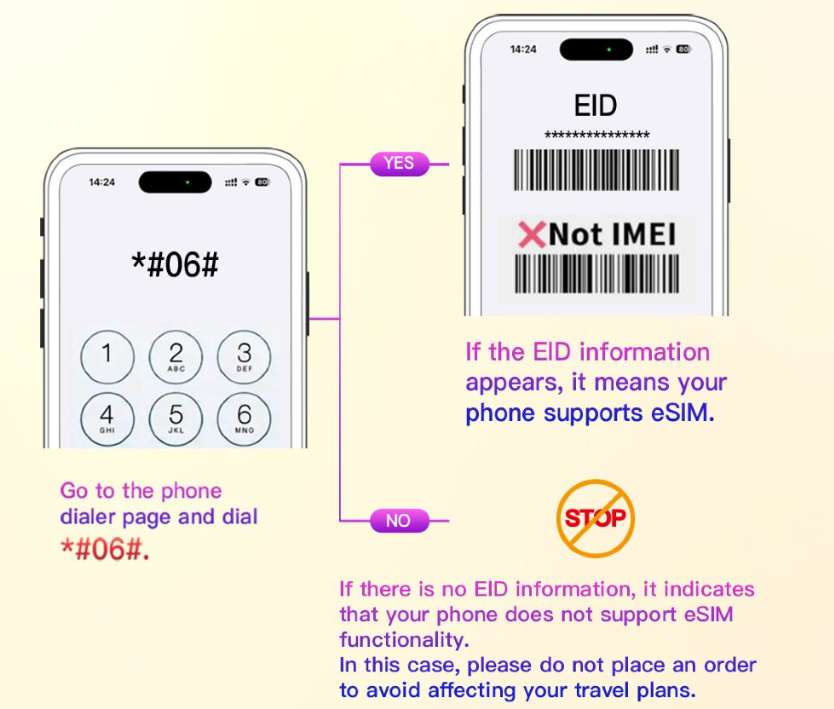
Before buying an Asia eSIM, make sure your phone can use eSIM. Do these two checks:
Is Your Phone Unlocked?
- Android: Go to Settings → Connections → Mobile Networks → SIM card info and setting → Carrier/Network Operators. If it lets you “Select automatically” and shows multiple networks, it’s unlocked.
- iOS: Go to Settings → General → About → Carrier Lock. If it says “No SIM restrictions,” it’s unlocked.
Does Your Phone Have eSIM?
- Open your phone’s dialer and type
*#06#. A screen will pop up: - If you see EID (a special ID for eSIM), it probably indicates that your phone supports eSIM. But to make 100% sure, please also check the product page or contact customer service for exact info.
- If you only see IMEI (without EID), your phone does not support eSIM - do not order eSIM, or it will not work.
How to Set Up Asia eSIM on iPhone & Android


Setting up an eSIM in Asia is quite simple, but the steps for iphones and Android phones are different.
For iPhones (Super Easy!)
- In-app one-click (iOS 17.4+) : After purchasing on Trip.com, click Account → All Orders → click "Install". eSIM will be automatically added to your Settings.
- QR code: Open the QR code of the Trip.com app, then go to Settings → Cellular Phone → Add eSIM→ Use QR Code. Scan the code, click "Activate eSIM", and then click "Continue". Add a tag (such as "Asia eSIM") to distinguish it from other SIMS.
For Android Phones
- Qr code: Enter Settings → Network and Internet → Click the + next to "SIM Card" → Click "Download SIM Card?" → "Next" → "Scan QR Code from the Internet" Scan the QR code of Trip.com, click "Download", and after completion, click "Settings".
- Manual input: If the QR code is not supported, please go to "Settings → Network → Add eSIM→ Use QR Code → Manual enter details" in sequence. From Trip.com input “SM-DP+ address” and “Activation code”, click "Next" to "Activate eSIM", "Continue". Add labels.
How to Use Your Asia eSIM
Credit: Unsplash, Brett Jordan
Once your Asian eSIM is set up, it will be very easy to use. Here are what you should do:
- Turn On the eSIM:
- iOS: Go to "Settings → Cellular", turn on the eSIM line (if you only want to use eSIM, you can turn off the primary SIM card).
- Android: Go to Settings → Network and Internet, and enable the SIM card of eSIM.
- Turn On Data Roaming:
Find “Data Roaming” in your cellular settings and switch it on (eSIMs need this to work in other countries). - APN for TikTok/ChatGPT:
Most apps (Google Maps, WhatsApp, Instagram) work fine without extra steps. But for TikTok or ChatGPT, change the APN: - Go to Cellular Data Network (iOS) or Mobile Data Network (Android).
- Enter APN:
firoam. - Restart your phone.
- If There’s No Internet:
If data still doesn’t work, double-check data roaming is on. Then set APN tomobile.three.com.hk(same steps as above) and restart your phone.
Apps You Can Use with Trip.com Asia eSIM
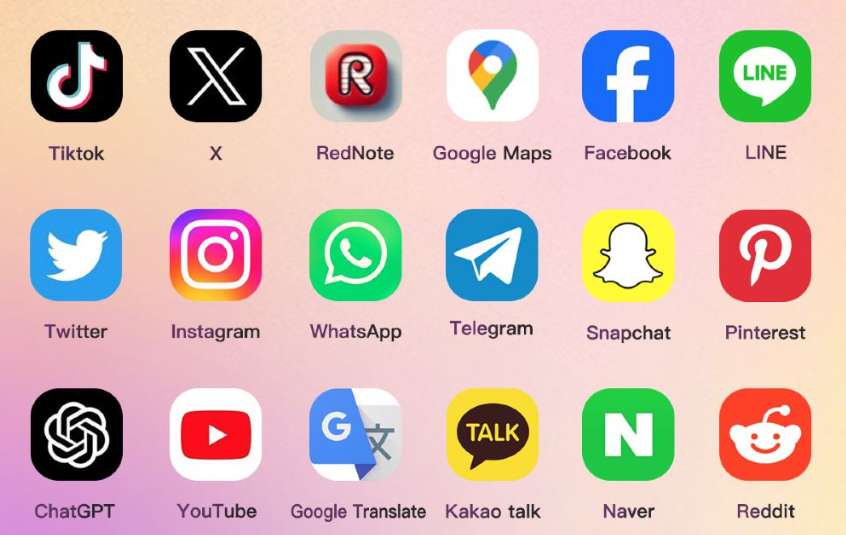
Asia eSIM works with hundreds of apps across social media, navigation, AI, and more—so you can stay connected for messaging, maps, and entertainment during your trip. Popular apps include:
- Social & Messaging: TikTok, X (Twitter), Facebook, LINE, WhatsApp, Telegram, Snapchat, Instagram
- Navigation & Travel: Google Maps
- AI & Tools: ChatGPT, Google Translate
- Local Apps (Japan/Korea): Kakao Talk, Naver
- Others: YouTube, Pinterest, Reddit, RedNote
The eSIM auto-connects to the best local network in each country (like SoftBank in Japan or AIS in Thailand) for seamless access. Note: For TikTok or ChatGPT, manually switch your APN to “firoam” in your phone’s cellular settings—other apps work without this step.
Which Asian Countries does Trip.com eSIM work in?
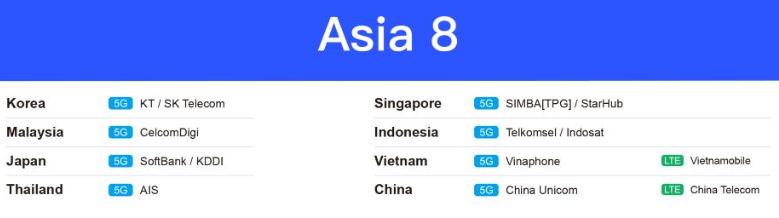
Trip.com Asia esim connects to the top local operators in each country to achieve good coverage. The following are Asia eSIM networks used by Trip.com's eSIM in popular destinations in Asia:
Country | Networks (5G or LTE) |
South Korea | KT, SK Telecom (5G) |
Singapore | SIMBA (TPG), StarHub (5G) |
Malaysia | CelcomDigi (5G) |
Indonesia | Telkomsel, Indosat (5G) |
Japan | SoftBank, KDDI (5G) |
Vietnam | Vinaphone (5G), Vietnamobile (LTE) |
Thailand | AIS (5G) |
China | China Unicom (5G), China Telecom (LTE) |
Trip.com Asia eSIM Setup – No QR Code Needed!
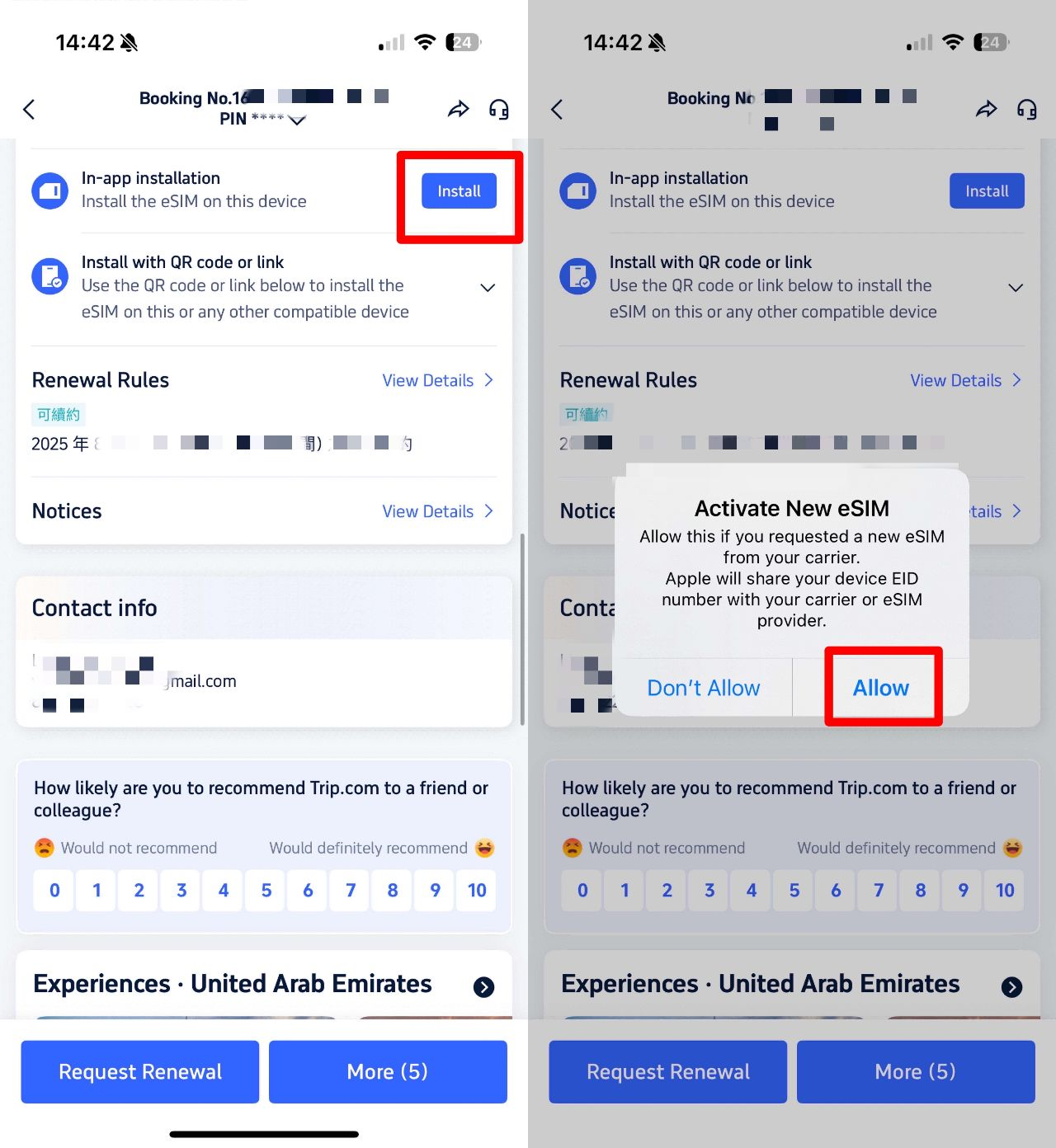
Trip.com makes the setup of eSIM super simple, especially for iphones. Trip.com eSIM Setup method is as follows:
- Purchase the Asia eSIM plan in the Trip.com app.
- Go to "My Orders" and find your eSIM
- Click "Install in App".
- Done - Your phone automatically adds eSIM to Settings → Cellular (no need to scan the QR code or enter the code).
Asia eSIM vs Physical SIM vs WiFi – Which Is Better for Asia Travel?
When traveling in Asia, what you want is a reliable network, not trouble. The following is a comparison of esim (such as Trip.com), physical SIM cards and WiFi devices:
First of all, to sum up quickly: esim is the simplest because you don't need to change your SIM card or carry additional devices. Physical SIMS can work, but it takes time to purchase and install them. WiFi devices are suitable for group use, but they may be quite large in size. The following is the detailed classification:
Feature | Asia eSIM (e.g., Trip.com) | Physical Local SIM Card | Portable WiFi Device |
How Easy to Set Up | Install on your phone before/after arrival (no SIM swap) | Buy at an airport/store, swap SIMs | Pick up/rent a device (airport/store or online) |
Coverage | Multiple countries (one eSIM for Asia) | Single country (need a new SIM for each nation) | Multiple countries (depends on the device) |
Works With Your Phone | Needs an eSIM-supported phone | Works with any unlocked phone | Connects to any WiFi-enabled device |
Cost | From ~$0.34/day (flexible plans) | Varies by country (~$5–$20 for data) | ~$5–$10/day (plus a deposit) |
Convenience | No extra device; use your phone’s hotspot | Need to swap SIMs; risk losing your old SIM | Bulky; share with a group; needs charging |
Data Limits | Choose plans (500MB–30GB or daily/total data) | Varies by SIM plan | Usually unlimited data (but slow after a certain cap) |
See More International eSIM Plans for Your Trip
The 5% off promo also applies to many other regions and it gets shoutouts for making it budget-friendly, especially compared to buying local SIMs in each country.
 Global eSIM
  China eSIM
  Thailand eSIM
  Japan eSIM
  Vietnam eSIM
  India eSIM
  Malaysia eSIM
  South Korea eSIM
  Indonesia eSIM
  UK eSIM
  Singapore eSIM
  USA eSIM
  Italy eSIM
  Egypt eSIM
  Saudi Arabia eSIM
  Germany eSIM
  Canada eSIM
  Portugal eSIM
  Pakistan eSIM
  Aruba eSIM
  Switzerland eSIM
  Greece eSIM
  Israel eSIM
  Morocco eSIM
 [10% OFF] Trip.com Asia Hotel Recommendations
Search Top Asia Hotels
See All Hotels
 NO.1
NO.1






FAQs about Asia eSIM
-
Which eSIM is best for Asia travel?
-
Can I use an Asia eSIM and a SIM Card at the same time?
-
How much does an Asia eSIM cost?
-
Do Asia eSIMs have unlimited data?
-
Which Asian countries does an eSIM work in?
-
Can I use apps like TikTok or ChatGPT with an Asia eSIM?
-
How do I install a Trip.com Asia eSIM on my phone?
Disclaimer: This article has been provided by an individual contributor or third party platform. If there is any discrepancy regarding the copyright, please contact us directly and we will delete the content immediately.
Trending Searches
-
eSIM/SIM card
-
Top destinations
-
Latest Flight Deals
-
Popular Attractions
- Hotels in Shanghai
- Hotels in Guangzhou
- Hotels in Beijing
- Hotels in Bangkok
- Hotels in Shenzhen
- Hotels in Hong Kong
- Hotels in Chongqing
- Hotels in Tokyo
- Hotels in Ho Chi Minh City
- Hotels in Chengdu
- Hotels in Kuala Lumpur
- Hotels in Seoul
- Hotels in Zhangjiajie
- Hotels in Hanoi
- Hotels in Singapore
- Hotels in Hangzhou
- Hotels in Xi'an
- Hotels in Istanbul
- Hotels in Bali
- Hotels in Osaka
- Forbidden City Tickets
- Zhangjiajie National Forest Park
- Shanghai Tower Tickets
- Shanghai Wild Animal Park
- Shanghai Disneyland Tickets
- Canton Tower Tickets
- shanghai to wangxian valley
- Shanghai Disneyland Fast Pass
- Huangshan
- Book China Attraction Tickets with Passport
- Universal Studios Beijing Tickets
- Great Wall of China Tickets
- Yu Garden Tickets
- Summer Palace Tickets
- Shanghai Disneyland Crowd Forecast