Car Rentals
Car Rental Promo Code - 8% Off
New User Enjoy up to 8% Off
TRIPCAR8

by Trip.com
July 2, 2026

Looking to rent a car? Trip.com Car Rental makes it super easy! You can compare prices from top rental companies like Hertz, Avis, Enterprise, Budget, and Sixt all in one place, usually getting better deals than booking directly. Plus, new users get 8% off their first rental! You can pick up your car in one city and drop it off in another - perfect for road trips.
Everything is crystal clear on Trip.com, from car specs to insurance details, and the booking process is way smoother than dealing with rental companies directly. No matter if you're picking up from an airport or city center, it's easy to find and book what you need, and their customer service team is super helpful.
Source from Unsplash
Why pay more? Trip.com offers the most competitive rates, often better than booking directly. Plus, look out for Trip.com car rental special deals and discounts, especially for new users (often extra 8% OFF). We'll help you get the best value for your car rental, guaranteed.
Plans change? No problem! Most Trip.com car rentals offer free cancellation before pickup. You'll get a full refund if you cancel within the allowed time. Just check the cancellation policy when booking - we keep it simple and transparent.
Whether you need a compact car for city driving, an SUV for family trips, or a luxury vehicle for special occasions, Trip.com has you covered. Browse through economy options like Toyota Corolla, family-friendly choices like Honda CR-V, or treat yourself to premium rides like BMW and Mercedes-Benz models.

Pick up your car right where you land! Trip.com offers rentals at key airports like LAX and Orlando in the US, London Heathrow and Stansted in the UK, Tokyo Narita and Bangkok Suvarnabhumi in Asia, and major Australian airports. Easy airport pickups make starting your journey smooth and stress-free.
Trip.com works with the world's most trusted car rental brands. Book with confidence through partners like Avis, Budget, Enterprise, Hertz, National, Alamo, Dollar, Thrifty, Europcar, and Sixt. These industry leaders ensure you get quality vehicles and professional service wherever you travel.

Start and end your trip where it's convenient for you. Heading from San Francisco to LA? Pick up at SFO and drop off at LAX. Going from Tokyo to Osaka? We've got you covered. Just select different pickup and drop-off locations when booking.
Our support team is always here for you, 24/7. Whether you need help with your booking, have questions during your rental, or need assistance in an emergency, we're just a call or message away. Plus, we speak your language - literally, with support in over 40 languages!

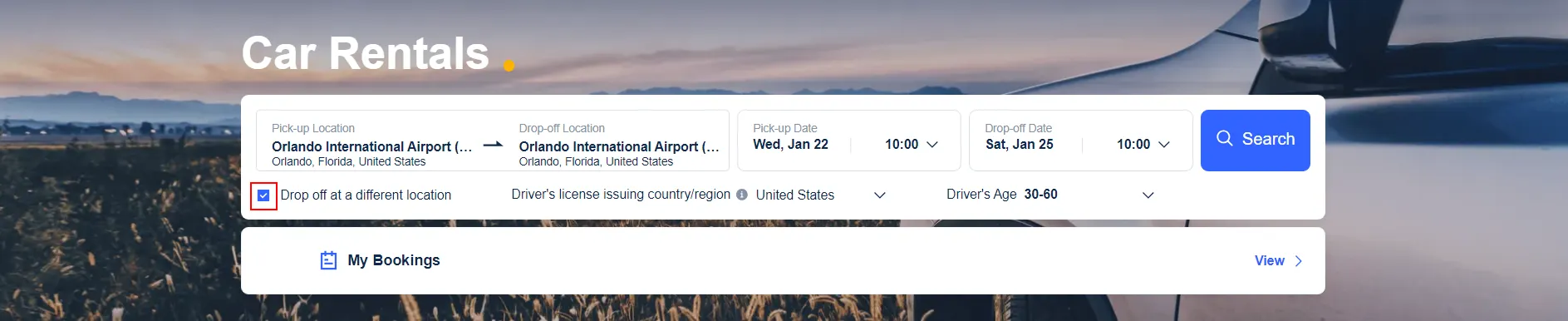
Visit Trip.com's car rental page and enter your pick-up location (city or airport), rental dates, and driver's age. Pro tip: If you're planning to return the car to a different location, just check the "Drop off at a different location" checkbox - super handy for one-way trips! Click "Search" to see what's available.
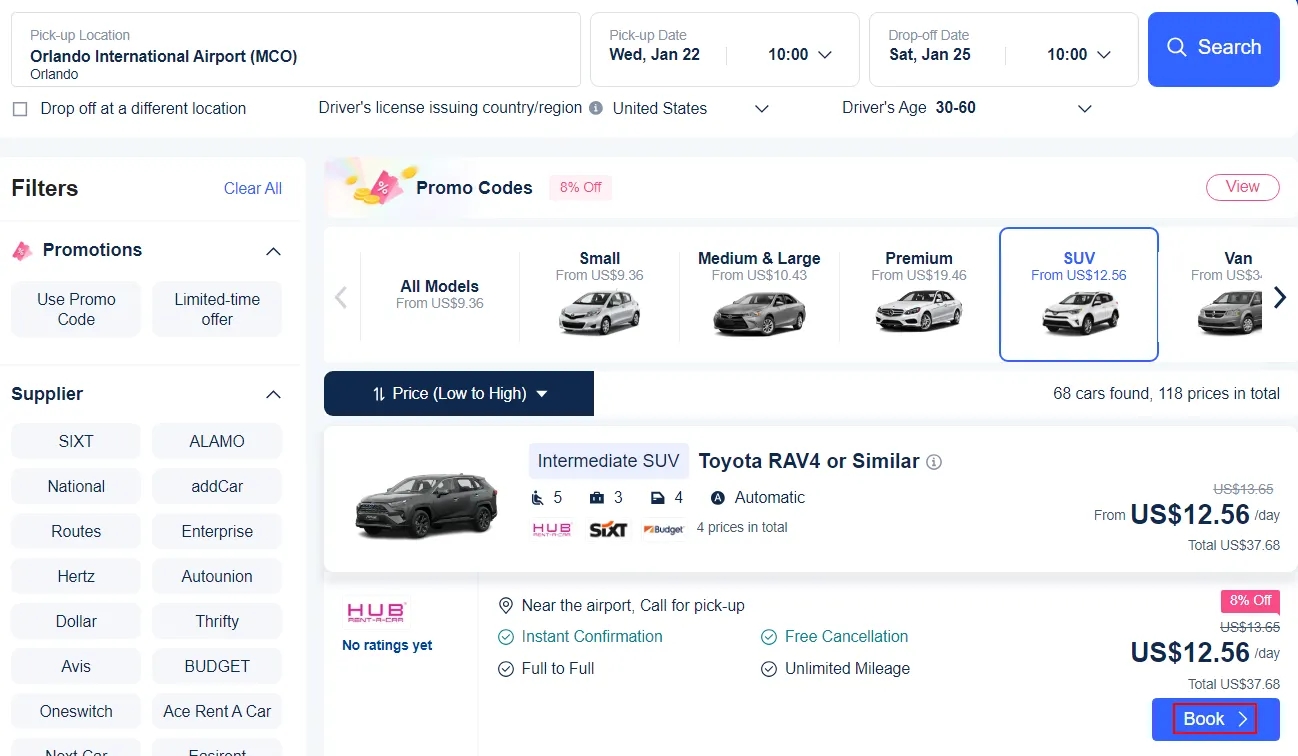
Now you'll see all available vehicles for your dates. Use the handy filters on the left to narrow down your options by passenger capacity, rental company (like Avis, Hertz, or Enterprise), price range, or vehicle type. You can even sort by best deals or customer ratings to find exactly what you need.
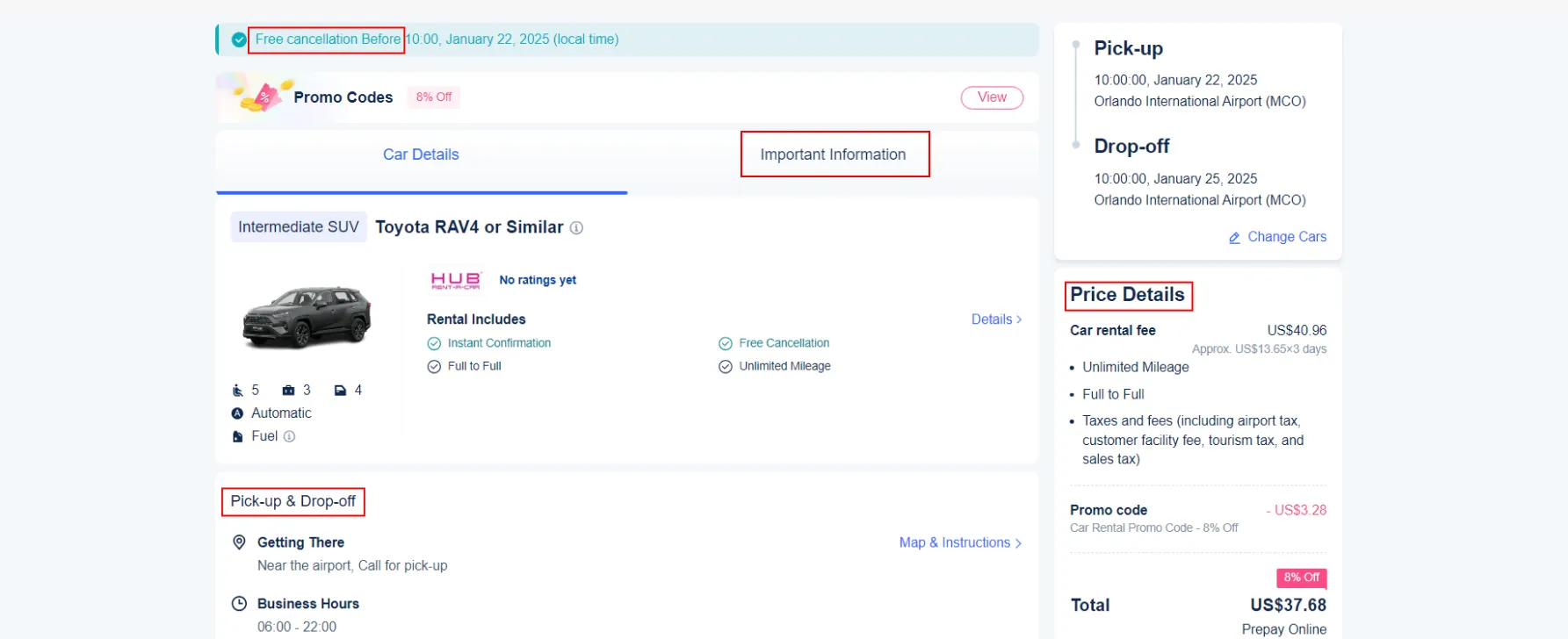
Once you've clicked on a car you like, you'll see all the important information: detailed vehicle specs, pick-up location info, included features, and a complete price breakdown. Take a moment to review everything - it's better to know all the details now!
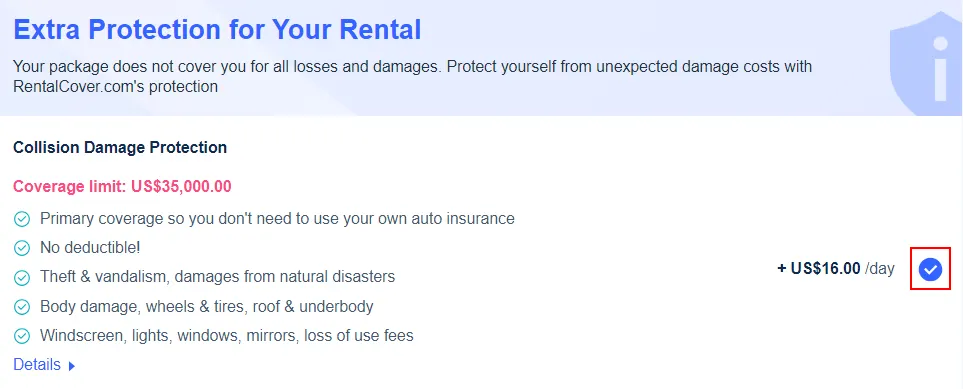
This is where you'll decide on your protection level. Review the included basic insurance and consider if you want to add premium coverage for extra peace of mind. Remember, Trip.com often offers better insurance rates than booking directly at the rental counter.
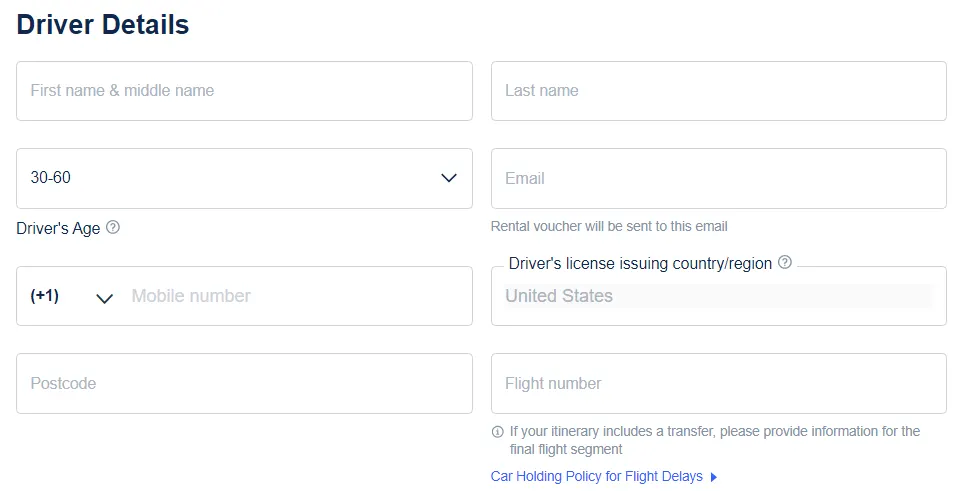
Time to enter the driver's information! Make sure to use an email address you check regularly - this is where your rental voucher will be sent. You'll need to provide the driver's name, contact details, and driver's license information. Double-check everything is spelled correctly!
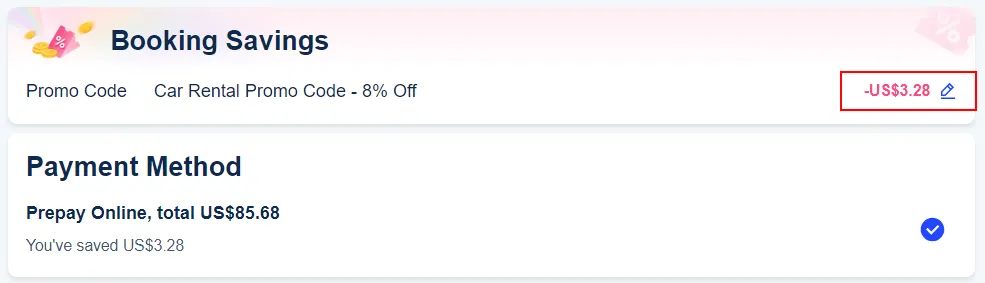
Almost done! Enter any promo codes you have (don't forget to check for that 8% new user discount!), select your preferred payment method, and review the final total. Once everything looks good, hit that "Book Now" button.
Success! You'll see your booking confirmation on screen and receive a rental voucher by email. Save both - you'll need to show the voucher when picking up your car. Quick tip: If you don't see the email right away, check your spam folder just in case.
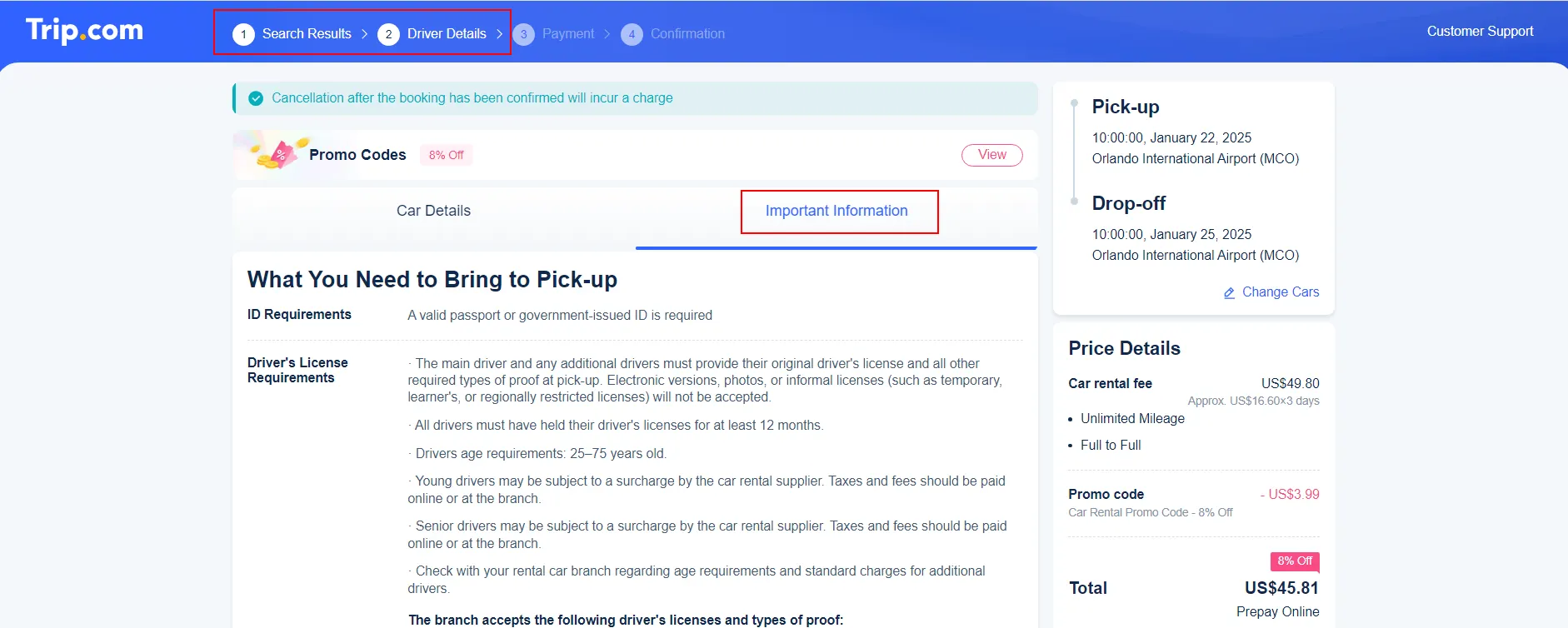
Click on Important Information Tab 👀
Remember, these requirements can vary between rental companies even within the same country. Always check the specific requirements listed on Trip.com's booking page (Important Information Tab) for your chosen location and rental company. When in doubt, Trip.com's 24/7 customer service can clarify any requirements for your specific rental.
When renting with an international license, most countries require your license to be at least a year old. Your IDP must be obtained in your home country before travel and must be presented alongside your original license - it's not valid on its own. Some countries have specific requirements for certain nationalities, so it's worth checking Trip.com's detailed requirements for your destination.
Most rental companies worldwide require your license to be clean - meaning no major violations in the past few years. The security deposit amount varies by location and vehicle type, but expect it to be substantial - often $200-500 in the US, £200-400 in the UK, and SGD 500-1000 in Singapore. This hold on your credit card will be released after you return the car undamaged.

Before heading to the rental location, make sure you've got your Trip.com rental voucher either printed or saved on your phone! You'll also need your valid driver's license, the credit card you used for booking, and your passport or ID. Having everything ready will make the pickup process smooth and quick.
When you arrive at the rental company's counter (whether it's Hertz, Avis, or any other partner), present your Trip.com voucher along with your documents. The rental agent will process your paperwork and take a security deposit on your credit card. Remember, the person who made the booking needs to be there in person - this is super important and can't be changed.
This is the crucial part that many people rush through - don't be one of them! Take your time to walk around the car with the rental agent. Check for any existing scratches, dents, or damage, and make sure they're noted on your rental agreement. Test all the important features like lights, wipers, and air conditioning. Taking photos or a quick video of the car's condition before you drive off can save you headaches later.

Remember, a smooth return starts with good planning. Keep your rental agreement handy, know your return location and time, and you'll be all set for an easy drop-off! 🚗
Most rentals use a "full-to-full" fuel policy - this means you'll get the car with a full tank and need to return it full. Fill up at a gas station close to your drop-off location (save your receipt!). If you return the car without a full tank, you'll likely face premium refueling charges that are much higher than regular gas prices.
Aim to arrive at least 15 minutes before your scheduled return time. Late returns can trigger extra charges - sometimes a full extra day's rental! If you know you'll be late, call the rental location or Trip.com's 24/7 support to extend your rental. It's usually cheaper to extend in advance than pay late fees.
Before returning, give the car a quick once-over. Remove all your belongings (check those seat pockets!), and make sure the car's clean and damage-free. Take photos or videos of the car's condition at drop-off, especially if you're using after-hours return. This documentation can be super helpful if any questions come up later.
Need to return the car somewhere else? If you haven't booked yet, just select different pick-up and drop-off locations during booking. Already booked? Contact Trip.com or the rental location at least 24 hours ahead to arrange a different drop-off point. Keep in mind there's usually a one-way fee for this, but it's worth it for the convenience of not backtracking.
Many locations offer after-hours return - just park in the designated area, lock the car, and drop the keys in the secure drop box. Take plenty of photos of the parked car and note the time. Keep all documentation until you're sure the return has been processed without issues. If you're nervous about after-hours return, try to adjust your schedule for a staffed return time.

When you rent a car, it comes with basic liability insurance - this covers damage you might cause to other people's property or injuries. But here's the thing: in the US, this basic coverage is often super low (sometimes just $10,000-$15,000). That's probably not enough if anything serious happens.
Already have car insurance? It might cover rental cars too. Same with some credit cards - they often include rental car protection. But watch out: using your personal insurance could raise your rates if you need to make a claim, and credit cards usually only cover damage to your rental car, not liability.
Think about getting rental company insurance if:
Trip.com offers insurance packages that are typically 20-30% cheaper than rental counter prices. Plus, you can add it when booking - no pressure at pickup time! 🚗