🔥Exclusive South Korea Train Coupon: Get 10% OFF Now!
Book KTX train tickets as a new user on Trip.com and enjoy a special 10% Off 🎁! Use our exclusive coupon to save big on your first train trip in South Korea! 👀

by Sophie
September 4, 2024

Planning to travel to South Korea? This article offers a detailed tutorial on Korail and Trip.com for foreigners, including how to buy and cancel Korail ktx tickets, tips, and everything you need to know!
Book KTX train tickets as a new user on Trip.com and enjoy a special 10% Off 🎁! Use our exclusive coupon to save big on your first train trip in South Korea! 👀
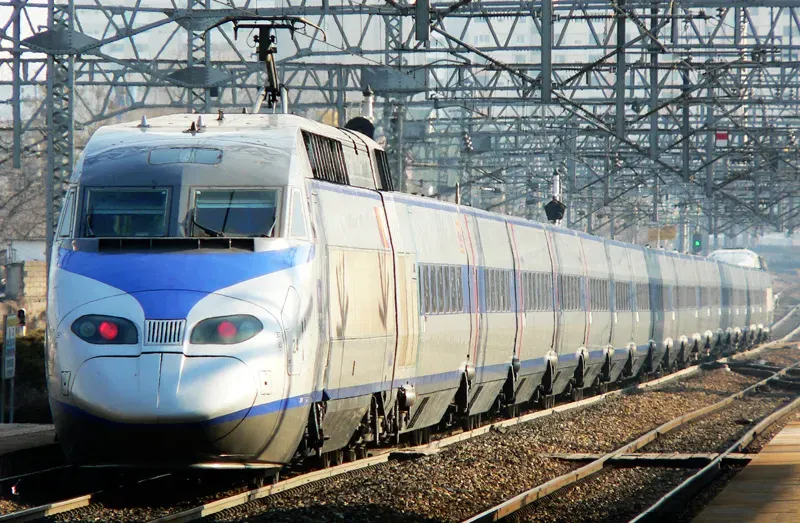
Korail, also known as Korea Railroad Corporation, is the national railway operator in South Korea. Korail's high-speed train, the KTX (Korea Train Express), is one of the most popular methods of transportation in South Korea, connecting major cities at speeds of up to 300 km/h. Korail KTX trains are also known for their punctuality and comfort, with amenities such as power outlets, Wi-Fi, and spacious seating.
KR Pass, also known as Korea Rail Pass, is a transportation pass designed for international travelers visiting South Korea. It allows unlimited travel on trains for a specific number of days, providing an efficient and cost-effective way to explore the country.
KORAIL offers three types of passes - the Consecutive Pass, the Flexible Pass, and the Saver Pass. Here is a price for different types of KR Passes.
| Types of KR Passes | Regular Adult | Regular Child (6-12) | Savers Pass |
| 2 Day Flexible | $134 | $68 | $123 |
| 3 Day Consecutive | $152 | $75 | $141 |
| 4 Day Flexible | $214 | $108 | $200 |
| 5 Day Consecutive | $230 | $115 | $220 |
| Note: Children below 6 can avail of the pass, free of charge. | |||
*The price varies depending on the exchange rate and date.
✨If you're curious about KTX train map and popular routes, check out the following articles to learn more!
Korail offers an extensive and efficient rail network that connects major cities and tourist destinations across the country. Here are several popular rail routes of Korail KTX:
| Travel Route | Distance | Frequency | Travel Time | Ticket Price (KTX) |
| Seoul to Busan | Approx. 520 km | Over 60 trains | ~2h 30m | From $40.19 (11% Off) |
| Seoul to Daejeon | Approx. 140 km | Over 40 trains | ~1h | From $15.91 (11% Off) |
| Seoul to Gangneung | Approx. 240 km | Over 10 trains | ~2h | From $18.63 (11% Off) |
| Seoul to Dongdaegu | Approx. 260 km | Over 90 trains | ~1h 50m | From $29.34 (11% Off) |
*The price varies depending on the exchange rate and date.
💖If you're curious about how to stay connected in South Korea, check our South Korea eSIM, Wifi and SIM card!

In South Korea, the most popular methods for booking Korail tickets are through Trip.com and Korail website. For foreign travelers who do not speak Korean, booking through Trip.com would be more convenient. Here's the comparison of the two:
| Booking Method | Detail |
| Trip.com | -Trip.com is an international online travel agency that provides 24/7 customer service in various languages, including English, Korean, Japanese, French, etc. -It offers a user-friendly interface and easy booking process. -Various payment methods including international credit cards, AliPay and Wechat Pay. -Also offers other travel services like hotel booking, flight tickets, and tour packages. |
| Korail | -Korail is the national railroad operator in South Korea, it has the most comprehensive info about train schedules, routes, etc. -Limited payment methods. -Only available in English, Korea, Japanese, and Madarin. |
💖If you're curious about how to buy and use Korail train tickets, check the following articles to learn more:
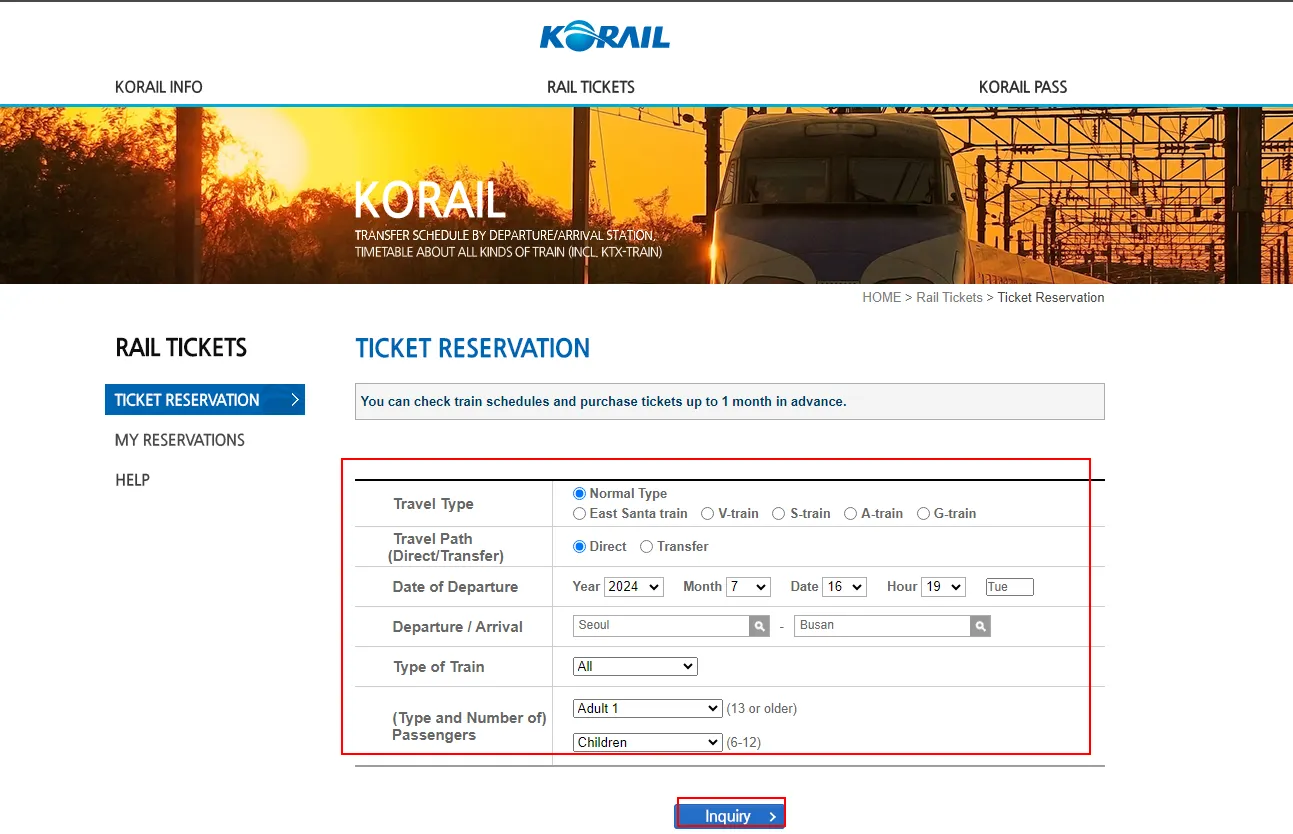
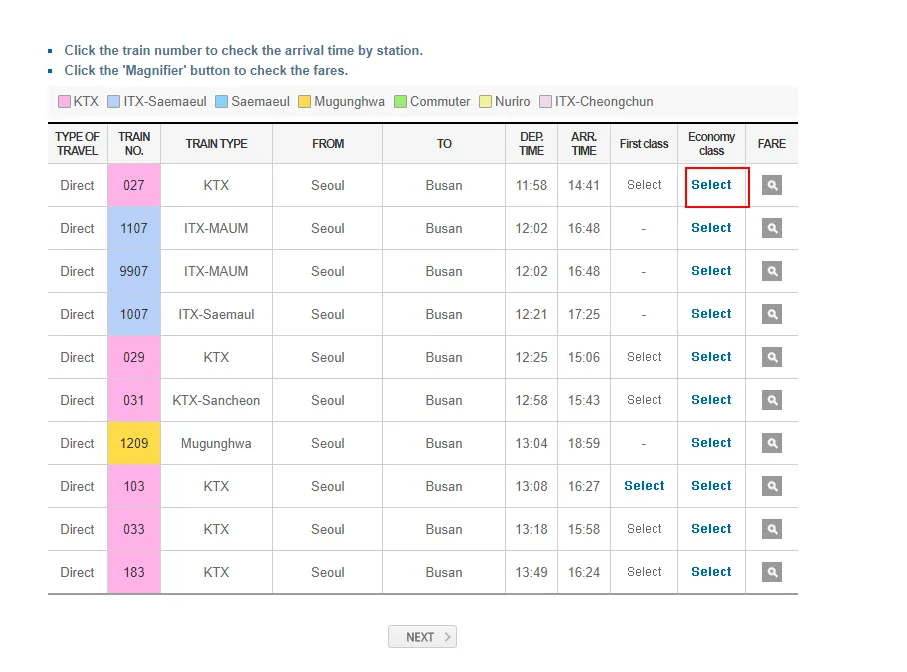
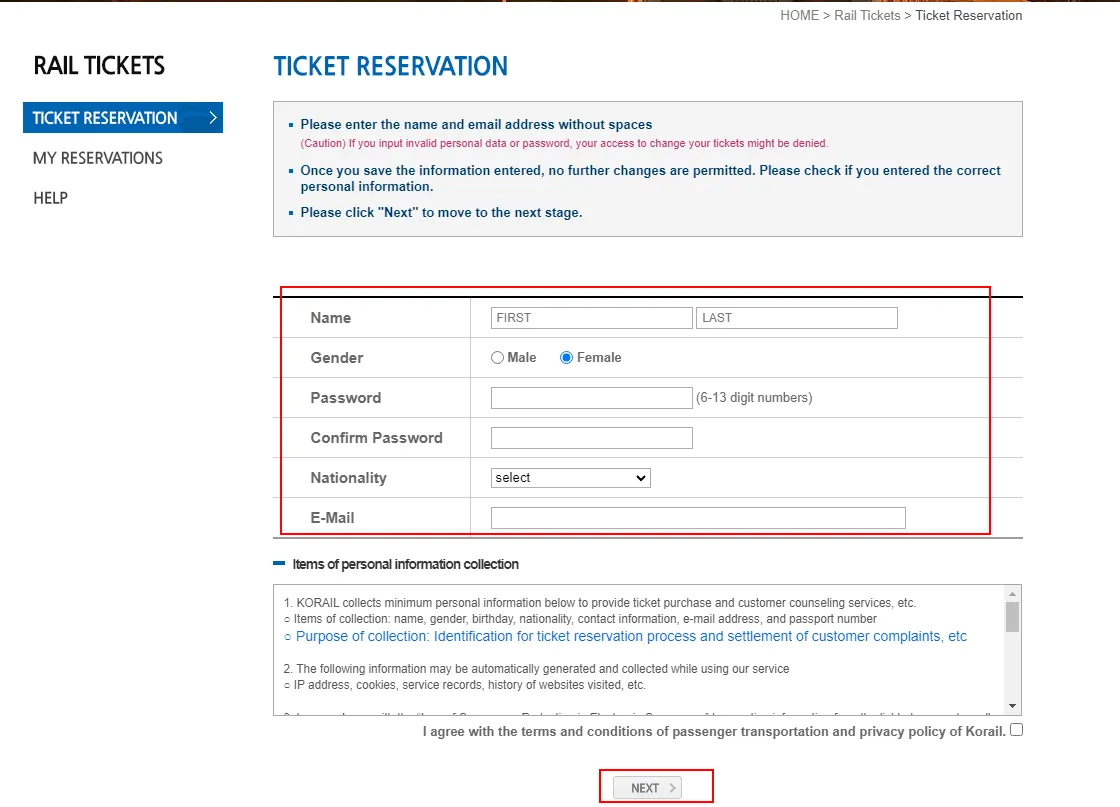
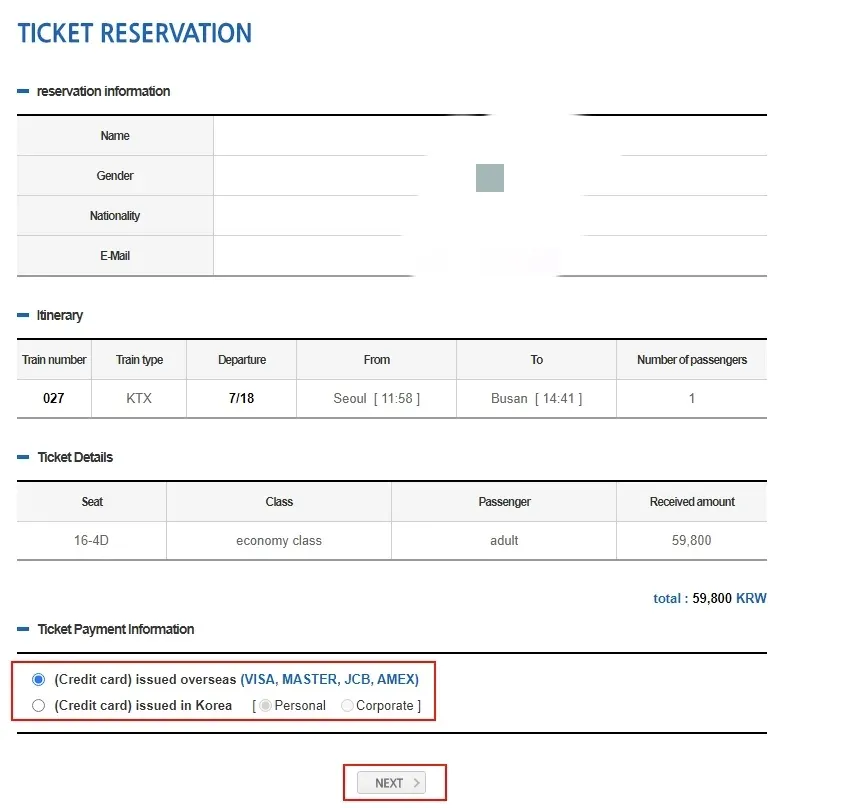
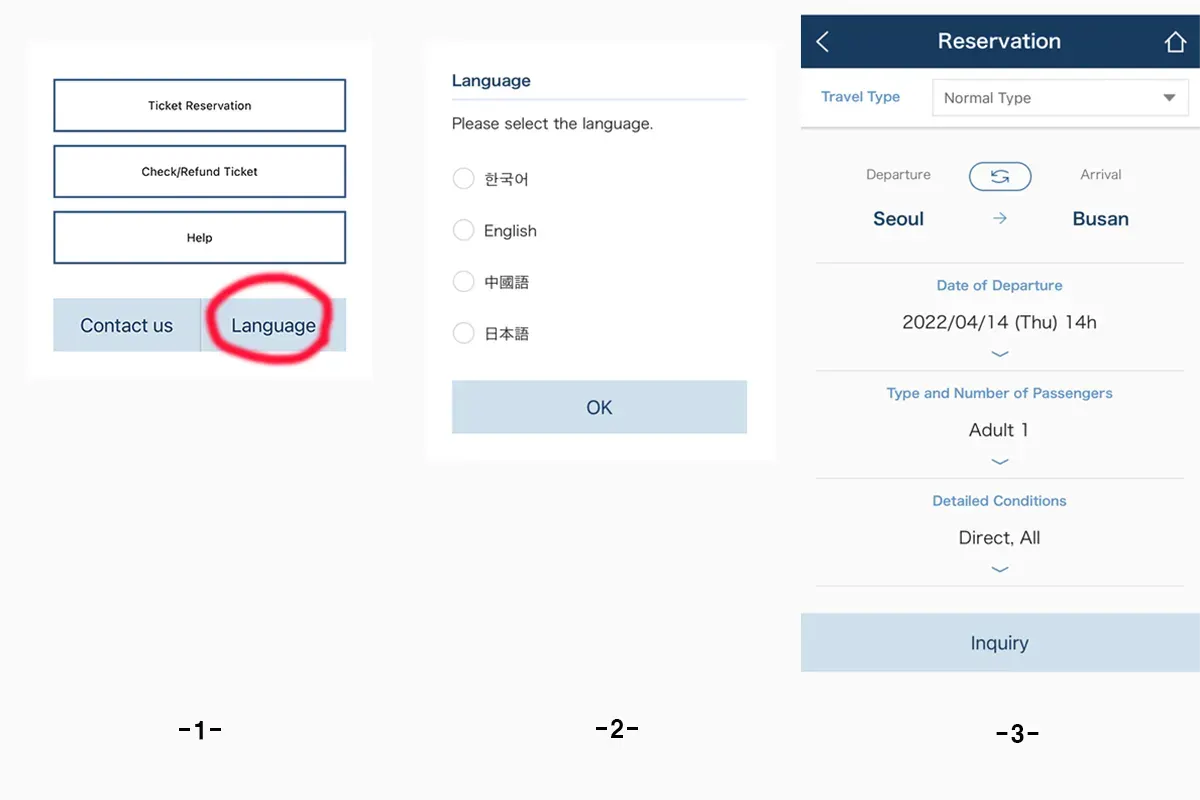
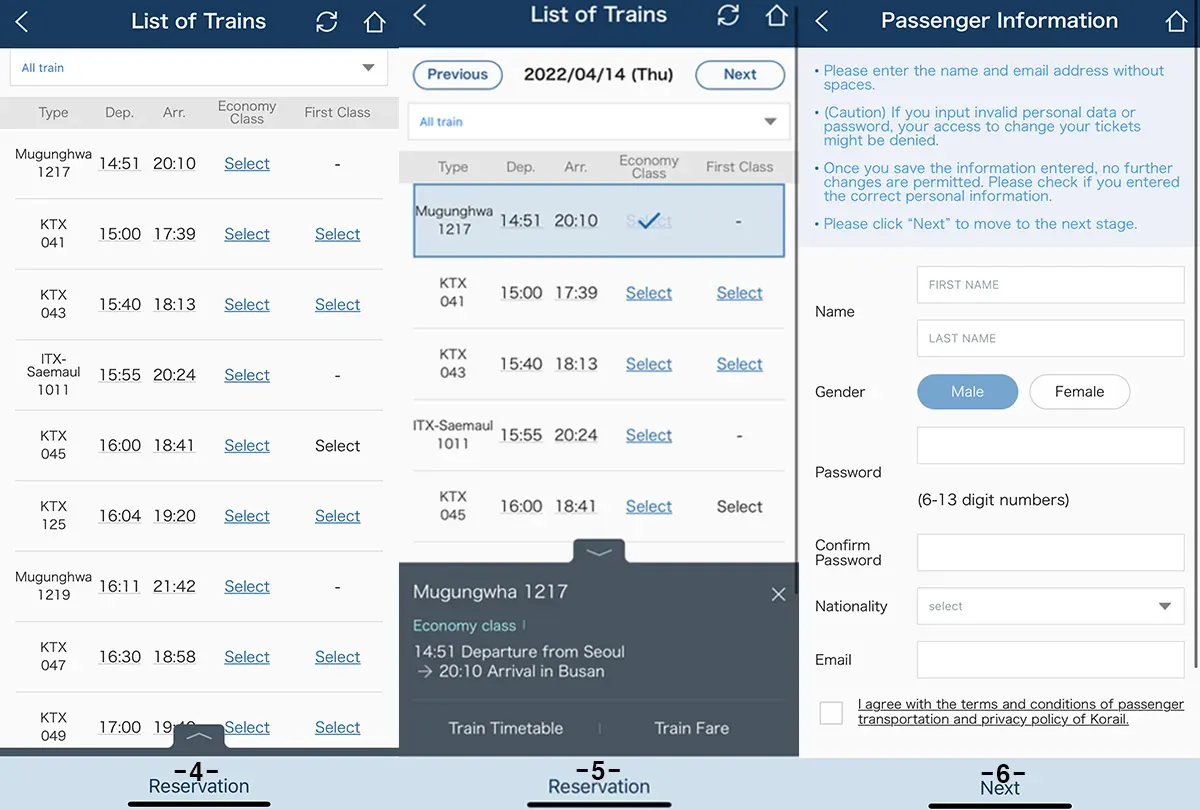
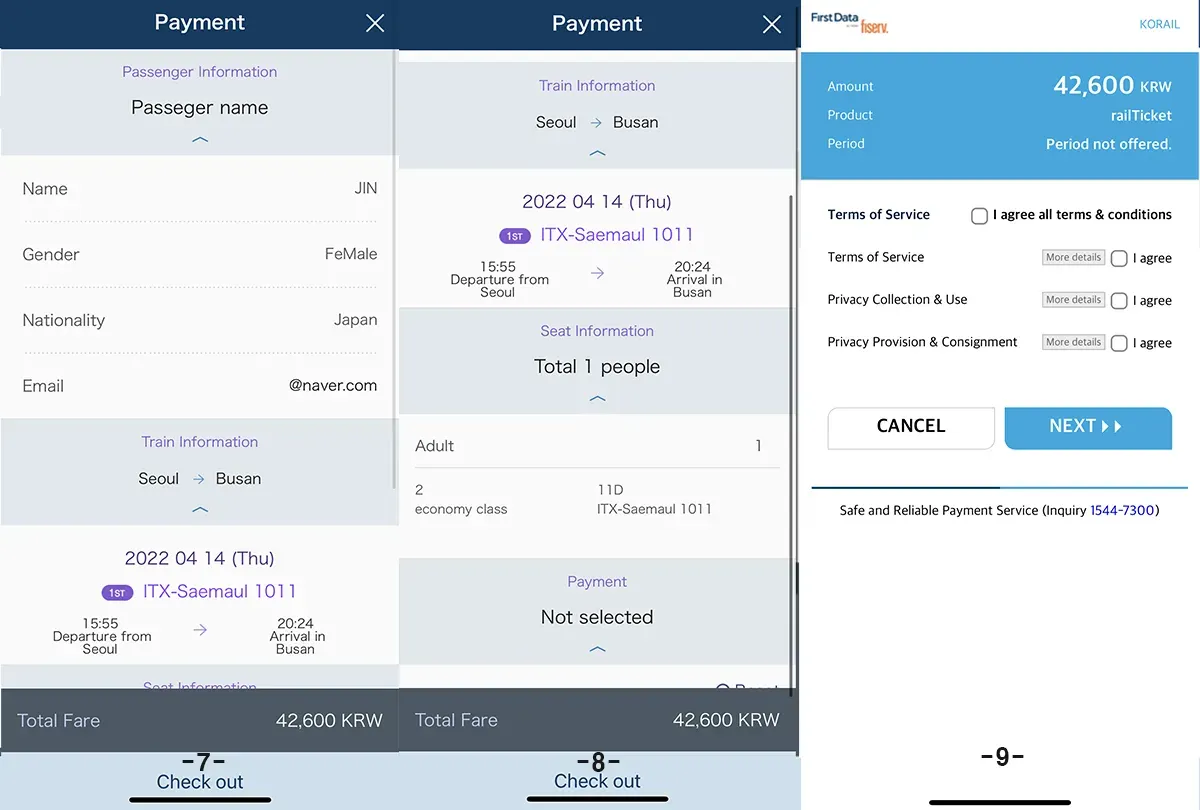
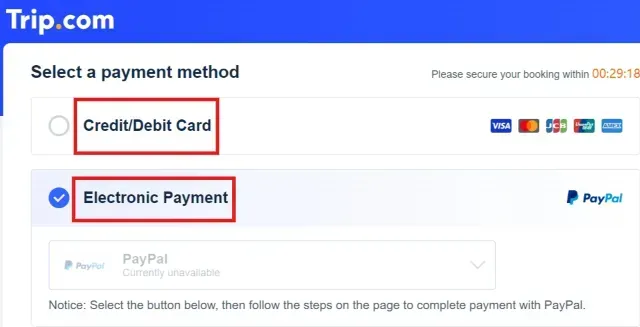
Step 7-9: Confirm that all your personal information is correct and agree the terms & conditions to pay the ticket.
Passengers can apply for a refund online through the Korail website or mobile app, or they can go to a railway station ticket counter to process the refund. The refund fee usually depends on how far in advance of the train's departure you cancel your ticket. Here is the overview of the refund:
| Timelines | Refund Time | Refund Fee |
| Before Departure | >1 Day | -Mon-Thu: No Cancellation Fee -Fri-Sun: KRW400 |
| 24 ~ 3 Hours | -Mon-Thu: No Cancellation Fee -Fri-Sun: 5% | |
| <3 Hours | -Mon-Thu: 5% -Fri-Sun: 10% | |
| After Departure | >20 minutes | 15% |
| 20-60 minutes | 40% | |
| 60 Minutes-Arrival | 70% |
Some useful Korea transport cards/tickets You might need in South Korea😆

Booking Korail KTX tickets on Trip.com can offer several advantages for travelers, including:
| Advantages | Detail |
| Convenience | An easy-to-use platform for booking train tickets, flight tickets, and hotels online |
| Language Support | Available in English, French, Japanese, Korean, etc. |
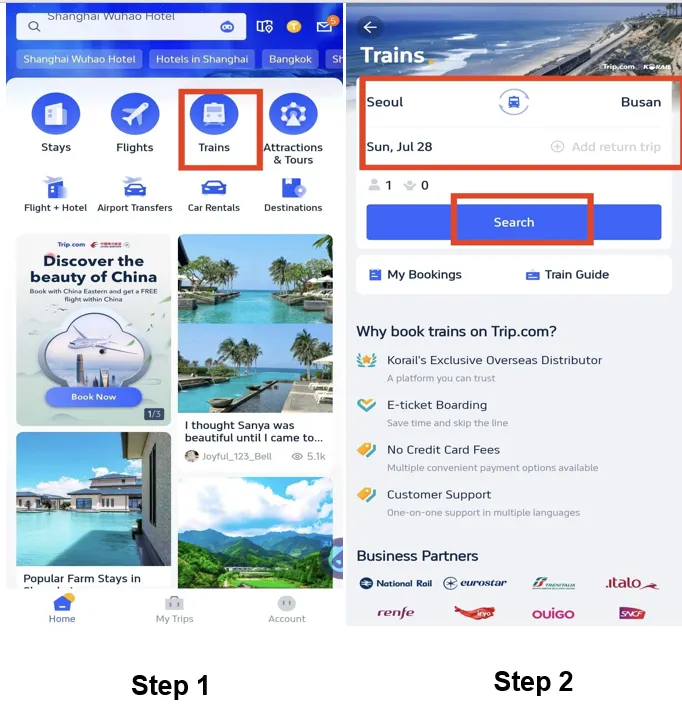
| 10% Discount | Trip.com offer exclusive 10% discount for new users booking Korail tickets on Trip.com App! |
| Multiple Payment Options | Includes international credit cards, AliPay and Wechat Pay. |
| E-Ticketing | Offers a digital ticket to go through the turnstile |
| 24/7 Customer Service | Can be very helpful if you encounter any issues for your booking or in travel |
| Loyalty Points | Earn points for booking train tickets, which can be redeemed for discounts on future bookings. |
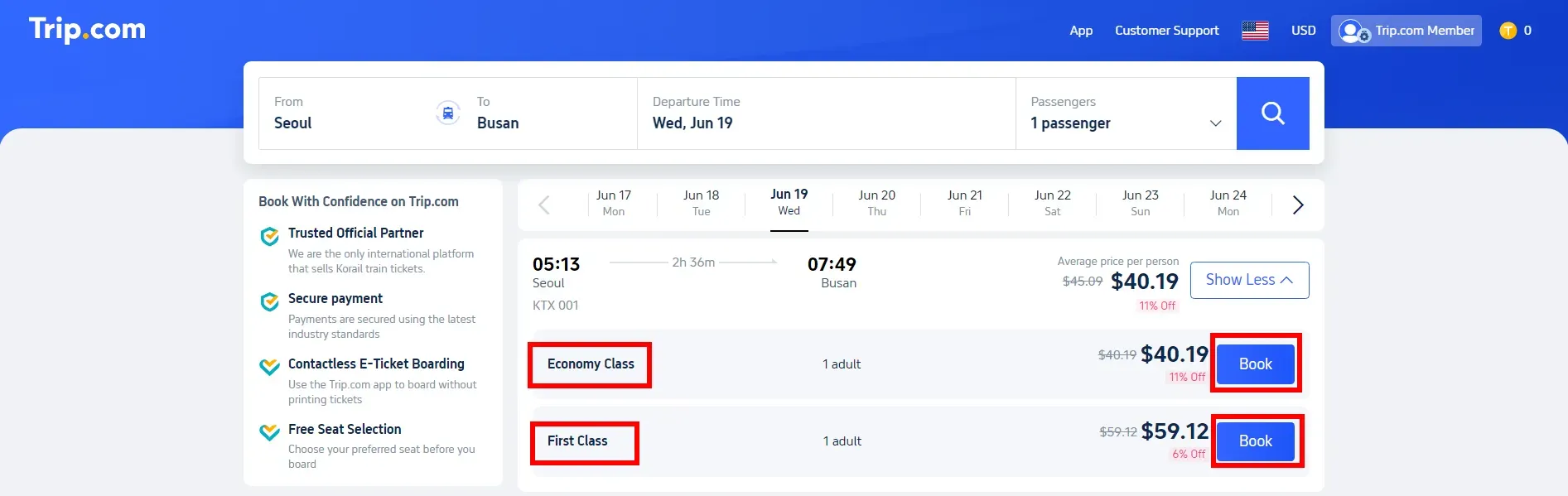
Step 1: Log in Trip.com website. Then select your departure city, destination, depart time to the detail page. *For cities that not showed, the name of cities need to be entered to be founded.
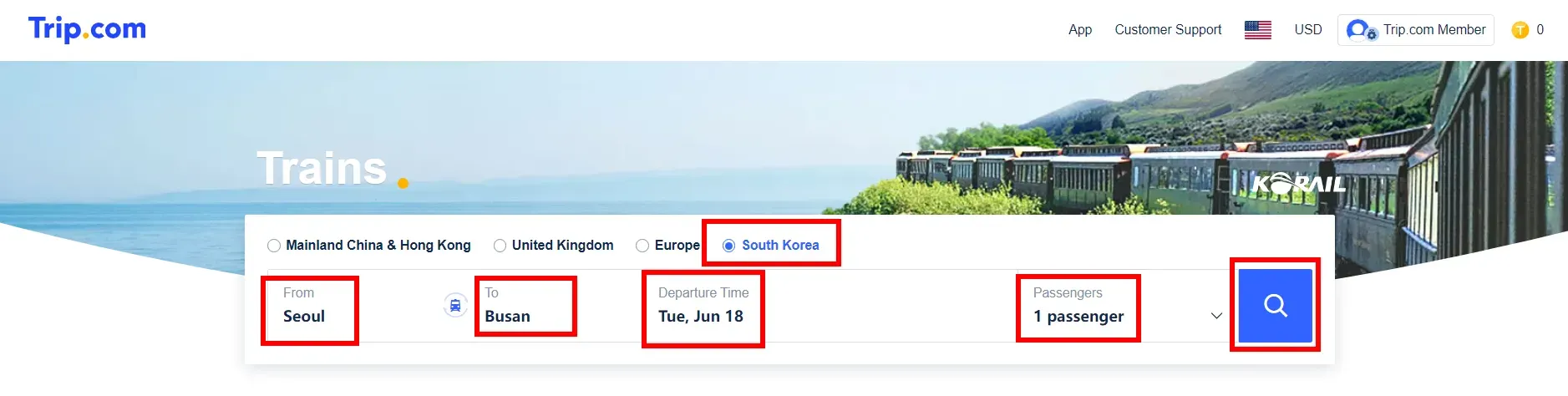
Step 2: Select the seat class. There are 2 types of seat classes available for Korail trains, including ecomomy class and first class. Visitors can choose the preferred one and tab "Book" to continue.
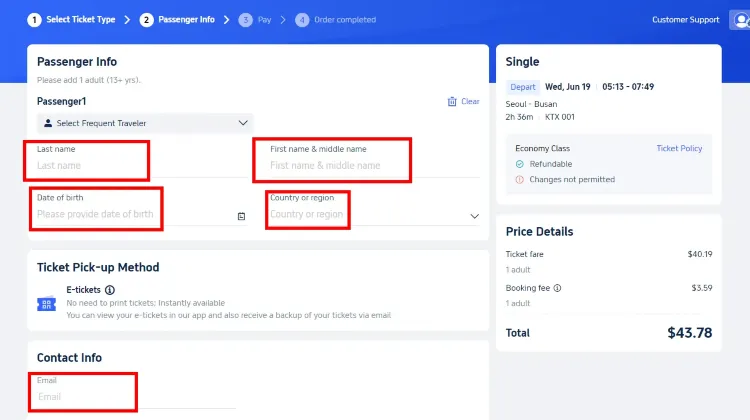
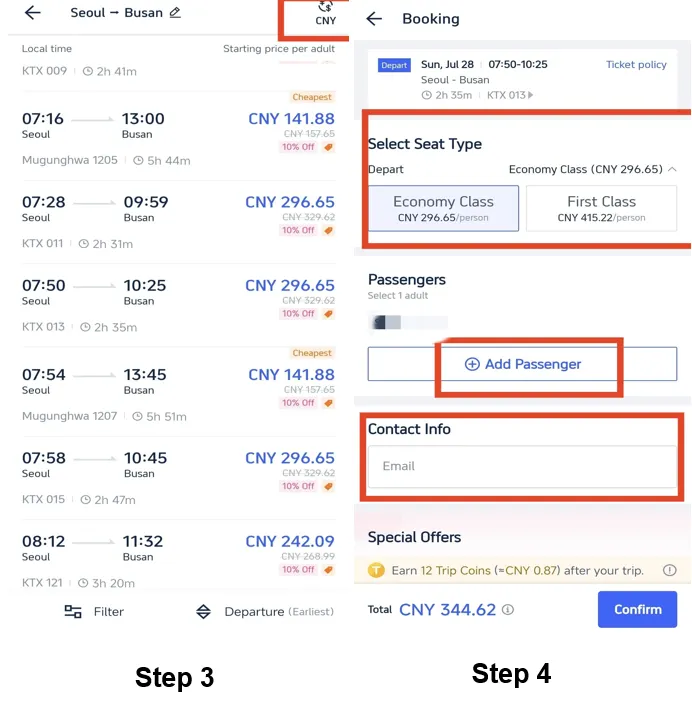
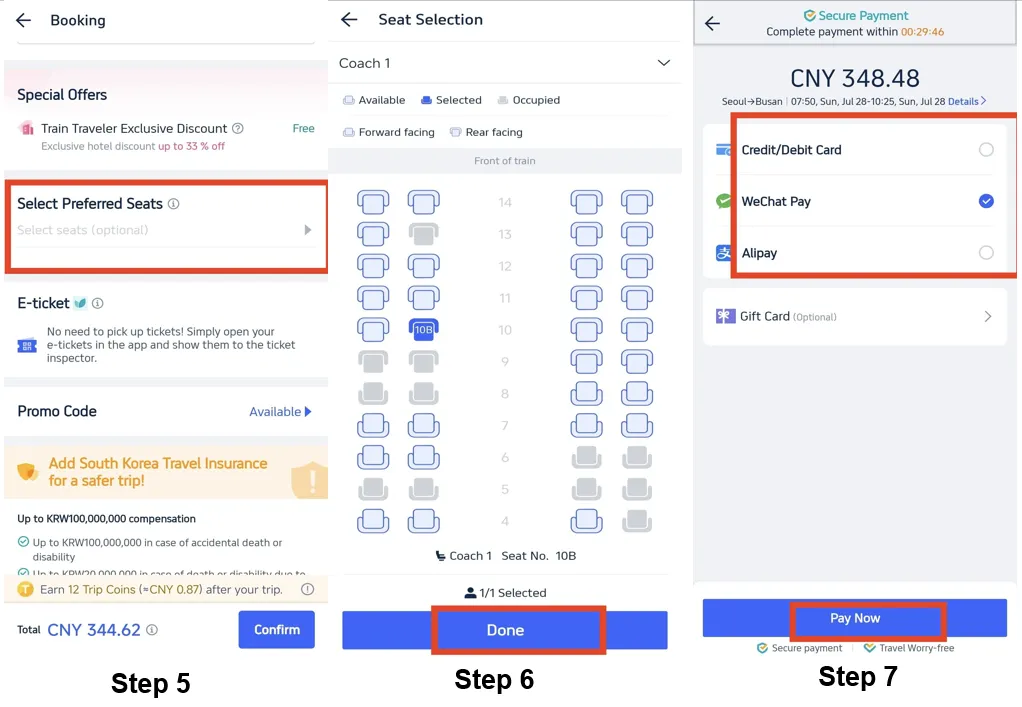
When purchasing Korail tickets on Trip.com, you typically need to provide a valid form of identification. For foreign travelers, this usually means your passport.
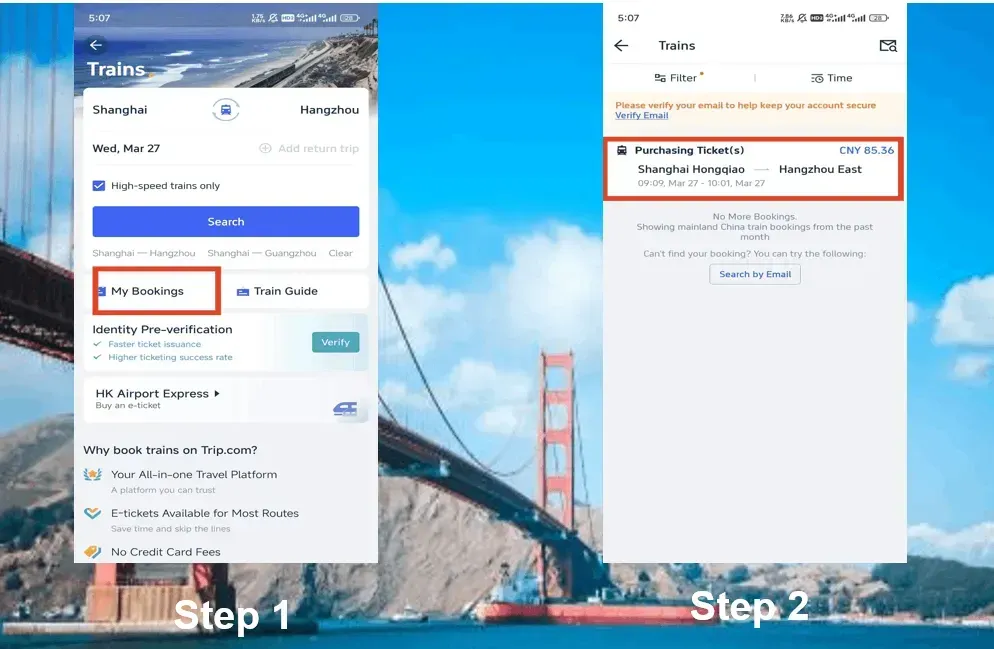
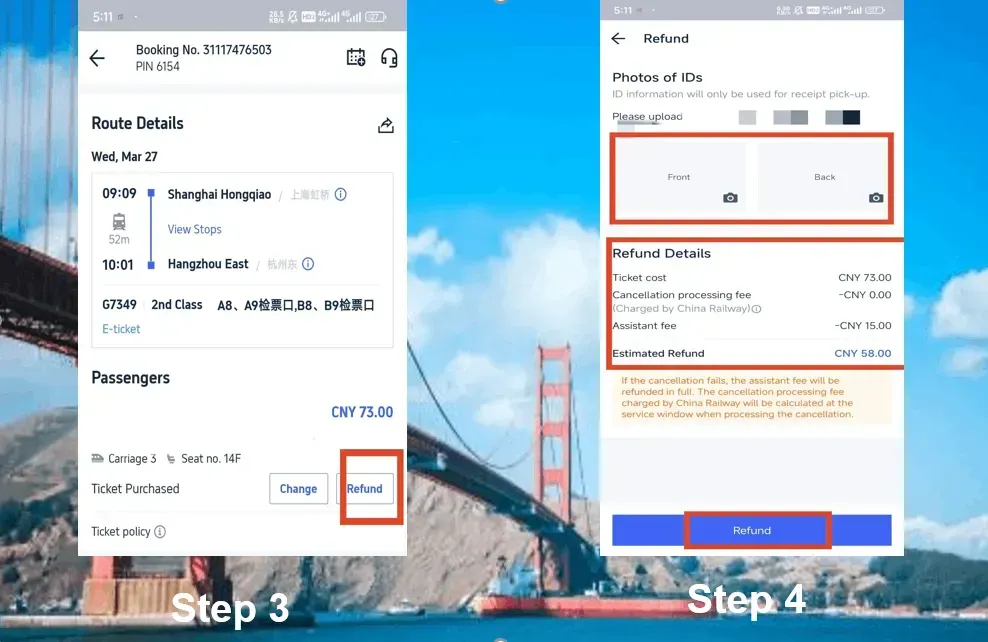
Discover the best of South Korea with a KTX ticket from Trip.com—now 10% off!
Explore a variety of tours easily accessible by train, and enjoy great deals and discounts on your Korea trip.
 475121 booked


![[South Korea] LG U+ combo card | 4G/5G SIM card + Tmoney transit card (from 3 days) | 1-90 days | Pick up at Incheon, Gimpo, Gimhae airports](https://ak-d.tripcdn.com/images/0354w12000ti6vb6xC6B8_C_568_320.png)