
This guide will outline the step-by-step process for booking hotels on Trip, complete with illustrated instructions, alongside answers to frequently asked questions.
⚡Book a Hotel on Trip.com in 6 Steps
- Open Trip.com → click Hotels & Homes
- Enter destination + check-in/check-out dates + rooms/guests
- Select filters (location, price, rating, amenities, cancellation policy)
- Open a hotel → compare room types + rate plans
- Fill in guest details (names, contact info, special requests if needed)
- Choose a payment method → pay → save your booking confirmation
🌍 Why Trip.com is easy for hotel booking?
Trip.com has a sizable hotel inventory that may be searched by city, airport, area, landmark, or property name if you're looking for a single location to search widely and make a quick reservation.
Explore more than 1.2 million hotels in more than 200 nations and areas, and use the more than 30 million real guest reviews as a guide. Additionally, according to Trip.com, you can explore more than 1.7 million hotels in more than 230 countries by using important criteria like location, price, star rating, amenities, and actual guest reviews.
What you care about | Where to check on Trip.com | Best practice |
|---|---|---|
Convenient location | Map/landmark filters | Filter by landmark or transport first, then compare prices |
“Worth it” quality | Guest rating + review patterns | Read recent reviews + look for repeated complaints |
Flexibility | Cancellation policy on the rate plan | Choose “free cancellation” if plans may change |
🔍 Step-by-Step: How to book a hotel through Trip.com?
All the following screenshots are based on booking a hotel in Shanghai, China.
Step 1 — Start a hotel search
Head over to the Hotels page. The search box is quite flexible. You can type in a city, a specific airport, a neighborhood, or even the name of a famous landmark.
Just fill in these few details:
- Destination
- Check-in and check-out dates
- Number of rooms and the count for adults and children
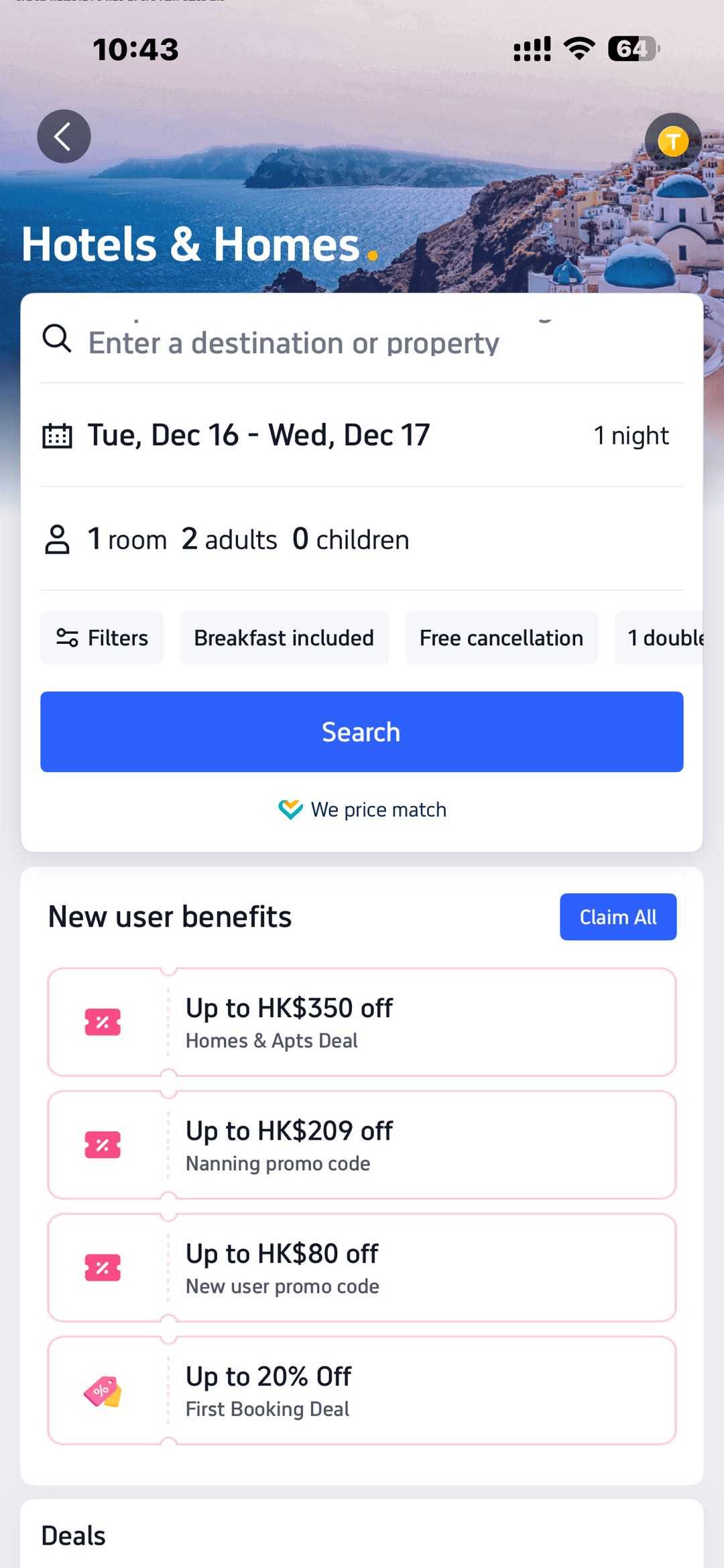
Step 2 — Filter fast
Filtering by location, cost, star rating, facilities, and visitor reviews is highlighted on Trip.com.
An order of practical filters:
- First, the location (landmark, transportation, or area)
- Guest rating (select out alternatives with poor ratings)
- Facilities (laundry, gym, family room, breakfast, etc.)
- Cancellation policy (free cancellation if flexibility is required)
- Price (to avoid cutting off good locations too soon, set your range last).
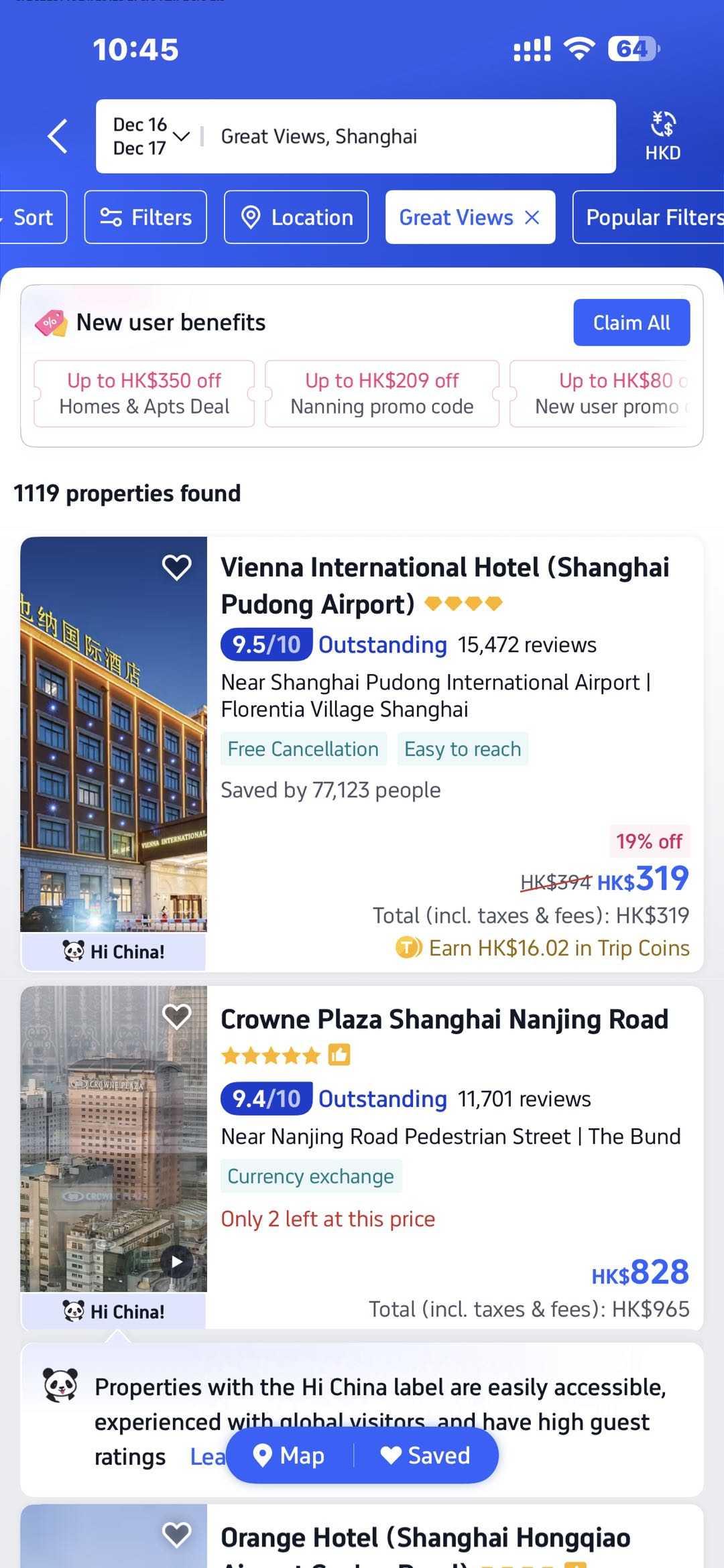
Step 3 — Open a hotel and compare room + rate plans
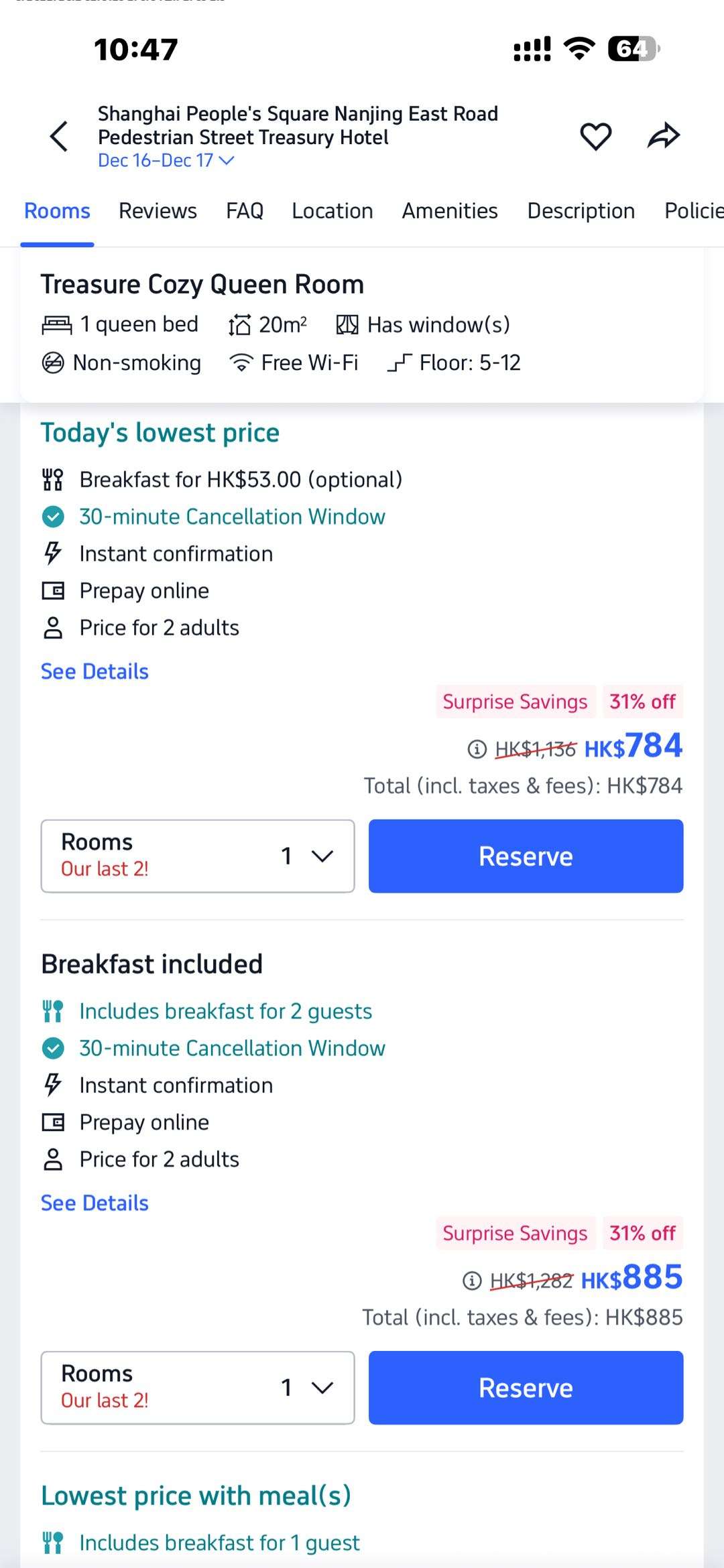
Once you pick a hotel, you will notice different price tags for what looks like the same room. These choices usually boil down to a few things:
- Refundable vs. non-refundable
- Breakfast included vs. no meal
- Pay now vs. pay at the hotel
The rules for your stay appear right before you pay. Keep a close eye on the change and cancel terms. Often, the cheapest rooms are final sales—you can't change them and you won't get your money back if you skip the trip. Read these details before you tap the final button.
Quick Comparison: Common Rate Plans
Rate Type | Policy Details | Best Choice If... |
Free cancellation | Full refund if you cancel before the deadline | Your plans might change |
Partial refund | Cancel late and you pay a small fee | You are mostly sure about the trip |
Non-refundable | No money back once you book | Your plans are 100% set and you want the lowest price |
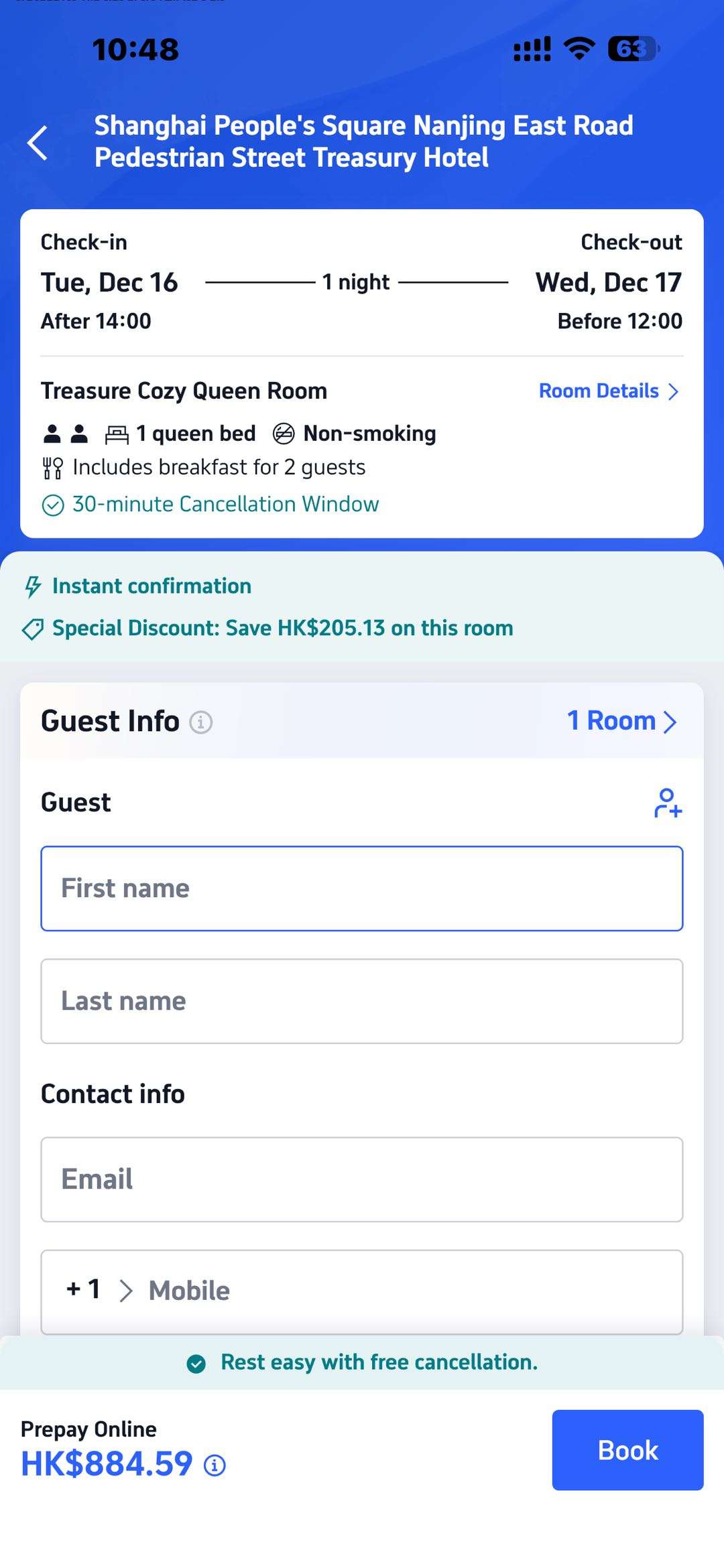
Step 4 — Enter guest info correctly
Fill in:
- Guest name(s) (match the ID the guest will use at check-in)
- Phone/email for confirmation and hotel contact
If you’re booking for multiple people, Trip.com’s Terms state the first name provided is responsible for accuracy and accepting terms on behalf of the group.
Step 5 — Pay securely with your preferred method
Trip.com offers several ways to settle your bill. The options you see might change depending on if you use a phone or a computer.
Here is a quick look at which methods work where:
Payment Method | iOS App | Android App | Desktop Web | Mobile Web |
Credit/Debit Card | ✔️ | ✔️ | ✔️ | ✔️ |
PayPal | ✔️ | ✔️ | ✔ | ✔ |
Google Pay | ❌ | ✔️ | ✔ | ✔ |
Apple Pay | ✔️ | ❌ | ❌ | ❌ |
Trip Coins | ✔️ | ✔️ | ✔ | ✔ |
Gift Card | ✔️ | ✔️ | ✔ | ✔ |
The platform accepts all major card networks. This includes big names like Visa, MasterCard, American Express, and Discover. You can also use JCB or UnionPay in many cases.
Step 6 — Save confirmation + know where to find your booking
Once the money goes through, make sure you have your proof ready. It is a smart move to keep these two things handy:
- A screenshot or the email of your booking confirmation.
- Your order page inside the Trip.com app or website.
Sometimes a hotel won't have your name in their system right away. If you call them and they can't find your file, stay calm. Trip.com guarantees your spot. Often, hotels receive guest names only a short time before the actual check-in date.
5 star
Business travel
Family friendly
Breakfast
🧾 Cancellation & Refunds: what to check before you book?
🧷 Cancellation depends on the rate plan
Trip.com states you’ll be shown change/cancel rules during booking, and that these rules form part of the terms you accept.
🧭 How to cancel a hotel booking in the Trip.com app
Trip.com’s cancellation guide describes this general path:
- check My Trips → All Bookings (or Account → All Bookings)
- Open your hotel booking
- Tap Cancel Booking
- Review View cancellation policy and refund details
- Submit the request
Refund timing varies. The same guide notes it may take about 1 business day for the refund to reach your bank account (and can vary depending on payment method/bank).
🛡️ Service guarantee note
Trip.com keeps things fair. Their policy makes it clear: they don't pocket extra cash from your change or cancellation fees. If you have to cancel a trip, they act as your middleman. They talk to the hotel directly and try to push for a lower fee so you keep more of your money.
🔁 Changing a hotel booking
Plans change. Maybe you need a different room or a new date. Usually, the hotel’s own rules decide if this is possible. Keep in mind that "non-refundable" deals are often set in stone.
If you need a swap, the process is quick. Log in to the app and find your reservation under "My Bookings." Hit the change button and update your details. If the new price is higher, you just pay the difference right there.
🧑🎓 Age & Check-in rules
Before you book, check the fine print. You must have the legal standing to sign a contract, which usually boils down to your age.
Here is a practical tip: many hotels won't let you check in if you are under 18. Some spots even set the bar higher. If you are younger than the limit, don't risk it. Ask a parent to handle the booking and call the hotel ahead of time to confirm their stance.
🆘 Help & Support: fastest ways to get assistance
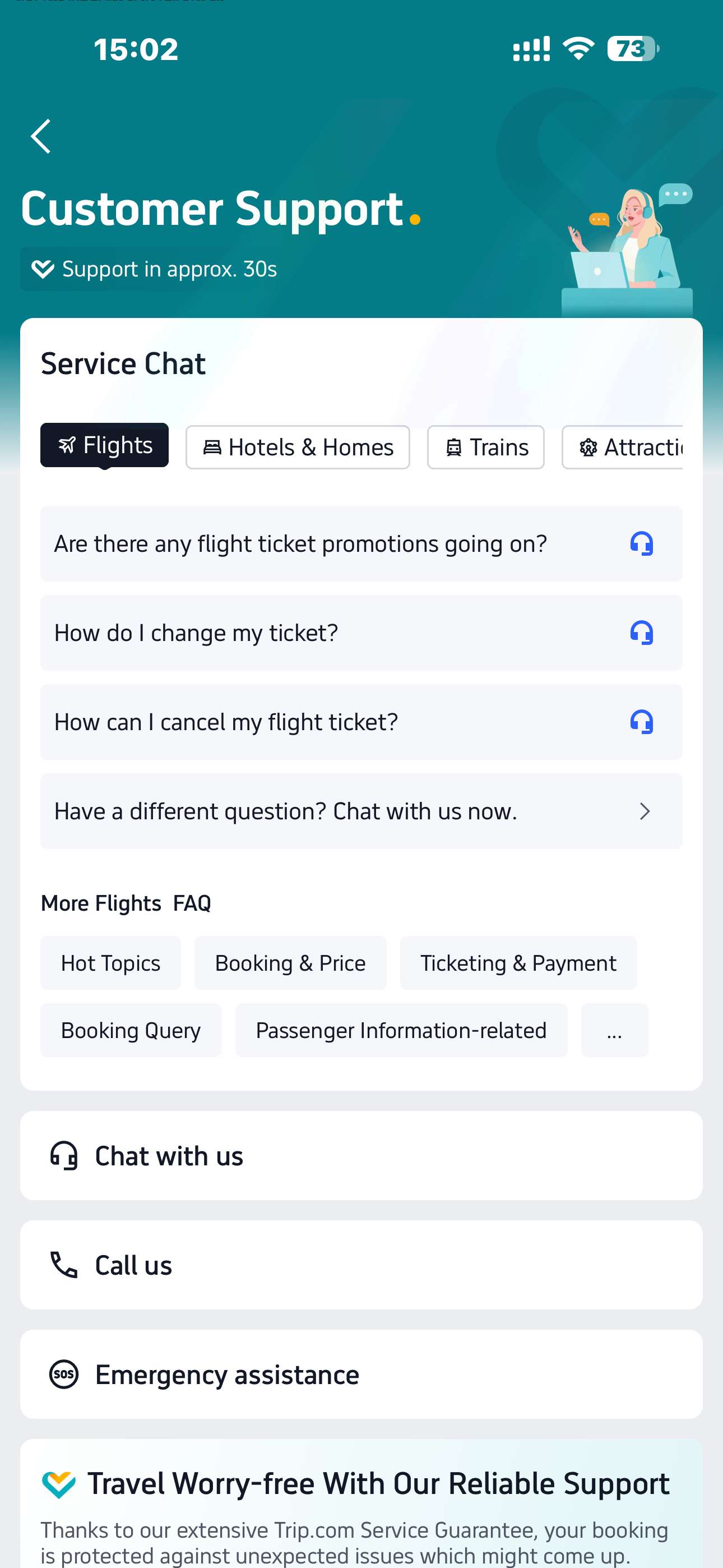
When things go wrong, you need answers fast. Trip.com offers support 24/7, so you are never stuck. Their app is the best tool for this.
You can use the chat feature or make a free call through the app. They claim to respond in about 30 seconds. If you have a real emergency, use the one-click help button to get a human on the line immediately.
Trip.com also highlights 24/7 support on its main site.
✅ 10-second checklist before you hit “Pay”
The dates and destination are accurate.
Accurate number of rooms and visitors
Your needs are met by the type of room (bed type, capacity).
Check the cancellation policy (free, partial, or non-refundable).
Included in breakfast (or not) verified
Payment method chosen (Apple Pay/Google Pay availability depends on platform) Guest name matches ID
Saved confirmation (email plus screenshot)
You are aware of the place of "My Trips / All Bookings" for modifications and cancellations.
❓You might be wondering
🧾 Where do I see my hotel booking after payment?
Once you pay, your details live in the "My Trips" or "All Bookings" section of the app. This is the same spot you visit if you ever need to look at the cancellation rules.
🏨 The hotel says they can’t find my booking—what now?
Don't panic. Trip.com guarantees your spot. Often, a hotel won't see your specific personal info until you get closer to your check-in date. If you feel uneasy, just reach out to support. They can confirm the order details for you.
💵 Why do prices vary so much between room options?
Prices shift for a few basic reasons. Often, a room costs more if it allows a full refund. You also pay a premium for breakfast or a bigger room. Sometimes the price just moves because the hotel has fewer rooms left for those dates.
🔁 Can I change dates later?
It depends on the deal you grabbed. If the rate plan is flexible, you can usually swap dates. However, the cheapest "non-refundable" plans are usually final.
This article references pricing data from Trip.com, updated on $. Actual prices are subject to real-time inquiries.