Are you concerned about maintaining your internet connection during your trip to Morocco? eSim is the ideal solution you've been looking for! With eSim, you can enjoy uninterrupted internet access anywhere without the fear of misplacing a physical SIM card. 👉This article will guide you in selecting the most suitable Morocco eSim and will also help you with the setup process. ✨Stay with us till the end!Popular Morocco eSim plans
- CountryMorocco
- Package Option500MB/Day
- Number of Days1 Day
- PriceUSD 1.80
- CountryMorocco
- Package Option5GB
- Number of Days7 Days
- PriceUSD 11.72
- CountryMorocco
- Package Option1GB/Day
- Number of Days10 Days
- PriceUSD 49.78
What is a Morocco eSIM? A beginner's guide
eSim, or embedded SIM, is a modern technology that allows devices to connect to a cellular network without the need for a physical SIM card. It is a small chip built directly into smartphones, tablets, and smartwatches, enabling users to choose a network provider, switch services, or add multiple cellular plans without swapping out physical SIM cards.
This technology is designed to make it easier for users to manage their mobile connectivity and improve the efficiency of the device setup process.
In-depth comparison between Morocco eSIM, SIM Card and WiFi Router
Traveling to Morocco or any other country requires a reliable means of communication. This is where the choice between a Morocco eSIM, SIM card, and WiFi router comes in. Here is an in-depth comparison of these three options:| Features | eSIM | SIM Card | WiFi Router |
| Pros | Convenient, no need to worry about losing or damaging; Allow dual Sim functunality | Usually cheaper than an eSIM or WiFi router; Wide availability | Can connect multiple devices; Compatible to various devices |
| Cons | Not all devices support eSIM; More expensive | Can be inconvenient; Have the chance of losing and damaging | Not as portable as a SIM card or eSIM; Can be expensive |
In conclusion, the best option depends on your specific needs and circumstances. If you value convenience and flexibility, an eSIM might be the best choice. If you're on a budget, a SIM card could be more suitable. If you're traveling in a group or need a stable internet connection, a WiFi router might be the best option.3 Benefits for using eSim in Morocco
1. Connectivity
eSIM allows you to stay connected without having to purchase a physical SIM card. This is particularly beneficial for travelers or expats in Morocco who need to stay connected without the hassle of buying and changing SIM cards.
2. Flexibility
With eSIM, you can easily switch between different mobile networks. This is beneficial in Morocco where network coverage may vary between different areas. You can choose the network that offers the best coverage or rates in your current location.
3. Cost-Effective
Using eSIM can potentially save you money. Instead of buying a local SIM card in Morocco and paying for roaming charges, you can download a data plan on your eSIM at local rates. This can be particularly cost-effective for frequent travelers or those staying in Morocco for an extended period.
How to use a Morocco eSim?
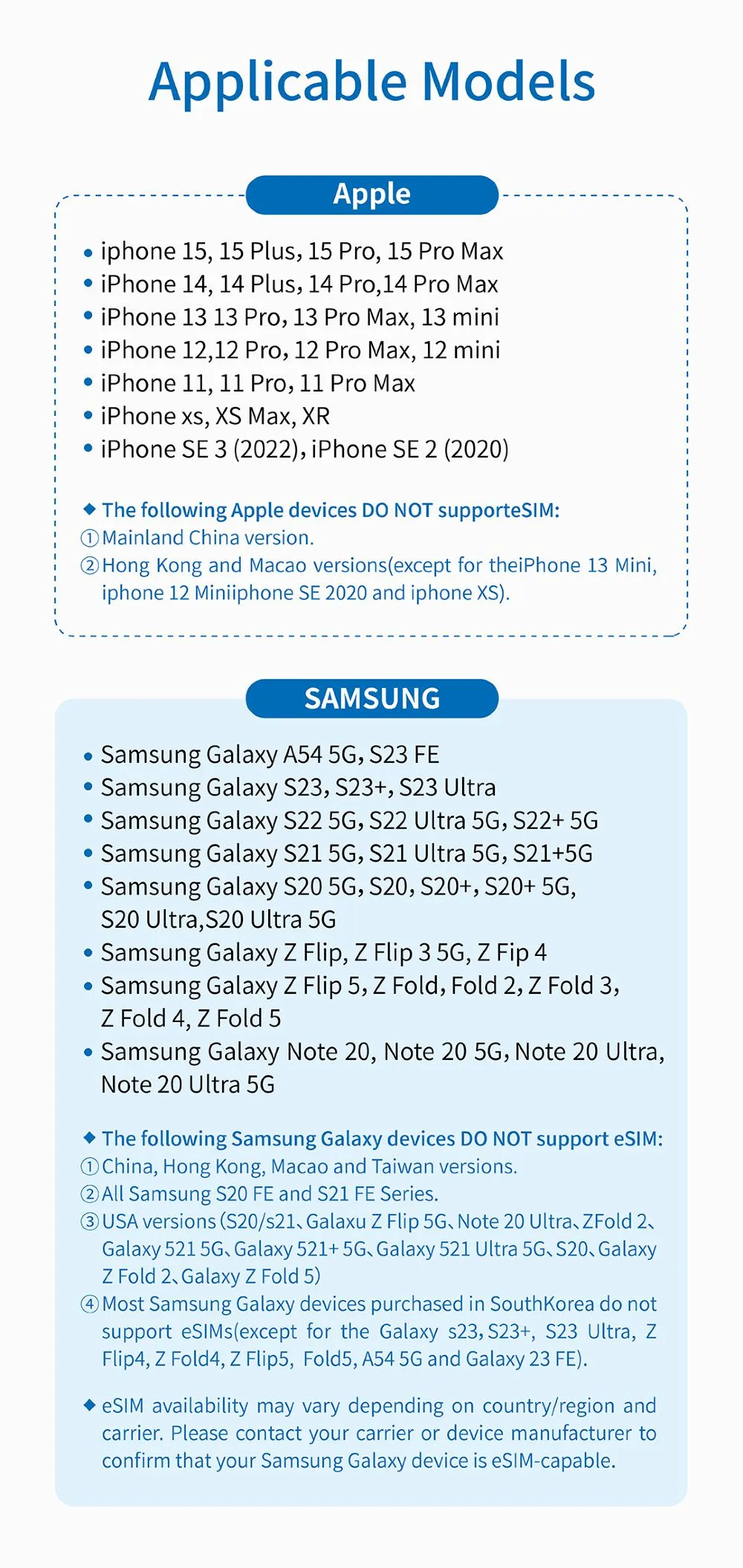
Before purchasing a Morocco eSim, please check if your phone can be used with the eSIM.Applicable Phone Models👇
Morocco eSim Setup Procedure
How to download?
- Open the eSIM activation email, and the eSIM activation QR code will be displayed in this email
- Click Settings on your mobile phone and open Cellular (ios) or SIM Card Management(Android)
- Click to add a Cellular Plan (ios) or SIM Card (Android), and then agree to download Cellular Plan (ios) or SIM Card (Android), after that, use the mobile phone to scan the QR code to download
How to use Internet?
- After the download is successful, close the primary card if you already have
- Enable the Cellular Plan (ios) or SIM Card (Android), and the LTE logo will be displayed in the upper right corner after success
- Turn on roaming to connect to the network and then can surf the Internet normally
- Please note that if there is no network after enabling, please turn on the airplane mode and then turn off or restart the phone.
How to close?
- Open the open Cellular (ios) or SIM Card Management (Android), and click to turn off the Cellular Plan (ios) or SIM Card (Android) (the steps of enabling and disabling are the same)
✨Special Note✨
If you encounter any problems during use, please email us at crm@51tgt.com consulting service.