Stay Connected in Russia: Get Your eSIM Russia for Fast 4G/5G Data—Choose from 24 Hours to 30 Days

by Yank
October 15, 2024
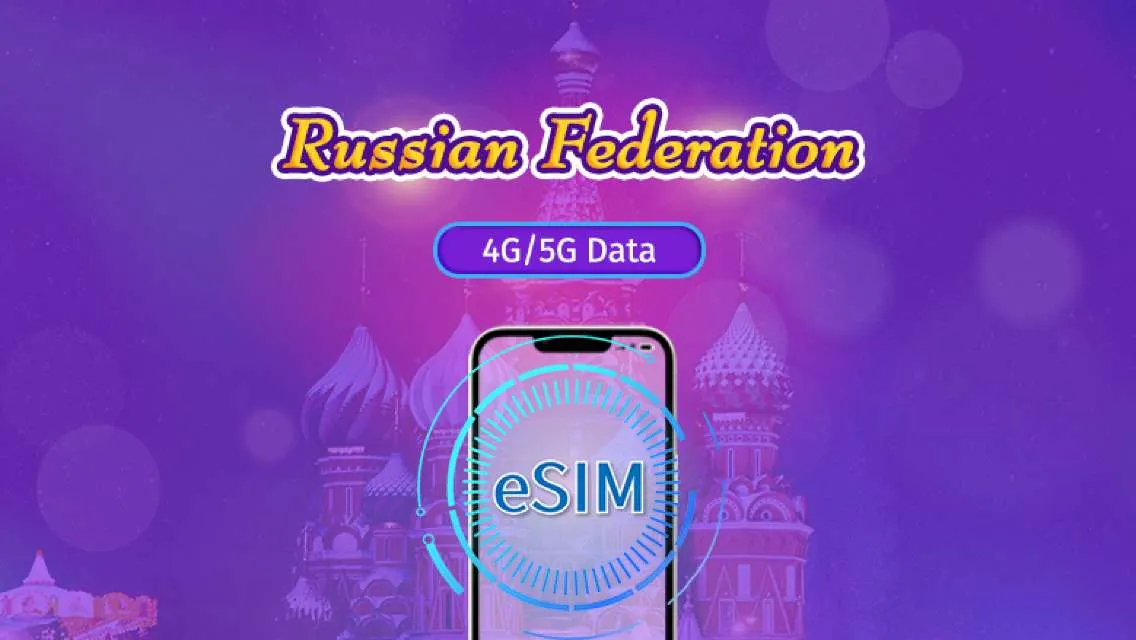
Our eSIM Russia offers travelers and residents of Russia an easy and reliable way to connect. Say goodbye to the inconvenience of physical SIM cards - our eSIM offers instant activation, flexible plans, and the ability to easily switch carriers. Experience the convenience and freedom of eSIM technology in Russia today!
- CountryRussia
- Data PackageTotal - 1GB
- Days 7 days
- PriceUS$2.80
- CountryRussia
- Data PackageTotal - 3GB
- Days15 days
- PriceUS$5.73
- CountryRussia
- Data PackageTotal - 5GB
- Days30 days
- PriceUS$9.31
Service Overview
Available from Today
- Booking Confirmation: Immediate upon purchase.
- Conditional Cancellation: Terms apply.
- Renewable: Yes, upon expiration.
- Validity: 60 days from the date of booking.
Notes:
- Includes a total of 5GB high-speed data, which will stop once used up.
- Days are calculated as 24-hour periods. For example, a 3-day package activated at 10:00 on October 1st will end at 09:59 on October 4th.
What is Exactly an eSIM Russia?

An eSIM for Russia is a digital SIM card that allows users to connect to mobile networks without the need for a physical SIM card. This service is particularly convenient for travelers, providing access to 4G/5G data packages that can be activated easily using a QR code. With options ranging from 1GB to 50GB of high-speed data and validity periods of 7 to 30 days, users can choose a plan that best suits their needs.
The eSIM is compatible with various devices that support eSIM functionality, and it allows for immediate activation upon arrival in Russia. Once activated, users can enjoy seamless internet connectivity while exploring the country. Additionally, the service offers flexibility in terms of booking and conditional cancellation, ensuring that users have the support they need throughout their travels.
Overall, an eSIM for Russia provides an efficient and user-friendly solution for staying connected during your trip.
Top eSIM providers in Russia
1. Trip.com
- Affordable and Flexible Packages:
Offers a variety of pricing options, with a 1GB data package available for just $2.80, making it ideal for short-term travelers.
Flexible duration options ranging from 7 to 30 days, allowing users to choose based on their needs.
- Convenient Purchase and Activation:
Users can purchase and activate their eSIM via a QR code, making it quick and easy to set up upon arrival.
Booking confirmations are valid for 60 days, providing flexibility for travel planning.
- Integrated Travel Services:
Trip.com offers not just eSIMs but also integrates hotel, flight, and car rental services, allowing users to book everything in one place, saving time.
- Customer Support:
Provides multi-channel customer support, making it easy for users to get assistance through email, ensuring a smooth experience.
- Clear Usage Instructions:
Offers detailed guides and troubleshooting tips, reducing uncertainties during use.
2. MTS
- Pricing: Typically higher than Trip.com, lacking flexible short-term packages.
- Customer Support: Primarily through physical stores, which is less convenient for users.
3. Beeline
- Package Options: Offers various packages but is less flexible than Trip.com, especially for short-term data use.
- Purchase Method: Mainly through physical stores or apps, lacking integrated travel services.
4. Megafon
- Network Coverage: Strong coverage but lacks flexibility in packages, usually better suited for long-term users.
- Customer Support: Offers hotline support but is less convenient compared to Trip.com.
5. Tele2
- Pricing: Competitive pricing but package complexity may confuse users trying to find the right option.
- Service Range: Online services are less comprehensive than those of Trip.com, lacking the ability to integrate travel products.
6. eSIM.net
- Specialization: Focuses on eSIM services but lacks integration with other travel products, not providing a one-stop solution.
- Customer Support: Limited online support, resulting in a less smooth user experience compared to Trip.com.
Conclusion
- Trip.com stands out for its reasonable pricing, flexible package options, and convenient one-stop travel services.
By combining eSIM with other travel needs, Trip.com offers a more comprehensive solution, ensuring a seamless experience for travelers of all types.
How to get and use eSIM Russia
Getting an eSIM in Russia is a straightforward process, especially with Trip.com. Here’s a step-by-step guide to help you secure your eSIM and stay connected during your travels.
Step 1: Choose Your eSIM Package
- Visit Trip.com: Start by navigating to Trip.com’s website or app.
- Select Your Package: Choose from various data packages tailored to your needs, ranging from 1GB to 50GB. Packages are available for durations of 7, 15, or 30 days.
- Affordable Pricing: For example, a 1GB package is priced at just $2.80.
Step 2: Complete Your Booking
- Instant Confirmation: After selecting your package, complete your booking. You will receive a booking confirmation valid for 60 days.
- Collect Your eSIM: The eSIM is delivered via a QR code, which you can access from the Trip.com app or your email.
Step 3: Check Device Compatibility
- Ensure eSIM Support: Before purchasing, verify that your device supports eSIM functionality. You can check this by dialing *#06# on your phone; if an EID is displayed, your device supports eSIM.
- Unlocked Device: Make sure your phone is not network-locked. If necessary, contact your carrier to unlock it.
Step 4: Install Your eSIM
- Activation: Once you arrive in Russia, connect your device to Wi-Fi and follow these steps:
1、Open the QR code attachment in your booking confirmation.
2、Go to Settings on your device:
- For iOS: Navigate to Cellular Networks and tap “Add Cellular Plan.”
- For Android: Open SIM card management and select “Add Mobile Option.”
3、Scan the QR code to install the eSIM.
Step 5: Activate Your eSIM
- Set Up Data Roaming: Ensure that data roaming is enabled on your device.
- Switch to eSIM: If you have a physical SIM, switch it off to use the eSIM.
Step 6: Troubleshooting
- Internet Connection Issues: If you face difficulties connecting to the internet, check the APN settings and ensure data roaming is active.
- Customer Support: If problems persist, contact Trip.com’s customer support for assistance.
Important Notes
- Data Usage: Remember that your data plan will stop once the allocated data is used up.
- Cancellation Policy: You can cancel your booking up to one day before the expiration date without a fee, but cancellations after activation are not allowed.
By following these steps, you can easily obtain and set up an eSIM in Russia through Trip.com, ensuring you stay connected during your travels!
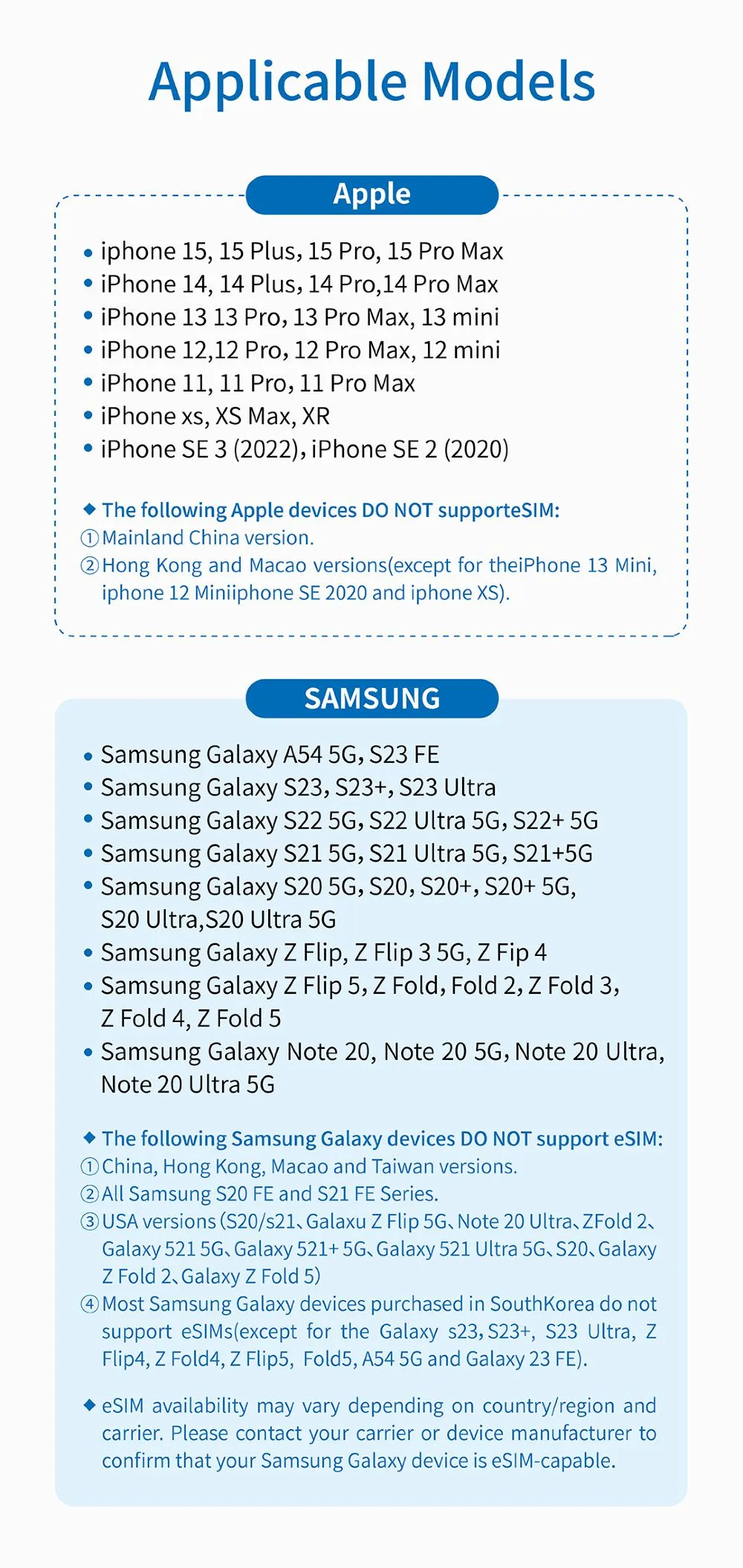
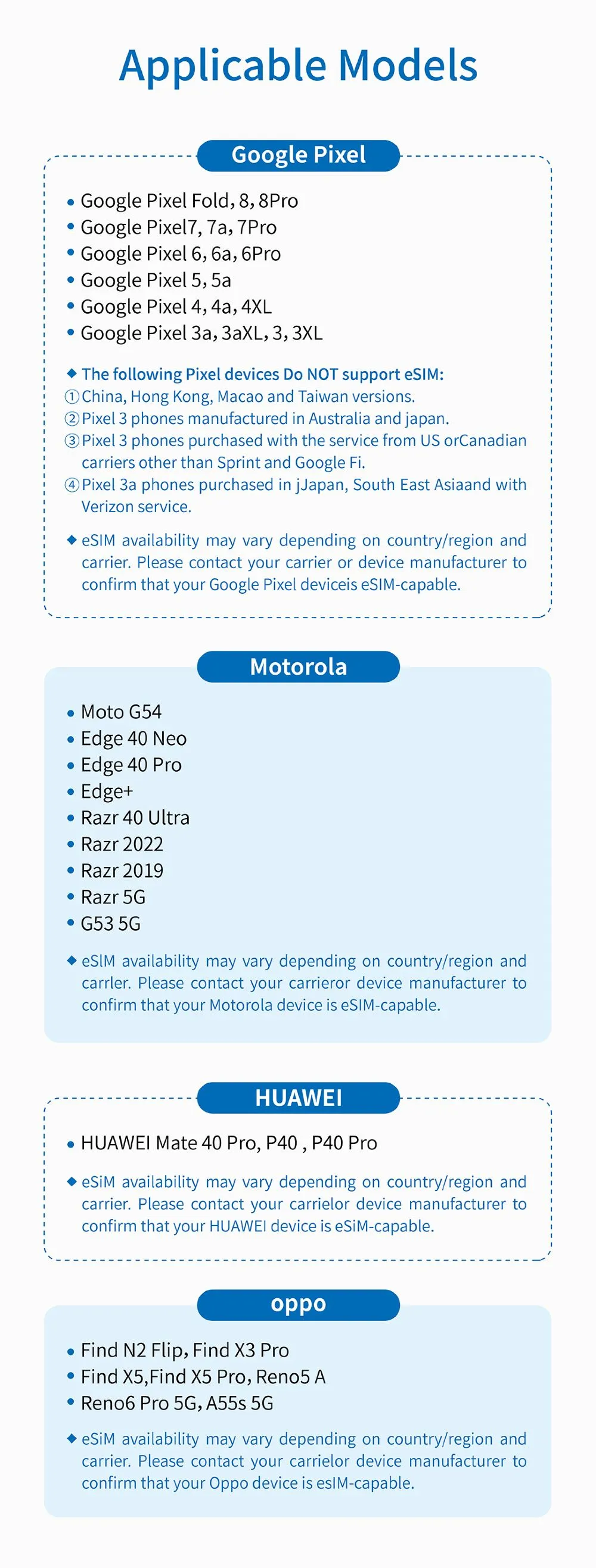
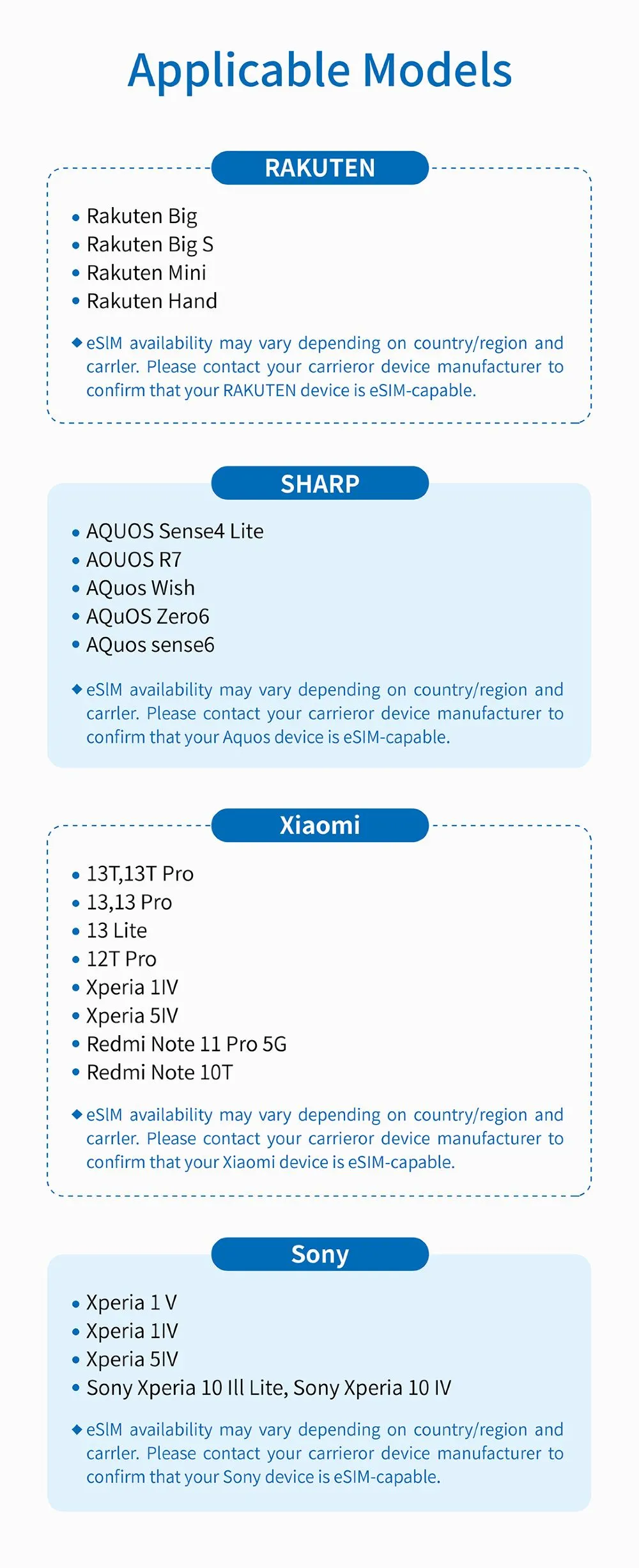
If My Phone Supports eSIM Russia
Check if your phone is compatible with eSIM technology by verifying its specifications, looking for an EID, and ensuring it runs on an updated operating system.
How to Activate eSIM in Russia
Check Compatibility:
- Ensure your device supports eSIM by dialing *#06#; if you see an EID, your phone is compatible.
Purchase eSIM:
- Buy an eSIM data package through a service provider, ensuring you choose the right data plan for your needs.
Receive QR Code:
- After purchase, a QR code will be sent to your email. This code is necessary for installation.
How to Install eSIM Russia
Prepare the QR Code:
- Save the QR code to your phone or print it out.
Access Settings:
- Go to Settings > Cellular (iOS) or Settings > Network & internet (Android).
Add eSIM:
- Tap on "Add Cellular Plan" (iOS) or "Add" in SIM card settings (Android).
- Scan the QR code to install the eSIM.
Activate eSIM:
- Follow on-screen instructions to complete activation. Look for an LTE icon to confirm it’s active.
Enable Data Roaming:
Ensure that data roaming is turned on to access mobile data.
Troubleshooting Tips
- If you experience issues, verify your device is unlocked and check APN settings (APN: plus).
- Restart your phone if you cannot connect to the internet.
By following these steps, you can successfully use eSIM in Russia for seamless connectivity!
Tips for Using Your eSIM in Russia
Tips for Using Your eSIM in Russia
Downloading Your eSIM:
- After your purchase, check your email for the QR code needed to download your eSIM. It will be sent to the email address you used for your booking.
Didn’t Receive the QR Code?:
- If you don’t get the email, contact customer service immediately to have the QR code resent.
Device Limitations:
- Remember, the eSIM profile can only be downloaded to one device. You cannot transfer it to another device once downloaded.
Joining the Mobile Plan:
- If you can’t “Join Mobile Plan” after scanning the QR code, ensure your device is connected to Wi-Fi and try again.
Activating the eSIM:
- To switch to your eSIM, check if your cellular plan is active: go to "Cellular Network" and select "Cellular Plan" to enable it. If you have issues, reach out to customer service.
Checking Your ICCID:
- If your cellular number is active, check your ICCID by navigating to "General" > "About" > "eSIM" on your device.
Unable to Connect to the Network?:
- If your eSIM is activated but your device cannot connect to the mobile network, restart your device and ensure it has the latest iOS version.
Hotspot Issues: If you can’t share a hotspot:
- Check if your phone is under contract or locked.
- Ensure VPN is turned off and data roaming is enabled.
- Set the eSIM as your primary number.
- Make sure your phone is updated to at least iOS 13.6.
- Try using a physical SIM to connect to the internet first, then switch to the eSIM for hotspot sharing. If problems persist, contact customer service for help.
What to Choose: Russia eSIM, SIM or Wi-Fi
When deciding between an eSIM, a physical SIM card, or Wi-Fi in Russia, consider the following factors:
eSIM
- Convenience: No need to physically swap SIM cards; can be activated remotely.
- Multiple Profiles: You can have multiple eSIM profiles, which is useful for frequent travelers.
- Network Compatibility: Ensure your device supports eSIM and check for local carrier coverage.
Physical SIM
- Accessibility: Can be purchased at airports, stores, or kiosks upon arrival.
- Cost: Often offers competitive local rates; may provide better deals for longer stays.
- Device Compatibility: Works with most phones, including older models.
Wi-Fi
- Cost-effective: Usually free in many public places like cafes, hotels, and airports.
- No SIM Swap Needed: Great for short visits or if you don’t want to change your SIM.
- Dependability: May not always be reliable; check for security risks when using public Wi-Fi.
Recommendations
- For Short Stays: Wi-Fi can be sufficient, especially if you plan to stay in urban areas.
- For Longer Stays: A physical SIM might be the best option for reliable connectivity.
- Tech-Savvy Travelers: Consider eSIM for flexibility and ease of management.
Ultimately, your choice should depend on your specific needs, duration of stay, and how much you rely on mobile data.
eSIM Russia
eSIM Russia Overview
Product Details:
- Type: 4G/5G eSIM
- Validity: 7 to 30 days
- Data Packages: Options ranging from 1GB to 50GB
- Activation: QR code-based
Features:
- Convenient Setup: Easily installed by scanning a QR code after purchase.
- Flexible Plans: Choose from various data packages tailored to your needs.
- Network: Powered by VimpelCom, ensuring good coverage throughout Russia.
- Accessibility: Perfect for travelers needing immediate connectivity upon arrival.
How to Use:
- Purchase: Select your desired data package and duration.
- Receive QR Code: Sent via email upon booking.
- Install eSIM:
- Access your phone’s settings.
- Scan the QR code to add the cellular plan.
- Activate: Ensure data roaming is enabled for optimal use.
Support and Policies:
- Customer Support: Available for installation and troubleshooting.
- Cancellation Policy: Full refund possible if canceled before the day of activation; no refunds after activation.
- Device Compatibility: Ensure your phone supports eSIM functionality before purchasing.
With the Russia eSIM, you can enjoy seamless internet access, making it easy to stay connected during your travels.
Benefits of Using eSIM in Russia

1. Convenience
- No Physical SIM Swap: Easily switch between multiple mobile plans without needing to change a physical SIM card.
- Quick Activation: Activate your eSIM by scanning a QR code, allowing you to get online almost instantly.
2. Flexibility
- Multiple Profiles: Store multiple eSIM profiles, making it easy to switch between different carriers or plans as needed.
- Local Data Plans: Access local data packages, often at lower rates than international roaming fees.
3. Space-Saving
- No SIM Card Slot Needed: Free up your device's SIM slot for other uses, especially beneficial for devices with limited slots.
4. Enhanced Security
- Remote Management: eSIMs can be managed and activated remotely, reducing the risk of loss or theft associated with physical SIM cards.
5. Support for Dual SIM
- Dual Connectivity: Many devices support both eSIM and a physical SIM, allowing you to use two numbers simultaneously (e.g., one for local use and one for your home country).
6. Easy Troubleshooting
- Simplified Setup: If you encounter issues, it’s easier to troubleshoot eSIMs since everything is digital and managed through your device settings.
7. Environmental Impact
- Reduced Plastic Waste: Using eSIMs contributes to less plastic waste from traditional SIM cards.
8. Global Reach
- International Use: eSIMs can be programmed for use in multiple countries, making them ideal for frequent travelers.
Overall, using an eSIM in Russia offers a hassle-free, efficient way to stay connected while traveling, providing flexibility and ease of use.
Drawbacks of Using eSIM in Russia

Using an eSIM in Russia has some drawbacks.
First, not all devices support eSIM technology, so compatibility is crucial. The activation process can also be complicated for some users, and issues may arise if the device is locked to a specific carrier. Additionally, not all local carriers offer eSIM options, which can limit your choices.
Another concern is the lack of a physical backup; if you lose access to your eSIM, recovery can be more complicated than with a traditional SIM. Data roaming settings might lead to connectivity problems if not configured correctly, and some eSIM plans can have higher initial costs. Finally, certain devices may not allow you to share your eSIM connection as a hotspot.
Overall, while eSIMs provide convenience, these potential drawbacks should be considered when making your decision.
If You Need an eSIM in Russia, Use it Right Away!

If you’re traveling to Russia and need mobile data, consider getting an eSIM for immediate connectivity. With easy activation through a QR code, you can quickly access local networks and avoid high roaming charges.
Why Use an eSIM?
- Instant Setup: Activate your eSIM as soon as you arrive without the hassle of buying a physical SIM card.
- Local Rates: Enjoy affordable data packages tailored for your needs, ensuring you stay connected without breaking the bank.
- Flexibility: Easily switch between different plans if your needs change during your stay.
Getting Started:
- Check Compatibility: Ensure your device supports eSIM technology.
- Purchase a Plan: Choose a suitable data package from a local provider.
- Activate Immediately: Scan the QR code and follow the setup instructions to get online.
Using an eSIM in Russia offers a convenient way to stay connected, so don’t wait—get yours set up right away!
Trending Searches
-
eSIM/SIM card
-
Top destinations
-
Latest Flight Deals
-
Popular Attractions
- Hotels in Shanghai
- Hotels in Guangzhou
- Hotels in Beijing
- Hotels in Bangkok
- Hotels in Shenzhen
- Hotels in Hong Kong
- Hotels in Chongqing
- Hotels in Tokyo
- Hotels in Ho Chi Minh City
- Hotels in Chengdu
- Hotels in Kuala Lumpur
- Hotels in Seoul
- Hotels in Zhangjiajie
- Hotels in Hanoi
- Hotels in Singapore
- Hotels in Hangzhou
- Hotels in Xi'an
- Hotels in Istanbul
- Hotels in Bali
- Hotels in Osaka
- Forbidden City Tickets
- Zhangjiajie National Forest Park
- Shanghai Tower Tickets
- Shanghai Disneyland Tickets
- Shanghai Wild Animal Park
- Tianmen Mountain
- Canton Tower Tickets
- shanghai to wangxian valley
- Huangshan
- Shanghai Disneyland Fast Pass
- Book China Attraction Tickets with Passport
- Universal Studios Beijing Tickets
- Great Wall of China Tickets
- Yu Garden Tickets
- Shanghai Disneyland Crowd Forecast