How to Scan QR code in WeChat to Log In & Pay for Foreigners


Learn how to scan WeChat QR codes for logging in, adding friends, joining groups, paying with WeChat Pay, and account registration for international users.
to Shanghai
to Beijing
to Guangzhou
See all flights


What is WeChat QR code? Types & Functions
WeChat uses different QR code formats for specific tasks. Below is a breakdown of the most common types and their uses:
QR Code Type | Core Functions |
|---|---|
Contact QR Code | Add friends, follow Official Accounts (public accounts), or connect with business contacts. |
Group QR Code | Join WeChat groups (class, company, interest, etc.). |
Payment QR Code | Scan to pay merchants, receive payments, or split bills. |
Login/Verification QR Code | Scan to log in to WeChat on a new device, complete account registration assistance, or verify identity. |
Where to Find the WeChat QR Code Scanner
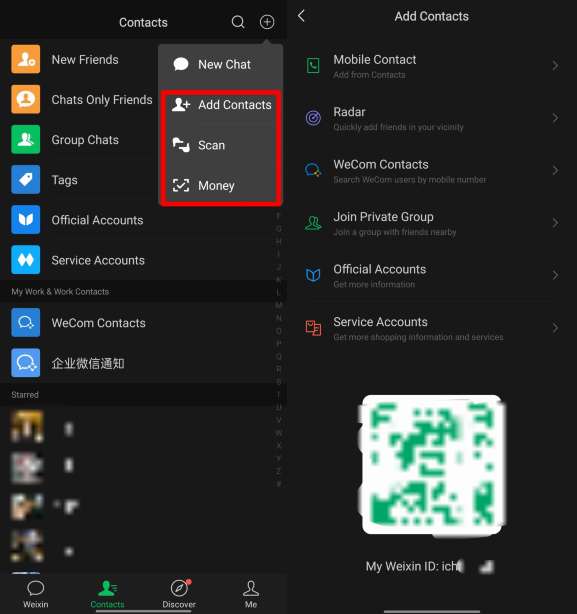
The QR code scanner is easily accessible on the WeChat home screen:
- Open the WeChat app (ensure you use the official version from App Store/Google Play).
- Tap the + icon in the top-right corner of the chat screen.
- Select Scan from the dropdown menu—this opens the camera scanner directly.
- For quick access, you can also long-press the WeChat icon on your home screen (iOS/Android) to launch the scanner instantly.
How to Scan a QR Code in WeChat: Step-by-Step
Once the scanner is open, the process is the same for all code types:
- Align the code: Hold your phone steady and center the QR code within the square frame on your screen.
- Wait for the beep/vibration: WeChat will automatically recognize it.
- Follow the prompt:
- For People: Tap "Add to Contacts" and send a greeting.
- For Groups: Scan group QR code → tap Join Group (full groups need admin invites).
- For Payment: Enter the amount, check the recipient's name, and enter your 6-digit payment password.
- For Login: Tap "Confirm Login" on your phone to authorize the PC/web session.
Scanning from a Screenshot?
If someone sent you a QR code via chat or you have a screenshot:
- Open the scanner → Tap "Album" (bottom-right corner) → Select the image. WeChat will scan the code from the photo .
See all attractions
 969014 booked




How to Add Friends Using QR Codes
This is the most common social use of QR codes in China. There are two ways to do this:
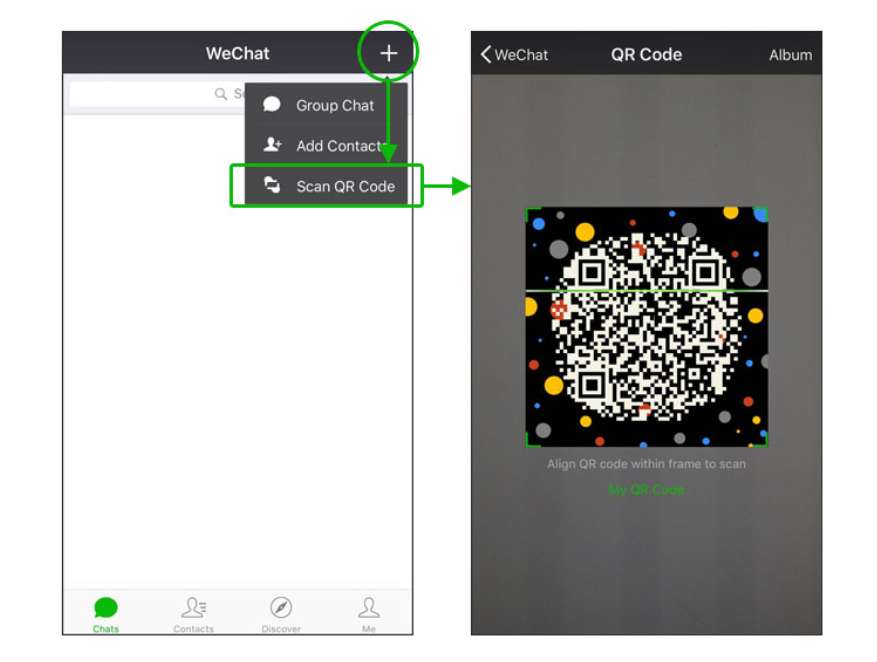
Credit: Wechat Official
A. Scan Someone Else's QR Code
- Open the scanner (see Section 2).
- Point the camera at their code.
- Tap "Add to Contacts" and optionally edit the greeting message.
- Wait for them to accept your request.
Credit: Wechat Official
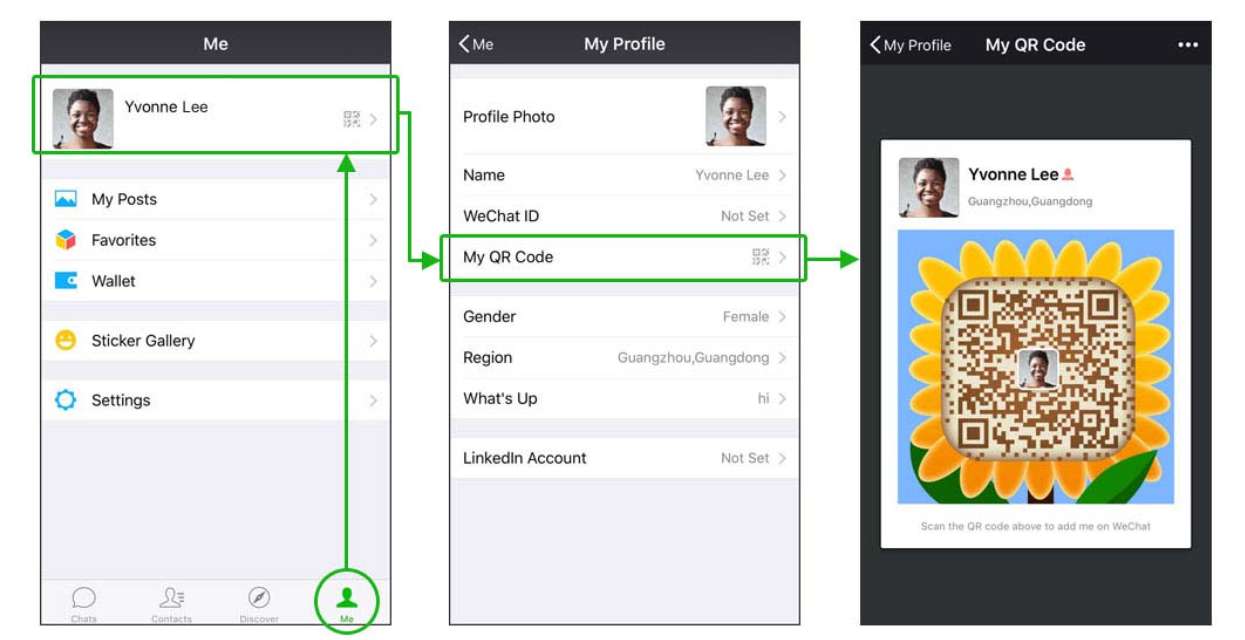
B. Show Your Own QR Code for Others to Scan
- Go to the "Me" tab (bottom-right).
- Tap your Profile Photo / Name at the top.
- Tap "My QR Code" .
- Let your friend scan it, or tap the "..." menu to save it to your album and share it online.
How to Pay Using WeChat QR Code (WeChat Pay)
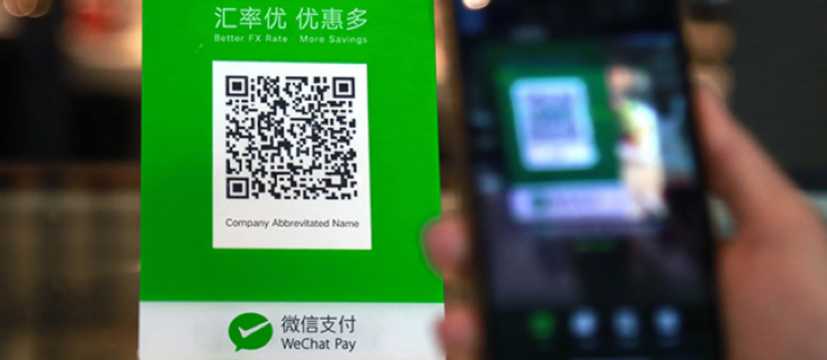
Payments are the most essential daily function for foreigners in China.
How to Activate and Use WeChat Pay
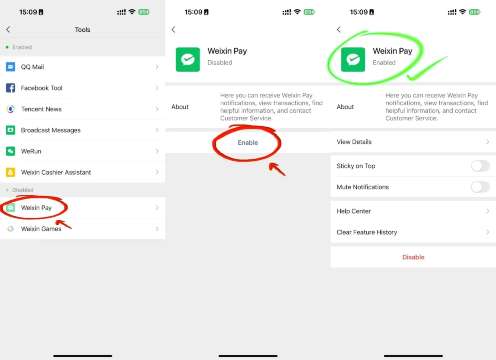
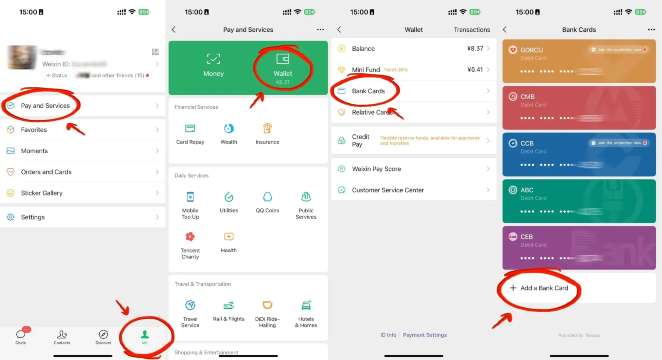
To Pay a Shop (You Scan Them)
- Open the scanner.
- Scan the merchant's QR code (usually printed and taped to the counter).
- Enter the amount.
- Type your 6-digit WeChat Pay password.
- Tap "Pay."
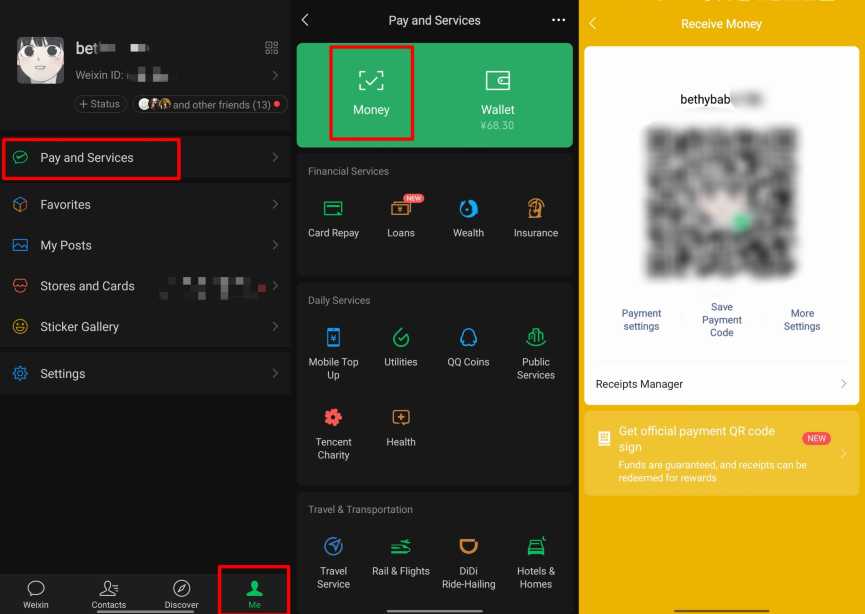
To Receive Money (They Scan You)
- Go to "Me" → "Wallet" (or "Services").
- Tap "Money" or "Receive Money".
- Show your personal QR code to the payer.
- They scan it and enter the amount to send to you.
Note for Foreigners: To use WeChat Pay, you usually need to link a Chinese bank card or complete real-name verification with your passport. Some international credit cards are now supported, but functionality may be limited depending on your region .
How to Scan QR Code to Log In to WeChat (PC/Desktop/Web)
- Visit web.wechat.com or open the desktop WeChat app (Windows/Mac).
- A large QR code will appear on the screen.
- Open WeChat on your phone and use the scanner to scan the code on your computer.
- Tap "Log In" or "Confirm" on your phone—your chats will sync to the desktop.
How to Register & Log in to WeChat Without QR Code
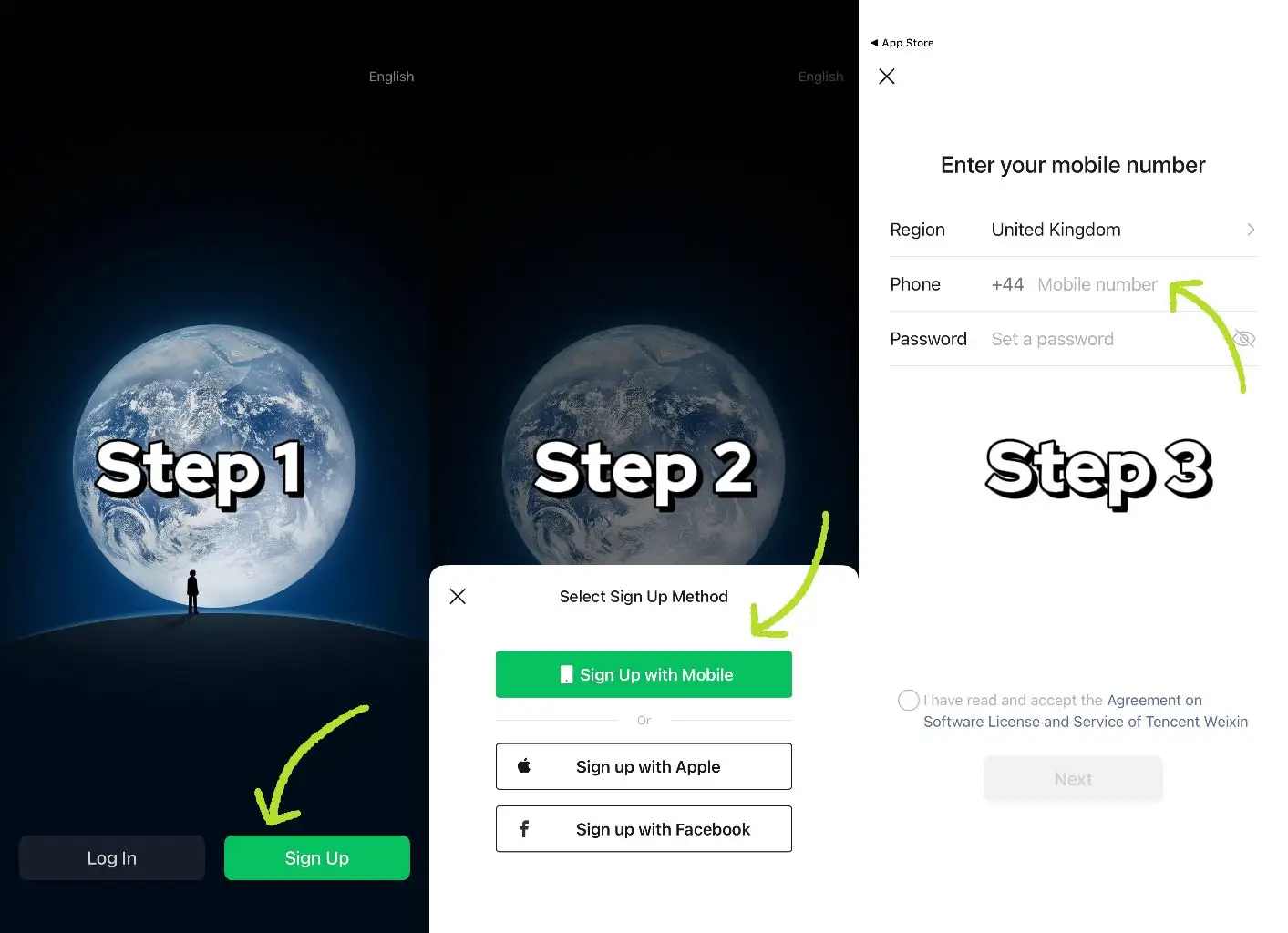
Sign Up Without QR Code
- Download the official WeChat app (do not use a VPN during registration).
- Option 1: Tap "Sign up with mobile" → select your region code → enter your phone number → set a password → verify via SMS.
- Option 2: Tap "Sign up via Facebook" → grant permission → enter your phone number → verify via SMS.
- If prompted for QR assistance: Use "Verify via Payment Card" or "Activate WeChat Pay" to bypass it.
Login Without QR Code
- Mobile: Enter your bound phone number + account password, or use SMS verification code.
- PC/Desktop (version 3.9.5+): Select "Mobile Number Login" → enter your phone number + password → verify via SMS.
How to Sign Up for WeChat Without a Friend's QR Code
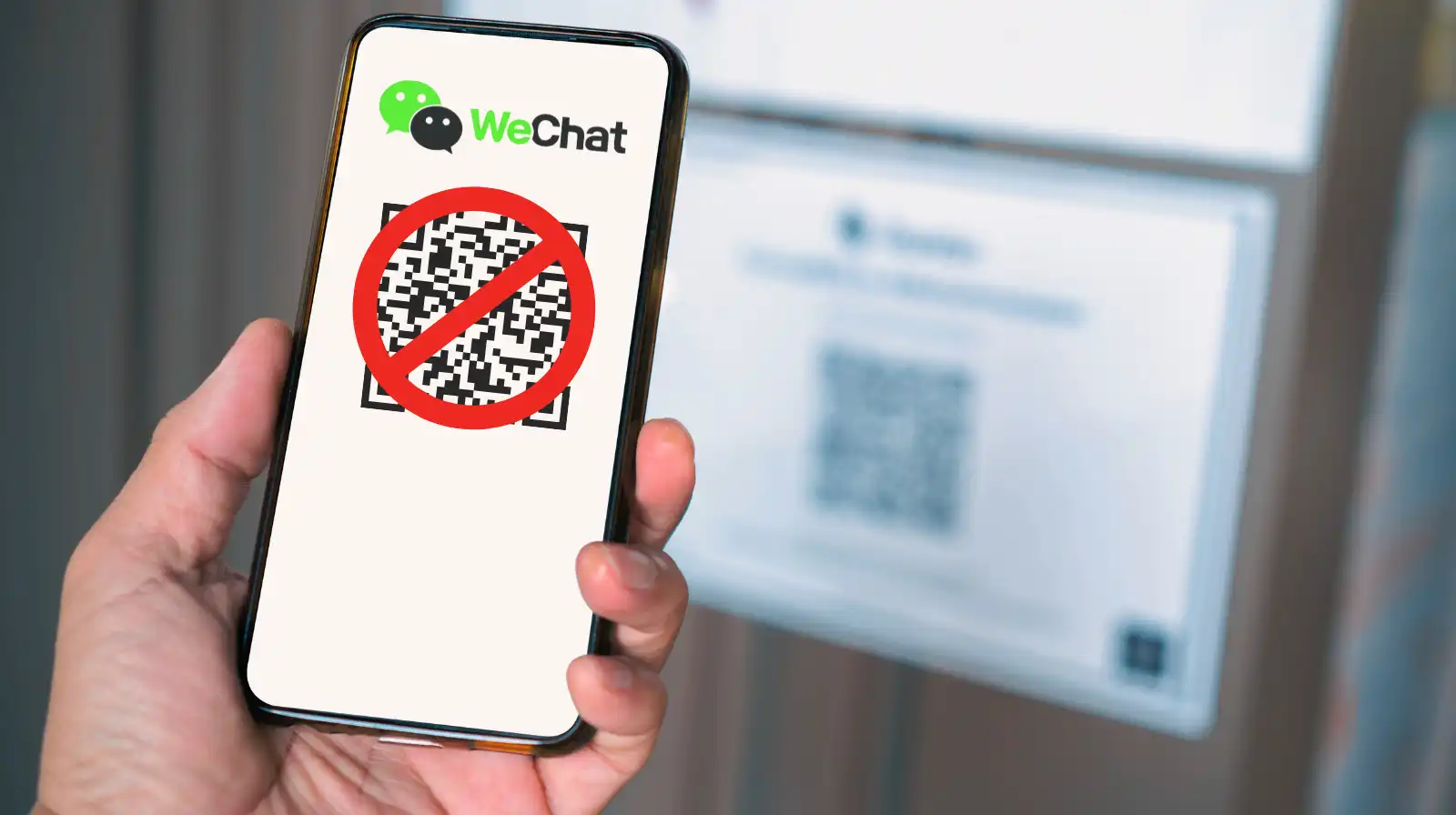
This is the #1 question from new foreign users. WeChat often asks an existing user to scan a QR code to verify your new account—if you don’t have a friend nearby, use these alternatives:
Method 1: Verify via Bank Card
- When prompted for assistance, tap "Verify via Payment Card."
- Enter your bank card details (Chinese or supported international cards).
- Complete any required authentication and finish registration.
Method 2: Verify via WeChat Pay (Weixin Pay)
- Tap "Verify and Activate WeChat Pay."
- Follow on-screen instructions to input your information and set a payment password.
- Complete registration.
Method 3: Standard Mobile Sign Up (No QR Needed Initially)
- Download WeChat from the official App Store/Google Play (avoid third-party APKs).
- Open the app → tap "Sign Up" → "Sign up with mobile."
- Select your region code, enter your phone number, and set a password.
- Complete SMS/phone call verification.
Note: The QR verification step usually appears after this initial setup, not during installation.
Important Registration Tips
- Do not use a VPN during registration—it may trigger security blocks.
- Always use the official version of WeChat.
- If stuck, contact WeChat Support with your mobile number and error screenshots—they typically respond within 3 working days.
WeChat Sign-Up: QR Code Assistance (If Needed)
If QR verification is mandatory, use:① Bank card verification (enter card details) ② WeChat Pay activation (set payment password). For persistent issues, submit your number and error screenshots to WeChat support (response within 3 days).
What to Prepare for a Trip to China?
- Visa & Entry Tips China’s 240-hour visa-free transit policy now covers 54 countries, incl. the US, UK, Canada, and Brazil, allowing up to 10 days during layovers. Learn more about China Entry Tips to land in China easily.
- Getting Connected VPNs are vital for accessing Google, WhatsApp, Instagram, etc in China. Set one up before arriving. China eSIMs are the easiest option for data and bypassing restrictions. Pocket Wi-Fi devices work best for group but are pricier and require pickup/return.
- Money Exchange & Tax Refunds Exchange money in China banks (better rates than airports). ATMs accept foreign cards, but notify your bank first. For tax refunds, spend over ¥500 at stores with a "Tax-Free" sign. Keep receipts and get forms stamped at customs before departure.
Must-Have Apps in China
- China Payment Apps Forget cash. Chinese use Alipay (I like it better) or WeChat Pay to pay for everything in China. Scan a QR code at noodle stalls, metros, even temples. Link your foreign Visa/Mastercard before landing.
- China Map Apps Amap (Gaode Map) & Baidu Map (limited English) is what locals use, with real-time navigation, metro/bus routes, and traffic updates. Apple Maps does a good job too if you're already an IOS user.
- China Transport Apps Street taxis are cheap, but drivers rarely speak English. Use China Taxi App like DiDi (China’s Uber)—set your destination in English, pay by Alipay.
- China Travel Apps 15+ China trips taught me: Use Trip.com. It's the best English app for booking China trains/flights/hotels + finds Trip.com deals.
- China Dating Apps Locals use Tantan (China’s Tinder) and Momo. WeChat’s “People Nearby” works too, but expect language barriers unless your Mandarin’s decent.
- China Food App Use Meituan (also helps find nearby restaurants) or Ele.me for food delivery—both have English mode. No English menu in restaurants? Scan the QR with Alipay's translator.
[10% Off] Best China Hotel Recommendations
Top Shanghai Hotels
Top Beijing Hotels
Top Guangzhou Hotels
See All Hotels























FAQs about WeChat QR code
-
How do I get my WeChat QR code?
-
Can someone scan my WeChat QR code?
-
Can I use WeChat without scanning QR code?
-
How to skip QR code verification during WeChat sign-up?
-
How long does a WeChat QR code last?
-
How to avoid 3% fee on WeChat Pay (international cards)?
-
How to scan WeChat QR code?
-
How to scan QR code to log in WeChat?
Disclaimer: This article has been provided by an individual contributor or third party platform. If there is any discrepancy regarding the copyright, please contact us directly and we will delete the content immediately.
Trending Searches
-
Air Travel Guide
-
Latest Flight Deals
-
Popular Flight & Hotel Packages
-
Getting Around
-
eSIM/SIM card
- Tokyo Flight and Hotel
- Koh Samui Flight and Hotel
- Osaka Flight and Hotel
- Langkawi Flight and Hotel
- London Flight and Hotel
- Seoul Flight and Hotel
- Shanghai Flight and Hotel
- Da Nang Flight and Hotel
- Sharm El Sheikh Flight and Hotel
- Cox'S Bazar Flight and Hotel
- Phuket Flight and Hotel
- Singapore Flight and Hotel
- Kuala Lumpur Flight and Hotel
- Antalya Flight and Hotel
- Hong Kong Flight and Hotel
- Shanghai Pudong Airport Transfer
- Child Car Seats in China
- China domestic flight vs train with kids
- Chengdu Layover
- Hongqiao Railway Station to Pudong Airport
- Rotterdam Day Tours
- Cairns Day Tours
- Jiangxi Day Tours
- Guangzhou Day Tours
- China Activities
- Seogwipo Activities
- San Francisco Day Tours
- Romania Sports & Adventure
- Suzhou Driving Experience
- Hiroshima City Day Tours
- Kenya Activities
- Cebu City Day Tours