eSIM Guide for Tourists: Activation, Compatibility, and Benefits

What is an eSIM?
An eSIM is a type of SIM card that is embedded directly into your mobile device, instead of being a removable card like traditional SIMs. "eSIM" stands for "Embedded Subscriber Identity Module."
Why use an eSIM?
eSIM technology offers several benefits, particularly for travelers, making it a preferred choice over traditional SIM cards. Here are the key advantages:
- Cost-Effective: Activating an eSIM usually costs much less than standard roaming fees, helping you save money while traveling.
- Seamless Experience: You can switch to a local carrier's tourist plan without the hassle of physically swapping out SIM cards. This provides a convenient and smooth transition.
- Dual SIM Capability: With a compatible phone, you can use the eSIM for data services while keeping your original SIM active. This allows you to access local data rates and avoid high roaming charges, while still using your home number for calls and texts.
These benefits make eSIM an attractive option for travelers seeking both convenience and cost savings.
 860023 booked


How Does eSIM Work?
An eSIM works much like a traditional SIM card, but in a 100% digital format. Here's how it works:
- Activation: To activate an eSIM, you will usually receive a QR code from your operator. By scanning this code with your phone's camera, you can download the eSIM profile directly to your device.
- Setup: The setup process involves entering any required verification codes and following on-screen instructions to complete activation. Once activated, the eSIM can be used just like a physical SIM to access mobile data, make calls and send texts.
- Multiple Profiles: One of the key benefits of eSIMs is the ability to store multiple profiles on a single device. This is particularly useful for frequent travellers who need different plans in different countries, or for people who want to keep separate personal and business numbers on the same phone.
- Compatibility: Most modern smartphones, including the latest iPhone models and Android devices, support eSIM technology. This means you can use eSIMs worldwide, provided your operator supports the feature.
eSIM-Compatible Phones
Here is a detailed table showing the brands and models that support eSIM:
| Brand | Model | Notes |
| Apple | iPhone 15, 15 Plus, 15 Pro, 15 Pro Max | Not Dual SIM |
| iPhone 14, Plus, Pro, Pro Max | Not Dual SIM | |
| iPhone 13, 13 Pro, 13 Pro Max, 13 mini | 13 Pro not Dual SIM | |
| iPhone 12, 12 Pro, 12 Pro Max, 12 mini | 12 Pro not Dual SIM | |
| iPhone 11, 11 Pro, 11 Pro Max | 11 Pro not Dual SIM | |
| iPhone SE (2020), SE (2022) | ||
| iPhone XS, XS Max | Not Dual SIM | |
| iPhone XR | Not Dual SIM | |
| iPad Air (2014, 2019, 2020, 2022) | ||
| iPad Pro 11" (2018, 2020) | ||
| iPad Pro 12.9" (2015, 2017) | ||
| iPad Pro 10.5" (2017) | ||
| iPad Pro 9.7" (2016) | ||
| iPad 10.2" (2019, 2020, 2021) | ||
| iPad 9.7" (2016, 2017, 2018) | ||
| iPad mini 4 (2015), mini 3, mini (2019, 2021) | ||
| Samsung | Galaxy A55, A54, A35 | |
| Galaxy S24, S24+, S24 Ultra | ||
| Galaxy S23, S23+, S23 Ultra, S23 FE | ||
| Galaxy S22 5G, S22+ 5G, S22 Ultra 5G | ||
| Galaxy S21 5G, S21+ 5G, S21 Ultra 5G | US versions not compatible with eSIM | |
| Galaxy S20, S20 5G, S20+, S20+ 5G, S20 Ultra, S20 Ultra 5G | US versions of S20 and S20 FE 4G/5G not compatible with eSIM | |
| Galaxy Note20, Note20 5G, Note20 Ultra 5G | US and Hong Kong versions of Note 20 Ultra not compatible with eSIM | |
| Galaxy Xcover7 | ||
| Galaxy Fold, Z Fold4, Z Fold3 5G, Z Fold2 5G | ||
| Galaxy Z Flip4, Z Flip3 5G, Z Flip, Z Flip 5G | US versions of Z Flip 5G not compatible with eSIM | |
| Pixel 7, 7 Pro | ||
| Pixel 6, 6a, 6 Pro | ||
| Pixel 5, 5a 5G | ||
| Pixel 4, 4a, 4 XL, 4a 5G | ||
| Pixel 3, 3a, 3 XL, 3a XL | ||
| Xiaomi | Xiaomi 13, 13 Lite, 13 Pro | |
| Xiaomi 12T Pro | ||
| Huawei | Huawei P40, P40 Pro | Not including P40 Pro + |
| Huawei Mate40 Pro | ||
| Sony | Sony Xperia 10 III Lite | |
| Sony Xperia 10 IV | ||
| Sony Xperia 5 IV | ||
| Sony Xperia 1 IV |
Models Not Supporting eSIM
- Apple: Mainland China versions; Hong Kong and Macao versions (except iPhone 13 mini, iPhone 12 mini, iPhone SE 2020, and iPhone XS).
- Samsung: China, Hong Kong, Macao, and Taiwan versions; All S20 FE and S21 FE Series; USA versions (specific models including S20/S21 series, Z Flip 5G, Note 20 Ultra, Z Fold 2, etc.); Most Samsung Galaxy devices purchased in South Korea (except Galaxy S23, S23+, S23 Ultra, Z Flip 4, Z Fold 4, Z Flip 5, Fold 5, A54 5G, and S23 FE).
- Google Pixel: China, Hong Kong, Macao, and Taiwan versions; Pixel 3 phones manufactured in Australia and Japan; Pixel 3 phones purchased with service from US or Canadian carriers other than Sprint and Google Fi; Pixel 3a phones purchased in Japan, South East Asia, and with Verizon service.
How to activate eSIM
Activating an eSIM is a quick process, usually taking about five minutes. When you purchase an eSIM package, you'll receive a QR code from the vendor within an hour. The activation steps differ slightly depending on whether you're using an iPhone or an Android device. Below are the instructions for each:
For iOS Devices:
- QR Code Installation:
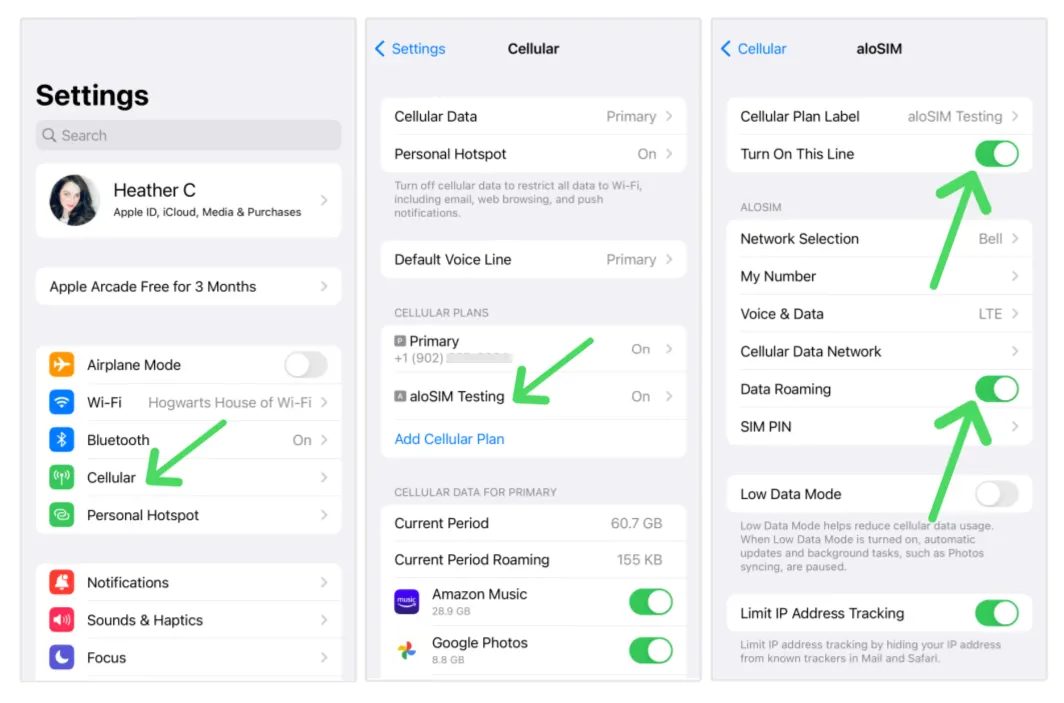
- Navigate to Settings > Cellular > Add eSIM.
- Select Use QR Code and scan the QR code.
- Tap Activate eSIM and then Continue.
- Choose the default network for Cellular Data. Ensure Allow Cellular Data Switching is off, Turn On This Line is enabled, and Data Roaming is on.
- If the network is incorrect, go to Network Selection and select the correct one.
For Android Devices:
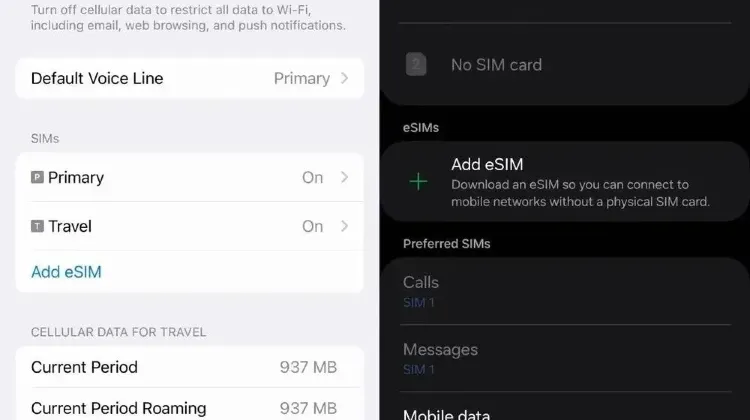
- QR Code Installation:
- Navigate to Settings > Network & internet > SIMs.
- Tap + to add a SIM, then select Download a SIM and tap Next.
- Scan the QR code, then tap Download.
- After "Download Complete" appears, return to Settings.
Source from Alosim
Trip.com eSIM: Cheap Price & Flexible Plans
Trip.com is committed to offering unbeatable prices on a wide range of eSIM plans to suit every traveler's needs. Whether you need just enough data for checking maps and emails or you're a power user streaming and sharing your photos, our competitively priced plans help you get the most bang for your buck.
 China eSIM China (HK) eSIM
  Thailand eSIM
  Japan eSIM
  Vietnam eSIM
  India eSIM
  Malaysia eSIM
  South Korea eSIM
  Indonesia eSIM
  UK eSIM
  Singapore eSIM
  USA eSIM
  Italy eSIM
  Egypt eSIM
  Saudi Arabia eSIM
  Germany eSIM
  Canada eSIM
  Portugal eSIM
  Pakistan eSIM
  Aruba eSIM
  Switzerland eSIM
  Greece eSIM
  Israel eSIM
  Morocco eSIM
 Trending eSIM for International Travel
FAQ
-
Can I set up eSIM by myself?
-
How do I activate my SIM to eSIM?
-
How can I install an eSIM?
Trending Searches
-
eSIM/SIM card
-
Top destinations
-
Latest Flight Deals
-
Popular Attractions
- Hotels in Shanghai
- Hotels in Guangzhou
- Hotels in Beijing
- Hotels in Bangkok
- Hotels in Shenzhen
- Hotels in Hong Kong
- Hotels in Chongqing
- Hotels in Tokyo
- Hotels in Ho Chi Minh City
- Hotels in Chengdu
- Hotels in Kuala Lumpur
- Hotels in Seoul
- Hotels in Zhangjiajie
- Hotels in Hanoi
- Hotels in Singapore
- Hotels in Hangzhou
- Hotels in Xi'an
- Hotels in Istanbul
- Hotels in Bali
- Hotels in Osaka
- Forbidden City Tickets
- Zhangjiajie National Forest Park
- Shanghai Tower Tickets
- Shanghai Disneyland Tickets
- Shanghai Wild Animal Park
- Canton Tower Tickets
- shanghai to wangxian valley
- Huangshan
- Shanghai Disneyland Fast Pass
- Universal Studios Beijing Tickets
- Book China Attraction Tickets with Passport
- Yu Garden Tickets
- Great Wall of China Tickets
- Summer Palace Tickets
- Shanghai Disneyland Crowd Forecast