How to Change Booking for Hotels/Flights on Trip.com?


to Bangkok
to Manila
to Shanghai
to Tokyo
to Seoul
See all flights


AI Summary
This summary is AI-generated by Trip.com. For the complete guide, please refer to the article below.
Trip.com booking modifications depend on third-party policies. Changes for flights, hotels, and trains often incur change fees ranging from $30 to $200. Users manage requests via the app.
Can You Change Bookings on Trip.com?

Trip.com acts as a travel agent, so whether you can modify a booking depends on the policies of the airline, hotel, train operator, or car rental company. Here’s a breakdown:
Flights ✈️
Most airlines allow flight changes to dates, times, or routes, but:
- Fees apply (varies by airline and fare class).
- You’ll need to pay the fare difference if the new flight is more expensive.
- Low-cost carriers often require you to modify directly on their official websites (not via Trip.com).
Hotels 🏨
Direct hotel change (e.g., changing dates/room type) are rarely necessary—we strongly recommend booking hotels with the “Free Cancellation” tag. Instead of modifying, simply cancel the original booking for free (within the hotel’s window) and rebook.
- Free Cancellation rates: Fully refundable if canceled by the deadline (e.g., 24/48 hours before check-in).
- Non-refundable rates: Cannot be canceled or modified—no exceptions.
Trains 🚆
Train changing rules are set by railway operators (e.g., China Railway):
- Most online changes must be completed well before departure; specific cutoff times vary by route type.
- Some operators permit date/time changes; others prohibit modifications entirely.
❗ Disclaimer: All change fees, eligibility rules and modification time limits are set by third-party suppliers (airlines, hotels, railway operators) and may be updated without advance notice. Trip.com only facilitates the submission of change requests and cannot override supplier policies.
How to Change & Reschedule Flights on Trip.com
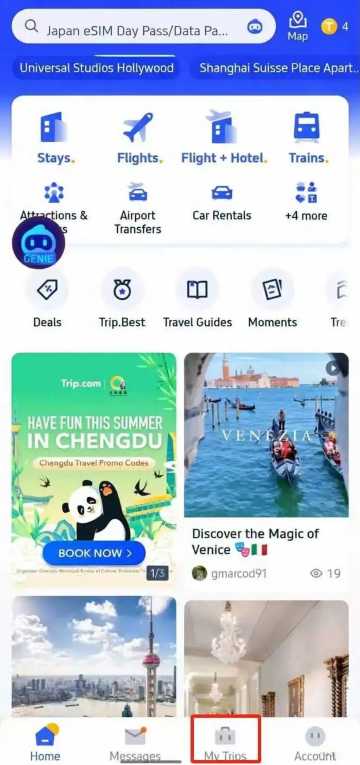
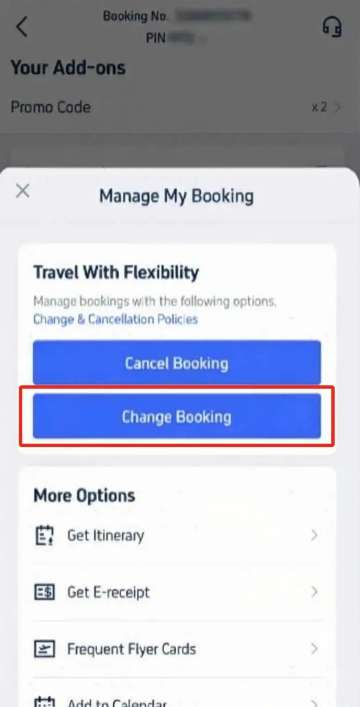
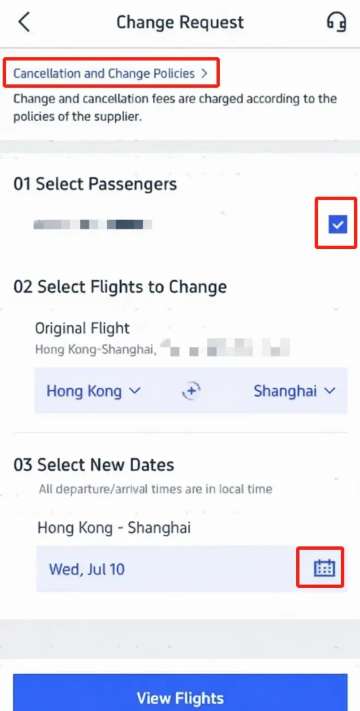
Follow these exact steps (using the Trip.com mobile app—most user-friendly for changes):
Step 1: Access Your Booking
- Open the Trip.com app and log in.
- Tap the “My Trips” tab (bottom of the screen)—all bookings are sorted by date/time.
Step 2: Navigate to “Manage My Booking”
- Select the flight booking you want to modify.
- On the reservation page, tap “Manage My Booking”.
- To review fees and rules first, tap “Cancellation & Change Policies”.
Step 3: Submit a Change Request
- Tap “Change Booking” (on the “Manage My Booking” screen) to go to the “Change Request” page.
- 1 Select Passengers: Choose which travelers need their flights changed.
- 2 Confirm Original Flight: Verify the flight you want to modify (e.g., Hong Kong-Shanghai).
- 3 Pick New Dates: Tap the calendar icon to select new travel dates.
- Tap “View Flights” to see available options.
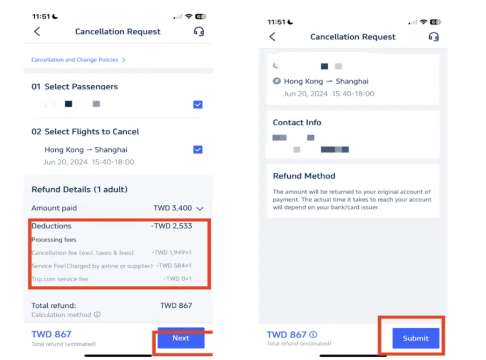
Step 4: Choose a New Flight
- Browse flights and use filters like “Non-stop” or “Lowest Price” to narrow down options.
- Ensure the flight is operated by the same airline or a partner carrier.
- Tap your preferred flight, then select the cabin class (e.g., Economy, Business).
Step 5: Confirm & Pay
- Review the fare difference (if new flight is pricier) and refund amount for the original ticket.
- If the cost is acceptable, tap “Confirm” and complete payment.
- Check your email for the new booking and refund confirmations.
How to Change Hotel Bookings on Trip.com
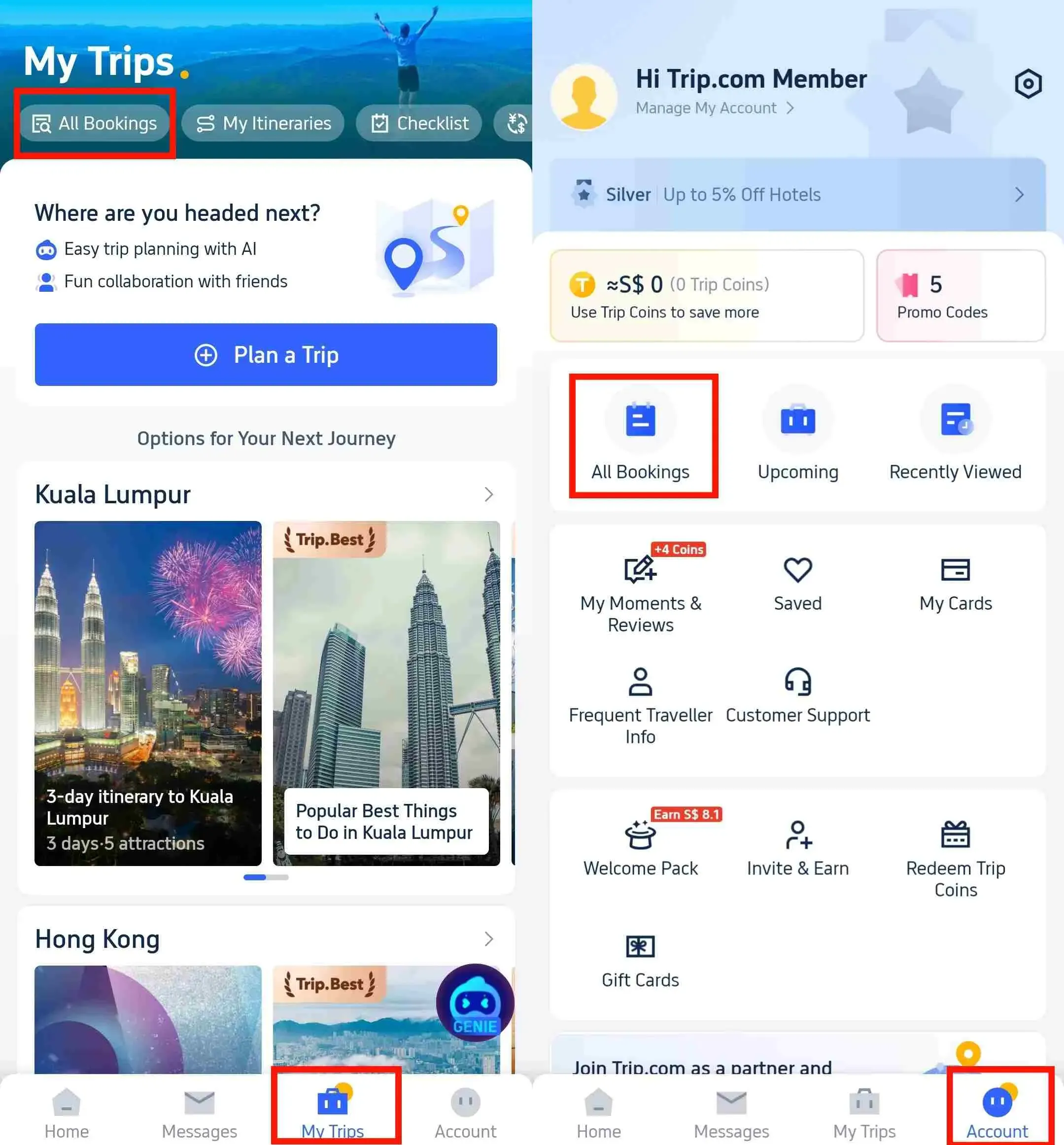
Hotel modifications are simpler than flights—here’s how to do it:
Step 1: Find Your Hotel Reservation
- Log in to the Trip.com app or website.
- Go to “My Trips → All Bookings” or “Account → All Bookings” → Locate your hotel reservation.
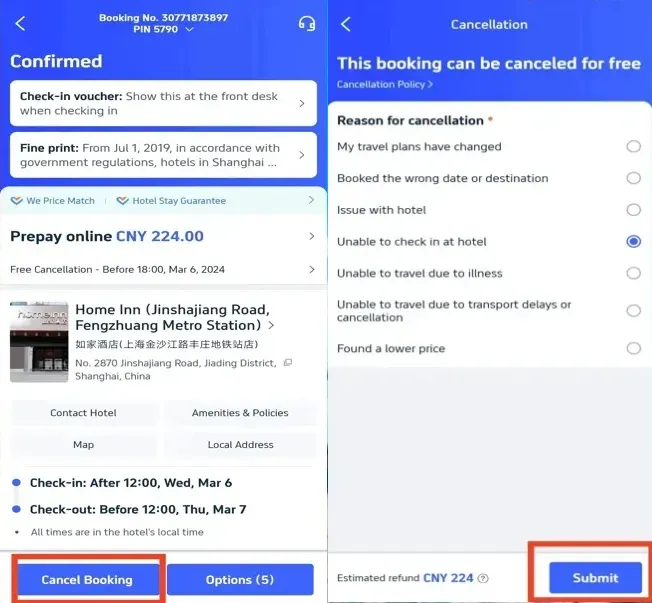
Step 2: Cancel Hotel Booking on Trip.com
- Tap “Cancel Booking” → Review the hotel’s cancellation policy (displayed automatically).
- Select a reason for canceling → Tap “Submit”.
- Tap “View Cancellation Policy” to verify refund details → Confirm cancellation.
Step 3: Change Hotel by Rebook
- Track progress via “My Trips → Refund Status”. Note: Trip.com usually processes refund requests within 1 business day, but actual funds arriving in your account take 3–15 working days, depending on your payment method (credit cards often take 7–14 days).
- Rebook the hotel or date you want on Trip.com.
[Discount] Global Hotel Recommendations
Find Best Global Hotels
See All Hotels
 NO.1
NO.1






How to Change Train Bookings on Trip.com
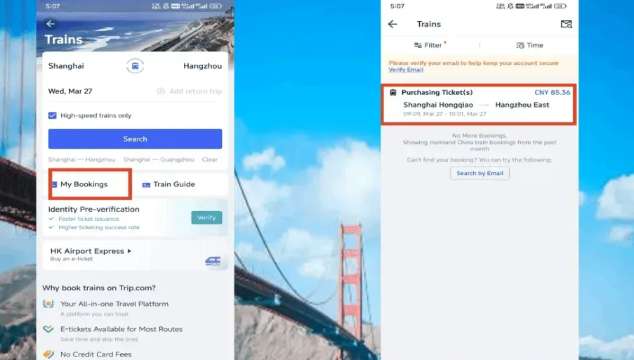
Train changes depend on whether you’ve collected your ticket and how close you are to departure:
Case 1: Uncollected Ticket & Meeting Online Modification Cutoff
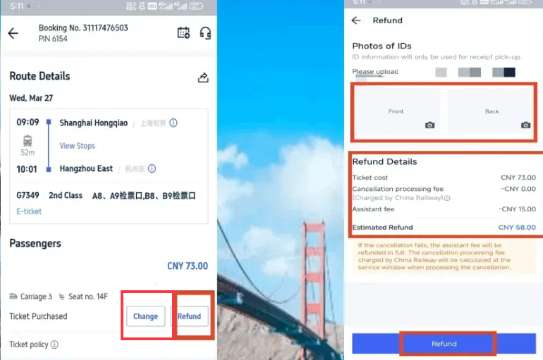
Find the booking and tap “Change” or "Refund" (canceling and rebooking may be easier if your schedule is flexible).
Follow the on-screen prompts to select a new train:
- More than 48 hours before departure: You can switch to any available pre-sale train.
- Within 48 hours before departure: Rescheduling to later travel dates is allowed, but change fees will apply.
Confirm the change and receive a new e-ticket.
Important rule for mainland China trains: Online changes must be submitted at least 90 minutes before midnight on the original departure day; cross-border high-speed routes require changes at least 90 minutes before departure.
Case 2: Collected Physical Ticket or Too Close to Online Modification Cutoff
Online modification is unavailable; processing changes at the railway station counter may carry lower fees.
Bring these documents:
- Original physical train ticket
- Valid ID used for booking (passport, national ID card, etc.)
Visit the station ticket change counter and request modification; staff will show available train options.
Key Train Change Rules
- Each train ticket is only eligible for one change; modified tickets cannot be adjusted a second time.
- You may reschedule to later departure dates within the pre-sale window, subject to applicable fees.
- If the new ticket fare is lower than the original, you will receive a refund for the price gap, but a change administration fee may still apply.
How to Avoid Trip.com Booking Change Fees
No one wants to pay extra for adjustments—follow these tips to minimize or avoid fees:
1. Book Flexible Options
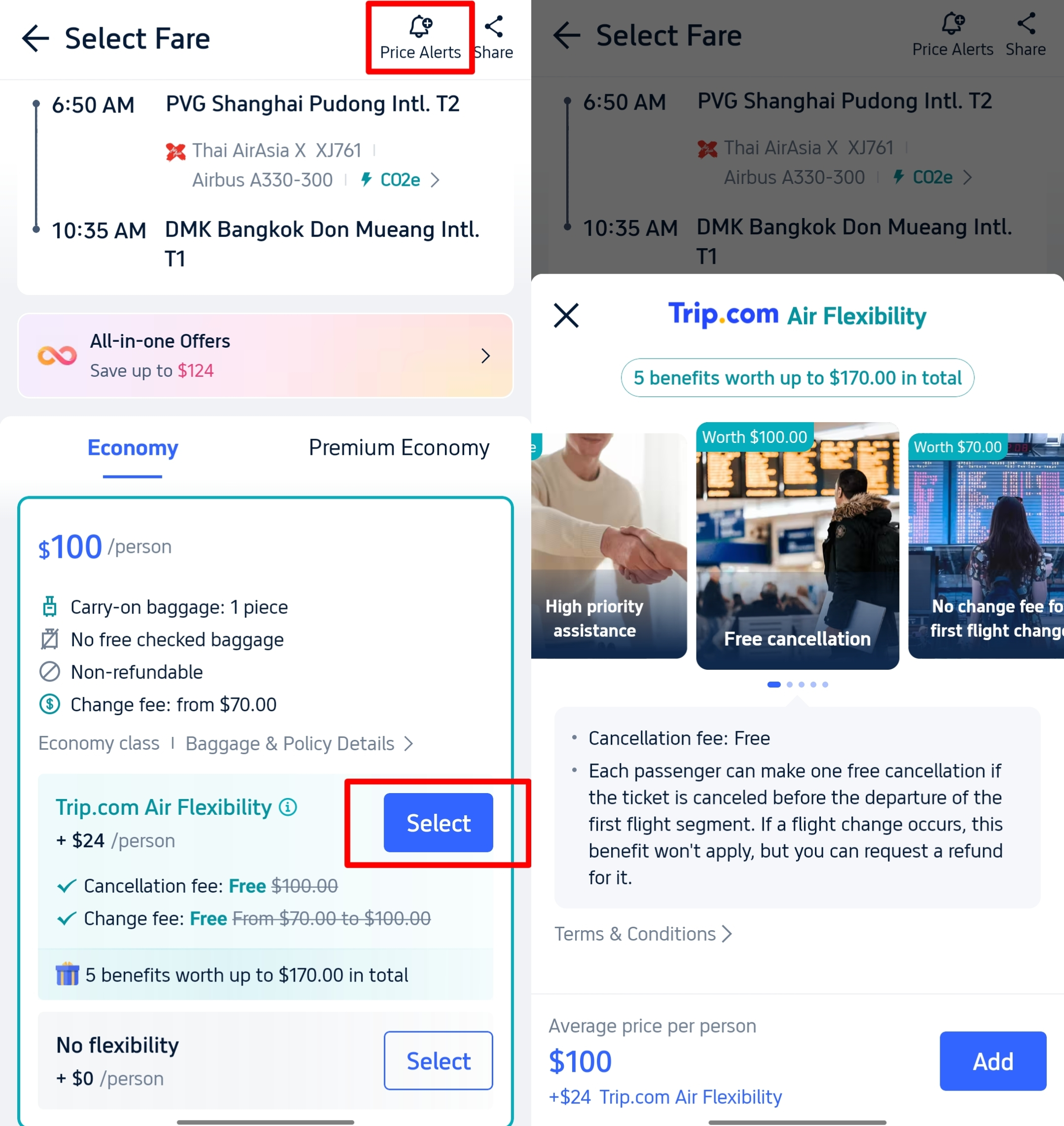
- Flights: Choose “flexible flight tickets” or add the “Air Flexibility” add-on during booking for enhanced change perks (e.g., free date adjustments without high penalties).
- Hotels: Look for the “Free Cancellation” tag on hotel listings. This ensures you can modify or cancel without fees (within the hotel’s time window, e.g., 24 hours before check-in).
2. Change Early
Last-minute modifications (e.g., <24 hours before flight departure) often come with higher fees and limited seat availability. Adjust your booking as soon as your travel plans shift—airlines and hotels typically charge reduced fees for early changes.
3. Watch for Trip.com Promotions
Trip.com runs limited-time promotions that waive partial change fees or offer discounts on modified bookings. Check the “Deals” tab on the app or subscribe to email alerts to stay updated.
How Much Do Trip.com Booking Change Fees Cost?

Fees vary by service type—here’s a breakdown of typical costs:
Flights
- Airline Change Fees: General range ~$30 to over $200. Fee structures differ greatly: many major full-service carriers have eliminated change fees for standard economy fares, while low-cost airlines may either ban modifications entirely or impose steep fixed charges. No universal rule states full-service carriers are always cheaper to adjust than budget airlines.
- Fare Difference: If the new flight is more expensive, you must pay the full price gap with no exceptions.
Hotels
- Flexible Free Cancellation Rates: No change or cancellation fees within the policy window.
- Non-Refundable/Strict Prepaid Rates: Modifications and cancellations are not permitted under any circumstance.
Trip.com Service Fees
May apply occasionally (typically ~$5–$20) for manual processing of flight/hotel changes that the supplier cannot handle directly. All extra handling charges are clearly displayed on the payment confirmation page before you submit modifications.
See all attractions







Trip.com Booking Change Rules & Customer Support
Before submitting any modification request, note these cross-product policies:
- Name transfers are almost never allowed: You cannot reassign a booking to another passenger. Minor spelling typos may qualify for correction, subject to the airline/hotel/train operator’s independent approval.
- Modifications are not permitted after departure or post check-in: No changes can be processed once your flight has taken off or you have completed hotel check-in.
- Confirmation emails sent post-modification: Two automated emails will be delivered upon successful adjustment: one new booking confirmation, plus a separate refund notification if a price refund applies. The actual arrival speed of refunded funds depends entirely on your payment issuer’s processing timeline.
- Same airline requirement for flight rebooking: When changing flights, the new service must be operated by the original airline or its official partner carriers; switching to an unrelated airline is not supported.
FAQs about Trip.com Booking Change
-
Can I change my flight or hotel booking on Trip.com?
-
How to avoid Trip.com booking change/cancellation fees?
-
What are Trip.com booking change fees?
-
Can I transfer my Trip.com booking to another person?
-
How to cancel a Trip.com hotel booking and get a refund?
Disclaimer: This article has been provided by an individual contributor or third party platform. If there is any discrepancy regarding the copyright, please contact us directly and we will delete the content immediately.
Trending Searches
-
Popular Flight & Hotel Packages
-
Getting Around
-
Popular Attractions
-
eSIM/SIM card
- Cancun Vacation Packages
- Medellin Vacation Packages
- Hong Kong Vacation Packages
- Tokyo Flight and Hotel
- Koh Samui Flight and Hotel
- Okinawa Vacation Packages
- Antalya Flight and Hotel
- Skopje Vacation Packages
- Nanded Vacation Packages
- Langkawi Flight and Hotel
- Macau Flight and Hotel
- Tampa Vacation Packages
- Salem Vacation Packages
- Daet Vacation Packages
- Grand Turk Vacation Packages
- Narita Airport to Tokyo
- Chengdu Metro
- JR Kyushu
- LAX to Downtown
- Istanbul Airport Transfers
- Shenzhen Metro
- Hong Kong Airport to Shenzhen
- Chongqing Airport
- JR Hokkaido Pass
- Shanghai Hongqiao International Airport
- Suica Card
- Qingdao Airport
- Phuket Taxi
- Chongqing Airport to City
- Macau to Hong Kong
- Narita Airport to Shinjuku
- Shanghai Airport Transfer
- Forbidden City Tickets
- Zhangjiajie National Forest Park
- Shanghai Tower Tickets
- Shanghai Wild Animal Park
- Shanghai Disneyland Tickets
- Canton Tower Tickets
- Huangshan
- Universal Studios Beijing Tickets
- Great Wall of China Tickets
- Summer Palace Tickets
- universal studios japan tickets
- Yu Garden Tickets
- Shanghai Zoo Tickets
- Nanjing Road Pedestrian Street
- hong kong disneyland tickets