Trip.com Customer Service: Phone Numbers, Live Chat & Email

Author's Profile Picture
Trip.com Customer Service

This is exactly how to reach Trip.com customer service—including Trip.com phone numbers, live chat tips, and email details

to Bangkok
to Manila
to Shanghai
to Tokyo
to Seoul
See All Flights
Los Angeles
LAX
Bangkok
BKK
Mon, Jan 19
Wed, Jan 21
One way
34% off
From 71,010.34INR 47,131.49
Los Angeles
LAX
Bangkok
BKK
Fri, Dec 5
Sat, Dec 6
One way
22% off
From 71,010.34INR 55,078.00
Los Angeles
LAX
Bangkok
BKK
Sun, Dec 7
Tue, Dec 9
One way
21% off
From 71,010.34INR 55,829.35
Los Angeles
LAX
Bangkok
BKK
Fri, Dec 5
Sun, Dec 7
One way
20% off
From 71,010.34INR 56,466.09
Los Angeles
LAX
Bangkok
BKK
Wed, Jan 14
Fri, Jan 16
One way
15% off
From 71,010.34INR 60,426.62
Los Angeles
LAX
Bangkok
BKK
Sun, Dec 7
Tue, Dec 9
One way
13% off
From 71,010.34INR 61,623.69
Los Angeles
LAX
Bangkok
BKK
Mon, Jan 19
Wed, Jan 21
One way
12% off
From 71,010.34INR 62,731.61
Los Angeles
LAX
Bangkok
BKK
Mon, Jan 19
Wed, Jan 21
One way
11% off
From 71,010.34INR 62,858.96

How to Find Trip.com Customer Service - Step by Step

Having any problem about your travel? Looking no further to Trip.com's customer service. It offers 24/7 support to assist customers with any issues or inquiries. And this article will offer a step-to-step guide to find Trip.com customer service. Stay with us till the end!

Step 1: Enter Trip.com to find Trip.com Customer Service

Log in to your Trip.com account on your mobile phone and go to "Account" section. Then click on the "Customer Support" button to view the detail.

Step 2: Select the Trip.com Customer Service
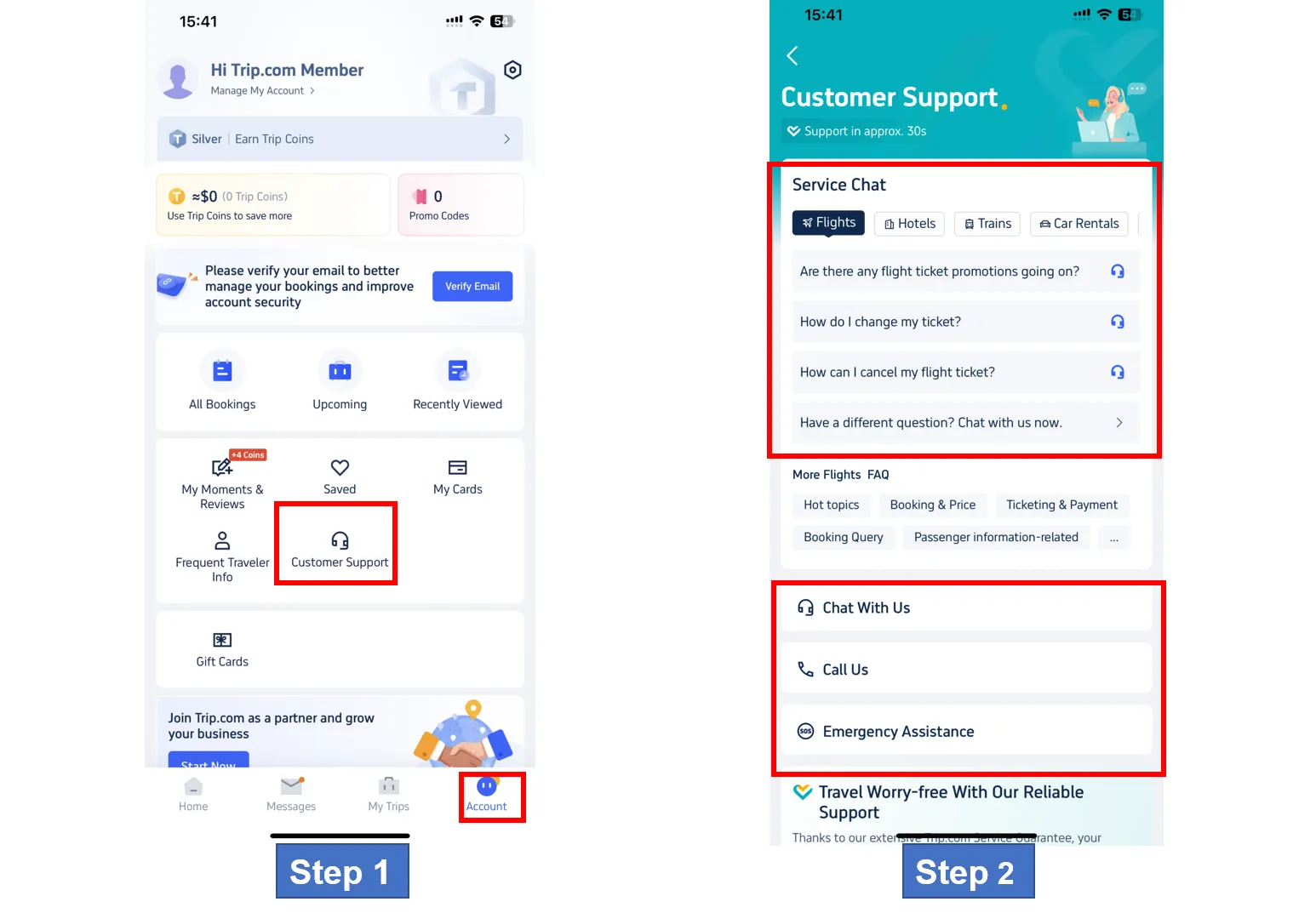
Trip.com offers various customer services, including Chat service, Call service, and Emergency assistance. Customers can choose the most suitable service based on their needs.

Step 3: Choose Chat Trip.com Customer Service
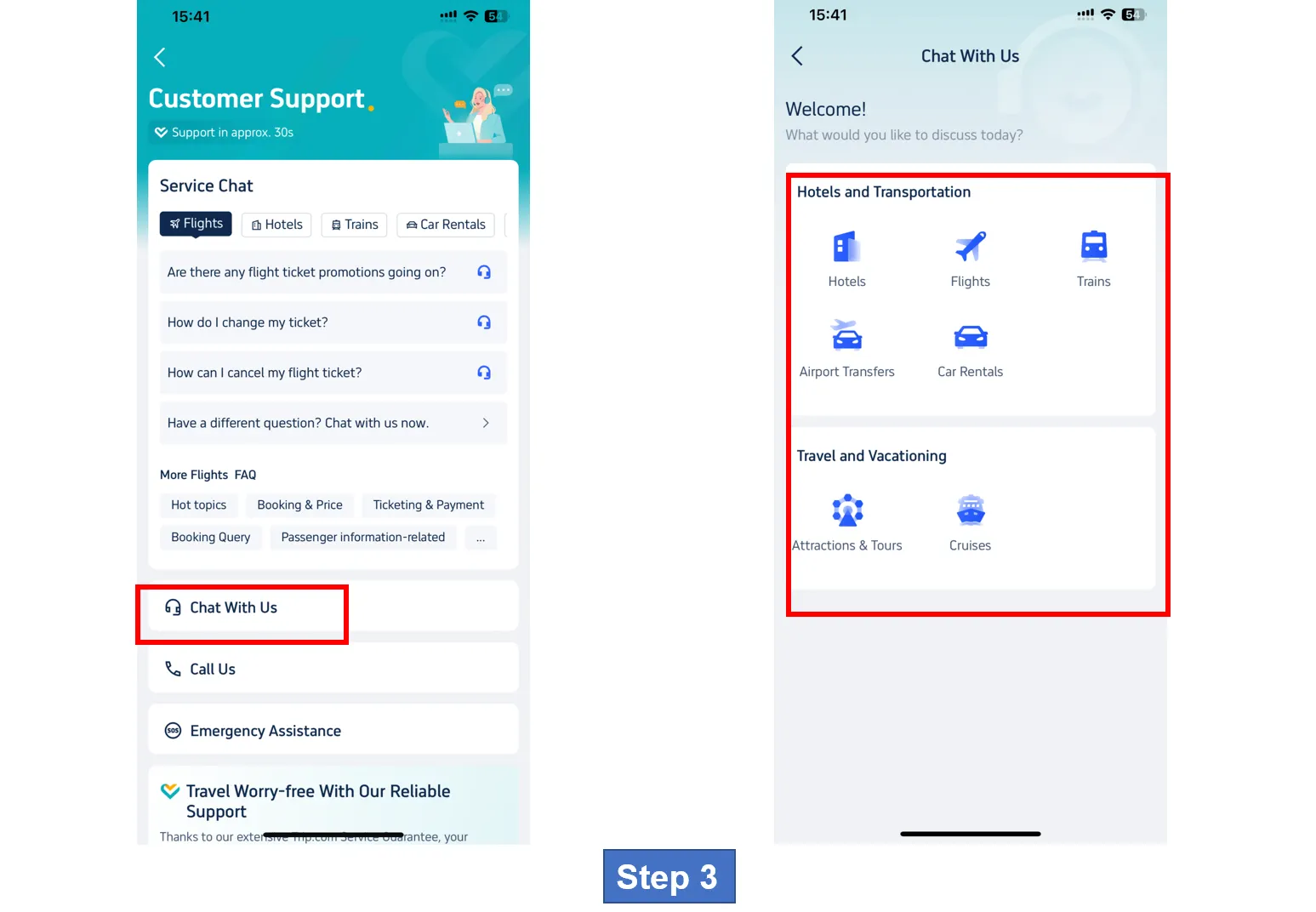
Click on to "Chat With Us" to enter the detail page. Customers can get chat service for diffrent aspects, including flights, hotels, transportation, and travel guide.
How to Find Trip.com Customer Service - Step by Step

Step 4: Choose Call Trip.com Customer Service
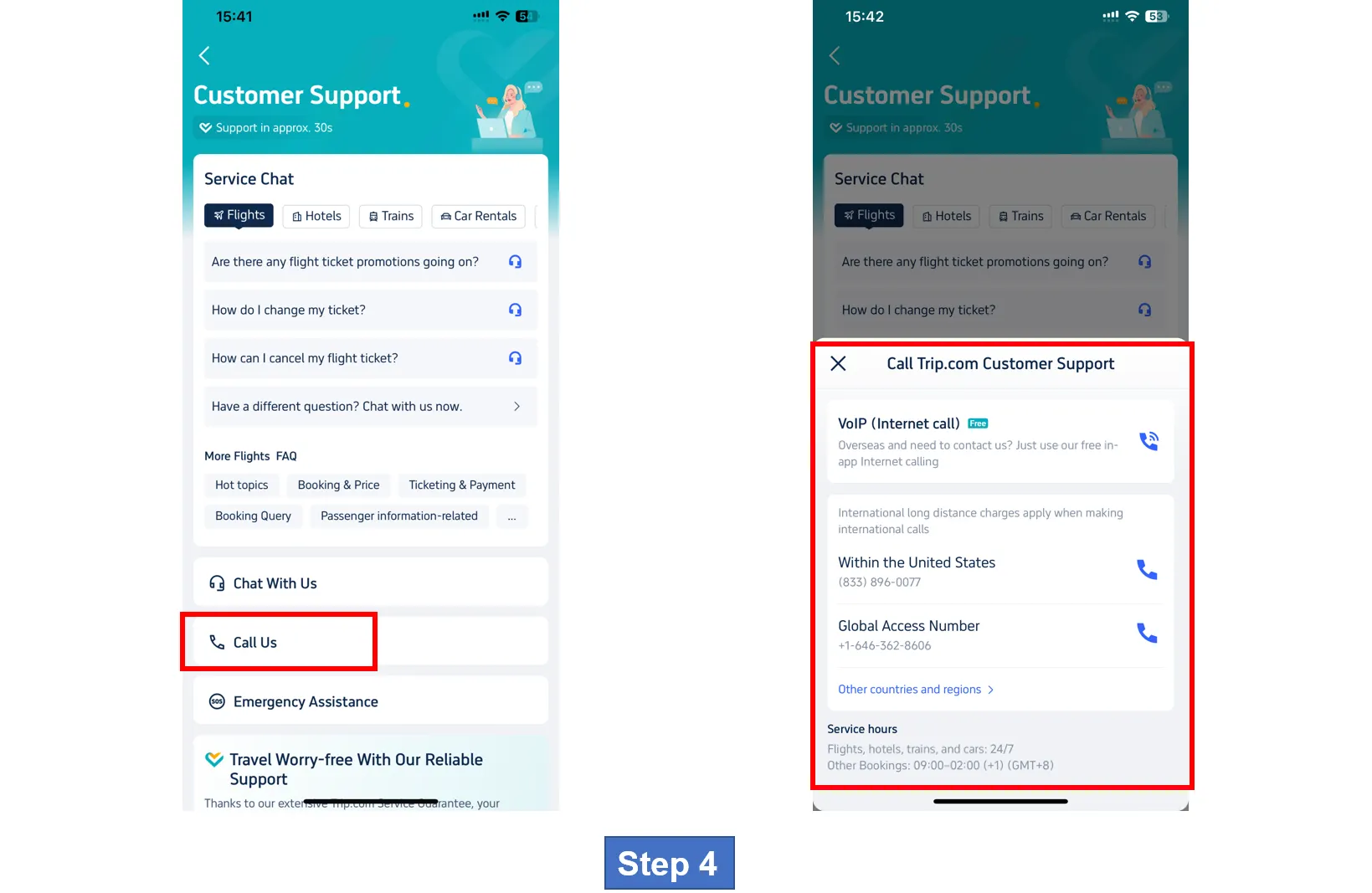
Go to "Call Us" section to enter call service page. Customers can choose Internet call or Global call according to their personal need.
How to Find Trip.com Customer Service - Step by Step

Step 5: Find Call Trip.com Customer Service of Other Countries and Regions
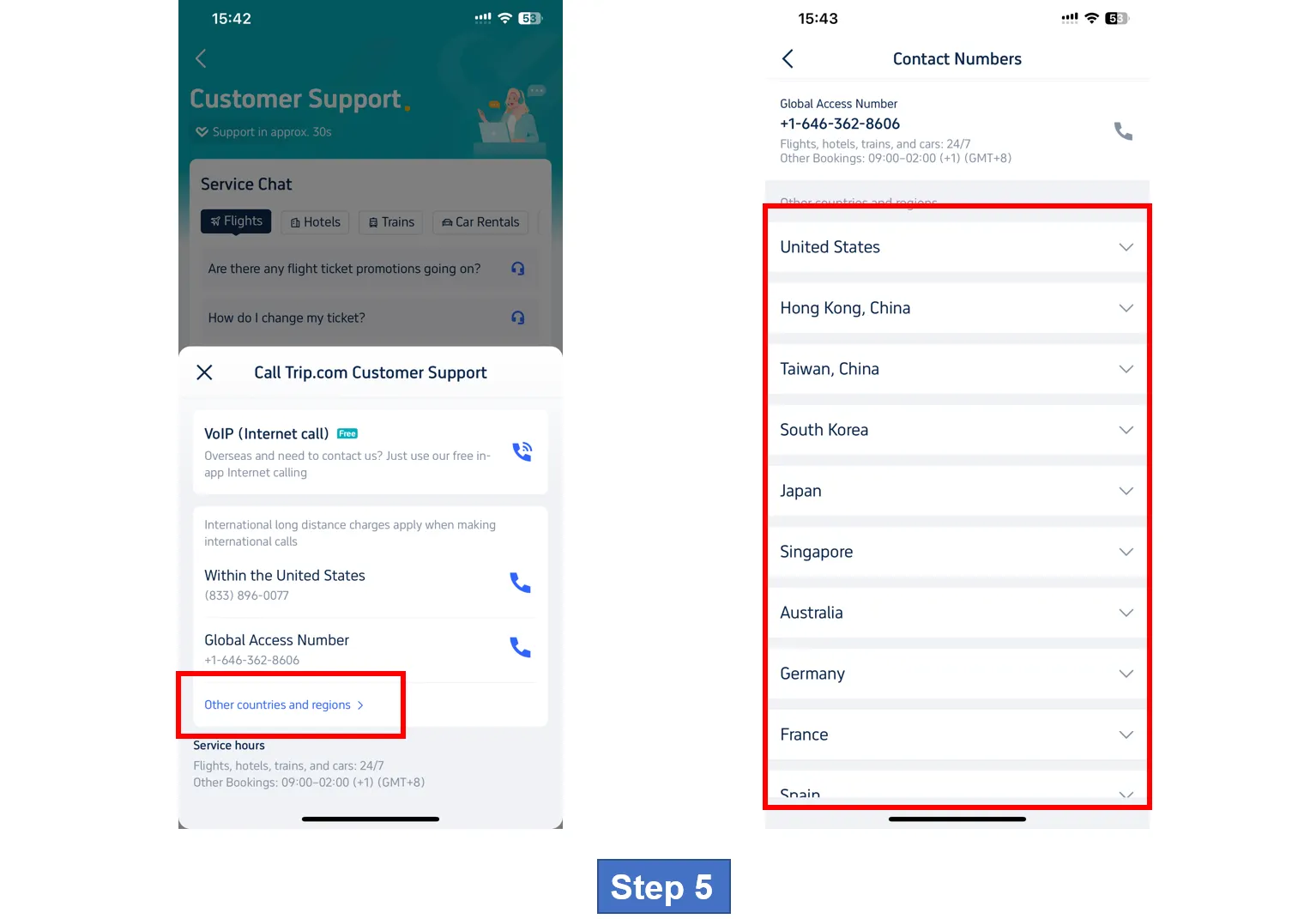
If customers need to find call customer service from other countries and regions, click on the button "Other countries and regions" to veiw the detail, where you can find contact numbers from lots of countries and regions. For more detail ,check the table!
How to Find Trip.com Customer Service - Step by Step

Step 6: Choose Emergency Assistance Trip.com Customer Service
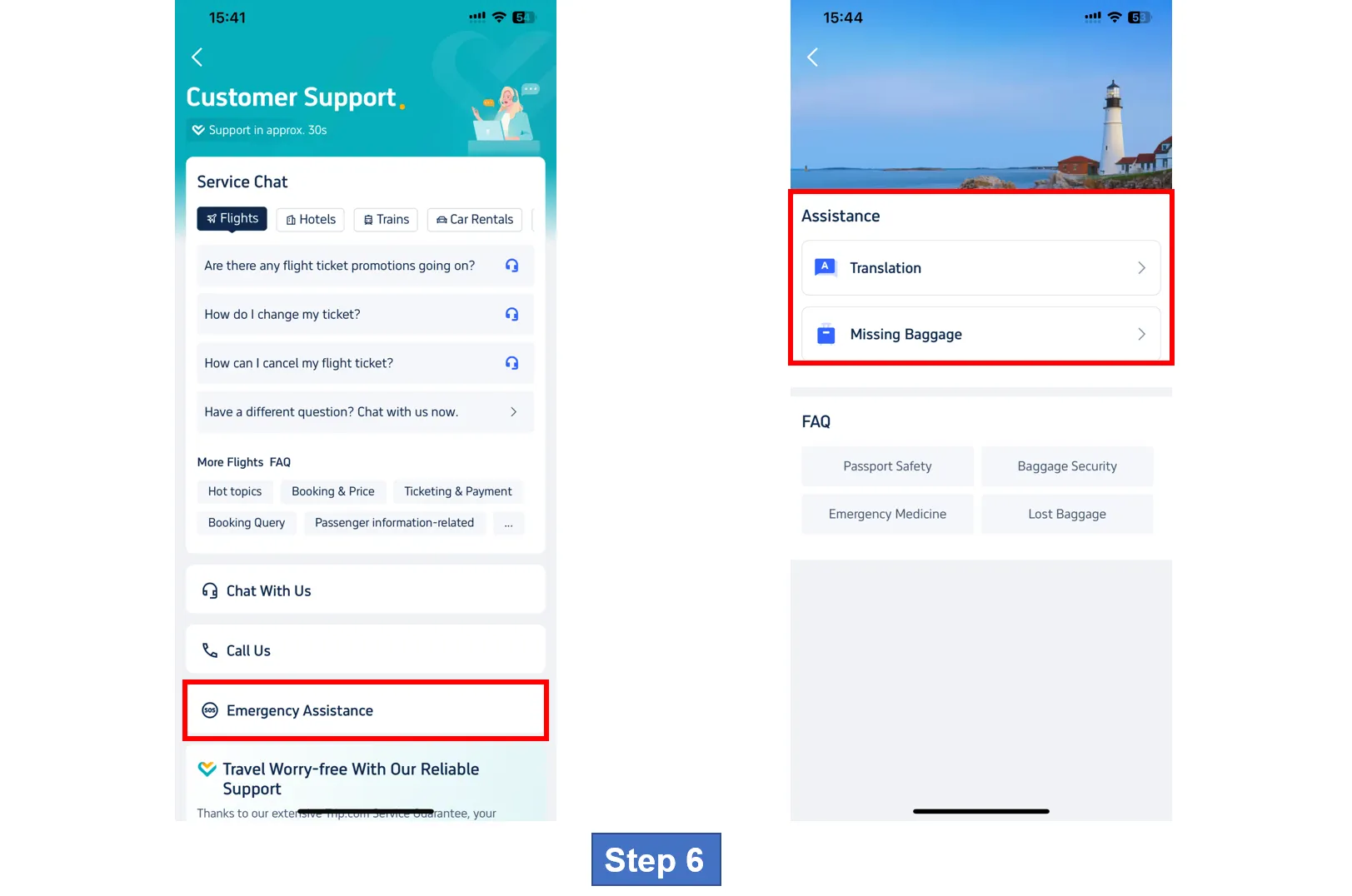
Go to "Emergency Assistance" section to acquire more customer support, including Medical assistance, Translation help, Emergency Medical Transfer, etc.
How to Find Trip.com Customer Service - Step by Step
🎁 Book Cheapest Flights Worldwide | 8% Off Best Hotels | Get fast & reliable eSIM.

Trip.com Customer Service - Contact Phone Number

Trip.com Contact Number: United States & Global Access

Trip.com customer service phone number is the fastest way to get help with urgent issues (such as flight cancellations and hotel check-outs). Trip.com offers local numbers for over 40 countries and regions, as well as global access numbers for international travelers. The following are key details, including popular regional contacts:

Regional Trip.com Contact Numbers (UK, Philippines, Canada & More)

Use the table below to find local or global numbers in your area. Note: International call charges may apply - choose a free in-app VoIP call (explained below) to save money.

Region/Country

Local Phone Number

Global Access Number

United Kingdom (UK)

0113 868 8886

+44 20 3856 8674

Philippines

+63 2 8846 0752

+63 2 8846 0752

Canada

(833) 897-6688

+1 833-295-4377

Australia

02 8880 7972

+61 2 8317 3388

Singapore

3125 4664

+65 3138 5161

United States (US)

(855) 750-2280

+1 855-750-2280

How to Make a Free VoIP Call to Trip.com

To avoid international call fees, use Trip.com’s free in-app VoIP call feature (works worldwide with Wi-Fi or data):

  1. Open the Trip.com app and log in (this will automatically save your booking information for faster support).
  2. Go to the "Messages" TAB and then click on the headphone icon (this is Trip.com Customer Service).
  3. Select "Call Us" → select "Free VoIP".
  4. The app will connect you directly to a local agent—no roaming charges, no additional fees.

How to Find Trip.com Contact Numbers for More Regions

If your country/region is not on the above list (such as Japan, Germany, Thailand) :

  1. Visit the Trip.com Global Support page on your browser.
  2. Scroll to the "Contact Number" section and then click "Other Countries and Regions".
  3. Select your region from the drop-down menu - you will see local numbers, global access numbers and hours.
  4. Save the page on your mobile phone for quick access during your trip.
🎁 Book Cheapest Flights Worldwide | 8% Off Best Hotels | Grab New User Coupon for eSIM, Attraction Tickets Below!
See All Attractions
1426 booked
4.6/578 reviews
Global 92 Countries 4G/5G eSIM | Day Pass/Total Package | 1-30 Days | QR Code
SIM card
82778 booked
4.7/53425 reviews
Europe 4G/5G eSIM | DayPass /Total | 500MB/day-total 30GB | 1-30 days | 24-hour billing | QR code
SIM card
INR 9.00
10599 booked
4.5/5371 reviews
USA/Canada 5G eSIM | Day Pass/Total Data Package | 1-30 Days | 24-Hour Billing | QR Code
SIM card
INR 42.00
178184 booked
4.7/56188 reviews
Japan SoftBank 4G/5G eSIM | TikTok & ChatGPT Available | Day Pass | 24-Hour Billing | 1-30 Days | QR Code
SIM card
INR 50.91
213850 booked
4.6/55490 reviews
Mainland China/Hong Kong/Macao/Taiwan | 5G eSIM | Day Pass/Total Package | 24H | 1-30 days | QR code
SIM card
INR 38.46
87039 booked
4.7/53879 reviews
Thailand | 5G eSIM | Day Pass/Total Package | 24H Billing | 1-30 days | QR code
SIM card
INR 21.37
1301 booked
4.3/5106 reviews
Vietnam eSIM | 1-30 Days | Up to 60GB High-Speed Data | Coverage on Leading Network
SIM card
33706 booked
4.6/51207 reviews
Malaysia 5G eSIM | Day Pass/Total Data Package | 1-30 Days | 24-Hour Billing | QR Code
SIM card
INR 13.70

Trip.com Customer Service - Live Chat with Human
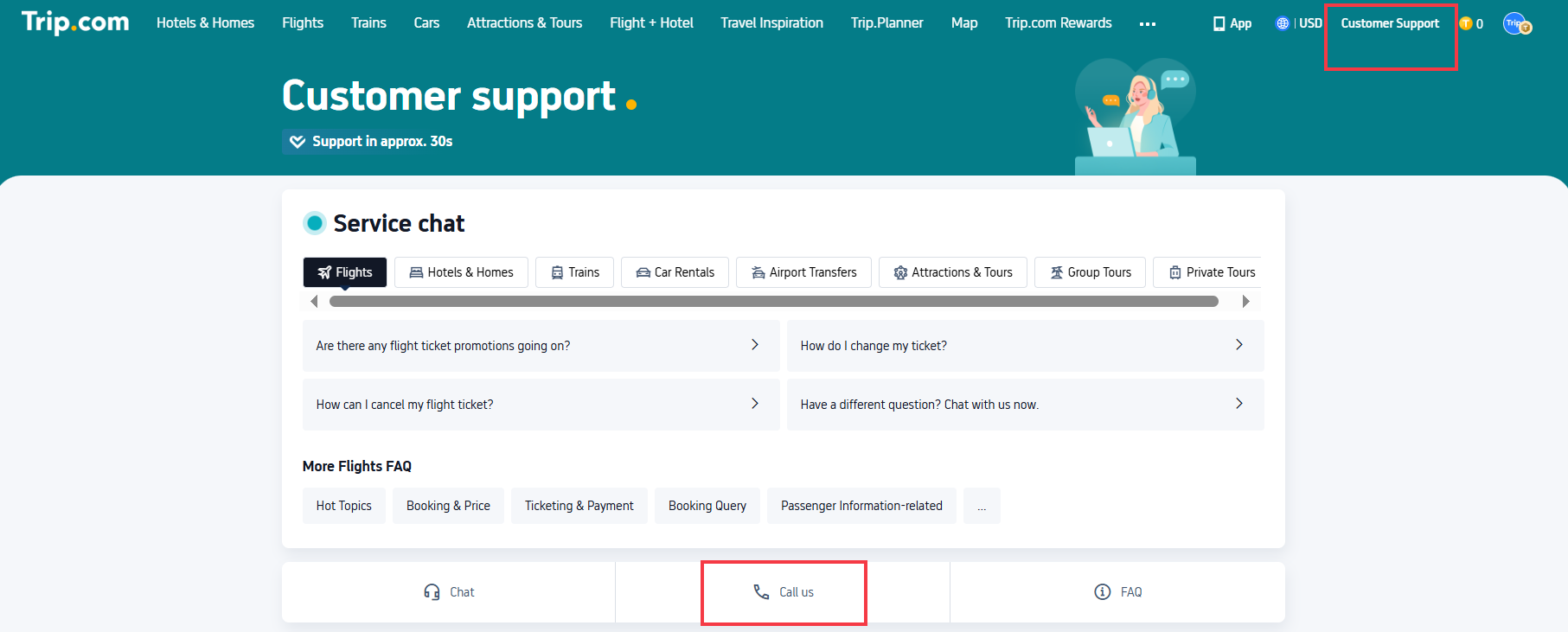
Trip.com Customer Service - Live Chat with Human

Trip.com customer service chat is ideal for non-urgent issues (e.g., modifying a hotel date, asking about Trip Coins) and connects you to a human agent fast. It’s available 24/7 for flights, hotels, trains, and cars—here’s how to use it.

How to Access Trip.com Live Chat (App & Desktop)

On the Trip.com App (Most Convenient for Travelers):

  1. Log in to your Trip.com account → Tap the “Message” tab.
  2. Tap the headphone icon (labeled “Customer Support”) at the top right.
  3. Select “Chat With Us” → Choose your issue category (e.g., “Flight Bookings,” “Hotel Queries”) to connect to a specialist.

On Desktop:

  1. Go to the Trip.com homepage → Click “Customer Support” (top right corner).
  2. On the support page, click the “Chat” button (usually in the bottom right).
  3. Select your issue type (e.g., “Cancel a Booking”) → Start typing your query.

How to Skip Bots & Talk to a Human Agent

Trip.com’s chat starts with a bot, but you can bypass it in 1 step: Type “Transfer to an agent” in the chat box. The bot will connect you to a live representative within 30 seconds to 2 minutes (faster than waiting for a call!).

Trip.com Chat Availability & Languages

  • Hours: 24/7 for flights, hotels, trains, and car rentals; 9 AM–2 AM (+1) GMT+8 for tours and attractions.
  • Languages: English, Cantonese, Japanese, Korean, Thai, Mandarin, and more—perfect for global travelers.
🎁 Book Cheapest Flights Worldwide | 8% Off Best Hotels | Get fast & reliable eSIM.

Trip.com Customer Service - Email Address

Trip.com customer service email is only recommended for non-urgent hotel issues (e.g., asking about hotel amenities, modifying a non-urgent booking). It’s not for flights, trains, or emergencies—use chat/phone for those (you’ll get answers in minutes vs. 1–2 business days).

Trip.com Hotel Support Email Address

The only official email for hotel-related queries is: en_hotelsupport@trip.com

Note: Do not use this email for flights, tours, or emergencies—Trip.com will not respond to non-hotel issues here.

How to Write an Effective Email (Get a Fast Reply)

To ensure your email is addressed quickly, include these 3 key details:

  1. Your Trip.com booking number (found in your confirmation email or “My Orders” on the app).
  2. A clear, specific request (e.g., “I need to change my hotel check-in date from October 10 to October 12 for booking #T123456”).
  3. Your phone number (in case agents need to call you for follow-up).

[8% Off] Global Hotel Recommendations

🎁 Book Cheapest Flights Worldwide & Trip.com Airport Transfer | 8% Off Best Hotels | Get fast & reliable eSIM.
Search Top Global Hotels
See All Hotels

NO.1
9/10908 reviews
TRIBE Living Bangkok Sukhumvit 39 by AccorHotels
Hotel in Bangkok
Sauna
Airport pickup service
NO.2
9.6/103102 reviews
Shanghai Xiangyun Parent Child Hotel
Hotel in Shanghai
Restaurant
24-hour front desk
NO.3
8.9/101326 reviews
KOKO HOTEL Osaka Shinsaibashi
Hotel in Osaka
24-hour front desk
Luggage storage
NO.4
9.7/1079 reviews
The Mulia Bali
Hotel in Bali
Airport pickup service
Restaurant
NO.5
9.5/103846 reviews
J Hotel Shanghai Tower
Hotel in Shanghai
Airport pickup service
Restaurant
NO.6
8.9/10108 reviews
HOSHINOYA Fuji
Hotel in Fujikawaguchiko
Restaurant
24-hour front desk

FAQs About Trip.com Customer Service

  • What’s Trip.com’s email address for complaints?

    For hotel complaints, use en_hotelsupport@trip.com (include your booking number). For other complaints, use live chat or phone (faster resolution).
  • Does Trip.com have live chat?

    Yes—Trip.com customer service chat is available on the app and desktop. Type “Transfer to an agent” to skip bots and talk to a human.
  • Is Trip.com customer service 24/7?

    Yes! Flight, hotel, train, and car rental support is 24/7 worldwide. Tours and attractions support is available 9 AM–2 AM (+1) GMT+8.
  • How do I contact Trip.com customer service UK?

    Call the UK local number: 0113 868 8886, or the global access number: +44 20 3856 8674. You can also use in-app chat (24/7 for flights/hotels).
  • How to call Trip.com for free from abroad?

    Use the app’s “Free Internet Call” (VoIP) feature: Go to “Message” → Headphone icon → “Call Us” → “Free Internet Call.” No roaming fees—just Wi-Fi/data.
  • Why can’t I reach Trip.com customer service?

    Common fixes: (1) Ensure you’re using the correct regional number; (2) Use VoIP instead of a regular call (avoids network issues); (3) Try chat if calls are busy (24/7 availability).
Disclaimer: This article has been provided by an individual contributor or third party platform. If there is any discrepancy regarding the copyright, please contact us directly and we will delete the content immediately.
>>
Trip.com Customer Service