
Learn to use the most popular China Food App - Meituan App for food delivery, restaurant discounts, taxi/bike rides, and booking activities. Tips for registration, payment, and how to use Meituan in English.
What Is Meituan App?

Meituan is a "super app" in China, where you can handle dozens of daily tasks in one place. Here's how it makes life easier:
- Food delivery: When you want to have noodles, bubble milk tea or a late-night snack, Meituan can directly deliver the food to the hotel where you are staying. Most express deliveries arrive within 30 to 45 minutes.
- Save money when dining at a restaurant: Get discount coupons for dishes like hot pot, dim sum or barbecue. Pay in the app, show the code at the restaurant and enjoy your meal for less money.
- Booking a taxi or renting a bicycle: In many cities, Meituan offers ride-hailing services, so this is another option besides apps like Didi or regular taxis. You can also rent shared bikes through it.
- local services: If you need a massage, a haircut or even laundry during your trip, Meituan enables you to easily book these services at local prices.
- Order groceries to your place: If you are going to stay in one place for a long time, you can have fresh fruits, snacks or drinks delivered to your place.
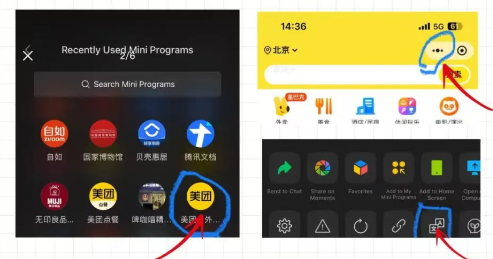
How to Change Language in Meituan App (or Use Translation)

Credit: Xiaohongshu, Mydetra
Meituan has no full English version, but you can:
1. Use Mini Programs on WeChat/Alipay
- WeChat: Open the Meituan mini program → tap the three dots in the top right → select “Translate” (works if your phone’s language is set to English).
- Alipay: Open the Meituan mini program → look for a “Translate” button (some users see this with an English phone setup).
2. Use Translation Apps
- Take screenshots and use apps like Youdao Translate or Google Translate to translate Chinese text.
- Use overlay translation apps that translate the screen in real time (helpful for navigating menus).
How to Download and Set Up Meituan App

1. Download the App
- iPhone: Change your App Store region to China (if needed), then search “美团” (Meituan).
- Android: Use a trusted app store or APK site (make sure it’s safe).
2. Register an Account
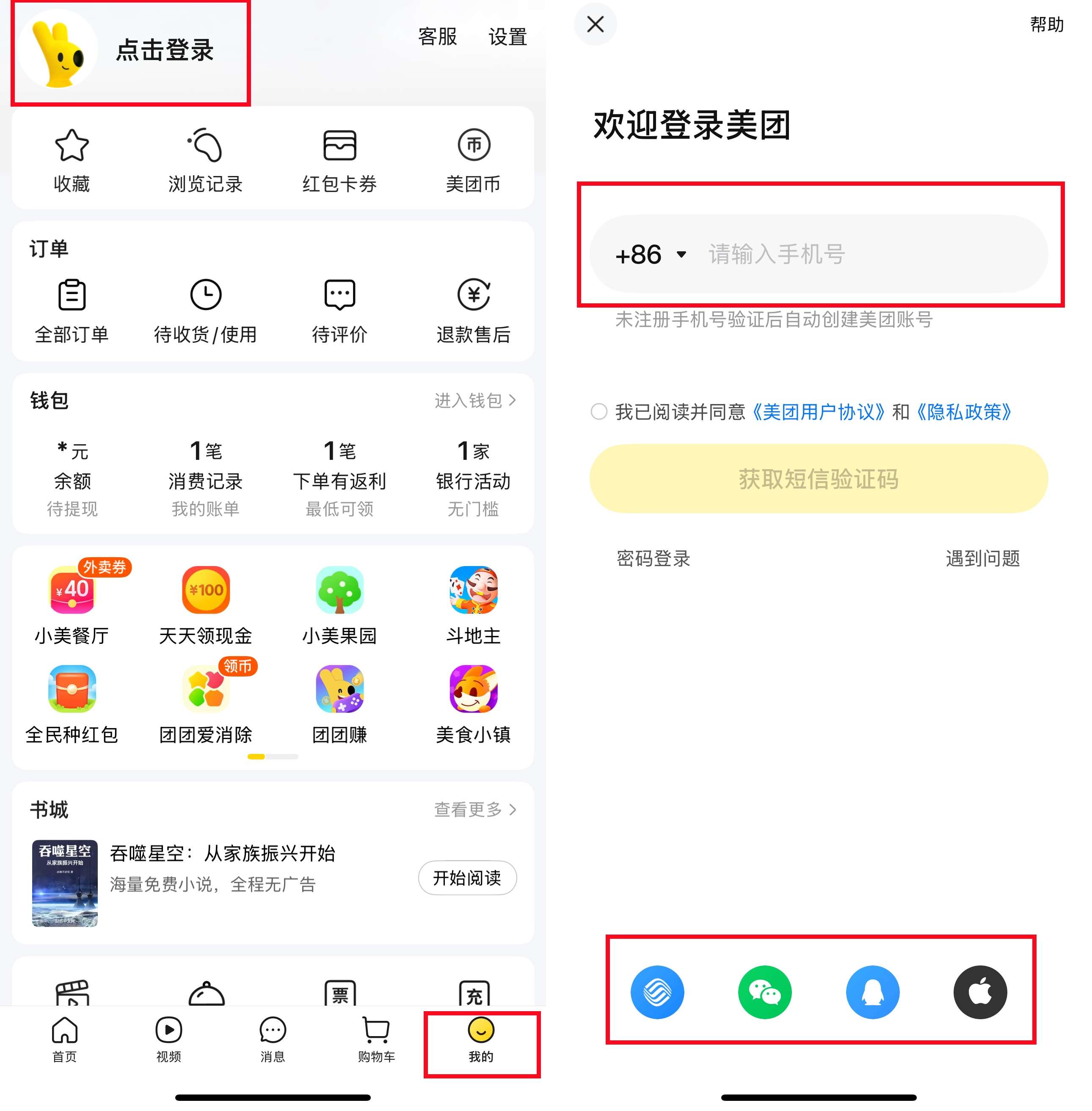
- Open the app and tap “我的” (My) → “点击登录” (Click to Login).
- Enter a foreign phone number to get a verification code via SMS.

3. Set Your Location
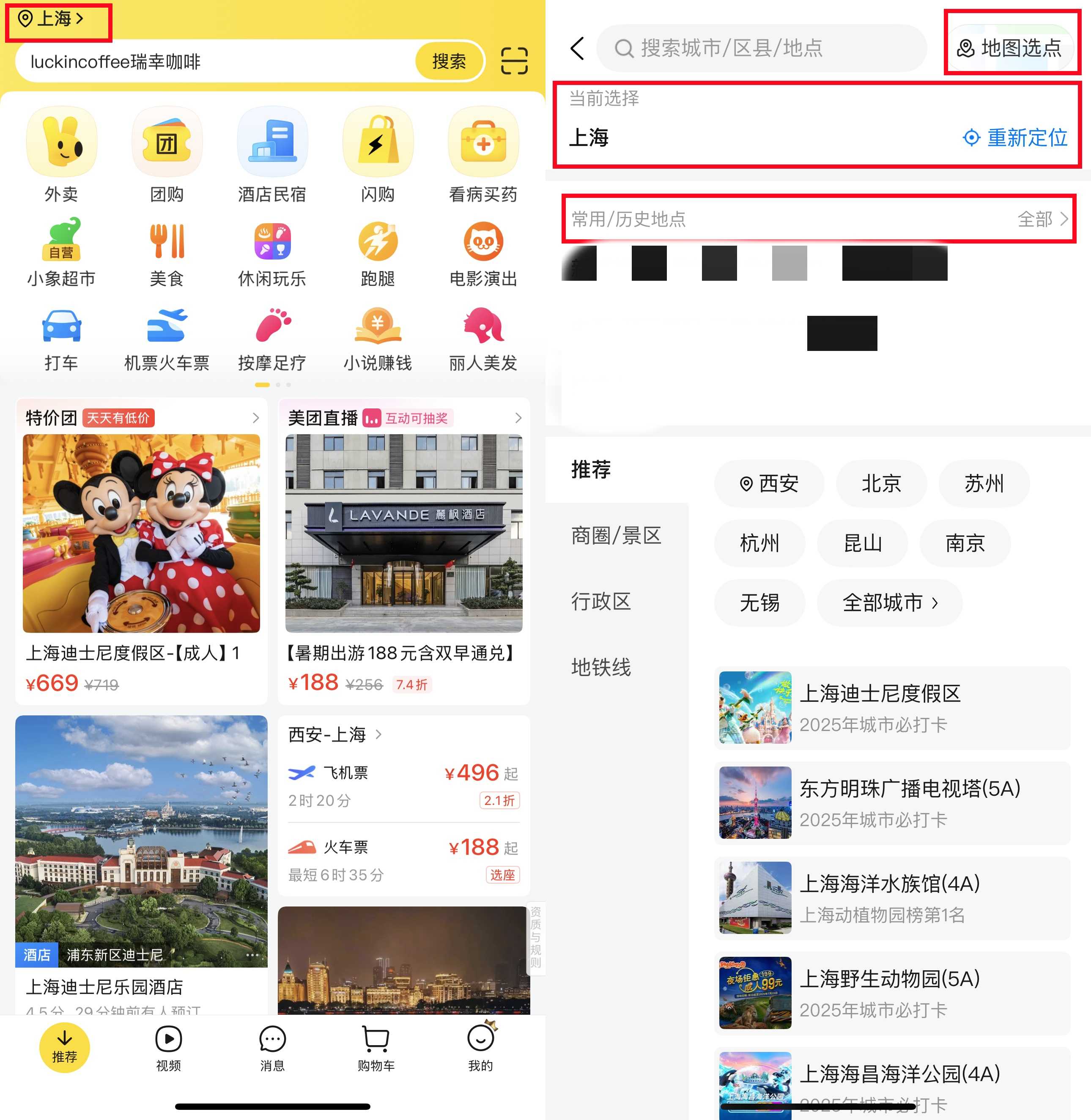
- Type or pin your city and address (e.g., your hotel’s name/address). If you don’t know Chinese, copy-paste the address from Google Maps (in Chinese) or ask your hotel for the Chinese address.
4. Link a Payment Method
Meituan uses WeChat Pay or Alipay. First, link your foreign credit card to WeChat/Alipay, then connect to Meituan. Payments will be automatic after that.
How to Use Meituan for Food Delivery

Getting food delivered on Meituan is easy with my steps below.
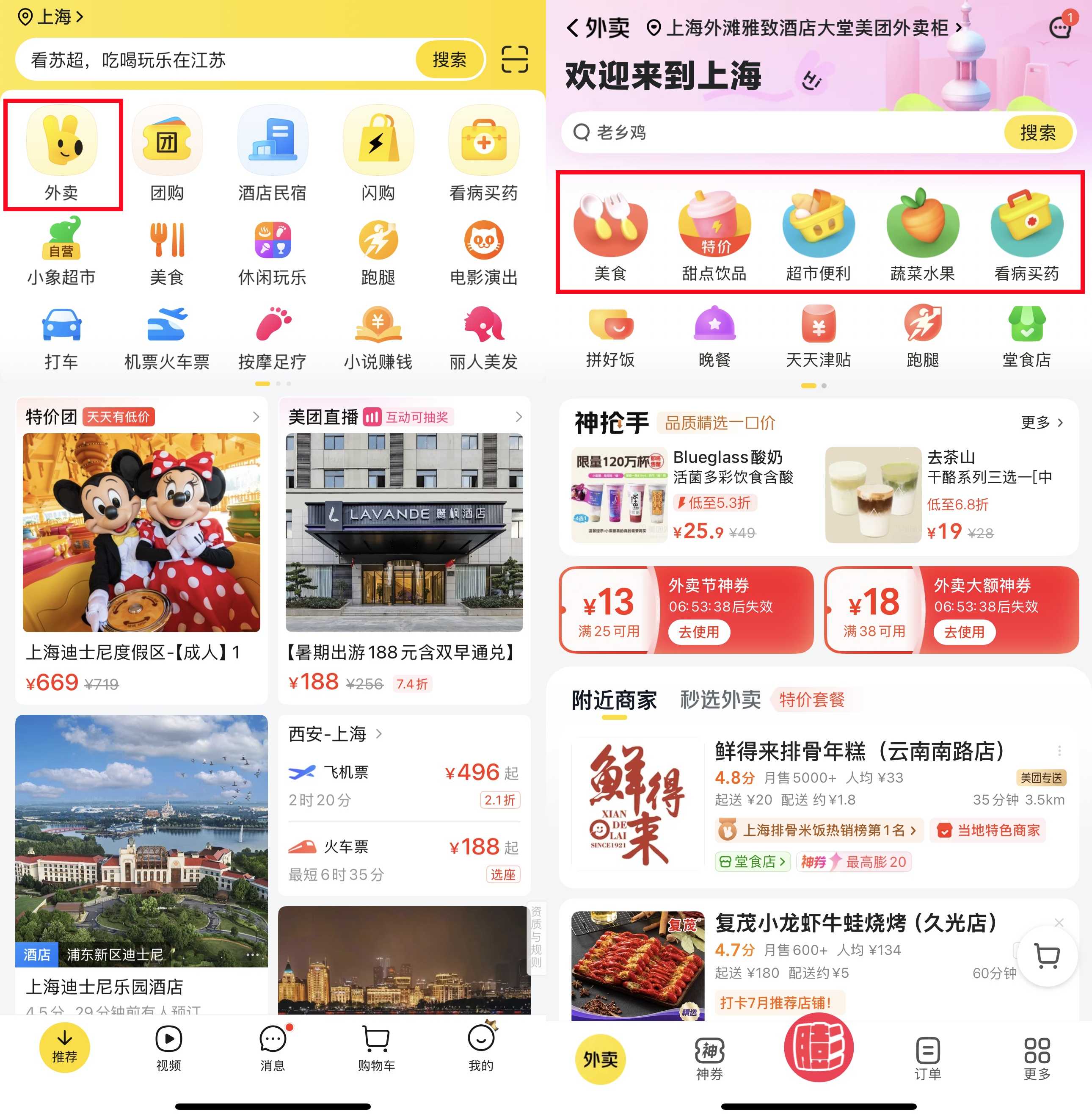
- Open the Food Delivery Section Look for the “外卖” (Takeaway) icon on the main screen—this is usually the first icon you see. Click it to access all the nearby takeout restaurants.
- Find the Food You Want You can browse the list of nearby restaurants or enter the specific food you want to eat (such as "pizza" or "noodles"). To have the best experience, stick to places with high yellow star ratings and delivery times within 45 minutes - this means fresher food and faster service.
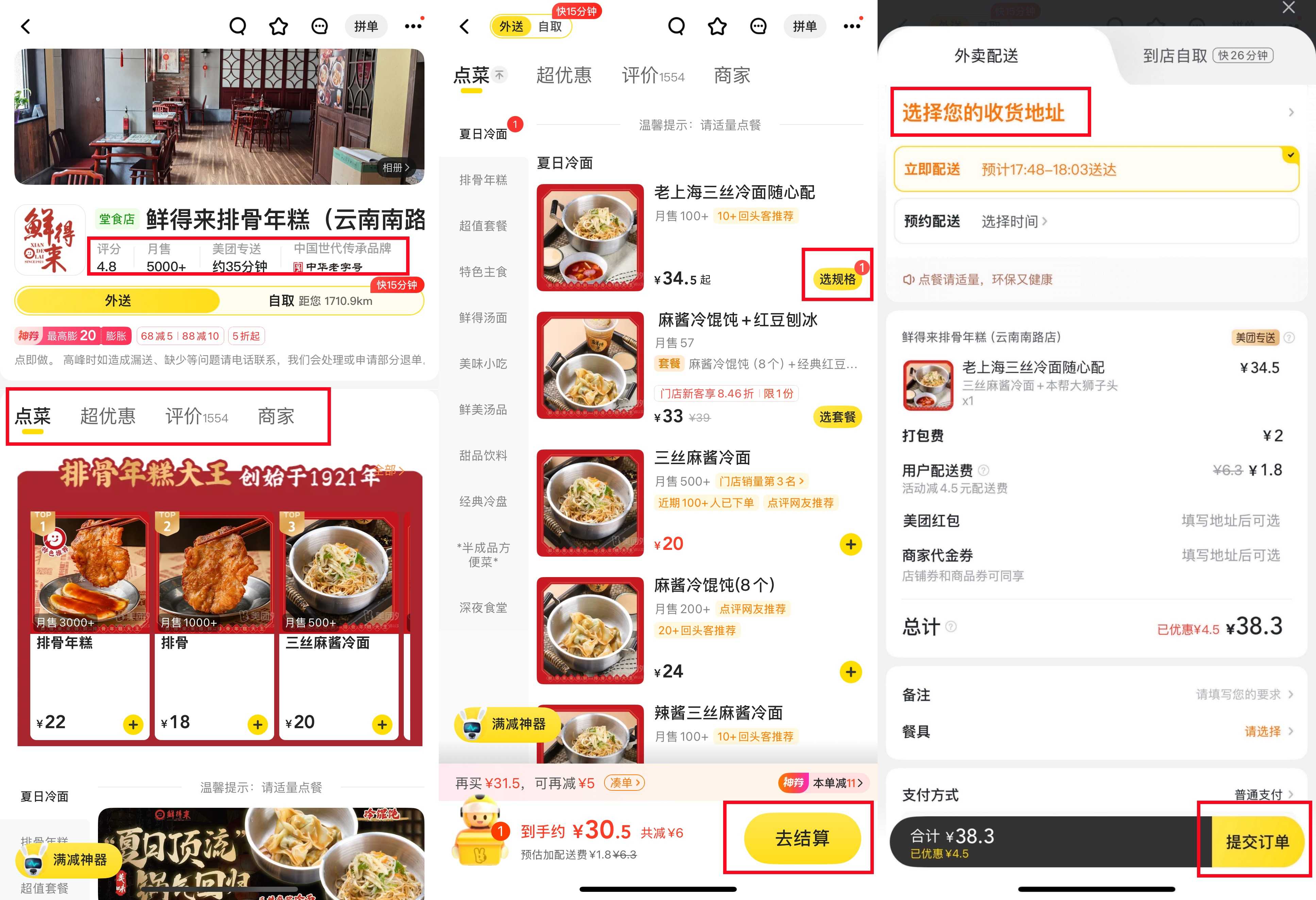
- Check Important Details Before picking a restaurant, can mainly look at 2 things:
- Delivery fee: Most places charge ¥3 to ¥6 for delivery.
- Minimum order amount: You need to pay a certain amount of money to get the door-to-door delivery service, but it's very easy to do - just add a drink to your main course.

- For each dish you want, click 选规格"Select Options" to choose the spice level or portion. Once you have added everything to the shopping cart, be sure to check carefully to avoid mistakes. Then click "Continue Checkout". If you need to leave a note - such as "Don't eat spicy food" for the kitchen or "Leave it at the hotel front desk" for the driver - write it here.
- Pay and track your order. Use wechat Pay or Alipay for payment. Once your payment is approved, you will be confirmed. Then you can see the driver's progress on the map, so you can accurately see when they will bring your food.
- When the driver arrives at your location, they might call you. If you don't speak Chinese, ask your hotel staff to answer the phone for you or send a short message to the driver, such as "I'm in the lobby", to let them know where they can find you.
How to Use Meituan for Restaurant Deals

Meituan has great discounts on in-restaurant meals—here’s how to use them:
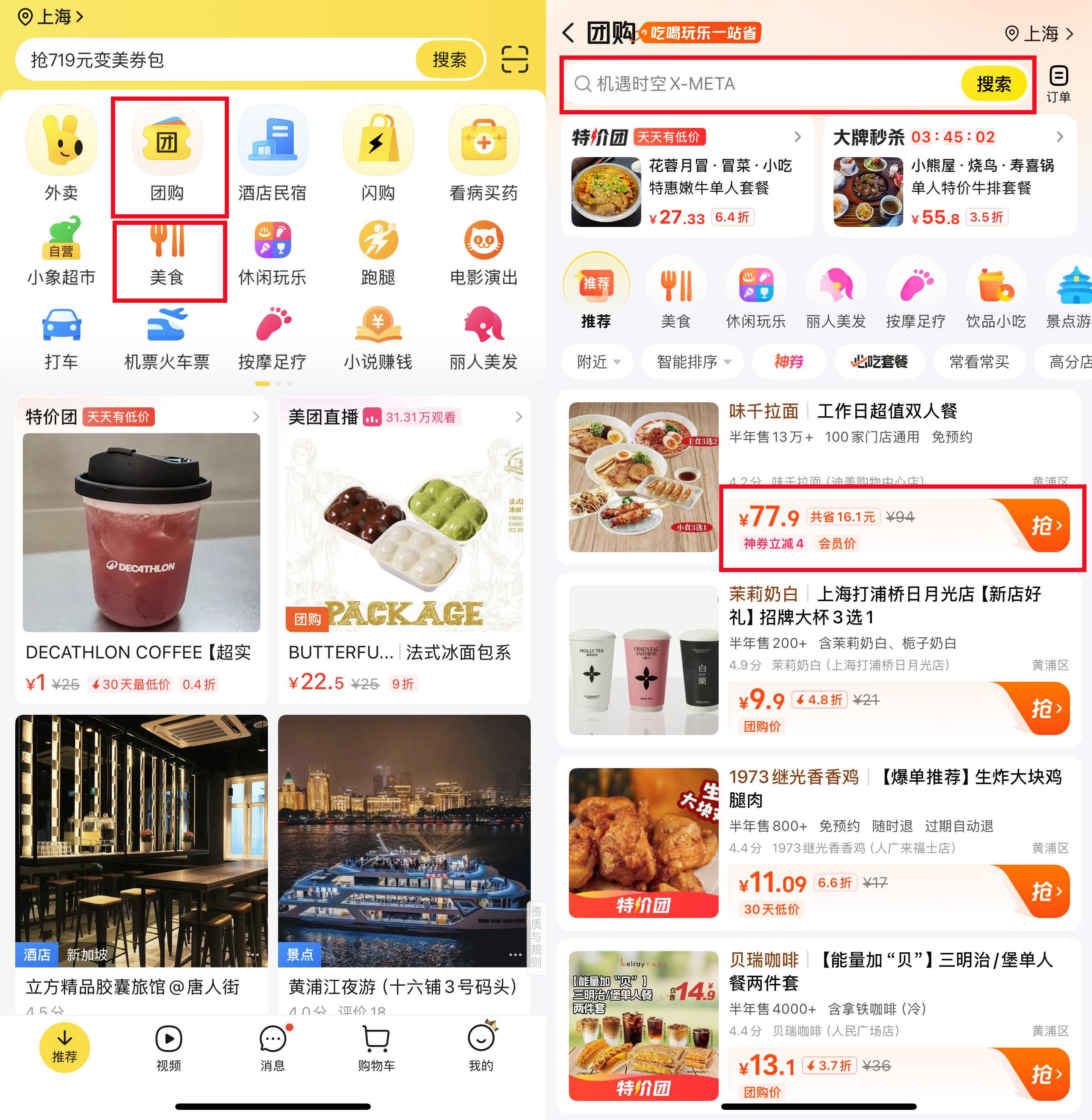
- Access the Dining Deals SectionHead to the “团购” (Group Buying) section. You’ll spot it by its icon—usually a fork and chopsticks or a voucher symbol. Tap it to browse all available restaurant deals.
- Find a Deal You LikeYou can search for specific cuisines (like “hotpot” or “dim sum”) or just scroll through nearby offers. Look for deals like “50% off lunch sets” or “BBQ for two at a discount”—these are the best ways to save.
- Read the Deal Fine Print Don’t skip this step! Check:
- What’s included: Does the deal cover a full meal, or just a main dish?
- Time limits: Is it only valid on weekdays, or during lunch hours?
- Reservations: Do you need to book a table before going?
- Buy and Use the Deal
Once you find a good deal, make the payment with wechat pay or Alipay. After payment, the voucher will appear in the "To Use" folder of the app. When you arrive at the restaurant, show the voucher code to the staff - they will scan it and the discount will be immediately applied to your bill.
How to Use Meituan for Transport (Taxi, Bike)

Meituan isn’t just for food—you can also book rides or rent bikes. Here’s how:
1. Book a Taxi (Ride-Hailing)
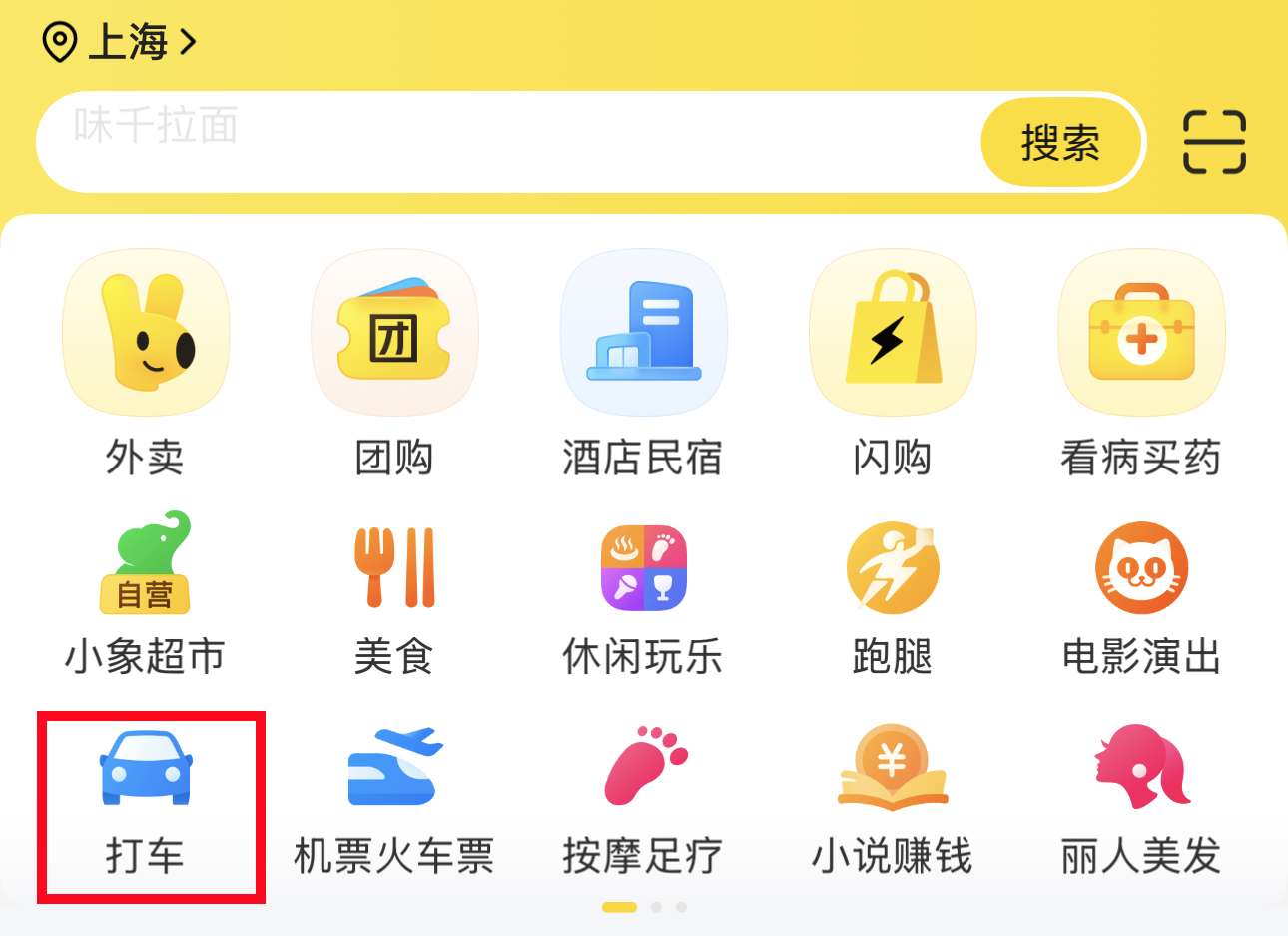
- Open the ride area: Find the "打车" icon (which looks like a car), and then click on it.
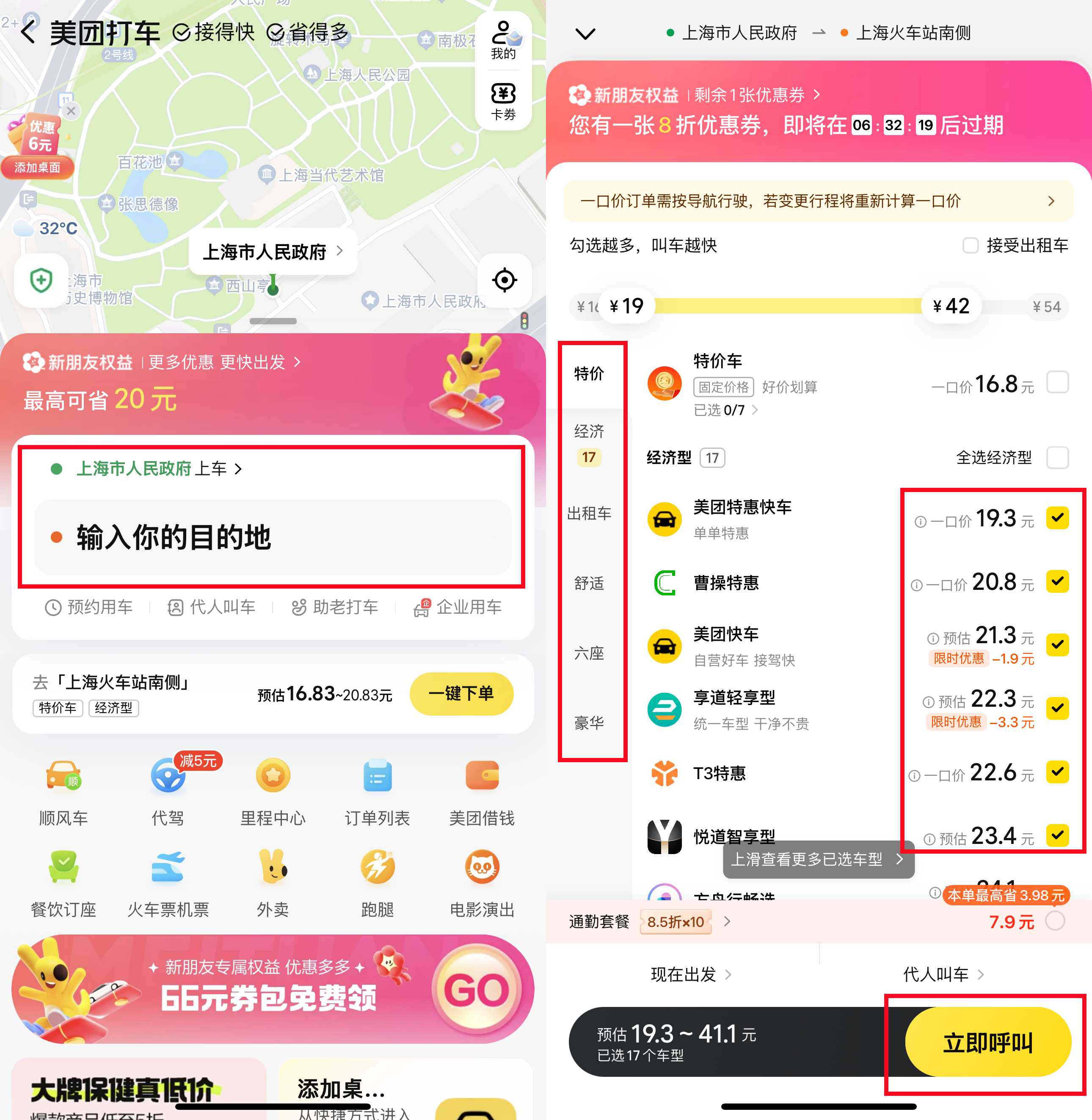
- Set your location: The application may automatically detect your location (your pick-up point), but you can adjust it by fixing the map. If you don't understand Chinese, you can copy and paste the address from Google Maps or your hotel confirmation.
- Choose the type of car: Standard cars are suitable for most people, but you can choose "Comfort" because it has more space, or if you have luggage, you can choose a larger car.
- Confirmation and tracking: You will see the estimated fare and the time you need to wait for the driver. Click to confirm your reservation. Then, based on the driver's location on the map - you will know exactly when they will arrive.
- Communicating with the driver: If the driver calls you and you don't speak Chinese, ask your hotel staff for help or send a simple message, such as "在这接我", to confirm your location.

2. Rent a Shared Bike
- Find the bicycle section: Look for the "Shared Bike" icon (which looks like a bicycle), and then click on it.
- Unlock: Scan the QR code on the bike with the Meituan app to unlock it.
- Cycling and parking: Walk around with your bike and then park it in the designated bike area (you will see signs or marker points). Lock the bicycle and end the trip. The payment will be automatically deducted from your linked wechat, Alipay or Alipay account, so you don't need to do anything else.
How to Use Meituan for Activities (Movies, Spa, Beauty)

Meituan works for more than just food:
1. Movie Tickets
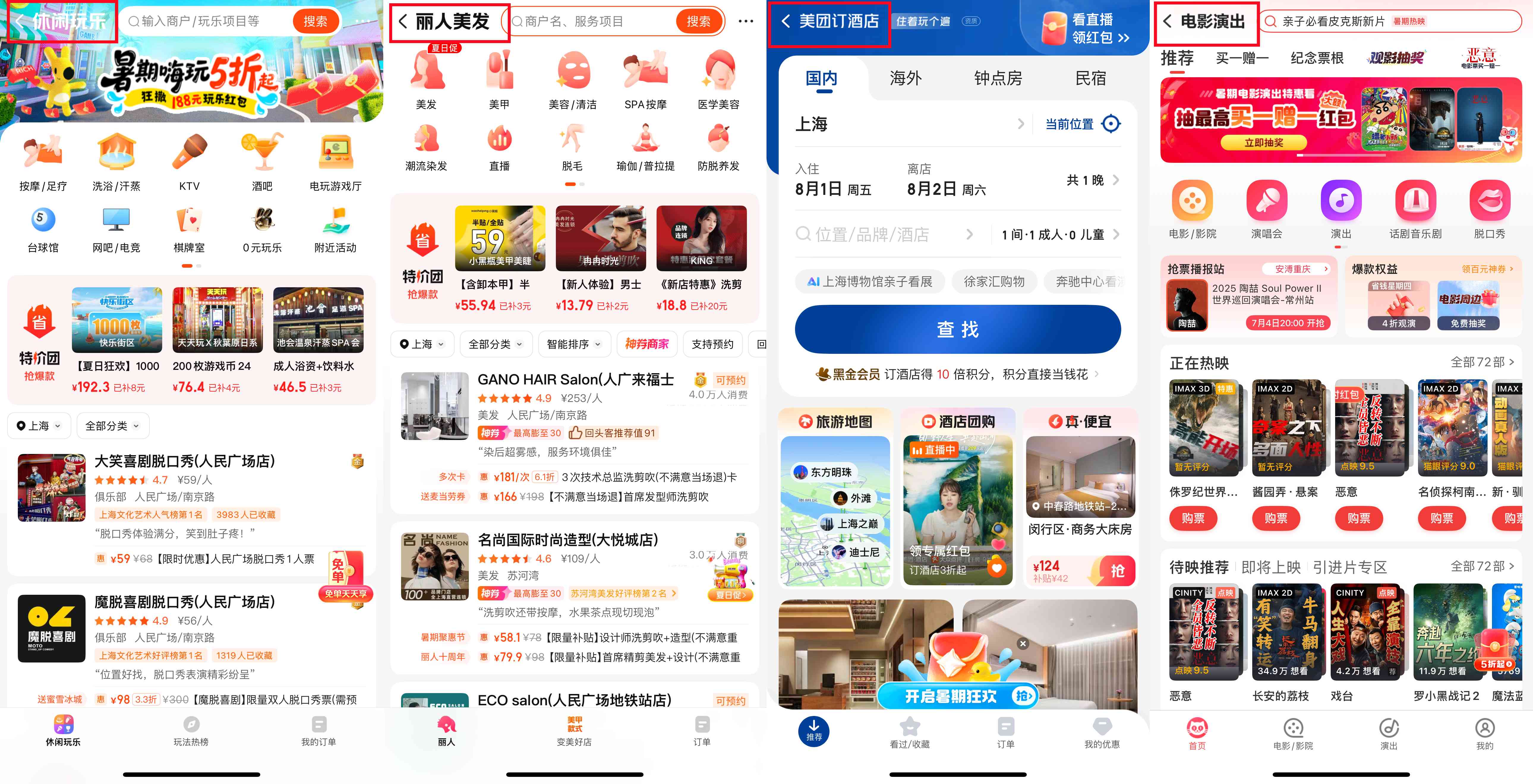
- Go to “电影 / 演出” (Movies/Shows).
- Pick a cinema and movie, choose seats, and pay. Show the ticket QR code at the cinema.
2. Spa, Massage, or Beauty
- Tap “丽人 / 美发” (Beauty/Hair).
- Browse services (massages, haircuts, facials), check reviews, book a time, and pay. Show the voucher at the shop.
3. Other Services
- For laundry, home cleaning, or workshops, use the “生活服务” (Life Services) section. Book, pay, and show the voucher when you arrive.
[5% Off] Must-Visit Attractions in China
Check some of the top attractions in China below!👀
[8% Off] Best China Hotel Recommendations
From now until stock last, you can enjoy up to 8% off hotel deals on Trip.com when you register as a member on desktop or app!
What to Prepare for a Trip to China?
- Visa & Entry Tips China’s 240-hour visa-free transit policy now covers 54 countries, incl. the US, UK, Canada, and Brazil, allowing up to 10 days during layovers. Learn more about China Entry Tips to land in China easily.
- Getting Connected VPNs are vital for accessing Google, WhatsApp, Instagram, etc in China. Set one up before arriving. China eSIMs are the easiest option for data and bypassing restrictions. Pocket Wi-Fi devices work best for group but are pricier and require pickup/return.
- Money Exchange & Tax Refunds Exchange money in China banks (better rates than airports). ATMs accept foreign cards, but notify your bank first. For tax refunds, spend over ¥500 at stores with a "Tax-Free" sign. Keep receipts and get forms stamped at customs before departure.
Must-Have Apps in China
- China Payment Apps Forget cash. Chinese use Alipay (I like it better) or WeChat Pay to pay for everything in China. Scan a QR code at noodle stalls, metros, even temples. Link your foreign Visa/Mastercard before landing.
- China Map Apps Amap (Gaode Map) & Baidu Map (limited English) is what locals use, with real-time navigation, metro/bus routes, and traffic updates. Apple Maps does a good job too if you're already an IOS user.
- China Transport Apps Street taxis are cheap, but drivers rarely speak English. Use China Taxi App like DiDi (China’s Uber)—set your destination in English, pay by Alipay.
- China Travel Apps 15+ China trips taught me: Use Trip.com. It's the best English app for booking China trains/flights/hotels + finds Trip.com deals.
- China Dating Apps Locals use Tantan (China’s Tinder) and Momo. WeChat’s “People Nearby” works too, but expect language barriers unless your Mandarin’s decent.
- China Food App Use Meituan (also helps find nearby restaurants) or Ele.me for food delivery—both have English mode. No English menu in restaurants? Scan the QR with Alipay's translator.
FAQs about Meituan App
Can I use Meituan with a foreign phone number?
Yes. When registering, enter your foreign number to get a verification code via SMS (works for most countries).Is there an English version of Meituan?
No, but you can use translation methods (mini programs, screenshot translators) to get by.How do I pay on Meituan?
Use WeChat Pay or Alipay. Link your foreign credit card to WeChat/Alipay first, then connect to Meituan.How do I find restaurant deals on Meituan?
Go to the “团购” (Group Buying) section—you’ll see discounted packages for local restaurants.Does Meituan work in all Chinese cities?
Major services (food delivery, ride-hailing) work in big cities (Beijing, Shanghai, Guangzhou, Shenzhen). Smaller cities may have limited coverage—check when you arrive.


384349 booked