How to Use Amap (Gaode Map) Guide for Foreigners in China


If you’re traveling to or living in China, you’ve probably noticed that Google Maps doesn’t work well here—its data is outdated, and many features are unavailable. But don’t worry: Amap (also known as Gaode Map) is China’s most popular navigation app, designed specifically for the country’s roads, public transport, and local services.
To Beijing
To Shanghai
To Guangzhou
See all flights


What Is Amap (Gaode Map) in China?

Amap (short for “Gaode Map” in Chinese, 高德地图) is China’s leading digital map, navigation, and location-based service platform owned by Alibaba Group. Launched in 2002, it has become the go-to app for over 700 million users in China, offering real-time navigation, traffic updates, ride-hailing, and detailed information about local businesses, attractions, and public services.
Unlike Google Maps, Amap is fully optimized for China’s road networks, including newly built highways, small alleys, and real-time traffic conditions, making it the most reliable navigation tool for foreigners in China.
Does Amap Have an English Version? How to Switch to English

Yes! Amap officially launched its English version in January 2025, tailored specifically for international users, and it now supports 15 languages in total, including English, Spanish, French, and Japanese. Switching to English is easy—follow these steps:
- Open the Amap app.
- Tap the “Me” tab (the profile icon in the bottom right corner—looks like a person).
- Scroll down and tap “Settings” (⚙️ icon, labeled “设置” in Chinese).
- Select “General” (通用设置) and then tap “Language” (语言).
- Choose “English” from the list. The app will automatically refresh, and all menus, buttons, and instructions will switch to English.
Alternative: If you’re using the international version “Amap Go” (available on App Store and Google Play), it will automatically prompt you to select a language when you first open it, including English. The English version also includes an English ride-hailing interface, making it even easier for foreigners to book rides.
5 star
Very Good11713 Reviews
People's Square Area Shanghai|0.54km from city center
If you travel in Shanghai, in my opinion this hotel is one of your best choices. The room is clean and comfortable, and also which is the most important thing is it is very convincing for visitor to find it. And almost all the famous places for visitor that must have a visit are just nearby the hotel. It is on the Nanjing Road and you can just walk to the Waitan and Lujiazui very convinice to visitors.
Last I really wanna show my sincerely thanks to all staffs especially Mr.Jimmy Zhu and Staff No.078 staff. During our staying, they really showed their professionalism and helped us a lot. As a visitor, I really appreciate it and thanks.FromUS$99
Outstanding6666 Reviews
People's Square Area Shanghai|0.47km from city center
I randomly picked this hotel for a business trip, and it completely exceeded my expectations – a pleasant surprise! The location is incredibly convenient, and the service quality of this long-standing hotel is truly exceptional. Many of the staff members are locals from Shanghai, and they are all incredibly friendly and approachable. You can always see many international guests around the hotel, which clearly indicates that it's consistently busy. The overall experience was fantastic, and I highly recommend it!FromUS$113
Excellent8647 Reviews
People's Square Area Shanghai|0.7km from city center
Our stay at the Marriott was overall very satisfying. 👍 Upon arrival, the front desk proactively upgraded our room and offered complimentary breakfast for our child, which made for a very pleasant experience. My child went swimming on the sixth floor for two consecutive days. The hotel staff were very attentive, providing towels and water, and there was a lifeguard on duty. The swimming area environment was also excellent. The hotel room size was decent, and the cleanliness was good. It came with a bathtub, which my child loved 💕, although the toilet was a bit old. I'd like to praise the hotel's delicious breakfast 😋, which offered both Chinese and Western sections. The restaurant was spacious with a beautiful ambiance and a wide variety of food options, definitely something to look forward to! The overall check-in experience was great; the lobby staff were very responsive to all requests. Food delivery robots could bring orders directly to our room. When we left, they even gave us small toys as souvenirs. We will definitely visit again!FromUS$148
Very Good5143 Reviews
Huaihai Road Area/Xintiandi Area Shanghai|1.78km from city center
Big thumbs up for the Garden Hotel! I came specifically to stay here for two nights, having heard great things, and I truly experienced the professionalism, warmth, attentiveness, and courtesy of a top-notch hotel. I enjoyed the cleanliness, tranquility, comfort, and a wonderfully unconstrained sense of relaxation. I believe the Garden Hotel has a strong competitive edge in Shanghai, characterized by its approachability and welcoming atmosphere.FromUS$127
Outstanding10150 Reviews
Train Station Area Shanghai|2.4km from city center
A top choice for business travelers! The hotel is conveniently located, close to the metro station and commercial areas. The room is spacious and quiet, perfect for working and resting, with smooth internet access. The cleanliness is excellent, and the bedding is comfortable, ensuring a good night's sleep. The front desk handled check-in efficiently, and the service was attentive. The breakfast spread was rich and varied. Overall, I had a very satisfying experience and will prioritize staying here for future business trips.FromUS$79
Business travel
Good2630 Reviews
Jing'an District/West Nanjing Road Shanghai|0.85km from city center
My friend was only staying in Shanghai for a day, so naturally, I wanted to give her an itinerary that offered both 'old-world charm and new-age chic.' While passing Nanjing West Road recently, this InterContinental 'Luxury Collection' hotel immediately caught my eye. And just as I expected, critical as she is, she complimented my taste the moment she walked in.
Its most appealing features are its convenient location and its ability to be a tranquil oasis amidst the bustle: step outside, and you're on the vibrant Nanjing Road; turn around, and you're in the quiet serenity of a residential area. My friend said the elevator decor instantly made her feel like she'd 'traveled through time,' and that unique 'Haitian style' evoked long-lost memories of Shanghai. She had originally come to sightsee but happily spent most of her day lingering at the hotel.
What she loved most were the terrace and the restaurant. On a summer evening, the breeze felt just like those childhood nights spent cooling off in the alleyways – she used to live in a Shikumen house. She remarked, 'If only I could lie in a wicker chair, fan myself with a palm-leaf fan, eat watermelon, and watch an outdoor movie, that would be truly divine.' She also adored the red hanging ornament in the lobby; it was vibrantly bright, yet its glass texture gave it a lively feel, much like Shanghai's character – passionate yet steady, with a touch of lightness within its composure.
The food did not disappoint either. I pushed her to try the Shiqipu Noodle Restaurant, where the owner asked in Shanghainese, 'Mi dao ai hao fa?' (Is the taste good?), and she smiled and replied, 'Authentic,' instantly tearing up. She specifically bought the sweet variety of butterfly pastries from the International Hotel – saying 'only sweet is truly Shanghai.' Her only regret was: having stayed in too many foreign-style grand hotels, this time, with Shanghai elements everywhere and Shanghai flavors in every bite, it was 'just missing the sound of Shanghai.' Perhaps the cicada chirps in the alleyways and the hawkers' cries from the Shikumen are the hometown sounds she truly yearns to hear.
However, she has already declared: the next time she returns, this will be her chosen hotel, and she plans to visit all the routes I arranged. I believe the charm of Shanghai has never been in its superficial glamour but in its ability to always find the most fitting way to blend East and West, ancient and modern, living as a unique 'Haipai' (Shanghai style). This is also the root that every Shanghainese person cherishes.
Below are the three half-day itinerary options I created for her, which I've also compiled here, hoping they might help someone else:
Option 1 · A Stroll Through Old Shanghai Charm
Start from the hotel's main entrance on Fengyang Road and turn into Huanghe Road. The Changjiang Building and Changjiang Theater were the last residences of Eileen Chang; Huanghe Road is the origin of 'Blossoms Shanghai' (Fan Hua). The International Hotel is where her mother and aunt once stayed; next to it, the Sports Museum is rumored to be where Eileen Chang used to study. Diagonally opposite is the History Museum (formerly the Racecourse); the East Wing houses the old bronze lions from the HSBC Building on the Bund, and the 'Echoes of Shanghai' exhibition in the West Wing happens to talk about the past of Fengyang Road. The ornate windows of the West Wing and the Changjiang Building, mirroring the hotel's architecture, perfectly showcase the most fashionable Art Deco style of the 1930s.
Option 2 · Tracing Red Memories
Walk along Chengdu North Road to the Secretariat of the China Labor Movement, to see how Shanghai workers united into a revolutionary force; then visit the former site of the Songpu Special Committee. Go to the Sihang Warehouse to hear the echoes of the Battle of Shanghai and see the bullet-riddled walls recount the tragedy of that year. At night, turn into Xiang Kang Li on Xinchang Road to find the former site of the CCP Central Committee's secret printing press; on Nanjing West Road, there is also the former site of the Soviet Liaison Office, where, amidst the flickering lights, memories of the past reside.
Option 3 · Modern and Retro Collision
The LV 'Big Boat' on Nanjing West Road is currently a popular spot for photos; after visiting, turn into Wujiang Road for shopping and dining, and further ahead is Zhangyuan Shikumen – where new trends emerge in old alleyways, perfect for capturing stunning photos.
Food Tips
· The hotel restaurant's afternoon tea set is exquisite and picture-perfect.
· Shiqipu Noodle Restaurant (the owner's Shanghainese is a living signboard).
· Deda Western Restaurant and Gongdelin Noodle Restaurant, each with its own charm.
· Donghai Small Restaurant (authentic Ningbo cuisine).
· Chongming cuisine on the second floor of the hotel, authentic local flavors.
· International Hotel butterfly pastries, remember to choose the sweet ones.
Though the day was short, the essence of Shanghai will give her much to savor. When she returns next time, we'll continue our journey.FromUS$151
Outstanding9433 Reviews
The Bund Area Shanghai|1.73km from city center
Overall, I was very satisfied with my stay. The hygiene was good, and the room layout was well-designed. The shower and toilet were separate, which was convenient. There was also a vanity table for women, which was super helpful – no more standing while doing makeup! 👍👍 This hotel is incredibly female-friendly.
The location is excellent; it's about a 5-minute walk to the Huangpu River, giving direct access to bustling areas. You can quickly visit Shanghai's iconic landmarks, and Yu Garden is right next door with plenty of delicious food options and even travel photography services.
The breakfast was incredibly rich and diverse. Eating there before heading out for some sightseeing really brightened up my day! I'll definitely stay here again next time I visit! 😝😝FromUS$101
8723 Reviews
The North Bund Area Shanghai|2.55km from city center
The hotel's location is convenient, not far from the subway station, making it very easy for commuting and getting things done. The overall style of the hotel is simple and elegant, the lobby has a great atmosphere, the hallways are quiet, and the soundproofing is excellent, so you won't be disturbed by outside noise at all. The room layout is well-designed, with clear distinctions between the work and rest areas, and the room size is ample, so it doesn't feel cramped. The room cleanliness is impeccable, and the toiletries have a fresh scent. The bedding is comfortable, allowing for a good rest and relaxation after a busy day. Front desk staff Z handled check-in and extension procedures quickly and even proactively offered recommendations for nearby dining and shopping spots. The hotel has a gym and a self-service laundry room, providing complete amenities. Overall, the stay was comfortable and reassuring. Choosing this hotel was a great decision, and I will definitely book it again in the future.FromUS$94
Good3775 Reviews
The Bund Area Shanghai|1.27km from city center
We were on a road trip and stayed in Shanghai for two days. Parking was convenient with plenty of spots available. We spent one day exploring on foot and the other at Disneyland. The room was clean and hygienic, and the breakfast was delicious, especially the Western pastries which tasted very authentic. We signed up for a Marriott membership, which allowed one child to eat breakfast for free. The hotel is also very close to the Bund, Nanjing Road Pedestrian Street, and the Sihang Warehouse.FromUS$135
Very Good5694 Reviews
People's Square Area Shanghai|0.9km from city center
The room is very spacious. The location is right on Nanjing Road, making it super easy to find places to eat, shop, or buy souvenirs. The breakfast was decent with a good variety of options.FromUS$111
Family friendly
Very Good4118 Reviews
Jing'an District/West Nanjing Road Shanghai|2.6km from city center
The hotel was exceptionally clean and tidy. It was recommended by my foreign colleagues for my business trip to Shanghai. The surrounding area is bustling, located in the core business district of Jing'an Temple, making it very convenient for subway travel, shopping, and sightseeing. The bedding in the room was soft and comfortable, and the soundproofing was excellent, ensuring a good night's rest for my business trip. I happened to be there during a typhoon with heavy rain in Shanghai, and I particularly appreciate the doorman who promptly helped with my luggage. The front desk and room service were professional and attentive. The executive lounge experience was outstanding, with excellent food. From the room window, I could enjoy panoramic views of the beautiful surroundings.FromUS$91
Outstanding7491 Reviews
Dapuqiao Area Shanghai|2.92km from city center
Decent stay, but several misses for a 5-star property
My stay at the Pullman Shanghai Central was a mixed bag—nice in some areas, but disappointing in others.
Check-in: The staff were very friendly and welcoming on our first day. However, I was surprised that they wouldn't let me check in until 3:00 PM. At most other hotels, I'm usually able to get an early check-in (even if I arrive at noon), so this felt a bit rigid for a property of this level.
The Room: The room itself was comfortable—the bed was soft and the shower pressure was actually perfect (not too strong, not too weak, just right). Unfortunately, the room smelled strongly of cigarette smoke upon arrival. To their credit, when I called the front desk, they immediately offered to change my room, which was very professional of them.
Breakfast: This was the biggest letdown. The breakfast buffet felt more like what you'd expect from a 3-star hotel rather than a 5-star Pullman. The quality and selection just weren't there for me.
Overall: It was an okay stay—nothing terrible, but nothing exceptional either. I wouldn't rate it a 10/10, more like a solid 6. Good service from the staff, but the check-in policy, smoke issue, and food really held it back.FromUS$93
Outstanding13770 Reviews
Lujiazui Area Shanghai|2.51km from city center
When in Lujiazui, Pudong Shangri-La is always my first choice. The hotel is well-maintained, and Sean Zhu, the front desk manager, arranged my room in advance. I'm very satisfied with it – it's spacious with a great view. He was friendly and polite. The room was exceptionally clean, and any requests were promptly attended to. During check-in, he also helped register my license plate into the system. Overall, it was an excellent experience, and I'll definitely stay here again on my next visit to Shanghai.FromUS$170
Very Good11471 Reviews
Train Station Area Shanghai|2.52km from city center
The InterContinental Shanghai Jing'an is definitely my first choice when I travel to Shanghai for business. It's just a block away from Shanghai Railway Station, the breakfast is plentiful, the rooms are clean and tidy, and both the Chinese and Japanese restaurants are excellent. I also really like the gym, swimming pool, and steam room. Bella at the front desk is super nice and provides great service. I'll keep choosing this hotel!FromUS$118
Outstanding4548 Reviews
Lujiazui Area Shanghai|2.69km from city center
This is my second time at the Ritz-Carlton Pudong, and the facilities are, as expected, top-notch. Since I have a flight to the UK in two days, I decided to spend both days fully enjoying the hotel experience. The concierge team thoughtfully prepared extra bottled water for me in advance, and also gifted me a little lion charm and a personalized room key. The handwritten card was a truly warm and sincere touch, showing they remembered details I had mentioned, and they even helped me with restaurant reservations. I also took the opportunity to experience the Ritz-Carlton spa. While the price might be a bit higher, the quality of service and the staff's attitude are absolutely impeccable.FromUS$325
Breakfast
Outstanding10311 Reviews
Sheshan, Songjiang University Town Shanghai|35.83km from city center
Nisha, our butler, provided excellent and responsive service, catering to all our needs. Overall, we had a very pleasant stay. The room environment was generally fine, but there was a musty smell in the hallway, which is a significant drawback that can't really be helped. However, we happened to check in at the same time as a senior citizen tour group, and it felt quite noisy. We hope the breakfast area arrangements can be further improved.FromUS$210
Outstanding2435 Reviews
Wujiaochang Commercial Area Shanghai|9.08km from city center
Every stay at Pagoda Hotel Wujiaochang has been a great experience. The location is superb, right in the Wujiaochang business district. It's within walking distance to Hopson One and Wanda Plaza, which is incredibly convenient, and also very close to Fudan University campus.
The front desk staff are very welcoming, and both check-in and check-out are handled very efficiently. The room layout is well-designed, and cleanliness is excellent. The bedding is very comfortable, with just the right balance of softness and firmness.
The smart room control system is very convenient, and the bathroom has a great wet/dry separation. The toiletries also have a pleasant scent. The breakfast offers a wide variety of options and tastes good. Overall, it offers great value for money, and I will definitely choose to stay here again!FromUS$78
Very Good524 Reviews
Hongqiao Airport/National Exhibition and Convention Center Shanghai|15.59km from city center
Location: Conveniently situated, directly accessible from Hongqiao Railway Station underground, after passing through the complex, so there's no need to go above ground to find it. Dining and other amenities are also easily accessible.
Hygiene: Satisfied, quite clean.
Facilities: Well-equipped, though the air conditioning was a bit difficult to adjust.
Service: A big commendation to the front desk duty manager who answered the phone and handled my issue on the evening of March 13th. There was a slight problem with my room type upon check-in, and the duty manager resolved it promptly and with a sincere attitude. Very satisfied!FromUS$89
Very Good1749 Reviews
Everbright Convention and Exhibition Center Shanghai|12.35km from city center
Service: The front desk staff were all very easy to communicate with.
Facilities: Everything was great, and there was even a robot delivering food.
Environment: It smelled wonderful as soon as I walked in, very comfortable, and the lobby was beautiful.
Hygiene: The bathroom was very clean, and the room overall was excellent.FromUS$28
Excellent1950 Reviews
Hongqiao District Shanghai|8.21km from city center
The hotel environment is clean and tidy, with excellent housekeeping, and the service is attentive and welcoming. The location is convenient, the price is affordable, and the stay was quiet and comfortable. Overall, it was a great experience with superb value for money. Highly recommended.FromUS$45
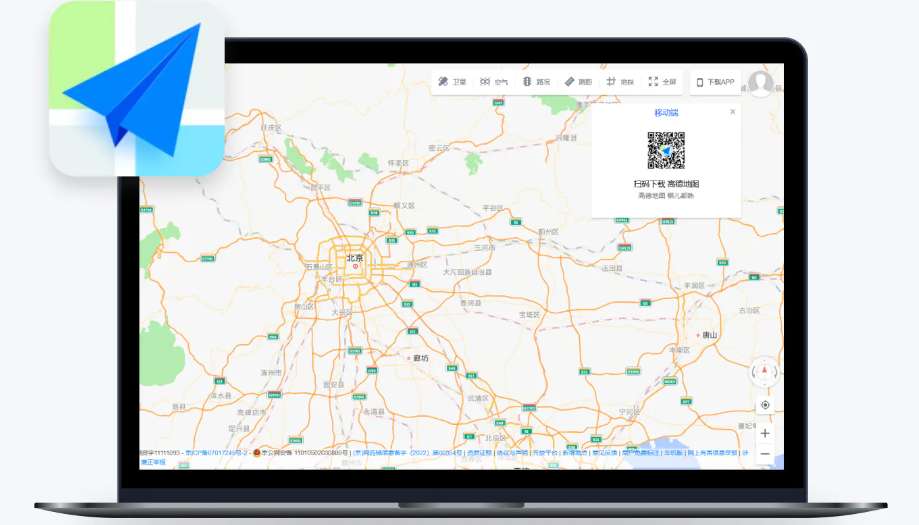
Amap vs. Google Maps, Baidu Maps & Apple Maps in China
Credit: jet ruby
If you’re confused about which map app to use in China, here’s a quick comparison to help you choose. We recommend Amap and Apple Maps for foreigners, as they offer the most accurate and user-friendly experience:
Map App | Accuracy in China | English Support | Key Pros | Key Cons |
|---|---|---|---|---|
Amap | ★★★★★ (Most accurate—optimized for China’s roads) | ★★★★☆ (Full English interface and support) | Real-time traffic, ride-hailing, offline maps, traffic light countdowns; works on all devices; owned by Alibaba for seamless payments. | Some local small businesses may only have Chinese labels. |
★★★★☆ (Uses Amap’s data—very accurate) | ★★★★★ (Fully English, no setup needed) | Seamless integration with iPhones; no extra app needed; works without VPN; offline maps available. | Only available on Apple devices; less detailed local business information than Amap. | |
★★★★☆ (Very accurate, similar to Amap) | ★★☆☆☆ (Poor English translation; most menus are in Chinese) | Good public transport information; AI traffic light countdowns (similar to Amap). | Clunky English interface; too many ads; not user-friendly for foreigners. | |
Google Maps | ★☆☆☆☆ (Outdated data; many roads/businesses missing) | ★★★★★ (Fully English) | Familiar interface for international users; works well outside China. | Most features (navigation, traffic) don’t work in China; requires VPN to access; data is not updated for Chinese roads. |
Final Verdict: If you have an iPhone, Apple Maps is the easiest (it uses Amap’s data but is fully English). If you have an Android device, or want more features (like ride-hailing and detailed local info), Amap is the best choice. Avoid Google Maps and Baidu Maps (unless you speak Chinese).
Amap Features You’ll Love
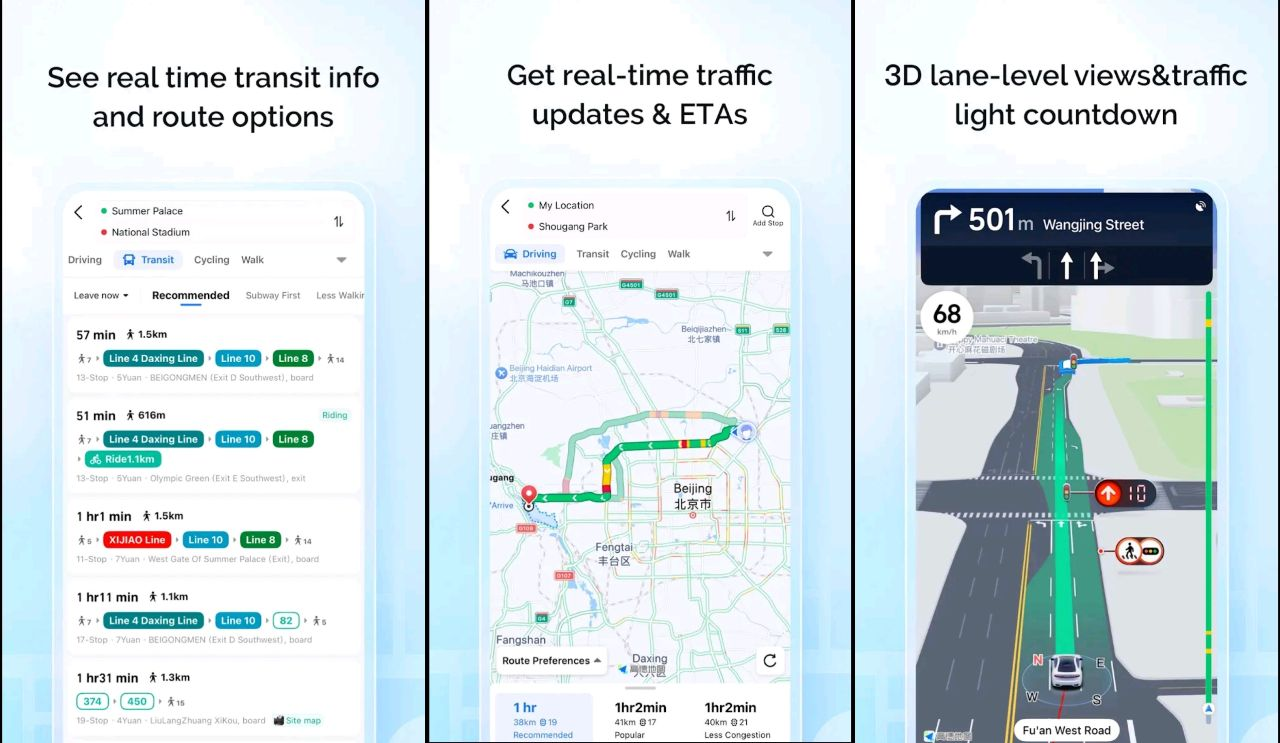
- Real-Time Traffic Light Countdown: Amap shows the exact number of seconds left for red/green lights, so you can plan your stops and starts without guessing. This feature covers millions of traffic lights across China, thanks to AI technology and data from local traffic departments.
- Accurate Fare Estimates: For driving and ride-hailing, Amap calculates the estimated cost based on distance, traffic, and time, so you won’t be overcharged.
- Offline Maps: Download maps of cities in advance to use Amap without an internet connection—perfect for areas with poor signal. Go to “Me” > “Offline Maps” to download the map for your destination.
- Nearby Search: Tap the “Nearby” icon to find restaurants, hotels, ATMs, public toilets, and other facilities near you—all with English descriptions (for popular spots).
Where to Download & Install Amap
Amap is free to download and available on both iOS and Android devices. Here’s how to get it:
- iOS Users: Open the App Store, search for “Amap” (not “Gaode Map”—the English name is preferred for international users) and tap “Get” to install. It works seamlessly on iPhones without any extra setup.
- Android Users: If you’re outside China, you can download Amap from Google Play. If you’re already in China and can’t access Google Play, you can get it from local app stores like Huawei AppGallery, Xiaomi App Store, or Oppo App Store. Search for “高德地图” (Gaode Map) since the Chinese name is more commonly used in local app stores.
Pro Tip: Download Amap before you arrive in China to avoid any internet or access issues. You can use it in guest mode without logging in—no Chinese phone number required.
How to Use Amap (Gaode Map) in China
Amap is user-friendly, even if you don’t speak Chinese. Here’s how to use its core features:
Search for Your Destination
- On the Amap homepage, tap the search bar at the top (it says “Search for a place or address” in English).
- Type in your destination in English (e.g., “The Bund, Shanghai” or “Beijing Capital International Airport”) or Pinyin (e.g., “Wangfujing”). Amap will automatically show relevant results with English labels.
- Tap the correct destination from the list—it will appear on the map, and you’ll see options to get there (navigation, ride-hailing, etc.).
Select Different Travel Modes
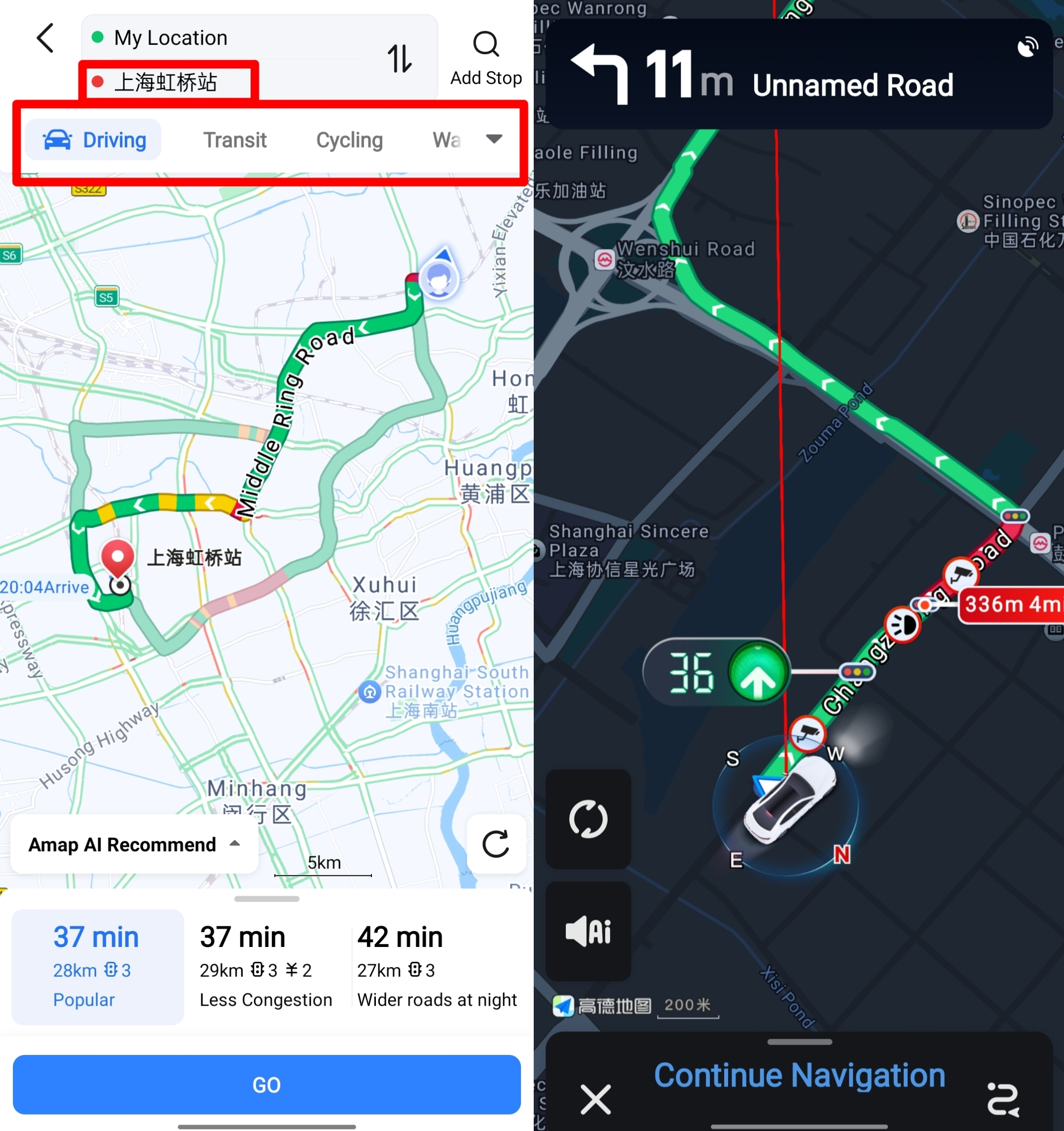
Amap supports four main travel modes, plus ride-hailing, to suit all your needs. After selecting your destination, tap the “Route” button (blue arrow icon) to choose your mode:
- Driving: Perfect for those renting a car or driving in China. Amap shows real-time traffic (red = congested, orange = moderate, green = smooth), estimated travel time, the number of traffic lights, and even real-time traffic light countdowns so you know exactly when the light will change. It also offers multiple routes to avoid traffic jams.
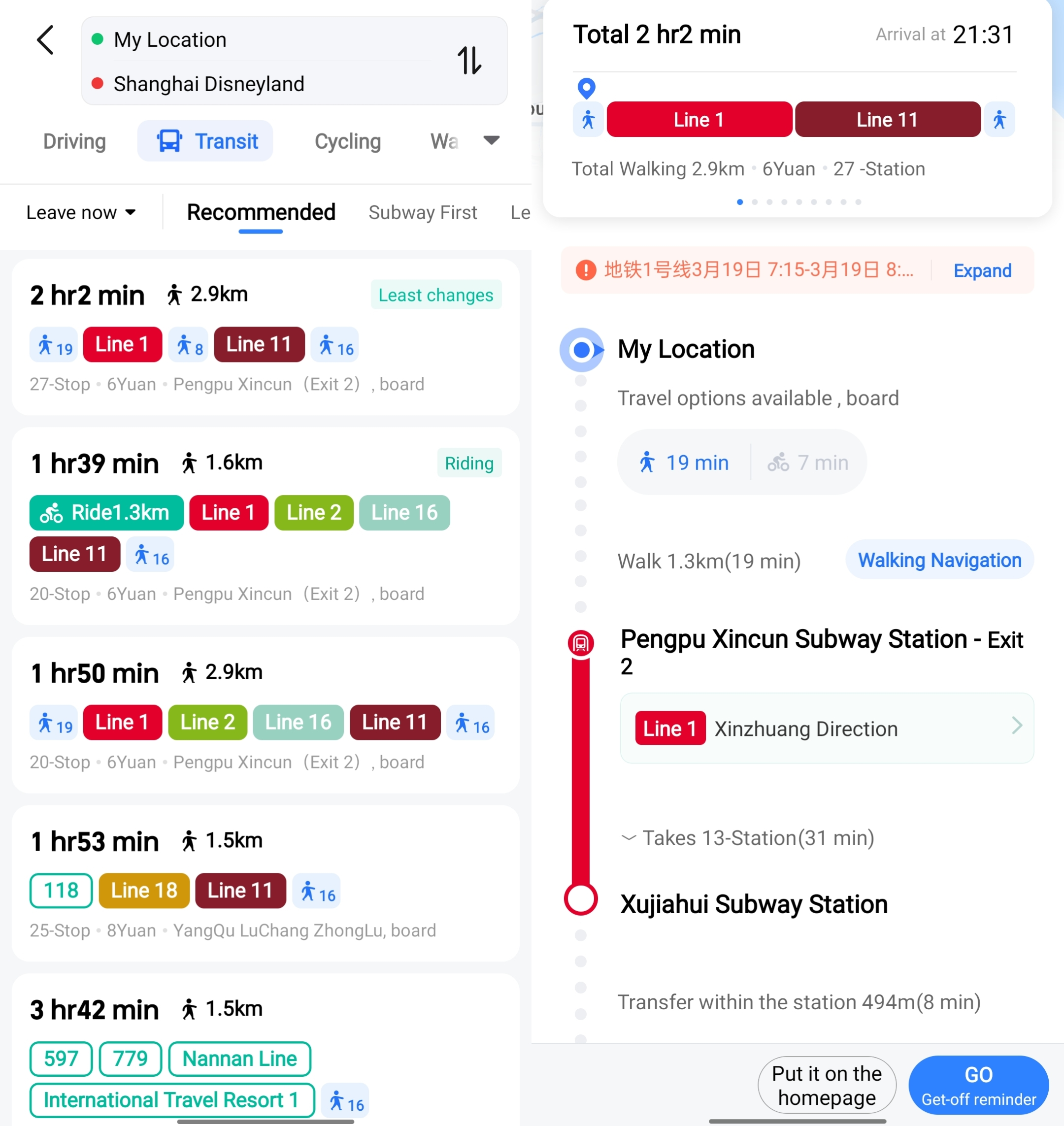
- Transit: Ideal for using buses, subways, or a combination of public transport. Amap shows detailed routes, including which subway line to take, which station to exit, and how long you’ll walk between stops. It also updates in real-time if there’s a delay or route change.
- Cycling: Great for short trips. Amap shows bike lanes, recommended routes, and the estimated time to your destination. You can also find shared bikes nearby (if available) through the app.
- Walking: Perfect for exploring cities on foot. Amap gives turn-by-turn directions, avoids busy roads when possible, and shows nearby attractions or facilities along the way.
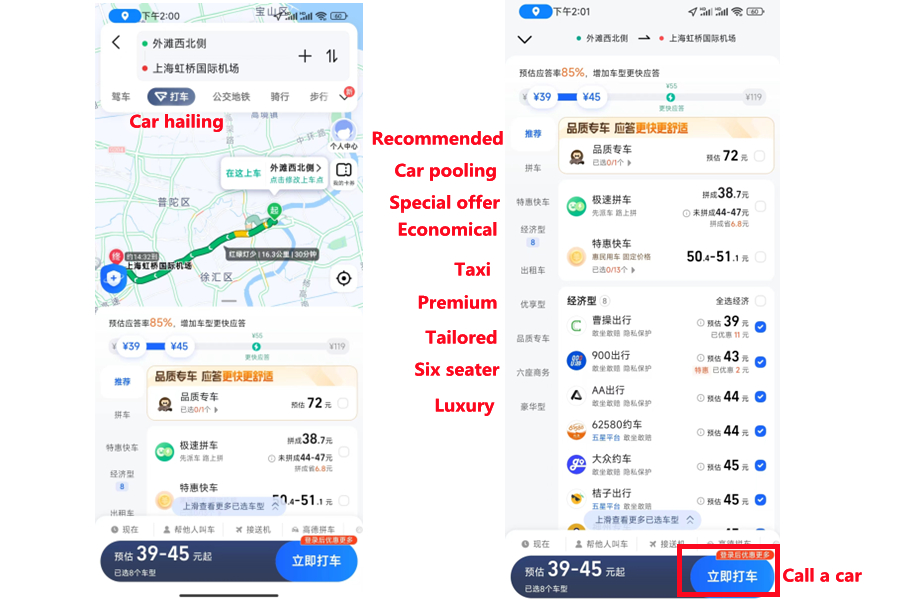
Book a Taxi/Ride-Hailing in Amap
Amap has a built-in ride-hailing feature that lets you book taxis or private cars directly in the app—no need for a separate ride app. Here’s how:
- After selecting your destination, tap the “Taxi” icon (it looks like a taxi car) on the route options.
- Amap will show you the estimated fare, the number of available taxis nearby, and the estimated pickup time.
- Confirm your pickup location (it’s usually your current location, but you can adjust it) and tap “Call Taxi” or “Book Ride.”
- You can pay using Alipay or WeChat Pay, both of which accept international bank cards, making it easy for foreigners to pay without cash.
See all attractions
 876673 booked




[10% Off] Best China Hotel Recommendations
Top Shanghai Hotels
Top Beijing Hotels
Top Guangzhou Hotels
See All Hotels






What to Prepare for a Trip to China?
- Visa & Entry Tips China’s 240-hour visa-free transit policy now covers 54 countries, incl. the US, UK, Canada, and Brazil, allowing up to 10 days during layovers. Learn more about China Entry Tips to land in China easily.
- Getting Connected VPNs are vital for accessing Google, WhatsApp, Instagram, etc in China. Set one up before arriving. China eSIMs are the easiest option for data and bypassing restrictions. Pocket Wi-Fi devices work best for group but are pricier and require pickup/return.
- Money Exchange & Tax Refunds Exchange money in China banks (better rates than airports). ATMs accept foreign cards, but notify your bank first. For tax refunds, spend over ¥500 at stores with a "Tax-Free" sign. Keep receipts and get forms stamped at customs before departure.
Must-Have Apps in China
- China Payment Apps Forget cash. Chinese use Alipay (I like it better) or WeChat Pay to pay for everything in China. Scan a QR code at noodle stalls, metros, even temples. Link your foreign Visa/Mastercard before landing.
- China Map Apps Amap (Gaode Map) & Baidu Map (limited English) is what locals use, with real-time navigation, metro/bus routes, and traffic updates. Apple Maps does a good job too if you're already an IOS user.
- China Transport Apps Street taxis are cheap, but drivers rarely speak English. Use China Taxi App like DiDi (China’s Uber)—set your destination in English, pay by Alipay.
- China Travel Apps 15+ China trips taught me: Use Trip.com. It's the best English app for booking China trains/flights/hotels + finds Trip.com deals.
- China Dating Apps Locals use Tantan (China’s Tinder) and Momo. WeChat’s “People Nearby” works too, but expect language barriers unless your Mandarin’s decent.
- China Food App Use Meituan (also helps find nearby restaurants) or Ele.me for food delivery—both have English mode. No English menu in restaurants? Scan the QR with Alipay's translator.
FAQs about Amap
-
What is Amap in China?
-
Does Amap have an English version?
-
What is an Amap certification?
-
Is Apple Maps or Amap better in China?
Disclaimer: This article has been provided by an individual contributor or third party platform. If there is any discrepancy regarding the copyright, please contact us directly and we will delete the content immediately.
Trending Searches
-
Air Travel Guide
-
Latest Flight Deals
-
Popular Flight & Hotel Packages
-
Getting Around
-
eSIM/SIM card
- Medellin Vacation Packages
- Hong Kong Vacation Packages
- Tokyo Flight and Hotel
- Koh Samui Flight and Hotel
- Hong Kong Flight and Hotel
- Ottawa Vacation Packages
- New York Vacation Packages
- Saint Petersburg Vacation Packages
- Key West Vacation Packages
- Oaxaca Vacation Packages
- Istanbul Flight and Hotel
- Banff Vacation Packages
- Zurich Vacation Packages
- Yerevan Vacation Packages
- Cotabato Vacation Packages
- Tokyo Metro
- Ningbo Metro
- Singapore Airport to City
- Haneda Airport to Tokyo
- Hong Kong Airport to Shenzhen
- Wuxi Airport
- How to Use DiDi in China
- Harbin Metro Map
- Kyoto Airport
- Shenzhen to Guangzhou
- Shanghai Airport Transfers
- Wuhan Airport
- Shenzhen Metro
- China Metro
- Narita Airport to Shinjuku
- Macau to Hong Kong
- JR Hokkaido