Does eSIM Work in China? 2026 Official Guide for Travelers

by Robin
October 15, 2026
Traveling to China? Staying connected is no longer a headache! Whether you’re landing in Beijing, exploring Shanghai, or hopping between Hong Kong and mainland China, the right eSIM keeps you online instantly. This guide aims to help you, as foreign travelers, to have a better understanding of the capability of eSIMs in China.
to Shanghai
to Shenzhen
to Guangzhou
See all flights


Does eSIM Work in Mainland China?

Yes! International travel eSIMs work reliably across mainland China. They connect to major carriers like China Mobile (best rural coverage), China Unicom, or China Telecom (strong in dense cities). Coverage reaches 99% of populated areas, including high speed trains, tourist hotspots, and remote provinces like Xinjiang and Tibet on certain plans. Compared to local Chinese SIMs (which you can’t easily buy as a tourist anyway), travel eSIMs use international roaming partnerships. Your data routes through overseas or Hong Kong gateways, automatically bypassing the firewall and to help you stay connected.
Official Status (September 2026): According to China Unicom's commercial eSIM announcement on September 9, 2026, all three major Chinese carriers now fully support eSIM services for mainland users. This marks the official large-scale commercialization of eSIM across China.
CMCC China 4/5G eSIM
- CoverageMainland China
- Data0.5G-3GB/day or 1-50GB Total
- Validity1 to 30 Days
- Pricefrom US$0.41

China Mobile 5G eSIM
- CoverageMainland China
- Data0.5G-3GB/day or 1-50GB Total
- Validity1 to 30 Days
- Pricefrom US$0.43

China/HK/Macau eSIM
- CoverageChina(Mainland,HK&Macau)
- Data3-50GB Total or 0.5-100GB/Day
- Validity1 to 30 Days
- Pricefrom US$0.43
Why eSIM Is the Best Choice for China Travel
China’s internet is famously restricted. Apps like WhatsApp, Instagram, Google services, Facebook, and YouTube are blocked on local networks. Traditional physical SIM cards or public Wi-Fi require Chinese ID registration and still route through censored connections.
eSIM solves this. It’s a digital SIM you install before arrival via QR code or in-app activation. Modern phones (iPhone 11+, Samsung Galaxy S20+, Google Pixel 3+, and most recent flagships) support it easily. You keep your home SIM for calls/SMS while using the eSIM for data.
eSIM in China: Real-Name Registration and Activation Policy (2026 Update)
As of 2026, eSIM activation in mainland China requires real-name registration and has specific activation procedures:
Real-Name Registration Requirements:
- All eSIM activations require real-name verification
- In most provinces, users must visit an offline operator service center with a government-issued ID or passport
- Some regions (Shanghai, Henan) now support online real-name verification via operator apps
- Foreign travelers may find offline activation at operator stores more accessible than online methods
Activation Process:
- Contact your chosen carrier (China Mobile, China Unicom, or China Telecom) at an official service center
- Bring your passport and a valid phone to complete face verification
- Staff will assist with eSIM provisioning and activation
- Setup typically takes 15-30 minutes
Important Policy Note (Effective June 17, 2026): China Mobile discontinued activation of prepaid and data-only cards within mainland China, requiring activation in Hong Kong or overseas first. However, this policy explicitly does not affect eSIM real-name registration procedures — standard eSIM activation continues normally.
"One ID, Five Numbers" Rule: One identity card or passport can register a maximum of five phone numbers per carrier, across all SIM types (including eSIMs).
Sources:
The information in this guide is updated based on official announcements from China's major telecommunications carriers as of 2026, specifically:
- China Unicom eSIM Commercial Launch (September 9, 2026)
- China Mobile, China Telecom eSIM Support Statements (2026)
- International eSIM provider offerings and pricing (September 2026)
- Real-name registration policies across major Chinese carriers (2026)
Can I Use Hong Kong and Macau eSIM in Mainland China

Yes, Hong Kong eSIMs work in mainland China when you choose the right plan. Hong Kong only eSIMs may offer limited or expensive roaming. But there are plans for the Greater Bay Area/Mainland China + Hong Kong + Macau, which are designed specifically for travelers which have the need to hop between these places.
These plans deliver seamless coverage across all three regions without manual changes. Since traffic often routes through Hong Kong infrastructure, you bypass the firewall entirely. Allowing you to have access to WhatsApp, Google Maps, Instagram... with no VPN required.

Mainland China/Hong Kong/Macau 5G eSIM | Dual Network | Day Pass/Total Data Package | 24-Hour Billing | QR Code
4.6/5
21574 reviewsEasy to use, works well, easy to install, runs smoothly. I will choose to use it again.

5G/4G eSIM in 8 Asian countries | Multi-network support, supports ChatGPT & Google Maps | 500MB/day - 50GB total | 1-30 days | 24-hour billing | QR code
4.6/5
6167 reviewsE SIM is a lifeline to official mails and social Media as they are not supported by Chinese local network
Mainland China 5G eSIM | Supports Google Maps / ChatGPT | Daily/Total Data Plans | 24-Hour Billing | 1–365 Days | QR Code
4.6/5
28753 reviewsEasy to use, works well, convenient to attach, plays smoothly. I will choose to use it again if needed.

Mainland China 5G eSIM | Day Pass/Total Data Package | ChatGPT Available | 24-Hour Billing | 1-365 Days | QR Code
4.6/5
63114 reviewsGood, very beautiful, people give me really really really good room. It’s really nice. People were really good. Very verygood
China eSIM | 1-30 Days | Up to 60GB High-Speed Data | Coverage on Leading Network
4.3/5
119 reviewsthe signal is very good,it is very easy to open and use,the price is relatively better than buying a general store,and the quality of the signal is much better.
Popular Providers for China eSIMs 2026
There are a lot of different eSIMs for your choosing and it ranges anywhere between $4 to $99. Among all these providers, Trip.com, eSIMX, Nomad, GlobaleSIM, eSIMX, etc, Trip.com stands out with the cheapest daily fares and flexible plans. Let's take a quick look at some of the options
General overview of different eSIMS
Provider | Top Data Plans | Duration Options | Price Range (USD) | Network |
500MB/day - 100GB/day; 1GB Total - 100GB Total | 1-30 days | from $0.49 | China Mobile | |
Nomad | 3GB/day, 2GB/day, 20GB Total | 1, 2, 3, 4, 5, 6, 7 days | $20.00 - $26.00 | China Mobile |
eSIMX | 20GB, 15GB/day, 10GB/day | 7, 15, 30 days | $11.00 - $21.00 | China Mobile, China Unicom |
GlobaleSIM | 50GB, 20GB, 10GB | 30 Days | from $17.00 to $42.00 | Local carriers |
Note: Prices and data plans for Trip.com eSIM are continuously updated. Always check Trip.com China eSIM website for the most accurate and up-to-date information.
Trip.com - Best Value, Reliable Network & Fast Speed
- 1-day: 500MB/day - $0.49
- 10-day: 1GB/day - $5.45 ($0.54/day)
- 15-day: 1GB/day - $8.35 ($0.56/day)
I've tested some of the different eSIM providers and no doubt, Trip.com stands out. I've been to Beijing, Shanghai, and Guangzhou, I can assure you that it offers the best performance with the best price available. The internet speed goes between 50-100Mbps no matter if you're in cities or even on a high speed train.
After testing Trip.com's eSIM across Beijing, Shanghai, and Shenzhen, I can confirm it offers the best balance of price and performance. Running on China Mobile's network, I consistently got 50-100Mbps in cities and stable connections even in subway tunnels.
Setup takes literally 2 minutes - scan QR code, add eSIM, done. Works instantly with no registration hassle. Coverage extends to all mainland provinces, including tourist spots like Great Wall and Zhangjiajie. At $0.49/day, it's currently the cheapest and fast option in China.
While other providers give you a total data pool (like 10GB for your whole trip), Trip.com offers both total & daily data plans for you to choose. This means with their 10-day plan, you get 1GB every single day - if you use all your data on Monday, you'll still get a fresh 1GB on Tuesday. No more saving data for later or running out mid-trip!
What if my eSIM doesn’t work?
- Confirm activation before landing.
- Double check Data Roaming is ON for the eSIM line.
- Restart phone and toggle Airplane Mode.
- Verify you’re on the correct network (manual selection in settings if needed).
- Contact 24/7 support, providers like Trip.com respond fast via app or chat 24/7 anytime anywhere.
- Top up data or switch to a backup plan if you exceed limits.
How to Stay Connected in China Using eSIM
- Buy before you fly — Activate on Wi-Fi at home.
- Install via QR code or one-tap in-app (Trip.com offers both).
- On arrival: Go to Settings > Mobile Data > Select eSIM line > Enable Data Roaming.
- Toggle Airplane Mode briefly if needed to connect.
- Keep home SIM active for calls/texts (or use WhatsApp/WeChat).
How to Activate Your China eSIM on Trip.com (No QR Code Needed!)
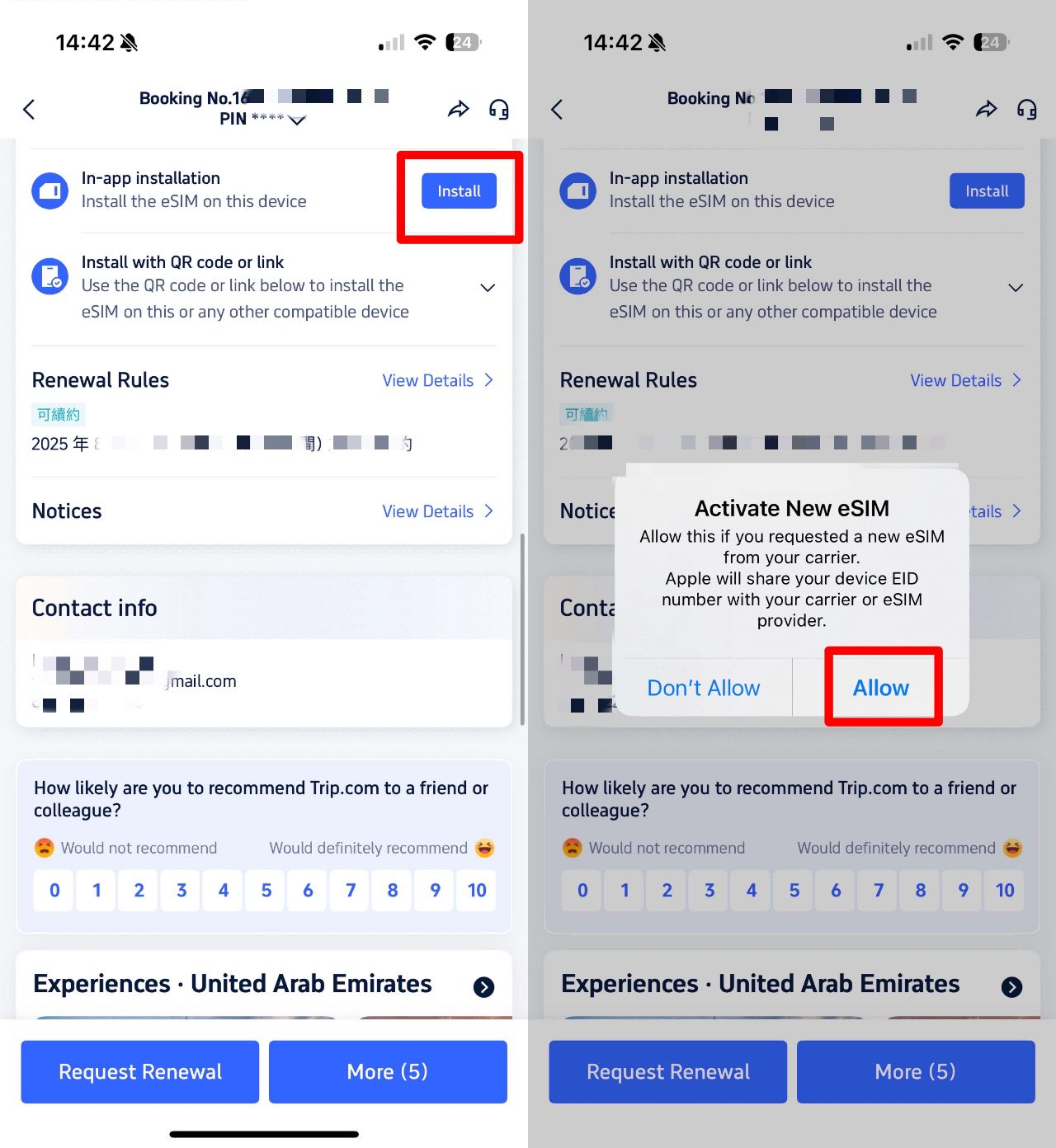
Booking your China eSIM is now easier than ever—no QR code scanning required! Here’s how it works:
1️⃣ Book your China eSIM on Trip.com
2️⃣ Go to your booking details → Find "In-App Installation"
3️⃣ Install directly to your device with one tap—no extra steps!
That’s it! Instant activation, no hassle, and you’ll stay connected to Western apps (no VPN needed).
How to Set Up and Use China eSIM?
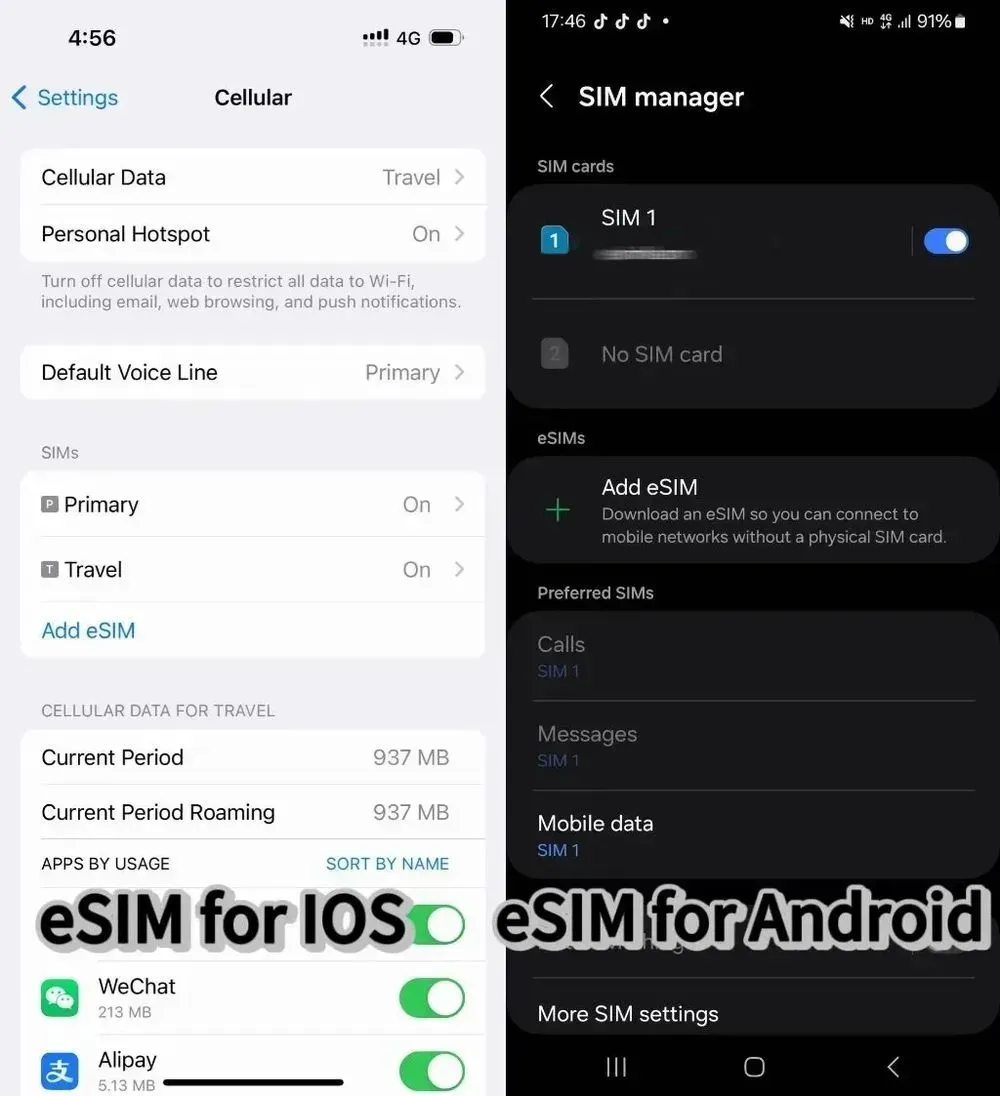
Before purchasing an eSIM product, please check if your mobile phone is compatible with eSIM.
How to Install China eSIM
1. Check the QR code displayed in the eSIM activation email.
2. Go to "Settings" on your smartphone's home screen and select "Mobile Data" (iOS) or "SIM Card Management" (Android).
3. Add a mobile data plan (iOS) or tap "SIM Card Management" (Android), agree to install Mobile Data (iOS) or SIM Card Management (Android), and then scan the QR code displayed in the activation email to complete the installation.
How to use China eSIM
1. After installation, switch from traditional SIM card to eSIM.
2. When using Mobile Data (iOS) or SIM Card Management (Android), the LTE icon will be displayed in the upper right corner.
3. Turn on data roaming to enable communication.
4. If you are not connected to the network after performing the above steps, toggle airplane mode on and off or restart your smartphone.
How to deactivate China eSIM
Tap "Mobile Data" (iOS) or "SIM Card Management" (Android) and switch it to "Off" (the same procedure applies for activation).
✅Need to compare more eSIM plans in China? I've found more super good data plans at cheap prices for you guys!
See all attractions
 928182 booked




FAQs About eSIM in China
-
Does international eSIM work in China?
-
How to stay connected in China using eSIM?
-
Do I need a VPN if I have an eSIM?
-
Is the internet speed fast on an eSIM in China?
-
Can I use my home SIM and eSIM at the same time?
-
What happens if I exceed my data limit?
-
Will eSIM work at remote areas like Tibet or Xinjiang?
-
How much faster is eSIM setup compared to buying a local SIM?
Disclaimer: This article has been provided by an individual contributor or third party platform. If there is any discrepancy regarding the copyright, please contact us directly and we will delete the content immediately.
Trending Searches
-
Air Travel Guide
-
Latest Flight Deals
-
Popular Flight & Hotel Packages
-
Getting Around
-
eSIM/SIM card
- Cancun Vacation Packages
- Medellin Vacation Packages
- Tokyo Flight and Hotel
- Koh Samui Flight and Hotel
- Osaka Flight and Hotel
- Tokyo Vacation Packages
- Toulouse Vacation Packages
- Manila Vacation Packages
- Key West Vacation Packages
- Almaty Vacation Packages
- Asheville Vacation Packages
- Zurich Vacation Packages
- Paros Vacation Packages
- Nadi Vacation Packages
- Rome Vacation Packages
- Wuhan Airport
- Japan car rental
- Chengdu Metro
- Beijing Metro
- Istanbul Airport Transfers
- Kunming Metro
- Yiwu Airport
- Macau to Shenzhen
- Harbin Metro Map
- Guangzhou Airport to City
- Zhangjiajie Airport
- China Taxi
- Beijing Daxing International Airport
- Haneda Airport Limousine Bus
- Macau to Hong Kong
- Narita Airport to Shinjuku
- Ho Chi Minh Airport