Dianping App in English for Foreigners: Reviews & Deals


Learn what Dianping does, how to access Dianping, switch language to English, search stores, and use in-shop features. A China Food App guide for foreigners in China.
to Shanghai
to Guangzhou
to Beijing
See all flights

What Is Dianping App?

Dianping (大众点评) is a go-to tool for anyone living in or visiting China. Think of it as your all-in-one helper for finding great local spots—whether you’re hunting for a hidden gem restaurant, need a last-minute haircut, or want to score a discount on a spa day.
What Can Dianping Do?
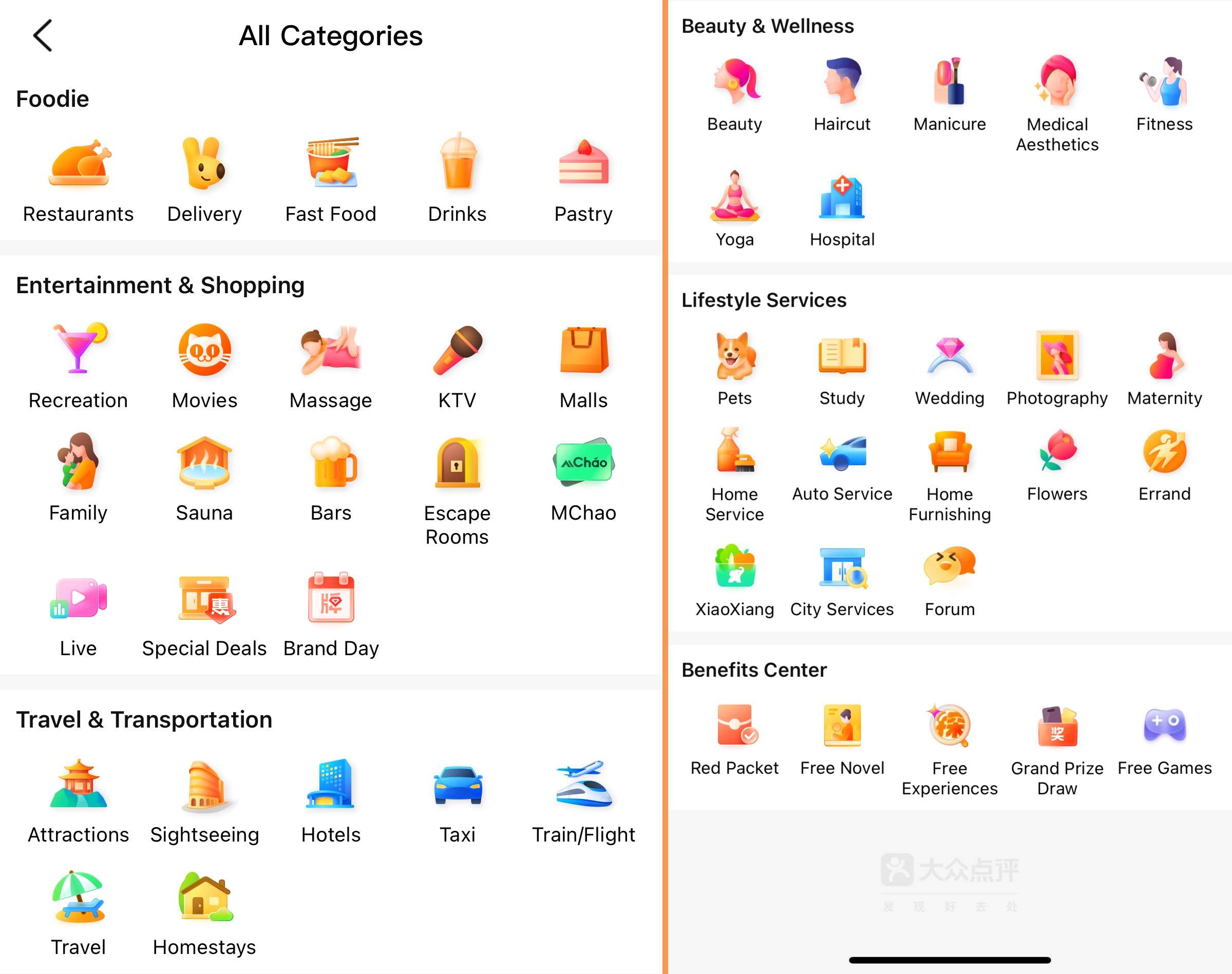
Dianping (大众点评) is a popular local service app in China. This is like combining Yelp, TripAdvisor and Groupon together. What can you do with it:
- Join the online queue to avoid queuing in busy areas.
- You can make appointments for services such as haircuts, massages or laundry without making a phone call.
- Search for restaurants: Search for cuisines (such as Sichuan cuisine), check star ratings, and read reviews with photos of the dishes.
- Discover local activities: theme parks, performances, or markets - see users' photos and rating options.
- Buy discount coupons: Get discounts on dining, spa or movie tickets. Make payments in the app and then display QR codes where they are used.
See all attractions
 881554 booked




How to Use Dianping App as a Foreigner (in English)

1. Register a Dianping Account
You can use Dianping in two ways:
- WeChat Mini-Program: No need to download an app. It offers accurate translations but has fewer features.
- Dianping App: Download it for full features. Group-buy coupons here are often cheaper than on WeChat. You can browse in the mini-program first and buy coupons via the app.
To use the app, register an account. You can log in with: Phone number (foreign numbers are supported—just select your country code). Or WeChat/QQ.
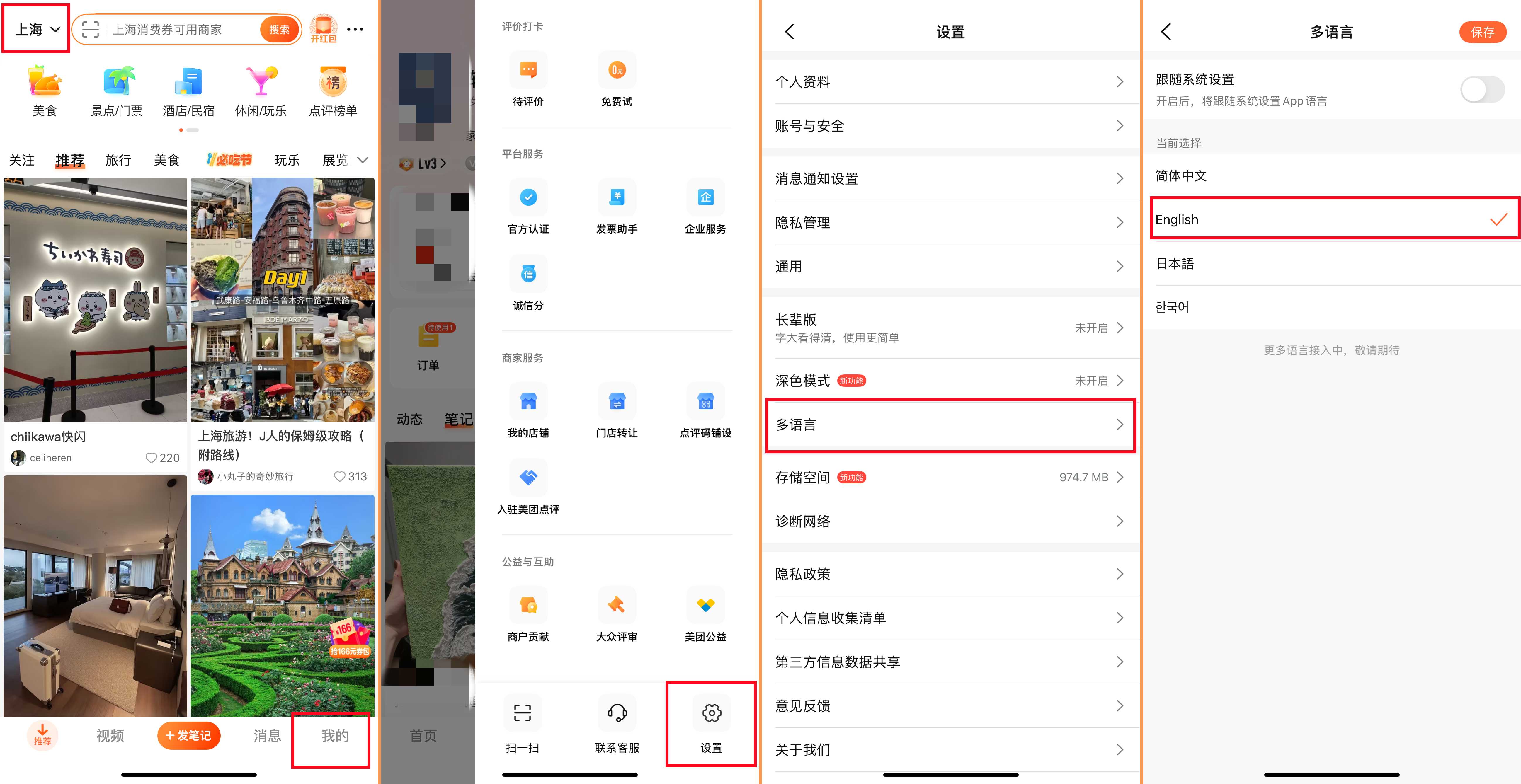
2. Switch Dianping to English (or Your Language)
Dianping supports multiple languages. Here’s how to change it:
- Tap “我的” (Profile) at the bottom right.
- Tap the three horizontal lines (menu icon) at the top right.
- Select “设置” (Settings) → “语言” (Language).
- Choose your language (English, Japanese, Korean, etc.) and save. Now the app will display in your chosen language.
How to Search for Stores on Dianping
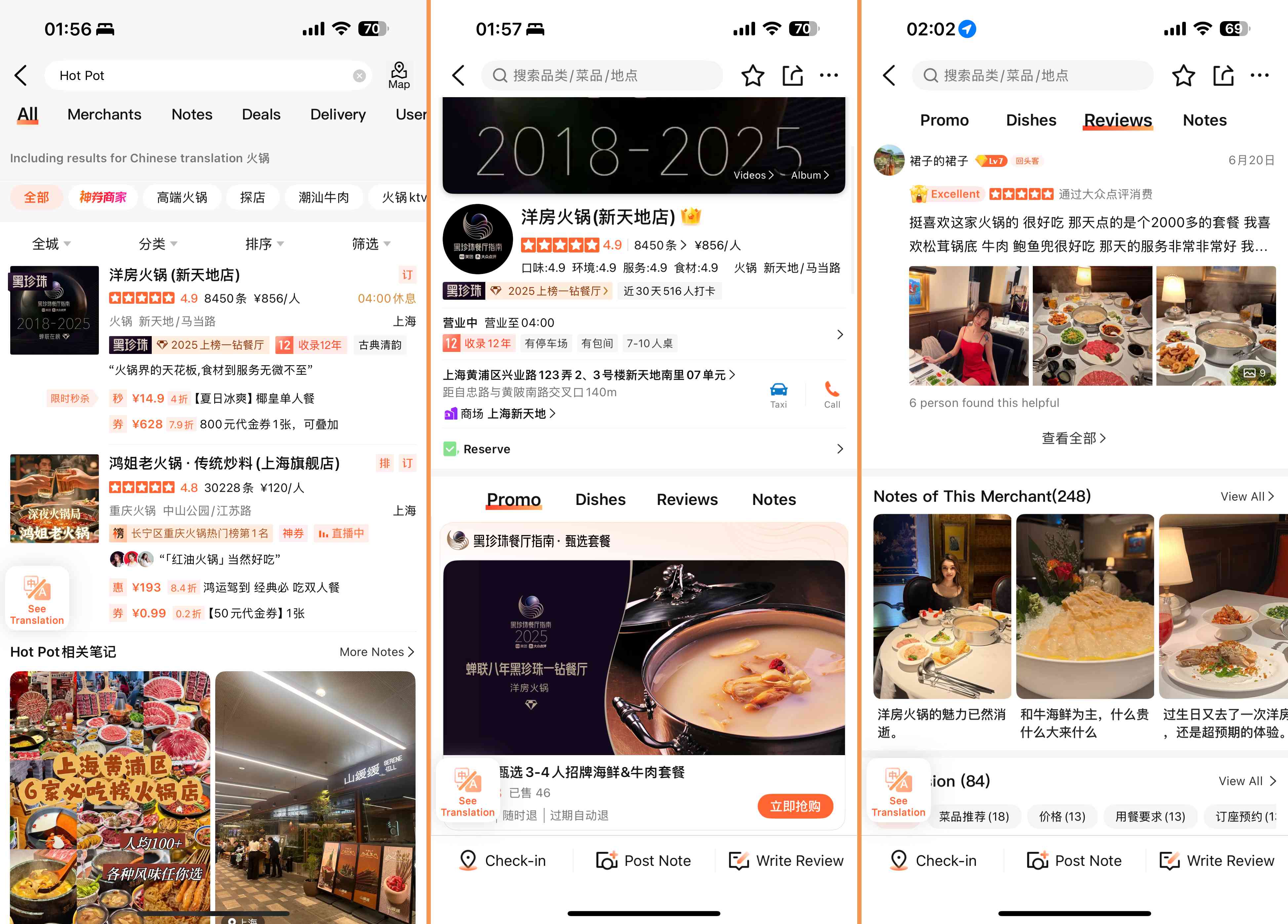
On the homepage of Dianping, you can find the store through the following four ways:
- Store name: Enter the exact name of the place you want to visit.
- Location: Look for stores near you or near a specific destination.
- Store type: Search by category, such as "Hot pot" or "nail salon".
- Filter: Narrows down the result by distance, rating or average price.
After entering the store page, you can:
- Browse store details: View photos of dishes/services, opening hours, addresses, average prices, and real user reviews. This helps you understand the store's environment, services and costs.
- Online queuing: If the store is busy, check if online queuing is available. Get a number to track your location in real time without having to wait on site.
- Purchase group-buying coupons: Find discounted deals on the store page. Make the payment in the app and then show the QR code to the staff when you arrive to redeem it.
How to Pick Restaurants & Use Deals on Dianping
How to Pick a Great Restaurant on Dianping
- Check Ratings & Reviews: Look for places with a high overall rating (4.5 stars+) and lots of reviews (the more, the better).
- Read Recent Reviews with Photos: User photos of dishes are more trustworthy than just text—they show what the food actually looks like.
- Look for “Must-Eat List” Labels: These are Dianping’s official recommendations for top restaurants in a city.
- Filter Negative Reviews (Wisely): Don’t avoid a place just because of a few bad reviews. Read why people didn’t like it—if the issues don’t matter to you (e.g., “too spicy” but you love spice), it might still be worth a try.
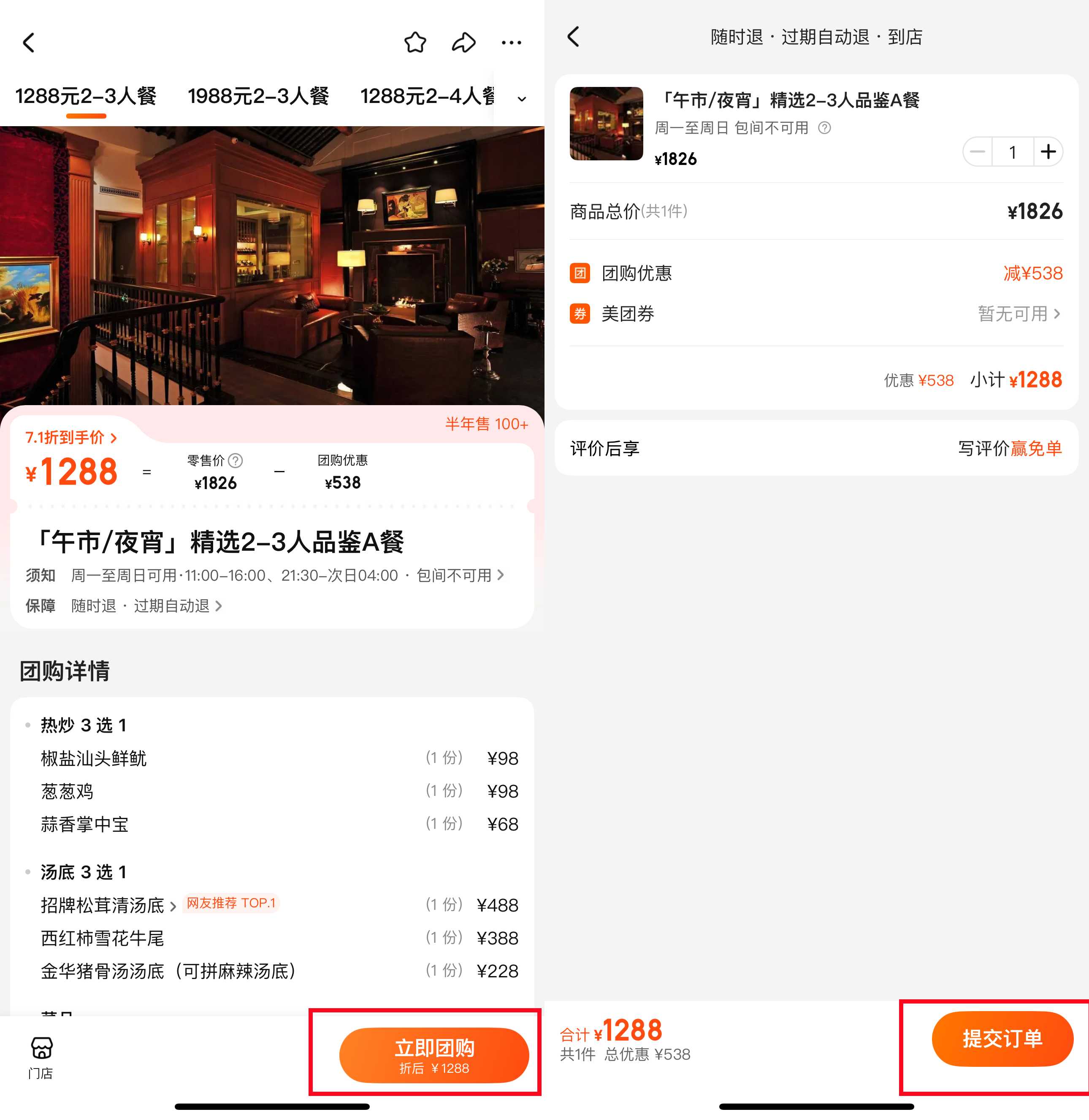
How to Use Group Deals on Dianping
- On the restaurant's page, scroll to "Offers" or "Coupons".
- Choose an offer (for example, "20% off lunch Set" or "120 yuan for a double dinner").
- Make the payment via wechat Pay or Alipay.
- When you arrive at the restaurant, show the QR code of the "My Offers" section to the staff. They will scan it and then the discount will take effect.
Dianping vs Meituan: What’s the Difference?

While both are popular food apps in China, they have distinct uses:
Feature | Dianping | |
Focus | Discovery & reviews (where to go/eat) | Services & delivery (getting things done) |
Strengths | Detailed restaurant reviews, community recommendations, lifestyle services | Food delivery, ride-hailing, hotel bookings, wider range of services |
Best For | Finding new spots, reading honest reviews, using group deals | Ordering food to your door, booking taxis, or buying movie tickets quickly |
Tips for Using Dianping for Foreigners
- Save Favorites: When you find a place you like, tap the “heart” icon to save it—this makes it easy to find later.
- Use “Nearby” Feature: When you’re out and about, tap “Nearby” to see restaurants, cafes, or attractions close to your current location.
- Check User Photos in Reviews: These are key to knowing if a restaurant’s food matches its description.
- Combine with Translation Apps: If you need to read a review in Chinese (or translate a menu), use apps like Google Translate or Papago for extra help.
[5% Off] Must-Visit Attractions in China
Check some of the top attractions in China below!👀






*Prices are approximate and vary by season, availability, and ticket type. All prices in CNY.
[10% Off] Best China Hotel Recommendations
Top Shanghai Hotels
Top Beijing Hotels
Top Guangzhou Hotels
See All Hotels























What to Prepare for a Trip to China?
- Visa & Entry Tips China’s 240-hour visa-free transit policy now covers 54 countries, incl. the US, UK, Canada, and Brazil, allowing up to 10 days during layovers. Learn more about China Entry Tips to land in China easily.
- Getting Connected VPNs are vital for accessing Google, WhatsApp, Instagram, etc in China. Set one up before arriving. China eSIMs are the easiest option for data and bypassing restrictions. Pocket Wi-Fi devices work best for group but are pricier and require pickup/return.
- Money Exchange & Tax Refunds Exchange money in China banks (better rates than airports). ATMs accept foreign cards, but notify your bank first. For tax refunds, spend over ¥500 at stores with a "Tax-Free" sign. Keep receipts and get forms stamped at customs before departure.
Must-Have Apps in China
- China Payment Apps Forget cash. Chinese use Alipay (I like it better) or WeChat Pay to pay for everything in China. Scan a QR code at noodle stalls, metros, even temples. Link your foreign Visa/Mastercard before landing.
- China Map Apps Amap (Gaode Map) & Baidu Map (limited English) is what locals use, with real-time navigation, metro/bus routes, and traffic updates. Apple Maps does a good job too if you're already an IOS user.
- China Transport Apps Street taxis are cheap, but drivers rarely speak English. Use China Taxi App like DiDi (China’s Uber)—set your destination in English, pay by Alipay.
- China Travel Apps 15+ China trips taught me: Use Trip.com. It's the best English app for booking China trains/flights/hotels + finds Trip.com deals.
- China Dating Apps Locals use Tantan (China’s Tinder) and Momo. WeChat’s “People Nearby” works too, but expect language barriers unless your Mandarin’s decent.
- China Food App Use Meituan (also helps find nearby restaurants) or Ele.me for food delivery—both have English mode. No English menu in restaurants? Scan the QR with Alipay's translator.
FAQs about Dianping App in China
-
Can I use Dianping in English?
-
What is the difference between Meituan and Dianping?
-
What is the Chinese name for Dianping?
-
Is Dianping owned by Meituan?
Disclaimer: This article has been provided by an individual contributor or third party platform. If there is any discrepancy regarding the copyright, please contact us directly and we will delete the content immediately.
Trending Searches
-
Air Travel Guide
-
Latest Flight Deals
-
Popular Flight & Hotel Packages
-
Getting Around
-
eSIM/SIM card
- Medellin Vacation Packages
- Hong Kong Vacation Packages
- Tokyo Flight and Hotel
- Koh Samui Flight and Hotel
- Hong Kong Flight and Hotel
- Langkawi Vacation Packages
- Pangkor Vacation Packages
- New Orleans Vacation Packages
- Astana Vacation Packages
- Zacatecas Vacation Packages
- Pittsburgh Vacation Packages
- Ulaanbaatar Vacation Packages
- Corfu Vacation Packages
- Sharm El Sheikh Flight and Hotel
- Subic Bay Vacation Packages
- Kansai Airport to Nara
- Shanghai Metro Map
- Guilin Airport
- JR pass airport transfer
- Taipei Airport
- Suica Card
- Nara Transportation
- Shenzhen Metro
- Sanya Airport
- How to Use Shared Bikes in China
- Zhangjiajie Airport to City
- Wenzhou Airport
- Shenzhen Metro Map
- Harbin Metro Map
- Narita Airport to Shinjuku
- Macau to Hong Kong
- Hong Kong Airport to Guangzhou