Unlimited 4G China eSIM: Fast & Easy for Beijing Travel


Planning a trip to Beijing and overwhelmed by Internet options? SIM cards are a pain, and roaming fees are a wallet killer. That’s where eSIMs come in. They’re the easy, affordable way to stay online in Beijing without the stress. In this guide, I’ll walk you through:
- How to choose the right eSIM for your trip.
- Simple steps to set it up in minutes.
- The key differences between eSIMs and traditional SIMs. And more...
Let’s get started!
Popular Beijing (China) eSIM Plans with VPN
4G Beijing eSIM 1 Day
- CountryChina
- Package Option500MB/Day
- Number of Days1 Day
- PriceUSD 0.49
4G Beijing eSIM 10 Days
- CountryChina
- Package Option1GB/Day
- Number of Days10 Days
- PriceUSD 5.45
4G Beijing eSIM 15 Days
- CountryChina
- Package Option1GB/Day
- Number of Days15 Days
- PriceUSD 8.35
What's a Beijing, China eSIM?
Okay, let’s talk about the real travel MVP for China trips: eSIMs. Remember those infuriating physical SIM cards? The ones you’d lose in airport carpets, stab your fingernails trying to eject, or accidentally snap in half? 😩 Well, say goodbye to all that.
An eSIM is like a digital ninja hiding inside your phone. No physical chip, no plastic waste—just a sleek, built-in profile that lets you connect to Chinese networks instantly. Think of it as downloading a local data plan like you’d download an app. No more awkward charades with shop staff in Beijing trying to explain you need "1GB for 10 days, please!
Top 4 China eSIM Providers for Beijing Travel
After testing multiple providers across Beijing’s hutongs, subway lines, and even the outskirts of the Great Wall, here’s my honest take on the top players. I’ll cut through the marketing fluff and focus on what actually works in the capital.
| Provider | Data Plans | Duration Options | Price Range (USD) | Network |
| Trip.com | 500MB/day – 100GB/day 1GB Total – 100GB | 1–30 days | 0.49–99.00 | China Mobile |
| Nomad | 3GB/day, 2GB/day, 20GB Total | 1–7 days, 30 days | 20.00–26.00 | China Mobile |
| eSIMX | 10GB/day, 15GB/day, 20GB Total | 7, 15, 30 days | 11.00–21.00 | China Mobile/Unicom |
| GlobaleSIM | 10GB, 20GB, 50GB | 30 days | 12.00–44.00 | China Mobile |
1. Trip.com – Cheap, Reliable & Fast Data
Why It’s My Top Pick:
Trip.com’s eSIM saved me during a packed 10-day Beijing trip. Their daily data refresh is genius—no more rationing data for fear of running out. Need to upload Great Wall selfies on Monday? Go wild. By Tuesday, you’ll get a fresh 1GB.
Plans & Performance:
- 1GB/day for 10 days ($5.45 total): Perfect for most travelers. I streamed maps, WeChat, and even YouTube (with a VPN) without hiccups.
- Speed: Consistently hit 50-80Mbps in central Beijing (tested around Wangfujing and the Forbidden City). Even in the subway’s Line 1 tunnel, it held up.
- Coverage: Works nationwide, but Beijing-specific performance was flawless.
Best For: Travelers who want simplicity, daily data peace of mind, and the lowest cost.
See all attractions
 1859853 booked


4.6/5
26985 reviews
5/5
Everything works great, we connected it without any problems at home and activated it when we landed, no restrictions
5/5
Excellent connection, worked for two weeks in all cities where it operates (Beijing, Guangzhou, Linyuan). In the mountains, on horseback, on trains, in cities... everywhere there is stable reception and fast internet. I recommend it.

5/5
Easy to purchase easy to install, and easy to use. Most of the time reception is very good. Just something is slow when reception is not good, which is normal.
5/5
The best option and the best electronic chip

5/5
Easy to install, convenient to use, and the signal is pretty good.
2. Nomad – Reliable but Pricey
Nomad uses the same China Mobile network as Trip.com, so coverage in Beijing is solid. Their setup is equally easy—scan, activate, done.
The Catch:
- Cost: Their 5-day plan (3GB/day) costs **$26**. Compare that to Trip.com’s 10-day plan at half the price.
- Data Structure: Nomad offers “total data” pools (e.g., 20GB for 30 days). If you burn through data early, you’re stuck topping up.
Who Should Consider It:
If you need 5G speeds (Nomad supports it) or prioritize brand recognition, but be prepared to pay a premium.
3. eSIMX – Heavy Data Users, Look Here
eSIMX offers large data bundles (10GB–20GB) without daily limits. I used their 20GB/30-day plan during a workation in Beijing and appreciated the freedom to binge Netflix (via VPN) without tracking daily usage.
The Not-So-Good:
- Price Per Day: Their 7-day plan (11for10GB)averages1.57/day—still pricier than Trip.com’s $0.54/day rate.
- Network Switching: Uses both China Mobile and China Unicom. While this should improve coverage, I noticed slightly slower speeds in Beijing’s Sanlitun area compared to Trip.com.
Best For: Remote workers or travelers streaming heavily.
4. GlobaleSIM – Long-Term Stays Only
GlobaleSIM markets to travelers staying a month or longer. Their 50GB/30-day plan ($44) seems tempting, but let’s break it down:
- Value Issue: Trip.com’s 30-day plan offers 30GB (1GB/day) for **$15.99**—less than half the cost.
- Performance: Both use China Mobile, so speeds in Beijing are comparable.
Who It’s For:
If you need 50GB and will use it all (think: frequent video calls), maybe consider it. But for most, Trip.com’s daily refresh model is smarter.
Key Takeaways for Beijing Travelers
- Daily Data Refresh Wins: Trip.com’s model eliminates the stress of rationing data. Perfect for sightseeing-heavy days in Beijing.
- Speed Consistency Matters: All providers use China Mobile/Unicom, but Trip.com and Nomad delivered the most stable speeds in crowded areas like the Summer Palace.
- Skip Long-Term Plans: Unless you’re staying months, daily or weekly eSIMs offer better flexibility.
Final Tip: Always cross-check current prices on Trip.com’s site—they frequently update deals. During my last check, their 15-day plan dropped to $7.99 during a promo.
👍 Beijing Hotel Recommendations 👍



China eSIM vs. Physical SIM Cards: Which Should You Choose?
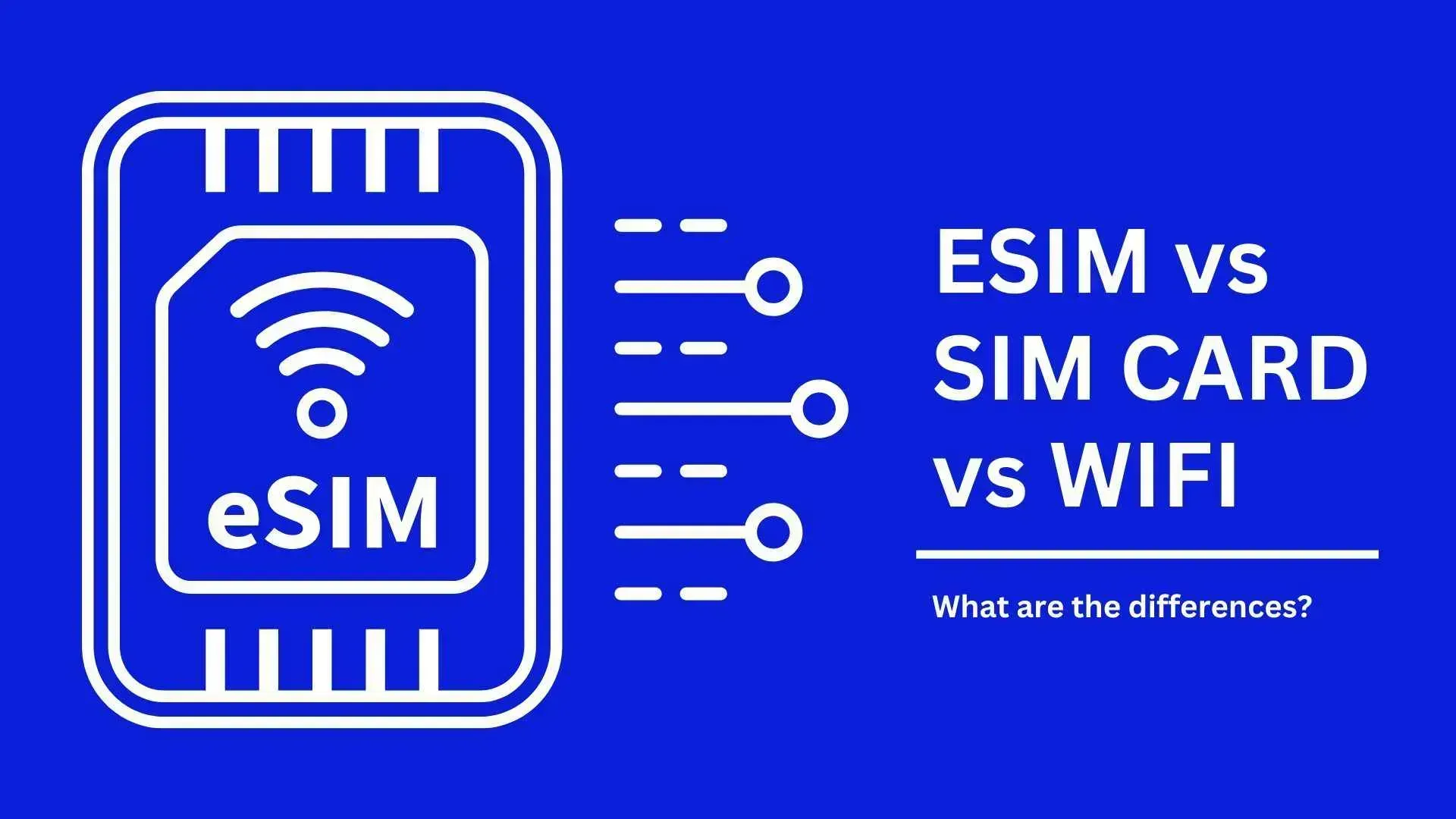
Let’s settle the debate: eSIM or physical SIM for China? If your phone supports eSIMs, this is the way to go. Save time, money, and sanity by ditching physical SIMs. For heavy data users or long stays, Trip.com’s daily refresh plans are unbeatable.
Only Use Physical SIMs If:
- Your phone isn’t eSIM-compatible.
- You need a Chinese phone number for local calls.
| Feature | Physical SIM | China eSIM |
| Form | Plastic card (nano/micro sizes) | Digital profile embedded in your phone |
| Setup | Insert into SIM slot, activate APN settings | Scan QR code, activate in settings (2 minutes) |
| Switching Carriers | Buy new SIM, swap physically | Change plans digitally via app/email |
| Device Support | Any phone with SIM slot | eSIM-compatible devices only (iPhone 11+, newer Androids) |
| Travel Convenience | Risk losing the tiny card | No physical item to carry or lose |
| Roaming | Often requires manual APN tweaks | Auto-connects to local networks (China Mobile/Unicom) |
Why I Prefer eSIMs:
- No airport kiosk queues.
- Keep your home SIM active for texts/calls.
- Eco-friendly (no plastic waste).
✅Grab your China eSIM now for instant, unlimited data at the best price I've found!
See all attractions



Beijing (China) eSIM Users' Review
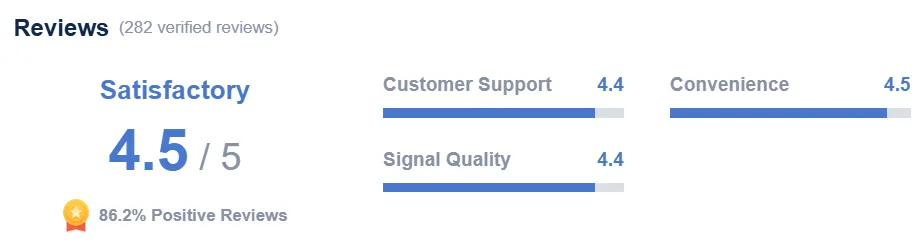
Voices of eSIM users for China on Trip.com
There are no problems at all in using it. The setup is easy, the signal is good, and the price is cheap. It was really helpful this time.
It's a great product that works like a "VPN" service, so you can access all Western apps. The only problem is that in the end, there is an issue with payment apps like Alipay and WeChat, and you need a local WiFi connection to complete the payment.
After canceling another eSIM that didn't work for me in China, this one worked fine. It worked as expected, and I had seamless access during my stay.
How to Set Up a China, Beijing eSIM
Before You Buy:
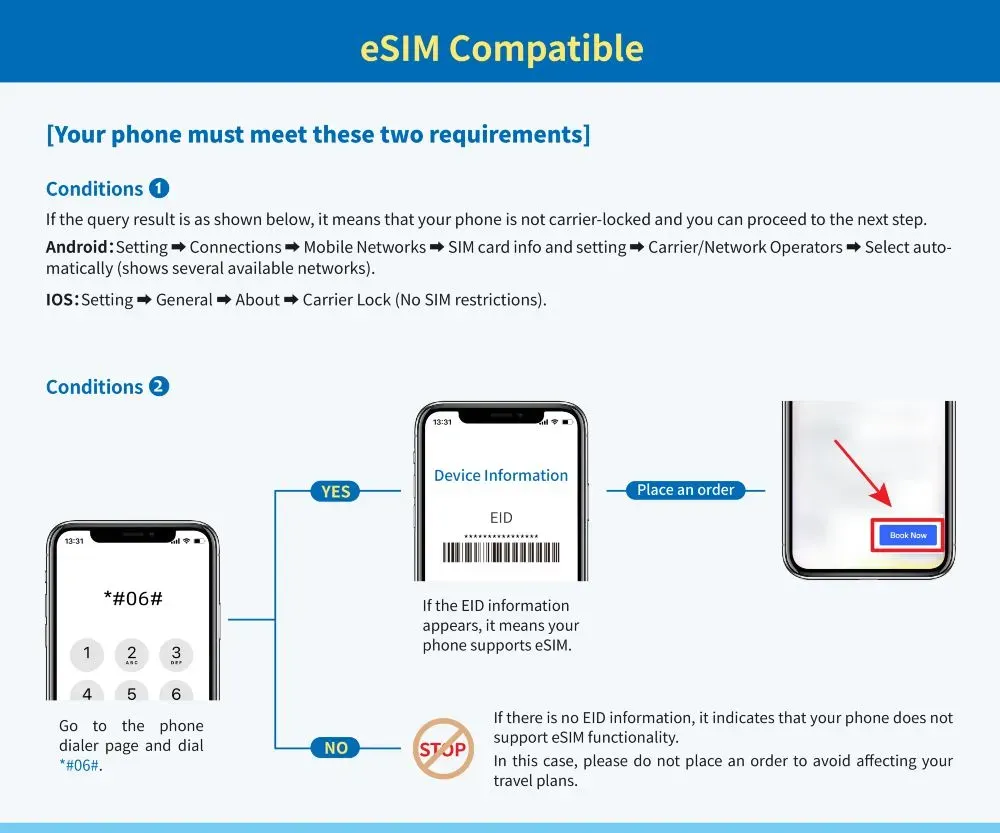
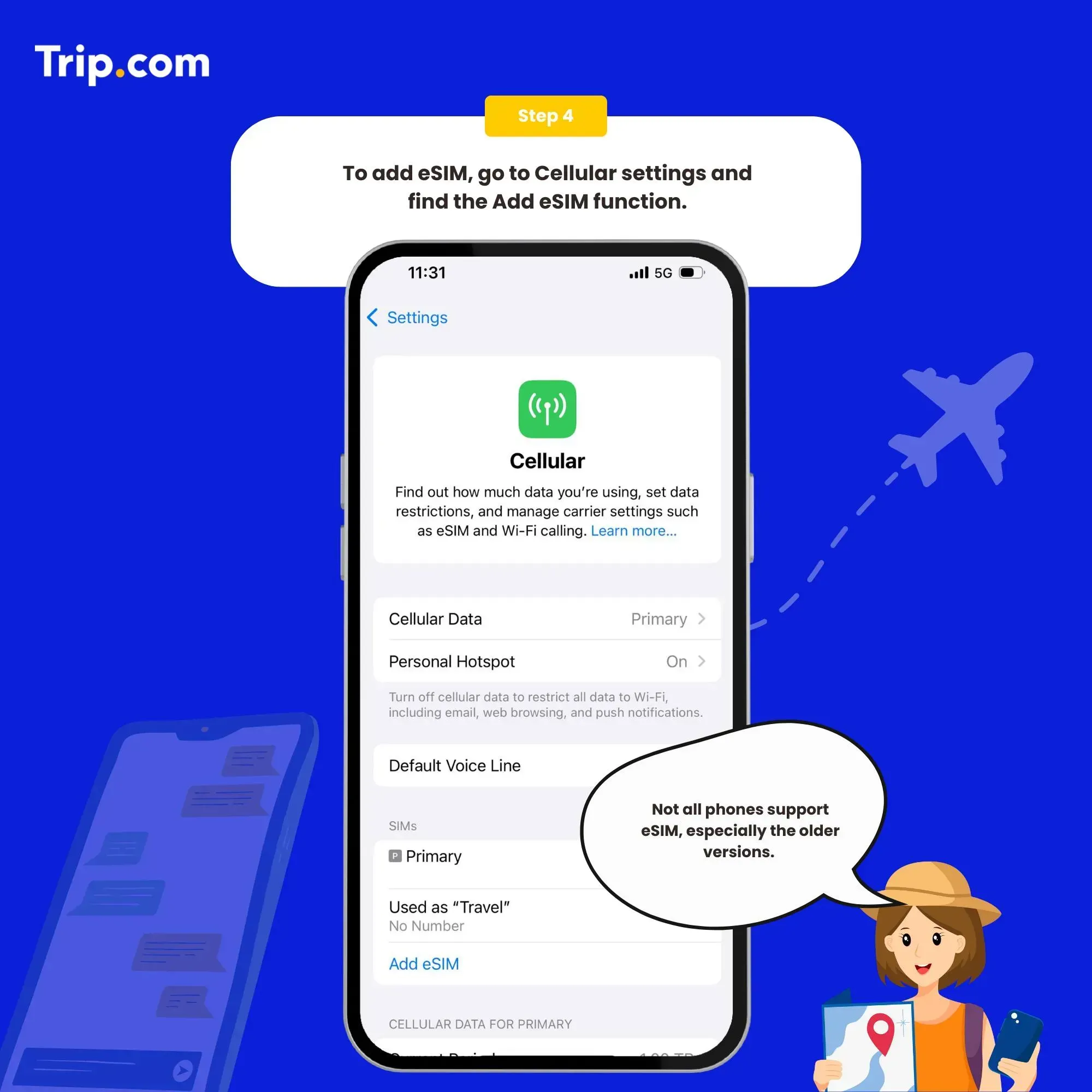
- Check Device Compatibility (Settings > Cellular > Add eSIM).
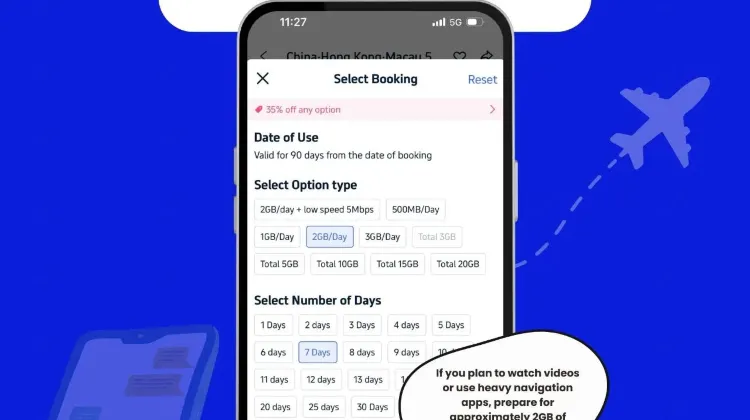
- Purchase Plan: I use Trip.com’s eSIM for China – cheap and reliable.
Installation:
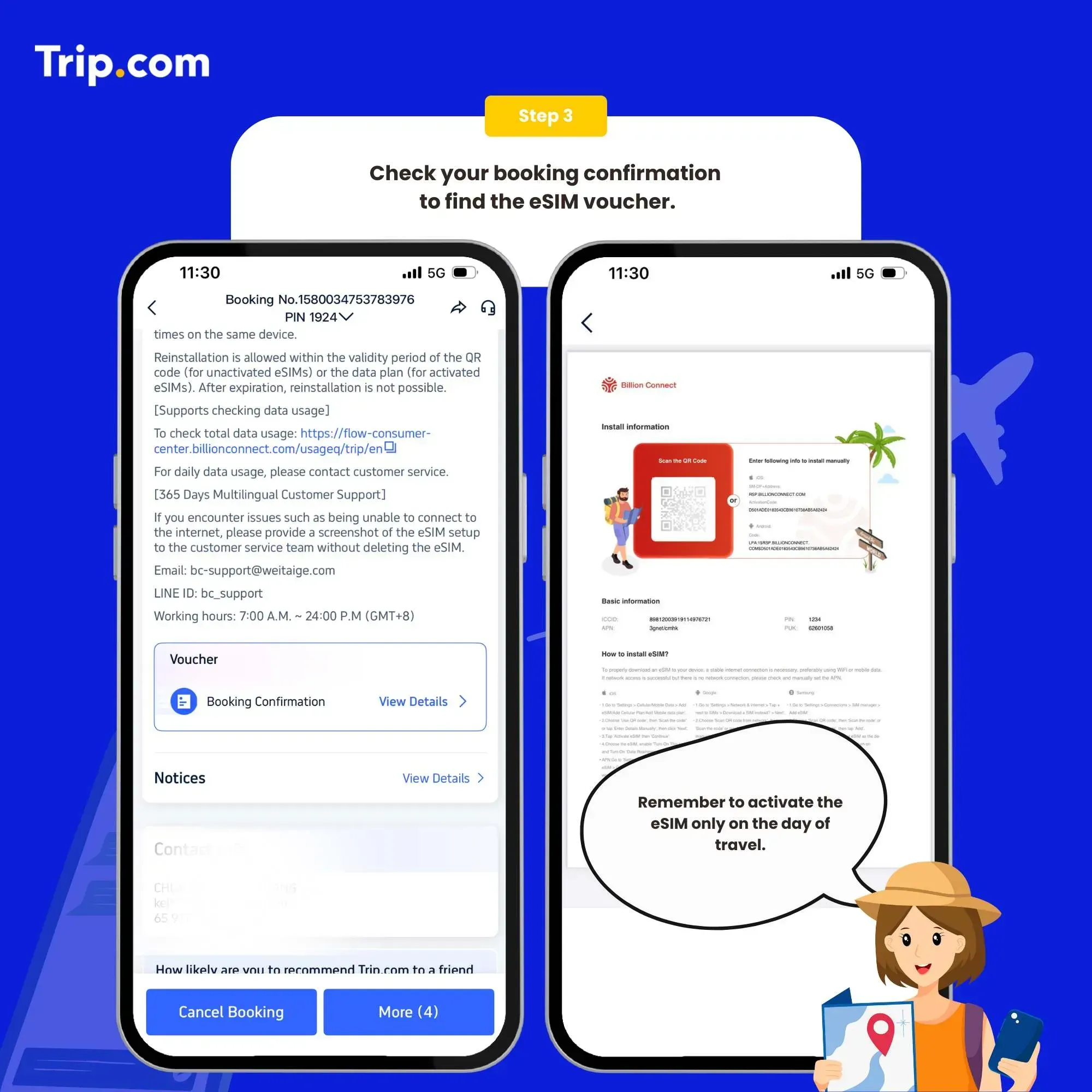
- Scan the QR Code from your confirmation email.
- Follow Prompts: On iPhone: Settings > Cellular > Add Cellular Plan. On Android: Settings > Connections > SIM Manager.
- Name Your Plan: I label mine “China Data” to avoid confusion.
Activation in China:
- Toggle Off Your Home SIM (keep it active for texts).
- Enable Data Roaming: Critical for connectivity.
- Auto-Connect: Your phone links to China Mobile/Unicom instantly.
Pro Tip: If it doesn’t work immediately, toggle airplane mode on/off. Solved my connection glitch at Beijing Capital Airport!
Deactivation: Just go back to Cellular Settings and switch off the eSIM profile. No residue fees – unlike some physical SIMs.
Beijing eSIM Compatible Phones
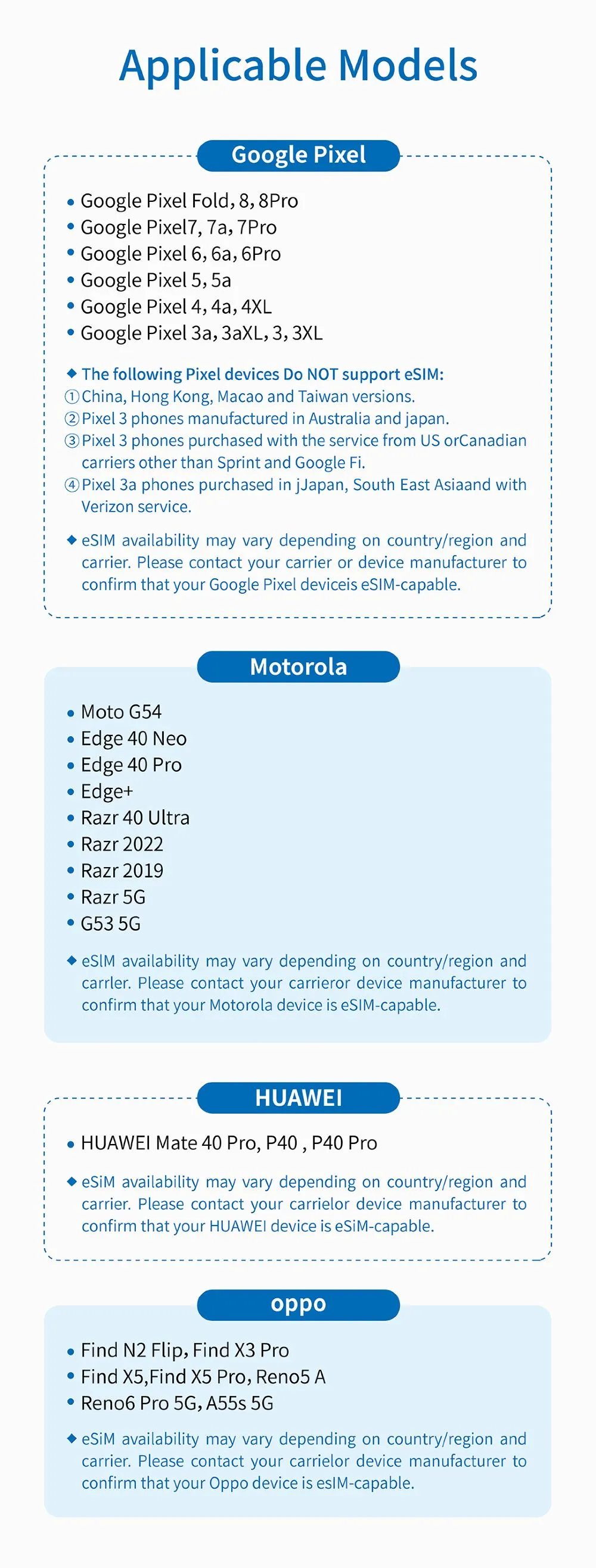
First, check if your phone can use eSIM:
- For iPhone: Go to Settings → General → About → Check for "Carrier Lock"
- For Android: Settings → Connections → Mobile Networks → Carrier/Network Operators
- Or simply dial #06# to check for an EID number - if you see one, your phone supports eSIM!
iPhone 11 or newer, Samsung Galaxy S20+, Google Pixels, and most flagship devices released after 2019. Pro tip: Check your settings under "Cellular" or "SIM Manager" to confirm eSIM compatibility before buying!
How Much Data Do You Need for Beijing eSIM?

Wondering how much data to pack for your Beijing trip? It depends on what you’ll be doing. Here’s a simple guide to help you choose the right plan—so you’re never stuck without maps or Instagram.
Light User (Maps, Messaging, Photos)
If you’re just using Google Maps (via VPN), WeChat, and snapping a few photos, you’ll need:
- 500MB/day: Enough for basic navigation and messaging.
- Total for 5 days: ~2.5GB.
Best For: Short trips focused on sightseeing.
Moderate User (Social Media, Light Streaming)
If you’re posting stories, checking emails, and streaming music, go for:
- 1GB/day: Covers Instagram, Facebook, and occasional YouTube (with VPN).
- Total for 7 days: ~7GB.
Best For: Travelers who want to stay active on social media.
Heavy User (Video Calls, Streaming, Work)
If you’re working remotely, video calling, or binge-watching shows, you’ll need:
- 2GB/day: For Zoom calls, Netflix, and heavy app usage.
- Total for 10 days: ~20GB.
Best For: Digital nomads or long-term stays.
More Global eSIMs for Tourists
Popular eSIMs Worldwide
Disclaimer: This article has been provided by an individual contributor or third party platform. If there is any discrepancy regarding the copyright, please contact us directly and we will delete the content immediately.
Trending Searches
-
eSIM/SIM card
-
Featured guides
-
Top destinations
-
Latest Flight Deals
-
Popular Attractions
- Cheap flights from Ulaanbaatar to Beijing
- Return flights from Seoul to Beijing
- Direct flights from Yiwu to Beijing
- Return flights from Hong Kong to Beijing
- Direct flights from Erenhot to Beijing
- Cheap flights from Xi'an to Beijing
- Direct flights from Hangzhou to Beijing
- Return flights from Zhangjiajie to Beijing
- Return flights from Shenzhen to Beijing
- Direct flights from Shanghai to Beijing
- Return flights from Ta Khmau to Beijing
- Cheap flights from Chongqing to Beijing
- Return flights from Bangkok to Beijing
- Direct flights from Guangzhou to Beijing
- Direct flights from Chengdu to Beijing
- Hotels in Shanghai
- Hotels in Guangzhou
- Hotels in Beijing
- Hotels in Bangkok
- Hotels in Shenzhen
- Hotels in Hong Kong
- Hotels in Chongqing
- Hotels in Tokyo
- Hotels in Ho Chi Minh City
- Hotels in Chengdu
- Hotels in Kuala Lumpur
- Hotels in Seoul
- Hotels in Zhangjiajie
- Hotels in Hanoi
- Hotels in Singapore
- Hotels in Hangzhou
- Hotels in Xi'an
- Hotels in Istanbul
- Hotels in Bali
- Hotels in Osaka
- Forbidden City Tickets
- Zhangjiajie National Forest Park
- Shanghai Tower Tickets
- Shanghai Disneyland Tickets
- Shanghai Wild Animal Park
- Canton Tower Tickets
- shanghai to wangxian valley
- Huangshan
- Shanghai Disneyland Fast Pass
- Universal Studios Beijing Tickets
- Book China Attraction Tickets with Passport
- Yu Garden Tickets
- Great Wall of China Tickets
- Summer Palace Tickets
- Shanghai Disneyland Crowd Forecast