Trip.com Call Center: Global Numbers, Online Call & Customer Service


This guide has everything you need to know: how to find the correct Trip.com call center number in your country, the steps to make a toll-free online call, other support options, and practical tips for getting help quickly.
to Bangkok
to Manila
to Shanghai
to Tokyo
to Seoul
See all flights


Trip.com Call Center Global Numbers

Trip.com provides call center support across over 40 countries and regions, with 24/7 assistance for flights, hotels, trains, and cars (most other reservations have specific time limits).
International calls may incur charges—click the country/region name to access each official help page for the latest phone number updates. For countries not listed above, please call Trip.com global phone number.
Region | Country/Region Phone Number | Service Hours (Local Time) | Supported Bookings |
|---|---|---|---|
North America | 24/7 (flights/hotels/trains/cars); 9:00 PM–2:00 PM (+1) (other bookings) | All | |
24/7 (flights/hotels/trains/cars); 9:00 PM–2:00 PM (+1) (other bookings) | All | ||
9:00–23:00 (all bookings) | Flights, hotels | ||
Europe | 24/7 (flights/hotels/trains/cars); 02:00–19:00 (other bookings) | All | |
09:00–23:00 | Flights, hotels | ||
09:00–23:00 | Flights, hotels | ||
09:00–23:00 | Flights, hotels | ||
09:00–23:00 | Flights, hotels | ||
24/7 (flights/hotels); 02:00–19:00 (other bookings) | All | ||
Asia Pacific | 24/7 (flights/hotels/trains/cars); 09:00–02:00 (+1) (other bookings) | All | |
24/7 (flights/hotels); 08:00–24:00 (other bookings) | All | ||
24/7 (flights/hotels); 08:00–24:00 (other bookings) | All | ||
24/7 (flights/hotels/trains/cars); 11:00 AM–04:00 AM (+1) (other bookings) | All | ||
24/7 (flights/hotels/trains/cars); 13:00–06:00 (+1) (other bookings) | All | ||
24/7 (flights/hotels/trains/cars); 09:00–18:00 (other bookings) | All | ||
24/7 (flights/hotels/trains/cars); 09:00 AM–02:00 AM (+1) (other bookings) | All | ||
24/7 (flights/hotels); 08:00–24:00 (other bookings) | All | ||
24/7 (flights/hotels); 08:00–24:00 (other bookings) | All | ||
Middle East | 24/7 (flights/hotels/trains/cars); 05:00–22:00 (other bookings) | All | |
24/7 (flights/hotels/trains/cars); 04:00–21:00 (other bookings) | All | ||
09:00–21:00 | Flights, hotels | ||
South Asia | 24/7 (flights/hotels/trains/cars); 06:30–23:30 (other bookings) | All | |
24/7 (flights/hotels/trains/cars); 05:00–21:00 (other bookings) | All |
You can also choose Trip.com in-app call (VoIP) for free on Trip.com App, check how to call for free in the next chapter!
How to Make a Free Trip.com Call Online
Trip.com offers free online calls (at no charge) through its app or website, this is an ideal choice if you don't want to pay for international calls or prefer a fast connection. Here's how to start it:
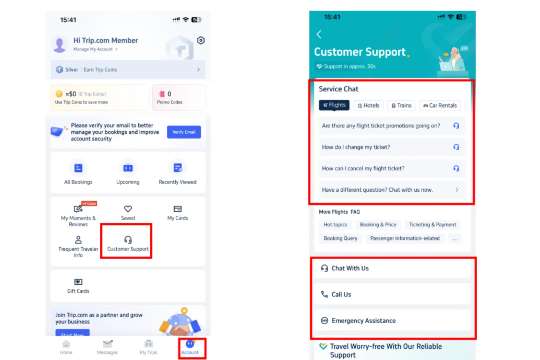
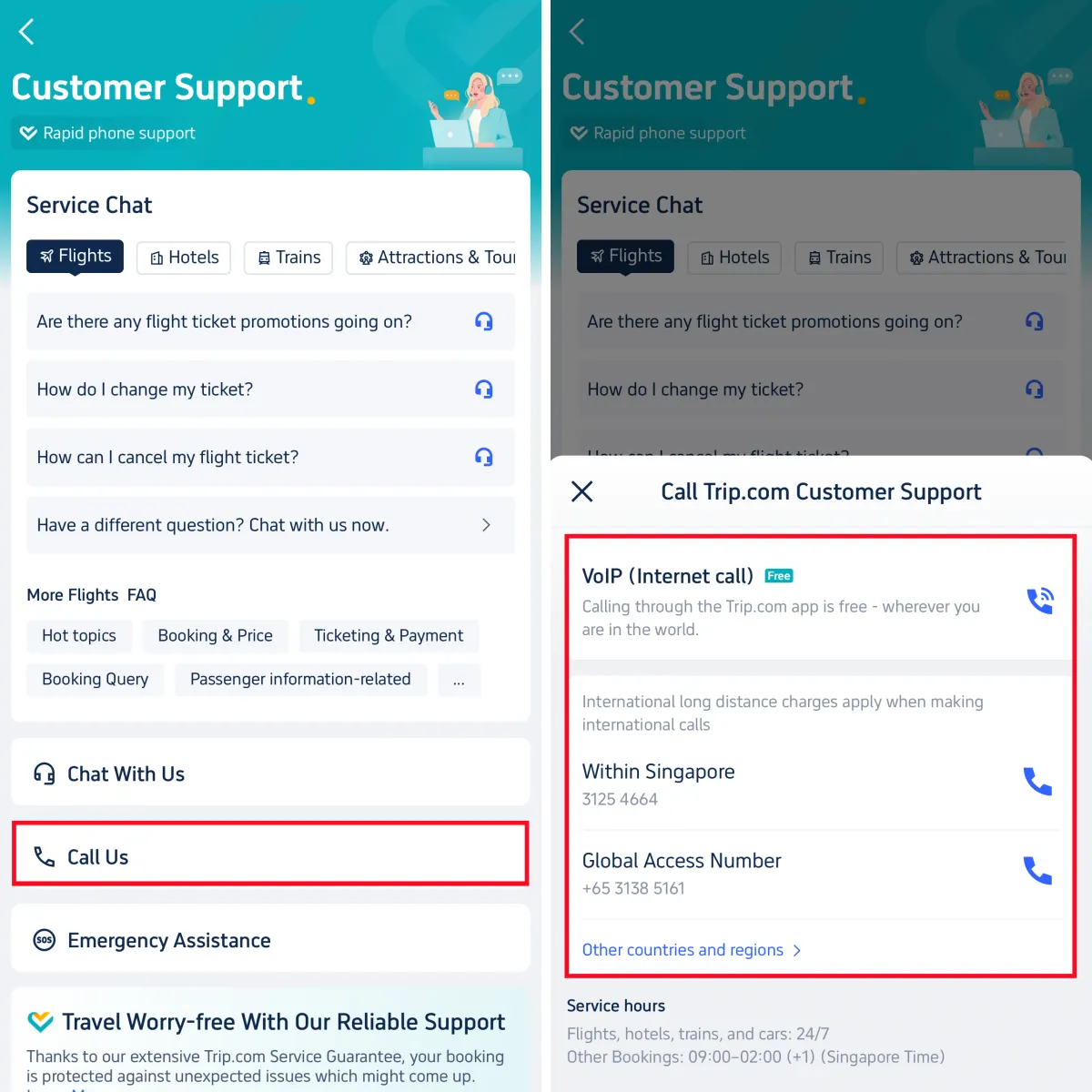
Step-by-Step for Trip.com Free Online Call
- Open the Trip.com app and log in (skip this if you’re already logged in).
- Follow the steps above to reach the Customer Support page (Account → Customer Service).
- Tap Call Us, then look for the VoIP (Internet Call) option (marked with a Wi-Fi symbol next to the phone icon).
- Select your issue type from the dropdown (e.g., “Booking Change,” “Refund Inquiry”) and enter your booking ID (if you have one) + a brief description of your problem.
- Tap “Connect” to start the call—you’ll be matched with a live agent (in English or your local language) within 1–5 minutes.
Benefits of Trip.com Online Call
- Free (Wi-Fi/ data usage, no phone charges).
- Faster than regular calls (shorter waiting times for common questions).
- The agent can directly access your booking details (since you are logged in), so you don't have to repeat the information.
How to Find Trip.com Call Center Numbers
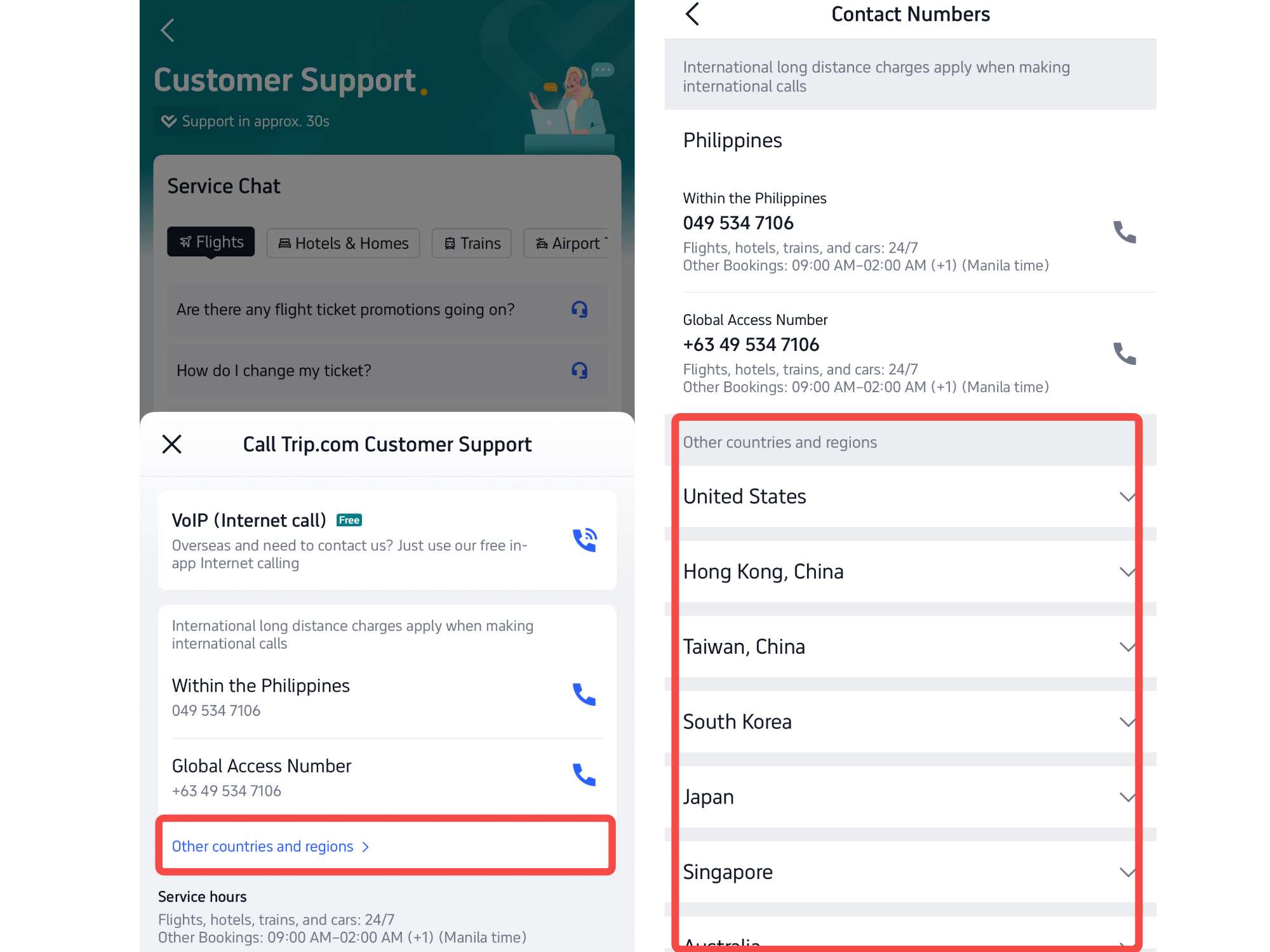
If you can't find the phone number of your country in the above table, you can directly find it through the Trip.com app or website, the method is as follows (use the exact button names for the steps, for clarity):
1. Via Trip.com App (iOS/Android)
- Open the Trip.com app and log in to your account.
- Click on the Account icon (the outline of the character) at the lower right corner of the screen.
- Scroll down to the "Help and Support" section and click on "Customer Service".
- On the "Customer Service" page, click "Call Us", and you will see a list of numbers suitable for your current location (for example, if you are in the United States, it will display phone numbers in the United States and global access numbers). If you want to see the full table, pls choose Other countries and regions
2. Via Trip.com Website (Desktop/Mobile Browser)
- Go to Trip.com’s official website and log in. Scroll to the bottom of the homepage and click Help Center (under “Customer Support”).
- Select your country/region from the dropdown menu—your local call center number and global access number will appear.
Other Trip.com Customer Support Channels (In-App Chat)
If you don't want to call, Trip.com also offers other reliable support channels:
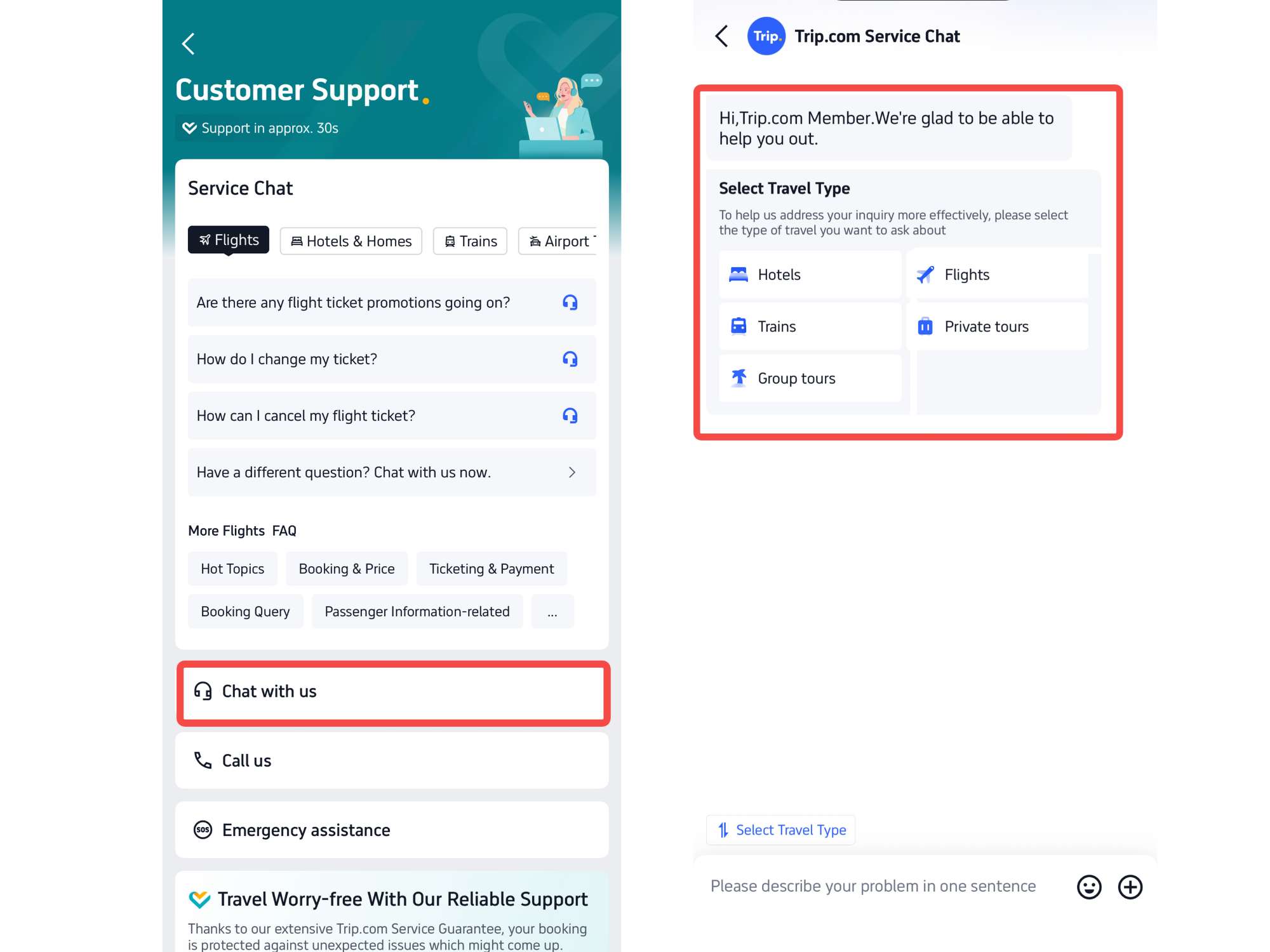
1. In-App Chat (Instant Messaging)
For non-urgent questions (e.g., “What’s the baggage allowance for my flight?”), use the in-app chat:
- On the Customer Service page, tap the Chat with us icon under service chat section.
- Enter your question here or select from travel types or common topics (e.g., “Booking Help,” “Refund Status”).
- The chatbot will respond first, if it cannot solve your problem, enter “Speak to a human” to escalate to a live agent (response time: 30s- 3minutes).
2. Email Support (Not Available Now)
Trip.com does not have a public email address, but you can send messages through the in-app/website contact form:
Go to theCustomer Servicepage (Account → Help & Support → Customer Service).Click "Email Us" (or the "Contact Form" on the website).Fill in your detailed information: name, phone number, email address, booking ID (if applicable), and a detailed description of your issue (including date, passenger name and screenshots, if necessary).Submit the form- you will receive a reply within 24 to 48 hours (for urgent issues such as flight cancellations, it will be faster).
See all attractions
 2229 booked






[10% Off] Global Hotel Recommendations
Search Top Global Hotels
See All Hotels







Get Cheap Flights to Everywhere
to Bangkok
to Manila
to Shanghai
to Tokyo
to Seoul
See all flights
FAQs about Trip.com Call Center
-
What is Trip.com’s global English-speaking call center number?
-
Are calls to Trip.com’s global access number free?
-
Can I call Trip.com 24/7?
-
How long does it take to connect to a Trip.com live agent?
-
Can I change or cancel a booking via the call center?
-
Does Trip.com offer customer service in languages other than English?
Disclaimer: This article has been provided by an individual contributor or third party platform. If there is any discrepancy regarding the copyright, please contact us directly and we will delete the content immediately.
Trending Searches
-
Air Travel Guide
-
Latest Flight Deals
-
Popular Flight & Hotel Packages
-
Getting Around
-
eSIM/SIM card
- Medellin Vacation Packages
- Hong Kong Vacation Packages
- Tokyo Flight and Hotel
- Koh Samui Flight and Hotel
- Hong Kong Flight and Hotel
- Langkawi Vacation Packages
- Paris Vacation Packages
- Chengdu Vacation Packages
- Busan Vacation Packages
- Niagara Falls Vacation Packages
- Larnaca Vacation Packages
- Istanbul Vacation Packages
- Aktau Vacation Packages
- Marinduque Vacation Packages
- Coron Vacation Packages
- Shanghai Bike Rental
- Wakayama Transportation
- JR Hokkaido
- Chitose Airport to Sapporo
- Osaka to Kyoto
- Shanghai Maglev Train
- Beijing Airports
- KL MRT Map
- Nara Transportation
- Shanghai Airport Transfers
- Changsha Metro
- Guangzhou Airport Transit
- Hong Kong Airport
- Tokyo Car Rental
- Narita Airport to Shinjuku
- Macau to Hong Kong
- Cruises from Shanghai to Japan vs Korea