China eSIM with VPN - 5G Unlimited High Speed SIM

by Trip.com
April 20, 2026

My honest guide to China eSIM with built-in VPN for foreign travelers. Find top plans, device compatibility checks, setup steps, provider reviews, and how to choose between eSIM+VPN vs SIM+VPN.
to Shanghai
to Beijing
to Guangzhou
See all flights

Top 3 China eSIM with VPN Data Plans
When picking an eSIM, focus on value and data that fits your trip length. Below are 3 top-rated China eSIM plans with built-in VPN, most with unlimited data (after reach the high-speed data cap for the day, you still have lower speed data)!

CMCC China 4/5G eSIM
- CoverageMainland China
- Data0.5G-3GB/day or 1-50GB Total
- Validity1 to 30 Days
- Pricefrom US$0.41

China Mobile 5G eSIM
- CoverageMainland China
- Data0.5G-3GB/day or 1-50GB Total
- Validity1 to 30 Days
- Pricefrom US$0.43

China/HK/Macau eSIM
- CoverageChina(Mainland,HK&Macau)
- Data3-50GB Total or 0.5-100GB/Day
- Validity1 to 30 Days
- Pricefrom US$0.43
💥 Limited Time Offer: New Trip.com users get an extra 5% off for many China eSIM plans! Grab the coupon and sign up for a free account, and the discount applies automatically at checkout. This makes Trip.com’s already affordable plans even more competitive compared to other platforms like Airalo or Klook.
How to Access Western Apps in China

Download apps on your iPhone or iPad – Apple Support (UK)
If you’re visiting China for less than a month, an eSIM with built-in VPN is a simple and reliable way to stay connected. You won’t need extra China VPNs to use apps like Instagram, TikTok, Google, or WhatsApp—they work right out of the box. Plus, Chinese apps like Amap (navigation) or Alipay (mobile payments) run smoothly with just data, no extra setup required.
Unlike physical SIM cards, eSIM is digital and does not require card replacement or carrying physical devices. You can purchase and activate them online before your trip, which can save time after arriving at your destination. Although most travelers have a smooth experience, we will cover potential problems and backup plans to ensure that you never leave without an Internet connection.
Which Apps Work with China eSIM with VPN?

A good China eSIM with built-in VPN supports both international and Chinese apps, covering all your travel needs. Below are some of the international apps available with China eSIM:
- Social Media: Instagram, TikTok, Facebook, WhatsApp, Twitter/X
- Productivity: Google Search, Gmail, Google Maps
- Entertainment: YouTube, Netflix (availability depends on your region)
China eSIM with Built-in VPN or SIM + VPN: Which to Choose?
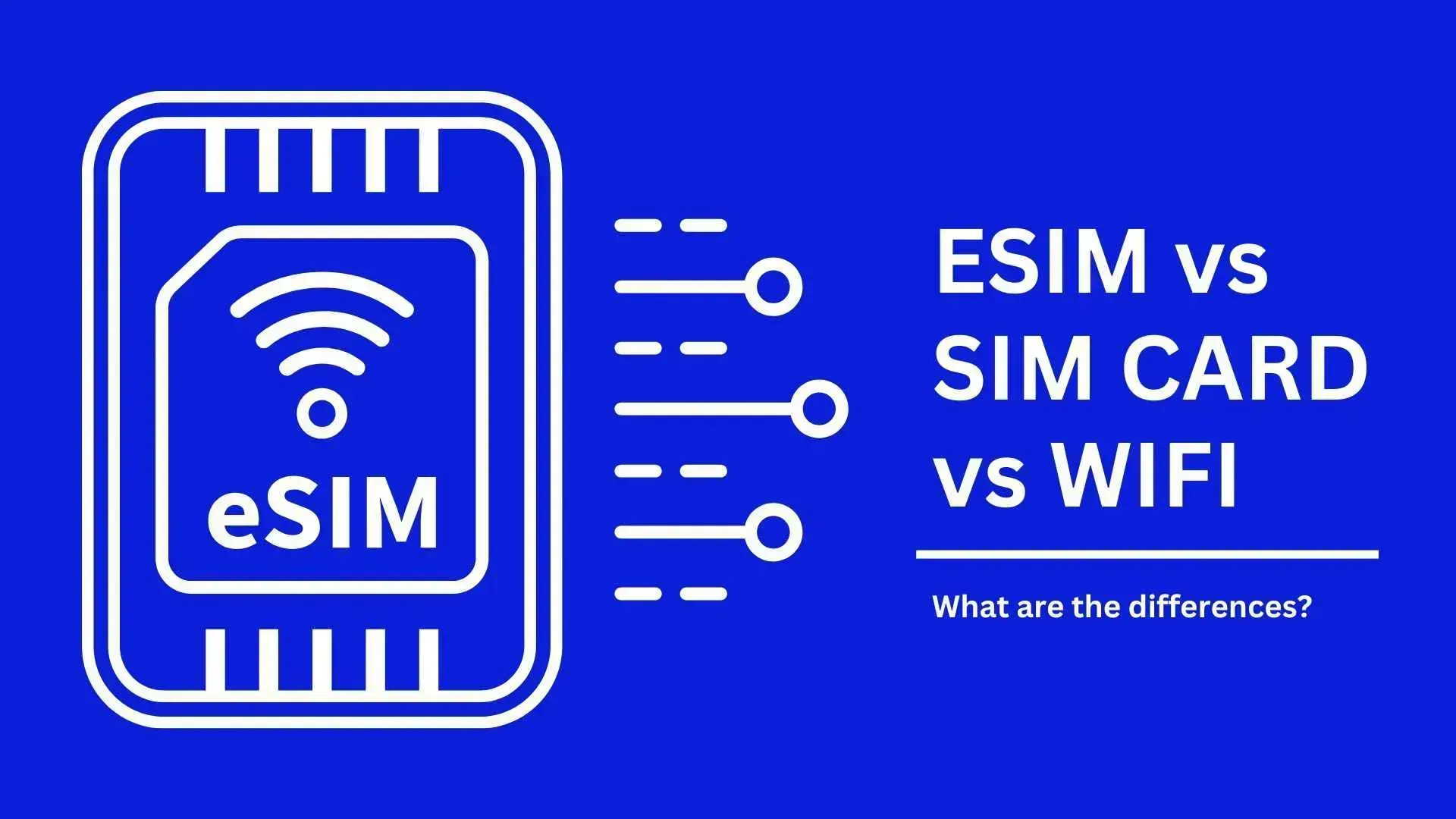
Here’s a side-by-side comparison to help you decide based on your needs:
Criteria | eSIM with Built-in VPN | Physical SIM + VPN |
|---|---|---|
Convenience | High: Digital activation (buy online before travel), no physical card | Low: Need to buy SIM locally (requires ID) and install VPN separately |
Stability | Reliable: Partnered with official operators for consistent coverage | Variable: VPN connections can be spotty; depends on SIM network quality |
Cost | Affordable: All-inclusive (data + VPN) | More expensive: Separate costs for SIM, data, and VPN subscription |
Suitability | Best for most tourists (especially short-term travelers) | Backup option: Only if eSIM isn’t compatible or no WiFi is available |
China eSIM with VPN - Top Provider & Reviews
Based on Reddit user experiences and hands-on testing, these are the most reliable providers:

Mainland China/Hong Kong/Macau 5G eSIM | Dual Network | Day Pass/Total Data Package | 24-Hour Billing | QR Code
4.6/5
21163 reviewsA great hotel and experience. Loved how there were so many activities included like afternoon tea and craft making. The service was also super attentive and the front desk responded to all my questions super fast. Location is great and the rooms were clean and lovely with a fantastic view.

5G/4G eSIM in 8 Asian countries | Multi-network support, supports All AI & TikTok | 500MB/day - 50GB total | 1-30 days | 24-hour billing | QR code
4.6/5
5730 reviewsIt worked perfectly every time. We didn't have a single problem in either mainland China or South Korea. It was also easy to install and started working as soon as I arrived in the destination country.

Mainland China 5G eSIM | Supports Google Maps / ChatGPT | Daily/Total Data Plans | 24-Hour Billing | 1–365 Days | QR Code
4.6/5
27426 reviewsThe reception was perfect, whether in cities or in the countryside. We never once lost connection. Purchase and installation were very easy. Highly recommended!

Mainland China 5G eSIM | Day Pass/Total Data Package | ChatGPT Available | 24-Hour Billing | 1-365 Days | QR Code
4.6/5
60449 reviewsFoodies and travelers will definitely love this! A SIM card for traveling in China that meets all your needs. Booking is super easy; just choose a package and click, and you're done! Plus, you can pay with Trip Coins – it doesn't get any more worthwhile than this. Once in China, the signal is excellent, and the stable internet makes searching for delicious restaurants or famous cafes quick and accurate. The ease of accessing information made this trip perfect. Using various apps was smooth. It's a very worthwhile investment.
China eSIM | 1-30 Days | Up to 60GB High-Speed Data | Coverage on Leading Network
4.3/5
119 reviewsthe signal is very good,it is very easy to open and use,the price is relatively better than buying a general store,and the quality of the signal is much better.
1. Trip.com (My Fav)
- Pros: Great value for money, multiple plan options (short-term/long-term accommodation, cross-regional), official operator partnership (guaranteed legality), 24/7 English customer support, and simple in-app activation.
- Cons: Limited to Trip.com’s app for install (but the app is user-friendly).
- Best for: All tourists, especially those looking for an easy and affordable option with English support.
2. Airalo
- Advantages: Widely used globally, a reliable brand, and a small data plan for light users (for example, 3GB in 30 days).
- Disadvantages: It is more expensive than Trip.com (3GB costs about $11.50), but there are fewer high-capacity options.
- Most suitable for: Travelers who only need a small amount of data to view emails.
3. Holafly & Nomad
- Advantages: It is very popular in Western markets and offers unlimited data options.
- Disadvantages: The comments on Reddit are mixed (some users have reported network connection issues in remote areas), and the price is higher than that of Trip.com.
- Most suitable for: Travelers who are already familiar with these brands, but Trip.com is more reliable in China.
How to Check If Your Device Supports Chinese eSIM
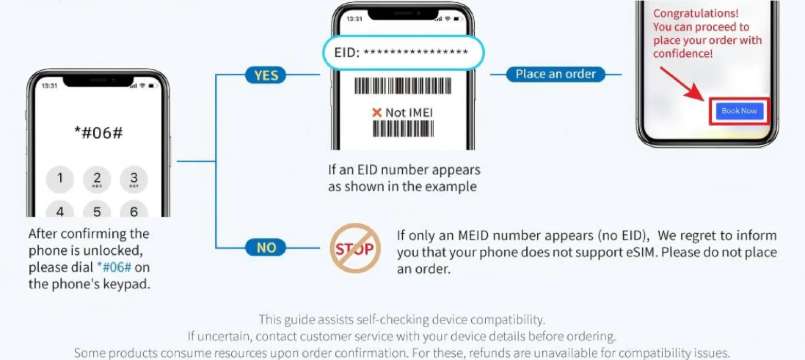
Before purchasing eSIM, please confirm that your phone is compatible with the following quick steps:
- Dial
*#06#and press call. - If your device supports eSIM, you will see an EID (Embedded Identity Document) number on the screen. The absence of EID means that your phone does not support eSIM.
Extra Tips:
- iOS: Need iOS 12.1 or later (iOS 17.4+ for direct in-app installation on Trip.com).
- Android: Android 8.1 or above is required. The mobile phone locked by the operator may not support international esim - please contact your home provider to unlock it first.
How to Install & Use China eSIM with VPN
Before eSIM Installation
- Ensure you’re connected to stable WiFi or mobile data.
- For Trip.com eSIMs: One QR code/activation link works for only one device—confirm you’re using the phone you’ll take to China.
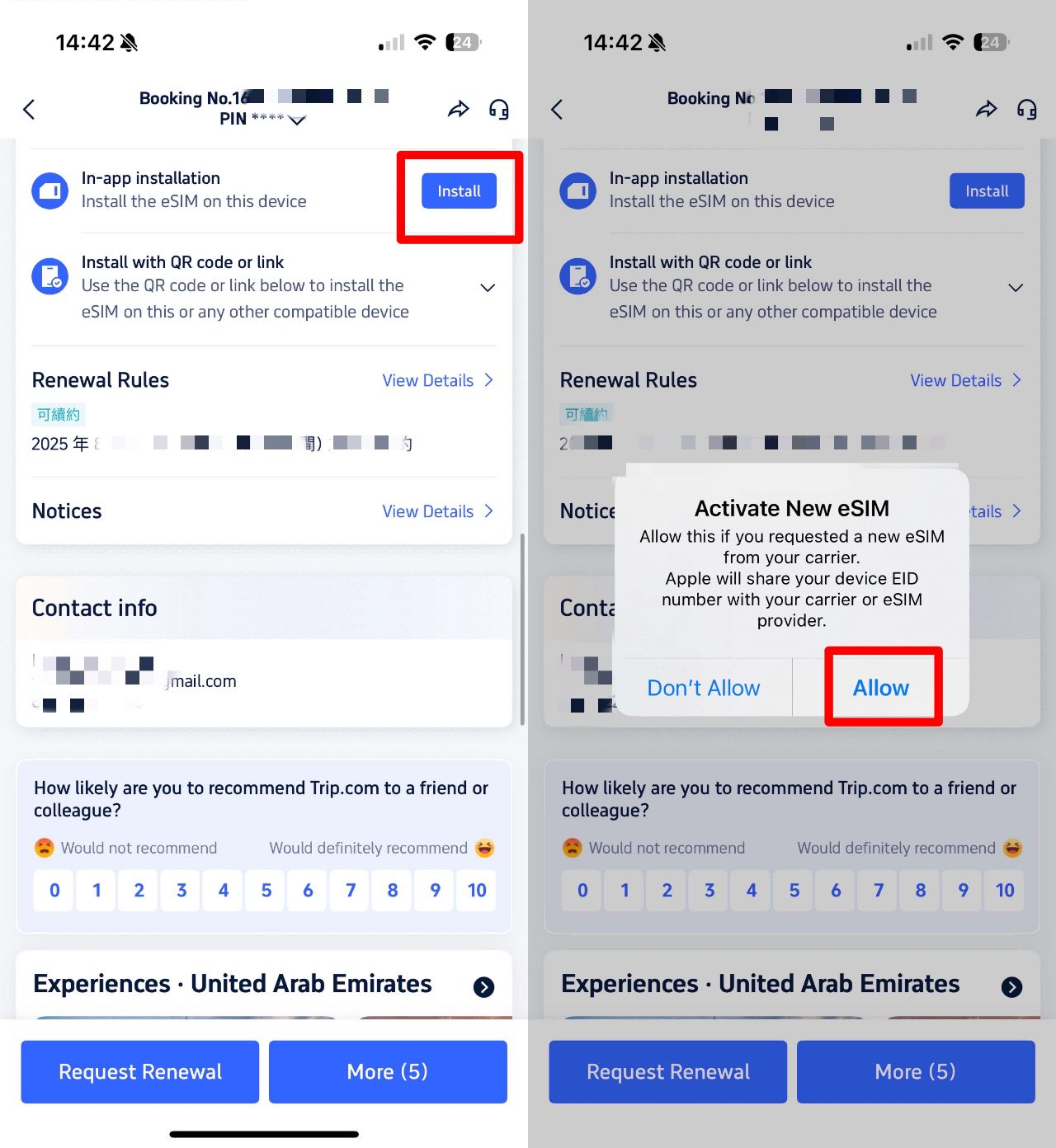
Option 1: Direct Installation (iOS 17.4+ via Trip.com App)
- Open the Trip.com app → Go to “Account” → “All Orders”.
- Find your eSIM order → Tap “Install” (no QR code needed!).
- Follow the on-screen prompts to activate the eSIM.
Option 2: QR Code/Manual Installation (All Other Devices)
- In the Trip.com app, open your eSIM order and save the QR code (print it or save it to another device).
- Go to your phone’s settings:
- iOS: “Cellular Network” → “Add Cellular Network”
- Android: “SIM Card Management” → “Add SIM Card”
- Scan the QR code. If scanning fails, enter the “SM-DP+ Address and Activation Code” from your Trip.com order confirmation.
- If still stuck: Your phone may be carrier-locked—contact your home provider to unlock it.
How to Use China eSIM
- Turn off your primary SIM card (to avoid roaming charges) and enable the eSIM.
- Activate data roaming:
- iOS: “Settings” → “Cellular” → “Data Roaming”
- Android: “Settings” → “Connections” → “Mobile networks” → “Data Roaming”
- If no internet: Manually set the APN to “cmhk” (rarely needed, but fixes most issues):
- iOS: “Settings” → “Cellular” → “Cellular Data Network”
- Android: “Settings” → “Connections” → “Mobile networks” → “Access Point Names” → “Add”
- Restart your phone after setting the APN.
How to Renew China eSIM
- The renewal plan will be automatically activated after the initial plan ends, so no need to scan the QR code again.
- If your initial plan has low-speed data, it will be used first. Restart your phone and switch to the renewal plan.
- To use eSIM on different devices, please purchase a new plan (renewal cannot be transferred).
About Trip.com’s eSIM Partner Operators
Trip.com's eSIM services cooperate with the 3 major official mobile operators in China to ensure consistent legal network coverage across the country.
China Mobile
China Mobile’s eSIM through Trip.com covers almost all major cities and popular tourist attractions, from the center of Beijing to the karst mountains in Guilin and other scenic spots. Whether you are browsing social media, using navigation or making mobile payments, its 4G/5G signal is very stable in daily use, so if your itinerary is centered around well-known destinations, it is a reliable choice.
China Telecom
China Telecom’s eSIM performs exceptionally well in terms of network stability, even in areas where the signal may be weak, such as some remote mountain villages or suburbs. If your trip includes visits to some less bustling and less frequented places, this operator's eSIM is unlikely to go offline, keeping you online when you need it.
China Unicom
China Unicom’s eSIM through Trip.com supports seamless network switching among Chinese mainland, Hong Kong and Macao through eSIM provided. If your travel plan involves shuttling between these regions (for example, a trip from Guangzhou to Hong Kong), you don't need to exchange esims or purchase separate plans - this option enables you to cross borders without any additional hassle.
When & How to Use a VPN in China
How a VPN (Virtual Private Network) Works | HowStuffWorks
It is very important to abide by the regulations in China when using VPNs. Here's what you need to know:
When to Use a VPN
- As a backup: If your eSIM fails (for example, in a remote area without coverage) and you can access public WiFi, a VPN can help you access international apps.
- For physical SIM card foreign users: If you are using a local SIM card (without a built-in VPN), you will need a VPN to access blocked applications.
How to Choose a VPN
- Use a reputable and law-compliant VPN service.
- Avoid free VPNS, they are usually unreliable and may endanger your data.
- Install a VPN before arriving in China (some services cannot be downloaded locally).
Important Compliance Reminder
The use of VPN is regulated in China. Always use VPNs for legitimate travel purposes and avoid any illegal activities. Trip.com’s eSIMs with built-in VPN complies with local regulations and is the safest choice for tourists.
🔥Exclusive China Train Coupon: Get 3% OFF Now!
Book your China train tickets as a new user on Trip.com and enjoy a special 3% Off 🎁! Use our exclusive coupon to save big on your first train journey!!!👀
[8% Off] Best China Hotel Recommendations
Top Shanghai Hotels
Top Beijing Hotels
Top Guangzhou Hotels
See All Hotels
 NO.1
NO.1






















What to Prepare for a Trip to China?
- Visa & Entry Tips China’s 240-hour visa-free transit policy now covers 54 countries, incl. the US, UK, Canada, and Brazil, allowing up to 10 days during layovers. Learn more about China Entry Tips to land in China easily.
- Getting Connected VPNs are vital for accessing Google, WhatsApp, Instagram, etc in China. Set one up before arriving. China eSIMs are the easiest option for data and bypassing restrictions. Pocket Wi-Fi devices work best for group but are pricier and require pickup/return.
- Money Exchange & Tax Refunds Exchange money in China banks (better rates than airports). ATMs accept foreign cards, but notify your bank first. For tax refunds, spend over ¥500 at stores with a "Tax-Free" sign. Keep receipts and get forms stamped at customs before departure.
Must-Have Apps in China
- China Payment Apps Forget cash. Chinese use Alipay (I like it better) or WeChat Pay to pay for everything in China. Scan a QR code at noodle stalls, metros, even temples. Link your foreign Visa/Mastercard before landing.
- China Map Apps Amap (Gaode Map) & Baidu Map (limited English) is what locals use, with real-time navigation, metro/bus routes, and traffic updates. Apple Maps does a good job too if you're already an IOS user.
- China Transport Apps Street taxis are cheap, but drivers rarely speak English. Use China Taxi App like DiDi (China’s Uber)—set your destination in English, pay by Alipay.
- China Travel Apps 15+ China trips taught me: Use Trip.com. It's the best English app for booking China trains/flights/hotels + finds Trip.com deals.
- China Dating Apps Locals use Tantan (China’s Tinder) and Momo. WeChat’s “People Nearby” works too, but expect language barriers unless your Mandarin’s decent.
- China Food App Use Meituan (also helps find nearby restaurants) or Ele.me for food delivery—both have English mode. No English menu in restaurants? Scan the QR with Alipay's translator.
🎁 Search Cheapest flights to China & book the best China hotels! Get connected fast with China eSIM.
FAQs about China eSIM with VPN
-
Which is the best eSIM to use in China with VPN?
-
Can I use a VPN with an eSIM in China?
-
Which eSIM comes with VPN?
-
Can I use a VPN with an eSIM?
Disclaimer: This article has been provided by an individual contributor or third party platform. If there is any discrepancy regarding the copyright, please contact us directly and we will delete the content immediately.
Trending Searches
-
eSIM/SIM card
-
Top destinations
-
Latest Flight Deals
-
Popular Attractions
- Hotels in Shanghai
- Hotels in Guangzhou
- Hotels in Beijing
- Hotels in Bangkok
- Hotels in Shenzhen
- Hotels in Hong Kong
- Hotels in Chongqing
- Hotels in Tokyo
- Hotels in Ho Chi Minh City
- Hotels in Chengdu
- Hotels in Kuala Lumpur
- Hotels in Seoul
- Hotels in Zhangjiajie
- Hotels in Hanoi
- Hotels in Singapore
- Hotels in Hangzhou
- Hotels in Xi'an
- Hotels in Istanbul
- Hotels in Bali
- Hotels in Osaka
- Forbidden City Tickets
- Zhangjiajie National Forest Park
- Shanghai Tower Tickets
- Shanghai Disneyland Tickets
- Shanghai Wild Animal Park
- Canton Tower Tickets
- shanghai to wangxian valley
- Shanghai Disneyland Fast Pass
- Huangshan
- Book China Attraction Tickets with Passport
- Universal Studios Beijing Tickets
- Great Wall of China Tickets
- Yu Garden Tickets
- Summer Palace Tickets
- Shanghai Disneyland Crowd Forecast