eSIM Mexico 2026: Best Plans, Prices & How to Buy

If you’re heading to Mexico, one of the first questions you might ask yourself is: how on earth am I going to stay connected? Trust me, I’ve been there, a solid internet connection like Mexico eSIM can make or break a trip to Mexico.


Popular Mexico eSIM Plans
- CountryMexico
- Option1GB
- Duration2 Days
- Standard PriceUS$5.93
- CountryMexico
- Option3GB
- Duration7 Days
- Standard PriceUS$17.07
- CountryMexico
- Option5GB
- Duration14 Days
- Standard PriceUS$29.08
What is Mexico eSIM and How Does It Work?
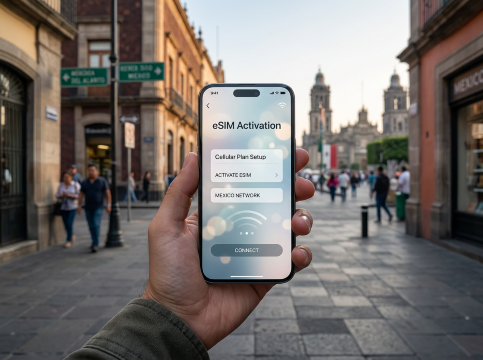
Mexico eSIM activation.
An eSIM, or embedded SIM, is like a virtual SIM card that you can download straight onto your phone. It’s perfect for travelers because it lets you connect to local mobile networks without having to swap out a physical SIM card. Think of it as a digital version of that little SIM tray we’ve all struggled to open—it’s just already built into your phone, ready to be activated.
In Mexico, using an eSIM means you can set up your data plan even before you arrive. Once you buy a plan (like those from Trip.com), you’ll get a QR code via email. Just scan it with your phone, and your eSIM will be activated in minutes. This means you’re connected as soon as you step off the plane—no scrambling at kiosks or hunting for Wi-Fi. All you need is a compatible phone and a quick setup, and you’re ready to explore, share, and navigate with ease.
What is the Best eSIM for Mexico?

Looking for affordable and flexible internet options while traveling? Trip.com offers a range of budget-friendly eSIM plans tailored to every kind of traveler. Whether you're on a quick business trip or an extended vacation, our eSIM solutions keep you connected effortlessly. And most importantly, our eSIM is super CHEAP!!! ✌️
Cheap Plans with Flexible Options
Trip.com offers a variety of eSIM plans to meet different travel needs. Whether you’re staying for a short trip or an extended vacation, there’s a plan for everyone. Here’s a breakdown of the current options:
Data Plan | Validity | Price (USD) |
1GB | 2 Days | $5.93 |
2GB | 5 Days | $9.94 |
5GB | 7 Days | $24.23 |
10GB | 15 Days | $48.97 |
These packages offer flexibility and great value for your money, whether you’re a light data user or someone who needs more bandwidth for streaming or staying connected for work. For more details or to find additional affordable options, click to explore more eSIM plans on Trip.com.
 16615 booked

Which is Better in Mexico? eSIM vs. SIM Card vs. Wi-Fi Router
There are several ways you can stay online while traveling in Mexico, and each one has its own ups and downs. Depending on what kind of traveler you are—a digital nomad looking for constant connectivity, or just someone who wants to check Instagram occasionally—some options might suit you better than others.
Let’s get into it and break down the pros and cons of each way to stay connected, from eSIMs to roaming, and everything in between. Let's start with a quick comparison of the main options available:
Option | Pros | Cons |
eSIM | Easy setup, no physical SIM needed, affordable data plans, keep your primary number | Requires eSIM-compatible device |
Local SIM Card | Local rates, good coverage | Need to purchase and swap SIMs, possible language barriers |
Pocket Wi-Fi | Connect multiple devices, portable | Expensive, extra device to carry, limited battery life |
Free Wi-Fi | No cost, available in public places | Unreliable, security risks, not always accessible |
Roaming | Convenient, use your existing SIM and number | Extremely high costs, potential for unexpected charges |
eSIM: Easy Connectivity
eSIM is a virtual SIM you download onto your phone. No need to mess with tiny cards. Buy it online, activate before you go, and you’re connected as soon as you land. Trip.com has affordable plans. The only catch: your phone needs to support eSIM. If it does, it’s a no‑brainer – you keep your regular number active while using local data.
Local SIM Cards: Old‑School but Effective
If eSIM isn’t for you, grab a local SIM in Mexico. Telcel, Movistar, and AT&T have good coverage and fair rates. You’ll need to find a kiosk or store and maybe use some Spanish. The downside is losing access to your home number for a while, but it works well if you have a dual‑SIM phone.
Pocket Wi-Fi: Great for Groups
Traveling with friends or multiple devices? Pocket Wi-Fi is a portable hotspot. Everyone stays connected at once. But it’s pricey – around $80 a week – and you have to keep it charged and worry about losing it. Handy, but weigh the cost.
Free Wi-Fi: Budget Friendly, Unreliable
Free Wi-Fi is everywhere: cafés, bars, public squares. It’s great for quick updates. But reliability varies, and security is risky. Use it as a backup, not your main connection.
Roaming: Easy but Expensive
Roaming is simple – just use your home SIM. But it costs a lot. Expect $5–$15 per day for limited data (a few hundred MB), or high per‑MB fees (though nowhere near $15 per MB). Without a travel plan, you could face a huge bill. I turn roaming off. Not worth it unless you have a proper international plan.
How to Get an eSIM in Mexico?
Check if your phone supports eSIM
Dial *#06#. If you see an EID number, your device likely supports eSIM. For confirmation, go to your phone's settings:
- iPhone: Settings > Cellular – look for "Add eSIM"
- Android: Settings > Connections or Network & Internet – look for an eSIM option
Buy an eSIM plan
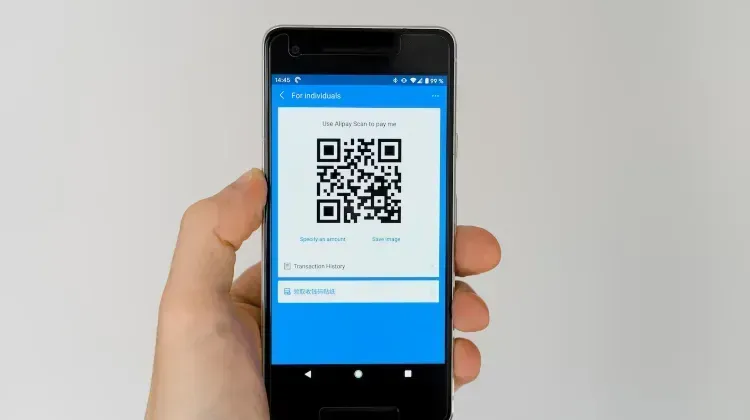
Go to Trip.com Mexico eSIM and choose a plan that fits your needs. After purchase, you'll receive a QR code by email. Keep it handy.
Connect to a stable Wi‑Fi network
Make sure you're online before you start the activation process.
Scan the QR code to install the eSIM
- iPhone: Settings > Cellular > Add eSIM (or "Add Data Plan"), then scan the QR code
- Android (most models): Settings > Network & Internet > SIMs > Add eSIM, then scan
- Samsung: Settings > Connections > SIM Manager > Add eSIM
Follow the prompts to activate
Once scanned, follow the on‑screen instructions. The eSIM will be added and activated.
How to Activate Mexico eSIM?
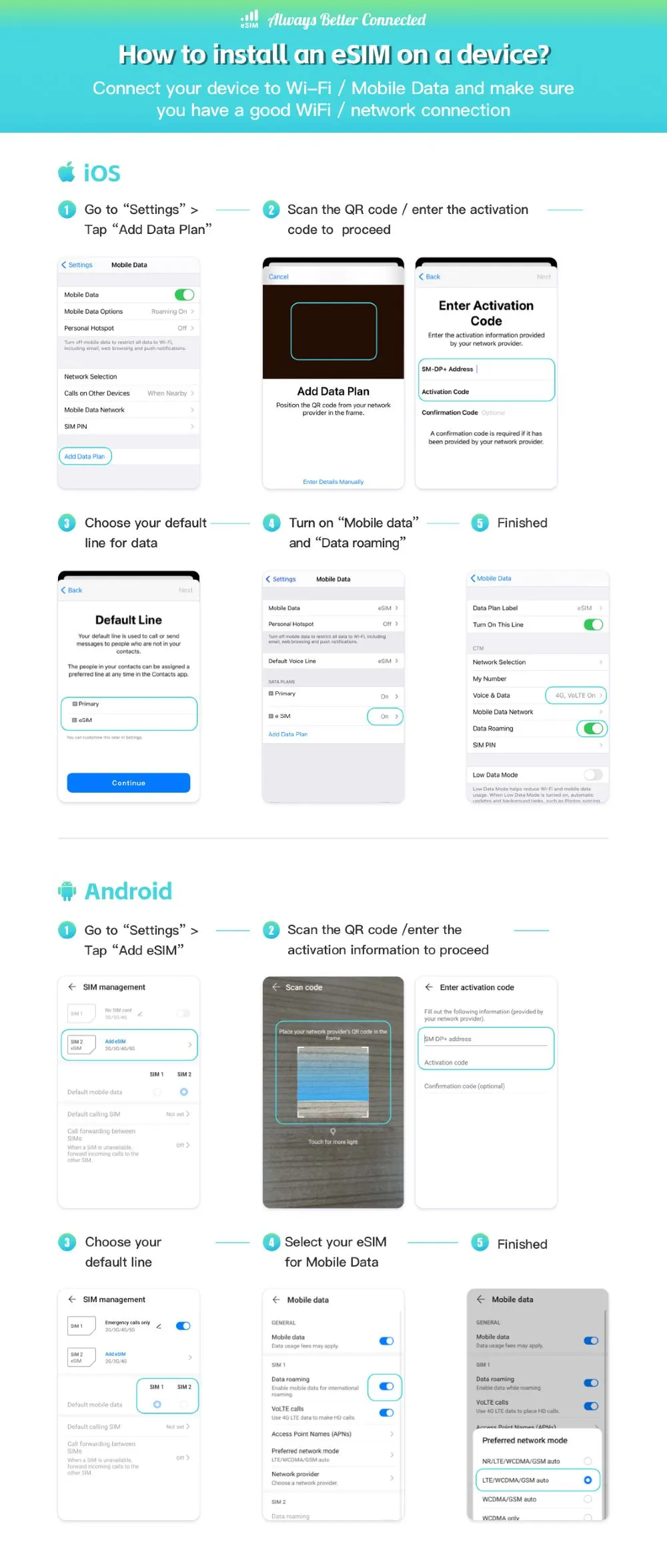
Now that you have your eSIM ready, it’s time to activate it. The process is simple and quick, but it does vary slightly between iOS and Android devices. Let’s break it down step-by-step.
Install Mexico eSIM on an iOS Device (iPhone)
- Connect to Wi-Fi or Mobile Data: Make sure your device is connected to a stable Wi-Fi or mobile network.
- Go to Settings: On your iPhone, go to the “Settings” app.
- Add Data Plan: Tap on “Cellular” or “Mobile Data,” and then select “Add Data Plan.”
- Scan the QR Code: Use your phone’s camera to scan the QR code you received from Trip.com. Alternatively, you can manually enter the activation code if scanning doesn’t work.
- Choose Default Line: Once the eSIM is added, you’ll be prompted to choose your default line for data. You can select the eSIM for mobile data, while keeping your primary line for calls and texts if needed.
- Enable Mobile Data and Data Roaming: Go back to “Cellular” settings and make sure “Mobile Data” and “Data Roaming” are both turned on. This is especially important if you want to use your data without interruptions.
And just like that, you’re ready to use your eSIM in Mexico. Enjoy seamless connectivity wherever your travels take you!
Install Mexico eSIM on an Android Device
- Connect to Wi-Fi or Mobile Data: Start by ensuring that your device is connected to Wi-Fi or mobile data.
- Go to Settings: Open your Android phone’s settings.
- Add eSIM: Look for an option called “Network & Internet” or something similar, and tap on “Add eSIM.”
- Scan the QR Code: Just like on iOS, scan the QR code from Trip.com or enter the activation details manually if required.
- Select Your Default Line: Choose which line you want to use for mobile data. This could be SIM1 or SIM2, depending on your setup.
- Choose eSIM for Data: Select the eSIM as your default line for mobile data.
Once you’ve completed these steps, you’re all set to enjoy hassle-free connectivity throughout Mexico.
Tips for Using Mexico eSIM
After activation, your eSIM plan will be valid for the duration and data limit you’ve selected. It’s important to note that once the data limit is used up, the plan will no longer be valid—even if the number of days hasn’t expired yet. So, keep an eye on your usage if you’re a heavy data user.
How to Check eSIM Traffic Usage
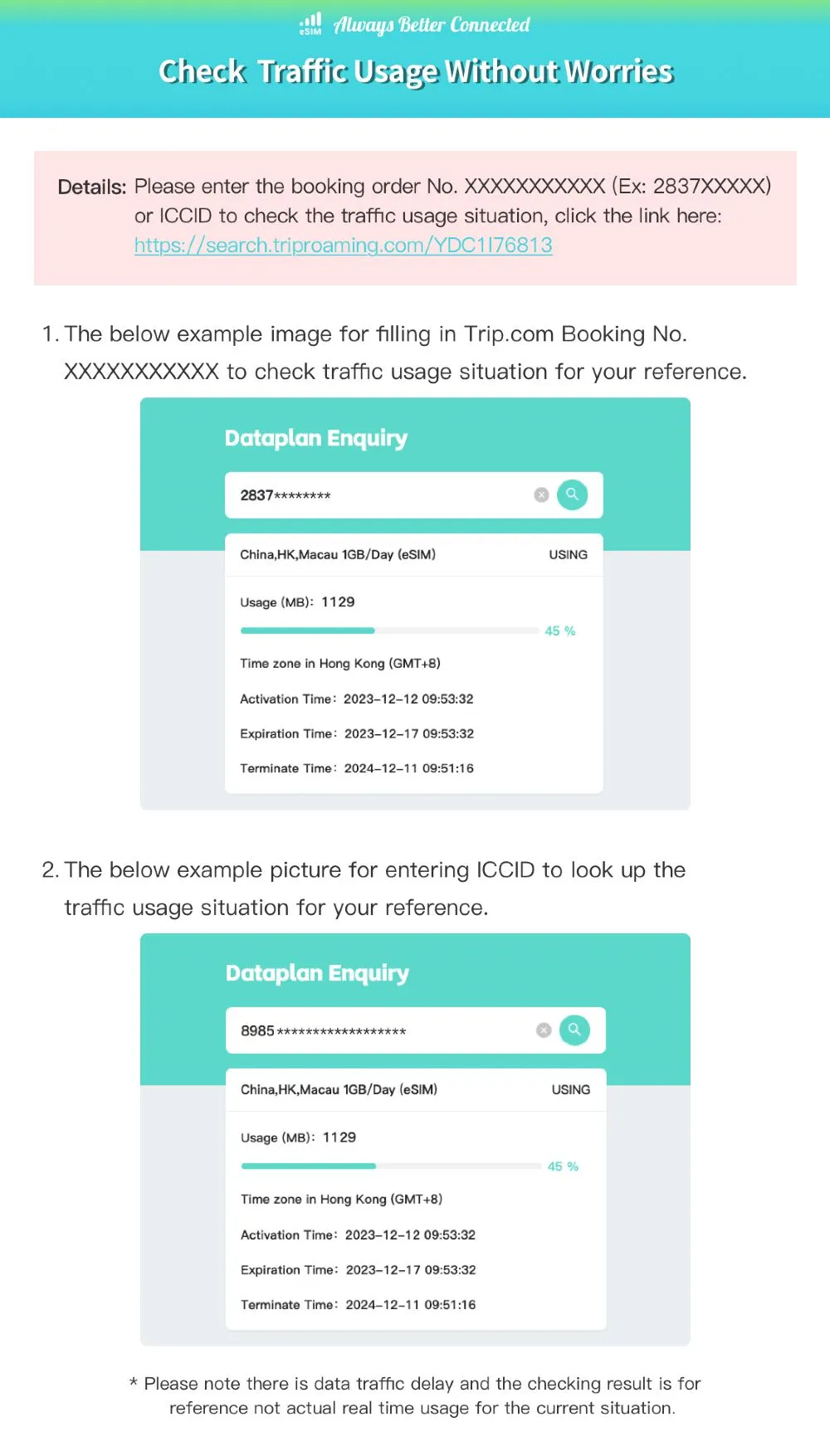
To monitor your data usage, simply go to eSIM Traffic Usage and enter your Trip.com booking number (e.g., 2837XXXXX) or your eSIM ICCID. This will display key information like current data usage, percentage used, and activation and expiration dates. Note that the data usage displayed may not be in real time, so use it as a general reference rather than exact current consumption. This helps you keep track of your usage and avoid surprises during your trip.
Is my Phone Compatible with Mexico eSIM?

Before you order, confirm that your device is carrier-unlocked and compatible with eSIM. Check your phone's eSIM support before buying, as refunds for cancellations due to incompatibility are not provided.
Dial *#06# to see if your phone shows an EID, generally indicating eSIM support. Keep in mind, actual compatibility may depend on your device's OS and the manufacturer's specifications.
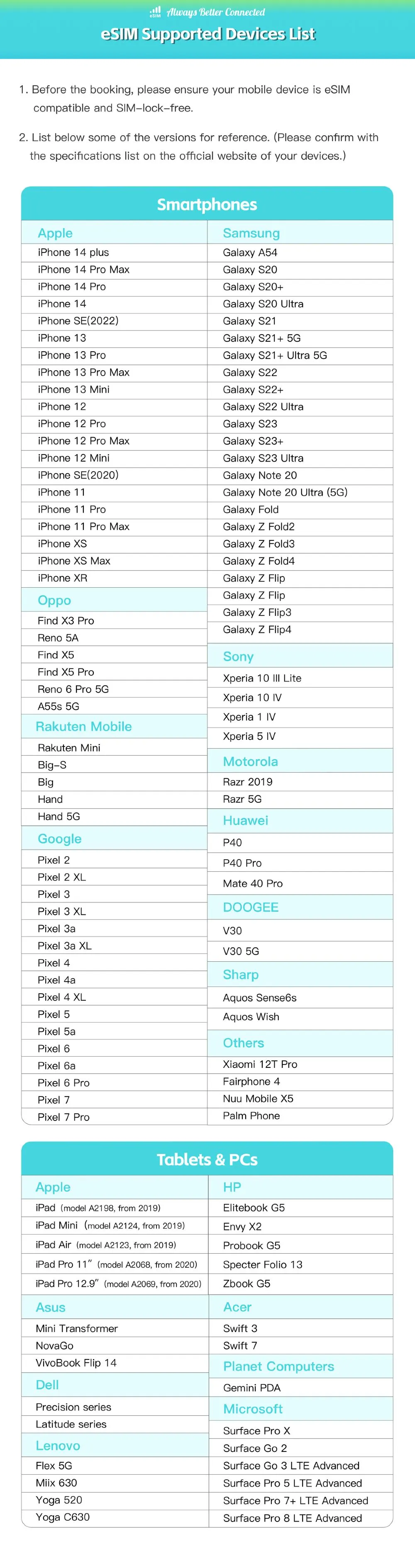
Most modern smartphones support eSIM technology. Here's a quick list:
- Apple iPhones: XR, XS, XS Max, 11 series, SE (2nd generation), 12 series, 13 series, and newer.
- Google Pixel: 3 and newer models.
- Samsung Galaxy: S20, S21, Note 20, Fold, Flip, and newer models.
- More: Some Huawei, Motorola, and other brands also support eSIM. See the complete list below👇👇
FAQs about Mexico eSIM
-
Can I top up my eSIM if I run out of data in Mexico?
-
How do I activate a Mexico eSIM after purchase?
-
Is my phone compatible with a Mexico eSIM?
Trending Searches
-
eSIM/SIM card
-
Top destinations
-
Latest Flight Deals
-
Popular Attractions
- Hotels in Shanghai
- Hotels in Guangzhou
- Hotels in Beijing
- Hotels in Bangkok
- Hotels in Shenzhen
- Hotels in Hong Kong
- Hotels in Chongqing
- Hotels in Tokyo
- Hotels in Ho Chi Minh City
- Hotels in Chengdu
- Hotels in Kuala Lumpur
- Hotels in Seoul
- Hotels in Zhangjiajie
- Hotels in Hanoi
- Hotels in Hangzhou
- Hotels in Singapore
- Hotels in Xi'an
- Hotels in Istanbul
- Hotels in Osaka
- Hotels in Bali
- Forbidden City Tickets
- Zhangjiajie National Forest Park
- Shanghai Wild Animal Park
- Shanghai Tower Tickets
- Shanghai Disneyland Tickets
- shanghai to wangxian valley
- Huangshan
- Canton Tower Tickets
- Book China Attraction Tickets with Passport
- Shanghai Disneyland Fast Pass
- Shanghai Disneyland Crowd Forecast
- Universal Studios Beijing Tickets
- Summer Palace Tickets
- Great Wall of China Tickets
- How to Register for Tiananmen Square