How to Track Flight Status on Trip.com? Free Live Tracker & Real-Time Updates


to Bangkok
to Manila
to Shanghai
to Tokyo
to Seoul
See all flights


What Information Do You Need to Track Flight Status?
Tracking flight status doesn’t require much information, you just need one or two key details to get real-time updates. Here’s what you’ll need:
- Flight number: This is the unique code assigned by the airline (e.g., U22521), usually found on your booking confirmation or ticket.
- Departure date: The date your flight is scheduled to leave (use local time of the departure airport).
- Optional: PNR number (explained below) or route (origin airport + destination airport), if you don’t have the flight number handy.
What is PNR? (Passenger Name Record)
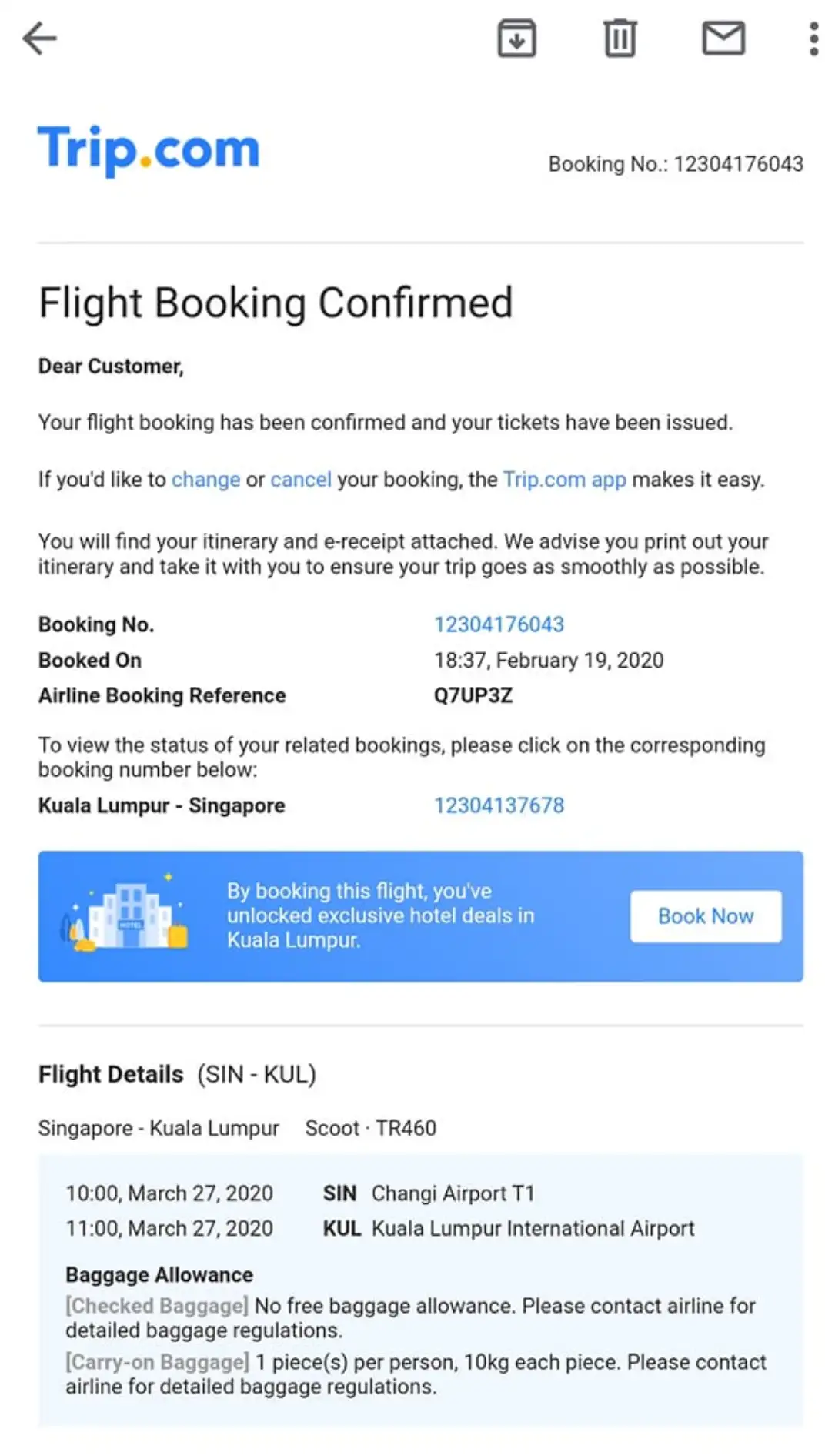
PNR stands for Passenger Name Record—a unique 6-character code (letters and numbers) that airlines use to track your booking. When you book a flight on Trip.com, you’ll find the PNR in your booking confirmation email or in the “My Bookings” section of the app/website. You can use this PNR (along with your full name) to track your flight status on both Trip.com and the airline’s official website, especially if you can’t find your flight number.
How to Track Your Flight Status Directly on Trip.com
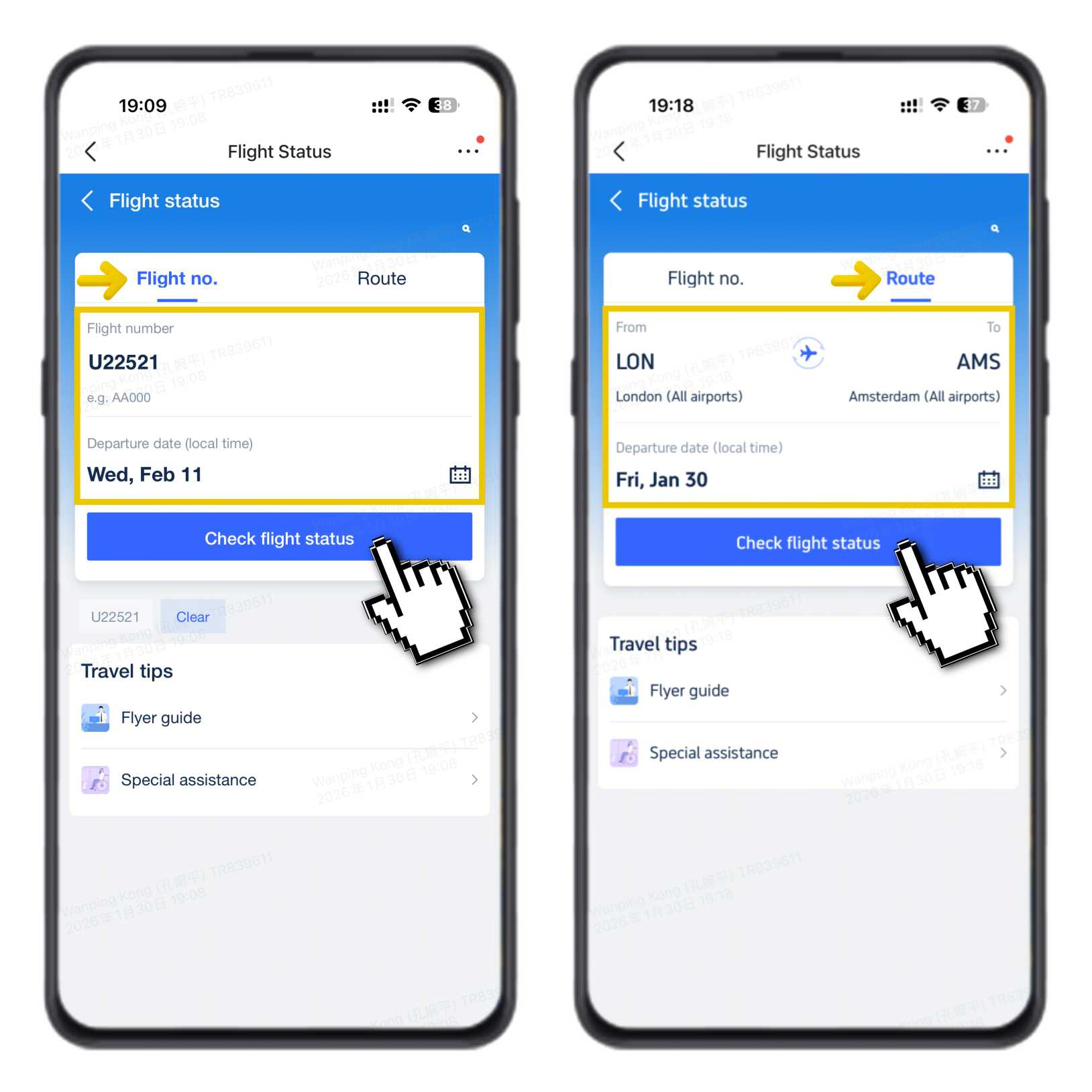
- Go directly to the Trip.com Flight Status page.
- Enter your flight number (e.g., U22521) or choose your route (e.g., London to Amsterdam).
- Select your departure date (local time).
- Click “Check Flight Status.”
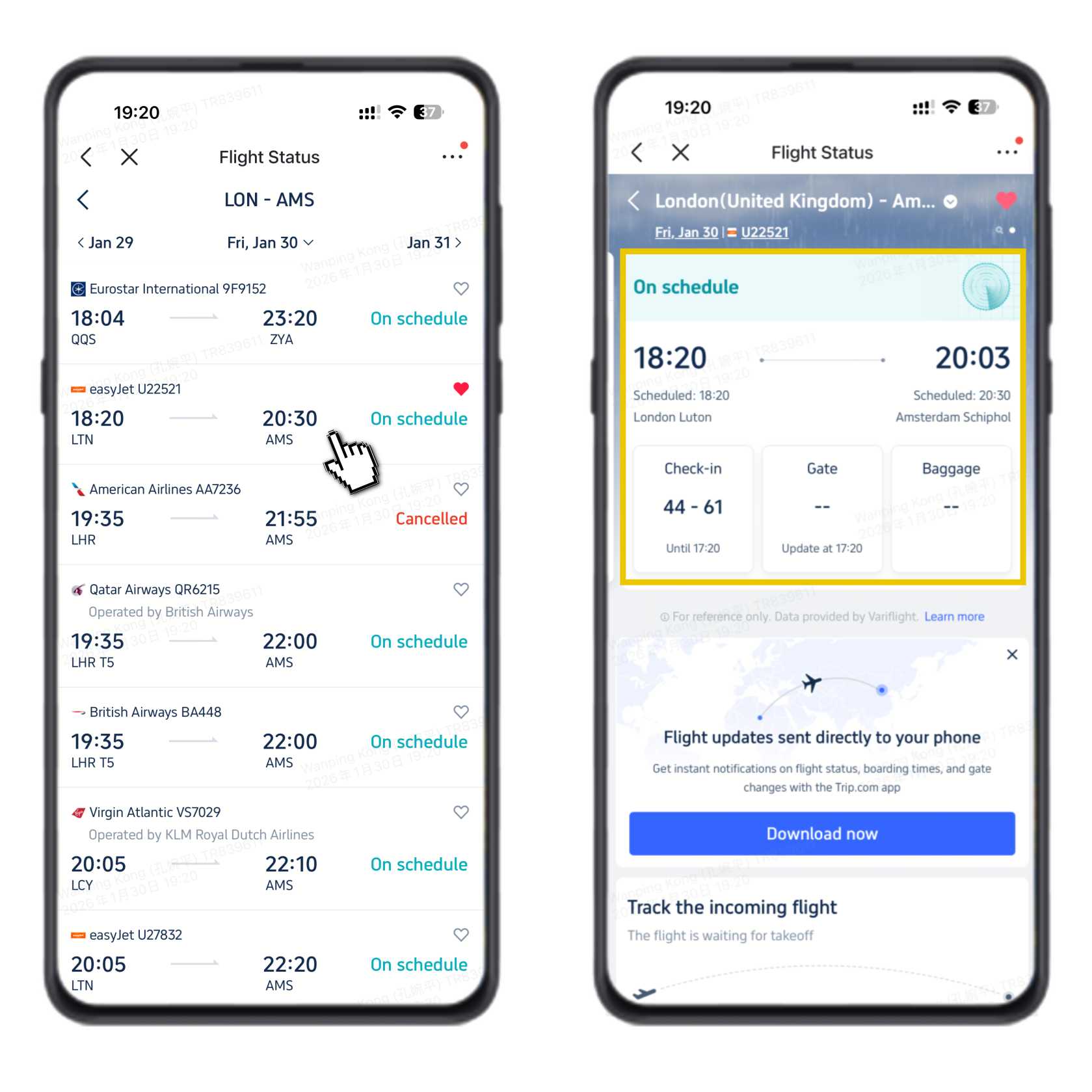
You’ll then see the full flight status page with live updates.
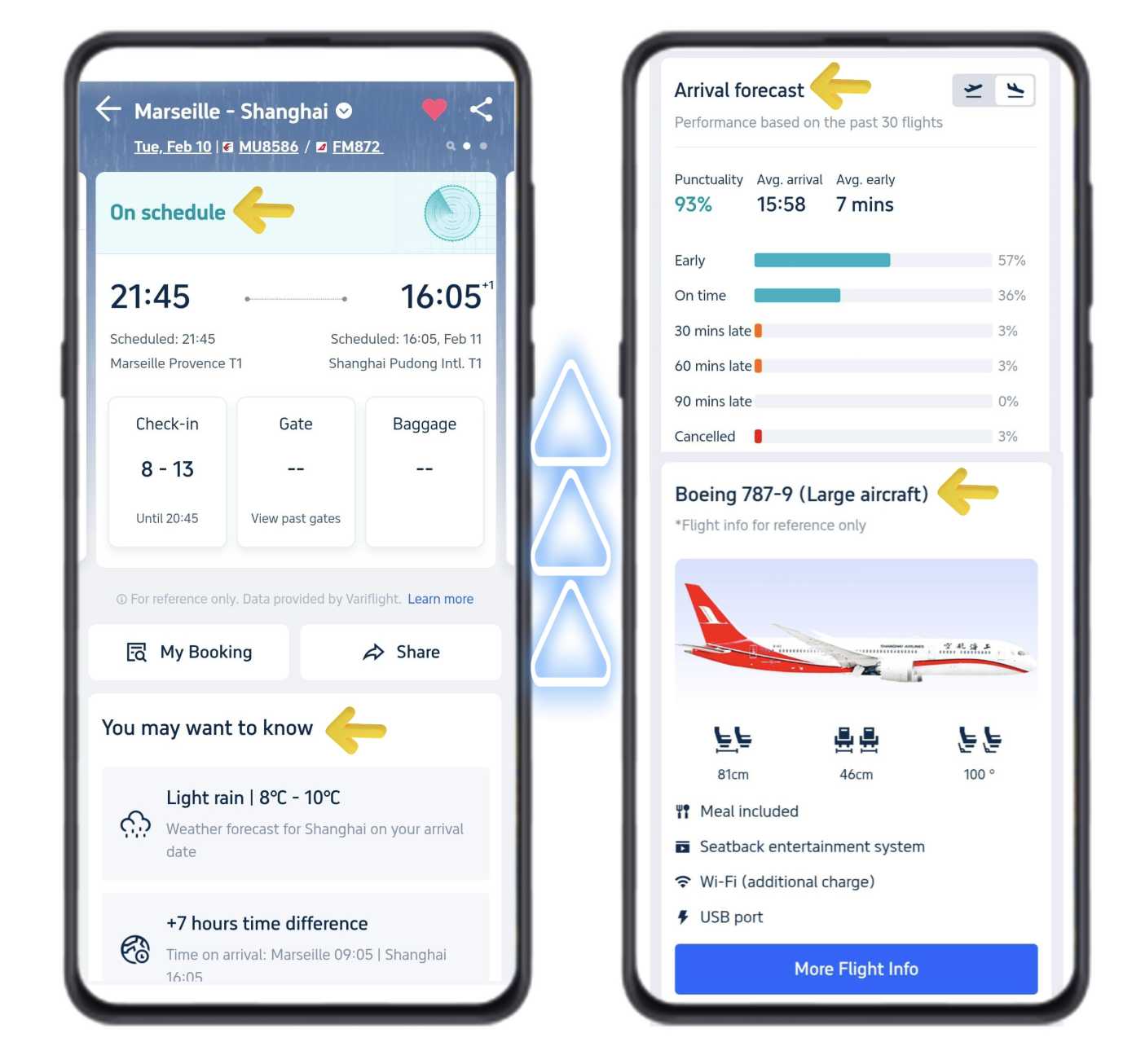
On this page, you can view:
- Real-time flight status (on time, delayed, etc.)
- Scheduled departure & estimated arrival times
- Check-in counter numbers, check-in closing times, and gate information
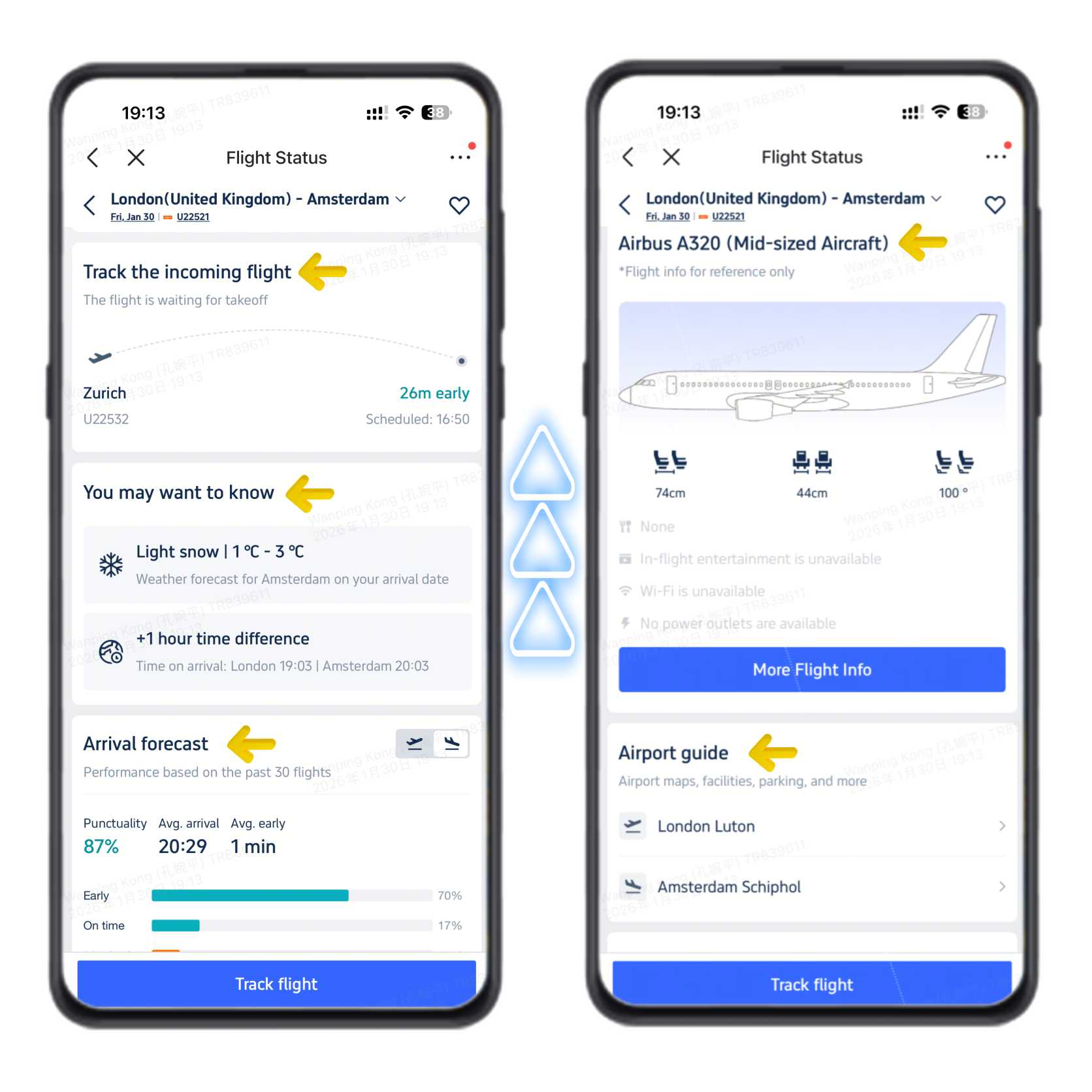
Swipe up or scroll down for more details:
- Incoming flight tracker (live location of your aircraft)
- Destination weather and local time difference
- Arrival forecast (on-time rate from recent flights)
- Aircraft type and onboard services
- Airport maps and guides for departure and arrival airports
See all attractions
 2162 booked






How to Track Flight Status on the Trip.com App (Mobile: iOS & Android)
The Trip.com app is easy to use for tracking flights on the go. It’s fast and gives you all the real time status updates you need to plan your trip to the airport. Here’s how:
- Download the Trip.com app if you haven’t already. Open the app and sign in to your account—creating a free account takes just a minute if you don’t have one.
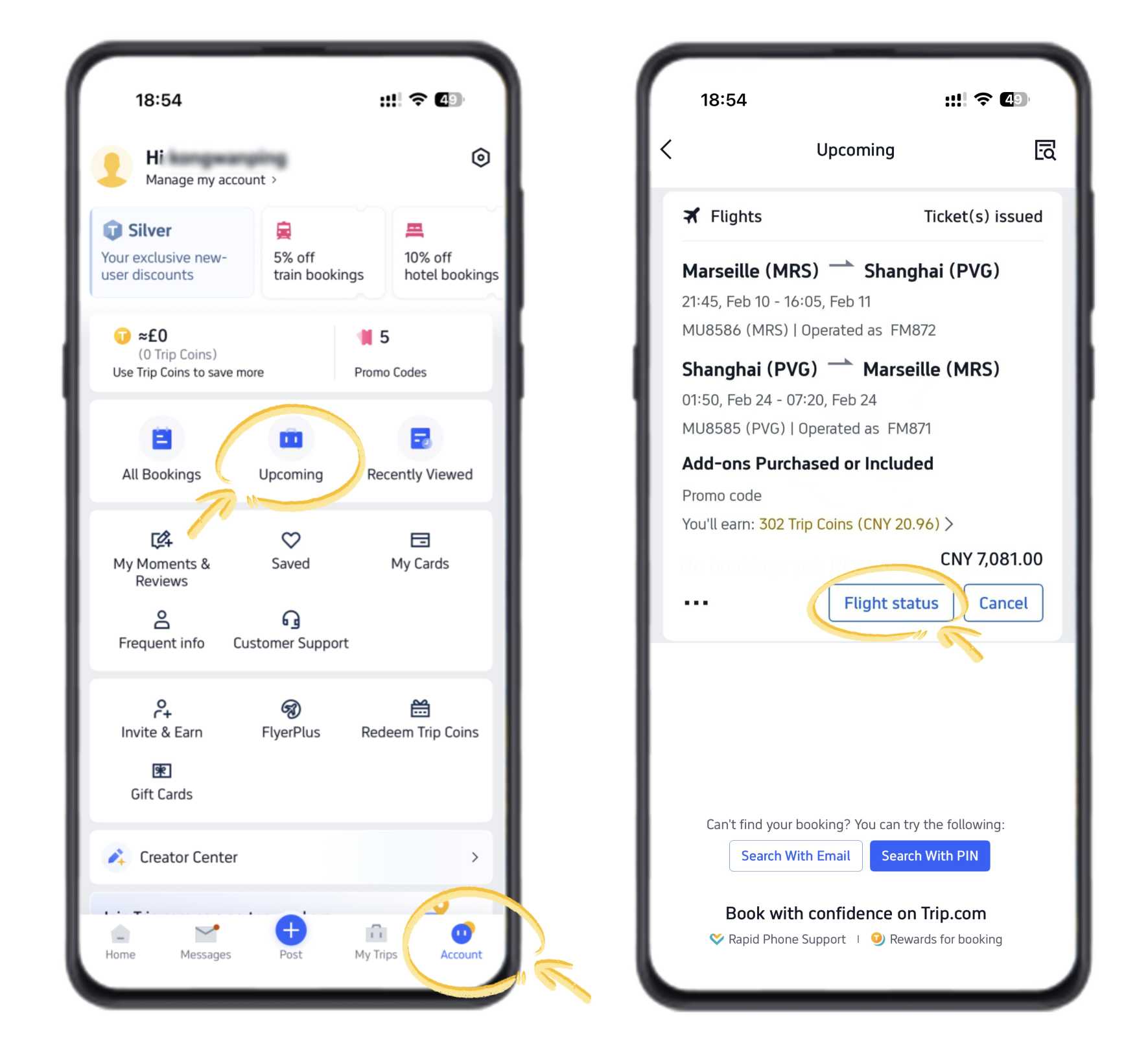
- On the app’s homepage, tap the “Account” icon in the bottom right corner. This will take you to your trip dashboard.
- In your account, find the “Upcoming” tab (it lists all your booked trips) and tap it. Then select “Flight Status” from the options—this is where the flight status live tracker is.
- On the Flight Status page, you’ll see all your upcoming flights. Tap the one you want to track, and you’ll get real time status right away—whether it’s on time, delayed, or canceled.
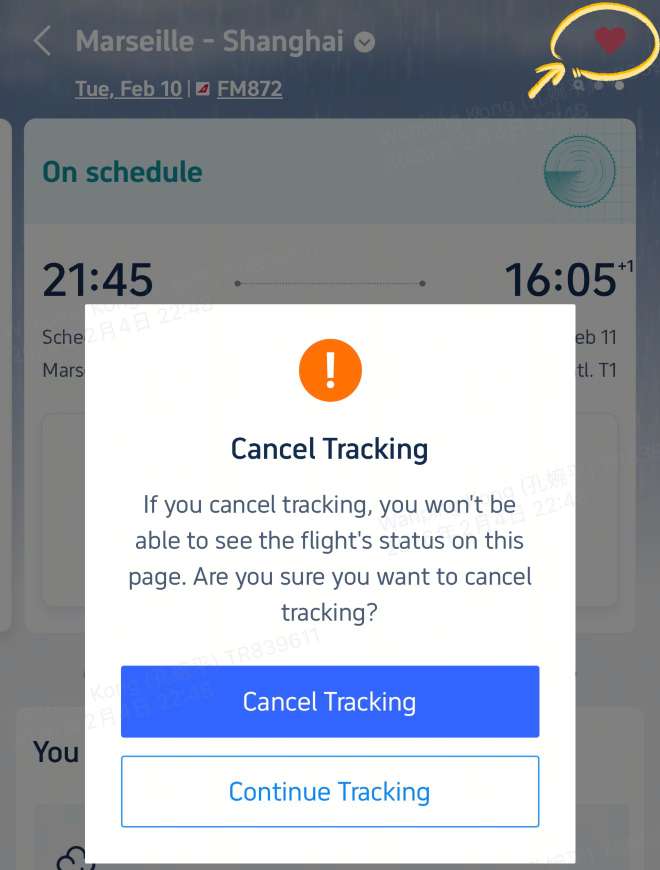
Pro Tip: Turn on push notifications in the Trip.com app. That way, you’ll get instant live updates straight to your phone—no need to keep checking the app. You’ll be alerted about gate changes, delays, cancellations, and check-in reminders, so you’re always prepared.
The app’s flight status live tracker also shows extra useful info: where your incoming plane is right now, destination weather, check-in counter numbers, and airport maps—all in one place.
How to Check Flight Status Online on the Trip.com Website
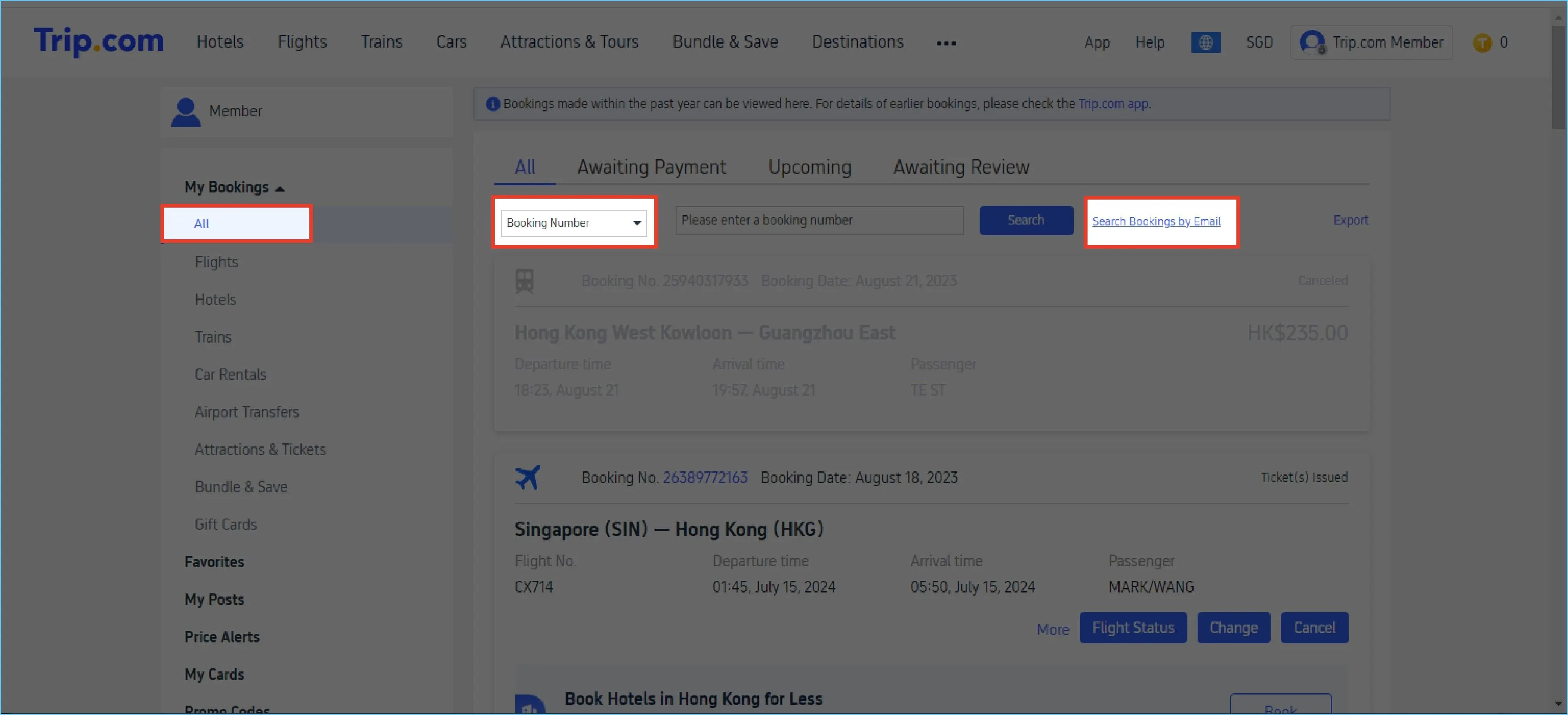
If you’re at your desk or prefer a bigger screen, checking flight status online on Trip.com’s website is just as easy. The web version has the same real time status and live updates as the app, so you won’t miss anything. Here’s what to do:
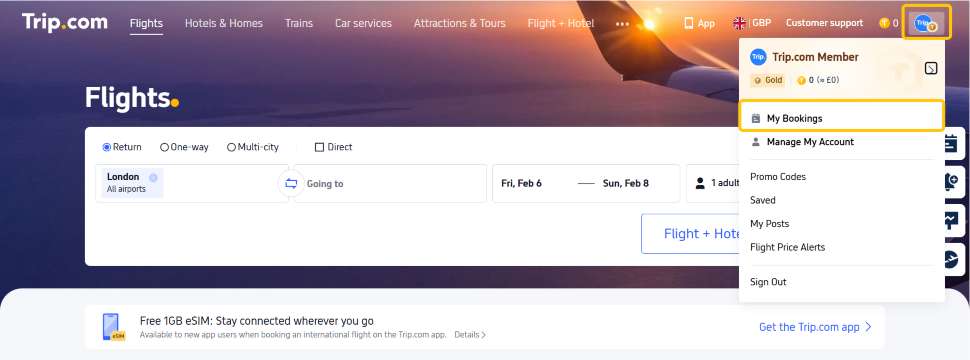
- Open your web browser and go to Trip.com. Sign up or log in to your account—use the same details as the app to sync your trips.
- At the top right of the website, click “My Bookings”—this will show all the trips you’ve booked with Trip.com.
- Find the trip you want to track and click on the flight details. You’ll see your flight’s real time status, including departure/arrival times, gate info, and any last-minute changes.
Just like the app, the website’s flight status tracker lets you check flight status online and get live updates anytime—no app download needed. It’s great for planning your airport arrival or sharing flight details with someone picking you up.
How to Track Flight Status on Airline Official Websites
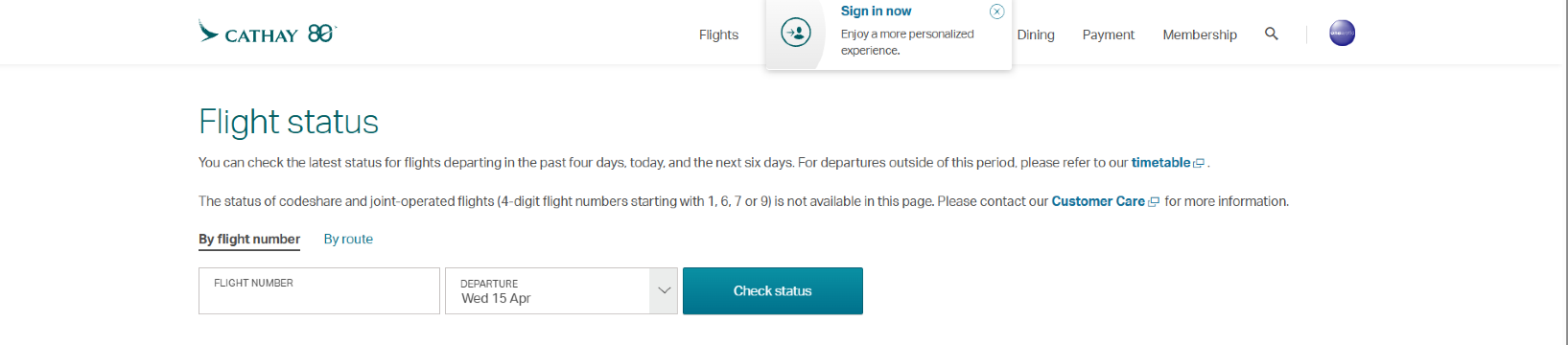
If you booked your flight on Trip.com, you can also track its live status directly on the airline’s official website. Most major airlines offer a free flight status live tracker, and it’s easy to use—here’s how:
- Go to the official website of the airline operating your flight.
- Look for the “Flight Status” or “Track Flight” section (usually in the top menu or homepage).
- Enter your flight number + departure date, or your PNR number + full name (the name used when booking).
- Click “Track” or “Check Status”—you’ll get the same real time status and live updates as Trip.com, directly from the airline.
This is a good backup option if you want to get info straight from the source. Most airlines update their flight status in real time, so you’ll always have the latest details.
What You’ll See in Trip.com’s Flight Status Live Tracker
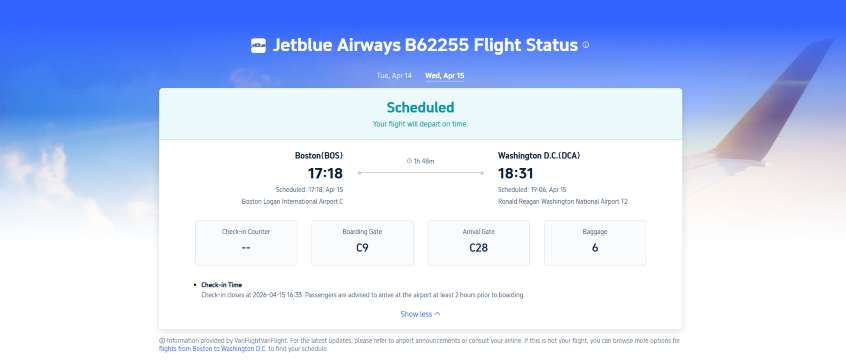
Whether you use the app or web, Trip.com’s flight status live tracker gives you all the key details in real time. Here’s what to look for:
- Real-Time Status: Quickly see if your flight is on time, delayed, canceled, or boarding—no guessing.
- Departure & Arrival Times: Check scheduled times, estimated times, and any changes (updated live when the airline shares new info).
- Airport Info: Find check-in counter numbers, check-in closing times, gate numbers (when available), and airport maps to help you get around.
- Incoming Flight Tracker: See where your plane is right now—you’ll know if it’s on its way to your departure airport or waiting to take off.
- Live Updates & Alerts: Get notified of changes like gate switches or delays, so you can adjust your plans fast.
- Arrival Forecast: Check the on-time rate of your flight based on recent trips, so you know what to expect.
Common Issues & Solutions When Tracking Flight Status
Sometimes you might run into small issues when tracking flight status—here are quick fixes:
- Flight not showing up: Make sure you entered the correct flight number and departure date (double-check local time). If you booked via Trip.com, wait 10-15 minutes after booking—sometimes it takes a little time to sync.
- Status not updating: Refresh the app or webpage—statuses update in real time, but sometimes you need to refresh to see the latest changes.
- Can’t find PNR: Check your Trip.com booking confirmation email or the “My Bookings” section—your PNR is always listed there.
Why Use Trip.com’s Flight Status Live Tracker?

There are lots of flight tracking tools, but Trip.com’s stands out for these simple reasons:
- 100% Free: No hidden fees or premium subscriptions—track your flight live for free, anytime.
- Real-Time Sync: The app and web update at the same time, so you get the same live updates on any device.
- Easy to Use: No complicated steps—even if you’re not good with tech, you can check flight status online or on the app in seconds.
- Auto-Synced Bookings: If you booked through Trip.com, your flight details sync automatically—no need to enter the flight number manually (you can if you want, though).
- 24/7 Support: If you have questions or issues, Trip.com’s 24/7 customer service can help.
Car Rentals
Car Rental Promo Code - 8% Off
New User Enjoy up to 8% Off
TRIPCAR8
[10% OFF] Global Hotel Recommendations
Find Best Global Hotels
See All Hotels







FAQs about Trip.com flight status tracker
-
How can I track the status of a flight?
-
How do I track my flight details?
-
Can I track my own flight?
-
How can I track a flight live for free?
Disclaimer: This article has been provided by an individual contributor or third party platform. If there is any discrepancy regarding the copyright, please contact us directly and we will delete the content immediately.
Trending Searches
-
Air Travel Guide
-
Latest Flight Deals
-
Popular Flight & Hotel Packages
-
Getting Around
-
eSIM/SIM card
- Medellin Vacation Packages
- Hong Kong Vacation Packages
- Tokyo Flight and Hotel
- Koh Samui Flight and Hotel
- Hong Kong Flight and Hotel
- Zhangjiajie Vacation Packages
- Budapest Vacation Packages
- Antwerp Vacation Packages
- Hanoi Vacation Packages
- Louisville Vacation Packages
- Baguio Vacation Packages
- Jakarta Vacation Packages
- Grand Turk Vacation Packages
- Mackinac Island Vacation Packages
- Puerto Princesa Flight and Hotel
- Kansai Airport to Nara
- Phuket Taxi
- Futian Station
- Shinkansen Tokyo to Kyoto and Osaka
- Osaka to Kyoto
- Hotels near LAX with Shuttle
- Shanghai Airport to City
- Xian Metro Map
- JR Hokkaido Pass
- Keisei Skyliner
- Singapore Airport to City
- Taipei Airport
- Hangzhou Metro
- Hangzhou Metro Map
- Macau to Hong Kong
- Narita Airport to Shinjuku
- Car Rental Insurance