Trip.com Booking Fee 2026: What's it & How to Avoid

Learn Trip.com’s official booking fee rules – not all bookings incur fees, fee ranges, display methods and practical ways to reduce/avoid fees for global travel.
to Bangkok
to Manila
to Shanghai
to Tokyo
to Seoul
See all flights


What Is the Trip.com Booking Fee
I think Trip.com’s booking (service) fee is a transparent, reasonable charge that can be easily offset by the platform’s frequent promos and coupons—and the fee is more than worth it for the reliable and comprehensive convenience, after-sales protection and trouble-free booking experience Trip.com provides.
This fee funds Trip.com’s key support services:
- Processing and confirming flight, hotel and activity reservations
- Secure multi-currency payment handling and safe transaction protection
- 24/7 customer support for booking changes, inquiries and after-sales issues
- E-ticket issuance, itinerary management and real-time booking updates
Not all bookings have a separate service fee—some exclusive Trip.com deals include the fee in the displayed base price, and the platform clearly labels which bookings have an additional charge. Service fee rules may vary slightly by region and booking channel.
How Much Is the Trip.com Booking Fee
There is no fixed, standard amount for Trip.com’s service fee. When it’s charged, it’s a small percentage of the total booking value (never a large chunk), and the exact percentage varies by the three factors above. In general:
- International bookings and last-minute reservations made close to travel dates have a slightly higher percentage fee due to extra platform processing work.
- Short-haul domestic bookings (flights, trains) have a lower percentage fee—often a tiny fraction of the total order value.
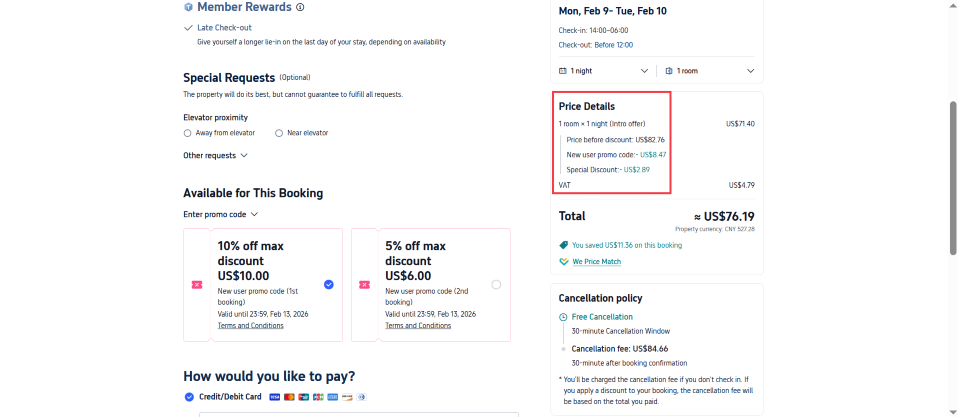
- For most hotel bookings, the service fee is typically included in the displayed room rate (no separate fee at checkout); I’ve never seen a hidden extra fee added for hotels on my bookings.
- For flights and train tickets, the fee (if applicable) is listed as a separate line item at checkout—you can see the exact percentage/amount at a glance.
From my personal experience, the service fee (when charged) is always a very small portion of the total cost. It’s never a dealbreaker, and Trip.com’s promotions almost always cover the full fee amount (and save extra money on the base price).
See all attractions
 2393 booked






Other Charges to Watch Out for on Trip.com
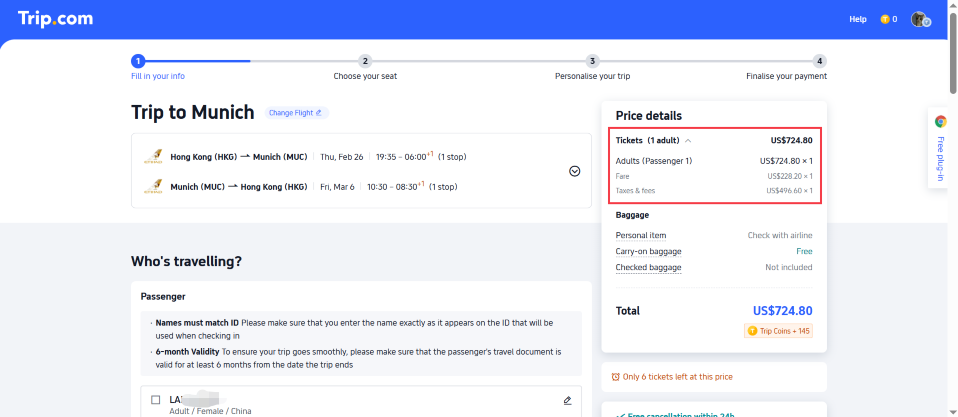
Trip.com’s service fee (if applicable) is the only platform-specific charge for bookings. All other additional costs displayed at checkout are imposed by third-party providers (airlines, hotels, payment issuers) and are clearly labeled as independent items, with Trip.com having no control over these charges. These third-party fees include:
- Credit card international transaction fees: usually ~1–3% (or more) of the total payment amount, charged by your card issuer (not Trip.com) for cross-border online payments
- Supplier add-on fees: Airlines may charge extra for seat selection, checked baggage, in-flight meals and priority boarding; hotels may impose resort fees, early check-in/late check-out charges and extra guest fees (set by the supplier, not Trip.com)
- Supplier/processing change/cancellation fees: If you modify or cancel a booking, the airline/hotel may charge a supplier-specific change/cancellation fee; in some cases, Trip.com may apply a small administrative handling fee for processing the change/cancellation request — fee waiver eligibility varies, and may apply to bookings with Free Cancellation terms or the Air Flexibility add-on
All third-party charges are clearly disclosed in the checkout page price breakdown and booking terms—you can review the full all-in cost before confirming payment.
How Do Trip.com Promotions Offset Service Fees

Trip.com offers promo codes and discounts for core travel products, which are automatically applicable at checkout (no extra claim steps required). These promotions can effectively offset any applicable service fee, and in most cases, the savings exceed the fee amount, making the final all-in booking cost more competitive.
Core global promotions (valid for 2026, subject to official promotion terms and eligibility):
- up to 10% off for first-time hotel bookings on Trip.com; 5% off your second eligible hotel booking (applies to room rates only)
- up to 5% off eligible China train ticket bookings
- up to 5% off for first-time attraction and tour and eSIM bookings (discount rates may vary by region and product)
- up to 8% off all global car rental bookings
Promotions can be stacked with Trip Coins (Trip.com’s loyalty reward currency, 100 Trip Coins = $1) for additional discounts on the total booking cost (including applicable service fees), with no minimum redemption amount for Trip Coins.
Does Trip.com Charge a Service Fee on All Bookings
Not always. Trip.com’s service fee application and amount vary based on three key factors:
- Booking type (flights, hotels, trains, car rentals, attractions/tours, etc.)
- Travel destination (domestic vs. international bookings)
- Total order value of the travel product
The fee is displayed in one of two ways: either as a separate line item in the checkout price breakdown, or included in the displayed base price (for exclusive promos/deals). All applicable charges are clearly shown on the checkout page before you confirm payment as per my booking experience.
Why Trip.com Charges a Service Fee
Trip.com charges a nominal service fee for select bookings to cover the cost of operating its global travel platform and providing free official services to all users. Unlike airlines/hotels that only focus on their own products, Trip.com invests heavily in infrastructure and services for global travelers, including:
- A multi-currency payment system supporting dozens of major global currencies for seamless cross-border bookings
- Real-time booking confirmation, itinerary synchronization and fraud protection for global transactions
- 24/7 multilingual customer service (app/website/phone) covering all major travel destinations
- Free loyalty programs (Trip Coins), permanent global promotions and free cancellation options for most bookings
- Official merchant mediation and after-sales support for booking disputes or supplier-related issues
Without this nominal service fee for eligible bookings, Trip.com would be unable to maintain these free and paid services or offer competitive base prices for global travel products.
Car Rentals
Car Rental Promo Code - 8% Off
New User Enjoy up to 8% Off
TRIPCAR8
Tips to Reduce or Avoid Trip.com Service Fees
These tips are based on Trip.com’s official rules and are applicable to all global users, helping to reduce or eliminate applicable service fees for bookings:
- Book via the Trip.com App: The app offers exclusive daily deals for select flights, hotels and activities with the service fee fully waived (no additional cost), where available.
- Choose Free Cancellation Bookings: Many bookings marked with the Free Cancellation tag have no service fee or a lower fee than non-refundable bookings, and allow free modification/cancellation within 24/48 hours of travel.
- Use a Fee-Free International Credit Card: Avoid the 1–3% international transaction fee from your card issuer by using a travel credit card with no cross-border payment fees; many such cards also offer cashback on travel bookings to offset applicable fees.
- Book in Advance: Last-minute bookings made shortly before travel incur a slightly higher service fee—booking well in advance typically helps secure the lowest applicable fee (if any).
- Use Trip Coins for Redemption: Trip Coins (earned on all bookings, reviews and Trip Moments content) can be redeemed for discounts on the total booking cost (including applicable service fees) with no minimum redemption amount.
- Compare Direct Booking Prices: For some domestic flights and local hotels, booking directly with the supplier may eliminate platform service fees entirely—always compare the all-in cost (Trip.com vs. direct booking) to select the best option.
Disclaimer: Content is based on Trip.com’s official fee rules and my real global booking experience. Fees, promotions and terms are subject to Trip.com’s official updates, and may vary by region and booking scenario.
[Discount] Global Hotel Recommendations
Find Best Global Hotels
See All Hotels







FAQ: Trip.com Booking Fee
-
What is the Trip.com booking fee?
-
Is Trip.com cheaper than booking direct?
-
Is the Trip.com service fee refundable if I cancel my booking?
-
How can I avoid the Trip.com service fee?
-
Where can I see the exact Trip.com service fee amount for my booking?
Disclaimer: This article has been provided by an individual contributor or third party platform. If there is any discrepancy regarding the copyright, please contact us directly and we will delete the content immediately.
Find Cheap Travel Deals & Explore Destinations on Trip.com
-
Air Travel Guide
-
Latest Flight Deals
-
Popular Flight & Hotel Packages
-
Getting Around
-
eSIM/SIM card
- Cancun Vacation Packages
- Hong Kong Vacation Packages
- Tokyo Flight and Hotel
- Koh Samui Flight and Hotel
- Hong Kong Flight and Hotel
- Cuenca Vacation Packages
- Pattaya Vacation Packages
- Mackinac Island Vacation Packages
- Phuket Vacation Packages
- Hanoi Vacation Packages
- Aqaba Vacation Packages
- Almaty Vacation Packages
- Kansas City Vacation Packages
- Bangkok Flight and Hotel
- Siem Reap Vacation Packages
- Haneda Airport Limousine Bus
- JR Shikoku
- Phuket Taxi
- Futian Station
- Osaka JR
- Shanghai Maglev Train
- Chengdu Airport
- Shenzhen Airport
- Wenzhou Airport
- Fuzhou Airport
- Kyoto Airport
- Tokyo Metro
- Chongqing Airport to City
- Gimpo Airport to Seoul
- Narita Airport to Shinjuku
- Macau to Hong Kong
- Beijing Airport to City