8 GPT Apps You Can Use in ChatGPT for Travel, Design, Music, Shopping, and More

8 GPT Apps You Can Use in ChatGPT for Travel, Design, Music, Shopping, and More
ChatGPT is no longer just a place to ask questions and get text answers. With GPT Apps, users can bring more practical tools into the conversation, from travel planning and design to image editing, home search, grocery shopping, and music discovery.
Instead of jumping between different websites or apps at the very beginning of a task, users can start inside ChatGPT and work with a connected app experience when it is available. That makes ChatGPT feel less like a simple chatbot and more like a flexible workspace.
This guide introduces 8 popular GPT Apps and what each one can generally help with. Trip.com is the travel app featured in this list. It helps users begin travel planning without immediately switching into a separate search form, making it easier to explore transportation options through conversation.
What are GPT Apps in ChatGPT?
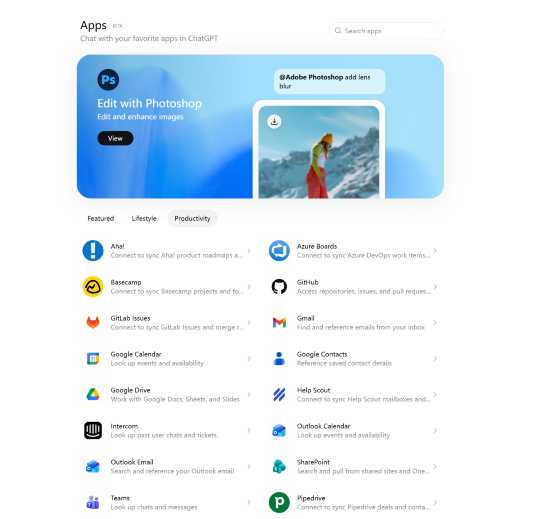
GPT Apps are app experiences that can be used inside ChatGPT. They allow users to connect a conversation with a more specific tool, so ChatGPT can help with tasks that go beyond a normal answer.
For example, a design app may help create visual content. A music app may help organize playlists. A home search app may show property-related results. A travel app such as Trip.com can help users start travel planning from the same conversation.
The main idea is simple: users describe what they want, and ChatGPT can work with the relevant app experience when that app is available. Some GPT Apps may show interactive results, cards, previews, maps, lists, or creative outputs directly inside ChatGPT. Others may connect users to the original product flow when more detail is needed.
GPT Apps are not exactly the same as mobile apps or desktop software. They are used through a ChatGPT conversation, and the experience can vary depending on the app. Some apps may require users to connect an account or grant permission before they work. Availability can also vary by region, account type, ChatGPT plan, or workspace settings.
For users, the benefit is that they can start with a natural request rather than opening a separate tool first. For brands and developers, GPT Apps create a new way to bring services into the moment when users are already describing what they need.
Why are GPT Apps useful?
GPT Apps are useful because they reduce the gap between thinking about a task and actually starting it. Many everyday tasks begin with a rough idea: plan a trip, make a graphic, edit a photo, browse homes, organize groceries, or find music for a certain mood.
Normally, that means choosing the right website, opening the right app, and figuring out where to begin. GPT Apps make the first step more conversational. A user can describe the task in ChatGPT and move toward an app-supported result.
They are also useful because different tasks often need different tools. ChatGPT can help with the conversation, while the connected app can provide the specialized experience.
What users want to do | How GPT Apps can help |
|---|---|
Plan a trip | Start travel search in the same conversation |
Create visuals | Generate social posts, presentations, or marketing assets |
Edit images | Make visual changes through a connected creative tool |
Explore homes | View home or neighborhood options |
Shop for groceries | Turn meal ideas into shopping support |
Listen to music | Discover or organize playlists |
GPT Apps are not always full replacements for the original products. In many cases, they are best seen as a faster starting point. Users can begin in ChatGPT, review the result, and then continue in the app or service when they need more control.
1. Canva: Design and marketing content
Canva is one of the most familiar tools for people who need to create visual content without starting from a blank design file. Inside ChatGPT, Canva can be useful for turning an idea into a first visual direction, especially for users who need content quickly.
It fits many everyday creative needs: social posts, presentation drafts, posters, flyers, event graphics, and simple campaign materials. A small business owner might use it to create promotional visuals. A student might use it for a class presentation. A marketer might use it to explore early campaign concepts.
Canva is especially useful when the goal is not advanced design control, but a clean starting point. Users can get a visual draft, review the direction, and continue editing as needed.
Use case | What Canva can help create |
|---|---|
Social media | Posts, story graphics, and simple campaign visuals |
Work presentations | Decks, summaries, and pitch visuals |
Marketing | Posters, flyers, and event graphics |
Brand content | Reusable design directions and layouts |
Canva’s role in the GPT Apps ecosystem is easy to understand: it helps turn words and ideas into visuals. For people who need fast design support, that makes it one of the most approachable creative apps to try.
(Screenshot suggestion: Canva design candidates or visual output inside ChatGPT.)
2. Figma: Product and UI design ideas
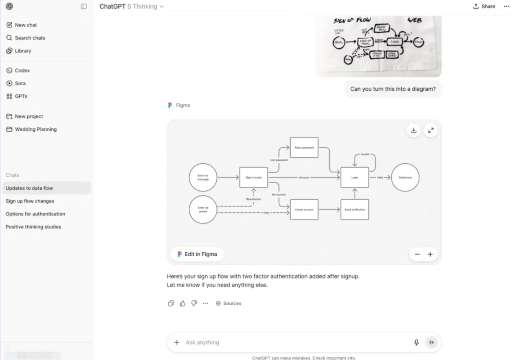
Figma is built for product design and interface collaboration, so its GPT App use case is different from a general design tool. It is most useful for people thinking about digital products, user interfaces, layouts, and user journeys.
A product manager might use Figma-related support to explore how a new feature could be structured. A designer might use it to think through screen hierarchy. A startup founder might use it to make a rough product idea easier to explain to a team.
Figma is not only about making something look nice. It is also about structure: how screens connect, how users move through a product, and how a design idea becomes clearer.
Use case | What Figma can help with |
|---|---|
Product design | Turn product ideas into interface directions |
UI layout | Explore screen structures and components |
User flows | Map app or website journeys |
Design review | Discuss hierarchy, layout, and usability |
This makes Figma useful for early product thinking. It should not be described as a tool that automatically finishes all design work. Instead, it is best presented as a way to help users explore product ideas, organize interface directions, and support team discussions.
3. Trip.com: Travel planning inside ChatGPT
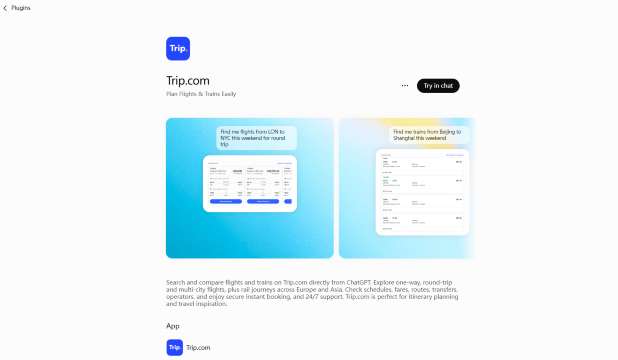
Trip.com is the travel app featured in this list. It helps users begin travel planning without immediately switching into a separate search form, making it easier to explore transportation options through conversation.
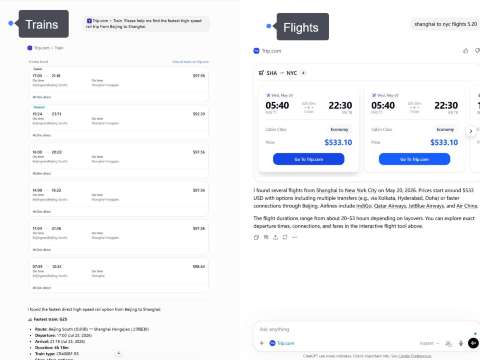
The Trip.com app in ChatGPT supports travel planning use cases including flights and trains. Users can start with a travel need and explore transportation options through a conversational experience, including flight routes and train journeys where available.
Instead of treating travel search as a fixed form from the start, the ChatGPT experience makes it easier to discover and compare options based on real travel needs.
For flights, Trip.com can help show useful details such as available fare options, airlines, departure and arrival airports, departure times, arrival times, total duration, and stopover information.
For trains, users can explore route options, departure and arrival stations, schedules, journey duration, transfers, seat classes, and fares when available.
These details matter because travelers often compare more than price. A faster route, more convenient departure time, or fewer transfers may be more important depending on the journey.
For real travelers, the value is not only that flight results appear. The value is that the travel planning process can begin in a more natural way. A user can compare route details, check airport choices, and think through timing before moving deeper into the booking flow.
Trip.com also has room to expand this kind of experience beyond flights. Hotels are the most natural next area because hotel planning depends on location, travel dates, amenities, guest type, budget, and neighborhood preference. In the future, a similar flow could also support car rentals and attraction tickets. Those future areas should be described carefully until they are officially available in the Trip.com app experience inside ChatGPT.
Trip.com can continue expanding this conversational travel experience beyond transportation search. Future possibilities may include more travel services such as hotels, car rentals, and attraction tickets, when these experiences become available inside ChatGPT.
For now, Trip.com’s role in this article is clear: it is a GPT App for travel planning, helping users explore flights and trains through a more conversational experience.
Travel need | Trip.com can help show |
|---|---|
Flight search | One-way and round-trip flight options |
Train search | Train routes, schedules, duration, and transfers |
Price comparison | Available fares when available |
Route details | Airports, stations, and travel connections |
Schedule review | Departure time, arrival time, and journey duration |
4. Spotify: Music and playlist discovery
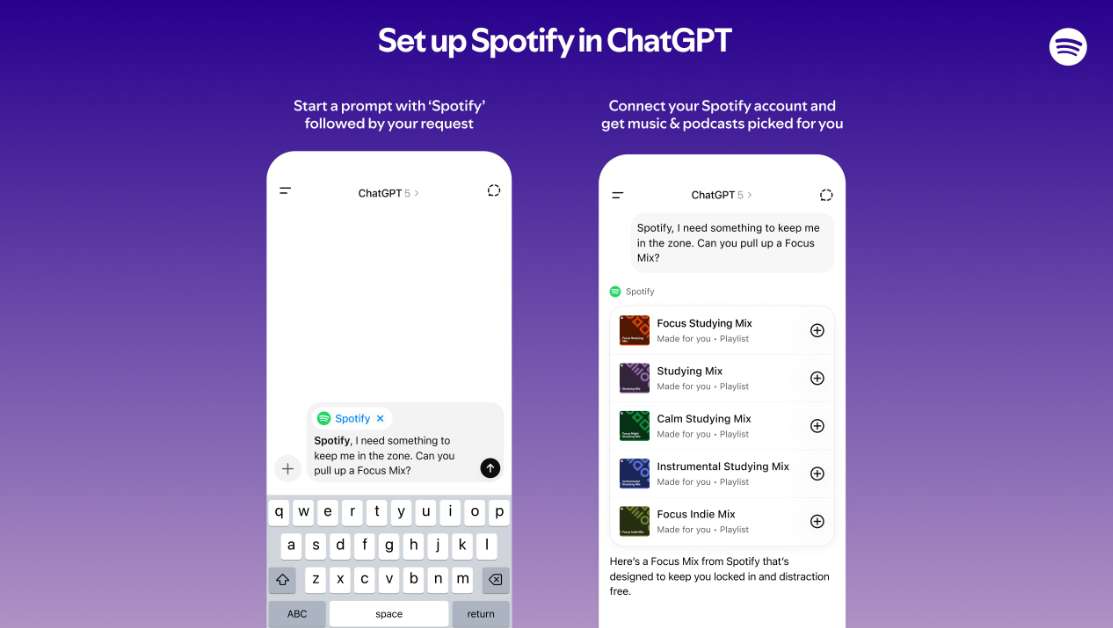
Spotify is a natural fit for GPT Apps because music discovery is often based on mood, activity, or context. People do not always start with a specific song. They may want music for studying, working out, commuting, relaxing, cooking, or spending time with friends.
Spotify can help users discover or organize music around those situations. In ChatGPT, that makes playlist creation feel more conversational and less like manual searching.
Use case | What Spotify can help organize |
|---|---|
Focus time | Study or work playlists |
Fitness | Workout music |
Travel | Road trip or flight playlists |
Relaxation | Calm background music |
Social moments | Party or dinner playlists |
Spotify also helps show the lighter side of GPT Apps. Not every app needs to be about productivity or work. Some are useful because they make everyday entertainment easier to shape around a moment.
When writing about Spotify, avoid including song lyrics. It is enough to describe playlist discovery, music organization, and listening contexts without quoting copyrighted content.
5. Adobe Photoshop: Image editing and visual changes
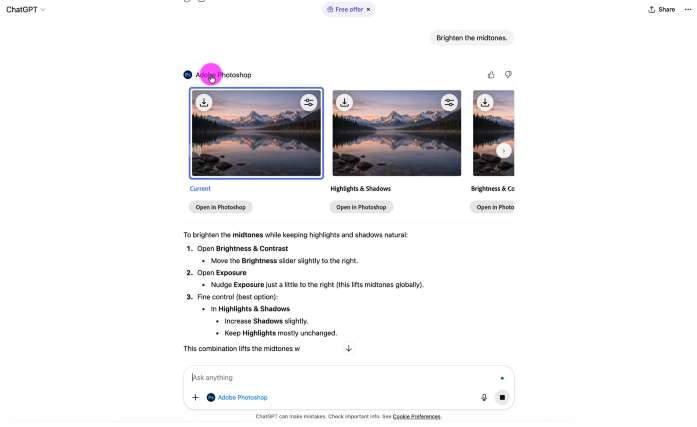
Adobe Photoshop is known for image editing, and its ChatGPT app experience is useful for people who want to make visual changes through a more conversational workflow. Instead of beginning with a complex editing interface, users can start by describing the kind of change they need.
Photoshop can be helpful for photo cleanup, background adjustments, lighting changes, composition improvements, and creative visual effects. It can support content creators, marketers, designers, and anyone preparing images for a post, campaign, or presentation.
Use case | What Photoshop can help edit |
|---|---|
Photo cleanup | Lighting, crop, and composition |
Background edits | Blur, remove, or adjust backgrounds |
Creative effects | Try different visual styles |
Content visuals | Prepare images for posts or campaigns |
The important distinction is that Photoshop in ChatGPT should not be presented as a complete replacement for the full professional Photoshop workflow. Advanced users may still want the full product for detailed layer control, precision editing, and complex creative work.
Its value here is speed and accessibility. For a user who has a clear visual change in mind, the app experience can help make image editing feel less intimidating at the starting point.
6. : Quick creative assets
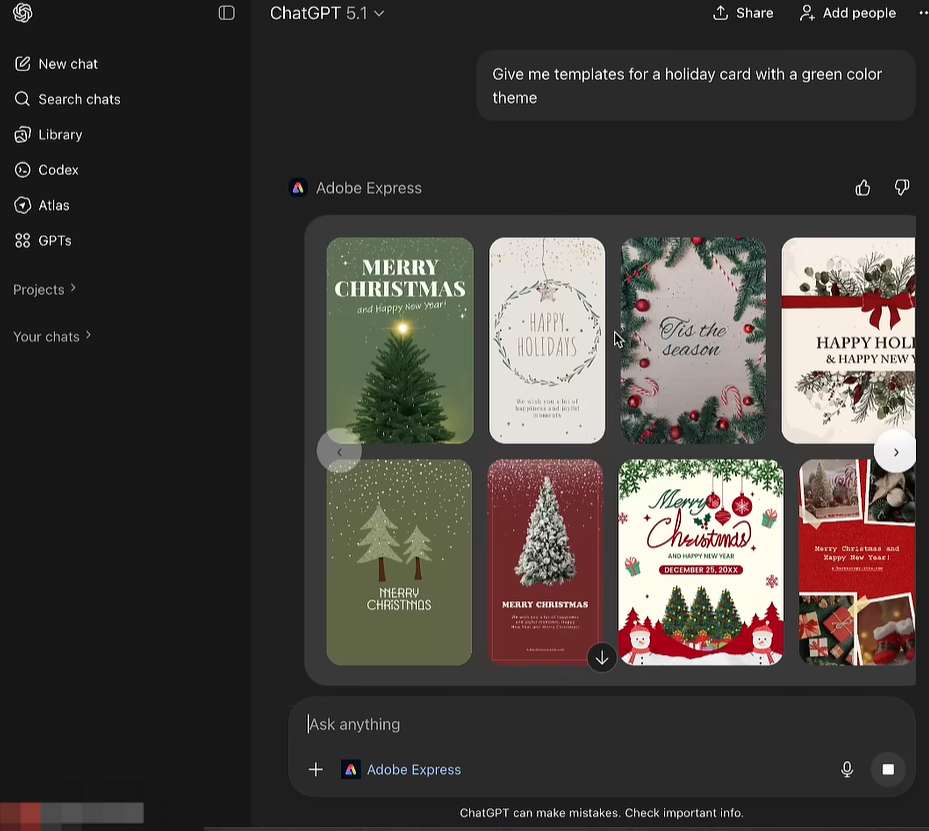
Adobe Express is also a creative app, but it serves a different purpose from Photoshop. Photoshop is mainly associated with editing and transforming images. Adobe Express is more about creating lightweight finished graphics quickly.
That makes Adobe Express useful for social posts, announcements, flyers, invitations, event visuals, and simple branded content. It is a good fit when the user wants a polished graphic without building everything from scratch.
Use case | What Adobe Express can help make |
|---|---|
Social content | Posts and announcements |
Events | Invitations, flyers, and posters |
Business updates | Branded graphics and short visual messages |
Quick campaigns | Lightweight creative variations |
Adobe Express can be especially helpful for users who do not consider themselves designers but still need a presentable visual. It can support quick content creation for work, school, small business, or personal projects.
In a GPT Apps article, Adobe Express is worth including because it shows how ChatGPT can support not only text-based work, but also everyday visual production.
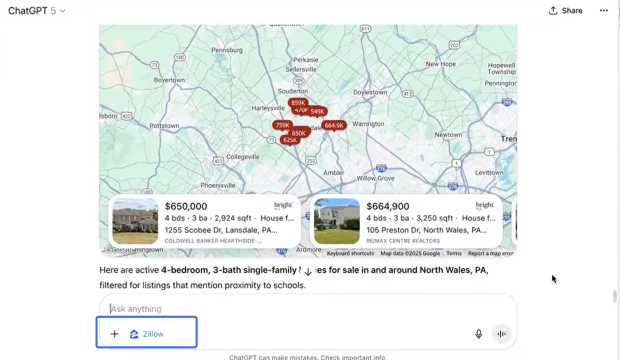
7. Zillow: Home and neighborhood exploration
Zillow brings a very different type of experience into ChatGPT: home and neighborhood exploration. It is useful for users who want to browse homes, apartments, locations, or areas in a more conversational setting.
A user may be thinking about moving, comparing neighborhoods, or casually browsing what is available in a certain city. Zillow can help turn that interest into a more visual home search experience, especially when maps, listings, and location filters are involved.
Use case | What Zillow can help explore |
|---|---|
Home search | Available homes or apartments |
Neighborhood browsing | Areas that match location preferences |
Budget filtering | Listings within a price range |
Moving research | Basic home and area comparisons |
This section should stay practical and careful. Zillow should be framed as a discovery and exploration tool, not as financial, legal, or investment advice. Home decisions involve many factors beyond a listing result, including local regulations, personal finances, inspections, contracts, and professional guidance.
As a GPT App, Zillow is useful because it shows how ChatGPT can connect with visual search experiences, not just text answers.
8. Instacart: Grocery and everyday shopping support
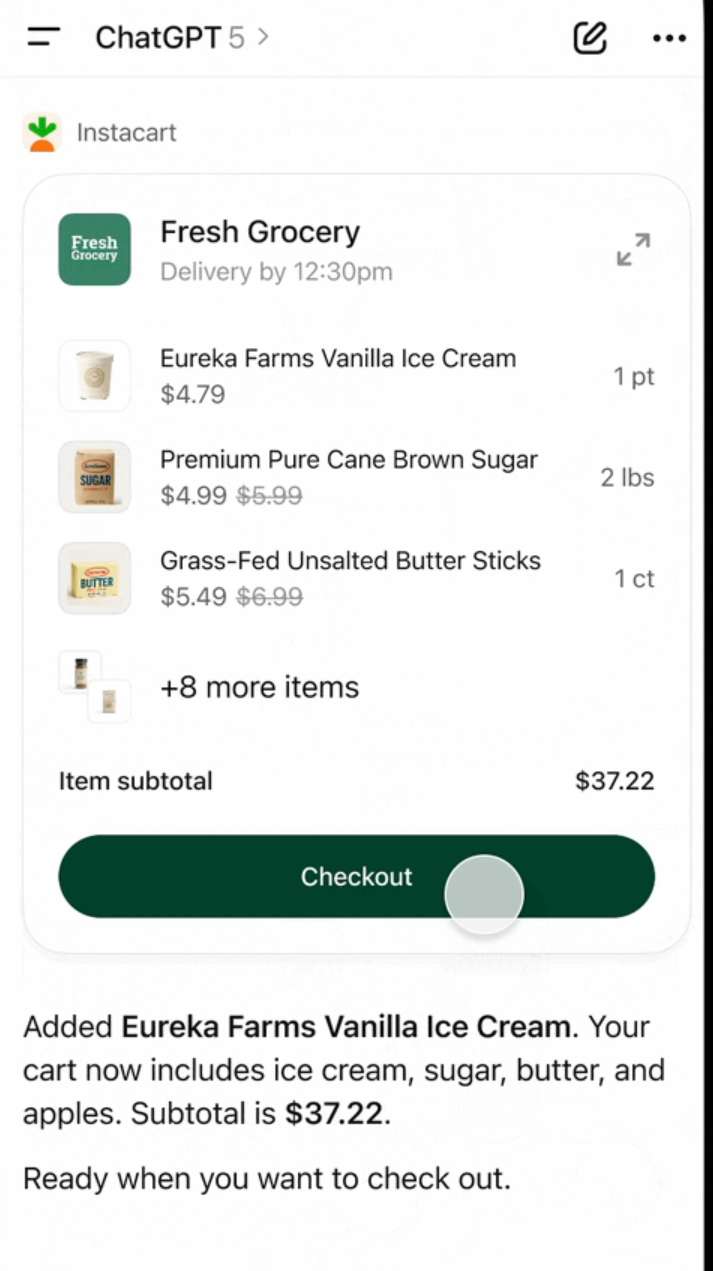
Instacart is useful for grocery planning and everyday shopping support. It fits a common type of task: turning a general idea into a practical shopping list.
For example, a user may be planning a few simple meals, restocking basic household items, or organizing ingredients for the week. Instacart can help connect that planning process with grocery shopping support, depending on availability and the user’s location.
Use case | What Instacart can help with |
|---|---|
Grocery planning | Build grocery lists from meal ideas |
Household shopping | Find everyday essentials |
Meal preparation | Organize ingredients for simple meals |
Time-saving errands | Reduce manual shopping list work |
This kind of app is useful because shopping often starts with an unfinished thought. A person may know what they want to cook, but not yet have a clear list. They may remember a few household items, but not everything they need. GPT Apps can help organize those loose ideas into something more actionable.
The article should keep this section focused on ordinary grocery and household needs. It should not discuss restricted products or make health claims. Instacart’s role here is convenience and organization.

Mainland China/Hong Kong/Macau 5G eSIM | Day Pass/Total Data Package | 24-Hour Billing | QR Code
4.6/5
19675 reviewsI purchased a plan in advance, before flying to my destination, choosing one based on 5G availability and the ability to stay connected in both mainland China and Hong Kong. I set everything up ahead of time by scanning a QR code. It was quick and easy. I turned it on as soon as the plane landed—the internet was available immediately and quite decently. All the apps we're accustomed to in Russia work. The speed is comfortable, allowing me to scroll through my feed, browse search engines, and use online maps without any issues.

Asia 8 countries 5G/4G eSIM | Daily/Total | 500MB/day - 50GB total | 1-30 days | 24-Hour Billing | QR code
4.6/5
4375 reviewsVery easy to install direct from the Trip app - worked as soon as arrived in China.
Easy to use the website to see usage per day and activate a new day when the limit was reached (I bought 25days but only needed 21days)

Mainland China 5G eSIM | Supports Google Maps / ChatGPT | Daily/Total Data Plans | 24-Hour Billing | 1–365 Days | QR Code
4.6/5
23830 reviewsI could handle 5G almost everywhere, but it wasn't fast enough for sharing. Overall, I was satisfied.

Mainland China 5G eSIM | Day Pass/Total Data Package | ChatGPT Available | 24-Hour Billing | 1-365 Days | QR Code
4.6/5
51754 reviewsThe internet is smooth, no interruptions. I used it from Hongkong to Macau, China, it was smooth all the way along.

China eSIM | 1-30 Days | Up to 60GB High-Speed Data | Coverage on Leading Network
4.3/5
119 reviewsthe signal is very good,it is very easy to open and use,the price is relatively better than buying a general store,and the quality of the signal is much better.
Which GPT App fits your task?
The easiest way to understand GPT Apps is to match each one with a real task. Some are best for creative work. Some are better for browsing or planning. Trip.com stands out as the travel planning app in this article, while the others support design, image editing, home search, groceries, and music.
If you want to… | Try this GPT App |
|---|---|
Search and compare flights | Trip.com |
Create social posts or presentations | Canva |
Explore UI or product design ideas | Figma |
Edit images | Adobe Photoshop |
Make quick creative assets | Adobe Express |
Explore homes or neighborhoods | Zillow |
Plan groceries or everyday shopping | Instacart |
Discover or organize music | Spotify |
This kind of comparison helps readers choose where to begin. A traveler may start with Trip.com. A creator may start with Canva or Adobe Express. A product team may look at Figma. Someone browsing homes may try Zillow, while a music listener may start with Spotify.
The point is not that every user needs every app. The point is that ChatGPT can become more useful when the right app is available for the task at hand.
What should users know before trying GPT Apps?
GPT Apps can make ChatGPT more practical, but users should still understand the limits of the experience. Not every app is available to every user, and the way an app appears may depend on region, account type, app access, and workspace settings.
Some apps may require users to connect an account or authorize access before they work. Others may show limited results until the user continues into the original product experience.
Users should also check important details before making decisions. For Trip.com, that means reviewing flight dates, airports, baggage, stopover details, policies, and final prices before booking. For creative apps, it means reviewing the final visual before publishing. For Zillow, it means verifying listing details and seeking appropriate professional guidance when needed. For Instacart, it means checking product availability, price, and delivery details before checkout.
[10% Off] Best China Hotel Recommendations
10 Best Global Hotels
See All Hotels
 NO.1
NO.1






FAQs about GPT Apps
-
What are GPT Apps in ChatGPT?
-
Are GPT Apps the same as normal mobile apps?
-
Which GPT App is useful for travel planning?
-
What can Trip.com help with in ChatGPT?
-
Are GPT Apps available to everyone?
Disclaimer: This article has been provided by an individual contributor or third party platform. If there is any discrepancy regarding the copyright, please contact us directly and we will delete the content immediately.
Trending Searches
-
Air Travel Guide
-
Latest Flight Deals
-
Popular Flight & Hotel Packages
-
Getting Around
-
eSIM/SIM card
- Hong Kong Vacation Packages
- Tokyo Flight and Hotel
- Hong Kong Flight and Hotel
- Seoul Flight and Hotel
- Dubai Flight and Hotel
- Pattaya Vacation Packages
- Moscow Vacation Packages
- Saipan Vacation Packages
- Zurich Flight and Hotel
- Oaxaca Vacation Packages
- Beijing Vacation Packages
- Batumi Vacation Packages
- Key West Vacation Packages
- Las Vegas Vacation Packages
- Almaty Vacation Packages
- ETC Card Japan
- Chongqing Airport to City
- Nankai Electric Railway
- Japan Taxi App
- JR Pass
- Nara Transportation
- Xiamen Airport
- Xi’an Airport
- Eurail Pass Discount
- Ningbo Airport
- Qingdao Airport
- Hotels near LAX with Shuttle
- Haneda Airport Limousine Bus
- Beijing Daxing International Airport
- Macau to Hong Kong
- Narita Airport to Shinjuku
- Osaka Station to Kyoto Station