How to Cancel Flight Ticket - Refund Rules & Airline Policies

Learn how to cancel flight on Trip.com or via airlines, check refund amounts, when to cancel flight and flight cancellation insurance.
to Bangkok
to Manila
to Shanghai
to Tokyo
to Seoul
See all flights


Can I Cancel a Flight Ticket?
Credit: Unsplash, Global Residence Index
All flight tickets may be cancelled prior to departure, with eligibility, fees and refund amounts determined by the airline’s fare rules, applicable local regulations, and ticket type (refundable/non-refundable). Bookings made via third-party platforms (e.g., Trip.com) must be cancelled through the original booking channel.
- 24-hour free cancellation eligibility varies by airline fare rules and regional regulations; please refer to the actual cancellation page display for specific availability and terms.
- Unused government and airport taxes are generally refundable, even for non-refundable or promotional fares, subject to airline processing rules.
- Ancillary add-ons (e.g., seat selection, checked baggage, meals) are governed by separate terms and conditions. Most are non-refundable once purchased, per airline policy.
- Refundable fares typically include a full cash refund, subject to any applicable handling fees. Non-refundable fares may only be eligible for travel credit (for the fare portion) plus a refund of unused taxes, per airline rules.
When Can I Cancel a Flight?
Flight cancellation is allowed at any stage before flight departure, with different fee standards for different time periods; check-in status will directly affect the cancellation process (must uncheck-in first if already checked in).
- Before check-in: Full cancellation rights apply—fees are lower if cancelled earlier (e.g., 7+ days before departure = lowest fee).
- After check-in: Uncheck-in first (via airline/OTA platform) → then cancel (deadline: ≥2-4 hours before departure, varies by airline).
- No-show: Cancellation is not allowed; only unused taxes may be refunded (airline approval required).
24-hour cancellation window: Specific terms and refund eligibility are displayed on the cancellation page at the time of application. Ancillary services (e.g., baggage, seat selection) follow their own refund rules.
❗Disclaimer: Eligibility is subject to airline terms and fare type restrictions. Actual refund amount and policy are determined by the real-time display during the cancellation application process.
How Much Will Be Refunded If I Cancel a Flight?
Credit: Unsplash, CardMapr.nl
Refund amount is calculated by fixed formula (no random deduction); for airline-caused cancellations, passengers are entitled to a refund per applicable regional regulations, plus statutory compensation where required by law. All calculations are based on original payment amount, with clear deduction breakdown displayed before cancellation confirmation.
Voluntary Flight Cancellation Fee (Passenger Reason)
Total Refund = Refundable Tax Amount - Airline Cancellation Fee - Applicable Service Fees
- Refundable Tax Amount: 100% of government/airport taxes (no deduction, displayed in fare breakdown).
- Airline Cancellation Fee: Set by fare type & cancellation time (e.g., non-refundable fare = 50%-80% of fare; refundable fare = 0-10% of fare).
- Applicable Service Fees: Charged by airline or platform (displayed in cancellation details).
Fare Part: Refundable fare → cash refund; non-refundable fare → converted to airline travel credit (valid for 12-24 months, no cash refund).
Involuntary Flight Cancellation Fee (Airline Fault)
Total Refund = 100% of Fare + 100% of Taxes + 100% of All Fees
- No any cancellation/service fee deduction; refund to original payment method.
- Additional statutory compensation may apply where mandated by regional aviation regulations, based on flight distance and disruption length.
📌 Flight Refund Notes
- For most bookings, Trip.com does not charge an additional platform service fee for standard cancellations; all deductions are imposed by the airline/supplier and displayed clearly on the refund details page. A small number of regional orders may incur applicable service fees, which will be shown during the cancellation process.
- Refund arrival time: Credit/debit card (7-15 business days), e-wallet (3-7 business days), bank transfer (up to 30 business days).
- Promo/discounted fares: Fare part is non-refundable; only taxes are refunded (airline official rule, no exception).
Important Reminder: All information provided is for reference only and does not constitute any commitment or contractual terms. When applying for a flight cancellation, passengers must refer to the real-time displayed refund amount, fee breakdown, and policy terms on the Trip.com App order management page and/or the airline's official booking page for the most accurate and up-to-date information.
How to Cancel a Flight Ticket? (via Airline/Trip.com)
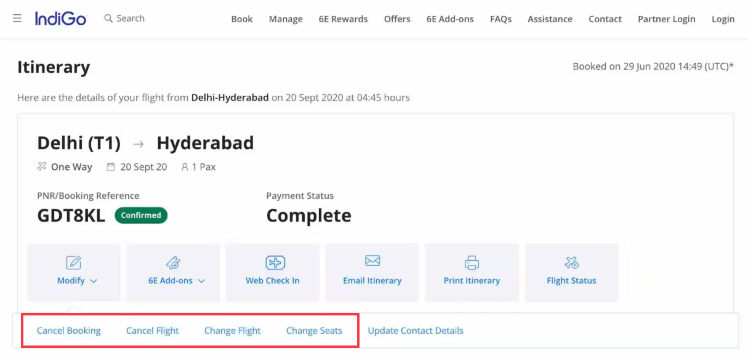
Credit: Indigo
How to Cancel Flight via Airline
Core Entry: Manage Booking or other similar buttons (airline official app/website, no other valid entry)
- Log in to your airline account with the registered mobile/email (matching booking information).
- Enter Manage Booking section, retrieve your order with PNR/Booking Reference Number + Passenger Name.
- Select the target flight segment, click Cancel Flight (prominent button in flight details).
- Confirm passenger information & flight to cancel, check refund breakdown (fare/tax/fee deduction) on the pop-up page.
- Click Confirm Cancellation, save the cancellation confirmation email (with refund tracking number) for follow-up verification.
Key Official Notes
- If booked via third party, airline official will reject direct cancellation—must use the original booking platform.
- After check-in: Click Uncheck-in first in the same section, then follow the above steps to cancel.
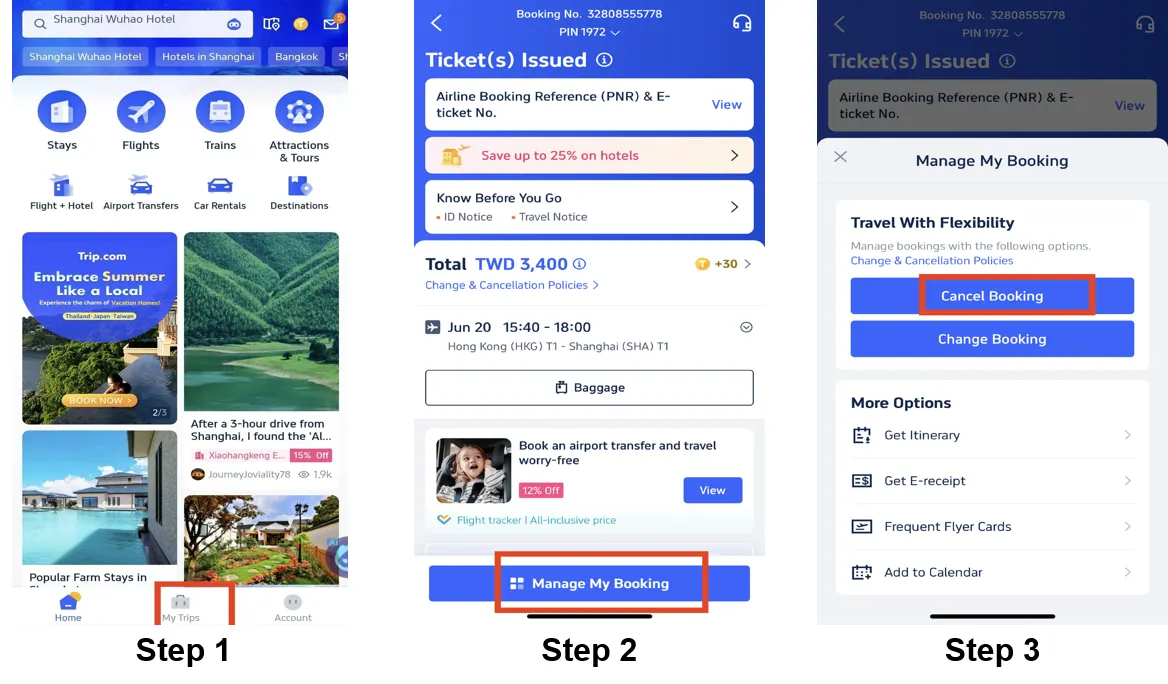
How to Cancel Flight on Trip.com
- Open Trip.com App, log in to your account, click My Trips (homepage bottom tab, core booking entry).
- Locate the flight booking to cancel, click Manage My Booking (right side of the order, blue button).
- On the management page, tap Cancel Booking (red prominent button in the flight module, no other cancellation entry).
- Check the automatic refund calculation (refund amount, cancellation fee, airline service fee) → click Next to enter the confirmation page.
- Confirm passenger/flight segment/refund method (original payment by default) → tap Submit to complete cancellation.
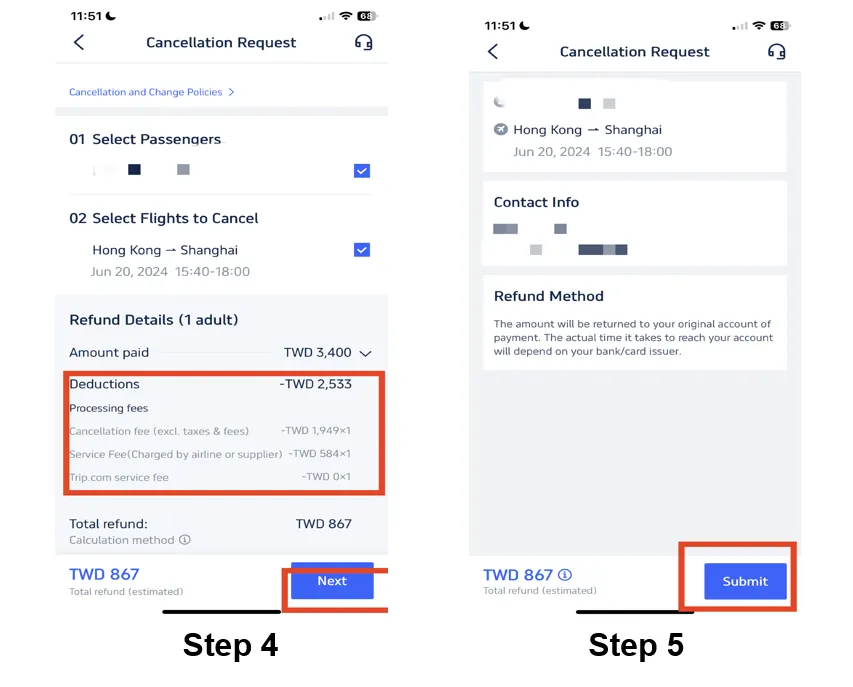
Trip.com Exclusive Notes
- Refund status can be tracked in My Trips → Canceled Bookings (status: Submitted/Processing/Refund Sent/Completed).
- For refund issues: Contact Trip.com 24/7 Live Chat (App inner) or country-specific hotline (no other valid channel).
See all attractions
 2198 booked






Flight Cancellation Insurance
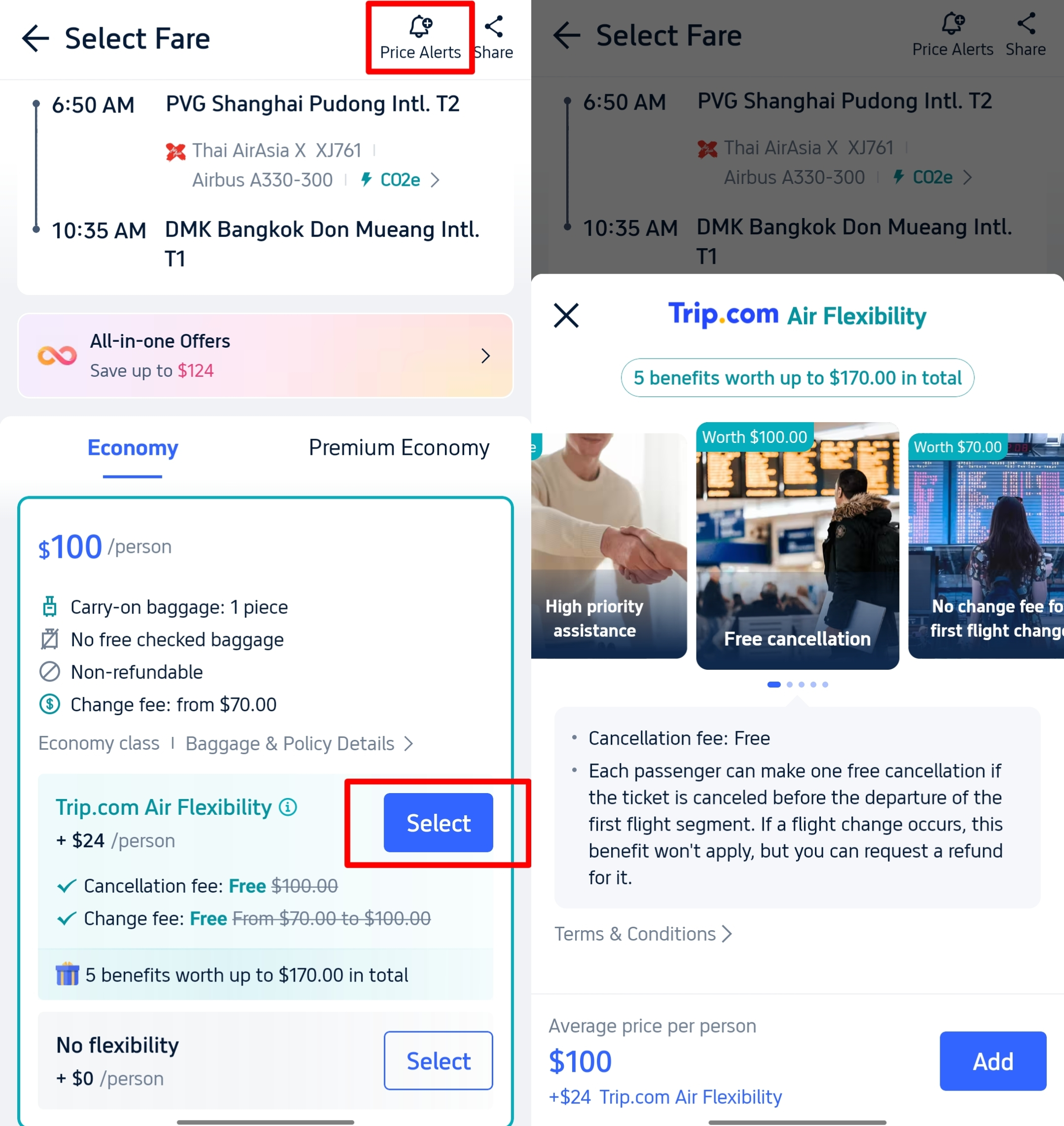
Trip.com Air Flexibility
- Core Benefit: Air Flexibility waive/reduce airline cancellation fee (50%-100% waiver based on option selected); some allow free date change (no fare difference).
- How to Use: Select the option when booking flights on Trip.com (additional fee, displayed in fare details).
- Applicable Scenario: Voluntary cancellation due to personal reasons.
Top Global Travel Insurance
- Allianz Partners: Global leader; covers illness, emergency, natural disaster; 24/7 help.
- AXA Assistance: Strong for international trips; trip cancellation up to 100% cost.
- Generali: Affordable, reliable for global travelers.
- IMG: Popular for US & international; high coverage limits.
Car Rentals
Car Rental Promo Code - 8% Off
New User Enjoy up to 8% Off
TRIPCAR8
[Discount] Global Hotel Recommendations
10 Best Global Hotels
See All Hotels







FAQs about Cancel Flight
-
What happens if my flight is cancelled?
-
Can I cancel a flight and get a full refund?
-
What am I entitled to if my flight is cancelled?
-
Can I get a hotel if my flight is cancelled?
-
How to track my flight refund?
Disclaimer: This article has been provided by an individual contributor or third party platform. If there is any discrepancy regarding the copyright, please contact us directly and we will delete the content immediately.
Trending Searches
-
Air Travel Guide
-
Latest Flight Deals
-
Popular Flight & Hotel Packages
-
Getting Around
-
eSIM/SIM card
- Medellin Vacation Packages
- Hong Kong Vacation Packages
- Tokyo Flight and Hotel
- Koh Samui Flight and Hotel
- Hong Kong Flight and Hotel
- New Orleans Vacation Packages
- Easter Island Vacation Packages
- Bucaramanga Vacation Packages
- Santa Cruz Vacation Packages
- Iloilo Vacation Packages
- Langkawi Flight and Hotel
- Corfu Vacation Packages
- Macau Vacation Packages
- Santo Domingo Vacation Packages
- Marrakech Vacation Packages
- JR Shikoku
- Beijing Airport to City
- Narita Airport to Tokyo
- JR Tokyo
- Chengdu Airport
- Kuala Lumpur Airport Transfer
- Kobe Airport
- Suzhou metro
- Singapore MRT Map
- Shenzhen to Guangzhou
- Tokyo Car Rental
- Narita Airport Limousine Bus
- Chongqing Metro Map
- How to Call Taxi in China
- Narita Airport to Shinjuku
- Macau to Hong Kong
- Hong Kong Airport to Macau