Trip.com Hotel Refunds: Cancellation Policy, Time & Status

by Trip.com
July 2, 2026

Planning a vacation can be exciting, but sometimes unexpected events can lead to changes in our travel plans. If you've booked a hotel through Trip.com and need to cancel, you might be wondering about Trip.com hotel refund policy. This article will provide a step-to-step guide for cancelling your hotel booking! Stay with us till the end!
Top 10 Global Hotels
See All Hotels
 NO.1
NO.1






AI Summary
This summary is AI-generated by Trip.com. For the complete guide, please refer to the article below.
Trip.com hotel cancellations require selecting the booking in the My Trips section. Refund processing takes 24 hours, with funds appearing in 1–7 business days depending on the payment method used.
Step 1: Enter the Trip.com app to get Trip.com hotel refund
Step 2: Find the hotel booking
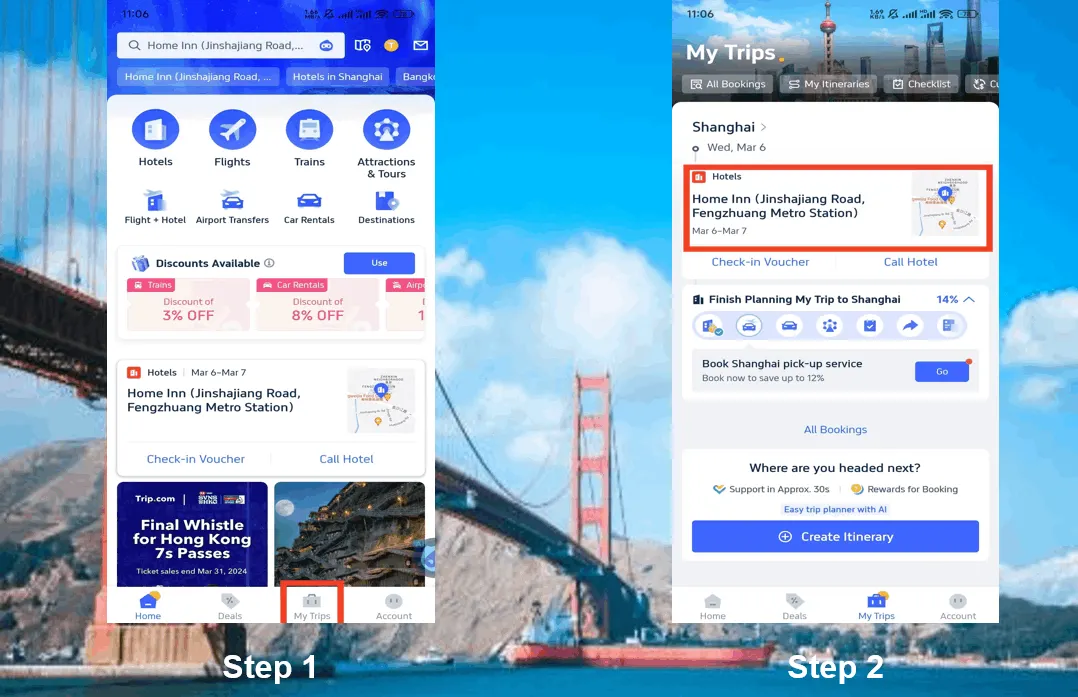
Step 3: Request the Trip.com hotel refund
Step 4: Provide a resaon for cancellation
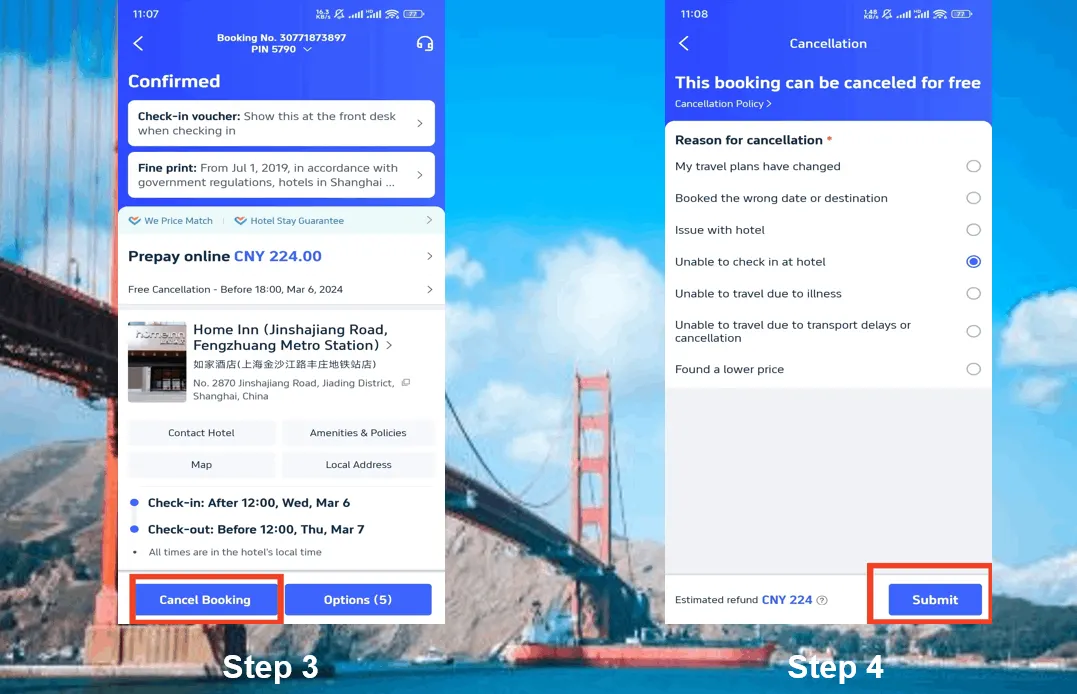
Step 5: Confirm the Trip.com hotel refund
Step 6: Check your Trip.com hotel refund status
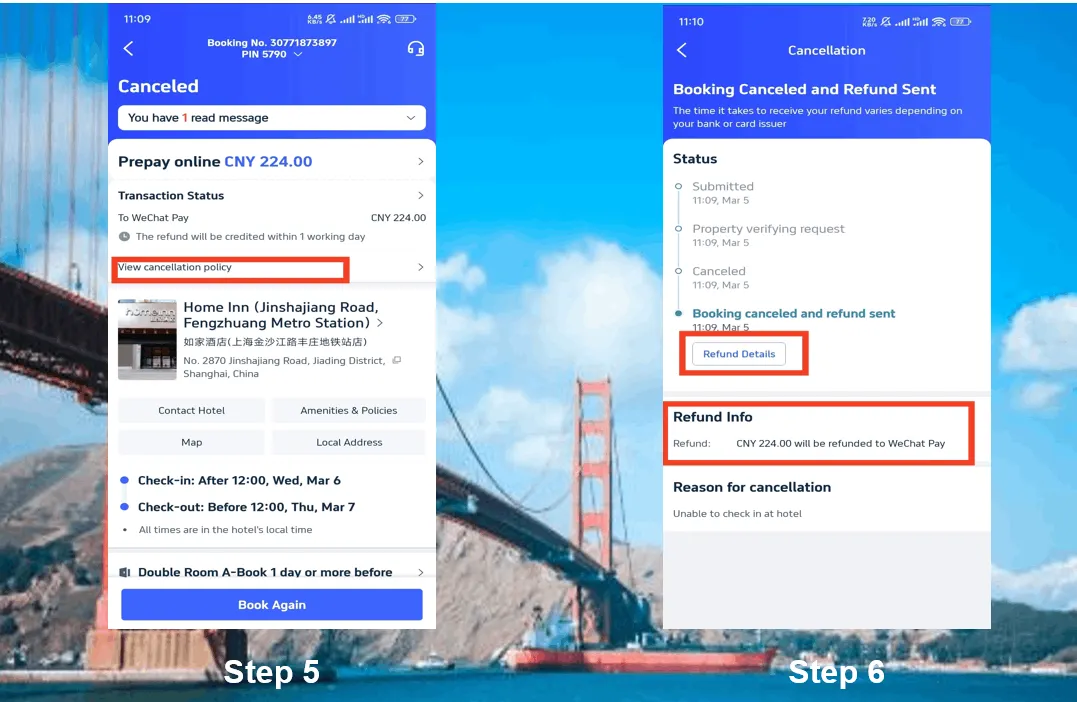
The screenshots are only for reference.
【Discount】Search the Best Hotels with Trip.com!
Trip.com is an international online travel agency that offers 24/7 customer service in multiple languages. It offers easy booking services for flights, hotels, and tours and activities. As Platinum & Diamond Members of Trip.com, you can access a free airport lounge, earn more Trip coins, save more on hotel booking, etc.
Disclaimer: This article has been provided by an individual contributor or third party platform. If there is any discrepancy regarding the copyright, please contact us directly and we will delete the content immediately.
Trending Searches
-
Popular Flight & Hotel Packages
-
Getting Around
-
Popular Attractions
-
eSIM/SIM card
- Medellin Vacation Packages
- Hong Kong Vacation Packages
- Tokyo Flight and Hotel
- Koh Samui Flight and Hotel
- Hong Kong Flight and Hotel
- Pattaya Vacation Packages
- Paris Vacation Packages
- Chengdu Vacation Packages
- Phuket Vacation Packages
- Moscow Vacation Packages
- Istanbul Flight and Hotel
- Almaty Vacation Packages
- Rotterdam Vacation Packages
- Porto Santo Vacation Packages
- Phuket Flight and Hotel
- Hangzhou Airport
- ETC Card Japan
- Kansai Airport to Nara
- Phuket Taxi
- Kunming Metro Map
- How to Get to Furong Ancient Town
- KL MRT Map
- Shenzhen Bao'an International Airport
- Macau to Shenzhen
- Wenzhou Airport
- AREX
- Telepass
- Hong Kong Airport Express
- Beijing Capital International Airport
- Narita Airport to Shinjuku
- Macau to Hong Kong
- JR West
- Forbidden City Tickets
- Zhangjiajie National Forest Park
- Shanghai Tower Tickets
- Shanghai Disneyland Tickets
- Shanghai Wild Animal Park
- Tianmen Mountain
- Canton Tower Tickets
- shanghai to wangxian valley
- Huangshan
- Shanghai Disneyland Fast Pass
- Book China Attraction Tickets with Passport
- Universal Studios Beijing Tickets
- Great Wall of China Tickets
- Yu Garden Tickets
- Shanghai Disneyland Crowd Forecast