
Learn how to change Taobao to English, shop on Taobao as a foreigner, what shipping/payment methods to use and more tips.


What Is Taobao?

Taobao is China’s biggest online shopping platform—you can buy almost anything here, from clothes and electronics to groceries and gadgets. It’s cheap, has millions of sellers, and offers international shipping (with a few tricks for foreigners). It has an English version for select countries—though switching it on can be tricky (more on that below).
How to Change Taobao to English?
Credit: Rednote, ExpatPedia
Taobao’s English interface isn’t available worldwide, but it works for 10 countries. Here’s how to switch it, plus fixes for common issues.
Which Countries Support Taobao English?
English is only available if you select one of these regions in settings:Singapore, Malaysia, Thailand, Australia, New Zealand, Kazakhstan, Uzbekistan, Kyrgyzstan, Mongolia, Georgia.
How to Switch Taobao to English?
- Download the Right Taobao App:
- Skip the “TAOBAO” (overseas version) on app stores—use the Chinese version “淘宝” (you may need a Chinese Apple ID/Android app store to download it; ask a Chinese friend to help if needed).
- Register or Log In:
- Sign up with your phone number or email (passport verification may be required later to avoid account bans).
- Change Region & Language:
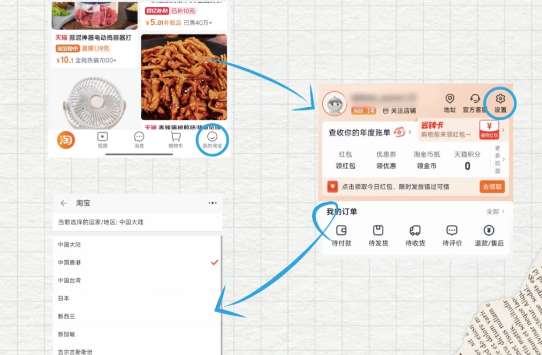
- Open Taobao → Tap “My” (bottom right) → Go to “Settings” (top right, looks like a gear) → Select “Region/Country”.
- Pick one of the supported countries (e.g., Singapore) → The app will automatically switch to English.
- If your country isn’t listed, choose “Global” for basic English (limited features but usable).
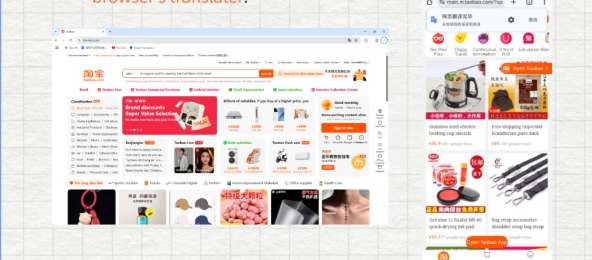
- If nothing works, please use Browser translate. Open Taobao.comin any browser that has a built-in translation feature, such as Chrome or Safari, and use the browser's translater. (advice from Rednote, ExpatPedia)
Credit: Rednote, ExpatPedia
Why Is My Taobao No English Option?
Many foreigners struggle with missing English, and here’s how to do with that:
- Issue 1: VPN didn’t work (e.g., connecting to Australia but still Chinese).
- Fix: Taobao detects your actual IP, not VPN. Use the Chinese version of the app and then pls select a supported region (e.g., Singapore) directly—no VPN needed.
- Issue 2: Selected a supported country but still Chinese.
- Fix: Log out, clear the app cache, then log back in. If it still doesn’t work, contact Taobao customer service to report the issue (they often enable English manually for foreign users).
- Issue 3: Can’t find the Chinese version of Taobao.
- Fix: Use a Chinese friend’s Apple ID to download it from the Chinese App Store, or search for “淘宝” on Android’s Huawei AppGallery/360 Mobile Assistant.
 407600 booked



How to Shop on Taobao and Pay?
Once you have an English interface (or use a translation tool), shopping on Taobao becomes very simple.
Credit: shanghai.gov
1. Search for Products (2 Easy Ways)
- Keyword search: Enter an English word (such as "wireless headphones") or use Google Translate to convert it to Chinese (such as "Chinese") and copy and paste. For brands, using a combination of English and Chinese (for example, "Nike") can achieve better results.
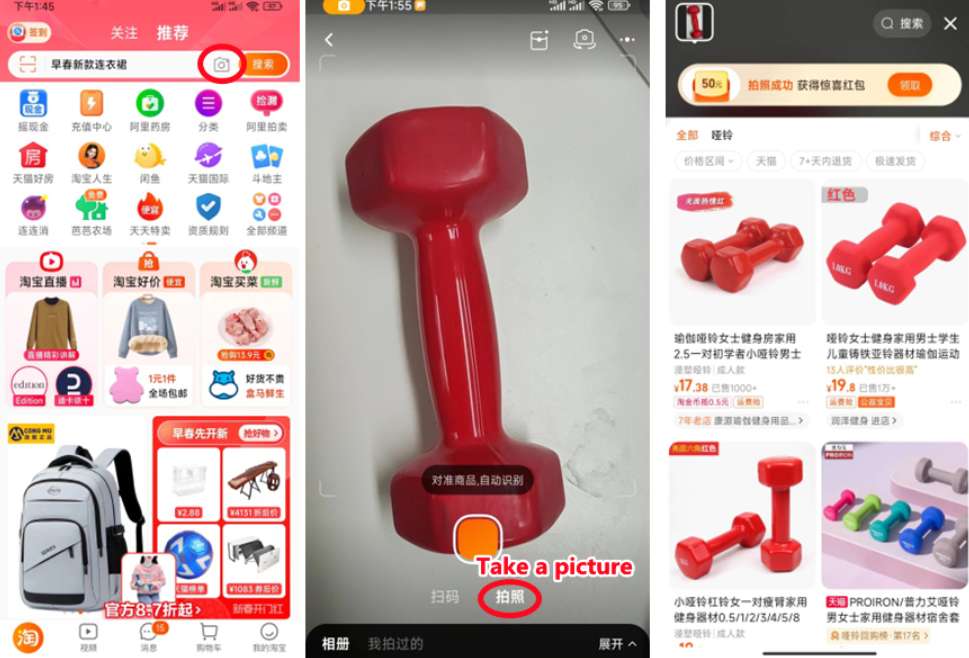
- Image search: Click on the camera icon in the search bar→ Upload a photo of the item you want (from your mobile phone or the Internet) → Taobao will find matching or similar products. It would be even better if you don't know its Chinese name.
Credit: shanghai.gov
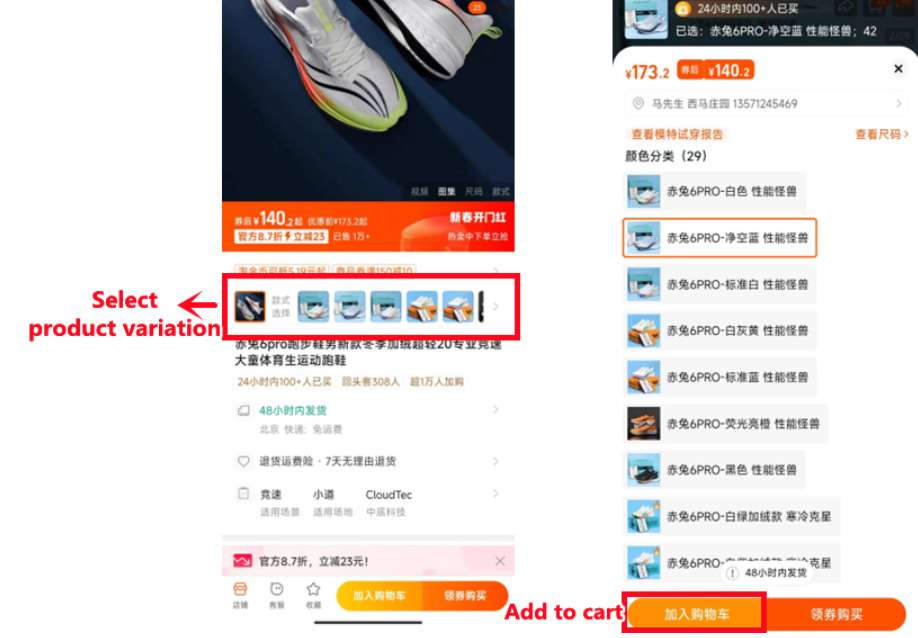
2. Pick a Product & Check Details
Clicking on a product allows you to view photos, descriptions and seller ratings. Follow
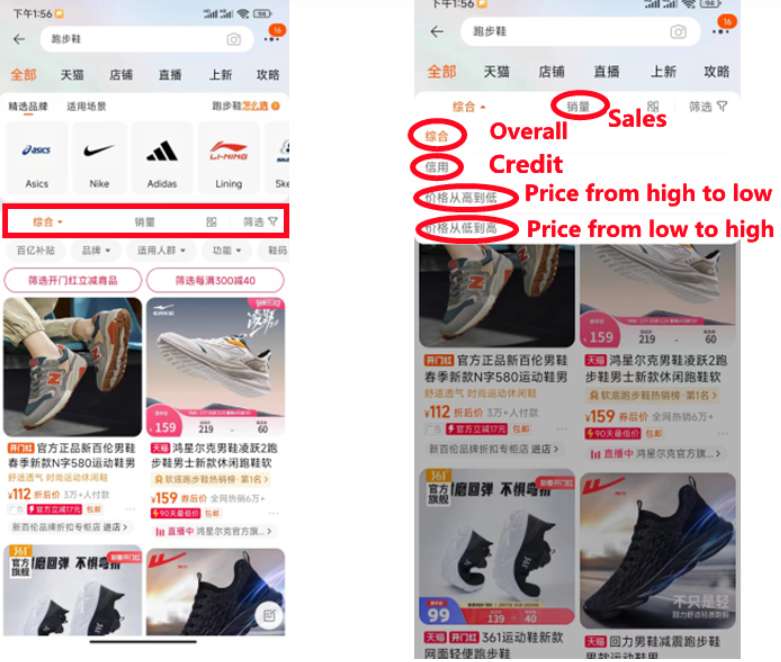
- Sales: More sales often equals more reliability (Search for popular products through "Sales" filtering, but some maybe fake sales, you should check reviews as well).
- Review: Look for reviews with photos as they show the real quality of the product (read Chinese reviews using Google Translate).
- Seller's review: The goal is 4.8+ stars (higher often means more trustworthy).
Credit: shanghai.gov
3. Add to Cart & Check Out
- Select the product variant (size, color, quantity) → click "Add to Cart" (please save later) or "Buy Now" (so check out immediately).
- Enter your shopping cart → Select the items you want → Click "Check Out".
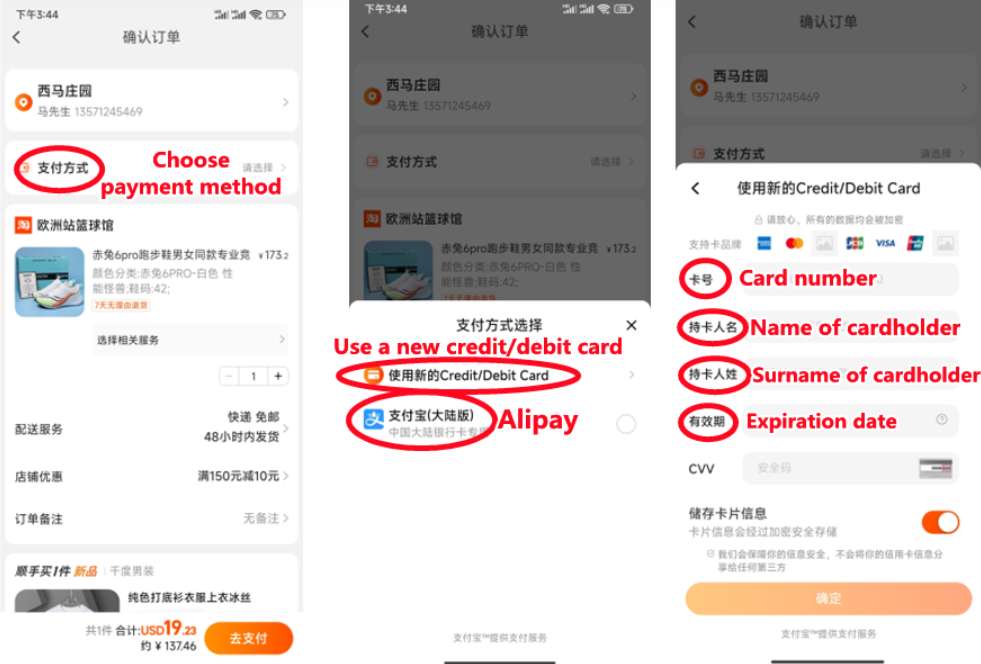
- Enter your delivery address (international addresses are suitable for direct delivery/consolidation).
Credit: shanghai.gov
4. Choose Payment Method
Taobao supports three main payment methods for foreigners- no need for a Chinese bank account:
- Credit/Debit cards: Visa, Mastercard and American Express are all acceptable. Just enter the detailed information of your card when prompted, and the payment will be made directly.
- Apple Pay: If you use an iPhone, first connect your credit card/debit card to Apple Pay. Then, you can use Apple Pay to check out with one click, which is much faster than entering credit card details each time.
- Alipay: Download the Alipay app, activate it with your foreign bank card, and then link your Alipay account to Taobao. This is a good choice because it also reduces the risk of your Taobao account being banned (Alipay verification will make your account look more legal).
Credit: shanghai.gov
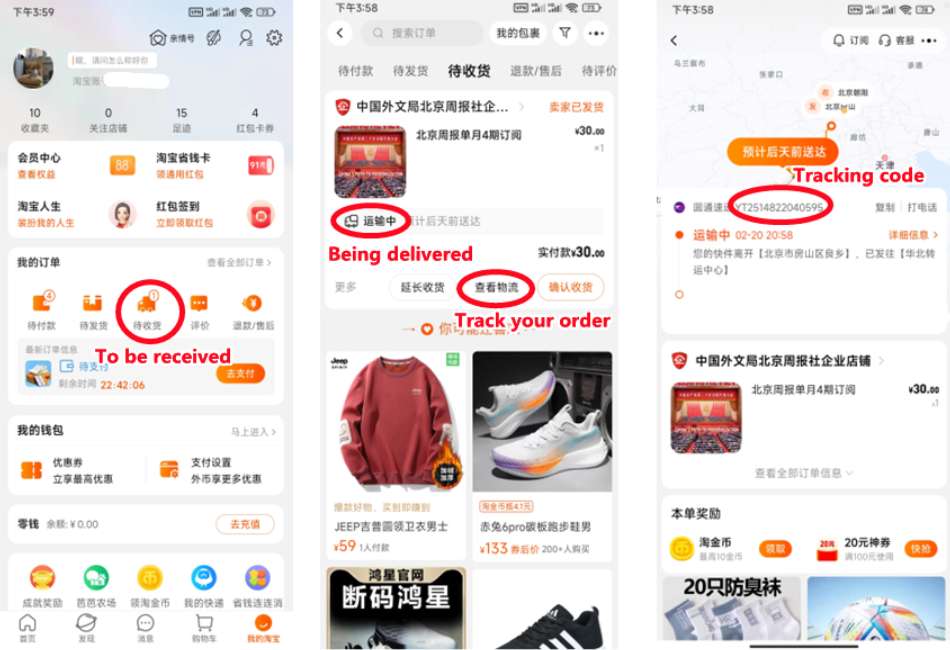
5. Track Your Order
After making the payment, go to "My Orders" to check the status. After the seller ships the goods, you will receive a tracking number - use Cainiao (Taobao's logistics partner) or 17Track to monitor the shipping status.
Taobao Shipping Methods for Foreigners
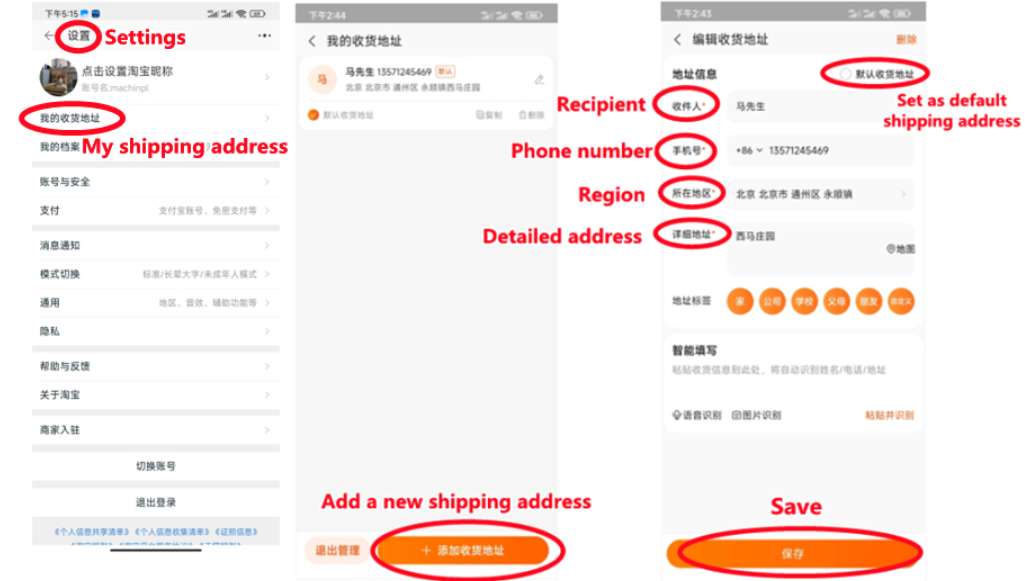
Credit: shanghai.gov, Enter your information and shipping address
Taobao offers three shipping methods- pls choose based on your budget and the speed at which you need your items.
1. Direct Shipping (Best for Beginners)
Items are directly delivered to your international address.
- Advantages: Simple, with no additional steps.
- Disadvantage: The shipping cost is relatively high (calculated by package).
2. Consolidated Shipping (Cainiao)
All your orders will first be sent to Cainiao's warehouses in China. After all the items arrive, you should combine them into one package and pay the international shipping fee.
- Advantage: It is cheaper than direct transportation (saving the cost of multiple packages).
- Disadvantage: It requires a longer time (1-2 weeks of integration time + transportation time).
- Note: You need the Chinese version of Taobao to use this function.
3. Third-Party Forwarding (Cheapest for Bulk Orders)
- How it works: Use a Chinese consolidation company (find them via WeChat mini-programs or online). Write the company’s warehouse address as your shipping address on Taobao. They’ll gather, pack, and ship your items internationally.
- Money-Saving Trick: For bulk orders, choose sea shipping (16–18 days to the US/Europe) instead of air. Companies like UPS will deliver to your door, and you won’t need to handle customs or extra taxes.
How to Use Taobao from Abroad? (US/EU/Asia)
Using Taobao from abroad like the US, Europe, or other countries is totally doable—here’s the critical info you need:
Do You Need a VPN for Taobao?
No. Taobao doesn’t block international IPs. The Chinese “淘宝” app + selecting a supported region (e.g., Singapore) is enough for English—VPNs don’t help with language switching (Taobao detects your real location).
Taobao Country-Specific Customs & Shipping Tips
Customs policies change often—always check your country’s latest rules. Here’s what to know:
- US: Small orders (typically under $800) are duty-free. Direct shipping takes 7–14 days; sea forwarding takes 16–18 days.
- Europe (EU): Orders under €150 avoid duties. Delivery takes 10–21 days. Prohibited items include counterfeits and certain electronics.
- Singapore: Low customs restrictions—most small orders are duty-free. Direct shipping takes 3–7 days (fastest for Southeast Asia).
- Australia: Orders under AUD 1000 are duty-free. Shipping takes 7–14 days. Strict on food/plant products—avoid shipping these.
- India: Customs are strict—small orders (under INR 50,000) are less likely to face delays. Shipping takes 14–21 days. Avoid branded/counterfeit items.
Core Steps for Taobao Overseas Users
- Download Chinese “淘宝” app (not overseas version).
- Register with international phone/email + verify with passport.
- Set region to supported country (e.g., Singapore) for English.
- Choose shipping: Direct (fast), consolidated (affordable), or third-party (cheapest bulk).
- Pay with Visa/Mastercard/Apple Pay/Alipay (no Chinese bank account needed).
Taobao vs. Other Shopping Apps
Taobao and Amazon serve different needs—here’s a clear comparison to help you choose:
Feature | Taobao | Amazon (US/EU) | Shein | Aliexpress |
Price | Lowest (30–70% cheaper than Amazon/Shein) | Higher (but consistent pricing) | Affordable (~20% higher than Taobao) | Affordable (similar to Shein) |
Product Variety | Vast (unique Chinese goods, custom items, bulk options) | Wide (brand-name, everyday items, Amazon Basics) | Fast fashion, beauty, small gadgets | Global sellers, similar to Taobao but less niche |
Authenticity | Mixed (stick to official stores/4.8+ stars) | High (strict brand verification) | Mixed (fast fashion, no luxury brands) | Mixed (check seller ratings) |
International Shipping | Possible (direct/consolidated/third-party) | Fast (Amazon Global, 3–7 days) | Fast (7–14 days, built-in global shipping) | Fast (7–14 days, built-in global shipping) |
Shipping Costs | Low (third-party forwarding: $5–$20; direct: $10–$40) | High (free over $35 for US/EU) | Low (free over $49) | Low (free over $50) |
Payment Methods | Visa/Mastercard/Apple Pay/Alipay | Visa/Mastercard/PayPal/Amazon Pay | Visa/Mastercard/PayPal/Apple Pay | Visa/Mastercard/PayPal/Apple Pay |
Language Support | English (select countries) + Chinese | Full English + local languages | Full English + 20+ languages | Full English + 20+ languages |
Customer Service | Basic (seller-focused; slow for foreigners) | Excellent (24/7 support, easy returns) | Good (24/7 support, easy returns) | Good (24/7 support, buyer protection) |
Return Policy | Dependent on seller (7–15 day returns) | 30–60 day free returns | 30 day free returns | 15–30 day returns |
Best For | Budget shoppers, unique Chinese goods, bulk orders | Fast delivery, brand-name items, reliable returns | Fast fashion, trend items, quick shipping | Global shoppers wanting easy shipping |
How to Get the Cheapest Deals on Taobao
Taobao is already cheap—but these tricks will help you save even more:
1. Shop During Major Sales
Taobao’s biggest sales offer 30–70% off:
- 618 Sale: June 1–18 (biggest mid-year sale).
- Double 11 Sale: November 11 (world’s largest shopping day—discounts up to 80%).
- New Year Sale: Late December–early January.
Set reminders—sellers often release coupons 1–2 weeks before sales.
2. Use Store & Platform Coupons
- Store Coupons: Most sellers offer coupons (e.g., “$5 off $30”) on their store homepage—tap “Coupons” to collect.
- Platform Coupons: Taobao’s main page has daily coupons (search “Taobao platform coupons”)—stack them with store coupons for extra savings.
3. Join Group Buys (“Tuan Gou”团购)
Group buys let you get lower prices by buying with other shoppers:
- Look for “Group Buy” labels on products—join existing groups (no need to invite friends) to unlock discounts.
- Group buy prices are 10–30% cheaper than regular prices—perfect for small items like phone cases or socks.
[5% Off] Must-Visit Attractions in China
Check some of the top attractions in China below!👀






[8% Off] Best China Hotel Recommendations
From now until stock last, you can enjoy up to 8% off hotel deals on Trip.com when you register as a member on desktop or app!







What to Prepare for a Trip to China?
- Visa & Entry Tips China’s 240-hour visa-free transit policy now covers 54 countries, incl. the US, UK, Canada, and Brazil, allowing up to 10 days during layovers. Learn more about China Entry Tips to land in China easily.
- Getting Connected VPNs are vital for accessing Google, WhatsApp, Instagram, etc in China. Set one up before arriving. China eSIMs are the easiest option for data and bypassing restrictions. Pocket Wi-Fi devices work best for group but are pricier and require pickup/return.
- Money Exchange & Tax Refunds Exchange money in China banks (better rates than airports). ATMs accept foreign cards, but notify your bank first. For tax refunds, spend over ¥500 at stores with a "Tax-Free" sign. Keep receipts and get forms stamped at customs before departure.
Must-Have Apps in China
- China Payment Apps Forget cash. Chinese use Alipay (I like it better) or WeChat Pay to pay for everything in China. Scan a QR code at noodle stalls, metros, even temples. Link your foreign Visa/Mastercard before landing.
- China Map Apps Amap (Gaode Map) & Baidu Map (limited English) is what locals use, with real-time navigation, metro/bus routes, and traffic updates. Apple Maps does a good job too if you're already an IOS user.
- China Transport Apps Street taxis are cheap, but drivers rarely speak English. Use China Taxi App like DiDi (China’s Uber)—set your destination in English, pay by Alipay.
- China Travel Apps 15+ China trips taught me: Use Trip.com. It's the best English app for booking China trains/flights/hotels + finds Trip.com deals.
- China Dating Apps Locals use Tantan (China’s Tinder) and Momo. WeChat’s “People Nearby” works too, but expect language barriers unless your Mandarin’s decent.
- China Food App Use Meituan (also helps find nearby restaurants) or Ele.me for food delivery—both have English mode. No English menu in restaurants? Scan the QR with Alipay's translator.
FAQs about Taobao in English
Can I access Taobao in English?
Yes—but only if you select one of the 10 supported countries (Singapore, Australia, etc.) in the app’s region settings. Use the Chinese version of Taobao (not the overseas “TAOBAO” app) for the English option.Can I use Google Translate on Taobao?
Absolutely. If you can’t get the English interface, use Google Translate’s screen translation feature to read product descriptions, reviews, and menus. Copy-paste Chinese keywords from Google Translate to search for items.How do I change my Taobao app to English?
For Taobao: Go to “My → Settings → Region/Country” and select a supported country. For other Chinese apps (e.g., Pinduoduo), most don’t have English versions—use screen translation tools.