Best 7 Free AI Travel Itinerary Planners: Trip.com AI Planner & More


Learn how to use free AI travel tools like the Trip.com AI Trip planner to generate customizable, style-based itineraries with real-time bookings.
to Bangkok
to Manila
to Shanghai
to Tokyo
to Seoul
See all flights


What is the Best Free AI Trip Planner?

If you are looking for the absolute best free options, the travel community has been busy testing. A popular Reddit thread highlighted a head-to-head test of 7 top AI travel tools.
1. Trip.com AI Trip Planner (Best for All-in-One Booking)
- The Vibe: Seamlessly integrated with all functions incl. booking.
- Why it wins: If you hate copying and pasting your plans into booking apps, this is unmatched. Trip.com AI Trip Planner lets you plan, adjust, and buy tickets for flights, hotels, and tours in a single ecosystem.
2. Stardrift.ai (Best for Deep Research & Foodies)
- The Vibe: Like hiring a human local guide.
- Why it wins: Stardrift.ai pulls deep researcher insights and cross-references actual traveler reviews from Google and TripAdvisor. It asks for your budget upfront and works hard to find authentic dining spots rather than generic tourist traps.
3. EasyTripAI.com (Best for Avoiding Disasters)
- The Vibe: Your protective travel shield.
- Why it wins: It doesn’t just show you "where to go". It checks crowd levels, seasonal weather risks, cost reality, and common local tourist scams for your specific dates. It answers the critical question: "Should I even book this week?"
4. Wonderplan (Best for Quick, Clean PDF Exports)
- The Vibe: Minimalist and direct.
- Why it wins: It’s completely free and highly efficient. It generates clean visual plans and lets you export them to a PDF to keep on your phone offline.
5. Layla AI / Tripplanner.ai (Best for Conversational Planning)
- The Vibe: A friendly chat with a virtual travel agent.
- Why it wins: Acquired and merged under the Layla umbrella, it uses a chat-based setup to ask you smart clarifying questions about your pace, diet, and preferences before compiling your travel itinerary.
6. Mindtrip (Best for Visual & Map-Based Layouts)
- The Vibe: Sleek and highly collaborative.
- Why it wins: It features a polished, map-centric user interface. Mindtrip is excellent if you are visually-driven and want to see your entire day’s walking path mapped out clearly.
7. MonkeyEatingMango (Best for Budget Tracking)
- The Vibe: The spreadsheet-killer.
- Why it wins: Fully free with no paywall on core features. It automatically builds a detailed, multi-currency budget for your entire itinerary, showing estimated expenses for each activity so you never overspend.
What is the Trip.com AI Trip Planner?

The Trip.com AI Trip Planner is a free, interactive travel planning assistant built directly into the Trip.com ecosystem.
Unlike standalone AI models (such as basic versions of ChatGPT or Gemini) which only provide static, text-based recommendations that you have to copy-paste elsewhere, Trip.com’s planner acts as a living, breathing blueprint. It matches its advanced AI algorithms with Trip.com's massive, real-time booking database to design fully personalized itineraries complete with actual booking options, real-time pricing, and live availability.
What Can You Do With the AI Trip Planner? (Key Functions)
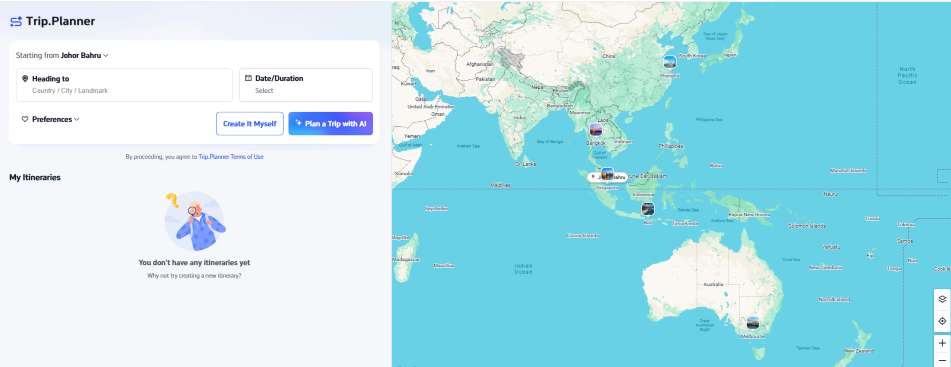
This tool is designed to move you from inspiration to booking in minutes. Instead of treating planning and booking as two separate steps, it unites them.
Key Feature | What It Does | Why It Benefits You |
All-in-One Integration | Syncs flights, trains, hotels, restaurants, and attractions. | Ensures everything is in one place with real-time availability and live pricing. |
Style-Based Itineraries | Tailors your plan based on whether you are a first-timer, culture buff, etc. | Your itinerary matches your pace and personal style—no generic, cookie-cutter plans. |
User-First Interface | Generates a complete itinerary using just three simple questions. | Saves you from input fatigue. You get a solid draft layout in less than a minute. |
Flexible Planning & Editing | Import existing Trip.com bookings and reorder via canvas editing. | Real-time flexibility to drag, drop, delete, or add notes to customize the plan. |
Expert Vetting | Access to real, human customer support team when you need assistance. | Blends AI-driven speed with the safety net of real-world human travel agents. |
See all attractions
 2162 booked






Step-by-Step: How to Use Trip.com AI Trip Planner
Creating an itinerary with Trip.com is straightforward. Here is exactly how to do it:

1.Enter Your Basics:
Head to trip.com trip planner. Enter your destination, travel dates (or duration), and departure city.

2.Select Your Style:
Choose your travel style. Are you traveling with kids, looking for a romantic getaway, focusing purely on local food, or seeking history and culture?

3.Generate and Review Your Itinerary:
Click "Plan a Trip with AI". In moments, the AI builds a day-by-day map showing optimized routes, recommended attractions, and logical breaks.
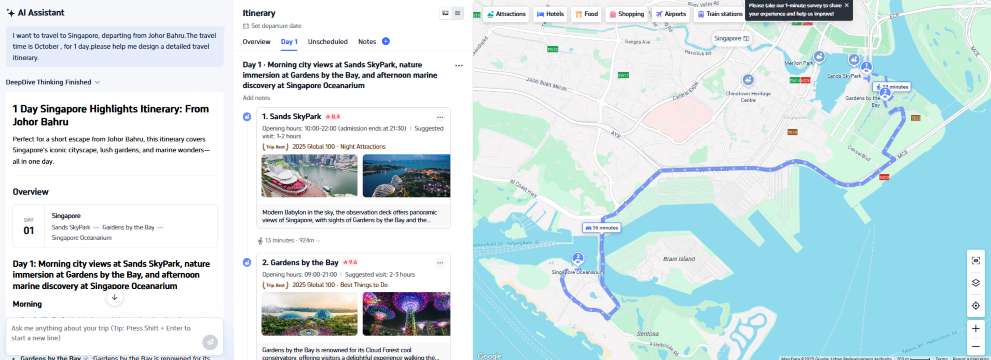
4.Fine-Tune on the Canvas:
Use the interactive canvas editor to delete spots, add personalized notes, swap out dining suggestions, or drag items into a different daily order.

5.Import & Book:
If you have existing flights or hotel reservations booked on Trip.com, import them instantly. For items you haven't booked yet, check the live availability directly on the screen to secure your spots.
Car Rentals
Car Rental Promo Code - 8% Off
New User Enjoy up to 8% Off
TRIPCAR8
[Discount] Global Hotel Recommendations
Find Best Global Hotels
See All Hotels







FAQ: Trip.com AI Trip Planner
-
Is Trip.com’s AI Trip Planner completely free to use?
-
Can I import my existing travel bookings to Trip.com Itinerary Planner?
-
Can I share my AI itinerary with my travel companions?
-
How does the AI Trip Planner know my travel style?
-
Will the AI Trip Planner suggest route-optimized schedules?
Disclaimer: This article has been provided by an individual contributor or third party platform. If there is any discrepancy regarding the copyright, please contact us directly and we will delete the content immediately.
Find Cheap Travel Deals & Explore Destinations on Trip.com
-
Air Travel Guide
-
Latest Flight Deals
-
Popular Flight & Hotel Packages
-
Getting Around
-
eSIM/SIM card
- Medellin Vacation Packages
- Hong Kong Vacation Packages
- Tokyo Flight and Hotel
- Koh Samui Flight and Hotel
- Hong Kong Flight and Hotel
- Abu Dhabi Vacation Packages
- Phuket Vacation Packages
- Guam Vacation Packages
- Beijing Vacation Packages
- Istanbul Vacation Packages
- Darwin Vacation Packages
- Erbil Vacation Packages
- Monterey Vacation Packages
- Pangkor Vacation Packages
- Tampa Vacation Packages
- Hangzhou Airport
- Hong Kong Airport to Guangzhou
- JR Hokkaido
- Xiamen Metro Map
- JR Tokyo
- Shenzhen Bao'an International Airport
- Macau Taxi
- Harbin Metro Map
- Gimpo Airport to Seoul
- Hong Kong to Macau
- AREX
- Hong Kong MTR Map
- Japan Taxi App
- Shenzhen Airport
- Macau to Hong Kong
- Narita Airport to Shinjuku
- Eurail Pass Discount