8 GPT Apps You Can Use in ChatGPT for Travel, Design, Music, Shopping, and More


8 GPT Plugins You Can Use in ChatGPT for Travel, Design, Music, Shopping, and More
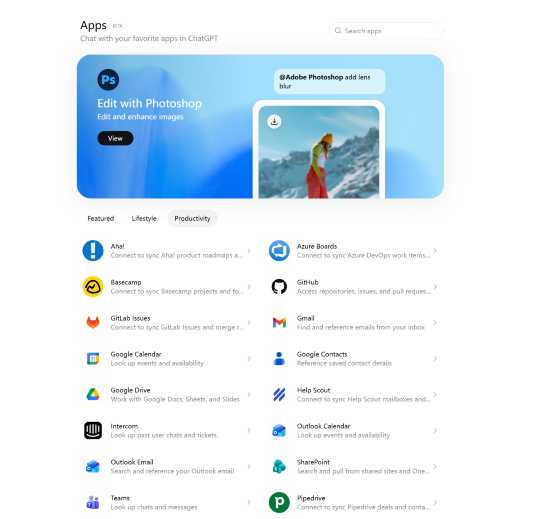
ChatGPT is no longer just a place to ask questions and get text answers. With GPT Apps, users can bring more practical tools into the conversation, from travel planning and design to image editing, home search, grocery shopping, and music discovery.
Instead of jumping between different websites or apps at the very beginning of a task, users can start inside ChatGPT and work with a connected app experience when it is available. That makes ChatGPT feel less like a simple chatbot and more like a flexible workspace.
This guide introduces eight popular tools available in ChatGPT and explains what each one can generally help with. Trip.com is the travel plugin featured in this list. It allows users to search and compare flights, hotels, trains, attractions, and tours through a natural conversation, making it easier to bring the main parts of a trip together.
What are GPT plugin in ChatGPT?
GPT Apps are app experiences that can be used inside ChatGPT. They allow users to connect a conversation with a more specific tool, so ChatGPT can help with tasks that go beyond a normal answer.
For example, a design app may help create visual content. A music app may help organize playlists. A home search app may show property-related results. A travel plugin such as Trip.com can help users search and compare flights, hotels, trains, attractions, and tours from the same conversation.
The main idea is simple: users describe what they want, and ChatGPT can work with the relevant app experience when that app is available. Some GPT Apps may show interactive results, cards, previews, maps, lists, or creative outputs directly inside ChatGPT. Others may connect users to the original product flow when more detail is needed.
GPT Apps are not exactly the same as mobile apps or desktop software. They are used through a ChatGPT conversation, and the experience can vary depending on the app. Some apps may require users to connect an account or grant permission before they work. Availability can also vary by region, account type, ChatGPT plan, or workspace settings.
For users, the benefit is that they can start with a natural request rather than opening a separate tool first. For brands and developers, GPT Apps create a new way to bring services into the moment when users are already describing what they need.
Why are GPT Plugins useful?
GPT Apps are useful because they reduce the gap between thinking about a task and actually starting it. Many everyday tasks begin with a rough idea: plan a trip, make a graphic, edit a photo, browse homes, organize groceries, or find music for a certain mood.
Normally, that means choosing the right website, opening the right app, and figuring out where to begin. GPT Apps make the first step more conversational. A user can describe the task in ChatGPT and move toward an app-supported result.
They are also useful because different tasks often need different tools. ChatGPT can help with the conversation, while the connected app can provide the specialized experience.
What users want to do | How GPT Apps can help |
|---|---|
Plan a trip | Start travel search in the same conversation |
Create visuals | Generate social posts, presentations, or marketing assets |
Edit images | Make visual changes through a connected creative tool |
Explore homes | View home or neighborhood options |
Shop for groceries | Turn meal ideas into shopping support |
Listen to music | Discover or organize playlists |
GPT Apps are not always full replacements for the original products. In many cases, they are best seen as a faster starting point. Users can begin in ChatGPT, review the result, and then continue in the app or service when they need more control.
1. Canva: Design and marketing content
Canva is one of the most familiar tools for people who need to create visual content without starting from a blank design file. Inside ChatGPT, Canva can be useful for turning an idea into a first visual direction, especially for users who need content quickly.
It fits many everyday creative needs: social posts, presentation drafts, posters, flyers, event graphics, and simple campaign materials. A small business owner might use it to create promotional visuals. A student might use it for a class presentation. A marketer might use it to explore early campaign concepts.
Canva is especially useful when the goal is not advanced design control, but a clean starting point. Users can get a visual draft, review the direction, and continue editing as needed.
Use case | What Canva can help create |
|---|---|
Social media | Posts, story graphics, and simple campaign visuals |
Work presentations | Decks, summaries, and pitch visuals |
Marketing | Posters, flyers, and event graphics |
Brand content | Reusable design directions and layouts |
Canva’s role in the GPT Apps ecosystem is easy to understand: it helps turn words and ideas into visuals. For people who need fast design support, that makes it one of the most approachable creative apps to try.
(Screenshot suggestion: Canva design candidates or visual output inside ChatGPT.)
2. Figma: Product and UI design ideas
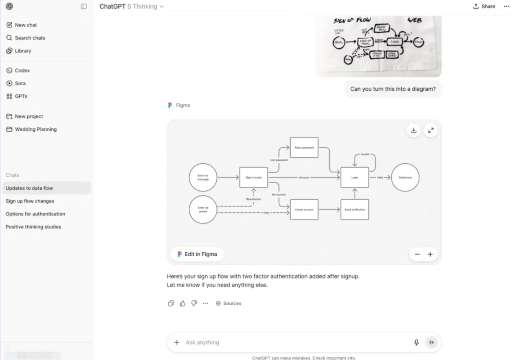
Figma is built for product design and interface collaboration, so its GPT App use case is different from a general design tool. It is most useful for people thinking about digital products, user interfaces, layouts, and user journeys.
A product manager might use Figma-related support to explore how a new feature could be structured. A designer might use it to think through screen hierarchy. A startup founder might use it to make a rough product idea easier to explain to a team.
Figma is not only about making something look nice. It is also about structure: how screens connect, how users move through a product, and how a design idea becomes clearer.
Use case | What Figma can help with |
|---|---|
Product design | Turn product ideas into interface directions |
UI layout | Explore screen structures and components |
User flows | Map app or website journeys |
Design review | Discuss hierarchy, layout, and usability |
This makes Figma useful for early product thinking. It should not be described as a tool that automatically finishes all design work. Instead, it is best presented as a way to help users explore product ideas, organize interface directions, and support team discussions.
3. Trip.com plugin: Travel planning inside ChatGPT
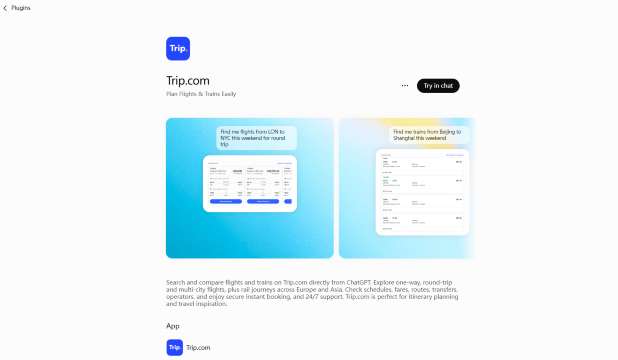
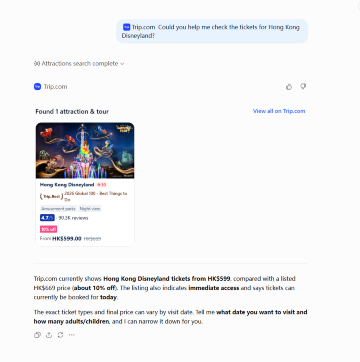
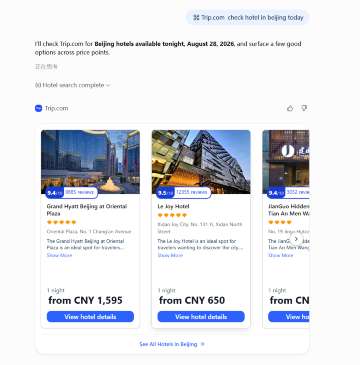
The Trip.com plugin brings several important parts of travel planning into one ChatGPT conversation. Users can search and compare flights, hotels, trains, attractions, and tours without starting with a separate search form for every product.
Instead of entering information through multiple pages and filters, travelers can describe what they need in natural language. For example, a user might ask for a nonstop flight to Tokyo, a hotel near Shinjuku Station, a high-speed train to Osaka, or family-friendly attractions available during the trip.
Search and compare flights
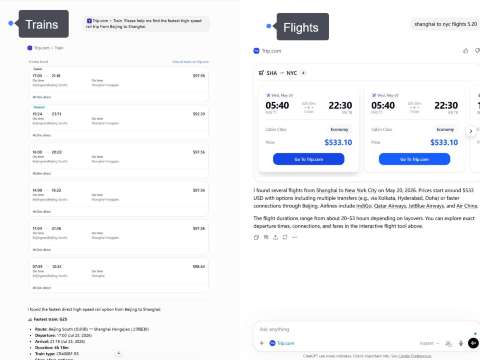
For flights, the Trip.com plugin can help users explore one-way, round-trip, and multi-city options. Available results may include airlines, departure and arrival airports, flight times, total journey duration, stopovers, and fares.
Users can refine the results through follow-up requests such as “show only nonstop flights,” “find an earlier departure,” or “compare cheaper dates.” This makes it easier to evaluate more than price alone and choose an option that fits the traveler’s schedule and preferences.
Find hotels
The plugin can also help users search for hotels based on destination, travel dates, number of guests, budget, location, star rating, and preferred facilities. A traveler can ask for a hotel near a station, business district, beach, or major attraction and then compare relevant options.
Hotel results may include information such as price, location, guest rating, room details, breakfast, and available amenities. Users can continue refining the search by asking for a different neighborhood, a lower price, better ratings, or specific facilities such as parking, a swimming pool, or free Wi-Fi.
Search train tickets
For supported destinations, users can explore train routes and available ticket options. Results may include departure and arrival stations, schedules, journey duration, transfers, train types, seat classes, and fares.
This is useful for high-speed, intercity, and cross-border rail journeys. Travelers can also compare a train with a flight to decide which option offers a better balance of price, travel time, departure location, and convenience.
Discover attractions and tours
The Trip.com plugin can help travelers find attractions, admission tickets, day tours, and local experiences at their destination. Users can search for museums, theme parks, observation decks, cultural activities, sightseeing tours, or family-friendly things to do.
Depending on the product, results may include opening times, available dates, ticket options, visitor ratings, activity duration, language, meeting points, pickup services, and cancellation conditions. Travelers can refine the search by date, budget, group type, or interest.
Plan different parts of one journey
The main benefit is that these products can be explored within the same conversation. A traveler might begin with a flight, continue with a hotel, add a train between two cities, and then search for attractions near each destination.
When the itinerary changes, users can update their requirements without rebuilding the entire search. For example, moving a flight by one day can be followed by new hotel, train, and attraction searches for the revised dates.
Travel need | What the Trip.com plugin can help show |
|---|---|
Flight search | One-way, round-trip, and multi-city flight options |
Hotel search | Locations, prices, ratings, room details, and amenities |
Train search | Routes, schedules, journey duration, transfers, and seat classes |
Attractions & Tours | Attraction tickets, tours, activities, and local experiences |
Price comparison | Available fares and prices when provided |
Schedule review | Departure times, arrival times, opening times, and activity duration |
The Trip.com plugin is most useful for travel discovery and comparison. After selecting an option, users will normally continue to Trip.com to verify the latest price, availability, and booking conditions before completing the reservation.
4. Spotify: Music and playlist discovery
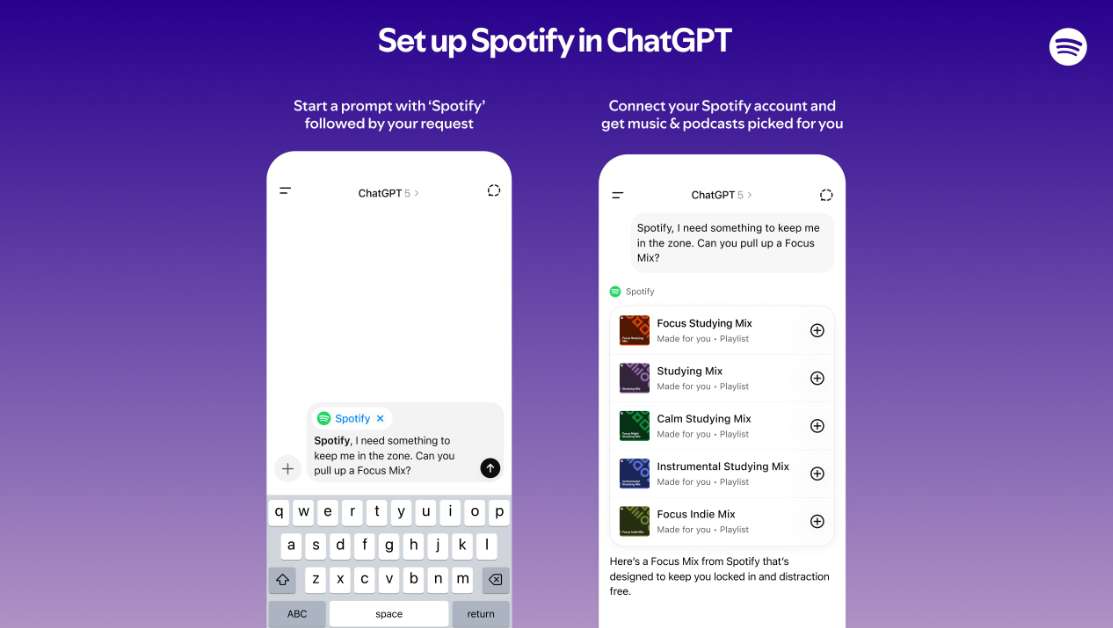
Spotify is a natural fit for GPT Apps because music discovery is often based on mood, activity, or context. People do not always start with a specific song. They may want music for studying, working out, commuting, relaxing, cooking, or spending time with friends.
Spotify can help users discover or organize music around those situations. In ChatGPT, that makes playlist creation feel more conversational and less like manual searching.
Use case | What Spotify can help organize |
|---|---|
Focus time | Study or work playlists |
Fitness | Workout music |
Travel | Road trip or flight playlists |
Relaxation | Calm background music |
Social moments | Party or dinner playlists |
Spotify also helps show the lighter side of GPT Apps. Not every app needs to be about productivity or work. Some are useful because they make everyday entertainment easier to shape around a moment.
When writing about Spotify, avoid including song lyrics. It is enough to describe playlist discovery, music organization, and listening contexts without quoting copyrighted content.
5. Adobe Photoshop: Image editing and visual changes
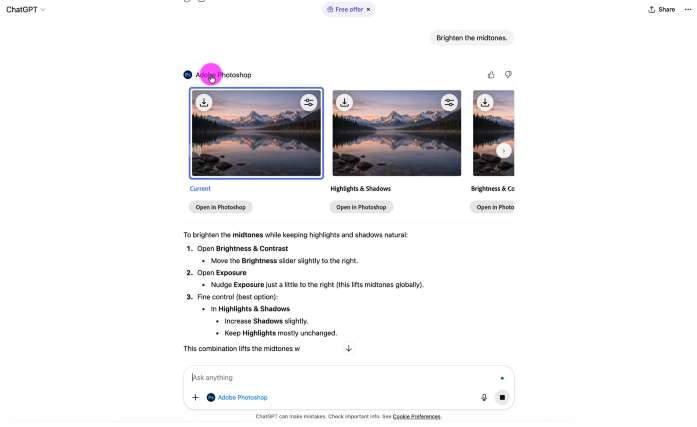
Adobe Photoshop is known for image editing, and its ChatGPT app experience is useful for people who want to make visual changes through a more conversational workflow. Instead of beginning with a complex editing interface, users can start by describing the kind of change they need.
Photoshop can be helpful for photo cleanup, background adjustments, lighting changes, composition improvements, and creative visual effects. It can support content creators, marketers, designers, and anyone preparing images for a post, campaign, or presentation.
Use case | What Photoshop can help edit |
|---|---|
Photo cleanup | Lighting, crop, and composition |
Background edits | Blur, remove, or adjust backgrounds |
Creative effects | Try different visual styles |
Content visuals | Prepare images for posts or campaigns |
The important distinction is that Photoshop in ChatGPT should not be presented as a complete replacement for the full professional Photoshop workflow. Advanced users may still want the full product for detailed layer control, precision editing, and complex creative work.
Its value here is speed and accessibility. For a user who has a clear visual change in mind, the app experience can help make image editing feel less intimidating at the starting point.
6. : Quick creative assets
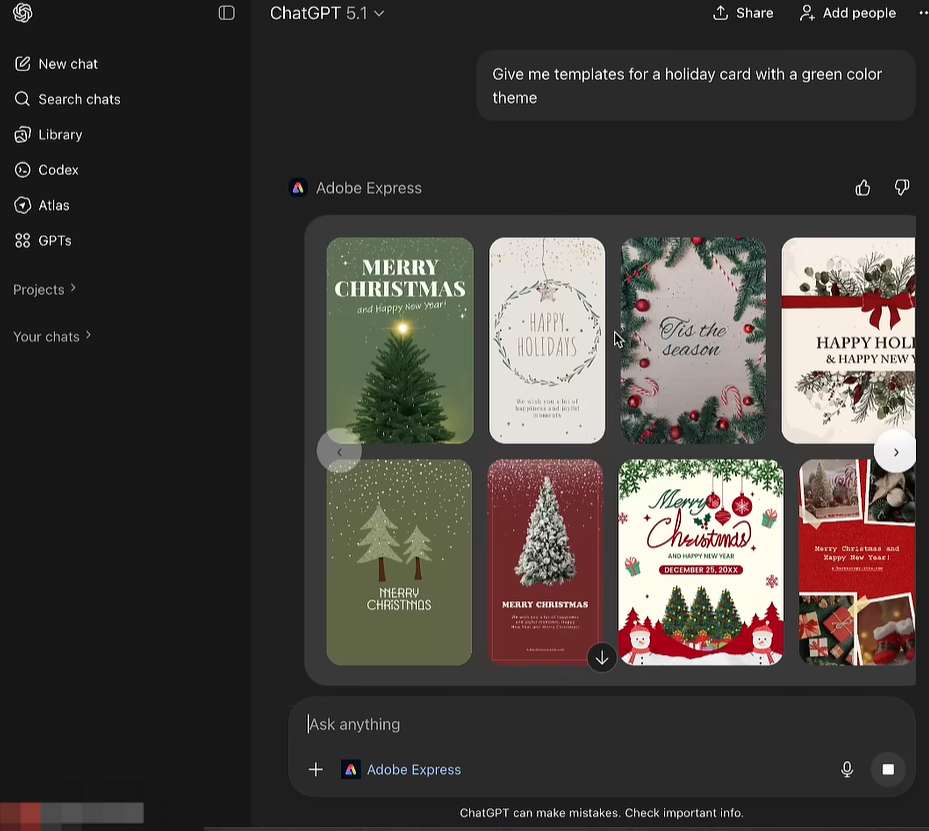
Adobe Express is also a creative app, but it serves a different purpose from Photoshop. Photoshop is mainly associated with editing and transforming images. Adobe Express is more about creating lightweight finished graphics quickly.
That makes Adobe Express useful for social posts, announcements, flyers, invitations, event visuals, and simple branded content. It is a good fit when the user wants a polished graphic without building everything from scratch.
Use case | What Adobe Express can help make |
|---|---|
Social content | Posts and announcements |
Events | Invitations, flyers, and posters |
Business updates | Branded graphics and short visual messages |
Quick campaigns | Lightweight creative variations |
Adobe Express can be especially helpful for users who do not consider themselves designers but still need a presentable visual. It can support quick content creation for work, school, small business, or personal projects.
In a GPT Apps article, Adobe Express is worth including because it shows how ChatGPT can support not only text-based work, but also everyday visual production.
7. Zillow: Home and neighborhood exploration
Zillow brings a very different type of experience into ChatGPT: home and neighborhood exploration. It is useful for users who want to browse homes, apartments, locations, or areas in a more conversational setting.
A user may be thinking about moving, comparing neighborhoods, or casually browsing what is available in a certain city. Zillow can help turn that interest into a more visual home search experience, especially when maps, listings, and location filters are involved.
Use case | What Zillow can help explore |
|---|---|
Home search | Available homes or apartments |
Neighborhood browsing | Areas that match location preferences |
Budget filtering | Listings within a price range |
Moving research | Basic home and area comparisons |
This section should stay practical and careful. Zillow should be framed as a discovery and exploration tool, not as financial, legal, or investment advice. Home decisions involve many factors beyond a listing result, including local regulations, personal finances, inspections, contracts, and professional guidance.
As a GPT App, Zillow is useful because it shows how ChatGPT can connect with visual search experiences, not just text answers.

8. Instacart: Grocery and everyday shopping support
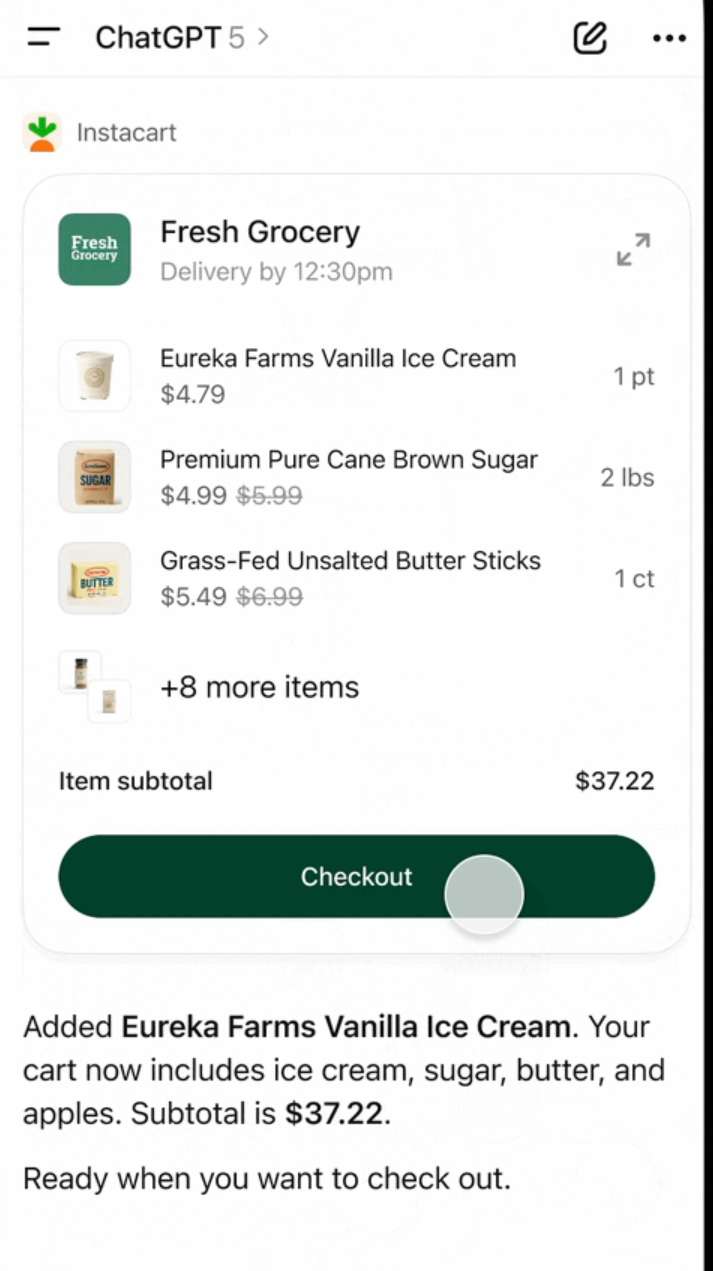
Instacart is useful for grocery planning and everyday shopping support. It fits a common type of task: turning a general idea into a practical shopping list.
For example, a user may be planning a few simple meals, restocking basic household items, or organizing ingredients for the week. Instacart can help connect that planning process with grocery shopping support, depending on availability and the user’s location.
Use case | What Instacart can help with |
|---|---|
Grocery planning | Build grocery lists from meal ideas |
Household shopping | Find everyday essentials |
Meal preparation | Organize ingredients for simple meals |
Time-saving errands | Reduce manual shopping list work |
This kind of app is useful because shopping often starts with an unfinished thought. A person may know what they want to cook, but not yet have a clear list. They may remember a few household items, but not everything they need. GPT Apps can help organize those loose ideas into something more actionable.
The article should keep this section focused on ordinary grocery and household needs. It should not discuss restricted products or make health claims. Instacart’s role here is convenience and organization.

Mainland China/Hong Kong/Macau 5G eSIM | Dual Network | Day Pass/Total Data Package | 24-Hour Billing | QR Code
4.6/5
21600 reviewsEverything was great. We bought this SIM card and used it in Shenzhen, Hong Kong, Macau, and Shanghai. Everything worked perfectly, we were always connected, and the speed was good.

5G/4G eSIM in 8 Asian countries | Multi-network support, supports ChatGPT & Google Maps | 500MB/day - 50GB total | 1-30 days | 24-hour billing | QR code
4.6/5
6211 reviews⭐⭐⭐⭐⭐ Excellent eSIM for Traveling in Asia!
Absolutely fantastic experience with Trip.com eSIM! The setup was incredibly quick and easy, and the internet connection has been fast, stable, and reliable throughout my travels in Asia.
The best part is that Google, WhatsApp, Gmail, YouTube, and all my favorite apps work perfectly, even in China, without any issues!
Excellent coverage, great speed, and seamless connectivity. No complicated setup, no interruptions, and no headaches.
Highly recommended! A must-have for anyone traveling in Asia. I will definitely use it again on my future trips!

Mainland China 5G eSIM | Supports Google Maps / ChatGPT | Daily/Total Data Plans | 24-Hour Billing | 1–365 Days | QR Code
4.6/5
28893 reviewsThe esim automatically installed into my phone with just one click. It got connected immediately after landing and had stable connection everywhere. I could easily access all my "western" apps and use my phone as hotspot to other devices. Highly recommended!

Mainland China 5G eSIM | Day Pass/Total Data Package | ChatGPT Available | 24-Hour Billing | 1-365 Days | QR Code
4.6/5
63399 reviewsEasy to use and flexible choices of days and data, the network is fast, however it gives local users experience, so you can't use blocked apps.

China eSIM | 1-30 Days | Up to 60GB High-Speed Data | Coverage on Leading Network
4.3/5
119 reviewsthe signal is very good,it is very easy to open and use,the price is relatively better than buying a general store,and the quality of the signal is much better.
Which GPT Plugins fits your task?
If you want to… | Try this tool |
|---|---|
Search and compare flights, hotels, and trains | Trip.com |
Discover attractions, tickets, and tours | Trip.com |
Create social posts or presentations | Canva |
Explore UI or product design ideas | Figma |
Edit images | Adobe Photoshop |
Make quick creative assets | Adobe Express |
Explore homes or neighborhoods | Zillow |
Plan groceries or everyday shopping | Instacart |
Discover or organize music | Spotify |
This comparison helps readers choose where to begin. A traveler can use the Trip.com plugin to explore transportation, accommodation, and things to do. A creator may start with Canva or Adobe Express, while a product team may use Figma. Someone browsing homes may try Zillow, and a music listener may start with Spotify.
What should users know before trying GPT Plugins?
GPT Apps can make ChatGPT more practical, but users should still understand the limits of the experience. Not every app is available to every user, and the way an app appears may depend on region, account type, app access, and workspace settings.
Some apps may require users to connect an account or authorize access before they work. Others may show limited results until the user continues into the original product experience.
Users should also check important details before making decisions. Users should also verify important details before making a decision. For Trip.com, this means reviewing travel dates, airports or stations, hotel locations, room and ticket types, baggage or boarding requirements, attraction meeting points, taxes and fees, cancellation policies, and final prices before booking. For creative tools, users should review the final visual before publishing. Zillow listing details should be independently verified, while Instacart users should confirm product availability, prices, and delivery information before checkout.
[10% Off] Best China Hotel Recommendations
10 Best Global Hotels
See All Hotels
 NO.1
NO.1






FAQs about GPT plugin
-
What are GPT plugin in ChatGPT?
-
Are GPT plugin the same as normal mobile apps?
-
Which ChatGPT plugin is useful for travel planning?
-
What can the Trip.com plugin help with in ChatGPT?
-
Are GPT plugin available to everyone?
Disclaimer: This article has been provided by an individual contributor or third party platform. If there is any discrepancy regarding the copyright, please contact us directly and we will delete the content immediately.
Trending Searches
-
Air Travel Guide
-
Latest Flight Deals
-
Popular Flight & Hotel Packages
-
Getting Around
-
eSIM/SIM card
- Cancun Vacation Packages
- Medellin Vacation Packages
- Tokyo Flight and Hotel
- Koh Samui Flight and Hotel
- Osaka Flight and Hotel
- Darwin Vacation Packages
- Acapulco Vacation Packages
- Atlantic City Vacation Packages
- Ottawa Vacation Packages
- Pangkor Vacation Packages
- Phu Quoc Island Vacation Packages
- Santorini Vacation Packages
- Beijing Vacation Packages
- Hurghada Vacation Packages
- Tripoli Vacation Packages
- Harbin Airport
- JR Hokkaido
- Hong Kong Airport Express
- Phuket Taxi
- Qingdao Metro Map
- Chitose Airport to Sapporo
- Osaka JR
- China Train Business Class vs Second Class
- Hong Kong Airport to Macau
- Hong Kong Airport to Shenzhen
- Ningbo Airport
- Shanghai Hongqiao International Airport
- Wuxi Metro
- Telepass
- Macau to Hong Kong
- Narita Airport to Shinjuku
- Eurail Pass Discount