Trip.com Referral Code: How Invite & Earn Works

A Trip.com referral code is the personal code or invite link inside Invite & Earn in your Trip.com account. You share it, your friend registers a new account with it, and both accounts receive a reward once that friend completes a qualifying booking. The reward is paid in Trip Coins, and the amount depends on your market and the campaign running when the booking completes.
What a Trip.com Referral Code Actually Is

Three things get shared under the same name, and mixing them up is the most common reason an invite produces nothing.
What you share | Where it is used | What it does |
|---|---|---|
Referral code | The code field on the friend's sign-up screen | Links the new account to yours at registration |
Invite link | Anywhere you can paste a URL: chat, email, social | Opens the sign-up flow with your code already attached |
Email invitation | Sent from the Invite & Earn page itself | Same as the link, addressed to that person |
A referral code is not a promo code: it rewards a new account for registering and booking, while a promo code discounts the price of one specific booking.
The distinction matters because the two are handled by different systems. A promo code is validated against the booking in front of you and applied to its price; a referral code is validated against the account being created and pays out later, in Trip Coins, to both sides. Using one where the other belongs is why people report that the code does nothing.
What Each Side Earns for Trip.com Referral Code
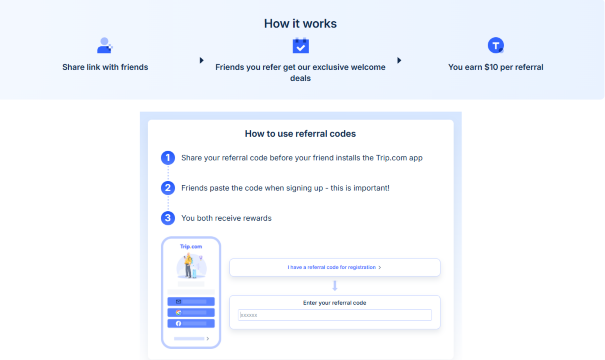
Both accounts benefit, but not in the same way or at the same moment.
Side | What they get | When |
|---|---|---|
You (referrer) | Trip Coins, scaled to how many friends complete a qualifying booking | After the friend's booking is completed |
Your friend (invitee) | A new-user welcome pack plus the standard first-booking offers | Around registration and the first booking |
- The invitation ladder on the page shows the value of each additional friend, so the second and later invites can be worth more than the first.
- Rewards are paid in Trip Coins, not cash; they are spent on future bookings.
- Amounts are set by the campaign, and Trip.com reserves the right to change them.
The invitation ladder
The page shows what each additional friend is worth, from the first invitation onwards. Because later invitations can be worth more than the first, the order in which your friends book matters if you are close to the next step.
- The ladder is per market: a page showing one currency is not the value another region pays.
- The completed count only moves after the friend's booking is completed, not at sign-up.
- Progress sits on the Invite & Earn page, so it is the place to check rather than your inbox.
- Only completed friends count towards the next step, so the counter is a better guide than the number of invitations you have sent.
The welcome pack
The invitee's side is a welcome pack plus the standard new-user offers, which is why a friend who has never booked should register through the link rather than searching for the site and signing up cold.
How to Find Your Trip.com Referral Code

Your code lives in the account that will receive the reward, so look for it while signed in. It is not printed on a booking confirmation and it does not appear in your profile, which is why people often assume they do not have one.
- On the web, open the Invite & Earn page from your account and use Copy Code or Copy Link — the page also shows your invitation progress.
- In the app, the same page is reachable from the account area; the code and the share sheet sit at the top.
- The page shows In Progress and Completed counters, so you can see which invite has registered and which has already produced a reward.
The program is run per market, so the reward shown on your page is the one that applies to you: the invitation ladder, the currency and the size of the welcome pack differ between regions and change between campaigns.
How a Friend Uses the Code at Sign-Up
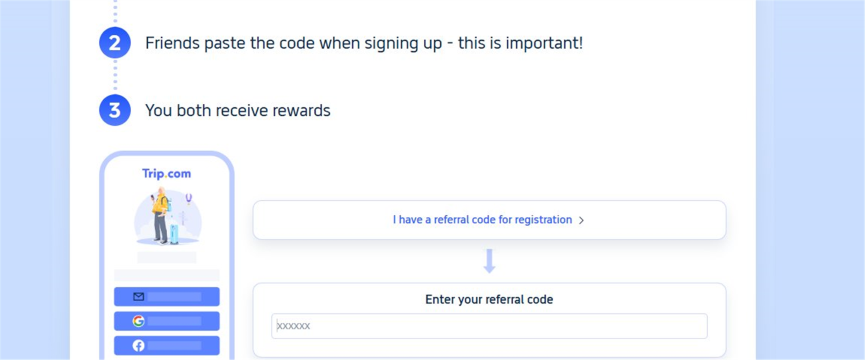
The code has to travel with the registration, not after it. Once an account exists, there is no field to attach a referral to it — the official steps put the code before the app install for exactly that reason.
- Send the code or link before your friend installs the app or opens the sign-up page.
- Your friend pastes it on the registration screen — the official steps put it plainly: friends paste the code when signing up.
- Your friend finishes registration and completes a qualifying booking; both rewards are then attached to the two accounts.
Example screen from the official Invite & Earn page: the wording of the steps can change between campaigns, but the order does not — code first, account second, booking last.
When the Reward Is Credited
This is the part the official terms are specific about, so it is worth reading exactly as written rather than assuming.
Rule | What the terms say |
|---|---|
Qualifying registration | The invitee must create a valid account through your referral link and comply with the general terms |
Qualifying booking | An eligible flight or hotel booking that meets the minimum total price set out for the program |
Completion | The booked journey or stay has to be completed, not just booked |
Timing | Coins are credited within 3 to 14 days after the booking completes |
Limits | A member can refer up to 20 invitees, with a cap on total Trip Coins earned through the program |
What counts as an eligible booking
- The terms name two types: eligible flight bookings and eligible hotel bookings.
- The booking has to meet the minimum total price set for the program — a cheap fare can fall under it and produce nothing.
- Completing the journey or stay is part of the condition, so a cancelled booking never becomes eligible.
Why a Referral Reward Hasn't Arrived
The official FAQ lists three reasons, and they cover almost every case. All three are about the friend's side of the invitation rather than your own account.
- The friend's booking is below the minimum payment requirement for flight or hotel bookings.
- The status shows Completed but fewer than 3 to 14 working days have passed.
- Either account has been flagged for suspicious activity — for example the same email address, IP address or device was used for both sides of the invitation.
What to check before contacting support:
- The friend's booking amount against the minimum shown in the terms.
- The completion date: count the working days, not the calendar days.
- That the friend registered a genuinely new account, not an existing one.
Referral Code Not Working? Five Usual Causes
If the code is rejected at sign-up or never links the accounts, one of these is normally behind it. Work down the list in order — the first two account for most reports.
Symptom | Cause | Fix |
|---|---|---|
No code field at sign-up | The account was created before the code was sent | A new registration is required — the code cannot be attached afterwards |
Code rejected | Typo or an expired campaign code | Copy it from the Invite & Earn page instead of retyping |
Friend registered but no link | The friend used the app or site without the code | Nothing can be linked retroactively; invite again from a new account |
Booking made, no reward | Below the minimum spend, or not yet completed | Check the minimum in the terms and wait for the journey or stay to finish |
Reward blocked | Both accounts share an email, IP or device | Use one account per person on a normal connection |
Three Mistakes That Void an Invite
These three account-level mistakes are the ones the official FAQ points at, and none of them can be fixed after the fact.
- Registering first and asking about the code afterwards — there is no field on an existing account.
- Running both accounts from the same email address, IP address or device, which the FAQ treats as suspicious activity.
- Booking below the minimum spend, or cancelling before the stay or journey takes place.
Each one leaves the invitation visible in progress without ever converting, so check them in that order before asking support.
Referral Code vs Promo Code vs Trip Coins
The three live in different places and solve different problems, which is why a referral reward never shows up as a discount at checkout.
A useful way to remember it: the referral code recruits an account, the promo code discounts a booking, and Trip Coins are the currency you end up holding. A referral reward therefore never appears as a line at checkout.
Item | Who it is for | How it is used |
|---|---|---|
Referral code | A friend who has no Trip.com account yet | Pasted at registration; rewards arrive as Trip Coins later |
Promo code | Anyone with an eligible booking | Entered at checkout; reduces the price of that booking |
Trip Coins | Any member | Accumulated in the account and spent on future bookings |
How to Make an Invite Count
Most failed invitations come down to timing rather than rules. Five habits make the difference.
- Send the code before your friend installs anything — the registration screen is the only place it can go.
- Send the link rather than the bare code when you can: it removes the typing step.
- Tell your friend the minimum spend, so the first booking actually qualifies.
- Keep one account per person and one device per account: shared emails, IP addresses or devices are exactly what the FAQ treats as suspicious activity, and a blocked reward is not recoverable by asking again.
- Track the In Progress counter, not your inbox, to see whether the invitation linked.
- Plan the invite around a real trip: a friend who was about to book anyway converts in days, while an open-ended invitation usually sits unfinished.
- Re-send the link rather than the code if the first attempt failed, since a link cannot be mistyped.
[Discount] Global Hotel Recommendations
Trip Coins from invitations sit alongside the usual saving channels, so compare the room rate before deciding where to spend them.
- Member prices apply once you sign in — no code needed.
- Free cancellation rates keep a booking changeable if plans move.
- Trip Coins can be put towards a booking where the rate allows it.
Find Best Global Hotels
See All Hotels
 NO.1







FAQ: Trip.com Referral Code and Invite & Earn
-
Where do I find my Trip.com referral code?
-
Can I add a referral code after I've registered?
-
How much do I get for referring a friend to Trip.com?
-
When will my referral reward arrive?
-
Why didn't I get my referral reward?
Disclaimer: This article has been provided by an individual contributor or third party platform. If there is any discrepancy regarding the copyright, please contact us directly and we will delete the content immediately.

Find Cheap Travel Deals & Explore Destinations on Trip.com
-
Air Travel Guide
-
Latest Flight Deals
-
Popular Flight & Hotel Packages
-
Getting Around
-
eSIM/SIM card
- Cancun Vacation Packages
- Rovaniemi Vacation Packages
- Tokyo Flight and Hotel
- Phuket Flight and Hotel
- Osaka Flight and Hotel
- Budapest Vacation Packages
- St. Augustine Vacation Packages
- Da Nang Flight and Hotel
- Gulfport Vacation Packages
- Karachi Vacation Packages
- Dar es salaam Vacation Packages
- Marrakech Vacation Packages
- Moscow Vacation Packages
- Havana Vacation Packages
- Antwerp Vacation Packages
- ETC Card Japan
- Japan Taxi App
- Hotels near LAX with Shuttle
- Guangzhou Metro Map
- Don Mueang Airport to Bangkok
- Hong Kong Airport to Shenzhen
- Beijing to Shanghai Train vs Plane
- Macau to Zhuhai
- Wenzhou Airport
- Shanghai Hongqiao International Airport
- Hangzhou Metro
- China Train Business Class vs Second Class
- Lijiang Airport
- Kunming Metro
- Macau to Hong Kong
- Narita Airport to Shinjuku
- Qingdao Metro Map