Nihao China App: Setup, Card Link & Payment Guide 2026

In China, nearly 86% of offline transactions are made via QR codes, and cash is becoming increasingly rare. For international tourists, navigating this cashless ecosystem can be daunting.
To bridge this gap, China UnionPay launched Nihao China (你好,China)—an official payment and travel service app designed specifically for inbound foreign visitors. Unlike standard Chinese domestic apps, it does not require a Chinese phone number or a local bank account. It is the perfect companion for short-term tourists (7–30 days), transit passengers, and business travelers.
to Shanghai
to Guangzhou
to Beijing
See all flights

Where to Download the Official Nihao China App?
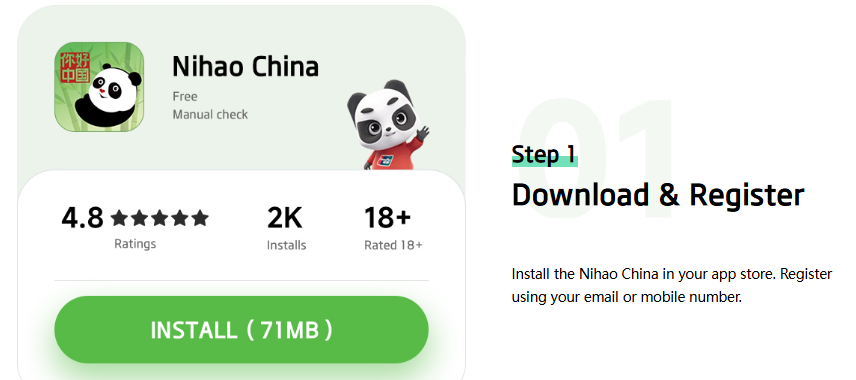
The app is entirely free and available globally on major official app stores.
- iOS Users: Open the App Store and search for "Nihao China". Ensure the developer is listed as "China Unionpay Co., Ltd." to avoid fake or phishing clones.
- Android Users: Download it directly from the Google Play Store.
- Alternative Download: If you use alternative Android app galleries, ensure you only download the official APK file directly from the official UnionPay International website.
⚠️ Security Warning: Never download "optimized," "localized," or third-party modified versions of this app from unverified forums. These are often phishing clones designed to steal your passport data and credit card details.
How to Register and Verify for Nihao China
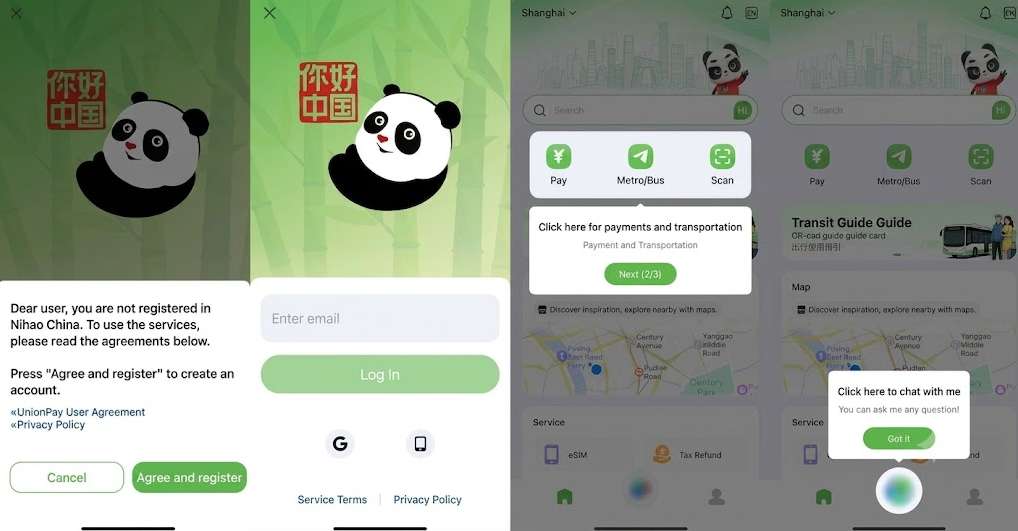
Setting up your account before flying to China is highly recommended so you have a working payment method the moment you land.
1.Choose Your Sign-In Method
Open the app. You can register using your international phone number (ensure your country code is correct), your email address, or via third-party fast log-ins like Apple ID or Google Sign-In.
2.Identity Verification (Real-Name Authentication)
Due to Chinese financial regulations, you must verify your identity to activate mobile payments. Upload a clear, glare-free photo of your passport's information/photo page. The automated system usually approves this within a few minutes.
3.Set Up Your Payment PIN
Create a secure 6-digit payment PIN. This PIN will be required to authorize larger transactions. Small everyday purchases often process instantly without prompting for a PIN.
What to Do If the SMS Verification Code Is Not Arriving?
If you register via a mobile phone number and the SMS verification code does not arrive:
- Ensure your phone allows international text messages and roaming is active.
- Switch from cellular data to a stable Wi-Fi connection and request the code again.
- If the SMS continues to fail, fallback to registering via Email, Google, or Apple ID, which bypasses the cellular SMS bottleneck entirely.
Which International Bank Cards Work with Nihao China?
While the app interface states support for multiple card networks, functionality depends heavily on your country of origin and the specific features you use.
Feature / Card Network | UnionPay Cards (Issued Outside Mainland China) | Visa / Mastercard / JCB / Diners Club |
Direct QR Code Payments | ✅ Fully Supported (Best Option) | ❌ Restricted or Unsupported in many regions |
Tour Wallet Top-Up | ✅ Supported (0.5% load fee) | ✅ Supported (Up to 5% load fee) |
How to Link Your Card to Nihao China
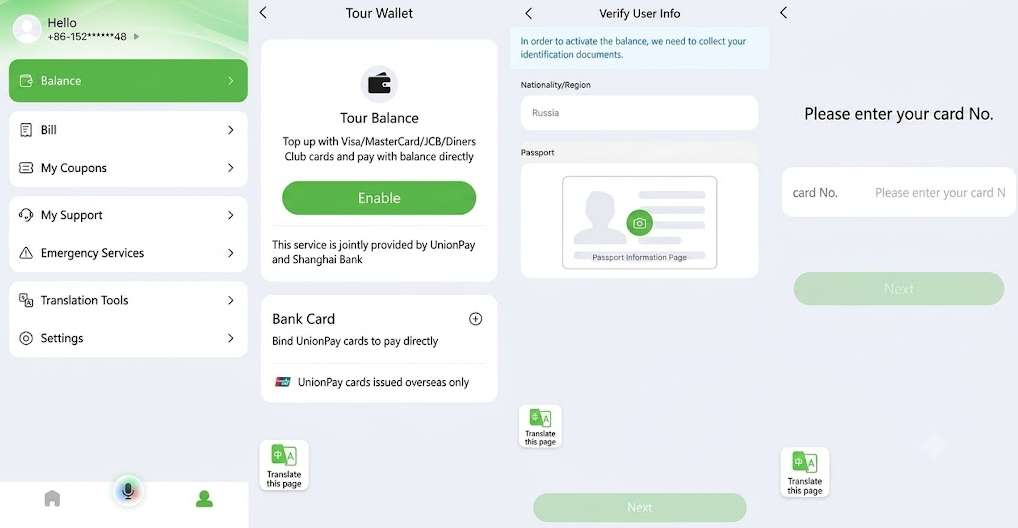
- Navigate to Profile → Tour Wallet → Bank Card and tap the "+" icon.
- Input your card number, expiration date, CVV, and cardholder name.
- Complete the security 3D-Secure (SMS/App) verification required by your home bank.
- A temporary pre-authorization charge of 1 Yuan may be applied to verify the card and will be refunded shortly after.
eSIM for China
See all attractions
 1951866 booked




![[5G SIM Card] China 5G Universal SIM Card Total 10GB/15GB/30GB/45GB High-speed 5G Unlimited Data (Pick up at Shanghai Pudong Airport)](https://ak-d.tripcdn.com/images/0352g12000fctosaw654A_C_568_320.jpg)
How to pay with Nihao China? Pay and Scan
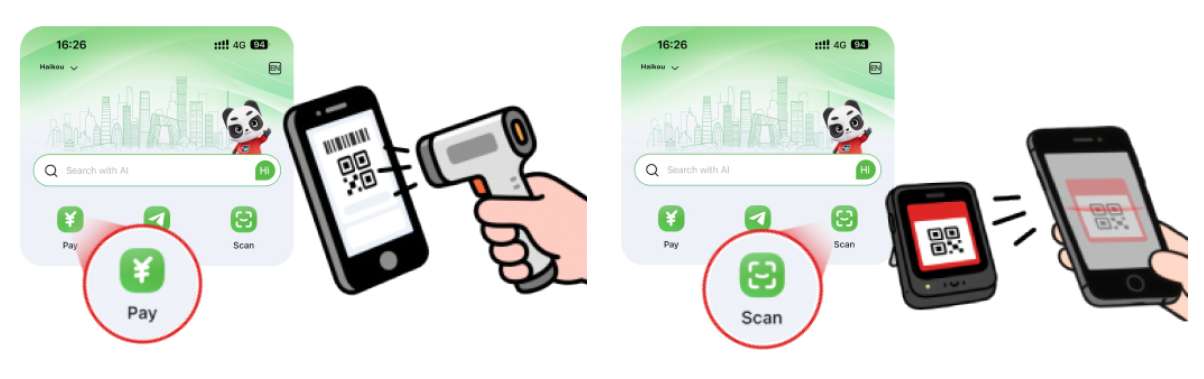
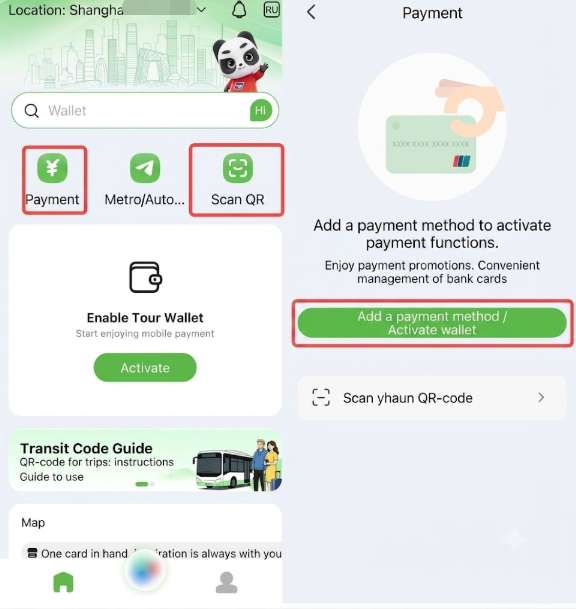
Paying with Nihao China uses two primary methods depending on the vendor's point-of-sale system.
1. The "Pay" Mode (Show Your QR Code)
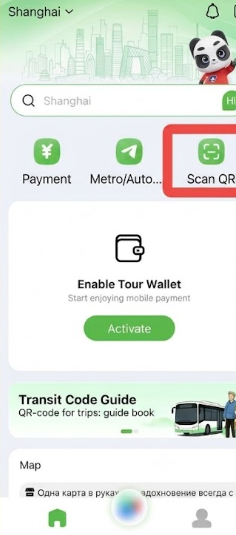
Tap "Pay" on the home screen to display your personal payment QR code. The merchant scans your screen with their terminal. This is widely used in supermarkets, chain restaurants, shopping malls, hotels, and convenience stores.
2. The "Scan" Mode (Scan the Merchant's QR Code)
Tap "Scan" to open your phone's camera. Scan the merchant's printed QR code, manually input the payment amount in Chinese Yuan (CNY), and confirm with your 6-digit PIN. This is common with small street vendors, local taxi drivers, and traditional markets.
Can Nihao China Scan Alipay and WeChat Pay QR Codes?
Nihao China is highly integrated into the Chinese payment grid:
- UnionPay QR Codes: 100% compatible everywhere.
- WeChat Pay Merchant Codes: Widely accepted via the Scan tool.
- Alipay Merchant Codes: Generally supported, though occasional merchant-side software bugs occur.
- Note: The app cannot scan private/personal QR codes belonging to individuals (peer-to-peer transfers).
How to top up your Nihao China wallet and WeChat Pay
You do not necessarily need to hold a balance in the app. There are two ways your money is handled:
- Direct Card Deduction: If you link a foreign-issued UnionPay card, the app pulls funds directly from your bank card at the time of purchase using your bank's real-time exchange rate.
- The Tour Wallet (Prepaid Account): This acts as a digital prepaid card managed by the Bank of Shanghai. You load funds onto this digital wallet using your international Visa, Mastercard, or UnionPay card before spending.
- Limits: The annual load limit is capped at 3,500 CNY.
- Refunds: Any unused balance in your Tour Wallet can be easily refunded back to your original international card.
How to Transfer Money from Nihao China to WeChat Pay
One unique feature of Nihao China is its ability to help fund small amounts into your WeChat Pay wallet, which is useful for localized mini-programs:
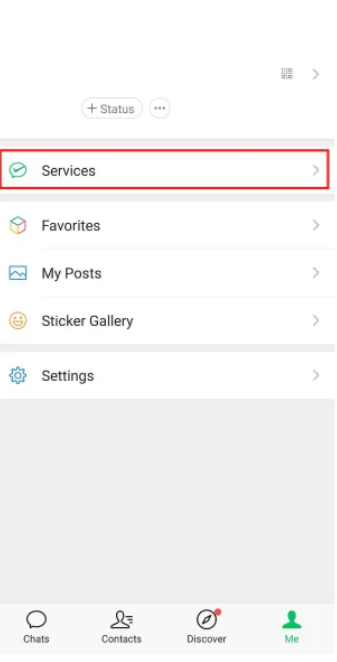
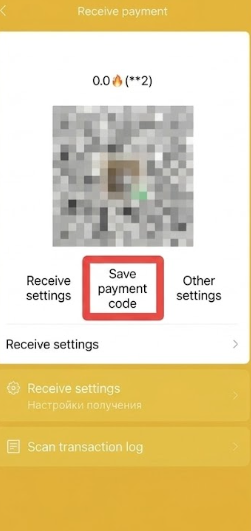
- In WeChat, go to your payment section, select Receive Money, and save your unique receiving QR code to your phone's photo gallery.
- Open Nihao China, tap Scan, and select the saved QR code from your gallery.
- Input the amount (subject to a daily limit of roughly 500 CNY) to transfer funds directly into your WeChat ecosystem.
How to Use Nihao China to Pay for Metros and Buses
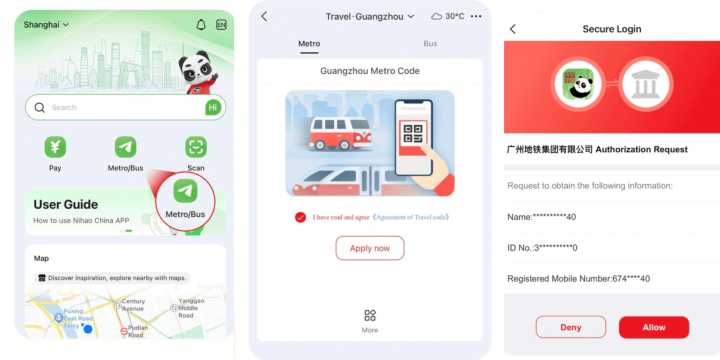
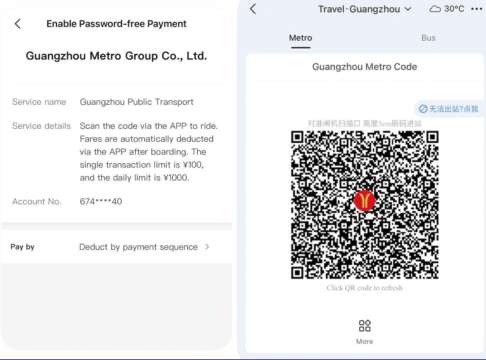
One of the most powerful features of Nihao China is its comprehensive, built-in transit network, eliminating the need to buy local physical transit cards.
- Subway/Metro: Supported across 43 major metropolitan areas (including Beijing, Shanghai, Guangzhou, Shenzhen, and Xi'an).
- Buses: Accepted on local buses in over 1,760 cities and counties.
- How to Use: Select your current city in the Transport section of the app to generate a specialized transit QR code. Swipe this code at the metro turnstile or bus scanner when boarding and exiting.
More Features about Nihao China: Translation, Maps, and Tax Refunds
Nihao China includes several auxiliary tools to assist you during your trip:
- Real-Time Currency Converter: Supports over 160 currencies for quick price evaluations.
- Voice Translation: Built-in English-to-Chinese voice translation tool.
- Tax-Free Refund Integration: Facilitates instant tourist tax refunds (VAT refunds) at departure points in major cities like Beijing, Shanghai, and Sanya for qualifying purchases over 200 CNY.
- Mini-App Portals: Provides direct links to book services via major Chinese platforms like China Railway (12306) and lifestyle applications.
Nihao China vs. Alipay vs. WeChat Pay
To maximize your payment success rate, it is best to understand how Nihao China compares to the dominant local giants.
Feature | Nihao China | Alipay (International Version) | WeChat Pay (International Version) |
Primary Strength | Unified public transport & UnionPay network integration | Unmatched native ecosystem & Didi Taxi hailing | Seamless social integration & vendor mini-apps |
Transaction Fees | 0% service fee on general payments | 3% fee on transactions over 200 CNY | 3% fee on transactions over 200 CNY |
Setup Friction | Low (Optimized for foreigners) | Moderate (Requires card verification) | Moderate (Requires passport hold) |
What the Nihao China App Cannot Do? Known Limitations
While highly convenient, Nihao China does have gaps you must plan around:
- Ride-Hailing Restrictions: You cannot directly hail or pay for a DiDi taxi inside the app; you will need to use Alipay or WeChat Pay for automated ride-hailing services.
- Language Gaps: While the main interface is in English, deeper pages (such as specific Bank of Shanghai wallet menus) occasionally revert to Chinese or display broken translations.
- Backup Strategy: Always maintain a three-tiered payment strategy:
- Nihao China / Alipay on your smartphone for 90% of daily expenses and metros.
- A physical UnionPay credit/debit card for hotel deposits and ATM cash withdrawals.
- Around 500–1000 CNY in physical cash for rural areas or unexpected technical glitches.
[10% Off] Best China Hotel Recommendations
Top Shanghai Hotels
Top Beijing Hotels
Top Guangzhou Hotels
See All Hotels























FAQs about Nihao China App
-
Can I use the Nihao China app without a Chinese phone number?
-
Does the Nihao China app charge a transaction fee?
-
Will Nihao China work on public transportation across different cities?
-
Can I link my standard Visa or Mastercard to Nihao China?
-
What happens to the leftover money in my Tour Wallet when my trip ends?
-
Can I use Nihao China to pay for ride-hailing apps like DiDi?
Disclaimer: This article has been provided by an individual contributor or third party platform. If there is any discrepancy regarding the copyright, please contact us directly and we will delete the content immediately.
Popular Searches
-
Air Travel Guide
-
Latest Flight Deals
-
Popular Flight & Hotel Packages
-
Getting Around
-
eSIM/SIM card
- Cancun Vacation Packages
- Medellin Vacation Packages
- Hong Kong Vacation Packages
- Koh Samui Flight and Hotel
- Hong Kong Flight and Hotel
- Barcelona Vacation Packages
- Cuenca Vacation Packages
- Osaka Flight and Hotel
- Phu Quoc Island Vacation Packages
- Mexico City Vacation Packages
- Tokyo Flight and Hotel
- Presque Isle Vacation Packages
- Alicante Vacation Packages
- Genoa Vacation Packages
- Reno Vacation Packages
- Guangzhou Airport Transit
- Nankai Electric Railway
- Beijing Capital International Airport
- Guilin Airport
- Hotels near LAX with Shuttle
- How to Get to the Canton Fair
- Shenzhen Airport
- Xiamen Airport
- Kyoto Airport
- Ningbo Airport
- Chongqing Airport to City
- Ningbo Metro
- Wakayama Transportation
- Wuxi Metro
- Macau to Hong Kong
- Narita Airport to Shinjuku
- Kyoto Station