How to Check and Get Trip.com Booking Confirmation?


Learn what a Trip.com booking confirmation is with a sample, how to get it, check issuance status & the difference between confirmation and e-receipt.
to Bangkok
to Manila
to Shanghai
to Tokyo
to Seoul
See all flights


What Is a Trip.com Booking Confirmation
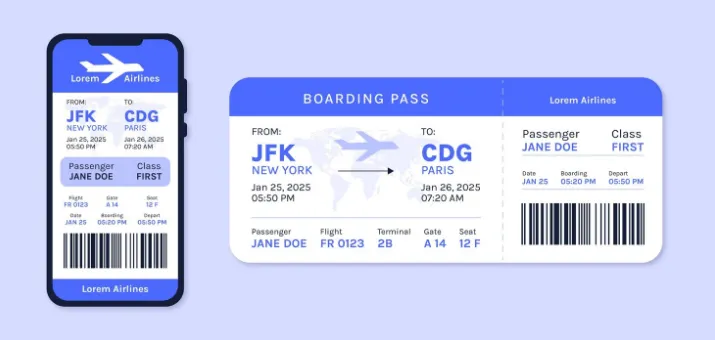
Source from Freepic
A Trip.com booking confirmation is the official digital record that indicates your travel reservation (flight, hotel, etc.) has been received and is being processed or confirmed. It’s not a physical document—you’ll get it as an email, or view it in the Trip.com app/website.
You may need this confirmation for various parts of your trip:
- To confirm your reservation status (so you don’t show up to an unbooked flight/hotel)
- To check in at the airport (you’ll need the booking reference number or e-ticket number from it)
- To modify or cancel your booking later
- To reference key details (like flight times, baggage rules, or hotel check-in hours)
Sample of Trip.com Booking Confirmation (e-Ticket)
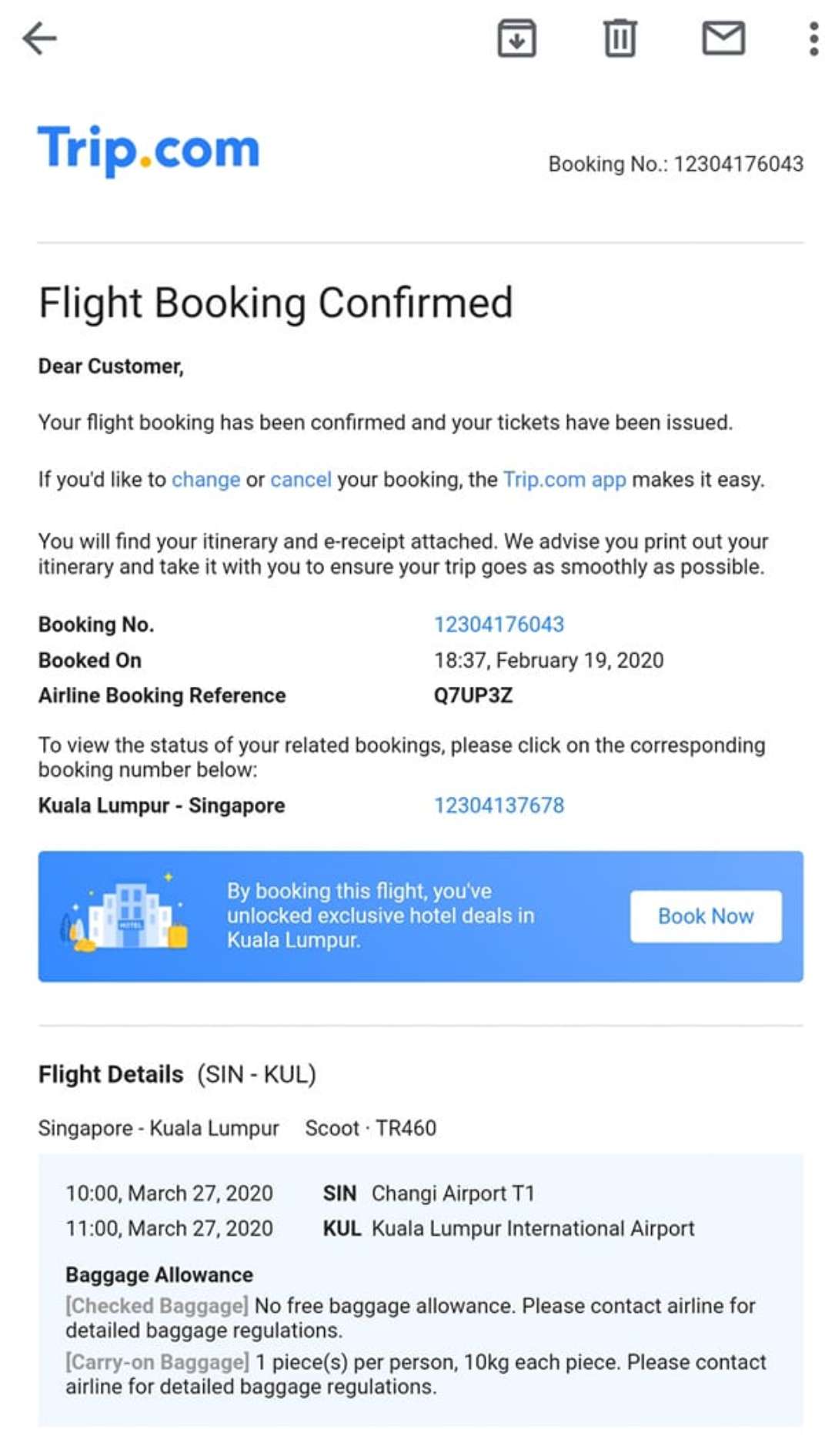
This is my sample confirmation (Trip.com e-Ticket), and these are the must-check details:
- Booking Number: A unique code to reference your reservation.
- Airline Booking Reference (PNR): A code (e.g., Q7UP3Z) to check your booking directly with the airline.
- Travel Itinerary: For flights—route, flight number (TR460), departure/arrival times (10:00 to 11:00), and airport terminals.
- Baggage Allowance: Rules like "no free checked baggage, up to 2 pieces of cabin baggage with combined weight of 10kg per person" (example only; actual allowance depends on airline and fare type).
- Booking Timestamp: The date/time you made the booking (e.g., 18:37, February 19, 2020).
⚠️ Important: The sample details above are for illustration purposes only. Actual flight numbers, routes, and baggage policies are subject to change by airlines. Please always refer to your specific booking confirmation and the airline's official website for the most current information.
How to Get Your Trip.com Booking Confirmation
Below are the general steps to find your confirmation, based on Trip.com’s typical processes:
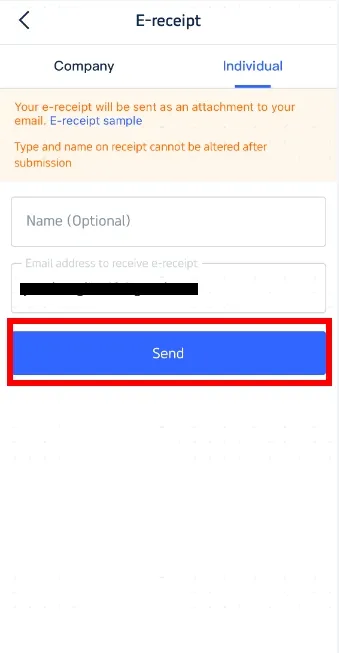
Get Trip.com Booking Confirmation via Email
After your payment is successfully processed, Trip.com will typically send a booking confirmation email to the email address you used for registration/booking. Delivery time may vary; in most cases, you should receive it shortly after payment, but some bookings may require additional processing time.
The email contains the reservation details, and an e-receipt may be attached (format may vary). You can save the email or download the attachment for later use.
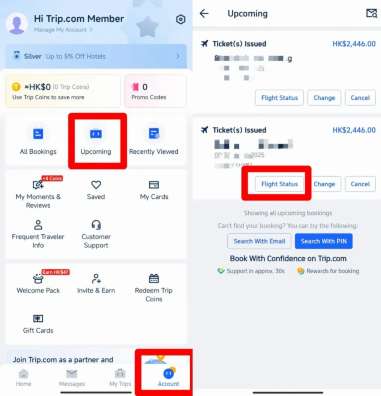
Get Trip.com Booking Confirmation via Trip.com App
- Open the Trip.com app on your phone.
- Log in using the same account you used to make the booking.
- On the app’s home screen, navigate to your trip list (typically located in the bottom menu bar; exact tab name and position may vary by app version and region).
- Scroll through the list of trips to find the booking you want to check.
- Tap on that booking entry—this will open the full details page, where your complete booking confirmation (including reference numbers and itinerary) is displayed.
- To save the confirmation, look for a download or save option on the details page (options may vary by booking type and app version).
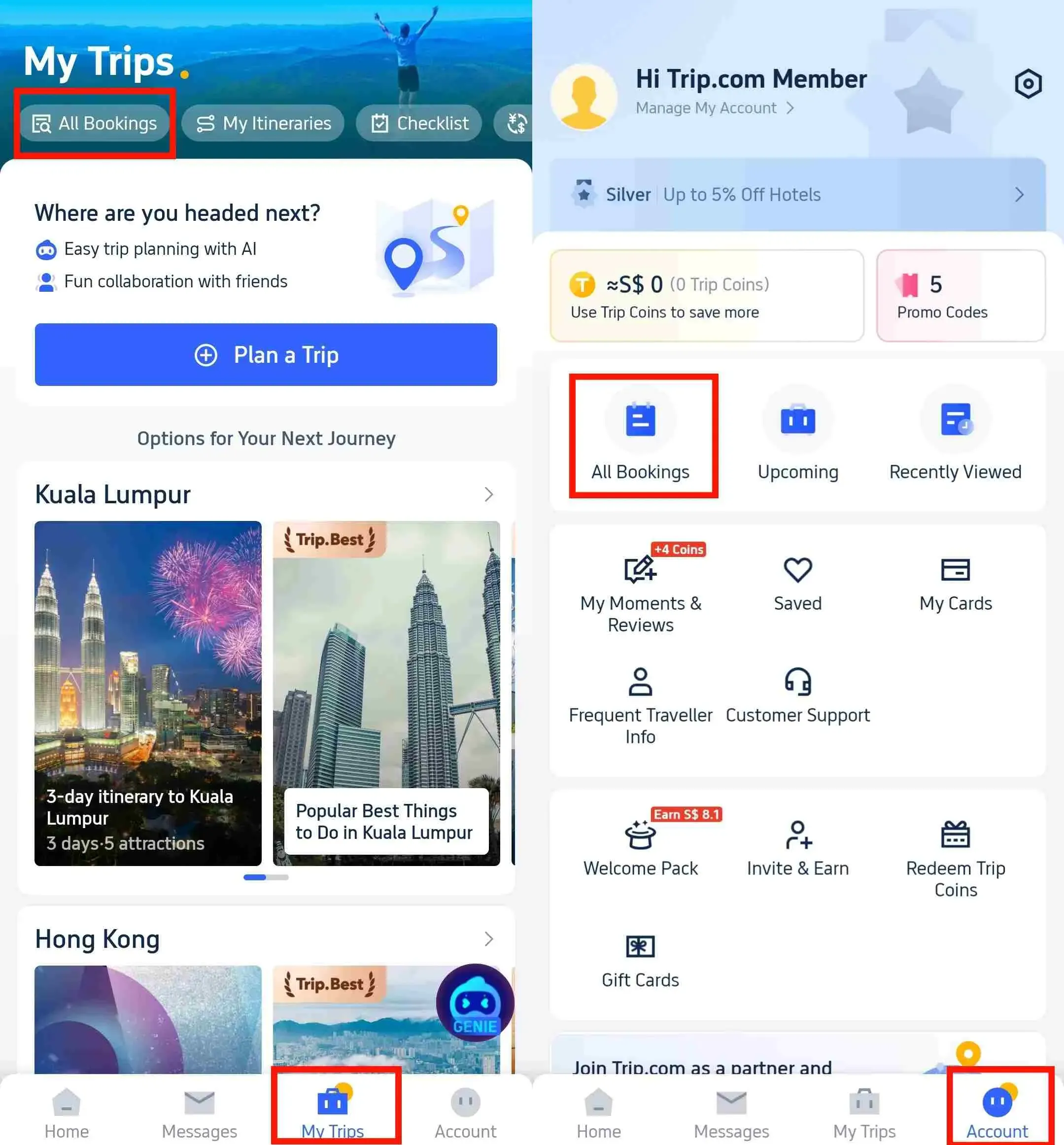
Get Trip.com Booking Confirmation via Trip.com Website
- Go to the Trip.com official website.
- Log in to your Trip.com account.
- Navigate to your bookings section (typically accessible under your account name or profile menu; exact location may vary by website version).
- From the list of bookings, select the one you need to view.
- On the booking details page, you’ll see the full confirmation info. Look for an e-receipt or download option to save a copy to your computer.
See all attractions
 2019 booked






How Long to Receive Trip.com Booking Confirmation & Ticket Issuance

- Booking Confirmation: Generally sent shortly after your payment is successfully processed on Trip.com—you will typically receive the email notification soon after, and the information will be synced to your Trip.com account (APP/website). Some bookings may show a "Processing" status temporarily before full confirmation is issued.
- Flight Ticket Issuance: For flight bookings made between 06:00 and 23:25 (GMT+8), Trip.com will typically send a ticket issuance notification email with the e-ticket number and PNR within 15 minutes; the ticket status will also be updated in your account. This timeframe is an estimate and may vary based on booking conditions, airline response time, and other factors. Some bookings may take longer to process.
- For bookings made outside of 06:00–23:25 (GMT+8), ticket issuance may take longer and will generally be processed on the next business day.
What to Do If You Can’t Find Your Trip.com Booking Confirmation
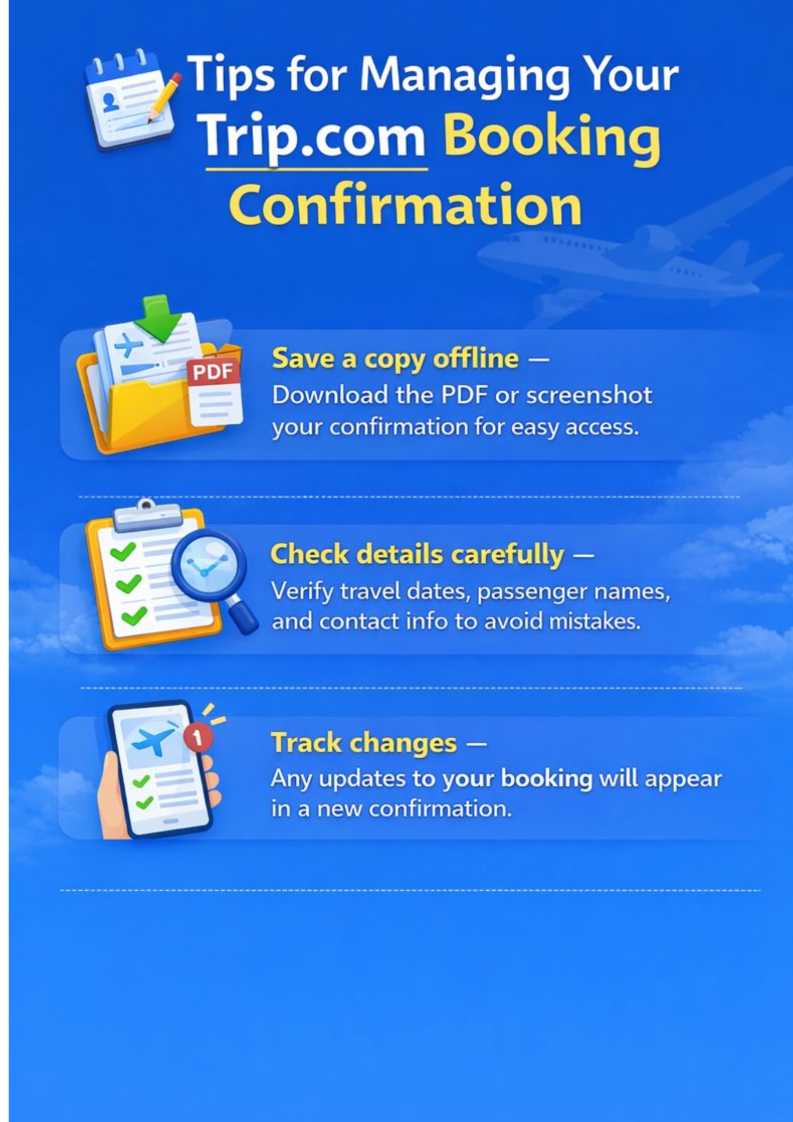
If you don’t see your confirmation after booking:
- Double-check the email address: Make sure you logged in with the same email used to book (sometimes users accidentally use a different account).
- Check spam/junk folder: Confirmation emails may sometimes be filtered into spam or junk folders.
- Allow processing time: Some bookings may require additional processing time before confirmation is issued.
- Resend the confirmation: In the Trip.com app, go to your bookings section, select the reservation, and look for a resend option (if available) to send the email again.
Car Rentals
Car Rental Promo Code - 8% Off
New User Enjoy up to 8% Off
TRIPCAR8
Trip.com Booking Confirmation vs. E-Ticket vs. E-Receipt (Key Differences)
You’ll need the confirmation to reference trip details, the e-ticket (flights/trains) to check in, and the e-receipt only if you need to prove payment (e.g., for reimbursement).
Document Type | Core Purpose | Key Info Included | Primary Use Case |
|---|---|---|---|
Trip.com Booking Confirmation | Indicates your reservation status | Booking number, itinerary, baggage rules, booking timestamp | Verify trip details; manage bookings |
Trip.com E-Ticket (Flights/Trains) | Serves as transport booking confirmation | PNR (airline/rail reference), flight/train number, passenger name | Check in for flights/trains |
Trip.com E-Receipt | Prove you paid for the reservation | Total cost, fee breakdown, payment method, transaction ID | Track expenses; request reimbursements |
Disclaimer: All timelines and descriptions above are general guidelines. Actual issuance time, content, and format may vary based on booking type, airline policies, and other factors. Please refer to your Trip.com account for the most accurate and up-to-date information.
[Discount] Global Hotel Recommendations
Find Best Global Hotels
See All Hotels







FAQs about Trip.com Booking Confirmation
-
How do I check my Trip.com confirmation?
-
What is a booking confirmation?
-
Is my e-ticket automatically confirmed?
-
How to make a booking confirmation?
-
Is a Trip.com booking confirmation the same as a receipt?
-
Can I print my Trip.com booking confirmation?
Disclaimer: This article has been provided by an individual contributor or third party platform. If there is any discrepancy regarding the copyright, please contact us directly and we will delete the content immediately.
Find Cheap Travel Deals & Explore Destinations on Trip.com
-
Air Travel Guide
-
Latest Flight Deals
-
Popular Flight & Hotel Packages
-
Getting Around
-
eSIM/SIM card
- Medellin Vacation Packages
- Hong Kong Vacation Packages
- Tokyo Flight and Hotel
- Hong Kong Flight and Hotel
- Langkawi Flight and Hotel
- Punta Cana Vacation Packages
- Dubai Flight and Hotel
- Cotonou Vacation Packages
- Bucaramanga Vacation Packages
- Aktau Vacation Packages
- Seoul Flight and Hotel
- Zacatecas Vacation Packages
- Budapest Vacation Packages
- Istanbul Flight and Hotel
- La Crosse Vacation Packages
- ETC Card Japan
- Haneda Airport Limousine Bus
- Ho Chi Minh Airport
- Shanghai Pudong Airport Transit
- Hong Kong Airport to Guangzhou
- Nankai Electric Railway
- Guangzhou Airport Transit
- Shinkansen Tokyo to Kyoto and Osaka
- Hong Kong Airport to Shenzhen
- Shanghai Airport Transfers
- Wenzhou Metro
- Suzhou Metro Map
- How to Get Around Shanghai
- Zhangjiajie Airport to City
- Macau to Hong Kong
- Narita Airport to Shinjuku
- Shanghai Pudong Airport