Trip.com Gift Card - Best Last-Minute Gift for Travel


Trip.com gift card is a perfect last minute virtual gift – see how to buy/use Trip.com gift card, limits & if it’s worth it! 🎁
to Bangkok
to Manila
to Shanghai
to Tokyo
to Seoul
See all flights


What Is a Trip.com Gift Card?

A Trip.com Gift Card is a virtual prepaid card issued by Trip Air Ticketing (UK) Limited, a subsidiary of Trip.com Group. It holds a preloaded value that can be used to book travel products and services (flights, hotels, car rentals, activities, etc.) on the Trip.com website or app.
Unlike physical gift cards, it’s 100% digital, I think it's perfect for last-minute gifting or sending to friends/family worldwide.
How to Gift and Use a Trip.com Gift Card
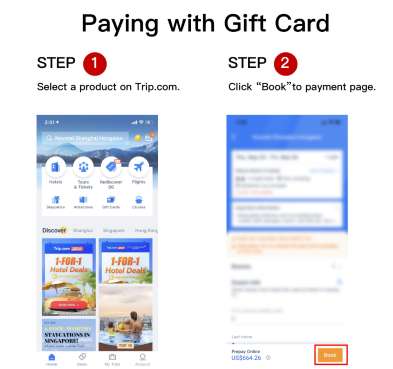
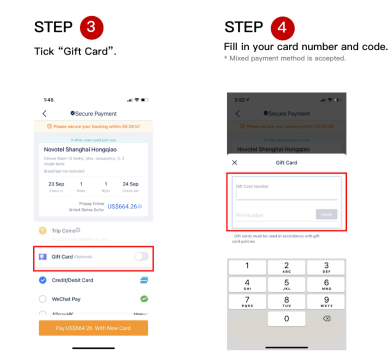
- Book Travel: On Trip.com, select your desired travel product (flight, hotel, etc.) and proceed to checkout.
- Apply Gift Card: On the payment page, enter your gift card number and PIN, then click “Apply” to deduct the balance.
- Combine Payments: If the card balance is less than the booking cost, use another payment method (credit card, PayPal, etc.) for the remaining amount.
- Link to Your Account (Optional):
- Go to “My Gift Cards” > “Search/Link Gift Card”.
- Enter your gift card number and PIN (you’ll need to set a Security PIN first).
- Note: Once linked, you cannot unlink the card from your account.
How to Buy a Trip.com Gift Card
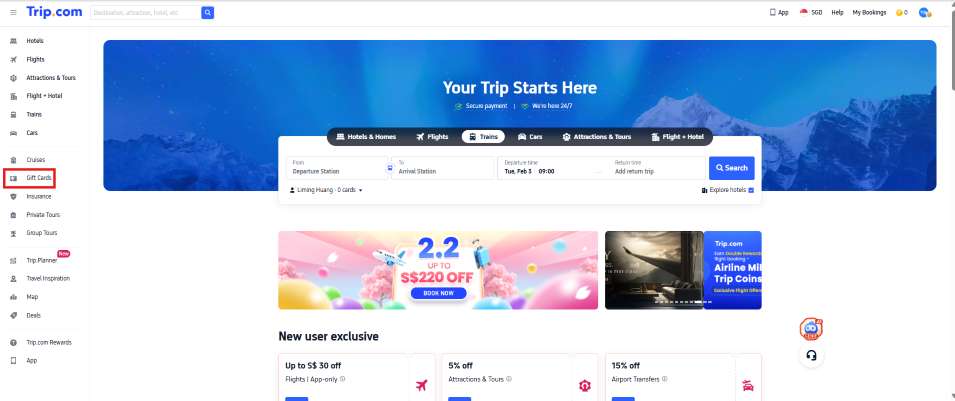
- Visit the Gift Card Page: Go to Trip.com’s official gift card section.
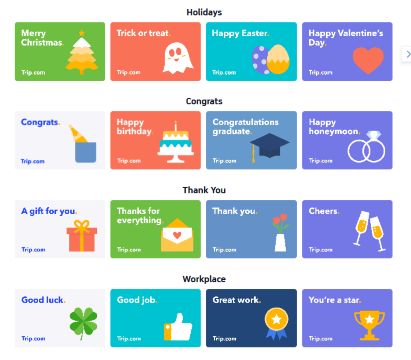
- Select a Design: Choose from occasion-based styles like:
- Workplace: “Good luck”, “Good job”, “Great work”
- Thank You: “A gift for you”, “Thanks for everything”
- Congrats: “Happy birthday”, “Congratulations graduate”, “Happy honeymoon”
- Holidays: “Merry Christmas”, “Trick or treat”, “Happy Easter”
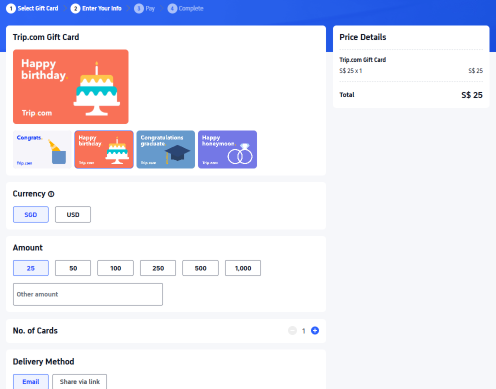
- Choose Currency and Amount: Pick currency based on your locale (Gift cards are available in USD, AUD, SGD, GBP, HKD, JPY, or THB. This amount can be converted and paid for using other currencies). Select a fixed denomination ($25, $50, $100, $250, $500, $1,000) or enter a custom amount (up to $4,000 per card).
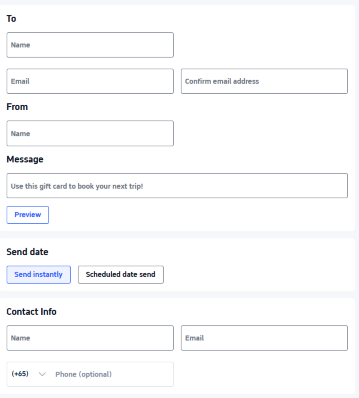
- Delivery Details: Add the recipient’s name, email, and a personalized message. Choose to send instantly or schedule delivery for a specific date (e.g., a birthday).
- Complete Payment: Pay with any currency (exchange rates are shown at checkout). You’ll receive an electronic receipt, and the gift card is emailed to the recipient. Note: Daily purchase limit per user is $10,000 USD.
What's the Difference between Trip.com Gift Card Currencies
- Trip.com Gift card currencies: The currencies in which gift cards are available in your locale.
- Trip.com Payment currencies: Gift cards can be purchased using any currency. To switch currencies, select the option in the top right corner of the information entry page.
- Trip.com Usage currencies: Gift cards can be used across all locales on Trip.com. Amounts will be automatically converted based on the current exchange rate.
How Does a Trip.com Gift Card Work?
- Prepaid Value: You load it with a fixed or custom amount (in currencies like USD, AUD, GBP, etc.) at purchase.
- Digital Delivery: The card (with a unique number and PIN) is sent via email instantly or on a scheduled date (e.g., Feb 5, 2026).
- Flexible Use: The balance can cover multiple bookings, and you can combine it with other payment methods if the card balance is insufficient for a purchase.
Is a Trip.com Gift Card Worth It?
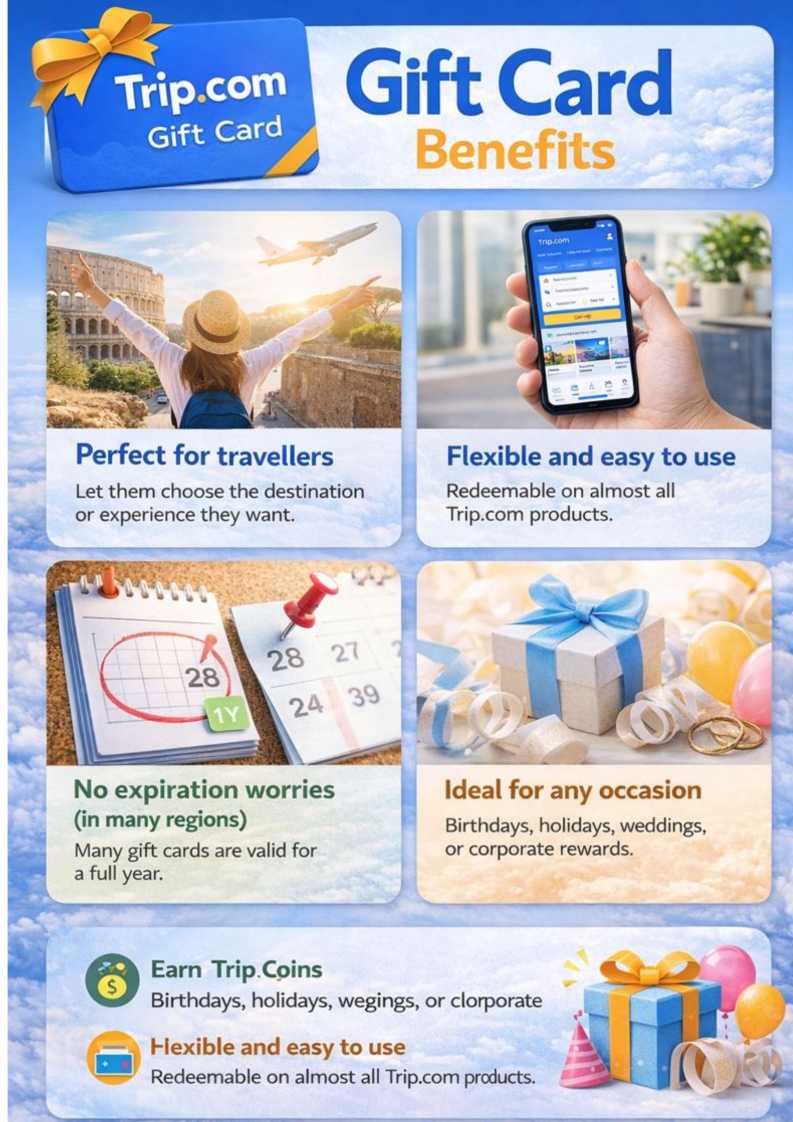
✅ Pros
- Flexible Gifting: Perfect for travelers, as it lets them choose their own adventure.
- Global Use: Works with Trip.com’s extensive travel inventory worldwide.
- No Fees: No extra costs for holding or using the card.
- Earn Rewards: Get Trip Coins when you buy a gift card (redeemable for future discounts).
❌ Cons
- Non-Refundable: Except for residents of the UK, EU, or Turkey (who can get a refund within 14 days of purchase).
- Exchange Rate Risks: If you use a card in a different currency than it was purchased in, exchange rate fluctuations may affect the value.
- Account Linking Limitation: Once linked to your account, you can’t unlink the card.
Verdict
It’s highly recommended for anyone who loves to travel or wants to give a meaningful, flexible gift. It’s especially useful for last-minute presents or when you’re unsure of someone’s travel plans.
See all attractions
 2622 booked






How to Check Your Trip.com Gift Card Balance
- Via the Website: Go to the Trip.com Gift Card homepage > “My Balance”.
- Enter Details: Input your gift card number and PIN to view your current balance.
- Linked Accounts: If your card is linked to your Trip.com account, check the “My Gift Cards” section for real-time balance updates.
Trip.com Gift Card - Limits, Refund & Policies
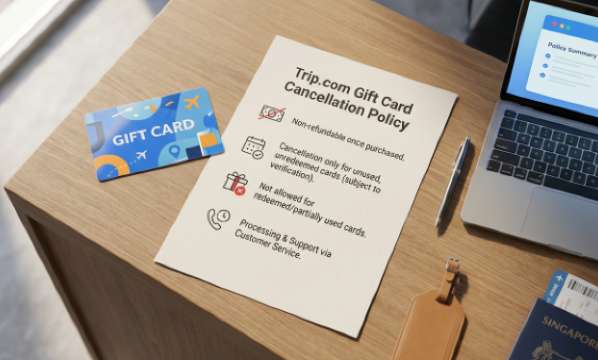
- Non-refundable (except UK/EU/Turkey residents: 14-day refund for unused cards)
- Refunds for Bookings: Refund to the gift card (original payment method for the extra amount if you combined payments); multiple gift cards → refund to the one with the longest validity
- No Trip Coins on bookings paid with gift cards (only earn coins when buying the card)
- Currency conversion gains/losses: Borne by the card holder/purchaser
- Usage Rules: Cannot be used for commercial purposes, to buy other gift cards, or to withdraw cash.
- Liability: Trip.com is not responsible for lost/stolen cards, exchange rate changes, or user errors (e.g., incorrect email addresses).
See full terms and conditions of Trip.com Gift Card.
[10% Off] Trip.com Hotel Promo Codes
Search Top Global Hotels
See All Hotels







FAQs about Trip.com Gift Card
-
Where Can You Use a Trip.com Gift Card?
-
What's the difference between Trip.com gift card currencies, payment currencies, and usage currencies?
-
How do I link a Trip.com Gift Card to my account?
-
How long are gift cards valid for?
-
Can I refund a gift card after purchase?
-
Are there any limits when making bookings with Trip.com Gift Card?
-
What are Trip.com gift cards?
-
What happens if my booking is cancelled?
Disclaimer: This article has been provided by an individual contributor or third party platform. If there is any discrepancy regarding the copyright, please contact us directly and we will delete the content immediately.
Find Cheap Travel Deals & Explore Destinations on Trip.com
-
Air Travel Guide
-
Latest Flight Deals
-
Popular Flight & Hotel Packages
-
Getting Around
-
eSIM/SIM card
- Cancun Vacation Packages
- Medellin Vacation Packages
- Tokyo Flight and Hotel
- Koh Samui Flight and Hotel
- Osaka Flight and Hotel
- Tokyo Vacation Packages
- Rotterdam Vacation Packages
- Buffalo Vacation Packages
- Saint Petersburg Vacation Packages
- Subic Bay Vacation Packages
- Bath Vacation Packages
- Hanoi Vacation Packages
- Siem Reap Vacation Packages
- Page Vacation Packages
- Ibiza Vacation Packages
- Narita Airport Limousine Bus
- Shinkansen Tokyo to Kyoto and Osaka
- Japan Taxi App
- Hangzhou Metro Map
- JR pass airport transfer
- KL MRT Map
- Japan Transport App
- Kyoto Station
- Wuxi Metro
- Osaka Metro
- Narita Airport Lounge
- Xian Metro Map
- LAX to Downtown
- Xiamen Metro
- Narita Airport to Shinjuku
- Macau to Hong Kong
- Shenzhen Metro Map