How to Get Trip.com Refund? Flight, Hotel Cancellation Policy


to Bangkok
to Manila
to Shanghai
to Tokyo
to Seoul
See all flights


✈️ Trip.com Flight Refund Policy & Cancellation Steps
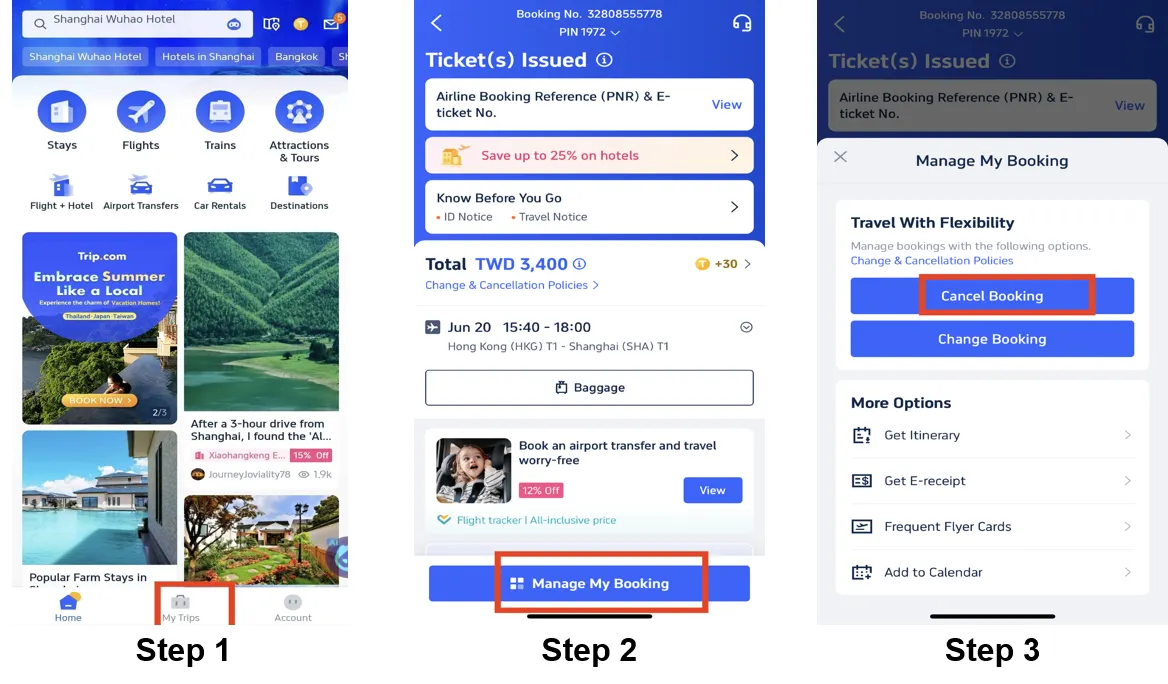
Trip.com’s flight refund rules depend on ticket type, airline policies, and when you cancel. All refund outcomes are ultimately governed by the operating airline’s fare terms, subject to updates without prior notice. Here’s what matters most:
Trip.com Flight Refund Rules
- Refundable Tickets: You can get partial or full refunds, but airlines or Trip.com may deduct cancellation fees or service charges. Exact amounts vary by airline, fare type, and days before departure.
- Non-Refundable Tickets: The ticket fare itself isn’t refundable, but taxes, airport fees, or service charges may be eligible for partial reimbursement, and this is not guaranteed across all airlines or routes.
- Discounted/Promo Fares: Strict no-refund rules for the fare. In some cases, limited amounts (e.g., airport taxes) may be refunded—flexibility is very limited.
- 24-Hour Cancellation: Some airlines may let you cancel for free within 24 hours of booking (must check airline fare conditions to confirm).
How to Cancel a Flight for Refund (Cancellation Process)
- Log in to your Trip.com account via the app or website.
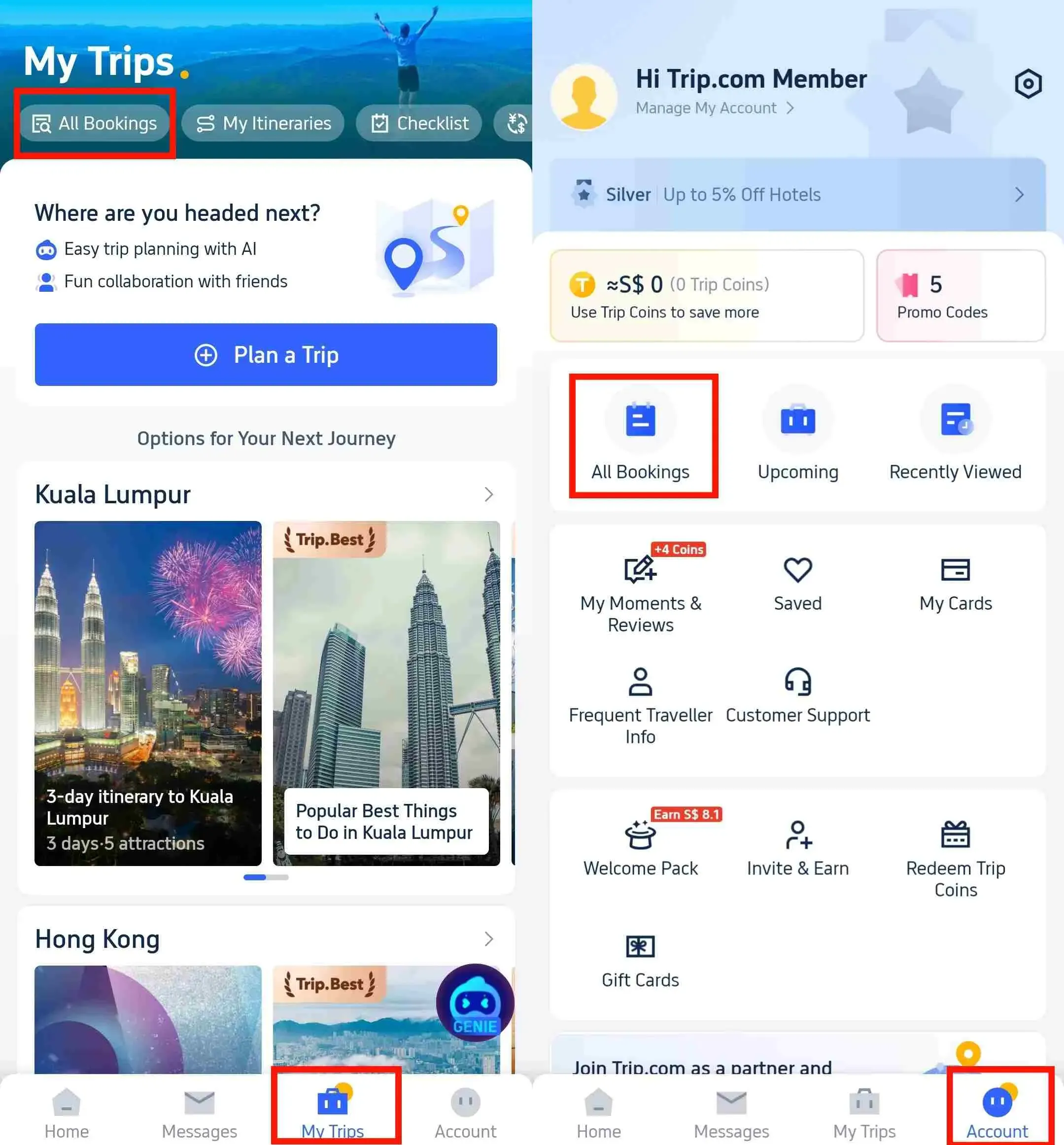
- Go to My Trips → All Bookings or Account → All Bookings.
- Find your flight booking, click Manage My Booking, then select Cancel Booking.
- Review the refund details (including deductions like cancellation fees) and click Next.
- Provide a cancellation reason (if asked) and tap Submit to confirm.
Flight Refund Processing Time
- Credit/Debit Card: 7–15 business days
- PayPal/E-Wallets: 3–7 business days
- Bank Transfer: Up to 30 business days
Note: Delays may happen due to airline processing—contact customer service if refunds are late.
👍 Trip.com Flight Flexible Add-on: Air Flexibility
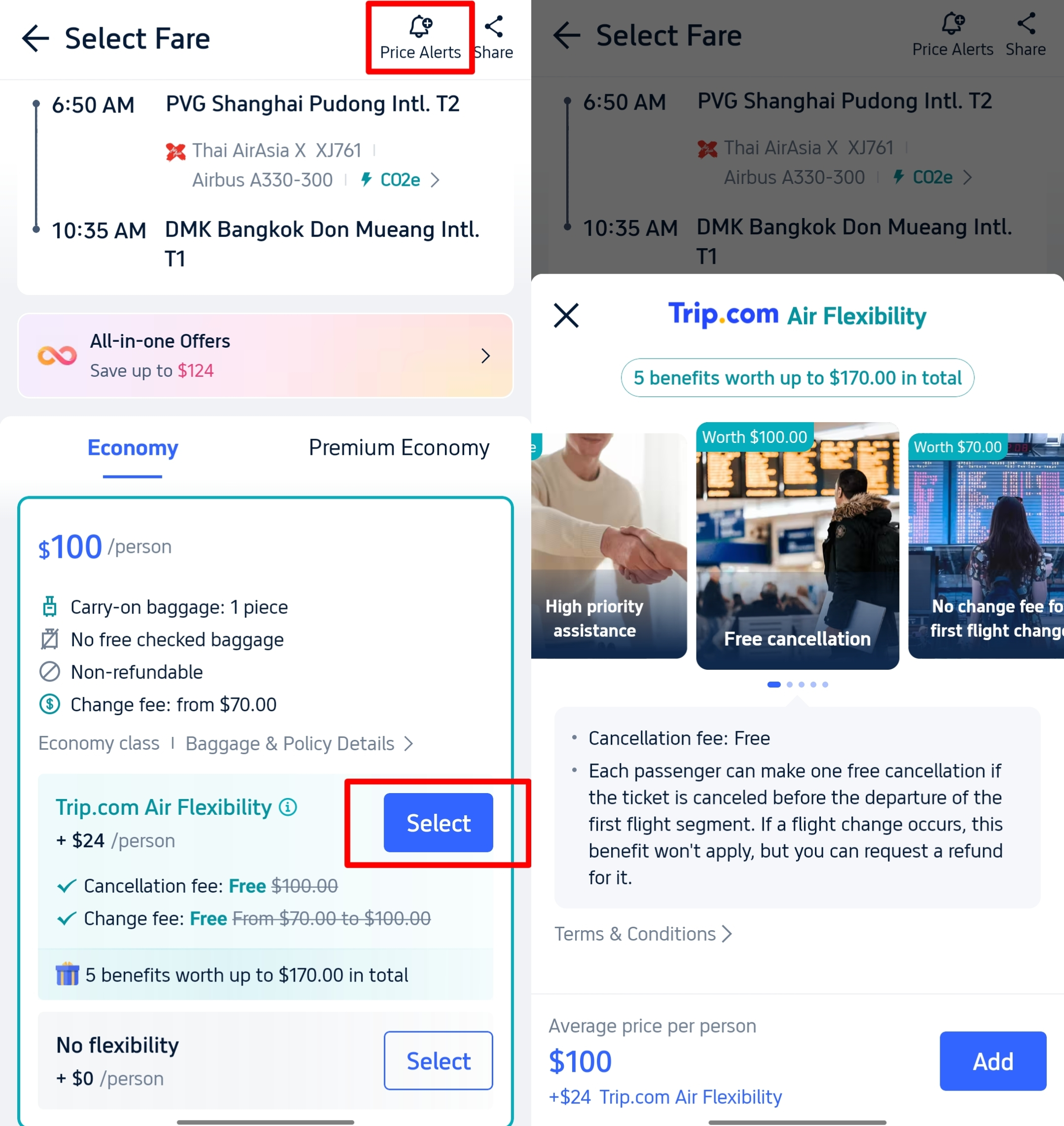
For uncertain plans, Air Flexibility is a third-party partner add-on available for select flights, not an exclusive Trip.com service. It helps with refunds: it may waive/reduce cancellation fees, allow date changes without heavy penalties, or guarantee a higher refund percentage. All program terms, compensation eligibility and fee standards are subject to change; reach out directly to the Air Flex provider for full claim rules.
🏨 Trip.com Hotel Refund Policy & Cancellation Steps
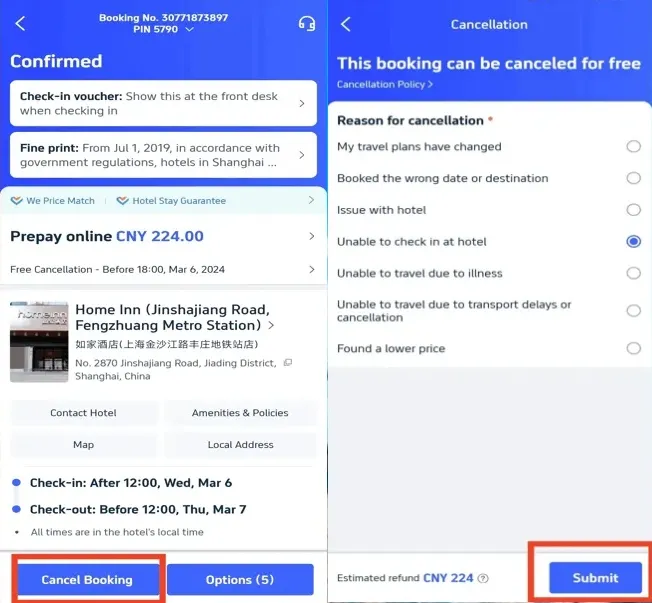
Hotel refund terms focus on cancellation deadlines and room type. The "Free Cancellation" tag makes it easy to find flexible options:
Trip.com Hotel Refund Rules
- Free Cancellation Hotels: Marked with a Free Cancellation tag on Trip.com. Most require cancellation 24–48 hours before check-in (some offer 1–2 days’ grace) for a full refund. Some allow free cancellation within 24 hours of check-in (check the hotel’s listing).
- Non-Refundable Rooms: Cheaper rates with no cancellation or refund options—you lose the full payment if you can’t stay.
- No-Show Policy: If you don’t check in and don’t cancel in advance, you’ll be charged for the full stay with no refund.
How to Cancel a Hotel for Refund (Cancellation Process)
- Log in to your Trip.com account (app/website).
- Navigate to My Trips → All Bookings to find your hotel reservation.
- Select the booking and click Cancel Booking.
- Choose a cancellation reason (e.g., changed plans, illness, wrong date) from the list.
- Tap Submit to confirm cancellation.
- Optional: Click View Cancellation Policy to verify refund details (full/partial amount).
Hotel Refund Processing Time
Refunds go to your original payment method within 1-3 working day; final fund arrival times for credit cards and bank transfers vary widely and can take an additional 1–7 or more business days, subject to payment provider processing schedules.
[Discount] Global Hotel Recommendations
Find Best Global Hotels
See All Hotels
 NO.1
NO.1






🚄 Trip.com Train Refund Policy & Cancellation Steps
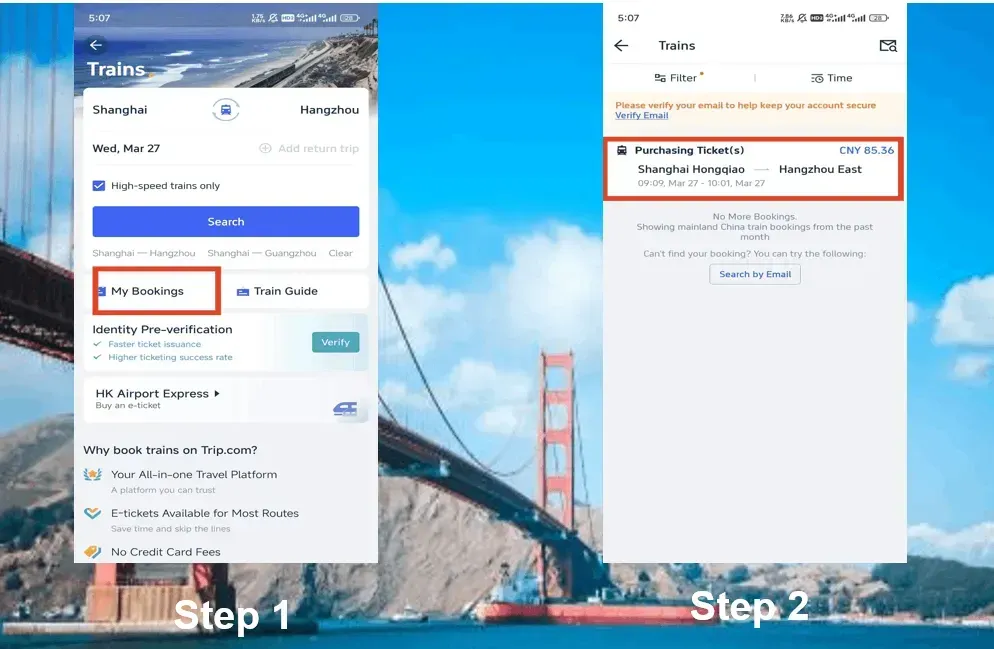
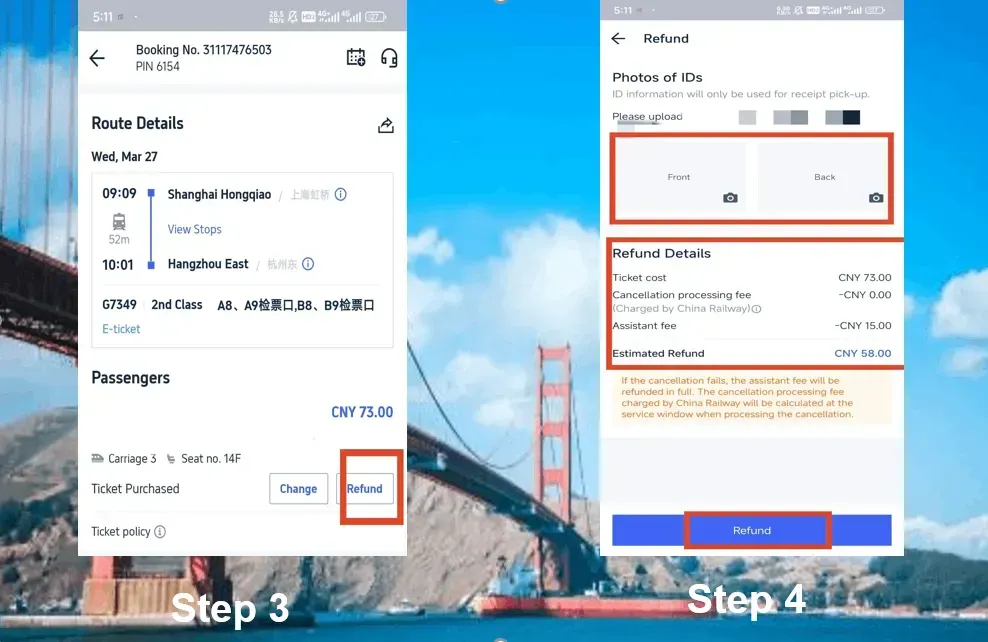
Train refund rules vary by railway provider (e.g., China High-Speed Rail, international trains) and ticket type. All refund deductions and eligibility follow official railway operator rules, which may adjust periodically. Here’s the essential info:
Trip.com Train Refund Rules
- China Trains: Free cancellation is allowed a certain number of days before departure (varies by railway). Cancellations closer to departure have fees; the 10% ticket surcharge for cancellations 24–48 hours pre-departure is only one tier of official fee standards, with additional rates applying for other time windows.
- International Trains: Policies depend on the operating railway—some allow free changes/cancellations, others charge fees or ban modifications.
- Refundable Components: Eligible cancellations get the full ticket price (minus fees) refunded; taxes/fees are usually fully refunded. Booking service fees for train tickets are generally non-refundable.
How to Cancel a Train Ticket for Refund (Cancellation Process)
- Log in to your Trip.com account and go to the Train section.
- Click My Bookings to find your train reservation.
- Select the booking and click Refund.
- Provide required ID verification (front/back of your ID card for domestic trains).
- Review refund details (e.g., deducted fees) and confirm by clicking Refund again.
Train Refund Processing Time
Refunds are processed within 7–15 working days:
- Credit Cards: 7–14 business days
- E-Wallets/Bank Transfers: 3–7 business days
- Note: A small assistance fee may be deducted for train refunds (varies by railway provider).
Can I Get a 100% Refund while Canceling Trip.com Ticket (flight/hotel/train)?

- Flights: Only with refundable tickets.
- Hotels: Yes—if you book a "Free Cancellation" room and cancel by the stated deadline (24–48 hours before check-in).
- Trains: Yes—if canceled within the railway’s free cancellation window (varies by provider).
How Long Does a Trip.com Refund Take?

- Flights: 3–7 days (PayPal/e-wallets), 7–15 days (credit/debit cards), up to 30 days (bank transfers).
- Hotels: about 1 working day (e-wallets/WeChat Pay/Alipay); +1–3 days for credit cards/bank transfers; final receipt may take an extra 1–7 days for credit cards and bank transfers.
- Trains: 3–7 days (e-wallets/bank transfers), 7–14 days (credit cards) — total processing up to 15 working days.
Delays may occur due to airline/railway/hotel processing or payment provider timelines.
See all attractions







How to Check Trip.com Refund Status
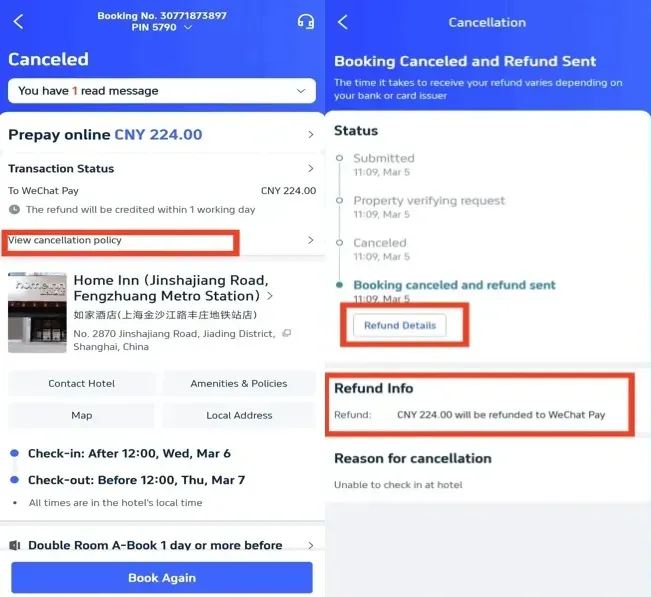
To track your refund progress:
- Log in to your Trip.com account (app/website).
- Go to My Trips → All Bookings.
- Find the canceled booking (flight, hotel, or train) and View Refund Status.
- You’ll see updates like:
- "Submitted": Refund request received.
- "Processing": Trip.com/railway/hotel is verifying the request.
- "Refund Sent": Funds credited to your payment method.
- "Completed": Refund fully processed.
If the status stays "Processing" longer than the stated time, contact Trip.com customer service.
Car Rentals
Car Rental Promo Code - 8% Off
New User Enjoy up to 8% Off
TRIPCAR8
How Do I Contact Trip.com for Refund Issues?

Use these channels to contact Trip.com:
- Live Chat (Trip.com app: 24/7 support).
- Country-specific 24/7 hotline (listed in the app’s "Customer Service" section).
FAQs about Trip.com Refund Policy
-
Can I cancel a trip and get a refund on Trip.com?
-
Does Trip.com have a cancellation policy?
-
Can I get a refund if I cancel my flight on Trip.com?
-
How do I get a 100% refund on a flight cancellation?
Disclaimer: This article has been provided by an individual contributor or third party platform. If there is any discrepancy regarding the copyright, please contact us directly and we will delete the content immediately.
Trending Searches
-
Air Travel Guide
-
Latest Flight Deals
-
Popular Flight & Hotel Packages
-
Getting Around
-
eSIM/SIM card
- Medellin Vacation Packages
- Hong Kong Vacation Packages
- Tokyo Flight and Hotel
- Koh Samui Flight and Hotel
- Hong Kong Flight and Hotel
- Tokyo Vacation Packages
- Punta Cana Vacation Packages
- Rzeszow Vacation Packages
- Taipei Vacation Packages
- Oaxaca Vacation Packages
- Sanya Flight and Hotel
- Murcia Vacation Packages
- Beijing Vacation Packages
- Istanbul Vacation Packages
- Tripoli Vacation Packages
- Wuhan Airport
- Tokyo Metro
- JR West
- Hangzhou Metro
- Nankai Electric Railway
- Beijing Metro Map
- Yiwu Airport
- Macau Taxi
- Chongqing Airport
- Macau to Zhuhai
- How to get to Great Wall of China
- Shenzhen Metro Map
- Ningbo Airport
- Ho Chi Minh Airport
- Narita Airport to Shinjuku
- Macau to Hong Kong
- Wakayama Transportation