

How to Pay in China for Foreigners: App & Card Guide

Author's Profile Picture
How to Pay in China

China payment guide for foreigners. Learn how to link international credit cards to Alipay and WeChat Pay, handle SMS verification, and avoid fees.

to Shanghai
to Beijing
to Guangzhou
See all flights

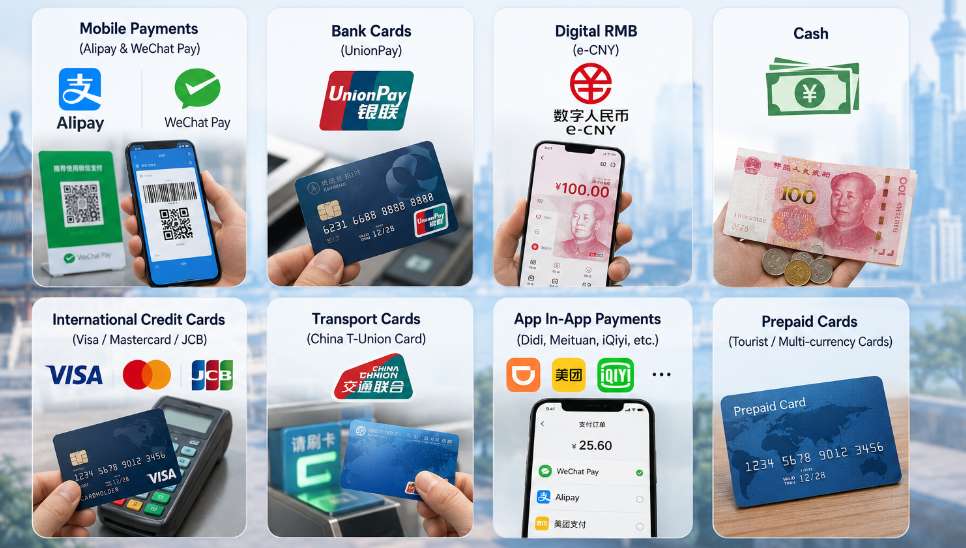
Types of Payment Methods in China

Types of Payment Methods in China

While Western countries rely heavily on tapping physical Visa or Mastercard credit cards, mainland China skipped that phase completely and went straight from cash to QR codes.

Payment Type

Availability in Mainland

Best Used For

Mobile App Wallets (Alipay / WeChat Pay)

99% (Primary)

Everything: Street food, taxis, hotels, restaurants, shopping, subways.

Cash (RMB / Yuan)

Backup Only

Legal everywhere, but small vendors frequently lack physical change.

International Credit/Debit Cards

Very Limited (<5%)

Directly swiped only at high-end international hotels and upscale malls.

Chinese Bank Cards (UnionPay)

Not for Tourists

Only applicable if you hold a local mainland bank account.

The Foreigner Strategy: Instead of trying to swipe your physical card at a shop counter, you link your international credit or debit card inside a Chinese mobile app (Alipay or WeChat Pay). When you scan a QR code, the app automatically charges your linked foreign card.

🎁 Search Cheapest flights to China & book the best China hotels! Get connected fast with China eSIM.

Payment Difference Between Mainland China & Hong Kong

Payment Difference Between Mainland China & Hong Kong

Hong Kong is part of China but operates an independent financial system with separate payment habits and currency.

  • Mainland China (Shanghai, Guangzhou, Shenzhen, Beijing etc.): Mobile payment (Alipay + WeChat Pay) dominates almost all scenarios; cash and international credit cards are secondary options.
  • Hong Kong: Cash, Octopus card and international Visa/Mastercard are mainstream; mobile wallets like Alipay HK / WeChat Pay HK have limited coverage for tourists.

Below focuses first on mainland China payment methods, with a standalone Hong Kong payment section at the end.

All Payment Types Available for Foreigners in Mainland China

How to Pay Using QR Codes in China

Top Recommended Payment Apps (Most Used by Tourists)

  1. Alipay (Tourist Version) – #1 choice for foreigners
    • No friend‑verification required (unlike WeChat)
    • Supports overseas phone number SMS verification, passport real‑name auth
    • Directly links international Visa/Mastercard/JCB, no need to pre‑top‑up wallet
    • Works for subway, bus, restaurants, supermarkets, convenience stores, food delivery, scan‑to‑order restaurant QR menus
    • Real Reddit user feedback: Easy setup, stable for daily small‑value transactions; only occasional slow connection issues.
  2. WeChat Pay – More barriers for tourists
    • Main problem: Needs a local WeChat user to complete friend verification for full payment access
    • International credit cards supported but with strict transaction limits
    • WeChat itself is essential for scanning restaurant menus, mini‑program orders (e.g. Luckin Coffee), even if payment function is limited
    • Workaround: WeChat Pay Tourist mini‑program for limited small‑amount payments via passport + overseas number

Physical Payment Methods

  • Cash (CNY/RMB only): Must prepare small notes (¥10, ¥20, ¥50). Large ¥100 notes are hard to get change for small shops/street vendors. Exchange money at airports, banks or border crossings.
  • International Credit Card (Visa/Mastercard/JCB): Only accepted at high‑end hotels, international chain malls, airports. Rarely usable for local eateries, street shops or public transport.
  • Debit Card: Not widely accepted directly; better to link debit cards to Alipay/WeChat Pay for QR payment.
  • UnionPay: Requires Chinese bank account, not suitable for short‑term tourists.

Useful Auxiliary Tools

  • eSIM: Get China eSIM before arrival for stable mobile data and SMS reception (critical for app verification and QR payments)
  • Bank FX Apps: Use your home bank’s app for real‑time CNY exchange rate checks to avoid bad airport exchange rates

How to Set up for Alipay & WeChat Pay for Foreigners

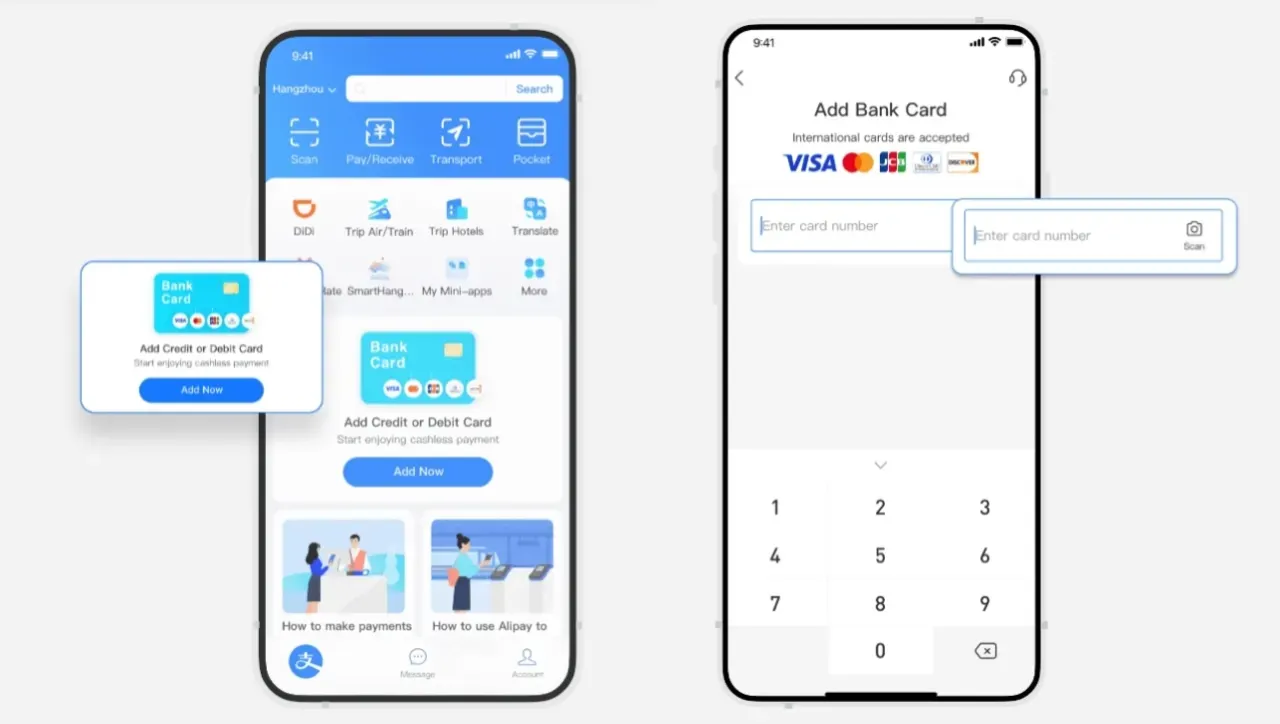
How to Pay with Alipay in China - For Shopping & Booking

Alipay Setup (Most Straightforward)

  • Download Alipay from the Google Play Store or Apple App Store.
  • Register with your overseas phone number and complete the SMS verification check.
  • Go to MeBank CardsAdd Card and enter your international credit or debit card details.
  • Complete Passport Real-Name Verification by uploading a clear photo of your passport information page when prompted.
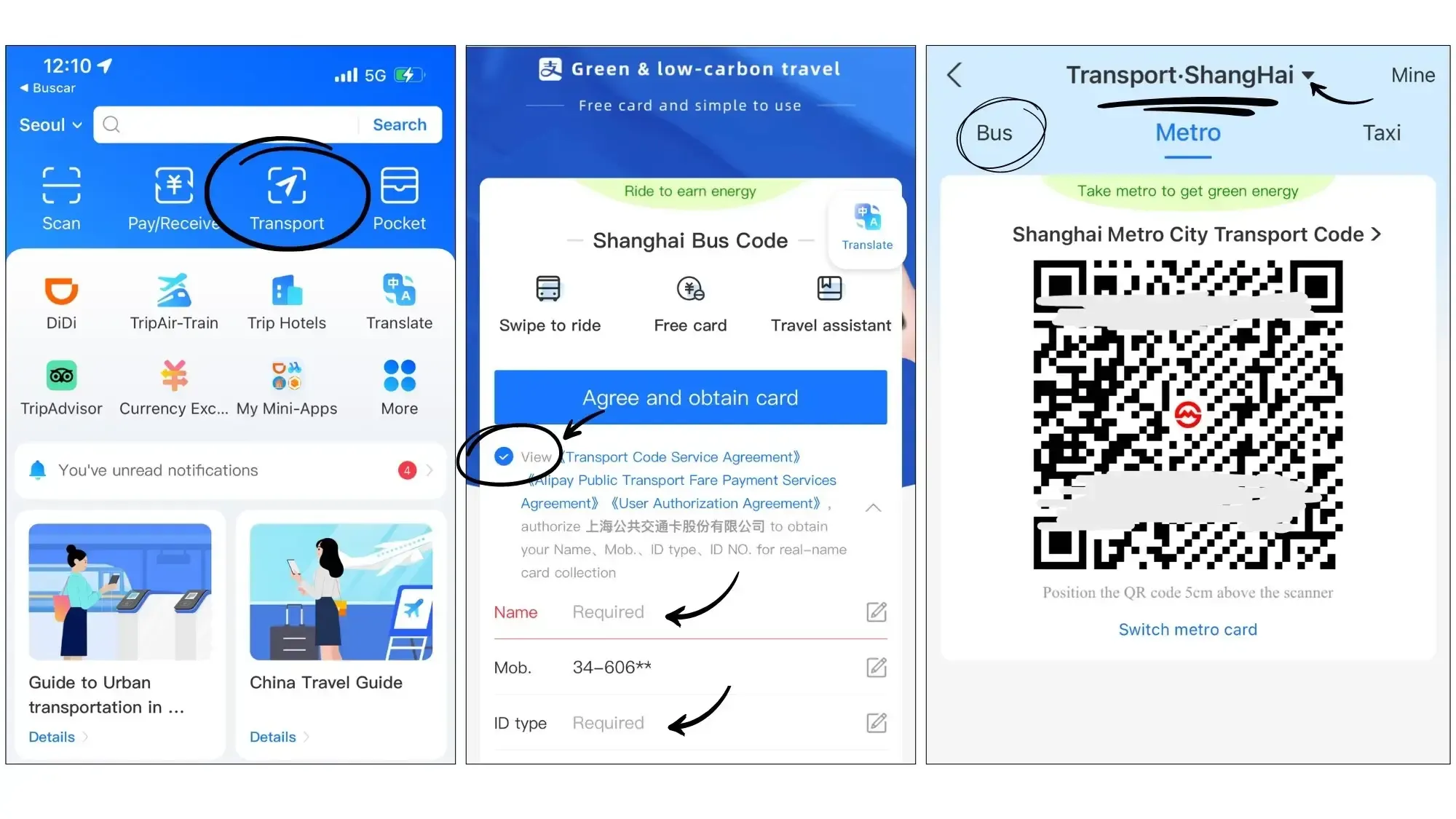
  • Go to the app homepage and enable the Transport function to generate public transit QR codes for subways and buses.
🎁 Search Cheapest flights to China & book the best China hotels! Get connected fast with China eSIM.
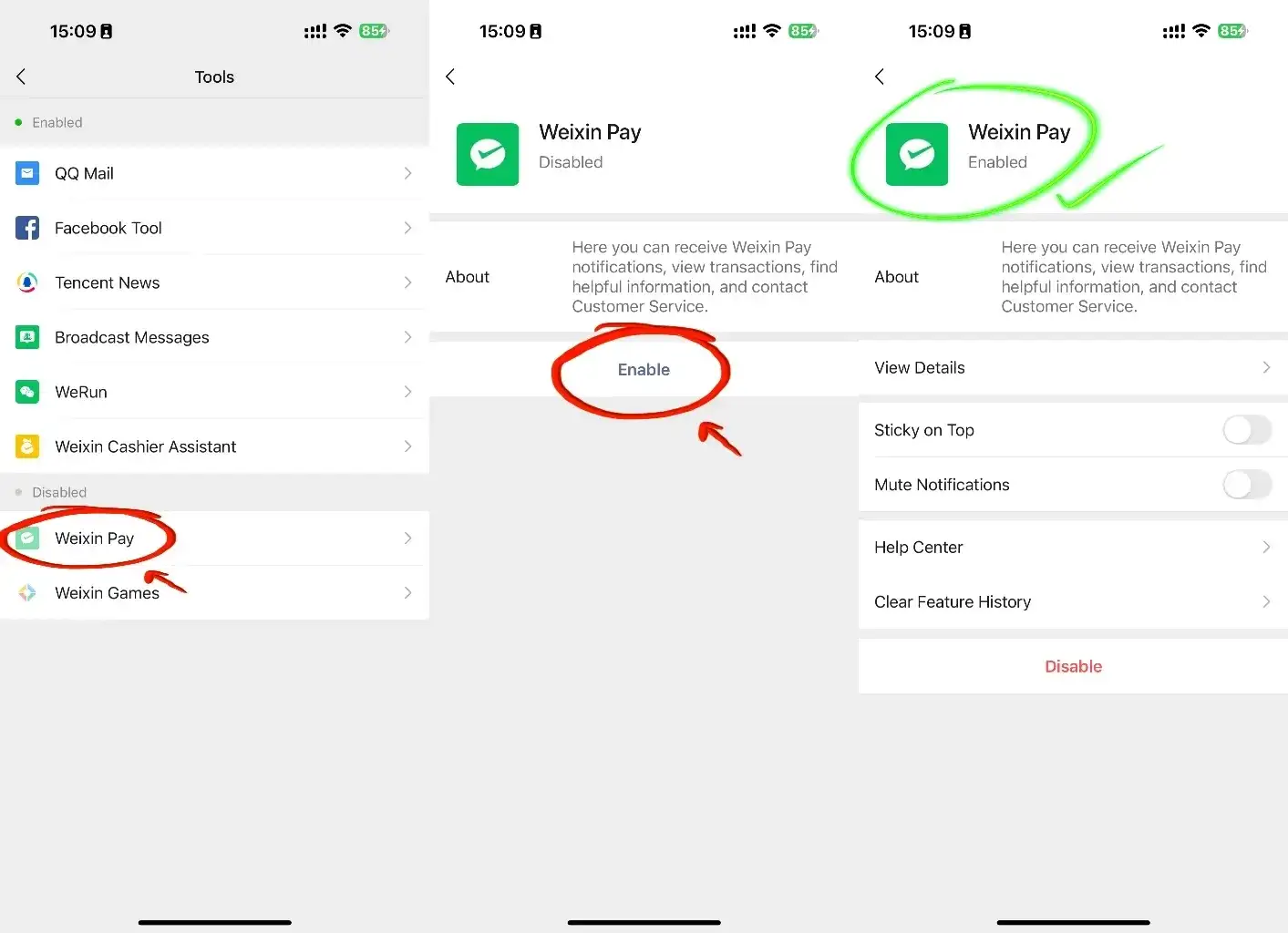
Enable WeChat Pay
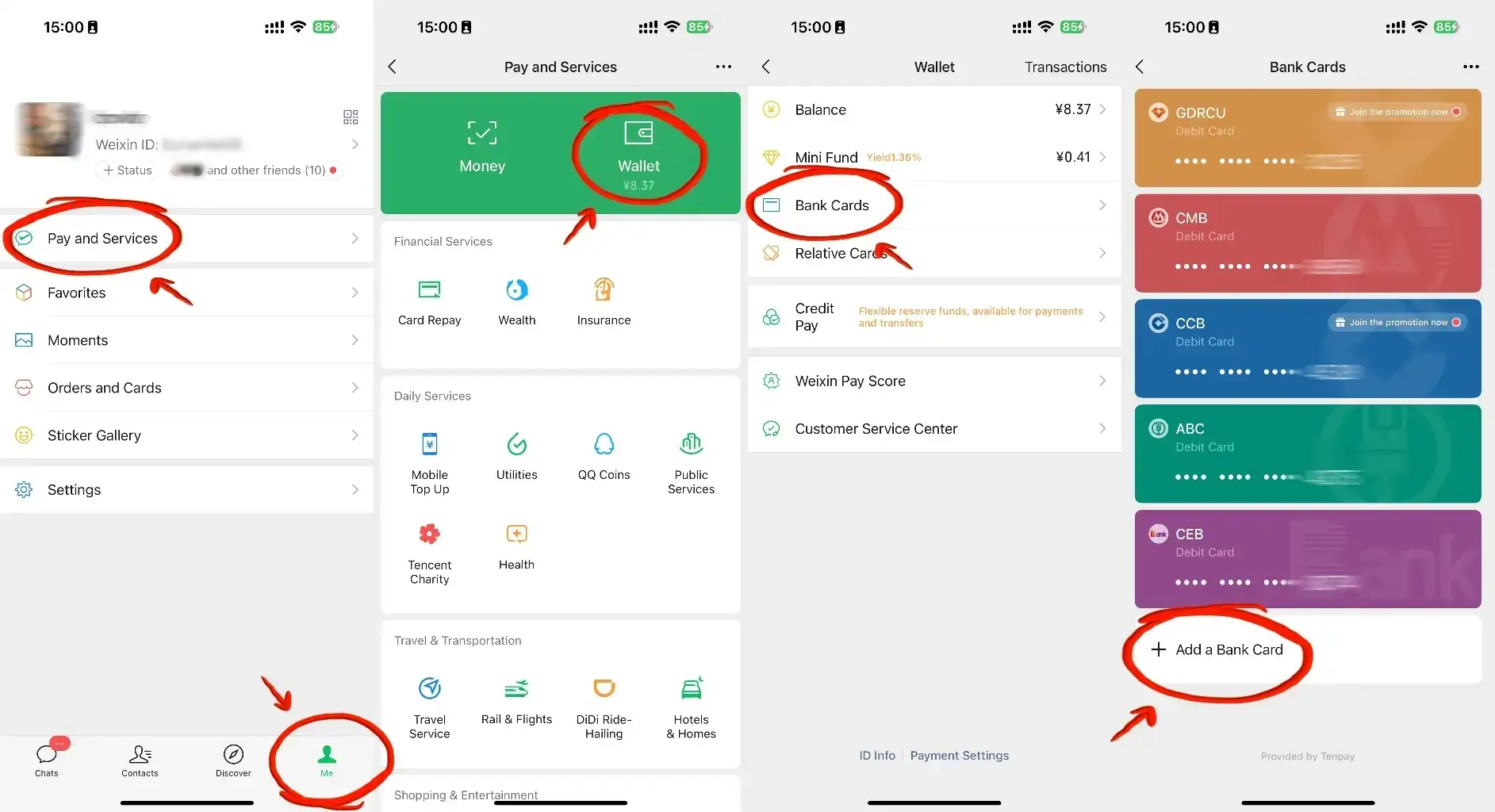
Link Bank Cards to WeChat Pay

WeChat Pay Setup

WeChat Pay is integrated into China’s primary messaging app, WeChat. While useful, it presents unique challenges for short-term tourists:

  • The Verification Block: When registering a new WeChat account outside of China, the app frequently triggers a security check requiring an active, long-term WeChat user to scan your screen. If you get stuck on this screen, do not waste time—simply switch to Alipay. Alipay is accepted anywhere WeChat Pay is used.
  • Tourist Workaround: If you manage to set up a regular messaging account, you can activate the WeChat Pay Tourist Mini-Program or link your card under Me → Services → Wallet using your passport details. It works well for small daily amounts but carries strict transaction limits.

The 200 RMB Fee Threshold

  • Transactions under 200 RMB: Alipay and WeChat Pay charge 0% platform fees.
  • Transactions of 200 RMB or more: The apps add a mandatory 3% processing fee to your total bill.
  • Tip: If your bill is slightly over 200 RMB (e.g., 220 RMB) at a restaurant, you can politely ask the cashier to split it into two separate transactions to avoid the 3% platform fee.

How to Pay Using QR Codes in China

How to Pay Using QR Codes in China

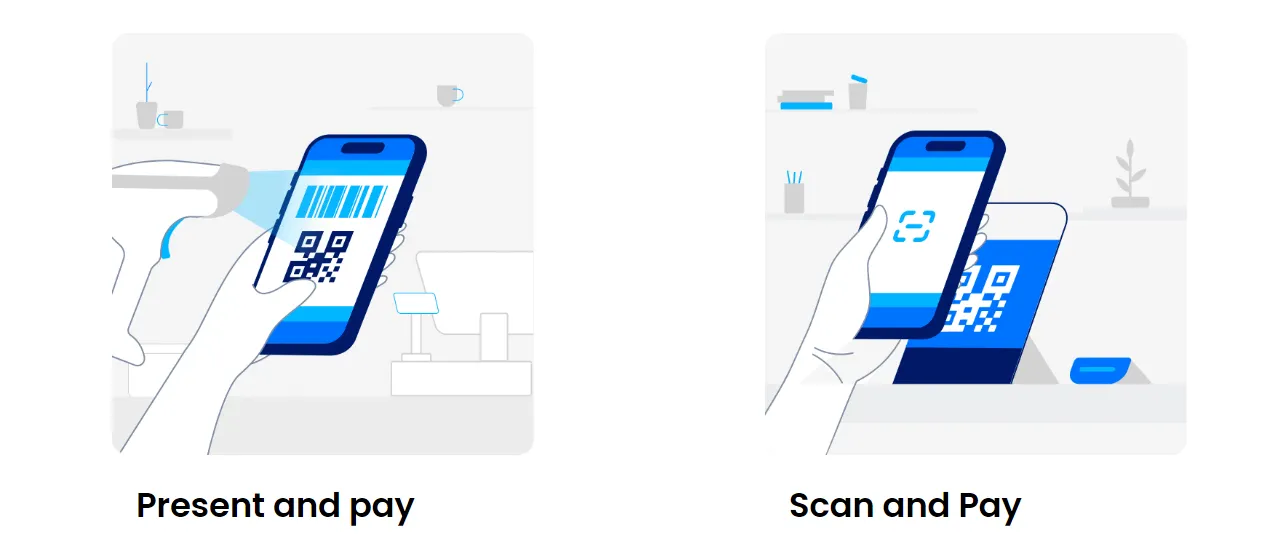
Pay Merchants (You Scan Their QR Code) on Wechat/Alipay

  1. Open Alipay / WeChat → tap the scanner icon
  2. Scan the merchant’s printed QR code at checkout counter
  3. Confirm payment amount
  4. Enter your 6‑digit payment password or use biometrics
  5. Complete payment
How to Pay Using WeChat QR Code (WeChat Pay)

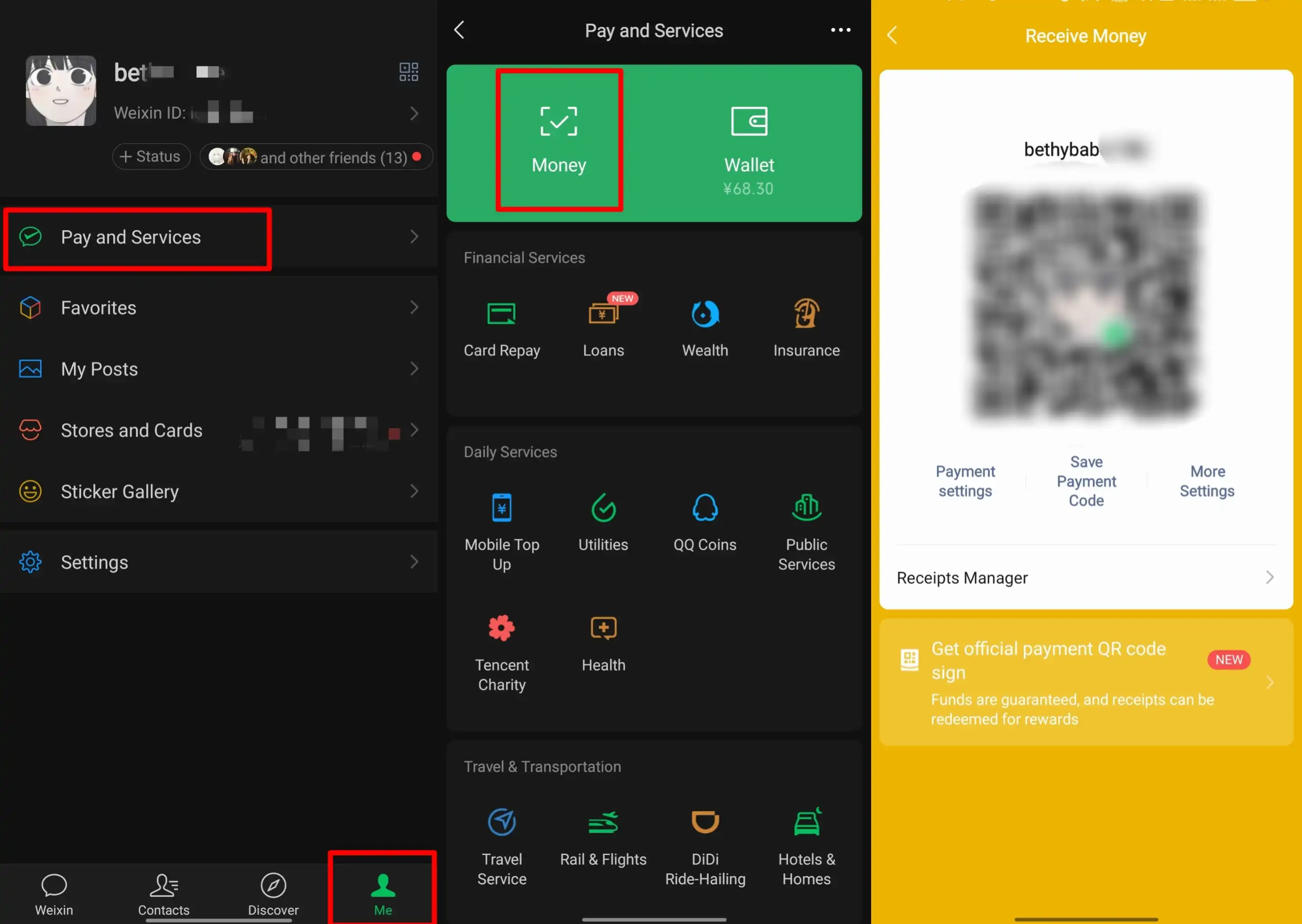
Receive Money (Others Scan Your QR Code) on Wechat/Alipay

Open your app and tap Pay/Receive (付款码) on the main screen.

  • Alipay: Me → Balance → Receive Money
  • WeChat: Me → Services → Receive Money
  • This displays a unique barcode (Alipay) or a QR code + barcode (Wechat Pay) on your screen.
  • Hold your screen face-up under the merchant’s optical desktop scanner or show it to the cashier.
How to Pay with Alipay in China For Transport

Public Transport QR Payment

Inside the Alipay "Transport" mini-program, select the city you are currently visiting. The app will generate a dedicated transit QR code. You simply scan this code directly at the subway turnstile or the bus card reader when boarding and exiting.

How to Pay in China? Phone Numbers & Internet

Before downloading any apps, you must ensure your phone setup can handle the transaction requirements.

  • SMS & Registration: You do not need a Chinese phone number. You can register your accounts using your home country's mobile number. However, you must be able to receive an international SMS verification code during setup. Make sure your home carrier has roaming enabled or setup is completed before leaving.
  • Constant Data Access: Mobile payments generate dynamic QR codes that change every minute for security. If you do not have an active internet connection (via an eSIM, international roaming, or local Wi-Fi), your payment will fail.

Real-Life Payment Scenarios: How to Pay for Daily Services

Real-Life Payment Scenarios: How to Pay for Daily Services

To give you an idea of how this functions on the ground, here is how you will pay for specific services during an average day:

  • Convenience Stores & Supermarkets: Open your app's personal barcode (Method B) and let the cashier scan your screen. This is the fastest method at places like 7-Eleven or local supermarkets.
  • Coffee Chains (e.g., Luckin Coffee, Starbucks): Many modern chains do not accept counter‑only verbal orders. You must scan the QR code at the counter to open their in-app "Mini-Program" menu, place your order, and settle the payment digitally within the app.
  • Local Restaurants & Street Food: Alipay is the most reliable option here. You will either scan a printed QR code on the table to order and pay, or scan the vendor's personal QR code directly.
  • Food Delivery & Online Shopping: Apps like Meituan (food delivery) or Taobao (shopping) integrate directly with Alipay at checkout, making it simple to process transactions using your linked foreign card.

Hong Kong Payment Guide (For Tourists Visiting HK Too)

Hong Kong Payment Guide (For Tourists Visiting HK Too)

Hong Kong uses HKD only (RMB not widely accepted; HKD cannot be used in mainland China Shenzhen/other cities).

Main Payment Methods

  1. Octopus Card: Must‑have for MTR subway, buses, convenience stores and small shops; buy at airport/7‑Eleven
  2. Cash (HKD small notes): Essential for street vendors and local small shops
  3. Visa/Mastercard: Accepted at most malls, hotels, chain restaurants
  4. Alipay HK / WeChat Pay HK: Need Hong Kong bank card for full functions; limited use for mainland tourists

Visa Note (Brief reference to Reddit user’s question)

The so‑called 24/144‑hour entry rule is TWOV (Transit Without Visa), only for transit purposes, not for round‑trip Shenzhen‑Hong Kong visits. Shenzhen 5‑day port visa is available at the border for short stays.

🎁 Search Cheapest flights to China & book the best China hotels! Get connected fast with China eSIM.

What to Prepare for a Trip to China?

  • Visa & Entry Tips China’s ​240-hour visa-free transit policy now covers ​54 countries, incl. the US, UK, Canada, and Brazil, allowing up to 10 days during layovers. Learn more about China Entry Tips to land in China easily.
  • Getting Connected VPNs are vital for accessing Google, WhatsApp, Instagram, etc in China. Set one up before arriving. China eSIMs are the easiest option for data and bypassing restrictions. Pocket Wi-Fi devices work best for group but are pricier and require pickup/return.
  • Money Exchange & Tax Refunds Exchange money in China banks (better rates than airports). ATMs accept foreign cards, but notify your bank first. For tax refunds, spend over ¥500 at stores with a "Tax-Free" sign. Keep receipts and get forms stamped at customs before departure.

Must-Have Apps in China

  • China Payment Apps Forget cash. Chinese use ​Alipay (I like it better) or ​WeChat Pay to pay for everything in China. Scan a QR code at noodle stalls, metros, even temples. Link your foreign Visa/Mastercard before landing.
  • China Map Apps Amap (Gaode Map) & Baidu Map (limited English) is what locals use, with real-time navigation, metro/bus routes, and traffic updates. Apple Maps does a good job too if you're already an IOS user.
  • China Transport Apps Street taxis are cheap, but drivers rarely speak English. Use China Taxi App like ​DiDi (China’s Uber)—set your destination in English, pay by Alipay.
  • China Travel Apps 15+ China trips taught me: Use Trip.com. It's the best English app for booking China trains/flights/hotels + finds Trip.com deals.
  • China Dating Apps Locals use ​Tantan (China’s Tinder) and ​Momo. WeChat’s “People Nearby” works too, but expect language barriers unless your Mandarin’s decent.
  • China Food App Use Meituan (also helps find nearby restaurants) or Ele.me for food delivery—both have English mode. No English menu in restaurants? Scan the QR with Alipay's translator.

🎁 Search Cheapest flights to China & book the best China hotels! Get connected fast with China eSIM.

[10% Off] Best China Hotel Recommendations

Top Shanghai Hotels
Top Beijing Hotels
Top Guangzhou Hotels
See All Hotels
NO.2
Grand Hyatt Shanghai
9.4/1018407 reviews
Grand Hyatt Shanghai
Hotel in Shanghai
NO.5
Radisson Collection Hyland Shanghai
9.2/105788 reviews
Radisson Collection Hyland Shanghai
Hotel in Shanghai
NO.6
Hotel Chalet Shanghai
9.5/1014100 reviews
Hotel Chalet Shanghai
Hotel in Shanghai
NO.2
UrCove by HYATT Beijing Forbidden City
9/104110 reviews
UrCove by HYATT Beijing Forbidden City
Hotel in Beijing
NO.3
Radisson Hotel Beijing Daxing Airport
9.6/105893 reviews
Radisson Hotel Beijing Daxing Airport
Hotel in Beijing
NO.5
Livefortuna Hotel
9.6/105439 reviews
Livefortuna Hotel
Hotel in Beijing
NO.6
Hilton Beijing Capital Airport
9.5/104929 reviews
Hilton Beijing Capital Airport
Hotel in Beijing
NO.7
Holiday Inn Express BEIJING DONGZHIMEN by IHG
9.7/106168 reviews
Holiday Inn Express BEIJING DONGZHIMEN by IHG
Hotel in Beijing
NO.8
ELONG WG.INTL BEIJING SANLITUN
9.7/10217 reviews
ELONG WG.INTL BEIJING SANLITUN
Hotel in Beijing

FAQs

Disclaimer: This article has been provided by an individual contributor or third party platform. If there is any discrepancy regarding the copyright, please contact us directly and we will delete the content immediately.
Bethy

Bethy

Trip.com Travel Expert

View profile

Hey there! I’m Bethy (Huang Lan, 黄澜) – a travel enthusiast and content creator for Trip.com. I live as a digital nomad, mostly based in China, and I’ve also lived in awesome places across Southeast Asia and Eastern Europe. I love traveling all over the world, sharing useful travel tips and guides for fellow wanderlusters. When I’m not on the road, I’m a huge cat lover and play guitar for fun~

626 articles
Travel Insights & Local Experiences Digital nomad travel Travel budget hacks Itineraries & Planning
> >
How to Pay in China