Trip.com Coupon Not Working? Check Scope, Validity and Stacking

A Trip.com promo code usually fails for one of five reasons: it has expired, it does not cover the product you are booking, another code is already applied, the booking was paid before you added it, or it was issued to a different account. Open My promo codes, read that coupon's Details panel — it lists the scope, the exact end date and the usage rules — then check them against the order in front of you.
Why Your Trip.com Coupon Won't Apply
The code is rarely broken. Trip.com matches your order against the code's scope, its validity window and its usage rules, and blocks the discount when any one of them does not match — so the fix is usually to change the order, not the code.
What you see | Usual cause | What to do |
|---|---|---|
Code rejected straight away | Typed wrongly, past its end date, or already used once | Paste it from My promo codes instead of retyping; read the dates on the card |
Discount is smaller than expected | The code only covers part of the order, or it carries a maximum discount cap | Read the Discount clause in Details; coupons that say "with cap" stop at a fixed amount |
Code will not attach to the order | Wrong product: a hotel code on a flight, a train code on a car | Switch to a code issued for that product, or book the product the code covers |
Second code is refused | A code cannot be combined with another promo code | Remove the applied code first, then compare which one saves more |
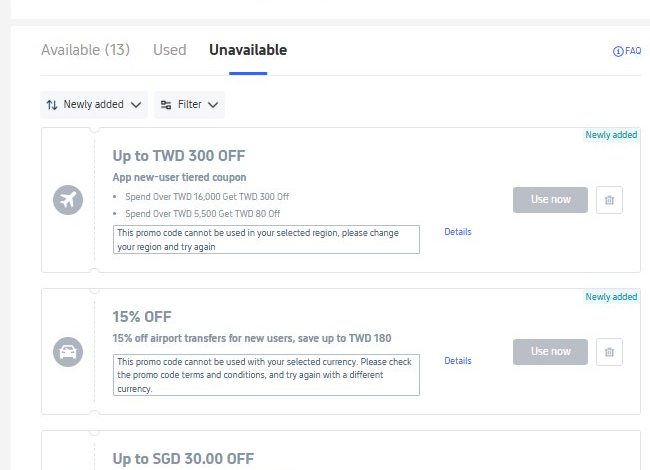
"Cannot be used in your selected region" | The campaign is restricted to another country or site | Switch the site or region on Trip.com and check the code again |
"Cannot be used with your selected currency" | The code is tied to one currency, and your page is priced in another | Change the page currency in the header, then re-apply the code |
Code worked before, not now | The validity window closed, or the campaign ended | Check the end date on the card and look for a newer code for the same product |
What the Trip.com Promo Code's Terms Actually Restrict
Every Trip.com promo code carries the same set of clauses, and four of them are what readers trip over. The wording below comes from the Details panel of a live code in My promo codes; the numbers on your own code may differ, so read the card.
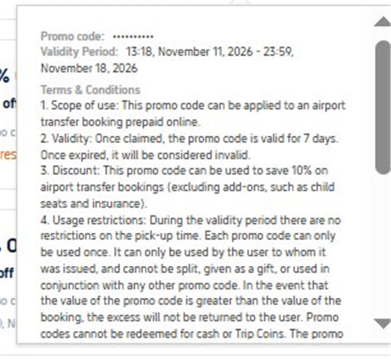
Example only: every coupon has its own terms, and the validity period differs from one campaign to the next. Open Details on the code in My promo codes to read the rules that apply to you — this screenshot is a reference, not a standard.
Clause | What it says | Where it bites |
|---|---|---|
Scope of use | The code applies to one named product, usually prepaid online | A hotel code will not touch a flight, and some pay-at-hotel orders do not qualify |
Validity | A start and an end date and time, printed on the card. Many campaigns run for a fixed period; some codes count from the day you claim them | Assuming "a week from now" is the common mistake — the card's date is the only one that counts |
Discount | A percentage or amount off the booking, with add-ons and extras excluded and sometimes a maximum cap | The saving lands below the headline percentage |
Usage restrictions | Single use, issued to one user, not transferable, and not combinable with any other promo code | A code shared by a friend, or a second code on the same order, both fail |
Already-paid bookings | A code cannot be applied once payment is complete | Adding a code after paying never works — it has to be in place before checkout |
Cancellations | A code returns to your account if a free cancellation, payment timeout or failed purchase happens while it is still valid | Cancel a paid booking outside the free window and the code is gone |
Two consequences are worth knowing before you write the code off as broken: the no-combination rule is about codes, not about loyalty value, so points and member rates sit outside it; and a code that is worth more than the order does not pay the difference back.
- Codes are not cash and cannot be converted into Trip Coins or refunded.
- Trip.com can withdraw a code in cases of misuse, so one account stacking codes for a single trip is a risk, not a trick.
How to Use a Trip.com Promo Code
There are two ways in: add the code to My promo codes first, or paste it at the payment step. Adding it first is the safer order, because a code that cannot be added never reaches a booking.
In the Trip.com app
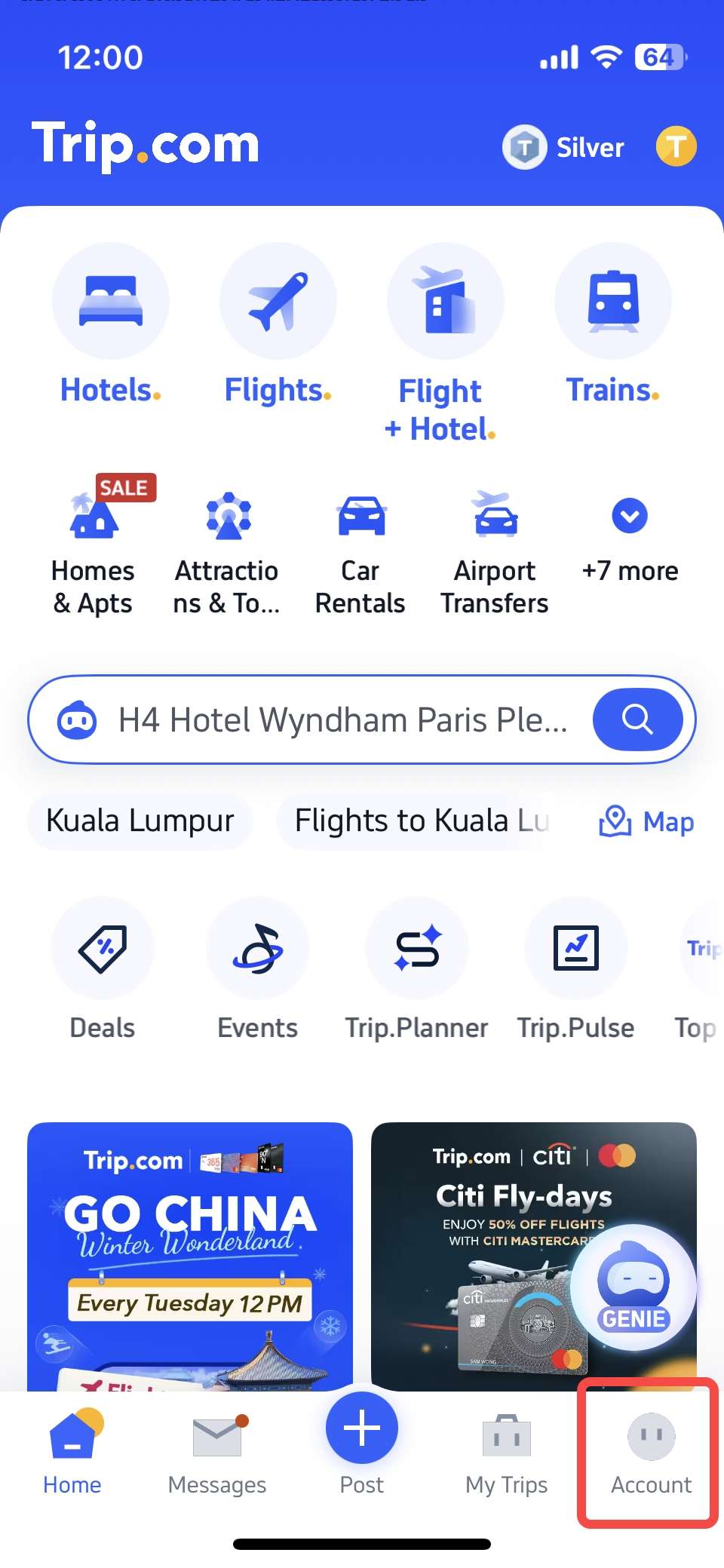
- Sign in, then tap Account in the bottom bar.
- Open the promo code area on the account page and either type the code or paste it from the campaign page, then confirm.
- A saved code is offered automatically when you reach payment on an eligible product.
On the Trip.com website
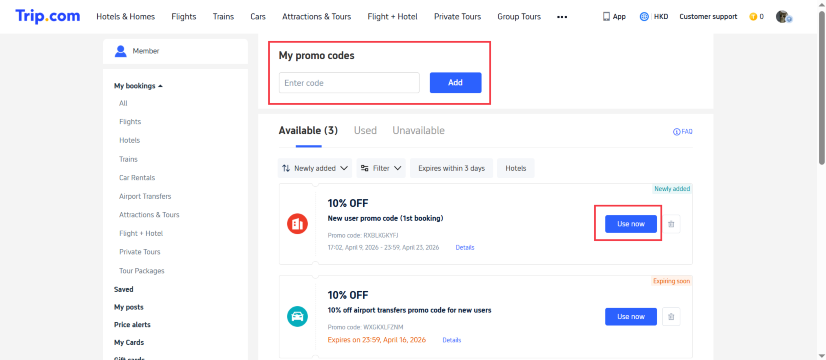
- Open My promo codes — it also sits under Promo codes in the member menu, below Gift cards.
- Paste the code into Enter code and press Add. If the code is invalid, already used or outside its window, it fails here and nothing is charged.
- Use now jumps to eligible products; otherwise continue booking normally and apply the code in the promo box on the payment step.
- Apply it before you pay. A code cannot be attached to a booking that is already paid.
Where Your Codes Live and How to Read One
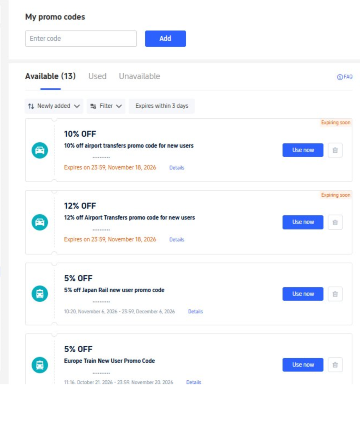
My promo codes is the only reliable record of what you hold — a code that is not listed there is not attached to the account, whatever the campaign email said.
- The three tabs separate Available, Used and Unavailable, which answers the most common question: whether the code is already spent.
- Each card shows the discount, the product it covers, the code itself, the end date and a Details link with the full terms.
- Sort by Newly added, or use the Filter chip for Expires within 3 days when you are choosing between several codes.
- An Expiring soon flag means the code is inside its last few days — worth using first.
Where new codes come from

- Coupon carousels let you claim with one click — the coupon then appears in My promo codes with its own cap, scope and end date.
- The Trip.com deals page and campaign pages carry the codes that are live right now.
- Copy the title, not just the code: the title says whether it is for a first booking, a second booking, one hotel chain or one destination.

Coupon, Promo Code or New-User Code: Which One Do You Have?
The three names are used interchangeably on the site, but they behave differently, and mixing them up is behind a lot of "it says invalid" reports.
Type | How it arrives | How it is applied |
|---|---|---|
One-click coupon | Claim button on a deals or campaign carousel | Saved to My promo codes automatically; Use now jumps to an eligible product |
Promo code | A string of letters and digits from a campaign or email | Pasted into the promo box at checkout, or added to My promo codes first |
New-user code | Issued to an account before its first paid booking | Same as a promo code, but it cannot be used once the account has a paid order |
App-only code | Marked as app-only in the campaign copy | Accepted in the Trip.com app; the desktop checkout may not take it |
- A code claimed on one account cannot be moved to another — it is tied to the user it was issued to.
- Coupons and codes share the same wallet, so read the card title before assuming which product the discount covers.
Which Trip.com Products Take a Code
Product scope is the single most common reason a valid code does nothing. Codes are issued per product line, not per booking value.
Product | Typical code you will see | Where it applies |
|---|---|---|
Hotels | Percentage off a first or second hotel booking, often with a cap | Prepaid hotel bookings; pay-at-hotel rates usually do not qualify |
Flights | Amount or percentage off selected routes or airlines | The fare at checkout, not the taxes and fees |
Trains | Percentage off rail tickets in one country or region | The ticket price on the rail checkout, per passenger |
Attractions & tours | Percentage off tickets and experiences | Selected products, excluding add-ons |
eSIM and connectivity | Discount on eSIM plans | eSIM orders placed in the app or on the sale page |
Airport transfers and car rental | Percentage off a prepaid transfer or rental | Prepaid online only, add-ons excluded |
See all attractions
 1066102 booked





How to Test a Code Without Losing It
Because a code is only marked as used once a booking is paid, you can try it on a real order and back out — as long as you back out the right way.
- Add the code to My promo codes first; an invalid or already-used code fails at Add, before any booking exists.
- Open Details and match the scope to the order in front of you: same product, prepaid, inside the date window.
- Apply it at the payment step and read the discount line before paying.
- If the price is wrong, leave the payment page without paying — a free cancellation or an abandoned payment returns the code to Available while it is still valid.
- Never pay first and ask for the code afterwards: the terms exclude bookings whose payment is already complete.
Still Rejected? What Support Needs From You
An agent can confirm whether a code is still valid, whether the order meets its scope, and whether a technical failure stopped it applying. What they cannot do is attach a code to a booking that is already paid, or move a code to another account.
- The code exactly as it appears in My promo codes, plus the date you claimed it.
- The order: product type, dates, and the booking reference if one exists.
- A screenshot of the promo box or error state at the moment the code was refused.
- The account the code was claimed on, since codes are tied to the user.
- Chat is the fastest channel; current numbers and hours are on the Trip.com contact page.
If the Coupon Is Dead, Cheaper Options on the Same Order
A dead code is not the end of the discount. The same order usually has a second saving path, and the largest one is not always the code.
- Compare the member rate with the code before assuming the code wins — on hotels the two are priced separately.
- Look for a one-click coupon on the exact product, which skips the code-entry step entirely.
- Use Trip Coins where they are allowed; loyalty value sits outside the no-stacking rule.
- On flights, a different date or a nearby airport often beats a discount code on the same route.
Trip.com Coupon Codes for Trains
Rail codes are issued per region — a China rail code will not discount a UK or European ticket — and they apply to the ticket price at the rail checkout.
- Check the cover line on the code: China Train, Japan Rail, UK/EU rail and multi-region codes all appear in the same wallet.
- Read the cap: many rail codes are percentage-based with a maximum, so a short hop saves very little.
- Seat reservations and sleeper upgrades may sit outside the discountable amount.
Trip.com Coupon Codes for Car Rental
Car rental codes are rarer and narrower than hotel ones: they apply to the prepaid rental fee, not to insurance, fuel or extras added at the desk.
- Look for a code that names car rental explicitly — a general discount code will not touch a rental.
- Prepaid bookings qualify; pay-at-pickup reservations usually do not.
- Check the exclusions on the code: extras charged at the rental desk are normally outside the discounted amount.
Car Rentals
Car Rental Promo Code - 8% Off
New User Enjoy up to 8% Off
TRIPCAR8
[Discount] Global Hotel Recommendations
Hotels are where the choice between a code and a rate matters most, so compare the room rate before hunting for another code.
- Free cancellation rates keep a booking changeable, which is what returns a code to your account if plans move.
- Member prices apply automatically once you sign in — no code needed.
- The confirmation email repeats the rate rules, the discount applied and the amount actually charged.
Find Best Global Hotels
See All Hotels







FAQ: Trip.com Coupons Not Working
-
Why is my Trip.com promo code not working?
-
Do Trip.com promo codes expire?
-
Can I use two Trip.com codes on one booking?
-
Can I add a promo code after I've paid?
-
Will I lose my code if I cancel the booking?
Disclaimer: This article has been provided by an individual contributor or third party platform. If there is any discrepancy regarding the copyright, please contact us directly and we will delete the content immediately.

Trending Searches
-
Air Travel Guide
-
Latest Flight Deals
-
Popular Flight & Hotel Packages
-
Getting Around
-
eSIM/SIM card
- Cancun Vacation Packages
- San Rafael Vacation Packages
- Koh Samui Flight and Hotel
- Phuket Flight and Hotel
- Osaka Flight and Hotel
- Hong Kong Flight and Hotel
- Rome Vacation Packages
- Marinduque Vacation Packages
- Mauritius Vacation Packages
- Karachi Vacation Packages
- Cox'S Bazar Flight and Hotel
- Nashville Vacation Packages
- Barcelona Vacation Packages
- Aruba Vacation Packages
- Taipei Vacation Packages
- Hangzhou Airport
- Ningbo Metro
- JR Kyushu
- Xiamen Airport
- Kobe Airport
- Gimpo Airport to Seoul
- Xian Metro Map
- How to get to Great Wall of China
- China Metro
- Kobe Transportation
- Suvarnabhumi Airport Transfer
- Singapore Airport to City
- New York Subway
- Nara Transportation
- Macau to Hong Kong
- Narita Airport to Shinjuku
- Beijing Metro