
How to Use WhatsApp in China? Is It Blocked?


Can you use WhatsApp in China? Learn about China’s WhatsApp restrictions, how to use WhatsApp in China, and alternatives for foreigners.
to Shanghai
to Guangzhou
to Beijing
See all flights

Does WhatsApp Work in China?

Direct Answer: No — WhatsApp is not accessible on mainland China’s domestic internet without official international connectivity. It is restricted under Chinese regulations, as it operates without a local license and does not meet domestic data security and content moderation requirements.
Foreigners in China must comply with Chinese law. Unauthorized tools to bypass restrictions are illegal, risky, and not recommended.
How to Use WhatsApp in China?
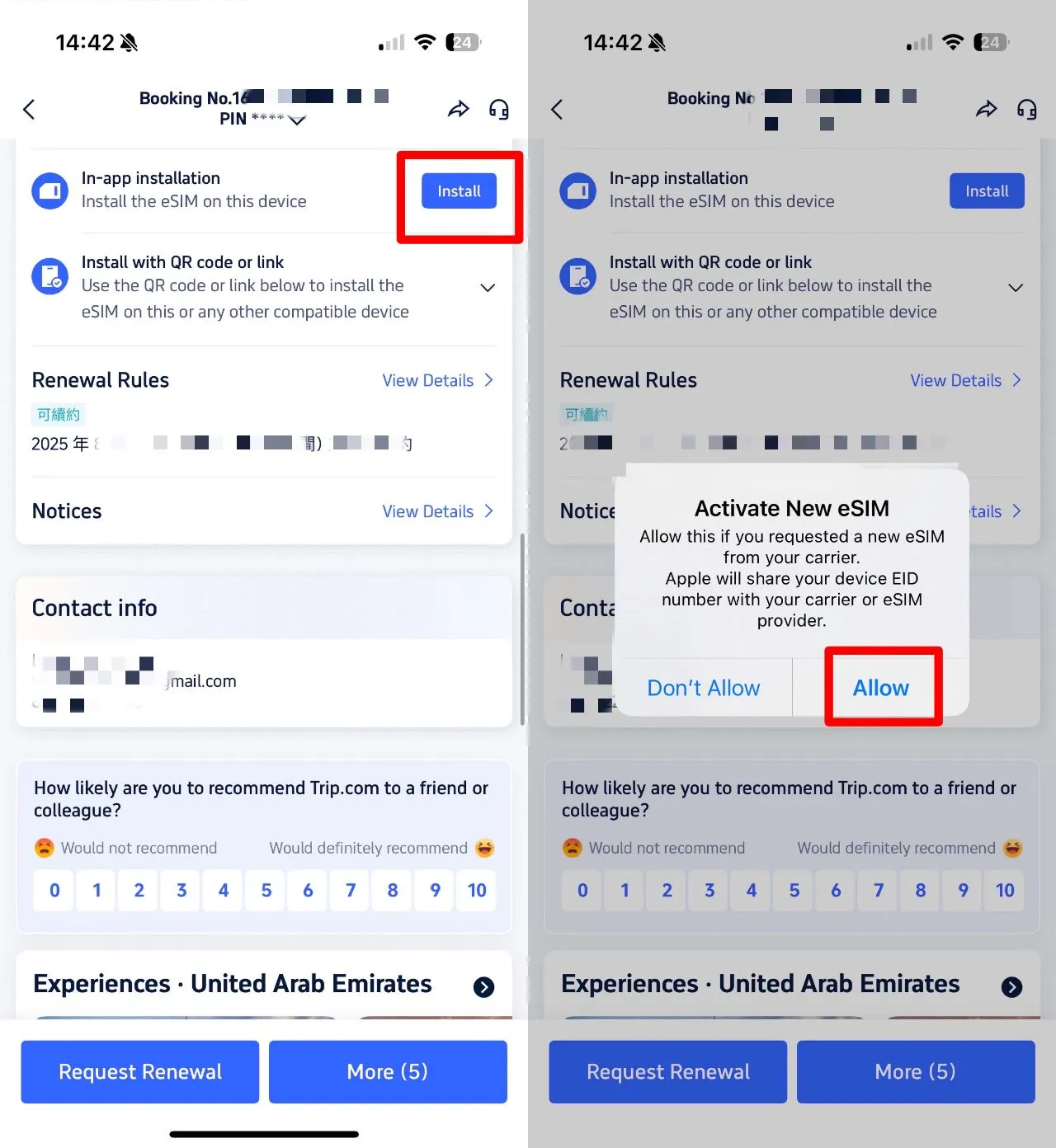
Trip.com eSIM: The Safest & Most Convenient Option
Trip.com eSIM is strongly recommended for foreigners. It provides compliant international data via approved channels, avoiding domestic network restrictions.
- How it works:
- Purchase a Trip.com eSIM plan (short/long-term) via the Trip.com app.
- Activate on your unlocked phone (no physical SIM).
- Connect to international data — WhatsApp works normally.
- Key Benefits:
- ✅ Fully legal: Complies with Chinese telecom regulations.
- ✅ No VPN needed: Zero legal risk.
- ✅ Stable & affordable: Reliable for calls, messages, media.
- ✅ Foreign-friendly: English support, easy setup.
International Roaming (Home Carrier)
If your home carrier offers China international roaming, enabling it lets you use WhatsApp via your foreign data plan.
- How to use:
- Activate China roaming with your home carrier.
- Enable data roaming on your phone in China.
- WhatsApp connects via your foreign carrier’s network.
- Considerations:
- ✅ Legal: Uses approved international roaming agreements.
- ❌ Expensive: Roaming fees are typically high.
- ❌ Coverage gaps: Less reliable in rural areas.
VPN: Strictly Regulated — Not Recommended for Individuals
Critical Warning: Unauthorized VPNs are illegal in China for individual users. Only approved enterprises with official telecom authorization may use dedicated VPNs for business.
- Why individuals should avoid VPNs:
- ⚠️ Severe legal risk: Fines, device seizure, deportation.
- ⚠️ High cost: Paid VPNs are expensive and often non-refundable.
- ⚠️ Poor experience: Slow speeds, frequent disconnections, unreliable.
- ⚠️ Security threats: Malware, data theft, account hacking.
- Legal VPN use case (only): Multinational companies with official approval from Chinese authorities for cross-border business operations. Individuals cannot apply.
See all attractions
 1002722 booked





Why WhatsApp Is Restricted in China?

Source from Unsplash
When in China, abide by Chinese laws and regulations at all times. For international communication needs like WhatsApp, use only legal options: Trip.com eSIM or international roaming. Avoid any unauthorized circumvention tools — they are illegal, costly, and risky.
Reason | Details | Legal Reference |
|---|---|---|
No Domestic License | WhatsApp is not licensed to operate in China’s regulated internet market. | Mobile Internet Application Information Service Management Regulations |
Overseas Data Storage | User data resides outside China, raising national security and data protection concerns. | Cybersecurity Law, Data Security Law |
No Local Content Moderation | Lacks systems required to manage content per Chinese rules. | Network Information Content Ecology Governance Regulations |
Cross-Border Service Compliance | Foreign apps must meet strict registration and operational requirements. | Negative List for Cross-Border Trade in Services |
Top WhatsApp Alternatives in China

For daily communication in China, use these legal, foreign-friendly apps:
1. WeChat (Weixin)
- WeChat is China's everything app. Messaging, calls, payments, social media, banking. If you're in China, you need WeChat.
- English UI available
- Problems: Some features limited for foreign accounts (less payment integration, fewer stickers)
Setup in 2026:
- Download WeChat from App Store/Play Store
- Sign up with international phone number
- Add contacts by phone number or QR code
- Verify by SMS (China +86 or international, both work)
2. Skype
- Best for: High-quality international video calls and screen sharing.
- Why: Microsoft-owned, legal in China; ideal for business/family calls.
3. HelloTalk
- Best for: Language exchange and chatting with global users.
- Why use: Built-in translation tools; great for foreigners learning Chinese.
Practical Tips for 2026
Before you leave:
- Check if your phone supports eSIM (iPhone 14+, recent Samsung, Google Pixel 6+, OnePlus 9+)
- Buy eSIM online before arriving (cheaper + guaranteed)
- Ask your home carrier about roaming just in case
- Download WeChat before you land
- Have WhatsApp open to give people your WeChat ID before arriving
At the airport:
- If phone supports eSIM and you haven't bought one yet: Buy Trip.com eSIM at airport
- If phone doesn't support eSIM: Buy roaming or local SIM at airport
- Test connection before leaving airport (scan airport WiFi, then switch to your data)
In China:
- Add everyone's WeChat ID (it's their username, like @john_smith)
- For international family: Use WhatsApp through eSIM, ask them to also use WeChat
- For work: Whatever your company uses (likely DingTalk or WeChat Work)
- For dating/socializing: WeChat only (that's what locals use)
Leaving China:
- Keep eSIM active until you're at the airport (backup data)
- After leaving: Switch back to home SIM
- Turn off data roaming to avoid surprise bills
- If keeping Chinese number: Leave it for next trip (can recharge eSIM later)
China Hotels Recommendation
Specific Situations: How to Stay Connected
Foreigner visiting Shanghai for a week:
- Buy Trip.com eSIM at airport (HKD 50, 7 days, 5 GB)
- Activate in 5 minutes
- Download WeChat + add local contacts
- Use WhatsApp for family back home (works on eSIM)
- Cost: $6
Expat moving to Beijing for a year:
- Get eSIM first week while getting settled
- Once settled, sign up for China Mobile/Unicom (need passport + local address)
- Get Chinese number for daily use
- Keep eSIM as backup for international apps
- Cost: eSIM $10/month, Chinese SIM CNY 30–80/month
Business traveler, Shanghai 3 days:
- Enable roaming on home carrier (call before trip)
- Check if company has approved VPN (probably not)
- Use eSIM if roaming is expensive
- Set up WeChat anyway (most Chinese prefer it)
- Cost: Roaming $30–50 or eSIM $5–8
Top Shanghai Hotels
Top Beijing Hotels
Top Guangzhou Hotels
See All Hotels























What to Prepare for a Trip to China?
- Visa & Entry Tips China’s 240-hour visa-free transit policy now covers 54 countries, incl. the US, UK, Canada, and Brazil, allowing up to 10 days during layovers. Learn more about China Entry Tips to land in China easily.
- Getting Connected VPNs are vital for accessing Google, WhatsApp, Instagram, etc in China. Set one up before arriving. China eSIMs are the easiest option for data and bypassing restrictions. Pocket Wi-Fi devices work best for group but are pricier and require pickup/return.
- Money Exchange & Tax Refunds Exchange money in China banks (better rates than airports). ATMs accept foreign cards, but notify your bank first. For tax refunds, spend over ¥500 at stores with a "Tax-Free" sign. Keep receipts and get forms stamped at customs before departure.
Must-Have Apps in China
- China Payment Apps Forget cash. Chinese use Alipay (I like it better) or WeChat Pay to pay for everything in China. Scan a QR code at noodle stalls, metros, even temples. Link your foreign Visa/Mastercard before landing.
- China Map Apps Amap (Gaode Map) & Baidu Map (limited English) is what locals use, with real-time navigation, metro/bus routes, and traffic updates. Apple Maps does a good job too if you're already an IOS user.
- China Transport Apps Street taxis are cheap, but drivers rarely speak English. Use China Taxi App like DiDi (China’s Uber)—set your destination in English, pay by Alipay.
- China Travel Apps 15+ China trips taught me: Use Trip.com. It's the best English app for booking China trains/flights/hotels + finds Trip.com deals.
- China Dating Apps Locals use Tantan (China’s Tinder) and Momo. WeChat’s “People Nearby” works too, but expect language barriers unless your Mandarin’s decent.
- China Food App Use Meituan (also helps find nearby restaurants) or Ele.me for food delivery—both have English mode. No English menu in restaurants? Scan the QR with Alipay's translator.
FAQs about WhatsApp in China
-
Can tourists use WhatsApp in China?
-
Is WhatsApp banned forever in China?
-
What happens if I use an unauthorized VPN for WhatsApp?
-
Is there any way for individuals to get a legal VPN?
-
How do I get Trip.com eSIM?
Disclaimer: This article has been provided by an individual contributor or third party platform. If there is any discrepancy regarding the copyright, please contact us directly and we will delete the content immediately.

Trending Searches
-
Air Travel Guide
-
Latest Flight Deals
-
Popular Flight & Hotel Packages
-
Getting Around
-
eSIM/SIM card
- Cancun Vacation Packages
- San Rafael Vacation Packages
- Tokyo Flight and Hotel
- Koh Samui Flight and Hotel
- Osaka Flight and Hotel
- Cork Vacation Packages
- Karachi Vacation Packages
- Vienna Vacation Packages
- Ulaanbaatar Vacation Packages
- Zhuhai Vacation Packages
- Key West Vacation Packages
- Asheville Vacation Packages
- Cox'S Bazar Vacation Packages
- Hong Kong Flight and Hotel
- New York Vacation Packages
- Chongqing Airport to City
- Narita Airport Lounge
- Qingdao Metro Map
- New York Subway
- Panda Luxury Train
- KL MRT Map
- Xi’an Airport
- How to Call Taxi in China
- Macau Taxi
- Osaka Metro
- How to Use DiDi in China
- ETC Card Japan
- JR Hokkaido Pass
- How to get to Great Wall of China
- Narita Airport to Shinjuku
- Macau to Hong Kong
- Ningbo Airport