

Learn what Xianyu (咸鱼) is, if it’s legit, how to use Xianyu (buy/sell/rent), communicate with sellers in English, and ship globally. Compare with eBay/Taobao.
What Is Xianyu (Idle Fish)? Is It Legit?

Xianyu (咸鱼), also called Idle Fish, is China’s biggest second-hand marketplace owned by Alibaba—think of it as China’s version of eBay, but with more local and daily-life features.
Yes, it’s 100% legit because it’s backed by Alibaba. But like any platform with individual sellers, you need to be careful to avoid scams. Here’s how to stay safe:
- Check the seller’s credit score (you’ll see a number near their name—higher is better) and reviews. Sellers with 4.5+ stars are usually trustworthy.
- Always use Xianyu’s built-in payment system (never pay directly via WeChat or Alipay—this is how most scams happen). Your money is held in escrow until you confirm the item is as described.
- Avoid sellers who refuse to send real photos of the item or rush you to buy.
What Can You Do with Xianyu (Idle Fish)?

Xianyu is more than just a second-hand shopping app—it’s a versatile platform for daily needs. Here’s what you can do with it:
1. Buy Second-Hand (or Even New) Items at Cheap Prices
This is the most popular use. You can find almost anything:
- Electronics: Used phones, laptops, cameras, and gadgets (great for saving 30–70% off new prices).
- Fashion: Trendy clothes, shoes, bags, and vintage pieces (many are barely worn).
- Home Goods: Furniture, kitchen tools, microwaves, and decor (perfect if you’re staying in China short-term and don’t want to buy new).
- Rare/Discontinued Items: Collectibles, out-of-print books, limited-edition toys, and old tech prototypes.
2. Sell Your Unwanted Stuff
Clear out clutter and make extra cash by selling items you no longer need:
- Clothes you don’t wear, electronics you’ve upgraded, or furniture you’re replacing.
- Even brand-new items (many people sell gifts or unopened products they don’t want).
3. Find Local Services
Xianyu isn’t just for goods—you can find local help:
- Home services: Renovation workers, cleaners, or movers.
- Skill-based services: Tutors, photographers, or pet sitters.
- Discounts: Cheap movie tickets, food delivery coupons, or gym passes.
4. Rent or Find Roommates
If you’re living in China, it’s a great tool for housing:
- Rent apartments or rooms (often cheaper than other rental apps).
- Find roommates to split rent costs.
5. Buy Items to Ship Overseas
Many sellers accept shipping to Chinese warehouses, so you can use a forwarding agent to send items to your home country (US, Europe, Singapore, etc.).
How to Download & Set Up Xianyu

Getting started with Xianyu is straightforward, but you’ll need a few things first:
1. Download the App
- For iPhones: You need a Chinese Apple ID to download the Xianyu app (search “闲鱼” in the Chinese App Store). Ask a Chinese friend to lend you their ID if you don’t have one—just log in, download the app, then log back out of their ID.
- For Android: Download the app from Chinese app stores like Huawei AppGallery or 360 Mobile Assistant (search “闲鱼”). If you can’t access those, use a trusted APK site like APK Mirror.
2. Register an Account
- Open the app and sign up with a Chinese phone number or link your Alipay account (Alipay is easier for foreigners if you have it set up).
- Foreigners without a Chinese phone number may need a local friend to help register—some users report success with international numbers, but it’s hit-or-miss.
How to Use Xianyu in English (Workarounds)
Xianyu has no official English interface—all listings and menus are in Chinese. But you don’t need to learn Chinese to use it. Here are simple workarounds:
1. Translate Xianyu App/Image Serach
- Screen translation apps: Use Google Translate or Pleco’s “screen translation” feature. Open the app, turn on the feature, and it will overlay English translations on Xianyu’s interface.
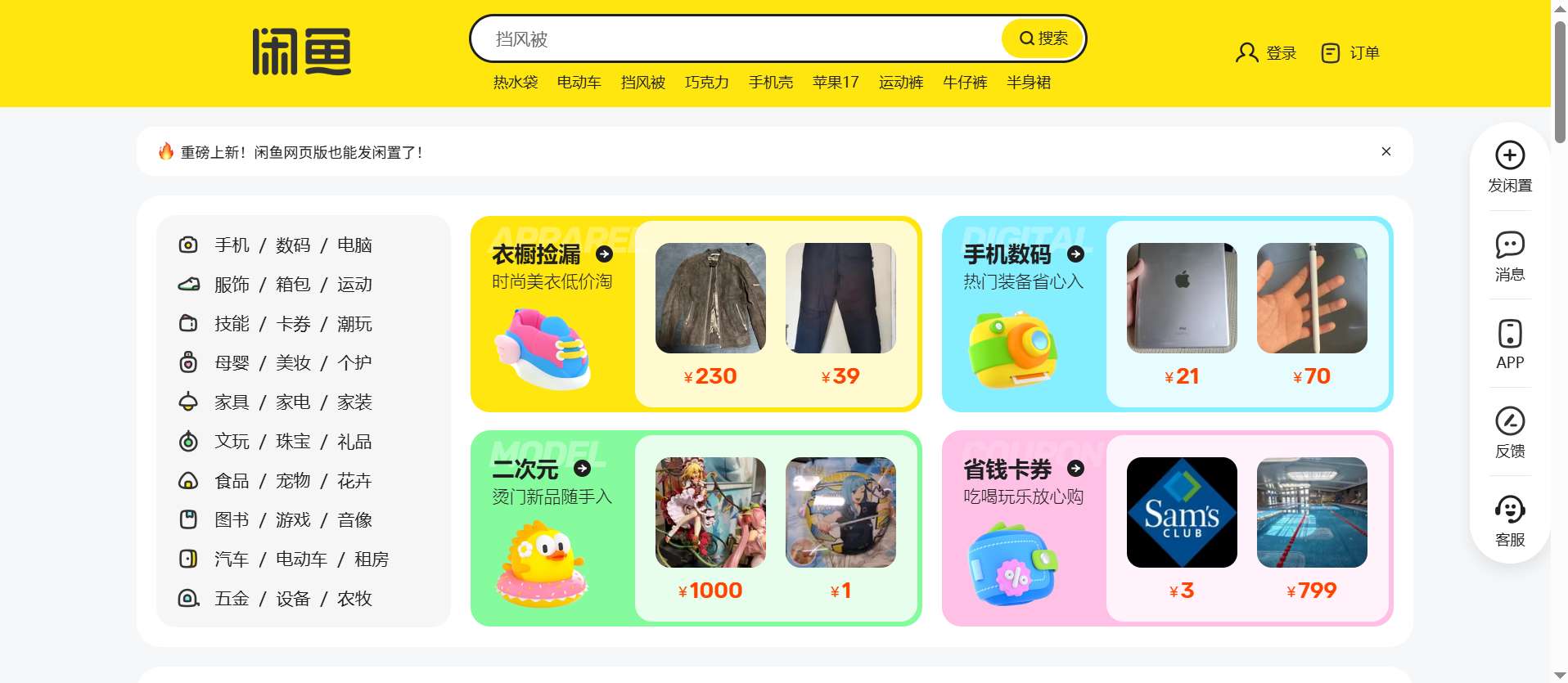
- Web version + browser translation: Go to Goofish.com (Xianyu’s official web version) and use Chrome’s auto-translate tool (click the three dots in the top right → “Translate to English”).
- Image search: If you don’t know the Chinese keyword for what you want, use Xianyu’s camera icon to upload a photo—this works for clothes, gadgets, or furniture, and you won’t need to type any Chinese.
2. Communicate with Xianyu Sellers in English
You don’t have to speak Chinese to message sellers. Many younger sellers speak basic or fluent English, and even if they don’t, most use translation apps like Baidu Translate.
- If they don’t respond, send a simple question like: “Can you speak English?” or “Do you accept international shipping?”
- For more complex questions, use Google Translate to convert English to Chinese and copy-paste the message.
How to Buy on Xianyu (For Foreigners Inside/Outside China)

Credit: Alibaba cloud
Use Xianyu If You’re in China (Easy Process)
- Search for Items:
- Type keywords in Chinese (use Google Translate to convert English words—e.g., “used microwave” → “二手微波炉”) or use image search (tap the camera icon in the search bar to upload a photo of what you want).
- Filter results by price (low to high), condition (e.g., “9.5 成新” = 95% new), or location (to find items you can pick up locally).
- Chat with the Seller:
- Ask questions to confirm details: “Is the item in good condition?” “Does it have any scratches?” “Can you ship it to my address?”
- Bargain! It’s common on Xianyu—offer 10–20% less than the listed price (e.g., “Can you sell it for 80 RMB instead of 100 RMB?”).
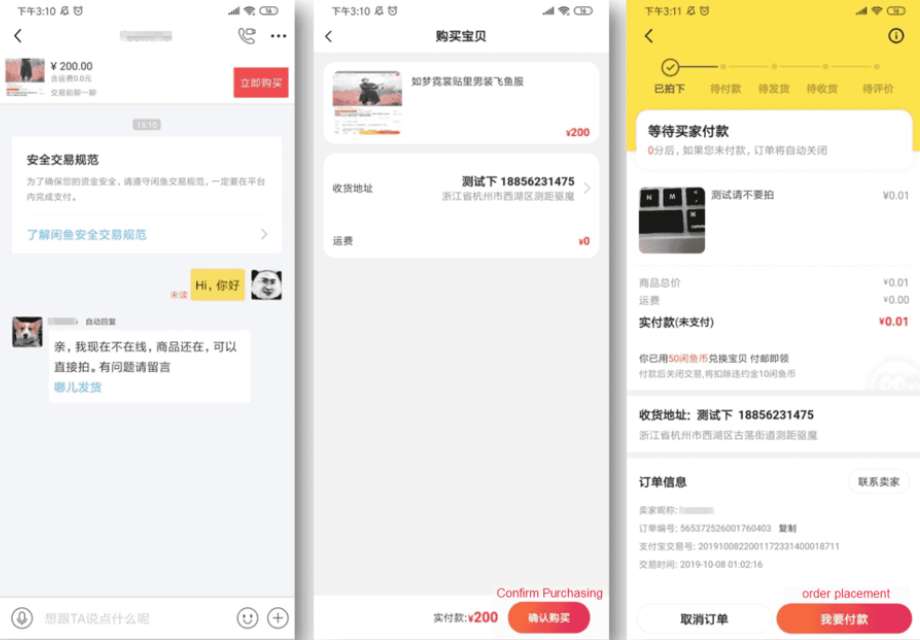
- Pay & Receive the Item:
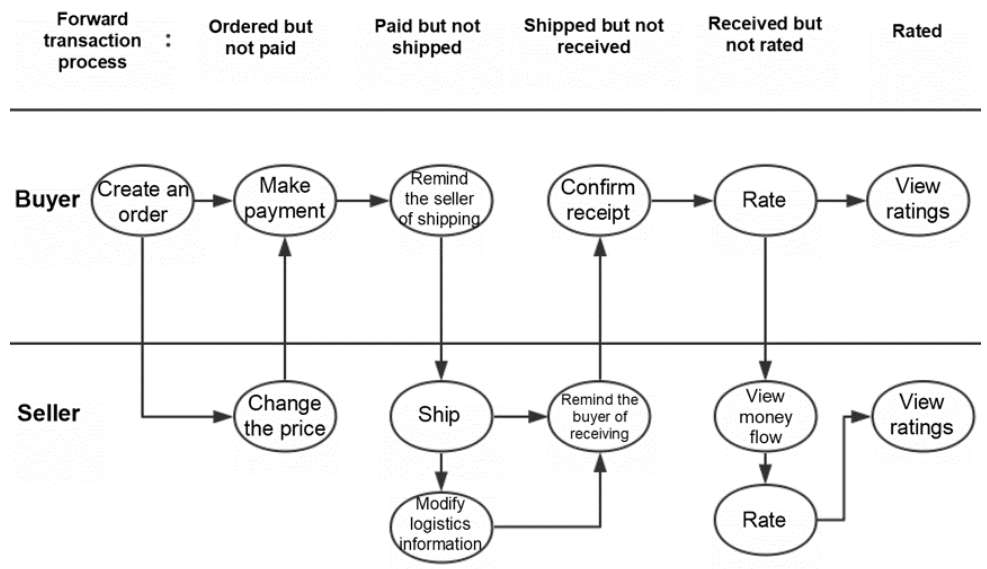
- Once you agree on a price, tap “Buy Now” and pay via Alipay or WeChat Pay.
- Choose shipping (sellers usually use SF Express or Cainiao) or local pickup (“面交”) if you’re nearby.
- When you get the item, check it carefully. If it’s as described, confirm receipt in the app to release money to the seller.
Use Xianyu If You’re Outside China (Need a Forwarding Agent)
Xianyu sellers almost never ship internationally directly, so you’ll need a Chinese forwarding agent (like Com&Buy or Superbuy). Here’s how:
- Sign a contract with a forwarder and they will provide you with a warehouse address in China.
- Shop on Xianyu as usual, but enter the agent's warehouse address as your delivery address.
- Then seller delivers the goods to the agent's warehouse.
- The agent will inspect the items (optional), combine them with other orders (to save on transportation costs), and deliver them to your home country.
- Pay the agency fee for international transportation (sea transportation is cheaper for bulk goods and air transportation is faster).
How to Sell on Xianyu (For Foreigners in China)

Credit: Alibaba cloud
If you have a verified account in China, it's very easy to shop and sell on Xianyu.
- List Your Item:
- Click the "Sell" button (usually the "+" icon at the bottom) → Upload a clear photo of the item (honestly take a photo of any scratches or defects).
- Write a description: Describe the condition of the item (for example, "used once", "brand new"), its size (if it is a piece of clothing), and any accompanying accessories.
- Set up a list similar to price checks to see how much others are charging.
- Chat with Buyers:
- Answer the questions (in English or Google Translate if necessary).
- Negotiate the price - The buyer's offer is usually lower than your asking price.
- Ship the Item:
- After the buyer makes the payment, the goods will be packed and delivered via SF Express or Cainiao (the app will offer you delivery options).
- Enter the waybill number in the fresh fish so that the buyer can monitor the shipping status.
- When the buyer confirms receipt, the payment will be deposited into your Alipay or wechat Pay account.
Note: Foreigners without Chinese ID cards may encounter trouble when selling high-priced goods- so if you are not sure, just buy cheap small items.
How to Pay on Xianyu? Payment Methods

Xianyu’s main payment method is Alipay—it’s required for both buyers and sellers (the app uses Alipay’s escrow to protect both parties).
- For buyers in China: Link your Alipay or Chinese bank card to pay.
- For foreigners outside China: Use a forwarding agent—they’ll pay the seller with their Alipay, and you pay the agent via Visa/Mastercard/PayPal.
- Never pay off-app: If a seller asks you to send money directly to their WeChat/Alipay, it’s a scam. Always use Xianyu’s built-in payment.
Xianyu vs. Similar Apps (eBay, Taobao, Facebook)

Xianyu stands out for its local focus and low prices, but here’s how it compares to other popular platforms:
| Feature | Xianyu (Idle Fish) | Taobao | eBay | Facebook Marketplace |
|---|---|---|---|---|
Focus | Second-hand goods, local services, rentals | New goods (all categories) | Global second-hand/auctions | Local community marketplace |
Price | Cheapest (30–70% off new prices) | Affordable (new items) | Varies (global shipping costs add up) | Low (local pickup saves shipping) |
Seller Type | Mostly individuals, some small businesses | Retailers, brands, individual sellers | Global individuals/retailers | Local individuals |
Language Support | Only Chinese (use translation tools) | English (select countries) + Chinese | English/global languages | English/regional languages |
International Shipping | Via forwarding agents only | Direct/consolidated/third-party | Built-in global shipping | No (local only) |
Best For | Cheap second-hand items, local needs | New items, bulk orders | Global auctions, rare international items | Local deals, furniture |
Safe Shopping Tips for Xianyu

- Check the seller's qualifications: Regularly review their credit scores and reviews- avoid sellers with no reviews or negative feedback.
- Ask for real photos: Don't trust inventory pictures- Ask for recent photos of the items to confirm their condition.
- Bargaining: Don't pay the marked price immediately -offer a discount of 10-20%, especially for electronic products or furniture.
- Avoid fraud: Never make payments outside the app, nor transfer a "deposit" unless you are certain that the seller is legitimate.
- Use a shipping agent wisely: For international purchases, choose an agent with good reviews to avoid losing or damaging your items.
[5% Off] Must-Visit Attractions in China
Check some of the top attractions in China below!👀
[8% Off] Best China Hotel Recommendations
From now until stock last, you can enjoy up to 8% off hotel deals on Trip.com when you register as a member on desktop or app!
What to Prepare for a Trip to China?
- Visa & Entry Tips China’s 240-hour visa-free transit policy now covers 54 countries, incl. the US, UK, Canada, and Brazil, allowing up to 10 days during layovers. Learn more about China Entry Tips to land in China easily.
- Getting Connected VPNs are vital for accessing Google, WhatsApp, Instagram, etc in China. Set one up before arriving. China eSIMs are the easiest option for data and bypassing restrictions. Pocket Wi-Fi devices work best for group but are pricier and require pickup/return.
- Money Exchange & Tax Refunds Exchange money in China banks (better rates than airports). ATMs accept foreign cards, but notify your bank first. For tax refunds, spend over ¥500 at stores with a "Tax-Free" sign. Keep receipts and get forms stamped at customs before departure.
Must-Have Apps in China
- China Payment Apps Forget cash. Chinese use Alipay (I like it better) or WeChat Pay to pay for everything in China. Scan a QR code at noodle stalls, metros, even temples. Link your foreign Visa/Mastercard before landing.
- China Map Apps Amap (Gaode Map) & Baidu Map (limited English) is what locals use, with real-time navigation, metro/bus routes, and traffic updates. Apple Maps does a good job too if you're already an IOS user.
- China Transport Apps Street taxis are cheap, but drivers rarely speak English. Use China Taxi App like DiDi (China’s Uber)—set your destination in English, pay by Alipay.
- China Travel Apps 15+ China trips taught me: Use Trip.com. It's the best English app for booking China trains/flights/hotels + finds Trip.com deals.
- China Dating Apps Locals use Tantan (China’s Tinder) and Momo. WeChat’s “People Nearby” works too, but expect language barriers unless your Mandarin’s decent.
- China Food App Use Meituan (also helps find nearby restaurants) or Ele.me for food delivery—both have English mode. No English menu in restaurants? Scan the QR with Alipay's translator.
FAQs about Xianyu
Is Xianyu different from Taobao?
Yes. Taobao is for new goods (from retailers/brands), while Xianyu is for second-hand items, local services, and rentals (from individuals). Both are owned by Alibaba, but they serve different needs.Can I trust Xianyu sellers?
Most sellers are honest, but it depends on their profile. Stick to sellers with high credit scores and positive reviews, and use escrow payment—this protects you from scams.What are Xianyu alternatives?
If you don’t want to use Xianyu, try JD Secondhand (for authentic electronics), Zhuan Zhuan (similar to Xianyu), or eBay (global shipping).Do I need a Chinese ID to use Xianyu?
You don’t need a Chinese ID to browse or buy (with a forwarding agent), but you do need one (or a linked Alipay) to sell.How long does international shipping take from Xianyu?
It depends on the agent and shipping method: air freight takes 7–14 days, while sea freight takes 16–25 days.


384349 booked