Trip.com App Download: App Discounts, Cashback & Customer Support


Learn how to download Trip.com App for Android/iOS, view all app-only coupons, earn Trip Coins cashback, and use in-app live chat & free calls easily.
to Bangkok
to Manila
to Shanghai
to Tokyo
to Seoul
See all flights


Where to Download the Trip.com App (Android & iOS)

The QR might be outdated on this image, see latest Trip.com App Download QR.
The Trip.com app is free and easy to install for both Android and iOS users. You can get the newest official version by scanning the updated QR code on the official Trip.com Download page.
- Scan the latest official QR code with your phone camera; it redirects you straight to the correct app store (the attached QR code is not the latest).
- Direct Download (not recommended): iOS Users: Tap the App Store icon to open the App Store, then tap “Get” to install. Android Users: The Google Play icon leads to Google Play; tap “Install” to start.
- Open the app, sign up with your email, phone number or social media for free to use all features.
What Is the Trip.com App?

The Trip.com app is a free travel booking platform that lets you plan and manage every part of your trip in one place. It’s trusted by millions worldwide for its transparent pricing, verified reviews, and—most importantly—app-only coupons and promo codes you won’t find on the desktop site.
Category | Key Features |
|---|---|
✈️ Flights | Compare fares from 100+ airlines, track real-time flight status, and get instant gate-change alerts. |
🏨 Hotels | Book 1.4M+ verified properties with guest reviews and app-only rates. |
🚆 Trains | Book cross-country/international tickets (China, Japan, Europe, etc.) and e-tickets for easy check-in. |
🚗 Car Rentals | Choose top providers with flexible pickup/drop-off and app-exclusive discounts. |
🎟️ Attractions | Skip-the-line tickets, day tours, and BOGO deals for must-see spots. |
😘 Support | 24/7 Live Agent Chat and free in-app calls to customer service—no waiting on hold. |
Trip.com App-Only Promo Codes & Discounts

The Trip.com app provides many exclusive discounts you cannot get on the website. Below are the main app-only offers:
Trip.com App-Only Coupons & Discounts
- Referral Bonus (Up to $100): Invite friends via your app link. They get welcome deals, and you earn $10 per referral—capped at $100 for future trips. This is a long-term offer.
- 10% Off Hotel Bookings: A permanent app-exclusive coupon for eligible properties.
Trip.com Travel Deals
You can check Trip.com promo codes on app, like the Deals of the Week page in the app every Tuesday at 11 AM PST for: Up to 40% off flight promo codes for domestic and international routes. Up to 50% off hotels worldwide. BOGO (Buy One, Get One) deals on popular attractions (domestic and international).
How to Find & Use Customer Support on Trip.com App?
You can use free 24/7 customer support directly in the app, with two quick options: live agent chat and free in-app calls. The entry buttons are easy to find.
Live Agent Chat
- Step 1: Open the app and tap Me (bottom right corner)
- Step 2: Find and tap Help and Support
- Step 3: Select Live Chat to talk with a real agent
- Use for: order changes, discount questions, booking issues
Free In-App Call
- Step 1: Go to Me → Help and Support
- Step 2: Tap Call Us to make a free call
- No extra phone charges, no need to dial a number manually
- Use for: urgent issues, complex problems, detailed help
How to Earn & Use Trip Coins for Cashback on Trip.com App?

Trip Coins work as cashback for Trip.com users. You can only earn and spend them on the app to lower your travel costs directly.
How to earn Trip Coins
- Book flights, hotels, trains, attractions or car rentals via the app
- Post travel moments (photos, stories) on the app
- Write reviews for hotels or attractions you have used
- Higher membership tiers earn more Trip Coins per booking
How to use Trip Coins
- 100 Trip Coins = $1, can be used to pay for bookings
- Select Trip Coins at checkout to offset your total cost
- Not usable on the desktop website, only valid in the app
How to Plan Trips with Trip.com App’s AI Tools


The app’s built-in AI takes the hassle out of travel planning, whether you need a full itinerary or quick answers.
Build Itineraries Fast with Trip Planner
Trip Planner is the app’s streamlined AI itinerary builder:
- Access it via the “Plan” tab (from the app’s interface)
- Input details (e.g., “Singapore to Sydney for 4 days”) to get a tailored, detailed itinerary (it accounts for your preferences)
- Integrate your existing Trip.com bookings (flights/hotels) into the plan
- Save drafts for later, or drag-and-drop activities to reorder your schedule
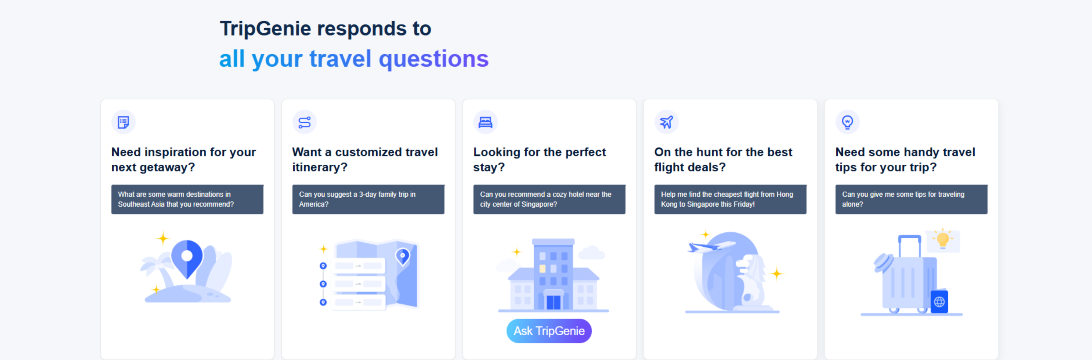
Get On-Demand Help with TripGenie AI Assistant
TripGenie is the app’s 24/7 travel helper:
- Ask it anything: destination recs (e.g., “warm Southeast Asia spots”), 3-day family itineraries (e.g., “America”), cozy hotels (e.g., Singapore city center), cheap flights (e.g., Hong Kong to Singapore this Friday), or solo travel tips
- It covers 1M+ attractions across 180+ countries/regions
- Use it on the go (right in the app) for real-time advice at every trip step
Is the Trip.com App Safe? with Reviews
From my five years of using Trip.com (both app and web), I’ve never had an issue with bookings. Here’s my own take:
- Safe & Secure: The app uses industry-standard encryption for payments and personal data.
- Reliable Bookings: All reservations are confirmed instantly, and e-tickets are valid for check-in.
- Trip.com App Reviews: Most negative feedback is about booking changes/cancellations—not the app itself. Airlines/hotels set strict policies, and Trip.com adheres to them. Always check the cancellation policy before booking.
Trip.com App Payment Methods
Trip.com app supports flexible payment options, tailored to your device:
Payment Method | iOS | Android | Desktop Web | Mobile Web |
|---|---|---|---|---|
Credit/Debit Card | ✔️ | ✔️ | ✔️ | ✔️ |
PayPal | ✔️ | ✔️ | ✔️ | ✔️ |
Google Pay | ❌ | ✔️ | ✔️ | ✔️ |
Apple Pay | ✔️ | ❌ | ❌ | ❌ |
Trip Coins | ✔️ | ✔️ | ✔️ | ✔️ |
Gift Card | ✔️ | ✔️ | ✔️ | ✔️ |
See all attractions
 2369 booked






[10% OFF] Global Hotel Recommendations
Find Best Global Hotels
See All Hotels







FAQs about Trip.com App
-
What is the Trip.com app?
-
Does the app offer exclusive deals?
-
Is the Trip.com app free to use?
-
How do I download the Trip.com app?
-
Can I manage all my bookings on the app?
-
Is the Trip.com app safe to use?
Disclaimer: This article has been provided by an individual contributor or third party platform. If there is any discrepancy regarding the copyright, please contact us directly and we will delete the content immediately.
Find Cheap Travel Deals & Explore Destinations on Trip.com
-
Air Travel Guide
-
Latest Flight Deals
-
Popular Flight & Hotel Packages
-
Getting Around
-
eSIM/SIM card
- Medellin Vacation Packages
- Hong Kong Vacation Packages
- Tokyo Flight and Hotel
- Koh Samui Flight and Hotel
- Hong Kong Flight and Hotel
- Bangkok Vacation Packages
- Punta Cana Vacation Packages
- Saipan Vacation Packages
- Havana Vacation Packages
- Astana Vacation Packages
- BALI Flight and Hotel
- Santorini Vacation Packages
- Macau Flight and Hotel
- Santo Domingo Vacation Packages
- Pittsburgh Vacation Packages
- Hangzhou Metro
- Macau Transportation
- WOWPASS
- Shanghai Maglev Train
- Guangzhou Metro Map
- Taipei Airport
- JR Pass
- Chengdu to Chongqing
- Kuala Lumpur Airport Transfer
- Osaka Metro
- Wakayama Transportation
- Wenzhou Airport
- Kunming Metro
- Chengdu Airport
- Macau to Hong Kong
- Narita Airport to Shinjuku
- Beijing Daxing International Airport